Listed from the MCP registry; nobody on Odel publishes it.

AEO
AEO tools for AI agents: crawler permissions, llms.txt, structured data, AI-readiness audit.
Runs on your machine from its package; the steps are below.
What it does
- Reads
- Writes
- High impact
At most: only reads or looks up information.
What it costs
FreeOdel charges nothing per call. The publisher may charge for its own service.
Runs locally over stdio
This server isn't hosted — your MCP client launches it from a package registry. Use one of the commands below, or drop the config into your client (e.g. Claude Desktop).
Run
npx -y aeo-mcp
MCP client config
{
  "mcpServers": {
    "aeo": {
      "command": "npx",
      "args": [
        "-y",
        "aeo-mcp"
      ]
    }
  }
}aeo-mcp
An MCP server that gives AI agents — Claude, Claude Code, Cursor, anything speaking the Model Context Protocol — tools to inspect a website's visibility to AI answer engines. Crawler permissions, llms.txt, structured data, on-page signals, and a full 29-check AI-readiness audit (powered by answer-audit), each one tool call away. Read-only, no API keys, no telemetry.
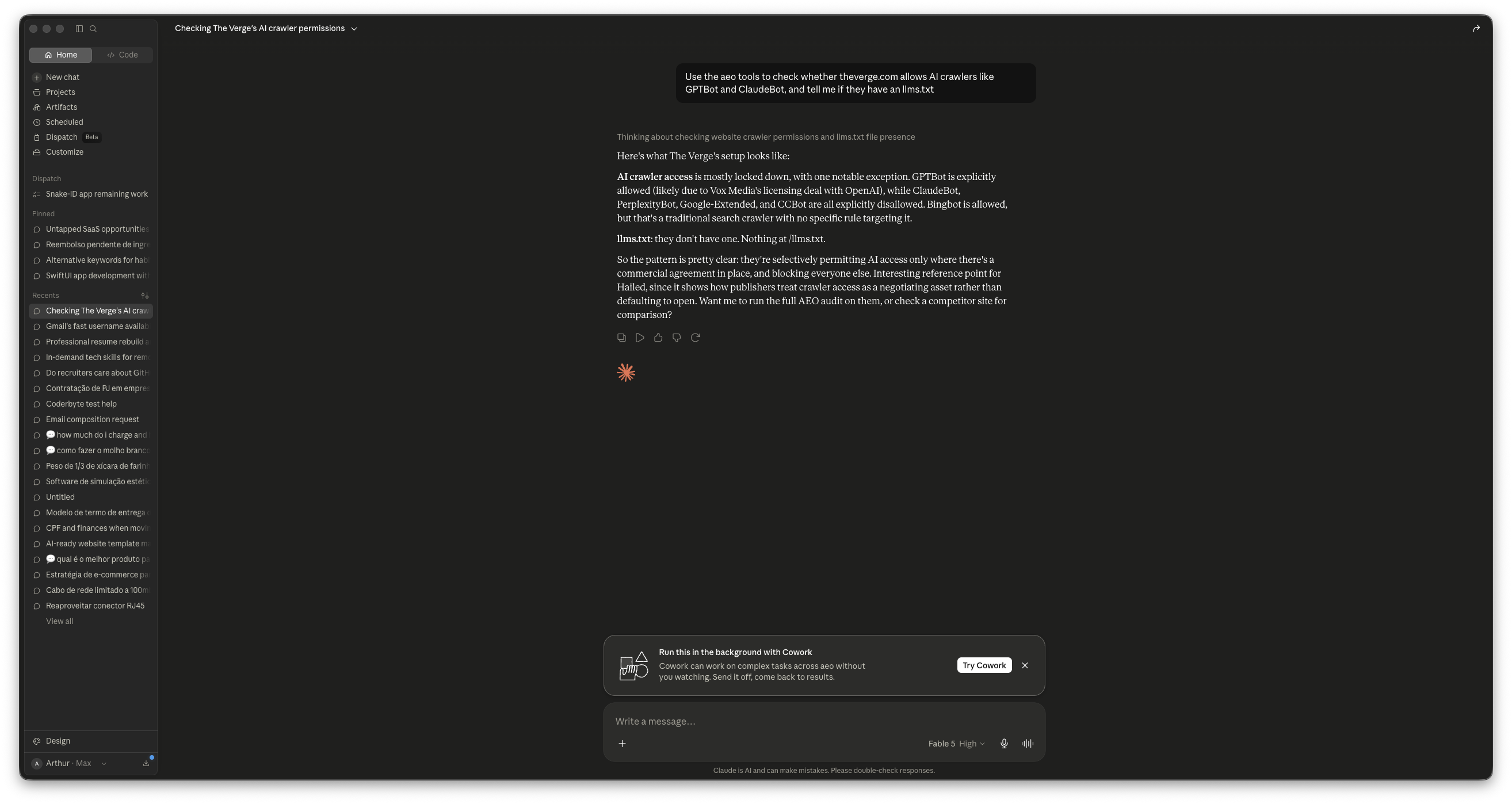
Real session: Claude Desktop discovers The Verge allows GPTBot (OpenAI licensing deal) while blocking ClaudeBot, PerplexityBot, Google-Extended, and CCBot — one tool call.
Install
Claude Code
claude mcp add aeo -- npx -y aeo-mcp
Claude Desktop (claude_desktop_config.json)
{ "mcpServers": { "aeo": { "command": "npx", "args": ["-y", "aeo-mcp"] } } }
Cursor (.cursor/mcp.json)
{ "mcpServers": { "aeo": { "command": "npx", "args": ["-y", "aeo-mcp"] } } }
Tools
| Tool | When the agent uses it | Input | Returns |
|---|---|---|---|
audit_url | "How visible is this site to ChatGPT/Perplexity?" — full AEO health check | { url } | 0-100 score, grade, category breakdown, failed/warned checks with fixes |
check_ai_crawlers | "Is GPTBot blocked?" — robots.txt policy per AI bot | { url } | Per-bot allow/block verdicts with the matching rule, plus sitemaps |
inspect_llms_txt | "Does this site have llms.txt? Is it valid?" | { url } | Title, summary, sections with links, structural issues, raw excerpt |
extract_structured_data | "What schema markup does this page have?" | { url } | JSON-LD types, key fields per node, parse errors |
extract_page_signals | "Why do engines misread this page?" | { url } | Title, meta description, h1, canonical, lang, text ratio, heading outline, client-side-rendering flag |
Bots checked by check_ai_crawlers: GPTBot, ClaudeBot, PerplexityBot, Google-Extended, CCBot, Bingbot.
Try these prompts
- "Audit glowlab.com and summarize the top 3 AEO fixes."
- "Compare the AI crawler policies of nike.com and adidas.com — who is more open to being cited?"
- "Check if my site has a valid llms.txt, and if not, draft one from my page signals."
Security
The server fetches model-supplied URLs, so it ships with an SSRF guard: http/https only, DNS resolution checked against private and special ranges (loopback, RFC1918, link-local, unique-local, IPv4-mapped forms), re-validation on every redirect hop, 10 s timeout, 2 MB body cap, max 5 redirects. Violations return a clean tool error, never an exception. All tools are read-only and no LLM calls happen inside the server.
Development
npm install
npm run build   # required before npm test (the protocol test runs dist/)
npm test
Tests include a scripted stdio round-trip (initialize → tools/list → tools/call) against the built server. To inspect interactively:
npx @modelcontextprotocol/inspector node dist/index.js
License
MIT © Arthur Carlson