Listed from the MCP registry; nobody on Odel publishes it.

Dvalincode
Deterministic security scanning, no model or API key, plus offline-verifiable proof a fix worked.
Runs on your machine from its package; the steps are below.
What it does
- Reads
- Writes
- High impact
At most: moves money, runs code or commands, deletes data, or sends messages for you.
What it costs
FreeOdel charges nothing per call. The publisher may charge for its own service.
Runs locally over stdio
This server isn't hosted — your MCP client launches it from a package registry. Use one of the commands below, or drop the config into your client (e.g. Claude Desktop).
Run
npx -y dvalincode
MCP client config
{
  "mcpServers": {
    "dvalincode": {
      "command": "npx",
      "args": [
        "-y",
        "dvalincode"
      ]
    }
  }
}
English · 中文 · 🌐 dvalincode.dev







Open security engineering for code written by humans and AI agents.
Every repair carries its own proof.
When an agent fixes a security finding, someone has to decide whether the fix worked. Almost every tool asks the model that wrote it — which is the one question a model cannot answer against its own interest.
Dvalin decides instead, and hands you the proof. It re-scans, runs your project's own tests itself, and reads the exit codes from processes it started. Who wrote the repair — our agent, Claude Code, Codex, Copilot, a person — is recorded and never consulted. The result is a Verified Fix Record: a small JSON file anyone can re-check offline, on a laptop with no network and no Dvalin state.
dvalin verify-fix fix-record.json
Fix record 2c9d71ac03e0 · VERIFIED · scan-and-checks
  executor: claude-code (recorded, not consulted)
  targets: 1 before · 0 remaining
  coverage: complete → complete
  introduced: 0 (gate high/new)
  outcome: verified
  ✓ test: npm run test (exit 0)
  audit: run verify-36509f42 @ 414644c75af0
That record says something narrow on purpose: these findings were gone, and these checks were observed to pass. It is not a claim that your code is safe, and Dvalin will not let it be read as one — every record carries what the scan actually covered, and a repair no check could confirm does not pass. The open profile →
A repair is a change, and a change can add as well as remove. So the record also
carries what the re-scan saw that the first scan did not, and the gate threshold
the verdict was reached under: a fix that removes an eval and introduces an SQL
injection is recorded as regressed and does not verify. Neither does a record
whose issuer never looked — introduced: not determined fails, because a
verifier that skips the question must not score better than one that asks it and
finds something.
Dvalin is the independent security runtime between code generation and merge. Humans, coding agents, and CI call the same versioned contract for discovery, remediation, and verification. It runs independently, or interoperates with specialist systems such as Codex Security through sealed scan artifacts or portable SARIF. Its built-in coding capability is a remediation executor — not the trust boundary, and not an attempt to compete with every general-purpose coding agent. See the security-agent strategy.
🧭 Two products: the CLI and the desktop app
DvalinCode ships as two products over one engine. Whichever you use, it is the same policy, the same approvals, the same audit trail and the same verification; what differs is how you work with it.
| CLI | Desktop app | |
|---|---|---|
| For | Terminals and automation: commit and CI gates, pull requests, headless runs, and the coding agents you already use | Working in a window: chat with the agent, read its diffs, approve each change, and run the Dvalin security workspace |
| Platforms | macOS · Linux · Windows | macOS · Windows |
| Released as | v* tags · npm · Homebrew | gui-v* tags |
| Guide | CLI guide → | Desktop app guide → |
Try the scanner in 30 seconds, with no install and no API key:
npx dvalincode security scan .
Install the CLI on macOS or Linux:
curl -fsSL https://raw.githubusercontent.com/arthurpanhku/dvalincode/main/scripts/install.sh | bash
Install the desktop app on macOS (on Windows, run
dvalincode-gui-v*-windows-x64-setup.exe from the
latest desktop release):
curl -fsSL https://raw.githubusercontent.com/arthurpanhku/dvalincode/main/scripts/install.sh | bash -s -- --gui
Homebrew, Windows and manual downloads are in each guide. What's new in each release →
🛡️ What that run actually did
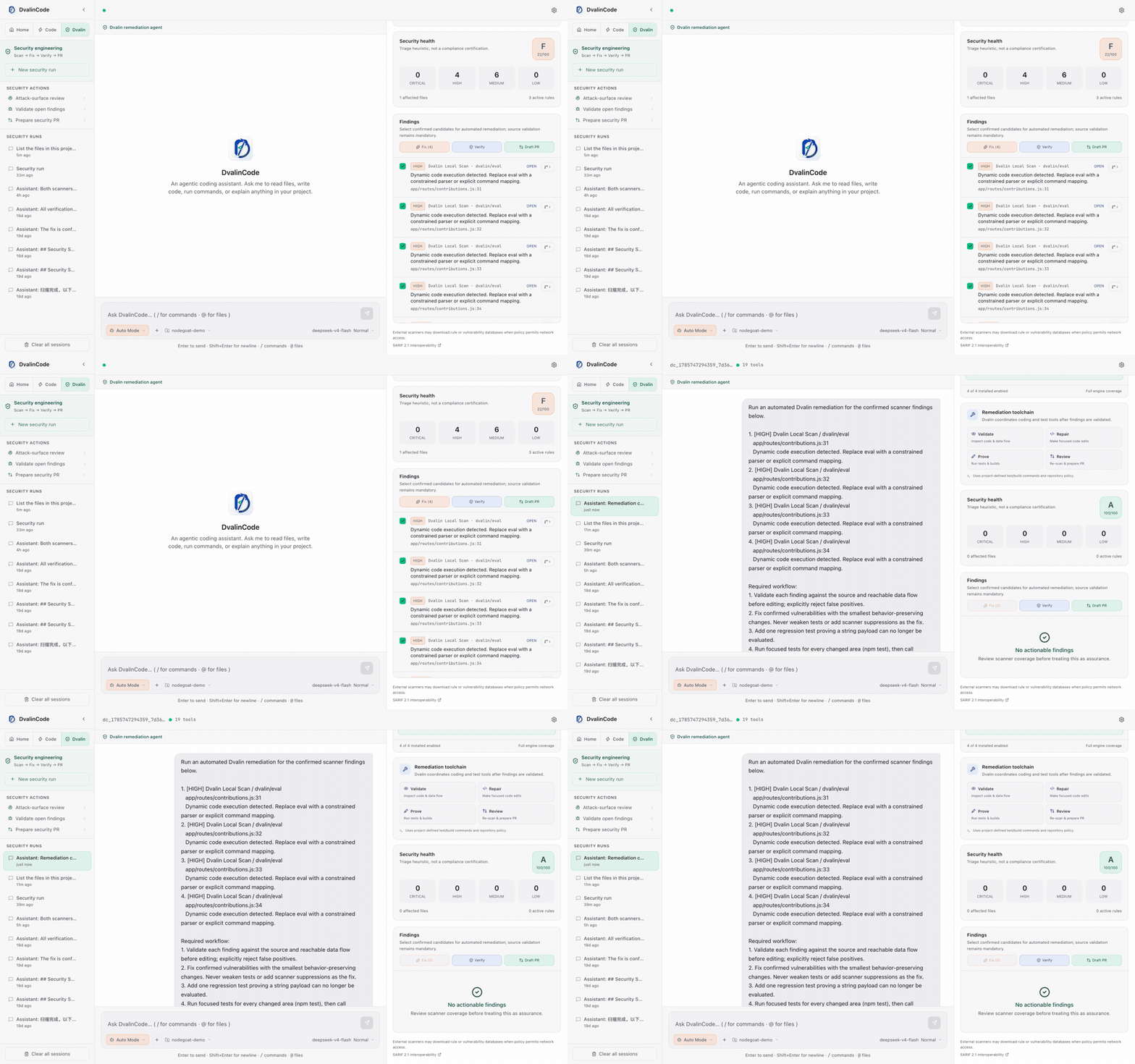
This animation is made from the real application, not a mock. The input is an Apache-2.0-licensed example adapted from OWASP NodeGoat, whose contribution route evaluated user-controlled text.
Dvalin turns open-source scanner evidence into a controlled scan → fix → test → re-scan → draft-PR workflow. Here is the run in the animation above, measured:
| Real NodeGoat-derived run | Before | After Dvalin remediation |
|---|---|---|
| Security health (triage heuristic) | 22 / 100 · F | 100 / 100 · A |
| Findings | 10 (eval across 3 rules, 2 engines) | 0 |
| Tests | 2 passing | 3 passing, including an injection regression test |
| Scanner fleet | 4 / 4 completed | 4 / 4 completed |
The scanning and hardening control plane uses open-source components:
- Semgrep CE and its community rules for semantic SAST.
- Trivy for filesystem vulnerabilities, secrets, and misconfiguration.
- OSV-Scanner with the open OSV database for dependency vulnerabilities.
- DvalinCode's MIT-licensed built-in rules, remediation orchestration, test and re-scan gates, plus SARIF 2.1 import for other compatible scanners.
The scanners find and rank evidence. The configured model proposes source changes; DvalinCode constrains that work, records the diff, runs project tests, re-scans the changed tree, and keeps PR publication explicit. It does not auto-merge and it does not claim that a clean scan proves the absence of bugs. Choose an open-weight model through Ollama if the repair-proposal step must also stay fully local and open; hosted model licensing depends on the provider.
You can still prove what the agent did after the fact:
dvalincode report verify # re-derive the hash chain of the last run's audit log
🏛️ And it survives a security review
That last command is the part that matters once more than one person depends on this. DvalinCode is a full coding agent — terminal, web GUI, and desktop app — built so that an organization, not the developer, bounds what it may do: a policy file constrains modes, commands, paths, tools, and models; every run is hash-chained into a tamper-evident audit log; nothing reaches a provider that the egress guard did not allow. A repo policy can only ever narrow the machine-level one.
If you are the person who has to approve this class of tool, start at APPROVABILITY-PLAN.md and the Evidence Pack that every release ships of itself.
| 🏠 Home | One place for read-only Ask and approval-gated Collaborate workflows. Switch intent without leaving the project or conversation. |
| ⚡ Code | Focused autonomous coding with full tool access and Ask / Plan / Auto / Bypass permission levels. Security and browser routines no longer compete with the core coding workflow. |
| 🛡️ Dvalin | Dedicated white-box security engineering: orchestrate the built-in scanner plus installed Semgrep CE, Trivy, and OSV-Scanner; triage findings; create isolated fixes; run tests and re-scan; then explicitly publish a reviewable draft PR. Dvalin guide → |
| 🏦 Regulated teams | Designed for finance, healthcare, security-sensitive SaaS, and internal platform teams that need AI coding under policy, audit, data minimization, and supply-chain review — not just developer convenience. |
| 🛡️ Secure remediation | Run a multi-engine scan or import SARIF from CodeQL, GitHub Code Scanning, Semgrep, or compatible scanners, then create an isolated remediation worktree and turn findings into focused repair tasks with source context, verification evidence, and PR-ready reporting. Workflow → |
| 📚 Skills | Upload, download, and inspect local skill bundles. DvalinCode ships built-in secure-code-scan and secure-code-remediation skills, plus agent tools for listing skills, reading skill instructions, scanning, listing cases, and preparing remediation worktrees. Format → |
| 🛡️ Audit trail | Every run emits a tamper-evident, hash-chained JSONL log — every file read/written, every command, every approval. A Run Report renders it as Markdown; dvalincode report verify proves the chain is intact. Threat model → |
🔒 Org policy & trust | A company — not the developer — bounds the agent. A dvalin.policy.json constrains modes, shell commands, file paths, tools, and models; a repo policy can only ever narrow the machine-level one, never widen it. Each run records the governing policy's hash. dvalincode trust prints the install's live security posture — active policy + hashes, audit status, runtime — so a reviewer can verify it directly. Policy reference → · Approvability plan → |
| 🏛️ Governance evidence | OpenSSF Scorecard, CodeQL, Dependabot, pinned GitHub Actions, CODEOWNERS, and ISO/IEC 42001 AIMS alignment docs are maintained as reviewable project evidence, and every release ships an Evidence Pack the binary produced of itself. Scorecard map → · ISO 42001 alignment → · Release evidence → |
| 📐 Open specs | PCP-1 — the provider-boundary contract (egress containment, credential containment, audit, policy binding) written as a vendor-neutral profile with test procedures, so any agent runtime can run it against its own adapters and publish the result. Not a DvalinCode test file; a checklist anyone can hold us to as well. Provider Conformance Profile → |
| 🖥️ First-class GUI | Modern web UI with code highlighting, file @-references, / slash commands, Git branch indicator, live token + cost counter, multi-profile LLM config, and a dark / light / system theme switcher. |
| 🖥️ Terminal or web — one binary | Run it bare for an interactive terminal agent with streaming output, inline approvals, and red/green diffs, or dvalincode serve to host the web GUI for browser/remote use. Both frontends drive the same agent core. |
| 🖥️ Native desktop app | DvalinCode.app — a real dock application (OS-native webview, no Electron) over the same engine. On macOS the one-line installer with --gui puts it in /Applications; launch it straight from Launchpad. On Windows a per-user setup executable installs it with a Start menu entry and an uninstall entry — no administrator, no UAC prompt, and no browser tab. |
| 🪶 Zero-dependency binary | Single ~25MB executable per platform. No Node, no Python, no Docker. |
| 🔐 Local-first | Sessions, config, profiles, and audit logs live in ~/.dvalincode/. .dvalincodeignore blocks the agent from reading sensitive files. AGENTS.md in your repo becomes persistent project instructions. |
| 💾 Portable & exportable | Export all local data (memory, sessions, config, audit) to one file and import it on another machine — your setup moves with you. Any conversation downloads as a clean Markdown transcript. |
🎯 Core Goal
Make every code-producing human or agent pass the same independent security gate.
DvalinCode is built as an agent-compatible security runtime, not another general coding-agent benchmark entry. The core product is scan evidence, policy, baseline, deterministic verification, and portable interfaces that a human developer, an external agent, or CI can all call. The bundled coding agent stays capable enough to implement and test focused remediations reliably; its model prose never decides whether the security gate passed.
- Any model — every OpenAI-compatible endpoint is a first-class citizen, local models included. Your workflow should never be hostage to one vendor's pricing, rate limits, or quality swings.
- Safe by default — three-tier approvals with diff preview, an undo stack, and sandboxed shell execution. An agent you can trust on full-auto.
- Small enough to audit — one ~25MB binary, a handful of runtime dependencies, a codebase you can read in a weekend. Trust through inspection, not promises. As of v0.5, every agent run is auditable too: a tamper-evident, hash-chained log of every action, verifiable after the fact.
- Open enough to embed — the agent core speaks a clean REST + WebSocket API, ready to be wired into your own product, CI, or internal tools.
- Approvable by any company — governance is built in, not bolted on. An org policy bounds the blast radius (controllable),
dvalincode trustmakes the posture self-verifiable (transparent), and the hash-chained log proves what every run did (auditable). Those three together are exactly what a security review needs to say yes — and what cloud, closed, mutable-log agents structurally struggle to provide. Approvability plan →
The bundled web GUI is the runtime's reference implementation and showcase — the first consumer of that public API, demonstrating everything the runtime can do.
✅ Why Teams Pick DvalinCode
DvalinCode is differentiated by approvability. It is built for teams that need AI coding to pass security, compliance, and data-governance review before it can touch production repositories.
- Closed-loop secure remediation — scan locally or import SARIF from
CodeQL, GitHub Code Scanning, Semgrep, or compatible scanners; persist
findings as local remediation cases; create an isolated
dvalin/remediate/...worktree; then send a focused repair prompt with source context and verification instructions. - Skills as governed operating procedures — upload, download, and inspect local skill bundles. Built-in secure scanning and remediation skills tell agents which tools to use and keep workflows portable across machines.
- Model freedom without policy drift — use DeepSeek, OpenAI, Claude via OpenRouter, Groq, Ollama, or any OpenAI-compatible endpoint while keeping tool permissions, audit, and workspace policy consistent.
- Security evidence, not just security claims — OpenSSF Scorecard support, CodeQL, Dependabot, pinned Actions, CODEOWNERS, ISO/IEC 42001 alignment docs, AI change-impact records, and hash-chained run logs are part of the project.
- Local-first by default — sessions, config, profiles, memory, and audit
logs stay under
~/.dvalincode/;.dvalincodeignoreand policy controls bound what the agent can read, write, or execute.
🛡️ Security & Governance



DvalinCode maintains project-level governance evidence for open-source and enterprise review. This is the differentiator for teams where AI coding must pass security approval before it can reach production repositories:
- Threat model — the full attack surface of an agentic coding runtime
(malicious
AGENTS.md, poisoned MCP servers, prompt-injection escalation, egress, audit tampering, supply chain, sandbox escape), each mapped to the control that defends it and the honest residual gap. Threat model → - OpenSSF Scorecard support — scheduled Scorecard workflow, SARIF upload, CodeQL, Dependabot, CODEOWNERS, least-privilege workflow permissions, and SHA-pinned GitHub Actions. Control map →
- ISO/IEC 42001 alignment — an AI management system scope, AI policy, role map, risk register, AI change classification, required records, and review cadence. AIMS alignment →
- AI change impact assessment — a reusable template for changes that affect model/provider behavior, prompts, permissions, tools, audit logs, or release security. Template →
- Regulated-use posture — local-first data handling, policy-controlled autonomy, minimized audit records, and release supply-chain evidence for finance, healthcare, security-sensitive SaaS, and internal enterprise use.
- Dvalin security engineering — the dedicated Dvalin workspace combines the built-in scanner with installed Semgrep CE, Trivy, and OSV-Scanner, normalizes SARIF findings, drives isolated test-backed fixes, and explicitly prepares a reviewable draft PR without auto-merging it. Workflow →
These documents are implementation evidence and operating procedures; they do not claim third-party ISO certification.
🆚 When to choose DvalinCode
| If you need… | DvalinCode's answer |
|---|---|
| An agent your security team can approve | Policy-bound tools, explicit approval modes, dvalincode trust, audit logs, OpenSSF evidence, and ISO/IEC 42001 alignment docs. |
| AI coding for regulated repositories — finance, healthcare, enterprise data, customer-confidential code | Local-first runtime, bring-your-own-model, .dvalincodeignore, governed egress, and minimized audit records. |
| A safer alternative to generic autonomous coding agents | The product thesis is controllable / transparent / auditable, not only "the model can edit files". |
| IDE-centric AI workflows | Zero-dep binary (~25 MB). Runs anywhere, no IDE required. macOS shell is sandboxed by default — network denied, writes capped to cwd. |
| Terminal-first AI workflows | CLI start → auto-opens a modern Web UI with code highlighting and red/green diff approval. One install command, nothing else needed. |
| Cloud-only AI workflows | Every OpenAI-compatible endpoint is a first-class citizen. Run Ollama with Qwen2.5-Coder: no key, no internet, no per-token cost. |
| Single-machine AI setup | AGENTS.md committed to the repo ships AI context to every clone. dvalin.json ships the team's automation commands the same way — export from the sidebar, commit, done. |
✨ Features
| Category | Feature | Notes |
|---|---|---|
| Modes | Home / Code / Dvalin | Home contains read-only Ask and approval-gated Collaborate; Code is focused autonomous development; Dvalin is the scan-to-fix security workspace |
| Code permissions | Ask Permissions / Plan Mode / Auto Mode / Bypass permissions | Verified behavior: Ask requests approval before writes/commands, Plan is read-only and does not write files, Auto runs operations automatically, Bypass runs without confirmation prompts |
| Workspaces | Open folder / Import Git / Add worktree | Cowork and Code can switch to a local folder, clone a Git project, or create a Git worktree from the UI |
| Governance | OpenSSF Scorecard / ISO 42001 AIMS alignment | Scorecard, CodeQL, Dependabot, pinned Actions, AI impact assessment, risk register, and review cadence are documented under docs/security/ and docs/governance/ |
| Secure remediation | Built-in + Semgrep CE + Trivy + OSV-Scanner / SARIF / cases / worktrees / tests / draft PR | Dvalin detects installed engines, normalizes SARIF, scores risk, persists cases, drives evidence-backed fixes, verifies changes, and publishes only after an explicit user action |
| Agent integrations | dvalin agents / MCP server | Finds Claude Code, Codex, Cursor, VS Code, Gemini CLI and OpenCode on this machine and wires Dvalin's MCP server into each, writing only with --yes; or hands it to CC Switch. Editors and MCP → |
| Skills | Upload / download / built-in security skills | Skills live under ~/.dvalincode/skills; built-ins guide security scanning and remediation with dedicated agent tools. Format → |
| Composer | @ file references | Type @ for a fuzzy file search; selected files get inlined into the prompt |
/ slash commands | /clear /compact /git /plan /undo /help | |
| Multiline + interrupt | Shift+Enter for newline, stop button to abort mid-stream | |
| Tool UI | Inline diffs | edit_file and write_file results render as red/green unified diff, default folded |
| Approval dialog with diff | Cowork mode shows the diff before the change is applied | |
| Live tool counter + token + cost | Topbar shows session totals in real time | |
| Agent | LLM-based context compaction | /compact summarises into Goal / Completed / Decisions / Pending |
| Persistent undo stack | /undo [N] reverses the last N tool calls | |
| Run Report | Markdown summary per run (files, commands, decisions, test result) — GUI card + dvalincode report | |
| Git awareness | Branch name in topbar; git context auto-injected into prompt; read-only git_status, git_diff, git_log, git_show and git_blame tools, also in Ask and Plan | |
| Code search and edits | search_text takes regular expressions, shows context lines, and skips .gitignored paths; edit_file makes several edits or a replace-all in one call; read_file reads line ranges of files over 256 KB | |
| Task checklist | update_plan keeps a step checklist that the desktop app shows as a card; in Code mode the agent is sent back if it stops with steps still open | |
AGENTS.md project memory | Per-repo persistent instructions, auto-loaded each turn | |
| Web search + fetch | web_search is free by default: it asks Exa's free tier, which needs no key, and your queries go to Exa. If that search fails, for example at Exa's free rate limit, it falls back automatically to a Tavily, Brave Search or Exa API key: the one saved in Settings → LLM Providers → Web search, then TAVILY_API_KEY, BRAVE_API_KEY, EXA_API_KEY. Your own SearXNG endpoint (DVALINCODE_SEARXNG_URL) takes Exa's place. Turn the free step off in Settings, or with "freeWebSearch": false in ~/.dvalincode/config.json, which the CLI reads too. web_fetch needs no key and reads public pages as text, asking once per site per turn. Both obey the policy network level and are audited by origin only | |
| Security | Tamper-evident audit trail | Hash-chained JSONL per run in ~/.dvalincode/audit/; dvalincode report verify detects edits |
| macOS shell sandbox | sandbox-exec denies network; allows writes only inside cwd + /tmp | |
.dvalincodeignore | gitignore-style exclusion; blocks read_file / list_files / search_text | |
| Per-action approval | Approve/deny each write / delete / shell call in Cowork mode | |
| Appearance | Theme switcher | Dark / light / system, persisted; system follows the OS live |
| Providers | OpenAI-compatible endpoints | DeepSeek · OpenAI · Groq · OpenRouter · Ollama · custom |
| Multi-profile config | Save and switch between named (provider, model, API key) sets | |
| Sessions | Auto-save + restore | All sessions persisted to ~/.dvalincode/sessions/ as JSON |
| LLM summary memory | Cross-session summary keeps the agent oriented after restart | |
| Memory | Local user/project memory | Searchable facts, preferences, and decisions in ~/.dvalincode/memory/; import from Claude/Hermes/Markdown |
| Data portability | Export / import all data | One bundle of memory + sessions + config + audit — dvalincode export / import, or GUI Settings → Export / Import |
| Markdown transcript | Download any conversation as Markdown — sidebar download icon, dvalincode session md <id>, or /api/sessions/:id/markdown |
⌨️ Slash Commands
| Command | Description |
|---|---|
/clear | Clear the current conversation (client-side, starts a fresh session) |
/compact | LLM-based context compaction — replaces history with a structured summary |
/undo [N] | Reverse the last N tool calls (default 1) |
/git | Run git_status and show branch, recent commits, changed files |
/plan <task> | Ask the agent to plan the task step-by-step without executing |
/help | Show all available slash commands |
🛠️ Architecture
┌───────────────────────────┐   ┌─────────────────────────┐
│  Terminal UI (readline)   │   │  Browser GUI (React/Vite)│
│  streaming · approvals    │   │  ChatThread · DiffViewer │
└─────────────┬─────────────┘   └────────────┬────────────┘
              │ in-process          HTTP / WebSocket
              │                ┌───────────────▼─────────────┐
              │                │  Express + ws server         │
              │                │  /api/* · `dvalincode serve` │
              │                └───────────────┬─────────────┘
              └──────────────┬─────────────────┘
┌────────────────────────────▼────────────────────────────┐
│  runAgentTurn — shared turn-runner (src/agent/session)   │
│  provider · prompt (mode · git · AGENTS.md) · session    │
└────────────────────────────┬────────────────────────────┘
                             │
┌────────────────────────────▼────────────────────────────┐
│                    Agent Engine                          │
│  AgentLoop (8-state machine) → AgentRunner              │
│  Streaming · Interrupt · Undo stack · LLM compaction    │
│  run_start / run_end → AuditSink (hash-chained JSONL)   │
└──────────────────────────┬──────────────────────────────┘
                           │ run()
┌──────────────────────────▼──────────────────────────────┐
│  ToolRegistry — Zod schemas + permission gating         │
│  + audit taps: tool_call · file_* · shell_exec          │
│  read_file · list_files · search_text · git_status ·    │
│  write_file · edit_file · delete_file · shell           │
│  web_search · web_fetch                                 │
│  git_log · git_show · git_blame · update_plan           │
└─────────────────────────────────────────────────────────┘
Agent Loop — 8 States
RESTORE → COMPACT → COMMAND → BUILD → RUN → SAVE → RESPOND → DONE
- RESTORE — Load session from
~/.dvalincode/sessions/ - COMPACT — If context near the limit, compress history (LLM summary)
- COMMAND — Handle built-in slash commands
- BUILD — Assemble system prompt (mode prompt + project + git + AGENTS.md)
- RUN — Delegate to
AgentRunnerfor the LLM tool-calling loop - SAVE — Persist session
- RESPOND — Generate cross-session summary memory
- DONE
🧪 Tests
npm test
819 core tests · 95 files · all green. The VS Code extension has a separate 37-test suite plus one opt-in published-package integration test.
🏗️ Build from source
Requires Bun (curl -fsSL https://bun.sh/install | bash).
git clone https://github.com/arthurpanhku/dvalincode
cd dvalincode
npm install
npm run dev:all                 # start backend (3001) + Vite (5173)
Build release binaries for every platform:
bash scripts/build-release.sh   # → release/ with tar.gz / zip + SHA256SUMS.txt
bash scripts/build-release.sh darwin    # macOS only
bash scripts/build-release.sh windows   # Windows only
Before publishing a release:
(cd release && shasum -a 256 -c SHA256SUMS.txt)
unzip -l release/dvalincode-v*-windows-x64.zip | grep 'web/dist/index.html'
tar tzf release/dvalincode-v*-macos-arm64.tar.gz | grep 'DvalinCode.app/Contents/Resources/AppIcon.icns'
Windows smoke test: unzip dvalincode-v*-windows-x64.zip on Windows and run dvalincode-windows-x64.exe serve from the extracted folder. The server should open http://localhost:3000. If it reports an ENOENT path under B:\~BUN\root\web\dist, the compiled Bun virtual path detection has regressed; the packaged binary must resolve web/dist beside the extracted executable.
Note: Bun only allows Windows .exe icon/metadata injection when compiling on Windows. macOS/Linux cross-builds still produce a valid Windows archive, but without an embedded .exe icon.
Build the desktop app — and, on a Windows host with Inno Setup 6, its installer:
npm run build:gui:darwin    # macOS .app
npm run build:gui:windows   # Windows .exe + dvalincode-gui-v*-windows-x64-setup.exe
npm run icon:windows        # regenerate installer/windows/dvalincode.ico from the app icon SVG
The installer is defined by installer/windows/dvalincode.iss and is compiled only on Windows, because Inno Setup is a Windows program. On any other host the rest of the Windows build still runs and the installer step is skipped with a note.
🌐 Providers
DvalinCode supports any OpenAI-compatible endpoint. Built-in presets, sorted by cost:
| Provider | Cheapest model | Input / Output | Notes |
|---|---|---|---|
| Groq | llama-3.1-8b-instant | Free tier | Fastest open models — Llama 3.3 70B, Mixtral |
| Ollama | qwen2.5-coder | $0 (local) | No API key needed, runs on your machine |
| DeepSeek | deepseek-chat | $0.14 / $0.28 per 1M | Cheap and strong; v3 nearly matches GPT-4 quality |
| OpenRouter | google/gemini-2.0-flash-001 | $0.10 / $0.40 per 1M | 200+ models including Claude, Gemini, Llama |
| OpenAI | gpt-4o-mini | $0.15 / $0.60 per 1M | Reliable; o1 available for deep reasoning |
| Custom | — | depends | Any OpenAI-compatible base URL |
| CC Switch | — | depends | provider set cc-switch: requests go through CC Switch's local routing (127.0.0.1:15721) to whichever provider its Codex app uses; CC Switch holds the key |
DvalinCode shows the per-session cost live in the topbar — flip between providers in the LLM Configuration modal, save named profiles, and compare on the fly.
❓ FAQ
Does it send my code to a third party?
Only what the agent sends to the LLM you configured. Sessions, configs, and profiles all live on your machine in
~/.dvalincode/. To exclude sensitive files from the agent's view, drop a .dvalincodeignore in your repo root (gitignore-style patterns).
Can I run this without an API key?
Yes — use Ollama. Pull a model (
ollama pull qwen2.5-coder), then in the LLM Configuration modal pick the Ollama provider. No key, no internet, no per-token cost.
Why Home, Code, and Dvalin?
They represent different outcomes and safety defaults. Home groups read-only Ask and approval-gated Collaborate. Code is the focused software-development agent. Dvalin is a security pipeline with scanner evidence, remediation cases, isolated worktrees, verification, and explicit draft-PR publication. You can switch at any time while keeping project context.
Is the shell tool sandboxed?
On macOS, commands use
sandbox-exec; on Linux, restrictive network policies use Bubblewrap when installed. Windows has no supported subprocess network sandbox yet, so restrictive policies fail closed instead of silently running unrestricted. The native command runner itself works on all three platforms.
Which operating-system shells are supported?
Linux and macOS commands run through
/bin/sh; Windows commands run through the system ComSpec (cmd.exe by default). Full native command lines support pipes, redirects, and conditional operators. The split command + args form quotes executable paths and arguments for the host shell.
How do I see what the agent actually did — and is the log trustworthy?
Every run writes a JSONL audit log to
~/.dvalincode/audit/run-<timestamp>-<id>.jsonl. Render it with dvalincode report --last (or see the collapsible Run Report card in the GUI). Each record is chained to the previous one with a SHA-256 hash, so any after-the-fact edit is detectable — dvalincode report verify <run-id> reports ✓ chain intact or the exact position of a break. It's tamper-evident, not tamper-proof: a local attacker who can rewrite the whole file could recompute the chain. The value is forensic/accountability. See docs/AUDIT-TRAIL.md for the full threat model.
Will it overwrite my files without asking?
Depends on the mode. Home → Ask never writes. Home → Collaborate requires approval per file (with inline red/green diff before you click Allow). Code and Dvalin honor their selected permission level; use Auto only for trusted workspaces or isolated branches.
The macOS binary won't open — "unverified developer"
The binary is unsigned. Run this once to clear the quarantine flag:
xattr -dr com.apple.quarantine ~/.dvalincodeDoes AGENTS.md get sent every turn?
Yes — DvalinCode reads
AGENTS.md from the project root before each turn and injects it under === PROJECT INSTRUCTIONS === in the system prompt. Keep it focused — it counts toward your token budget.
🤝 Contributing
Contributions welcome. The codebase is intentionally small and surgical — see CONTRIBUTING.md.
git clone https://github.com/arthurpanhku/dvalincode
cd dvalincode && npm install
npm test                # 819/819 core tests ✅
npm run typecheck
📄 License
MIT — see LICENSE.
🔗 Independence & Attribution
DvalinCode is an independent implementation. It is not affiliated with, sponsored by, or endorsed by Anthropic, Claude, Claude Code, OpenAI, OpenAI Codex, GitHub, Cursor, Aider, opencode, Cline, HKUDS/nanobot, or any other project or vendor named here.
We gratefully acknowledge that DvalinCode's product direction and architecture were informed by public research, open-source projects, published papers, standards, release notes, and common workflow patterns across the agentic coding ecosystem:
- HKUDS/nanobot (MIT) helped validate the
explicit turn-state approach used in DvalinCode's
TurnStateflow. - The ReAct paper (Yao et al., 2022) provides the widely used "reason, act, observe" loop that informs many modern tool-using agents.
- OpenAI's
tool_callsmessage format, along with the broader OpenAI-compatible provider ecosystem, gives DvalinCode a portable interface for model/tool interaction. - OpenAI Codex / Codex CLI, Claude Code, Aider, opencode, Cursor, Cline, and similar coding agents clarified user expectations around terminal agents, plan/build modes, permission prompts, project-local context, sandboxing, session lifecycle, MCP integration, and diff-first editing workflows.
- OpenAI Codex Security and its public documentation informed Dvalin's specialist security-agent research and portable SARIF handoff. Dvalin remains an independent, competing security runtime.
- The
AGENTS.mdproject-instruction convention, common in coding-agent tools, informed DvalinCode's project-local instruction loading behavior. - CodeQL, GitHub Code Scanning, Semgrep, SARIF, OpenSSF Scorecard, and ISO/IEC 42001 informed DvalinCode's security-remediation and approvability posture.
- Git worktree, MCP, and local-first developer tooling patterns influenced the product direction for isolated remediation, governed tool access, and auditable execution.
These references shaped our understanding of what users expect from coding agents. DvalinCode's source code, prompts, UI text, tool schemas, module layout, and product implementation remain original unless explicitly noted. No source code, prompts, or UI text from the projects above was copied.
Full source references: docs/REFERENCES.md
💛 Thanks to Our Contributors
Every issue, idea, documentation improvement, test, and code contribution helps make DvalinCode better.
| Contributor | GitHub profile |
|---|---|
| Arthur Pan | @arthurpanhku |
| Shivas | @shivasb42 |
| Aditya | @adity982 |
| badhope | @weed33834 |
| Samran Asif | @webdevsamran |
| dchaudhari7177 | @dchaudhari7177 |
| TayfurYldz | @TayfurYldz |
See the complete contribution history, including automated dependency and maintenance updates.
Want to join them? Read the contribution guide and send your first pull request.







