Listed from the MCP registry; nobody on Odel publishes it.

ASTra
Lets AI agents edit Word (.docx) files. Every save is schema-checked and kept as a git commit.
Runs on your machine from its package; the steps are below.
What it does
- Reads
- Writes
- High impact
At most: creates or changes data: records, files, settings.
What it costs
FreeOdel charges nothing per call. The publisher may charge for its own service.
Runs locally over stdio
This server isn't hosted — your MCP client launches it from a package registry. Use one of the commands below, or drop the config into your client (e.g. Claude Desktop).
Run
npx -y @attentionform/astra-mcp-server
MCP client config
{
  "mcpServers": {
    "astra": {
      "command": "npx",
      "args": [
        "-y",
        "@attentionform/astra-mcp-server"
      ]
    }
  }
}

The agent-first toolkit for Word documents.
Let AI agents read, edit and build .docx files, with every change validated and every save kept in a git history.








Quickstart · Use cases · Validator · History · Docs
ASTra is an agent-first toolkit for Word (.docx) documents. It lets an AI agent, or any script, read a document, change exactly what it needs to change, and build new documents from scratch, without ever touching the raw XML. It is not an office suite: there is no window, no toolbar and no cursor, only the layer an agent needs to work on a Word file safely.
It is powered by its own document engine, which turns a .docx into a compact tree of nodes with stable IDs. The engine comes with a Model Context Protocol (MCP) server, so AI assistants can use it directly, and a command-line tool for scripts and CI. ASTra is source-available.
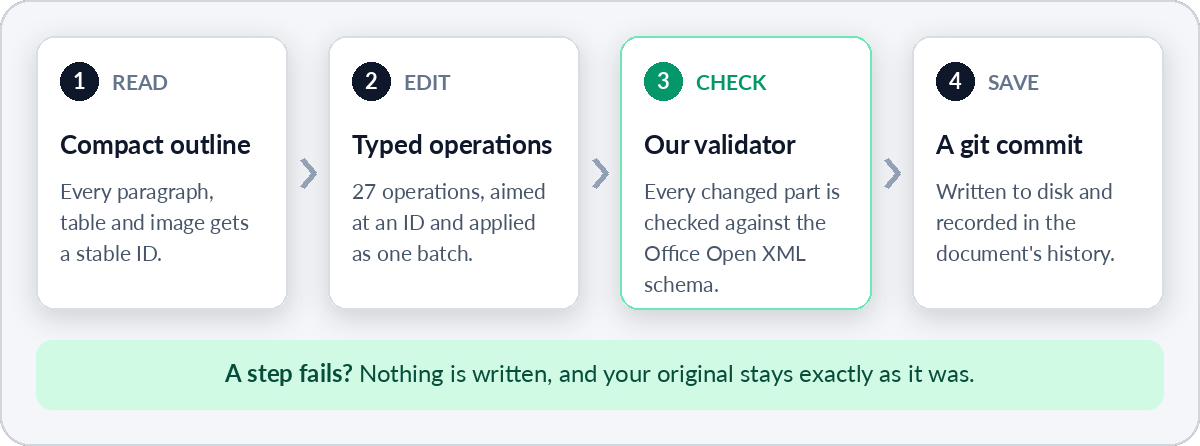
Why use it? An agent that edits Word files by writing code, or by reading the raw XML, either burns its context window on markup or produces a file that Word has to repair. ASTra gives the agent a compact outline to read, typed operations to apply by ID, and validation that catches schema errors before saving.
| An outline made for agents One row per paragraph, table and image, each with a stable ID. About 2.9x fewer tokens than raw XML at the median over our 40 test documents, and 6x or more on table-heavy ones. | Typed, batched edits 27 operations aimed at node IDs and applied as one batch. If any step fails, none of it is applied. | Built-in validation Files are checked against the Office Open XML schema before saving. Existing validation errors may be tolerated under the default policy; strict mode refuses saves with errors. |
| Git history Every save is a commit in a git repository kept next to the document. ASTra writes it itself, so git does not need to be installed. List it, preview a revert, restore, redo. | Made for automation JSON output, exit codes, batches from stdin, and one run per row of a CSV file. | Local and bounded Runs on your machine and sends nothing anywhere. The MCP server touches only the folder you name. |
Connect your AI assistant
You need Node.js 22.19 or newer. ASTra runs on your machine and needs no account, API key or install step. Add this to your assistant's MCP configuration and change the folder to the one that holds your Word files:
{
  "mcpServers": {
    "astra": {
      "command": "npx",
      "args": ["-y", "@attentionform/astra-mcp-server", "--allowed-dir", "/absolute/path/to/your/documents"]
    }
  }
}
| Assistant | Where it goes |
|---|---|
| Claude Code | One command, run in your project folder: claude mcp add astra -- npx -y @attentionform/astra-mcp-server --allowed-dir "$PWD" |
| Claude Desktop | claude_desktop_config.json: ~/Library/Application Support/Claude/ on macOS, %APPDATA%\Claude\ on Windows. Use the block above, then restart the app. |
| Cursor | .cursor/mcp.json in your project. Use the block above with ${workspaceFolder} as the folder. |
| Windsurf | ~/.codeium/windsurf/mcp_config.json. Use the block above. |
| Cline | The MCP settings tab: command npx, args -y, @attentionform/astra-mcp-server, --allowed-dir, ${workspaceFolder}. |
| Any other MCP client | Command npx, args -y @attentionform/astra-mcp-server --allowed-dir <folder>, transport stdio. |
The server can only read and write inside the folders you name with --allowed-dir. Details are in Quickstart and the MCP Specification.
Check that it works. Restart your assistant. It should list an astra server with 21 tools, starting with open_document, inspect_document and execute_batch. Then ask:
Create a new report document in my documents folder, add a heading and one paragraph, and save it.
The assistant should open the file, edit it and report that the save was checked and is valid. A new .astra folder next to the file holds the git history of each save.
If it does not connect
- Use an absolute folder path in
--allowed-dir. The server starts even when the folder is wrong, so a typo only shows up when a tool call fails. - Give the assistant absolute file paths, or paths inside that folder. A path outside it fails with
E_SANDBOX. A relative path is resolved from the server's working directory, not yours, and fails withE_IO(file not found). - Check
node --version. It must be 22.19 or newer. - Restart the assistant after you change its configuration. Most of them read it only at start.
- If the server banner reports an old version, a globally installed copy can shadow
npx. Runnpm uninstall -g @attentionform/astra-mcp-server, or pin a version:@attentionform/astra-mcp-server@0.4.0. - Run it by hand to see its output:
npx -y @attentionform/astra-mcp-server --allowed-dir "$PWD"prints a line startingserving 21 toolswhen it starts.
See it work
Two real edits. Each picture is rendered from the saved file.
Redline a contract
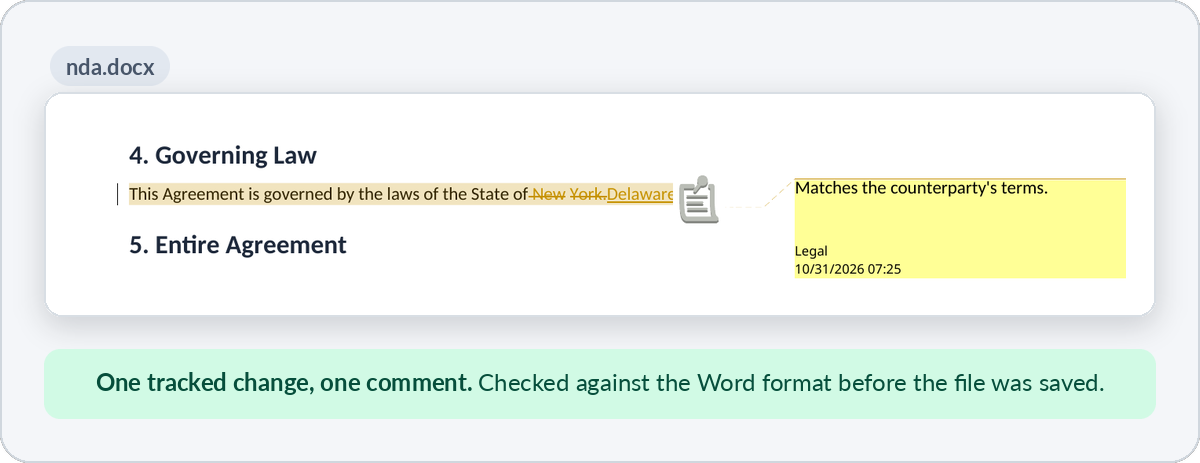
You: Open
nda.docx, change the governing law from New York to Delaware as a tracked change, and add a comment saying why.
The agent found the clause by its ID, made the change as a tracked change under an author name, and attached the comment. ASTra validated the whole file before it saved.
Edit a report
You: Open
board-report.docx. Add a fourth risk to the list in section 4: the hedging policy review is not due until the November board meeting. Save it.
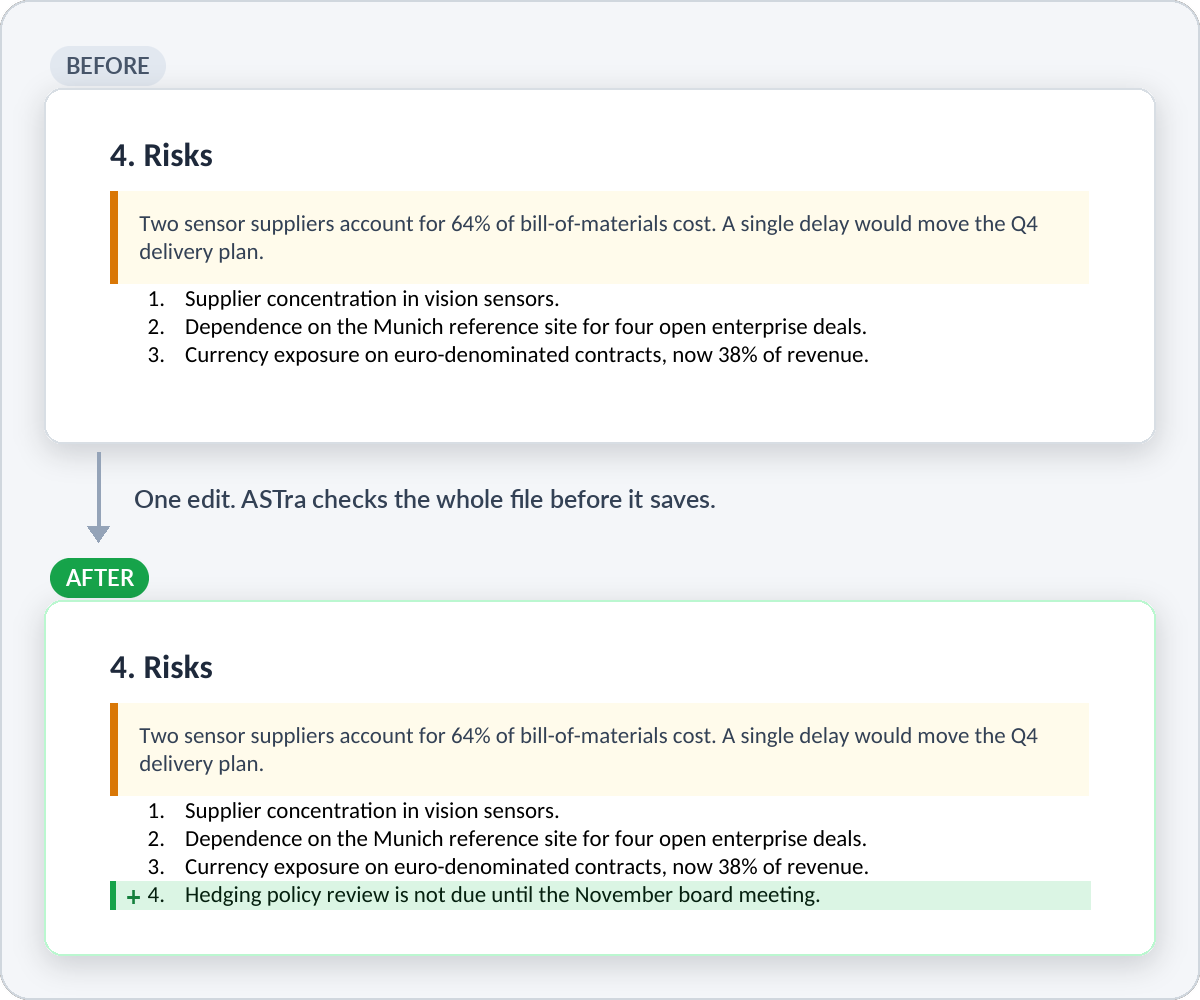
The agent found the list by its ID and added one item; nothing else on the page changed. To watch an agent build and edit a whole report, see the recorded session.
Every edit takes the same four steps
Quickstart
You need Node.js 22.19 or newer. Reading, editing, validating, sanitizing and the text page wireframe need nothing else; npx fetches what they need.
A renderer is not required, but it is recommended. ASTra reads, edits, validates and saves without one; PDF export and page images are the only calls that need it. For an agent it is also how the page gets checked: the text outline cannot show where a page breaks, whether a table fits, how a margin looks or whether the last page is blank. After you create a document, change the paper size, margins or columns, or make a large formatting change, render the affected pages and look at them. Inspect the affected pages and check for unexpected overflow or a blank last page. On Linux and macOS install LibreOffice and Poppler as below. On Windows use Microsoft Word when it is installed, or LibreOffice (see the next paragraph).
To render a PDF or a page image you need two tools on your PATH: LibreOffice (soffice) exports PDFs and lays out pages, and Poppler (pdftoppm) turns those pages into images. PDF export needs only LibreOffice; page images need both.
# Ubuntu / Debian / WSL
sudo apt-get install -y libreoffice-writer poppler-utils

# macOS
brew install --cask libreoffice && brew install poppler

# check
which soffice pdftoppm
Without them, those calls fail with E_DEPENDENCY and write nothing; everything else keeps working. Fonts matter for a faithful render: LibreOffice uses Carlito and Caladea in place of Calibri and Cambria (fonts-crosextra-carlito and fonts-crosextra-caladea on Debian and Ubuntu).
On Windows you can also use what is already installed. Windows 10 and later turn PDF pages into images without Poppler (--pdf-to-image windows, tried first by default, with Poppler as the fallback). With Microsoft Word 2010 or later installed, --renderer word (env ASTRA_RENDERER=word, MCP renderer: "word") lays out the document with Word and never falls back. By default (auto) ASTra on Windows tries Word first when it is installed and falls back to LibreOffice if Word fails. WSL is a Linux process, so under WSL ASTra uses LibreOffice and Poppler, as on any Linux machine.
Tracked changes and comments. Without --show-markup a Word render draws the content only (changes as if accepted, no comments) and a LibreOffice render draws tracked changes, deleted text included, but no comments. Pass --show-markup (env ASTRA_SHOW_MARKUP=1, MCP showMarkup: true). With it, Word draws changes inline and comments in balloons and LibreOffice draws comments in the margin. The output shows author names, deleted text and comments, so check it before you share it. LibreOffice 7.6.7 or later is needed; a very long comment can be cut short there, and in Word.
Network references. A document can name images or files at network locations. ASTra changes those references on a copy before it starts a renderer, so a document you did not write cannot make a render contact a server or send your Windows login hash. Your file is not changed. Pass --allow-network-references (MCP allowNetworkReferences: true) only when you want the content from those locations loaded. See Security.
Connect an AI assistant
Setup for Claude Code, Claude Desktop, Cursor, Windsurf, Cline and other MCP clients is in Connect your AI assistant above.
The folders named with --allowed-dir (or ASTRA_EXTRA_DOC_ROOTS) are the whole boundary: the server cannot read or write files outside them, and the system temp folder is not added. A symbolic link at or above a named folder is your choice and is followed. A link below a named folder that points outside it is refused.
How the tools treat a file that already has validator errors:
open_documentchecks the file and reportsvalid,invalid,timed-outorskipped. It never refuses the open. UsevalidationTimeoutMs(or the server flag--open-validation-timeout) to change the wait;0skips the check.- By default, a save is allowed when the normalized error-signature comparison detects no increase over the errors already present. Because that comparison groups similar errors and ignores position indices, it can miss an error replacing a similar existing error elsewhere. Use
strictonsave_document, the server flag--strict-validationorASTRA_STRICT_VALIDATION=1to refuse every error. normalize_documentrepairs known error kinds (element order, decimal sizes, smart tags and a few others). It drops any repair that changes the visible text or adds an error, and reportsremainingandrolledBack. It does not claim the file is valid.--strip-macrosremoves the macro parts and every reference to them, and refuses what it does not know.
All 21 tools and their parameters are described in the MCP Specification. To read a long document without paying for all of it, see Reading a document cheaply.
Use the command line
npx -y @attentionform/astra create report.docx --template report   # new document
npx -y @attentionform/astra inspect report.docx --fidelity compact # outline with IDs
npx -y @attentionform/astra search report.docx "milestones"        # find text, get IDs
npx -y @attentionform/astra batch report.docx --append "Key milestones for Q4."
npx -y @attentionform/astra validate report.docx                   # exit code 1 if invalid
npx -y @attentionform/astra export report.docx --format markdown -o report.md
npx -y @attentionform/astra sanitize report.docx clean.docx        # strip authors, comments, history
Add --json to any command for machine-readable output. The CLI Guide covers every command and option.
Which package do I need?
| If you want to... | Use | Package |
|---|---|---|
| Let an AI assistant (Claude Desktop, Claude Code, Cursor, Windsurf, or any MCP client) read, create and edit Word files | The 21-tool MCP server | @attentionform/astra-mcp-server |
| Inspect, edit, validate, convert or clean documents from a terminal, a script or CI | The command-line tool | @attentionform/astra |
| Build document editing and validation into your own Node.js program | The engine library | @attentionform/astra-engine |
Check any .docx against the Office Open XML schema | The validator | @attentionform/ooxml-validator |
The MCP server and the command-line tool are thin layers over the engine, so they behave the same way and obey the same safety rules.
What people use it for
Each of these is something ASTra does today.
| Job | How |
|---|---|
| Review a contract | The example at the top: tracked changes and comments, each attributed to an author. An agent can also resolve tracked changes. |
| Build a report from notes | Ask: "Turn notes.md into a board report with a revenue table, charts and a risks callout." |
| Change your mind | Every save is a commit. Ask: "Show me what the last save changed, then restore the version before it." |
| Fill a template for every client | One batch --matrix run. Each row of a CSV file fills the {{column}} placeholders, in the text and in the output file name. |
| Clean a document before it leaves the building | sanitize --client-safe --redact-pii strips author names, comments, revision history and metadata, and redacts emails and phone numbers. Add --keep-revisions --keep-comments to keep the review history and still clear the authors. |
| Check documents in CI | validate exits with code 1 when a file is not valid. |
For scripts and CI:
# one filled copy per row of clients.csv, named from its "client" column
npx -y @attentionform/astra batch template.docx ops.json --matrix clients.csv --out "{{client}}.docx"

# remove personal data before sharing
npx -y @attentionform/astra sanitize draft.docx clean.docx --client-safe --redact-pii

# fail the build when a document is invalid
npx -y @attentionform/astra validate report.docx
Our own validator
A file can be well-formed XML and still make Word show a repair prompt. So ASTra does not trust its own output: before anything is written, a validator checks every changed part against the Office Open XML schema (ECMA-376 / ISO 29500).
That validator is its own package, @attentionform/ooxml-validator, and it works on any .docx, not only files ASTra wrote:
import { validateFile } from '@attentionform/ooxml-validator';

const result = await validateFile('contract.docx');
console.log(result.ok, result.errors);
- Built on the Open XML SDK. It runs the SDK's
OpenXmlValidatorand returns the schema errors it finds. - Nothing to install first. It ships as a single-file native binary that already contains the .NET runtime, and npm picks the right one for Linux, macOS or Windows on x64 or arm64.
- No temporary files.
validateBufferchecks a document held in memory through a resident worker process.
Version history, like git
Original recovery preserves the input DOCX bytes when a new history captures them. Check original.available in history before relying on it. In the CLI, opt in before editing with astra history report.docx --init, then export with --export-original original.docx or restore with --restore-original. Older histories have no original and are not migrated. Sanitizing a working file does not remove sensitive data from its retained original or history. See the history guide.
The MCP server records every save as a commit in a hidden git repository next to the document, in .astra/ by default. The history is append-only: restoring an old version adds a new commit instead of rewriting the past. Each entry carries a message, an author, how many operations the save contained and which node IDs they touched. The files are plain local files and ASTra never uploads them.
History records saved states; unsaved edits are not entries, and the sidecar does not travel inside the DOCX. The repository grows as saves accumulate. Standard Git maintenance such as git gc can compact its storage without removing reachable saved states. To discard an entire history deliberately, remove its sidecar and its corresponding tombstone as described in the history guide.
You: Show me what the last save changed, then restore the version before it.
The agent uses get_document_history, preview_revert (a read-only dry run), revert_document and redo_document. From a terminal, astra history report.docx lists the same commits:
commit 8f3b2a1c9e8d7c6b5a4f3e2d1c0b9a8f7e6d5c4b (HEAD -> main)
Author: ASTra <astra@attentionform.com>
Date:   Sun Oct 25 12:00:00 2026 +0000

    batch edit (revision 2)
Reading documents cheaply: TOON
An AI agent should not have to read the XML inside a .docx. ASTra gives it TOON (Token-Optimized Outline Notation): one row per node, with its ID, style and text, and none of the surrounding markup.
ID | V | Path | Header | Style | Text | Flags
--- | --- | --- | --- | --- | --- | ---
41E5F245 | 1 | Root |  | Heading1 | Atlas Robotics: Q3 2026 Board Report
6E34034E | 1 | Root |  | Heading2 | 1. Executive summary
2A8D004A | 1 | Root |  | body:L-1 | Revenue reached $14.2M in Q3, up 34.2% year over year...
550B88F0 | 1 | Root |  | Heading2 | 2. Financial performance
t_002 | 1 | Root |  | table:6x4 | r1c1 Metric | r1c2 Q3 2025 | r1c3 Q3 2026 | r1c4 Change ; ...
The agent reads the outline, picks a node ID and edits exactly that node. On the three-page demo report, the raw XML is about 3,800 tokens and the TOON outline is about 800 (counts are estimates at 3.8 characters per token). The demo file is not included in this repository. To measure another file using the same estimate, run npx tsx scripts/measure-toon.ts path/to/document.docx; the ratio varies by document. An agent can also ask for a single section instead of the whole file, which keeps what it has to read small even for long documents.
Reviewing the layout: text first, pictures when needed
An agent often needs to know how a page is laid out, not only what it says. ASTra gives it two levels:
| Level 1: text wireframe | Level 2: page images | |
|---|---|---|
| What the agent gets | An ASCII sketch of each page: headings, paragraphs, tables, lists, callouts, chart and image placeholders, and warnings about large defects | A PNG or JPEG of the page, written to a file path |
| Cost | Kept under 500 tokens (the demo page below measured about 455) | A separate, heavier image input for the model |
| Needs | Nothing extra. It is built from the document's structure | LibreOffice and Poppler on your PATH (on Windows, Word is used first when it is installed, and the built-in page renderer replaces Poppler) |
| How to ask | MCP visual_inspect, which returns the wireframe by default | MCP visual_inspect with withVisual: true. From a terminal: astra visual report.docx --page 3 --out page3.png, or astra inspect report.docx --visual, which prints the wireframe and renders a page |
This is the wireframe for page 1 of the demo report:
+------------------------------------------------------------------+
| [PAGE 1 OF 3]                                                    |
+------------------------------------------------------------------+
|                                                                  |
| # Atlas Robotics: Q3 2026 Board Report                           |
|                                                                  |
| ## 1. Executive summary                                          |
| Revenue reached $14.2M in Q3, up 34.2% year over year, le...     |
|                                                                  |
| [CALLOUT] The board is asked to approve the $2.5M wareh...       |
|                                                                  |
| ## 2. Financial performance                                      |
|                                                                  |
| [TABLE: 4 cols]                                                  |
|   Metric | Q3 2025 | Q3 2026 | Change                            |
|   Revenue | $10.6M | $14.2M | +34.2%                             |
|   Gross margin | 58.1% | 63.4% | +5.3 pts                        |
|   (+3 more rows)                                                 |
|                                                                  |
| [CHART / IMAGE]                                                  |
+------------------------------------------------------------------+
The wireframe answers the routine layout questions: did the table land under the right heading, did the list renumber, is the callout there, did a chart go missing. It shows what sits on each page and where; fonts, colors and spacing show up in the page image. Without LibreOffice the wireframe still covers the whole structure and gives an estimated page count. With LibreOffice installed, ASTra uses LibreOffice's page count and flags any difference from its own estimate. Page images are rendered by LibreOffice, and the document's XML stays the source of truth.
A good rhythm for an agent is to work from the outline and the wireframe, and to ask for an image at the end and after any change to paper size, margins, columns or layout. Inspect the affected pages and check for unexpected overflow or a blank last page.
How it keeps documents safe
| Safeguard | What it means for you |
|---|---|
| Validation before saving | Saves are checked against the ECMA-376 schema. By default, detected increases in normalized error signatures are refused; strict validation refuses any reported error. |
| All-or-nothing batches | If operation 9 of 10 fails, operations 1 to 8 are undone and the document is exactly as it was before the batch. |
| Stable addressing | Edits target a node by ID, not a line number or character offset that may have shifted. |
| Namespace preservation | The document's XML namespaces are kept intact. Dropping them is a common reason Word shows a repair prompt. |
| A folder boundary | The MCP server works only inside the folders you name. Paths that escape them, including through symlinks, are refused. |
A saved file may retain existing schema errors under the default policy. Validation does not establish that the content or layout is correct, so review important documents before they go out.
Watch a failed edit change nothing
Create a document, look at it, change it by ID:
$ npx -y @attentionform/astra create report.docx --template report
CREATED report.docx (template=report)

$ npx -y @attentionform/astra inspect report.docx --fidelity compact
ID       | V | Path | Header | Style    | Text
-------- | - | ---- | ------ | -------- | ----------------------------------------
6C54C7A6 | 1 | Root |        | Title    | Q3 Executive Financial Performance Report
3FC95CAC | 1 | Root |        | Heading1 | 1. Executive Summary
...

$ echo '[{"action":"replace","target":"3FC95CAC","text":"1. Executive Summary (Q4)"}]' \
    | npx -y @attentionform/astra batch report.docx -
BATCH OK report.docx -> report.docx (applied=1 normalized=0)
Now make an edit that cannot succeed. Two operations, the second pointing at a node that does not exist:
$ echo '[{"action":"replace","target":"3FC95CAC","text":"Changed"},
         {"action":"replace","target":"DOESNOTEXIST","text":"x"}]' \
    | npx -y @attentionform/astra batch report.docx -
astra: error: [E_VALIDATION] batch failed (rollback=true): Node DOESNOTEXIST not found in AST. ... Nothing was written
The first operation was valid, but the batch is all-or-nothing, so the file is exactly as it was. The error says what to do next, which is what lets an AI agent recover on its own.
Everything ASTra can do
- Read a document as a compact outline (TOON) at three levels of detail, see each page as a text wireframe, search it, count words, or render a page to an image.
- Edit with 27 atomic operations: insert, replace, move and delete content; style text; build and edit tables, lists, charts, images, equations, callouts, footnotes, comments, bookmarks, headers and footers; and make or resolve tracked changes.
- Create documents from templates, or compose a whole document from Markdown.
- Validate against the ECMA-376 schema at any time, not only on save.
- Export to Markdown, HTML or PDF.
- Share safely by stripping author names, comments, revision history and metadata, and optionally redacting emails, phone numbers and similar personal data.
- Undo with the git-backed history: list earlier versions, preview a revert, restore one, or redo it.
Why not plain text or raw XML?
A .docx file is a zip archive of interlinked XML. The usual ways to automate it each fail in a different way:
- Converting to plain text loses tables, headers, footers, page layout and images.
- Handing an AI the raw XML floods its context window with markup. One long document is tens of thousands of tokens before it has read a word.
- Editing the XML directly is easy to get subtly wrong, and Word will refuse to open the file or "repair" it on launch.
ASTra sits between your tool and the file. It reads the document as a compact outline of nodes with IDs, applies typed operations to those nodes, and validates the result before saving.
Status
- Tested. The engine, command-line tool and MCP server are covered by more than 4,000 automated tests (
npx vitest listlists them), and are checked against nine ECMA-376 sample documents intest-gallery/. All 9 templates can be verified on your machine withnpm run validate:docs. - Version 0.x. 0.1.0 is the first public release; CHANGELOG.md lists what changes in each release.
- Validation. ASTra checks saved files with the Open XML SDK validator. The default policy can tolerate existing errors; strict validation refuses saves with reported errors. Schema validation does not guarantee Word rendering or semantic correctness.
- Optional tools. PDF export needs LibreOffice on your
PATH, and page images need LibreOffice and Poppler (see Quickstart). Everything else works without them, including the text wireframe of each page. - Privacy. The engine, CLI and MCP server run on your machine and send nothing anywhere. See Security and Sanitization.
Documentation
- MCP Specification: all 21 tools, inputs and outputs, folder restrictions, client setup.
- CLI Guide: every command and option, batch syntax, JSON streaming and CI use.
- Page Layout: sections, orientation, headers and footers, columns, page borders and multi-level lists.
- Architecture: how documents are parsed, addressed, edited and validated.
- Security and Sanitization: path restrictions, removing personal data, and what is sent over the network.
- Contributing Guide: development setup, coding standards and tests.
Building from source
git clone https://github.com/Attentionform/astra.git
cd astra
npm ci
npm run build:packages
npm test
Community and support
- Discord: join the server to ask for help or show what you built.
- X: @attentionform for release news.
- Bugs and feature requests: GitHub issues. Include the smallest file or command that shows the problem, and no real personal or confidential documents.
- Email: astra@attentionform.com for questions, commercial licenses and security reports. A second address, attentionform@protonmail.com, reaches the same person; use it if you want a Proton Mail end-to-end encrypted message or the first address bounces.
Contributing, security and license
Contributions are welcome after you sign the one-time contributor license agreement (one small file in your first pull request, written by npm run cla:sign); please read CONTRIBUTING.md and the Code of Conduct first. To report a vulnerability, see SECURITY.md.
ASTra is source-available under the Business Source License 1.1. It is free for individuals (including freelancers and consultants), schools and academic research, non-profits, public bodies, small organizations (up to 10 people and under USD 250,000 revenue) and products with under USD 250,000 revenue that have ASTra inside them; other production use needs a commercial license (astra@attentionform.com). Plans and prices are on attentionform.com/pricing. Each version becomes Apache-2.0 four years after it is first published. Read the plain-language LICENSING.md for examples. Copyright 2026 Attentionform; see NOTICE and THIRD_PARTY_NOTICES.md. The names and logos "ASTra" and "Attentionform" are not covered by the license; see TRADEMARKS.md.






