Listed from the MCP registry; nobody on Odel publishes it.

Signoff Cli
Five gates that make an agent's 'done' provable: run them, read the verdict, audit the record.
Runs on your machine from its package; the steps are below.
What it does
- Reads
- Writes
- High impact
At most: moves money, runs code or commands, deletes data, or sends messages for you.
What it costs
FreeOdel charges nothing per call. The publisher may charge for its own service.
Runs locally over stdio
This server isn't hosted — your MCP client launches it from a package registry. Use one of the commands below, or drop the config into your client (e.g. Claude Desktop).
Run
npx -y signoff-cli
MCP client config
{
  "mcpServers": {
    "signoff-cli": {
      "command": "npx",
      "args": [
        "-y",
        "signoff-cli"
      ]
    }
  }
}
SignOff™ · 落印™
代码 MIT 许可 · 名称与标志见 NOTICE 与 TRADEMARK.md
落印 / SignOff




你不需要做什么,照常进行任务,由它来守护这个过程。
SignOff 把「做完了」变成一个别人能复核的判决:七道关全过才放行,没过的当场拦住,并给出可执行的修法。
纯 Node(>= 18),不联网、不要账号、不装 Python;判决就是一个退出码(0 过 / 1 红 / 2 用法或环境错)。
English: README.en.md
1. 30 秒上手
npm i -g signoff-cli
cd your-repo
signoff init            # 装 pre-commit / commit-msg / pre-push 钩子 + CI,之后不用记
signoff status          # 这个仓库现在被守护了吗
signoff report --html   # 一页只读看板(默认写 .signoff/report.html)
装一次就够:每个新克隆 signoff ensure 会幂等地补齐钩子、配置和 CI,不用再记命令。
判定之外还有四条命令:signoff review(评审存证,绑 diff 哈希,--verify 才算数)、
signoff fix(有界修复循环:基线必须红、只动 scope 内、判定路径不改)、signoff dispute
(同一复现跑 N 次,分出成立 / 推翻 / 不定)、signoff patterns(同一个地方反复红的模式库)。细节见
docs/gates.md。账单也用同一套数:signoff tokens(--json / --md),看板上就是「Token 与费用」那一块。
2. 七道关:它到底挡什么
| 关 | 名字 | 挡什么 | 红了怎么办 |
|---|---|---|---|
| p1 | 测试 | 测试没跑、跑了没过、超预算 | 跑失败的那条用例,别改预算 |
| p2 | 覆盖率 | 改了代码但场景没覆盖到 | 补 verify/scenarios/*.json |
| p3 | 并发任务 | 两路任务改同一个文件 | 按任务卡 scope 拆开 |
| p4 | 危险动作 | 删库、改权限、发布这类动作没有记录 | 先 signoff p4 ask 再执行 |
| p5 | 文档 | 「彻底」「必然」这类没有数字支撑的断言 | 换成人话,补数字 |
| sec | 密钥 | 暂存区里有真的密钥 | 删掉值,或在 .signoff/config.json 放行这一条 |
| release | 发布 | 版本号 / server.json / CHANGELOG / tag 对不上 | 补齐四件,再 signoff release --pre |
判定细节只有一份:docs/gates.md(English: docs/gates.en.md)。
终端里问同一件事:signoff explain p1。
三条红线的真实含义是可以绕过,但绕不过记录:
| 绕过方式 | 留下什么 |
|---|---|
SIGNOFF_SKIP=1 git commit | .signoff/skips.log 里一条带时间与暂存树哈希的记录 |
git commit --no-verify | 什么都不留——所以 CI 是唯一不可绕过的边界 |
| 调低阈值让红变绿 | 只改变你自己的判定标准;仓库里的默认阈值不会被悄悄调低 |
工具不提供「让红变绿又不留痕」的开关,也不提供付费解锁通关。
3. 看板:一页看完,剩下点开
signoff report --html:一个自包含单文件(离线可开、无外链),七个徽章 + 月历 + 按任务。- 按项目名说话:每组任务写成「SignOff 项目更新 4.4.x 版」,最近一次跑闸同一写法;没有版本号的组回落成「SignOff · 区域」。
- DSH 菜单里的 SignOff 看板:列出一页数据(判决、七关、最近一次跑闸、组任务),满一页才出现「打开完整页面」。
- Token 与费用:累计 token、金额(DeepSeek 官方峰谷价)、按天、每组任务、每条提交各花了多少。
数据是本机 DSH 会话记录的只读汇总;读不到就写清原因,不写 0。闸门本身不消耗 token,所以这一块说的是
「产出这次提交的 agent 花费」。
--no-tokens关掉这一块。 - 多仓库:
signoff report --repos a,b或signoff report --scan ~/code,每仓单独判定,不合并。 - 给别的机器 / 别的 agent:
signoff report --html --mount写到~/.signoff/reports,面板读的就是它。
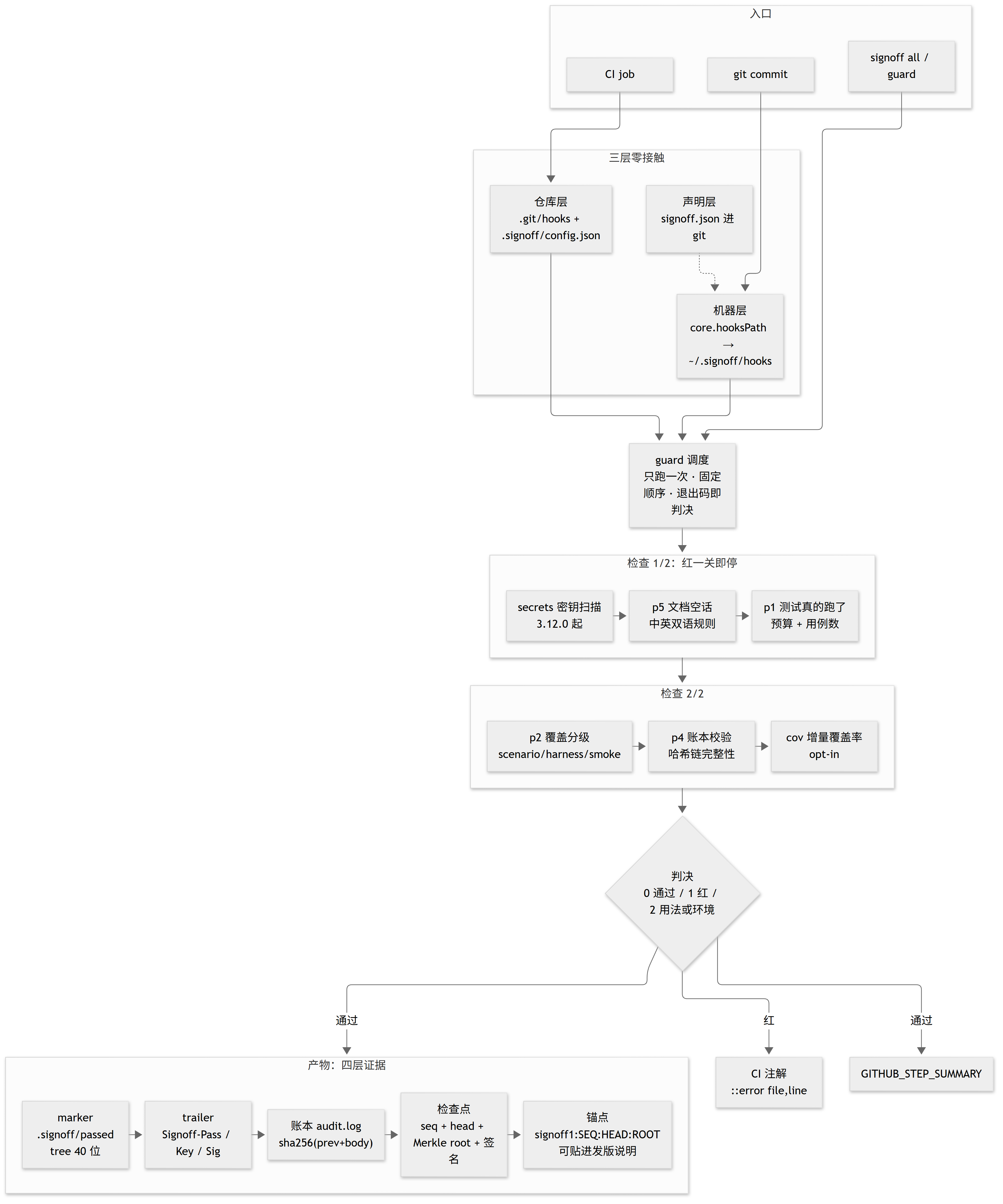
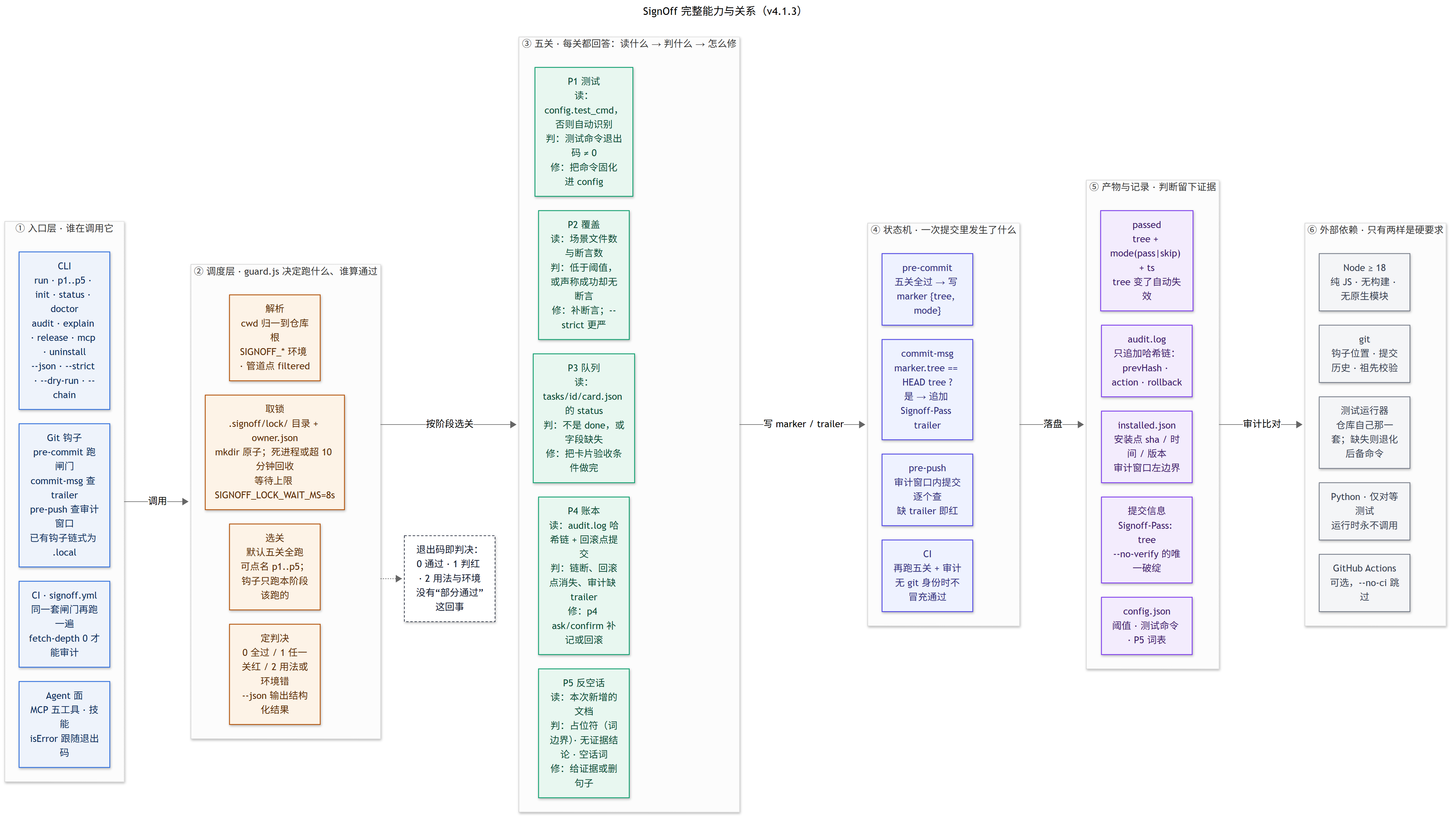
平台与薄壳:一页核心,多个入口,见 docs/SURFACES.md(English: docs/SURFACES.en.md)。
4. 接入:同一套判决,六种入口
| 入口 | 一句话 |
|---|---|
| 本机钩子 | signoff init 装 pre-commit / commit-msg / pre-push:提交跑快检,推送跑全套 |
| GitHub Actions | signoff init 顺带写 workflow(--no-ci 可跳过) |
| pre-commit | .pre-commit-config.yaml 里一行 hook |
| lefthook / husky | 已有钩子的仓库用 signoff init --chain,不抢你的钩子 |
| VS Code | signoff init --editor vscode 生成 tasks + 问题匹配器 |
| MCP | signoff mcp 以 stdio 提供同样的关 |
逐步做法:docs/integrations.md(English: docs/integrations.en.md)。
本机所有仓库一次接满:node tools/wire-all.js(--dry-run 先看会动谁)。它扫 --roots 下的每个 git 仓库,
只对还没接过的仓库跑 signoff init,已接过的一行不碰。没接过的仓库提交时只有"轻守卫"
(secrets + 测试,且不写 Signoff-Pass 尾注),所以看板上它们的提交会标成「未走闸」——
接上之后才会留下判决记录。
全机所有仓库一页看:signoff report --all --html --mount,索引落在 ~/.signoff/reports/index.html。
--all 读的是机器级名册 ~/.signoff/machine.json——init 装完登记一次、每次 guard 跑完再登记一次,
所以新仓库只要用过一次 signoff 就会自己出现在看板上,不需要谁去维护清单(契约 C13)。
5. 和谁比(一律匿名)
同类不是代码审查工具,而是抢同一个 pre-commit 钩子的那一层。表格只留能判定的行为与量级:
| 同行 | 给判决 | 留证据 | 采用量 |
|---|---|---|---|
| B1 | 否(只传退出码) | 否 | 千万级/周以上 |
| B2 | 半(记录跑没跑) | 否 | 千万级/周以上 |
| B3 | 否 | 否 | 千万级/周以上 |
| C | 单关结论 | 只留扫描报告 | 数万 star 级 |
| SignOff | 是 | 是 | 数千/周 |
不写实现语言、不写包名、不写各家精确数字——一写就能反推到具体项目,标记就白做了。 完整对照:docs/COMPARISON.md(English: docs/COMPARISON.en.md)。
6. 边界:它不保证什么
- 它不替你做判断:七关全过只说明「这七件事有人做过、有记录」,不说明产品对。
- 规模差得远:同行在千万级/周的采用量,本工具是数千/周。如果按采用量选型,今天就不该选它。
- 没有第三方审计:账本是本机自签的,能证明「没被人悄悄改过」,不能证明「跑的人可信」。
- 不评代码好坏:它挡的是「没验证就说完成」,不是「这段代码写得糙」。评审质量不在它的判定范围里。
- 审代码是存证,不是评分:
signoff review --by ID把「谁看过哪份 diff」绑到该 diff 的哈希上,signoff review --verify在哈希对不上时退 1(脚本与 CI 可直接用)。谁来审——本机模型、人工、任意云端—— 由你定,它不替你选,也不假装验证了「审得对不对」。接本机模型的可复算步骤见 docs/review-with-local-model.md。 - 推送前默认不查评审:
.signoff/config.json里写"review_on_push": true才会在 pre-push 时跑--verify;没打开时它不会假装检查过这一步。
信任模型与它不证明什么:docs/trust.md(English: docs/trust.en.md)。
7. 文档索引
用户向
| 文档 | 内容 |
|---|---|
| docs/gates.md | 七道关的判定与修法(唯一权威) |
| docs/integrations.md | 钩子 / CI / MCP / 编辑器接法 |
| docs/review-with-local-model.md | 用本机模型审代码,并把这一步钉成存证(可选推送门) |
| docs/review-pipeline.md | 复核的五层、配比、顺序与每次迭代的成本 |
| docs/trust.md | 证据链、篡改答复、威胁模型 |
| docs/COMPARISON.md | 匿名对照(含象限图) |
| docs/SURFACES.md | 平台薄壳一览 |
维护者向
| 文档 | 内容 |
|---|---|
| docs/ARCH-HEALTH.md | 架构自检:依赖成环、超限文件、基线 |
| docs/deletion.md | 卸载与删除数据的边界 |
| docs/promotion.md | 对外讲述口径(提问从哪来) |
| docs/diagrams/README.md | 图源与重绘命令 |
契约(改代码前必读)
| 文档 | 内容 |
|---|---|
| docs/REPORT-CONTRACT.md | 报告页与 --json 的契约(C1…C11) |
| docs/legal.md | 许可范围、商标、隐私与使用者责任 |
| docs/release-model.md | 发行通道与商业化论证(含价格假设) |
| docs/INTEGRATION-CONTRACT.md | 各平台薄壳的接线契约 |
英文版与中文版同构:上面每篇都有对应的 .en.md(契约类只有中文,英文摘要见各篇开头)。
许可
MIT。见 LICENSE。
English
SignOff™
MIT for the code · name and mark: see NOTICE and TRADEMARK.md
SignOff
You do not have to change anything. Keep working as usual — this thing guards the process for you.
SignOff turns "done" into a verdict someone else can re-check: all seven gates pass, or the commit is stopped
on the spot with a fix you can act on. Pure Node (>= 18) — no network, no account, no Python. The verdict is an exit
code: 0 pass, 1 red, 2 usage or environment error.
中文: README.md
1. Up and running in 30 seconds
npm i -g signoff-cli
cd your-repo
signoff init            # installs pre-commit / commit-msg / pre-push hooks + CI, then you can forget it
signoff status          # is this repository guarded right now?
signoff report --html   # one read-only page (writes .signoff/report.html by default)
Once per machine is enough: signoff ensure idempotently fills in hooks, config and CI for every new clone.
Beyond the gates there are four more commands: signoff review (an attestation bound to a diff hash;
only --verify counts), signoff fix (bounded repair loop: red baseline, in-scope only, verdict paths
untouchable), signoff dispute (run one reproducer N times and get supported / refuted / unresolved),
signoff patterns (a library of failures that repeat in the same place). Details in docs/gates.md.
2. The seven gates: what actually blocks you
| Gate | Name | What it blocks | When it is red |
|---|---|---|---|
| p1 | Tests | tests not run, run and failed, or over budget | fix the failing case, do not raise the budget |
| p2 | Coverage | code changed but no scenario covers it | add verify/scenarios/*.json |
| p3 | Tasks | two parallel tasks touching the same file | split them by task-card scope |
| p4 | Risky actions | drop-database / permission / publish actions with no record | run signoff p4 ask first |
| p5 | Docs | absolute claims with no number behind them | say it plainly, add the number |
| sec | Secrets | a real credential in the staged set | delete the value, or allow that one rule in .signoff/config.json |
| release | Release | version / server.json / CHANGELOG / tag disagree | align all four, then signoff release --pre |
The judgement rules live in one place: docs/gates.en.md (中文: docs/gates.md).
Ask the same question in the terminal: signoff explain p1.
What the three red lines really mean is you can bypass them, but not bypass the record:
| Bypass | What it leaves behind |
|---|---|
SIGNOFF_SKIP=1 git commit | a line in .signoff/skips.log with the time and the staged tree hash |
git commit --no-verify | nothing at all — which is why CI is the only boundary that cannot be bypassed |
| lowering a threshold to turn red into green | it only changes your own criterion; the repository defaults are not quietly lowered |
The tool offers no switch that turns red into green without a trace, and no paid unlock.
3. The board: one page first, then open the rest
signoff report --html: a single self-contained file (opens offline, no external references) with seven badges, a month calendar and a task view.- It speaks in project names: every task group reads "SignOff project update 4.4.x", and the last gate run is labelled the same way; a group with no version falls back to "SignOff · area".
- The SignOff panel in the DSH menu: lists one page of data (verdict, seven gates, last gate run, task groups) and only shows "Open full page" once that page is full.
- Tokens & cost: running total, money at DeepSeek's peak/off-peak list price, plus per day, per task group and per commit. A read-only summary of local DSH session records; when they are missing the block says why instead of showing zero. Gates themselves spend no tokens, so this is the agent spend that produced the commits. --no-tokens turns the block off.
- Several repositories:
signoff report --repos a,borsignoff report --scan ~/code— each repo keeps its own verdict. - For another machine or another agent:
signoff report --html --mountwrites to~/.signoff/reports, which is what the panel reads.
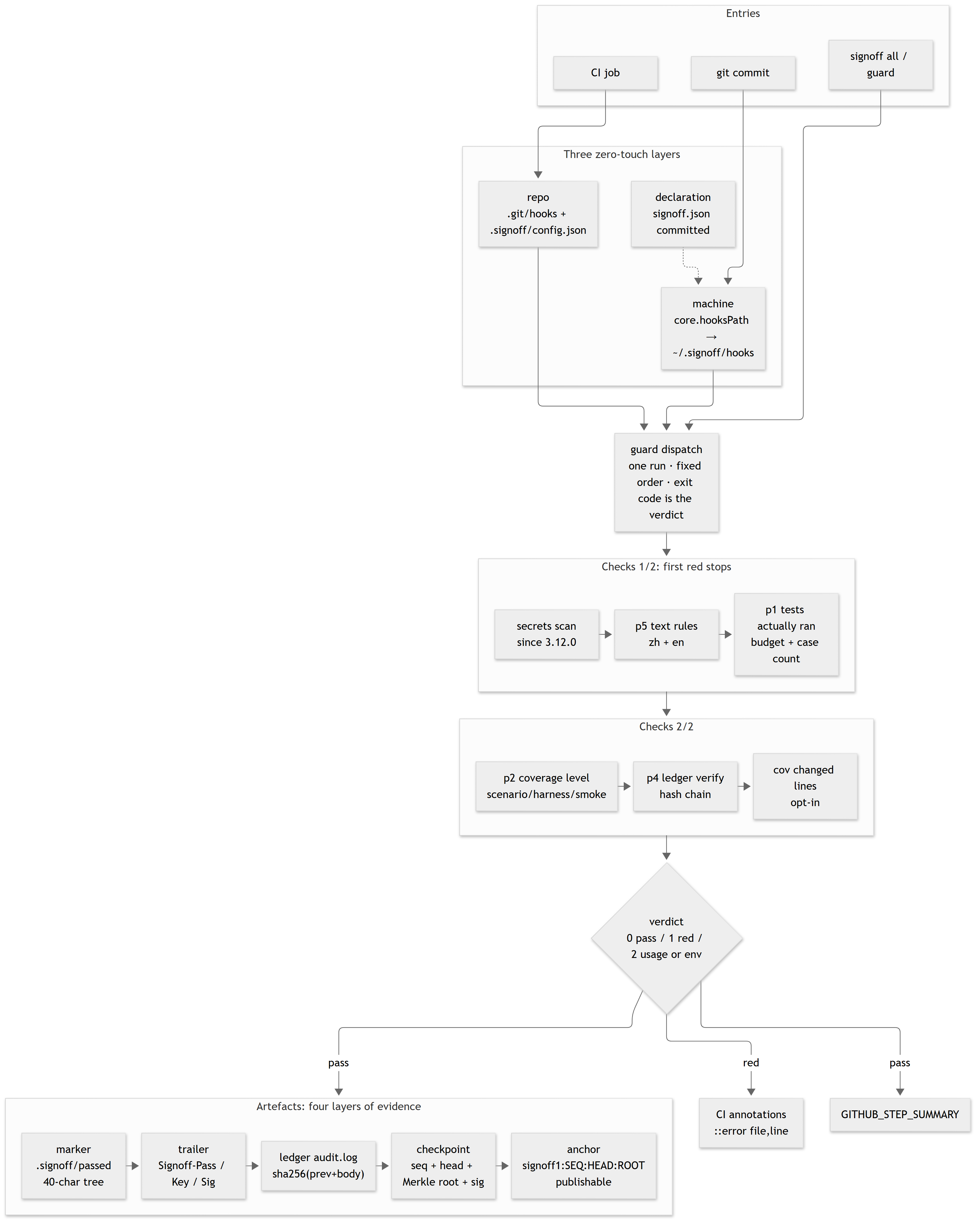
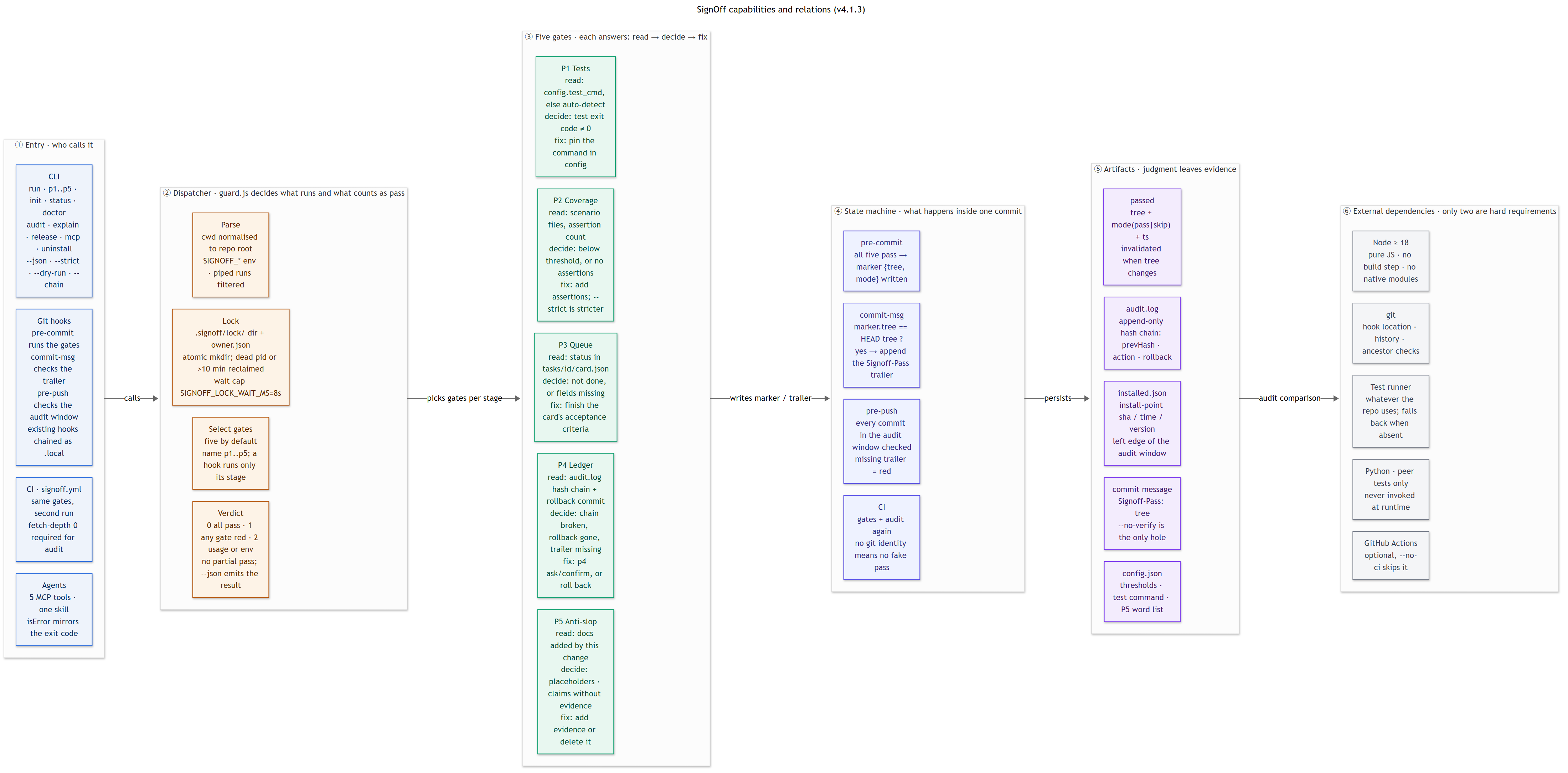
Platforms and thin shells: one core, several entry points — see docs/SURFACES.en.md.
4. Integrations: one verdict, six entry points
| Entry | In one line |
|---|---|
| Local hooks | signoff init installs pre-commit / commit-msg / pre-push: fast checks on commit, the full suite on push |
| GitHub Actions | signoff init also writes the workflow (--no-ci skips it) |
| pre-commit | one hook line in .pre-commit-config.yaml |
| lefthook / husky | repos that already have hooks use signoff init --chain; your hooks stay |
| VS Code | signoff init --editor vscode writes tasks + a problem matcher |
| MCP | signoff mcp serves the same gates over stdio |
Step-by-step: docs/integrations.en.md (中文: docs/integrations.md).
Wire every repository on this machine at once: node tools/wire-all.js (--dry-run first to see what it would touch).
It scans each git repository under --roots and runs signoff init only for repositories that are not wired yet.
An unwired repository only gets the light guard on commit (secrets + tests, no Signoff-Pass trailer), which is why
the board marks its commits as "not gated"; wiring it is what makes the verdict leave a record.
Every repository on the machine on one page: signoff report --all --html --mount; the index lands in
~/.signoff/reports/index.html. --all reads the machine registry ~/.signoff/machine.json — written once by
init and again after every guard run — so a repository appears by itself after its first signoff run, with no
list to maintain (contract C13).
5. Versus the neighbours (always anonymous)
The comparable thing is not a code-review tool; it is whatever else can grab the same pre-commit hook. Only
decidable behaviour and order of magnitude stay in the table:
| Peer | Verdict | Evidence | Adoption |
|---|---|---|---|
| B1 | no (exit code only) | no | tens of millions / week and up |
| B2 | half (records that it ran) | no | tens of millions / week and up |
| B3 | no | no | tens of millions / week and up |
| C | single-gate finding | scan report only | tens of thousands of stars |
| SignOff | yes | yes | thousands / week |
No implementation language, no package name, no exact peer numbers: any of those makes the label pointless. Full table: docs/COMPARISON.en.md.
6. Limits: what it does not promise
- It does not decide for you. Seven green gates mean seven things were done and recorded — not that the product is right.
- The scale gap is real. Peers sit at tens of millions of runs per week; this tool sits at thousands. If you buy by adoption, you should not pick it today.
- No third-party audit. The ledger is self-signed on this machine: it shows nobody quietly edited it, not that the person running it is trustworthy.
- It does not grade code. It stops "unverified, declared done", not "ugly but working code".
- Review is attestation, not a score.
signoff review --by IDbinds "who looked at which diff" to that diff's hash, andsignoff review --verifyexits 1 when the hash no longer matches (usable from scripts and CI). Which reviewer — a local model, a human, any hosted one — is your call; the tool neither picks one nor pretends to verify that the review was any good. A reproducible local-model recipe: docs/review-with-local-model.en.md. - No review check before push by default. Only
"review_on_push": truein.signoff/config.jsonmakes pre-push run--verify; when it is off, the tool does not pretend the step happened.
Trust model and what it does not prove: docs/trust.en.md.
7. Documentation index
For users
| Doc | Content |
|---|---|
| docs/gates.en.md | judgement rules and fixes for the seven gates (single authority) |
| docs/integrations.en.md | hooks / CI / MCP / editor wiring |
| docs/review-with-local-model.en.md | reviewing with a local model, and pinning it as an attestation (optional push gate) |
| docs/review-pipeline.en.md | the five review layers, their ratios, order and cost per iteration |
| docs/trust.en.md | evidence chain, tamper answers, threat model |
| docs/COMPARISON.en.md | anonymous comparison (with the quadrant image) |
| docs/SURFACES.en.md | platform shells at a glance |
For maintainers
| Doc | Content |
|---|---|
| docs/ARCH-HEALTH.md | architecture self-check: dependency cycles, oversized files, baseline |
| docs/deletion.md | uninstall and data-deletion boundary |
| docs/promotion.md | how the project is described in public |
| docs/diagrams/README.md | diagram sources and redraw command |
Contracts (read before changing code)
| Doc | Content |
|---|---|
| docs/REPORT-CONTRACT.md | report page and --json contract (C1…C11), Chinese only |
| docs/INTEGRATION-CONTRACT.md | wiring contract for each platform shell, Chinese only |
The English and Chinese sets are structurally identical: every doc above has an .en.md twin except the two contracts,
which are Chinese-only by design.
License
MIT. See LICENSE.







