Listed from the MCP registry; nobody on Odel publishes it.

Cardloom
Reviewed, git-backed engineering knowledge base for coding agents, served over MCP.
Runs on your machine from its package; the steps are below.
What it does
- Reads
- Writes
- High impact
At most: creates or changes data: records, files, settings.
What it costs
FreeOdel charges nothing per call. The publisher may charge for its own service.
Runs locally over stdio
This server isn't hosted — your MCP client launches it from a package registry. Use one of the commands below, or drop the config into your client (e.g. Claude Desktop).
Run
npx -y cardloom-mcp
MCP client config
{
  "mcpServers": {
    "cardloom": {
      "command": "npx",
      "args": [
        "-y",
        "cardloom-mcp"
      ]
    }
  }
}cardloom-mcp

Save engineering decisions and fixes your coding agent can look up later. Give your agent instructions to search before answering and to save new lessons as draft cards. Search returns verified cards by default, and you decide what gets verified. Cards are plain markdown in a git repository, and search is a local SQLite index with no LLM on the read path. It works with any MCP client, such as Claude Code, Cursor or Codex.
How it works
- Cards. One markdown file per lesson: a
decision,gotcha(with the error message inerror_signature),pattern,playbookorsnippet, tagged with the stack, versions and project it applies to. - Lifecycle.
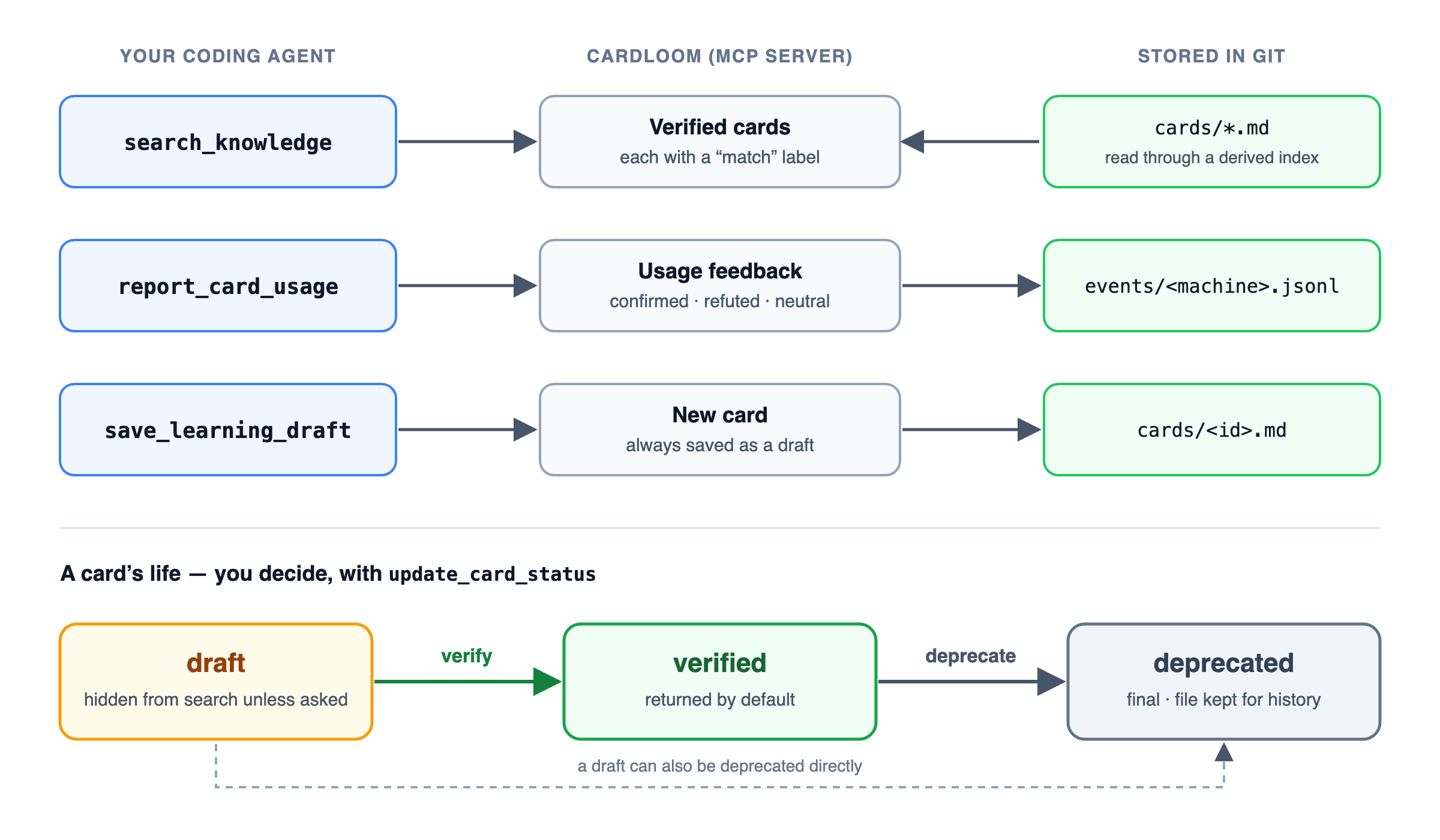
draft → verified → deprecated. An agent can only create drafts; a human approves (verified) or retires (deprecated) them. Deprecated is final and the file is kept for history. Merge promotion can optionally verify drafts whose source commit was merged. Search returns verified cards by default; drafts and deprecated cards only on request, always labelled. - Git is the source of truth.
cards/*.mdandevents/*.jsonlare committed locally. The SQLite index is derived and can be rebuilt at any time. Syncing between machines is an ordinary git push/pull that you run; the server never touches a remote. - Search. Full-text search (SQLite FTS5) with matching on stack, version and project. Every result says how it matched, so an agent can tell a real hit from a loose one, and carries a trust score from usage feedback and age.
- Checks on save and read. Draft and deprecated content is labelled
untrusted/deprecatedin every response, secret patterns are rejected on save, and a card that conflicts with an existing one is refused instead of silently overwriting it.
The agent searches before it works, reports whether a card helped, and saves what it learned as a draft. You decide what a draft becomes:
Tools
| Tool | What it does |
|---|---|
search_knowledge | Find cards by keywords or a pasted error message; returns compact results with a match label. |
get_card | Read one card in full (also available as the resource knowledge://card/{id}). |
save_learning_draft | Save a new card as a draft. |
update_card_status | Verify or deprecate a card; agents should call it only when you tell them to. |
report_card_usage | Report whether a card helped: confirmed, refuted or neutral. |
There is also one prompt, distill_project_knowledge, which guides an agent through turning an existing
project's docs and history into draft cards.
Quickstart
Five steps from an empty knowledge store to your first trusted card:
-
Register the server with Claude Code:
bashclaude mcp add cardloom -- npx -y cardloom-mcp -
Run
npx cardloom-mcp doctorto see the store path and card counts by status. If there are no verified cards, it points you back to this quickstart. The check is read-only. -
Ask your agent to save one gotcha it just hit, for example: "Save what we learned about this error as a gotcha card, and put the exact error message in
error_signature." The agent callssave_learning_draft; the card lands asdraft. -
Approve it in chat: "Verify that card." The agent calls
update_card_statuswith actionverify. Until you do this, the draft stays out of default search (see Approving knowledge in chat). -
Search for it: ask the agent to call
search_knowledgewith the exacterror_signaturetext you saved. With default settings the card comes back withmatch: "exact_signature".
To label results for the repo you are working in, add a .knowledge-map.yaml at that repo's root
(details in .knowledge-map.yaml):
project: acme/billing-api
stack:
  - node
domain: backend
To have your agent use the tools without being asked each time, see Enforcing usage.
Setup
The server exposes the same five tools with each setup option.
Options 2 and 3 run from a clone: git clone https://github.com/bangca85/cardloom-mcp.git && cd cardloom-mcp.
Option 1: npx (no clone, no Docker)
Needs Node 22 or newer (CI runs 22 and 24). The launcher keeps your cards in
~/.cardloom/knowledge-store and the SQLite index in ~/.cardloom/index.db; set
KNOWLEDGE_STORE_PATH / INDEX_DB_PATH to put them elsewhere.
claude mcp add cardloom -- npx -y cardloom-mcp
npx cardloom-mcp doctor   # read-only health check: store path, card counts by status
claude mcp add registers the server for the current project only; add --scope user to use it
everywhere (see Set it up once for all projects).
Other clients use the same command. Cursor (~/.cursor/mcp.json):
{
  "mcpServers": {
    "cardloom": { "command": "npx", "args": ["-y", "cardloom-mcp"] }
  }
}
Codex (~/.codex/config.toml):
[mcp_servers.cardloom]
command = "npx"
args = ["-y", "cardloom-mcp"]
The SQLite driver (better-sqlite3) ships prebuilt binaries for common platforms; elsewhere npm
compiles it, which needs a C++ toolchain.
Option 2: Docker
-
Build the server:
bashnpm install npm run build -
Build the container image:
bashdocker compose build -
Register the server with your MCP client using the wrapper script at
bin/cardloom-mcp.sh— use an absolute path, since MCP clients spawn the command with an arbitrary working directory and the wrapper needs to finddocker-compose.ymlregardless.Claude Code:
bashclaude mcp add cardloom -- /absolute/path/to/cardloom-mcp/bin/cardloom-mcp.shCursor (
~/.cursor/mcp.json):json{ "mcpServers": { "cardloom": { "command": "/absolute/path/to/cardloom-mcp/bin/cardloom-mcp.sh" } } }Codex CLI / Codex extension (VS Code) (
~/.codex/config.toml):toml[mcp_servers.cardloom] command = "/absolute/path/to/cardloom-mcp/bin/cardloom-mcp.sh" args = []Or via the Codex Settings UI → MCP servers → Connect to a custom MCP (writes to the same
config.toml): Namecardloom, TypeSTDIO, Command to launch =/absolute/path/to/cardloom-mcp/bin/cardloom-mcp.sh, leave Arguments/Environment variables/Working directory empty, Save. -
Verify: ask your client to list MCP tools. You should see exactly 5 —
search_knowledge,get_card,save_learning_draft,update_card_status,report_card_usage— plus one resource template,knowledge://card/{id}, and one Prompt,distill_project_knowledge(see Ingesting an existing project).
Each MCP session starts a fresh container (docker compose run --rm -i) that exits when the client
disconnects. Cards live in ./knowledge-store (a bind mount: human-editable and git-tracked). The SQLite
index lives in a separate named Docker volume, because a SQLite file on a macOS bind mount is unreliable;
never touch it by hand, it is fully disposable and rebuilds from knowledge-store/ (see
npm run rebuild-index).
Option 3: Native from a clone (no Docker)
Docker on macOS runs a Linux VM (Virtualization.framework) underneath, which reserves several GB
of RAM regardless of how small the container's own workload is. The server itself is light —
measured at ~100MB RSS for the MCP process and ~71MB for the web viewer, both idle at 0% CPU — so
running directly on the host with plain node skips the VM overhead entirely.
npm install
npm run build
Register the server with your MCP client using node directly instead of the Docker wrapper:
{
  "mcpServers": {
    "cardloom": {
      "command": "node",
      "args": ["/absolute/path/to/cardloom-mcp/dist/index.js"],
      "env": {
        "KNOWLEDGE_STORE_PATH": "/absolute/path/to/cardloom-mcp/knowledge-store",
        "INDEX_DB_PATH": "/absolute/path/to/cardloom-mcp/.metadata/index.db"
      }
    }
  }
}
Trade-off: you lose container isolation, and git commits use your host's git config. The SQLite
index and its write lock live on your local filesystem, so there is no bind-mount quirk to worry about.
Configuration
Every setting is an environment variable and every one is optional.
| Variable | Default | Meaning |
|---|---|---|
KNOWLEDGE_STORE_PATH | ~/.cardloom/knowledge-store with npx, ./knowledge-store otherwise | Where cards (cards/), usage events (events/) and your benchmark live. It is its own git repository. |
INDEX_DB_PATH | ~/.cardloom/index.db with npx, <store>/.metadata/index.db otherwise | The SQLite index. Derived data, safe to delete. |
SEARCH_FALLBACK | tiered | tiered: when exact-word search finds fewer than limit cards, add partial matches labelled related. off: exact-word search only. |
SEARCH_RANKING | baseline | Result order: baseline or the opt-in x / y. See How search works. |
STALE_THRESHOLD_DAYS | 180 | A verified card older than this is flagged stale. |
REVIEW_FAILURE_THRESHOLD | 2 | A card with this many refuted reports is flagged needs_review. |
REVIEWER_NAME | human-reviewer | Recorded as verified_by when a card is approved. |
KNOWLEDGE_MACHINE_ID | the host name | Names this machine's usage log (events/<id>.jsonl) so two machines never write the same file. |
PROMOTION_MODE and the other PROMOTION_* | see Merge promotion | Control npm run promote-merged. |
PORT | 3334 | Web viewer port. |
GRAPH_GENERIC_STACK_TAGS, MAX_SHARED_STACK_GROUP_SIZE, MAX_SHARED_STACK_EDGES | empty, 50, 5000 | Web viewer graph tuning. |
How search works
search_knowledge(query, context) takes keywords or a pasted error message. context carries the
calling repo's stack, versions, project and aliases (see
.knowledge-map.yaml).
Each result says how it matched:
match | Meaning |
|---|---|
exact_signature | The card's error_signature appears in your query. It is checked on the stored text, so ERR-42 does not match ERR_42. |
exact_identifier | Your query contains an identifier from the card's error_signature, such as ITMS-90683 or AccessDeniedException. |
exact_title | Your query is the card's whole title. |
all_terms | Every word of your query is in the card. |
related | Only some of the words match. |
When all returned cards are partial matches, the response includes no_direct_match: true. Use those
cards as leads for a follow-up search, not as an answer. Set SEARCH_FALLBACK=off to get only cards that
match all words.
By default only verified, non-restricted cards are returned. include_drafts, include_deprecated and
include_restricted opt in, and those cards are always labelled. Each result also carries a trust score
and flags: drift (the card's version range does not match the caller's), stale and needs_review.
With a project in the context, results also say whether a card belongs to this project, is shared, or
applies to another project; cards for other projects are never hidden.
Ranking. The default (SEARCH_RANKING=baseline) orders results by stack and version match, then text
relevance, then trust. The x and y modes also rank by project. They are opt-in because, in our
benchmark, putting the project ahead of the text score pushed exact matches from shared cards below weaker
matches from the caller's own project. Run npm run benchmark -- --matrix against your own store before
enabling them.
.knowledge-map.yaml — giving the agent context per repo
Add a .knowledge-map.yaml to the root of each project you work on. Your agent reads it and passes the
project and stack details to search_knowledge, so results are matched against your stack and versions:
# .knowledge-map.yaml — lives in the root of each project repo you work in
project: acme/billing-api
aliases:            # optional: other names this project has had in existing cards
  - billing-api
stack:
  - nextjs@15
  - postgres@16
  - node
domain: backend
project: is the key the agent passes as context.project (and aliases: as context.aliases)
so results are labelled by scope (this project, shared, other project); they are ranked by project
only when SEARCH_RANKING is set to x or y. Cards for other projects are never hidden.
Older maps that use repo: instead of project: are still accepted by clients.
Workflow for a brand-new repo:
- Ask the agent to inspect the repo (package.json, lockfiles, etc.) and generate a draft
.knowledge-map.yaml. - Review and edit it yourself — fix wrong stack detection, add domain hints.
- Commit it into the project repo (not
cardloom-mcp). - Point your agent/client at it so
search_knowledgecalls includecontext: {stack, versions, project, aliases}read from that file.
Enforcing usage (CLAUDE.md / AGENTS.md / GEMINI.md)
Nothing forces the agent to call these tools — MCP tools only fire when the model decides to. To have your agent search before answering, report whether a card helped, and save new lessons as drafts, give it the instructions below, in either of two places:
- Globally, once for every project: put the block in your client's global instructions file. See Set it up once for all projects.
- Per project: put it in the repo's own
CLAUDE.md(Claude Code),AGENTS.md(Codex) orGEMINI.md(Gemini CLI). Codex does not readCLAUDE.md, and Gemini CLI readsAGENTS.mdonly if you list it incontext.fileName. If several clients work in the repo, add the block to each client's file.
Use one place or the other: the same block in both only costs tokens.
## Knowledge Hub (MCP `cardloom`) — required

**Before answering/implementing a task touching a known domain** (auth, rate-limiting,
third-party API contracts, infra gotchas, etc.): call `search_knowledge(query, context)` first,
with `context` read from `.knowledge-map.yaml` at this repo's root (`stack`, `versions`, and
`project` / `aliases` so results are labelled for this repo). A result with `match: related`,
or a response with `no_direct_match: true`, is a partial match: use it as a lead for another search, not as an answer.
**If that file doesn't exist yet**, generate a draft yourself before proceeding — inspect this
repo's manifest (package.json / pubspec.yaml / go.mod / requirements.txt, lockfiles) for the
real stack + versions, write it in this shape, then ask the human to review before you rely on it:

```yaml
# .knowledge-map.yaml — repo root, human-reviewed after you draft it
project: <owner/repo-name>
aliases: []   # optional: other names this project has had in existing cards
stack:
  - <tech>@<version>
  - <tech>@<version>
domain: <frontend|backend|infra|product|...>
```

Don't re-derive something a `verified` card already answers.

**After using a returned card — you MUST call `report_card_usage(id, outcome)`**
(`confirmed`/`refuted`/`neutral`). This is not optional — every search/get_card response carries
a `write_back_reminder`; skipping it lets trust scores and `needs_review` flags drift stale.

**Learned something new** (a decision, pattern, or gotcha with no existing card, or a refinement
of an existing one) → call `save_learning_draft`. It always lands as `draft` — never verify it
yourself. Put a bare commit sha in `source_commit` and the repo's GitHub `owner/name` in
`source_repo` whenever the learning comes from a commit: that is what lets merge promotion find
it. Free text there ("working tree", "local changes") means the card can only ever be approved by hand.

**Found a major mismatch between a `verified` card and current reality** (the card says A, the
code/logs/API actually do B — a real contradiction, not a nuance): **stop, don't silently trust
either side.** Lay out:

- which card, what it currently claims (`id` + summary)
- what you actually observed (specific file/log/response)
- the two possible resolutions: the card is stale/wrong → deprecate it + save a new card with
  `supersedes`, or the code is the regression → fix the code and leave the card as-is

then ask for confirmation on which direction before calling `update_card_status` or
`save_learning_draft(supersedes=...)`. Don't decide alone when the mismatch affects an
architecture or security call.
Set it up once for all projects
Register the server for every project, and put the instruction block above in the client's global file:
| Client | Register the server for all projects | Global instructions file |
|---|---|---|
| Claude Code | claude mcp add --scope user cardloom -- npx -y cardloom-mcp | ~/.claude/CLAUDE.md |
| Codex (OpenAI's coding agent) | codex mcp add cardloom -- npx -y cardloom-mcp | ~/.codex/AGENTS.md |
| Gemini CLI | gemini mcp add --scope user cardloom npx -y cardloom-mcp | ~/.gemini/GEMINI.md |
-
Scope matters.
claude mcp addandgemini mcp addregister the server for the current project only unless you pass--scope user, so the Quickstart command is project-scoped.codex mcp addwrites~/.codex/config.toml, which is already global. -
Codex. Use
~/.codex/AGENTS.override.mdfor a temporary global override without touching the base file. If you setCODEX_HOME, both files live there instead of~/.codex. -
Gemini CLI. You can also add the server by hand to
~/.gemini/settings.json(merge it with what is already there):json{ "mcpServers": { "cardloom": { "command": "npx", "args": ["-y", "cardloom-mcp"] } } }To make Gemini CLI read an
AGENTS.mdas well, set"context": { "fileName": ["AGENTS.md", "GEMINI.md"] }in the same file. -
ChatGPT. The ChatGPT chat apps do not read these files; Codex is the OpenAI client covered here.
-
Check it worked. Run
claude mcp list,codex mcp listorgemini mcp listand look forcardloom, then ask the agent to list its MCP tools. In Gemini CLI,/memory showprints the instructions it loaded.
Approving knowledge in chat
Every card an agent saves via save_learning_draft starts in status: draft and stays out of default search
until it is verified. To promote or retire one:
- Approve: tell the agent to approve a card; it calls
update_card_status(id, "verify"). Status flips toverified, and if the card declaredsupersedes: <old-id>, the old card is deprecated in the same operation (one commit). - Reject / retire: tell the agent to deprecate a card with a reason; it calls
update_card_status(id, "deprecate", reason). The file is kept (a retired card is never deleted) and disappears from default search, but stays readable viaget_card.
deprecated is terminal — there's no un-deprecate. To bring a retired idea back, save a new card
with supersedes pointing at the old one and approve it.
Ingesting an existing project
Use the built-in prompt distill_project_knowledge to turn a repo's docs, architecture decisions, git
history and debug logs into draft cards:
- Invoke it from any MCP client that supports prompts (Claude Code does), optionally with
project_path(defaults to the current directory), and let the agent run it. - The prompt instructs the agent to enumerate sources exhaustively (not just CLAUDE.md's
condensed summaries — the full numbered decision list a summary points at, every story file's
Debug Log section, full git history, claude-mem if present), report a source survey with
an estimate of how many lessons each source contains before saving anything, dedupe against existing verified cards via
search_knowledge(usingsupersedeswhere a lesson is refined rather than new), and present cards in small batches for you to approve. - All cards still land in
draft— nothing getsverifyd without you approving in chat.
Merge promotion (npm run promote-merged)
promote-merged finds drafts whose source commit reached its repo's default branch after the draft was
written. By default it lists them for you to approve; in auto mode it verifies the eligible ones itself.
It runs on the host because it reads your other clones and calls gh, which the container cannot.
PROMOTION_MODE | What happens |
|---|---|
off | Nothing. |
review (default) | Lists merged drafts as candidates. You approve in chat; the agent calls update_card_status(id, "verify", verification_method="<evidence>+chat-approval"). |
auto | Verifies the eligible ones itself, verified_by: merge-bot, verification_method: merged:<repo>@<sha> (<via> <date>). Lists the rest as candidates. |
"Merged" means the commit entered the default branch AFTER the card was written (card date =
its knowledge: add commit in the store). A card about code already on main records main's
HEAD, which is trivially "merged"; counting that would verify every observation on save. How a
commit's arrival is dated: on the first-parent line → its own date; brought in by a merge → the
merge commit's date; not in the clone at all (squash merge) → the GitHub pull request's merged_at.
A commit pushed straight to the default branch also counts: that is evidence about the commit's history,
not proof that anyone reviewed the card.
auto never verifies, and always leaves as a candidate:
- a type outside
PROMOTION_AUTO_TYPES(defaultdecision,pattern— a merge is evidence about the change itself, not about a third-party system a gotcha describes); - a
restrictedcard; - a card with
supersedes— verifying it deprecates the old card, and an unapproved draft must never kill a verified card.
Skipped outright: source_commit without a sha, a learning from uncommitted work on top of a sha,
a commit not merged yet, a repo that cannot be found.
| Env | Default | Meaning |
|---|---|---|
PROMOTION_MODE | review | off / review / auto; anything else reads as review |
PROMOTION_REPO_ROOTS | — | :-separated dirs scanned 3 levels deep for clones named like the card's repo |
PROMOTION_AUTO_TYPES | decision,pattern | card types auto may verify |
PROMOTION_FETCH | 1 | git fetch origin each matched clone first; 0 = trust its current refs |
PROMOTION_BOT_NAME | merge-bot | verified_by written by auto |
npm run build
npm run promote-merged -- --dry-run          # auto mode prints would_verify, writes nothing
npm run promote-merged -- --mode=review --json
Note: an auto-verified card can be undone only like any verified card —
deprecateit, orgit revertitsknowledge: verifycommit in the store andnpm run rebuild-index. There is no way back todraft.
Host sync (git push/pull)
The server only commits locally: it never pushes, pulls, or touches remotes or SSH keys, so
credentials never need to be inside the Docker container. To sync between machines, run
git pull --rebase and git push from your host. Use the path of your store: ~/.cardloom/knowledge-store
with npx, or <clone>/knowledge-store otherwise.
# ~/.zshrc or ~/.bashrc
alias ksync='git -C ~/.cardloom/knowledge-store pull --rebase && git -C ~/.cardloom/knowledge-store push'
Run ksync whenever you switch machines, or automate it with cron/launchd:
# crontab -e — sync every 15 minutes
*/15 * * * * git -C /path/to/your/knowledge-store pull --rebase && git -C /path/to/your/knowledge-store push
Set up knowledge-store as its own git repo with a private remote (GitHub, etc.) from the
host, not from inside the container:
cd ~/.cardloom/knowledge-store   # or <clone>/knowledge-store
git remote add origin git@github.com:you/your-private-knowledge.git
git push -u origin HEAD
Do not commit your real knowledge-store/ to this project repository. It can contain private
project names, decisions, error logs, source references, and SQLite runtime files. Keep it in a
separate private repo or local-only directory.
Web viewer
A local List and Graph view of your cards, served at http://127.0.0.1:3334. From a clone run
npm run web (with the same KNOWLEDGE_STORE_PATH and INDEX_DB_PATH as the server); with Docker run
docker compose up cardloom-web. The npx launcher starts only the MCP server.
Rebuilding the index
If index.db ever goes missing or looks wrong, rebuild it from scratch — cards/*.md and
events/*.jsonl are the only source of truth, the index is 100% derived and disposable:
npm run build && npm run rebuild-index
# or, in the container:
docker compose run --rm cardloom-mcp npm run rebuild-index
Benchmark
Your benchmark is benchmark/queries.yaml inside your store, committed alongside your cards. It is a
plain YAML list:
- query: "how do I retry a failed network request"
  expected: pattern-retry-with-backoff       # card id this query should return as top-1
  context:                                    # optional, same shape as search_knowledge's context
    stack: [node]
- query: "TypeError: Cannot read property 'foo' of undefined"
  expected: gotcha-foo-undefined-crash
Each entry may also carry a kind (default known, so entries with just query + expected keep
working), an expected list, and forbidden ids:
- query: "retry policy for payments"
  kind: project_decision                      # known | missing | project_decision | cross_project
  expected: decision-payments-retry
  forbidden: [decision-billing-retry]         # top-1 here counts as a wrong-project answer
  context: { project: acme/payments-api, stack: [node] }
- query: "how do we shard the queue"
  kind: cross_project
  expected: [pattern-queue-sharding, gotcha-hot-partition]   # recall@5 counts any of these
- query: "zqxv7000 error"
  kind: missing                               # no card should answer this; no `expected`
Per kind the report gives n plus: known / cross_project hit@1, MRR@5, recall@5 (any id in
expected); missing falseAnswerRate (share whose top-1 is not labelled related) and
anyResultRate (share returning at least one result); project_decision hit@1 and
wrongProjectTop1Rate (share whose top-1 is in forbidden). To compare ranking modes before changing
SEARCH_RANKING, look at wrongProjectTop1Rate (project_decision) and recall@5 (cross_project).
--synthetic skips queries.yaml and derives a suite from the store (verified + normal cards
only): title (verbatim), title_nl (the first seven title words inside a question template), sig_noisy (a noisy pasted
error line, gotchas only) and 100 missing queries built from fabricated tokens, each checked to
have zero full-text hits. --matrix runs the same queries under baseline/off,
baseline/tiered, x/tiered and y/tiered (ranking/fallback) and prints one row per config:
npm run build && npm run benchmark -- --synthetic --matrix
Write queries the way you'd actually ask — real questions, real pasted error messages — each pointing at the card id you expect to come back first. Multiple queries can point at the same card.
Run it:
npm run build && npm run benchmark
# or, in the container:
docker compose run --rm cardloom-mcp npm run benchmark
Each run builds its own throwaway in-memory index from the card files in the store (it never
reads index.db, so a stale index cannot produce a false score), then prints a corpus fingerprint
line (card count, verified count, sha256 over id|status|file_mtime) before the report.
It runs every query through the exact same search_knowledge ranking path (no separate scoring
logic to drift out of sync) and reports top-1 hit rate, p50/p95 latency, and a list of misses. A
low hit rate is a signal to add facets or fix a card, not a failure. If any expected or forbidden card id in
benchmark/queries.yaml has no card in the store, the benchmark lists those ids and exits with
code 2 without scoring. Expected ids that exist but default search would never return (not
verified, or restricted) only print a warning. Other operational problems (corrupt YAML, unreadable store) exit 1. If
benchmark/queries.yaml doesn't exist yet, it says so and exits cleanly instead of erroring.
Commands
npm run build          # tsc
npm run dev            # tsx watch src/index.ts (runs on the host, no Docker)
npm test                # vitest run
npm run rebuild-index   # rebuild index.db from cards/ + events/
npm run benchmark       # measure top-1 hit rate + latency against benchmark/queries.yaml
npm run doctor          # read-only store health check (path, git, card counts by status)
npm run web             # local web viewer (List / Graph view) on http://127.0.0.1:3334
npm run promote-merged  # list or verify drafts whose source commit was merged
docker compose build && docker compose run --rm -i cardloom-mcp
Contributing, security, license
- Contributing: see CONTRIBUTING.md. Never commit a real
knowledge-store/, SQLite files or local agent settings; use synthetic cards in tests and examples. - Security: report vulnerabilities privately as described in SECURITY.md. Treat unreviewed cards as untrusted content.
- License: ISC.







