Yandex 360 (ycli)
Yandex 360 Tracker, Wiki and Forms: read and write tools with honest read-only annotations.
Runs on your machine from its package; the steps are below.

What it does
- Reads
- Writes
- High impact
At most: moves money, runs code or commands, deletes data, or sends messages for you.
What it costs
FreeOdel charges nothing per call. The publisher may charge for its own service.
Runs locally over stdio
This server isn't hosted — your MCP client launches it from a package registry. Use one of the commands below, or drop the config into your client (e.g. Claude Desktop).
Run
uvx yandex-cli
MCP client config
{
  "mcpServers": {
    "yandex-360-ycli": {
      "command": "uvx",
      "args": [
        "yandex-cli"
      ]
    }
  }
}Run
docker run -i --rm ghcr.io/bim-ba/ycli:0.142.0
MCP client config
{
  "mcpServers": {
    "yandex-360-ycli": {
      "command": "docker",
      "args": [
        "run",
        "-i",
        "--rm",
        "ghcr.io/bim-ba/ycli:0.142.0"
      ]
    }
  }
}ycli
Yandex 360 for people and for agents.
Tracker, Wiki and Forms from a command line, an MCP server and Python: one tool, and one name for each operation everywhere.
English · Русский







- A command line that scripts well. JSON when piped, ready for
jq,--dry-runfor every write, an exit code for each kind of failure. - An MCP server agents can trust. Every tool says whether it reads, writes or destroys; serve only reads, or a small everyday set.
- A typed Python SDK. Pydantic models for every answer, and examples the test suite runs.
- Careful with your data. A delete asks first, and your token goes only to Yandex's own hosts.
Documentation: ycli.savaznatnov.dev.
Install
uv tool install 'yandex-cli[mcp]'   # the ycli command, with the MCP server
uvx yandex-cli --help               # or run it once, without installing
pipx install 'yandex-cli[mcp]'      # or with pipx
The command is ycli (also yandex-cli). Then sign in: ycli auth login (how).
Writing Python? Add the SDK to your project: uv add yandex-cli.
| Extra | Adds | Install |
|---|---|---|
mcp | the MCP server, ycli mcp start | uv tool install 'yandex-cli[mcp]' |
service-account | the SDK's ServiceAccountAuth for a Yandex Cloud service-account key | uv add 'yandex-cli[service-account]' |
Connect your AI client
Every client gets the same MCP server, uvx --from 'yandex-cli[mcp]' ycli mcp start, and the same two variables.
| Client | Fastest way |
|---|---|
| Claude Code | /plugin marketplace add bim-ba/ycli, then /plugin install yandex-360@ycli |
| Claude Desktop | open the .mcpb bundle from the latest release |
| Cursor | one-click install |
| VS Code | one-click install |
| Windsurf (Devin Desktop) | config file |
| Zed | config file |
| Codex | config file |
| Gemini CLI | config file |
| opencode | config file |
| Any other MCP client | three values to copy |
Also: a Docker image, ghcr.io/bim-ba/ycli (as a server or a plain CLI), pipelines, and the official MCP Registry entry io.github.bim-ba/ycli.
Something not working? If it does not work.
Use it
Command line
ycli tracker issues get TRACKER-1                  # a table at a terminal
ycli tracker issues get TRACKER-1 | jq .summary    # JSON when piped
ycli -o yaml wiki pages get onboarding             # or pick: -o json | yaml | pretty | csv | markdown | ndjson | name
ycli tracker boards delete 7 --dry-run             # print the request a write would send
ycli tracker boards delete 7 --yes                 # a delete asks first; --yes answers
ycli api issues/TRACKER-1 --service tracker        # an endpoint ycli does not wrap
More: Script the CLI, Call an unwrapped endpoint, the CLI reference.
MCP server
ycli mcp start                     # every tool, reads and writes
ycli mcp start --read-only         # reads only
ycli mcp start --toolsets core     # about 40 everyday tools, for a client that caps the count
ycli mcp methods --toolsets core   # list the tool names without starting the server
More: Serve the MCP server, Self-host over HTTP for a team, the tool reference.
Python
from ycli.yandex.tracker.client import TrackerClient

tracker = TrackerClient(oauth_token="…", organization_id="…")
print(tracker.issues.get("TRACKER-1").summary)
More: the SDK reference.
Claude Code plugin
/plugin marketplace add bim-ba/ycli
/plugin install yandex-360@ycli
It adds the MCP server and five skills (yandex-360, yandex-360-tracker, yandex-360-wiki, yandex-360-forms, yandex-360-datalens) that teach an agent the commands and the API's quirks. Source: plugins/yandex-360/.
Configure
ycli auth login     # gets a token through Yandex ID, finds your organization, saves both to .env
ycli auth status    # whose token it is, and whether each service accepts it
ycli doctor         # something not working? every check in order, with the fix
ycli auth login needs a Yandex OAuth app of your own the first time: Authenticate walks you through it. ycli reads two variables, from the environment or a .env file:
YANDEX_ID_OAUTH_TOKEN=...        # a Yandex OAuth token with Tracker, Wiki and Forms access
YANDEX_ID_ORGANIZATION_ID=...    # your Yandex 360 organization id
Timeouts, retries, limits, logging and the exit codes are in the configuration reference.
Coverage
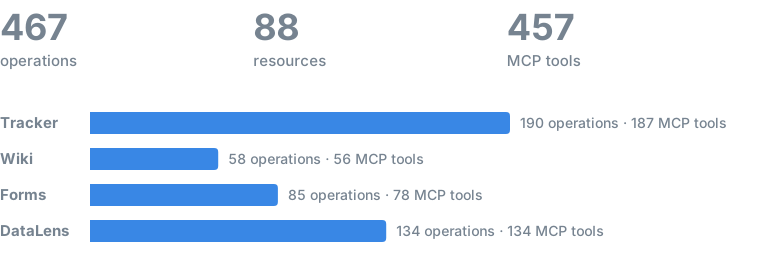
ycli wraps 468 operations across 88 resources of the Tracker, Wiki, Forms, and DataLens API. Every one is reachable from the Python SDK and the CLI, and 458 MCP tools serve them to agents (456 per service plus schema_get, status_get).
Legend. ✅ in CLI or MCP means the resource is reachable on that surface; MCP tools carry honest hints (reads are
readOnlyHint, writes say whether they are destructive or idempotent), andycli mcp start --read-onlyserves only the reads. Resource and operation names link to the official Yandex API reference. An operation has one of three states against what Yandex publishes. Covered (no mark): ycli sends every published parameter and reads every published field. Partial (◐): ycli wraps it and differs somewhere; the mark links to the row that says where and why. Not covered (○): Yandex publishes it and ycli does not wrap it; these are listed under each service. Wiki, Forms and DataLens are measured against their OpenAPI documents; Tracker publishes none, so its state is measured against the reference pages (operations, and query parameters where a page lists them). DataLens is in progress, wrapped section by section: the operations of a section ycli has not begun are pending, not missing. Generated from the code byscripts/gen_coverage.py; do not edit by hand.
Tracker
34 resources · 190 operations · 187 MCP tools
Issues & work items
| Resource | Operations | CLI | MCP |
|---|---|---|---|
| issues | get · search · count · create · update · move · suggest · scroll_clear · update_bulk · move_bulk · transition_bulk · import_ | ✅ | ✅ |
| comments | list · get · create · update · delete · reactions_create · import_ | ✅ | ✅ |
| links | list · list_filtered · create · delete · import_ | ✅ | ✅ |
| transitions | list · execute | ✅ | ✅ |
| worklog | list · search · list_global · create · update · delete · import_ | ✅ | ✅ |
| changelog | list | ✅ | ✅ |
| checklists | list · create · update · delete · clear | ✅ | ✅ |
| attachments | list · download · thumbnails_download · get · delete · upload · upload_temp · import_ · import_for_comment | ✅ | ✅ |
| remotelinks | list · create · delete | ✅ | ✅ |
Agile boards
| Resource | Operations | CLI | MCP |
|---|---|---|---|
| boards | list · get · create · update · delete | ✅ | ✅ |
| sprints | list · get · create · update · delete · start · archive | ✅ | ✅ |
| columns | list · get · create · update · delete | ✅ | ✅ |
Dictionaries
| Resource | Operations | CLI | MCP |
|---|---|---|---|
| priorities | list · create · update | ✅ | ✅ |
| statuses | list · create · update | ✅ | ✅ |
| resolutions | list · create · update | ✅ | ✅ |
| issuetypes | list · create · update | ✅ | ✅ |
| linktypes | list | ✅ | ✅ |
Fields, queues & structure
| Resource | Operations | CLI | MCP |
|---|---|---|---|
| fields | list · get · create · update · categories_create · categories_update | ✅ | ✅ |
| localfields | list · get · create · update | ✅ | ✅ |
| components | list · create · update · list_for_queue · get · delete · user_permissions_get · group_permissions_get | ✅ | ✅ |
| queues | list · get · tags_list · versions_list · fields_list · create · delete · restore · permissions_update · tags_delete · versions_create · versions_get · versions_update · versions_delete · user_permissions_get · group_permissions_get | ✅ | ✅ |
| workflows | list · get · list_for_queue · create · update · actions_update · delete | ✅ | ✅ |
| projects | list · get · queues_list · create · update · delete | ✅ | ✅ |
Automation & bulk
| Resource | Operations | CLI | MCP |
|---|---|---|---|
| macros | list · get · create · update · delete | ✅ | ✅ |
| triggers | list · get · create · update · webhook_log_list | ✅ | ✅ |
| autoactions | get · create · logs_list · logs_get | ✅ | ✅ |
| dashboards | create · widgets_create_cycle_time | ✅ | ✅ |
| bulk | get · issues_list | ✅ | ✅ |
Entities, users & search
| Resource | Operations | CLI | MCP |
|---|---|---|---|
| entities | create · get · update · delete · search · events_list · permissions_get · permissions_update · permissions_get_direct · permissions_update_direct · update_bulk · bulk_get · reports_create · comments_list · comments_list_relative · comments_get · comments_create · comments_update · comments_delete · checklists_create · checklists_update · checklists_items_update · checklists_delete · checklists_items_delete · checklists_move · links_list · links_create · links_delete · attachments_list · attachments_get · attachments_download · attachments_attach · attachments_delete | ✅ | ✅ |
| users | get · list | ✅ | ✅ |
| applications | list | ✅ | ✅ |
| filters | get · create · update · delete | ✅ | ✅ |
| gaps | create · search · delete | ✅ | ✅ |
| me | get | ✅ | ✅ |
Not covered (2)
- ○
GET /boards:boards listreads the paginatedGET /boards/_paginate - ○
GET /users:users listreads the paginatedGET /users/_relative
Wiki
10 resources · 58 operations · 56 MCP tools
Pages
| Resource | Operations | CLI | MCP |
|---|---|---|---|
| pages | get_by_id · get · descendants_list · descendants_list_by_id · grids_list · create · update · delete · append · clone · move · revisions_list · backlinks_list · search | ✅ | ✅ |
| resources | list | ✅ | ✅ |
| recovery | recover | ✅ | ✅ |
Collaboration
| Resource | Operations | CLI | MCP |
|---|---|---|---|
| comments | list · thread_list · thread_get · create · delete | ✅ | ✅ |
| attachments | list · get · previews_download · download · download_by_url · delete · attach · upload | ✅ | ✅ |
| access | create · update · delete · clear | ✅ | ✅ |
Grids (dynamic tables)
| Resource | Operations | CLI | MCP |
|---|---|---|---|
| grids | get · create · update · delete · rows_create · rows_delete · rows_move · columns_create · columns_delete · columns_move · cells_update · clone · columns_suggest · columns_update · rows_update | ✅ | ✅ |
Async & uploads
| Resource | Operations | CLI | MCP |
|---|---|---|---|
| operations | clone_get · clone_inline_grid_get · move_get | ✅ | ✅ |
| uploadsessions | create · get · parts_upload · finish · abort · abort_all | ✅ | ✅ |
Identity
Forms
16 resources · 86 operations · 79 MCP tools
Surveys & questions
| Resource | Operations | CLI | MCP |
|---|---|---|---|
| surveys | list · get ◐ · create ◐ · update ◐ · delete · publish · unpublish | ✅ | ✅ |
| questions | get · list · create ◐ · update ◐ · delete ◐ · move | ✅ | ✅ |
| conditions | question_list · question_get · question_create · question_update · question_delete · question_update_operator · page_list · page_get · page_create · page_update · page_delete · page_update_operator · submit_list · submit_get · submit_create · submit_update · submit_delete · submit_update_operator · hook_list · hook_get · hook_create · hook_update · hook_delete · hook_update_operator | ✅ | ✅ |
| access | list · update · grant · revoke | ✅ | ✅ |
| history | list | ✅ | ✅ |
Responses & export
| Resource | Operations | CLI | MCP |
|---|---|---|---|
| answers | get · list · columns_list · export · export_results_get · export_download · integrations_list · delete · restore | ✅ | ✅ |
| operations | get | ✅ | ✅ |
Integrations
| Resource | Operations | CLI | MCP |
|---|---|---|---|
| hooks | list · get · create · update · delete | ✅ | ✅ |
| subscriptions | list · get · create ◐ · update ◐ · delete · attach | ✅ | ✅ |
| variables | list | ✅ | ✅ |
| notifications | list · get · status_get · restart · cancel · errors_list | ✅ | ✅ |
Distribution
| Resource | Operations | CLI | MCP |
|---|---|---|---|
| keysets | list · get · create · update · delete · download | ✅ | ✅ |
| filling | get · submit · suggest | ✅ | ✅ |
Media
Identity
DataLens
28 resources · 134 operations · 134 MCP tools
Organization
| Resource | Operations | CLI | MCP |
|---|---|---|---|
| tenant | details_get | ✅ | ✅ |
| members | list | ✅ | ✅ |
| licensing | licenses_list · licenses_assign · limit_get · limit_set | ✅ | ✅ |
Collections & workbooks
| Resource | Operations | CLI | MCP |
|---|---|---|---|
| collections | get · list_by_ids · content_list · breadcrumbs_list · permissions_get_root · access_bindings_list · create · update · move · move_bulk · delete · delete_bulk · access_bindings_update | ✅ | ✅ |
| workbooks | get · list · list_by_ids · access_bindings_list · entries_list · create · update · move · move_bulk · delete · delete_bulk · access_bindings_update | ✅ | ✅ |
| workbookexports | start · status_get · result_get · cancel | ✅ | ✅ |
| workbookimports | start · status_get | ✅ | ✅ |
Entries
| Resource | Operations | CLI | MCP |
|---|---|---|---|
| entries | list · relations_list · permissions_get · revisions_list · rename | ✅ | ✅ |
| entrylocks | create · extend · delete | ✅ | ✅ |
| permissions | get_bulk | ✅ | ✅ |
| sharedentries | access_bindings_list · access_bindings_update | ✅ | ✅ |
| audit | entries_updates_list · entry_permissions_get | ✅ | ✅ |
Data
| Resource | Operations | CLI | MCP |
|---|---|---|---|
| connections | get · create · update · delete | ✅ | ✅ |
| datasets | get · create · update · delete · validate · data_get | ✅ | ✅ |
Charts, dashboards, reports & pages
| Resource | Operations | CLI | MCP |
|---|---|---|---|
| charts | data_get · wizard_get · wizard_create · wizard_update · wizard_delete · ql_get · ql_create · ql_update · ql_delete · editor_get · editor_create · editor_update · editor_delete | ✅ | ✅ |
| dashboards | get · create · update · delete | ✅ | ✅ |
| reports | get · create · update · delete | ✅ | ✅ |
| htmlpages | get · create · update · delete · preview_url_get | ✅ | ✅ |
SQL
| Resource | Operations | CLI | MCP |
|---|---|---|---|
| sqlqueries | get · create · update · delete · run | ✅ | ✅ |
Cloud environments
| Resource | Operations | CLI | MCP |
|---|---|---|---|
| cloudenvironments | list · get · create · update · delete | ✅ | ✅ |
| cloudenvironmentstorage | bucket_objects_list · bucket_object_metadata_get · bucket_download_url_create · bucket_upload_url_create | ✅ | ✅ |
| restcatalogs | list · create | ✅ | ✅ |
| lakehouseoperations | get | ✅ | ✅ |
| trinoclusters | list · get · create · delete · start · stop · catalog_create · catalog_delete · resource_presets_list · resource_preset_get | ✅ | ✅ |
| sparkclusters | list · get · create · delete · start · stop · resource_presets_list · resource_presets_get | ✅ | ✅ |
| sparkapplications | list · get · create · cancel · log_list | ✅ | ✅ |
Embedding
| Resource | Operations | CLI | MCP |
|---|---|---|---|
| embeds | list · create · update · delete | ✅ | ✅ |
| embeddingsecrets | get · list · create · delete | ✅ | ✅ |
Not covered (9)
- ○
POST /rpc/checkFavorites: new section published 2026-10, wrapping not decided - ○
POST /rpc/createFolder: the old placement model (folders); the organization has none to check it on (#394) - ○
POST /rpc/deleteFolder: the old placement model (folders); the organization has none to check it on (#394) - ○
POST /rpc/dlsSuggest: the old placement model (folders); the organization has none to check it on (#394) - ○
POST /rpc/getPermissions: the old placement model (folders); the organization has none to check it on (#394) - ○
POST /rpc/listDirectory: the old placement model (folders); the organization has none to check it on (#394) - ○
POST /rpc/listFavorites: new section published 2026-10, wrapping not decided - ○
POST /rpc/modifyPermissions: the old placement model (folders); the organization has none to check it on (#394) - ○
POST /rpc/moveFolderEntry: the old placement model (folders); the organization has none to check it on (#394)
Every resource and operation above deep-links to the Yandex API reference: 406 of 468 operations resolve to their own endpoint page and 20 to their resource's page. No public API reference exists yet for datalens.cloudenvironments, datalens.cloudenvironments.create, datalens.cloudenvironments.delete, datalens.cloudenvironments.get, datalens.cloudenvironments.list, datalens.cloudenvironments.update, datalens.cloudenvironmentstorage, datalens.cloudenvironmentstorage.bucket_download_url_create, datalens.cloudenvironmentstorage.bucket_object_metadata_get, datalens.cloudenvironmentstorage.bucket_objects_list, datalens.cloudenvironmentstorage.bucket_upload_url_create, datalens.lakehouseoperations, datalens.lakehouseoperations.get, datalens.restcatalogs, datalens.restcatalogs.create, datalens.restcatalogs.list, datalens.sparkapplications, datalens.sparkapplications.cancel, datalens.sparkapplications.create, datalens.sparkapplications.get, datalens.sparkapplications.list, datalens.sparkapplications.log_list, datalens.sparkclusters, datalens.sparkclusters.create, datalens.sparkclusters.delete, datalens.sparkclusters.get, datalens.sparkclusters.list, datalens.sparkclusters.resource_presets_get, datalens.sparkclusters.resource_presets_list, datalens.sparkclusters.start, datalens.sparkclusters.stop, datalens.sqlqueries, datalens.sqlqueries.create, datalens.sqlqueries.delete, datalens.sqlqueries.get, datalens.sqlqueries.run, datalens.sqlqueries.update, datalens.tenant, datalens.tenant.details_get, datalens.trinoclusters, datalens.trinoclusters.catalog_create, datalens.trinoclusters.catalog_delete, datalens.trinoclusters.create, datalens.trinoclusters.delete, datalens.trinoclusters.get, datalens.trinoclusters.list, datalens.trinoclusters.resource_preset_get, datalens.trinoclusters.resource_presets_list, datalens.trinoclusters.start, datalens.trinoclusters.stop, tracker.linktypes, tracker.linktypes.list, shown as plain text. See CONTRIBUTING.md for the intentional exclusions (UI-only endpoints with no public REST API) and per-method notes.
Against the published API
What ycli sends, replayed from its contract tests, compared with what Yandex publishes: the Wiki, Forms and DataLens OpenAPI documents and Tracker's API reference (prose, so only operations and the query parameters a page lists are compared). A request body is compared only where ycli has a typed model for it and the model is closed; the Bodies compared column says how many that is, so an empty list is not read as a match. The published side is the snapshot in scripts/api_snapshot/; a weekly job fetches it again and opens an issue when Yandex has changed it.
| Service | Published | Wrapped | Not wrapped | Operations that differ | Bodies compared | Source |
|---|---|---|---|---|---|---|
| Tracker | 190 | 188 | 0 (+2 on purpose) | 0 | — | API reference |
| Wiki | 56 | 56 | 0 | 0 | 24 of 24 | OpenAPI |
| Forms | 84 | 84 | 0 | 8 | 26 of 30 | [OpenAPI](http |