Listed from the MCP registry; nobody on Odel publishes it.

Obsidian Vault (TUI, CLI & MCP)
Local Obsidian vault MCP server, CLI, and TUI in Rust with Braille graph & safe edits.
Runs on your machine from its package; the steps are below.
What it does
- Reads
- Writes
- High impact
At most: moves money, runs code or commands, deletes data, or sends messages for you.
What it costs
FreeOdel charges nothing per call. The publisher may charge for its own service.
Runs locally over stdio
This server isn't hosted — your MCP client launches it from a package registry. Use one of the commands below, or drop the config into your client (e.g. Claude Desktop).
Run
docker run -i --rm ghcr.io/bitefoundry/obsidian:0.4.3
MCP client config
{
  "mcpServers": {
    "obsidian-vault-tui-cli-mcp": {
      "command": "docker",
      "args": [
        "run",
        "-i",
        "--rm",
        "ghcr.io/bitefoundry/obsidian:0.4.3"
      ]
    }
  }
}@bitefoundry/obsidian
Search local Obsidian vaults, manage Markdown notes and tasks, and inspect backlinks from the terminal.





BiteFoundry · Latest release notes
Highlights
| Pillar | Capabilities |
|---|---|
| Zero-Auth Native Vault Discovery | Automatically discovers every local Obsidian vault from %APPDATA%\obsidian\obsidian.json (Windows), ~/Library/Application Support/obsidian/obsidian.json (macOS), or ~/.config/obsidian/obsidian.json (Linux) — 100% local-first Markdown files on disk, zero API keys or cloud auth required. |
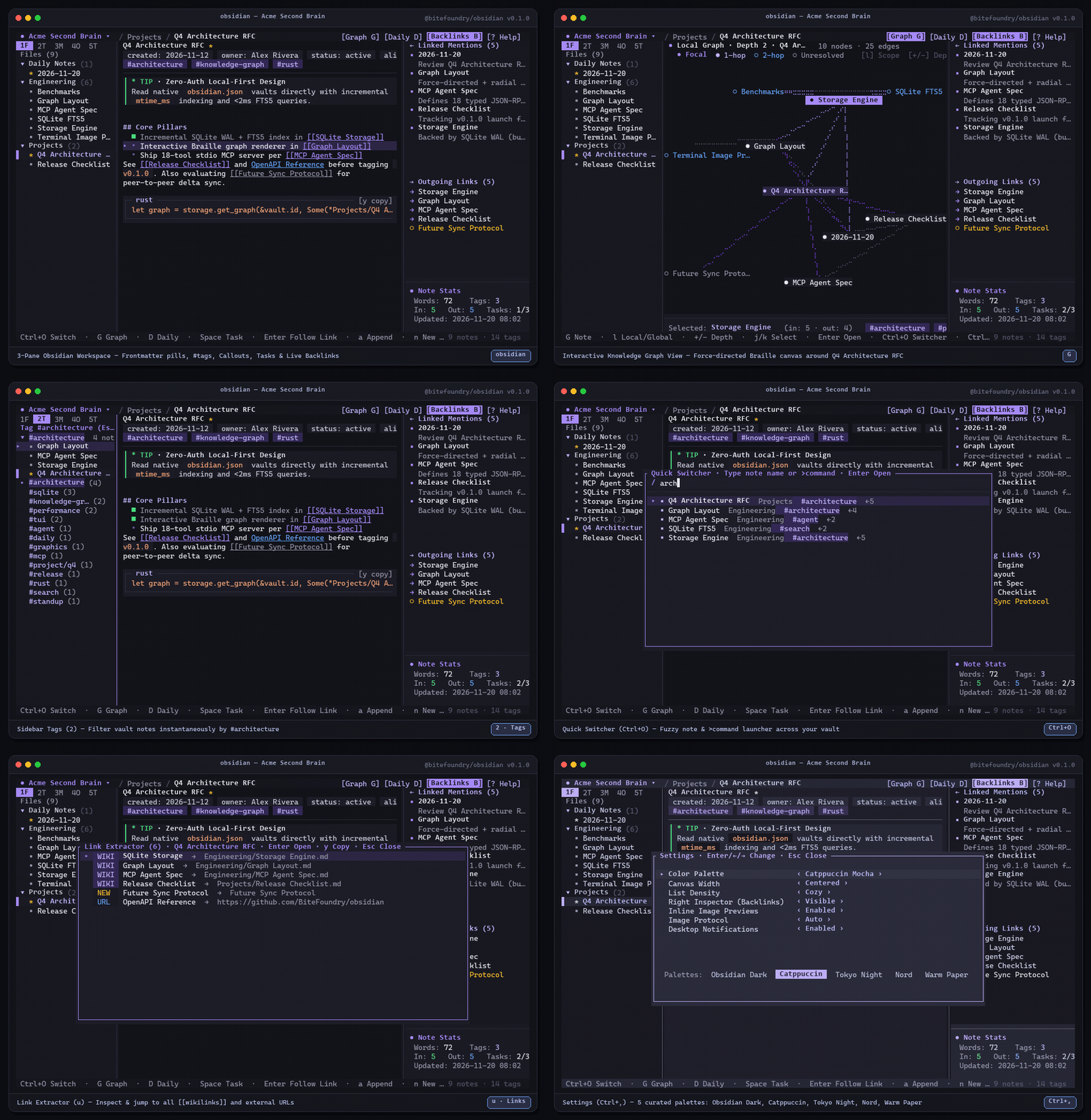
| Obsidian-Native 3-Pane TUI | Signature Obsidian purple (#a78bfa / #7c3aed) Minimal-Chrome workspace (bitefoundry-obsidian): collapsible 5-Tab Left Sidebar ([) (1 Files · 2 Tags · 3 Bookmarks · 4 Outline · 5 Tasks), Live Note Canvas with YAML Frontmatter pills, #tag chips, semantic Callout cards, interactive - [ ] checkboxes (Space/x updates the .md file atomically), clickable [[wikilinks]], inline HD ![[image.png]] previews (v), Right Backlinks & Outgoing Inspector (B), Quick Switcher (Ctrl+O), Daily Notes (D), and 5 curated palettes (Obsidian Dark, Catppuccin Mocha, Tokyo Night, Nord, Warm Paper). |
Interactive Knowledge Graph (G) | Force-directed & radial Braille Canvas Knowledge Graph rendered right inside the terminal: purple focal edges, 1-hop / 2-hop / unresolved ghost nodes, Local vs Global scope (l), hop depth (+/-), node cycling (j/k/Tab), and Enter jump-to-note. |
| SQLite WAL + FTS5 + 4-in-1 Agent Interface | Incremental mtime_ms + size_bytes filesystem scanner powering SQLite WAL + FTS5 search (Korean/CJK queries also match inside longer words), background watcher IPC daemon (bitefoundry-obsidian daemon), scriptable --json CLI, local HTTP JSON API (bitefoundry-obsidian serve, :8792), and stdio MCP server (bitefoundry-obsidian mcp, 20 typed tools with confirm: true .trash/ safety guard). |
Quick Start
# 1. Install the native CLI globally
npm i -g @bitefoundry/obsidian

# 2. Launch directly — auto-discovers your existing local Obsidian vaults!
bitefoundry-obsidian

# Optional: install a short shell alias (`ob` -> `bitefoundry-obsidian`)
bitefoundry-obsidian alias install

# Or scaffold a starter local vault anywhere:
bitefoundry-obsidian init ~/Documents/SecondBrain
bitefoundry-obsidian vaults list
bitefoundry-obsidian notes read "Roadmap" --json
Read a local note with its modification time and omission counts. Use a vault-relative path if several notes share its name. For full detail, add --full in the CLI or pass compact: false to read_note in MCP.
Upgrade from 0.1.x
Update shell scripts from obsidian notes list or obs notes list to bitefoundry-obsidian notes list. In MCP settings, change "command": "obsidian" or "command": "obs" to "command": "bitefoundry-obsidian" and keep "args": ["mcp"].
For npm, run npm install -g @bitefoundry/obsidian. Use a separate prefix when another program supplies an old command in the existing npm prefix. For a source install, run cargo install --git https://github.com/BiteFoundry/obsidian --locked. For a standalone install, download the asset named bitefoundry-obsidian for your platform. Shared npm prefix · Standalone updater transition
Keybindings Cheat Sheet
| Key | Action | Context |
|---|---|---|
Ctrl+O / Ctrl+K / Ctrl+P | Quick Switcher & Command Palette (fuzzy notes + >commands) | Global |
G | Toggle Interactive Knowledge Graph View (Braille force-directed canvas) | Global |
l / + - / j k / Enter | Toggle Local/Global scope · Depth · Cycle nodes · Open node | Graph View |
D | Open or create Today's Daily Note (reads .obsidian/daily-notes.json) | Global |
[ / Ctrl+B | Toggle collapsible Left Sidebar | Global |
1 2 3 4 5 | Switch Sidebar tabs: Files · Tags · Bookmarks · Outline · Tasks | Global |
B | Toggle Right Inspector (Linked Mentions / Backlinks & Outgoing Links) | Global |
Space / x | Toggle live - [ ] / - [x] checkbox surgically in the .md file | Canvas / Tasks |
Enter / Backspace / Alt+← | Follow [[wikilink]] / Navigate back in note history stack | Canvas |
a / n / b | Quick Append · New Note · Bookmark | Global |
e / Ctrl+E | Edit inline · Open in $VISUAL or $EDITOR and reindex on success | Note |
u / h / v / y | Link Extractor · Toggle Inline Hrefs · HD Image Preview · Copy Code/Note | Global |
Ctrl+V / Ctrl+F | Paste clipboard PNG into Attachments/ · File Picker (z zoxide jump) | Global |
Ctrl+S / Ctrl+, / . / ? | Vault Switcher · Settings (5 Palettes) · Context Menu · Keybinding Help | Global |
CLI, HTTP API & MCP
CLI (--json & --vault ready)
# Discover, register, scaffold & reindex local vaults
bitefoundry-obsidian vaults list --json
bitefoundry-obsidian vaults add ~/Vaults/Work --name work
bitefoundry-obsidian vaults use work
bitefoundry-obsidian init ~/Vaults/Starter
bitefoundry-obsidian reindex

# Search, read, author, daily notes & surgical checkbox toggles
bitefoundry-obsidian search "Architecture" --json
bitefoundry-obsidian notes list --folder Projects --json
bitefoundry-obsidian notes list --folder Projects --json --limit 50 --cursor "<next_cursor>"
bitefoundry-obsidian notes read "Q4 Architecture RFC"
bitefoundry-obsidian notes read "Q4 Architecture RFC" --json
bitefoundry-obsidian notes read "Q4 Architecture RFC" --json --full
bitefoundry-obsidian notes create "Sprint Retro" --folder Notes --tags "retro,q4"
bitefoundry-obsidian notes append "Q4 Architecture RFC" "- [ ] Verify the release"
bitefoundry-obsidian notes replace "Q4 Architecture RFC" --find "Draft review" --replace "Review complete" --json
bitefoundry-obsidian notes move "Q4 Architecture RFC" "Archive/Q4 Architecture RFC" --json
bitefoundry-obsidian daily "--append=- [ ] Review PRs"
bitefoundry-obsidian tasks --open --json   # paginated response (default 50; use --cursor or --all)
bitefoundry-obsidian toggle-task "Q4 Architecture RFC" 14

# Knowledge Graph & Link Intelligence
bitefoundry-obsidian backlinks "Q4 Architecture RFC" --json
bitefoundry-obsidian links "Q4 Architecture RFC" --json
bitefoundry-obsidian graph "Q4 Architecture RFC" --depth 2 --json
bitefoundry-obsidian orphans --json
bitefoundry-obsidian tags architecture --json

# Background watcher daemon & diagnostics
bitefoundry-obsidian daemon start
bitefoundry-obsidian doctor --json
notes read prints raw Markdown. With --json, it returns a compact object by default (rel_path, title, raw_markdown, mtime_ms, omitted, and hint); add --full to include summary, parsed, backlinks, outgoing_links, and images (--compact is kept as an alias for the default compact output). In --full output, parsed includes rendering blocks and body copies that can be around 10x the raw note size; select metadata with jq or use MCP read_note with compact: false when you do not need AST blocks. daily --json follows the same compact-by-default and --full rule, except that calls with a non-empty --append without --full return a minimal receipt (rel_path, created, appended). notes list --json and tasks --json return paginated objects with returned, total, has_more, next_cursor, and notes/tasks (default page size 50, max 500; pass --cursor to continue or --all for every item). search --json returns query, limit (clamped to 1..200), returned, has_more, next_cursor (null), and results; when has_more is true, raise --limit up to 200 or narrow the query. Use notes edit <NOTE> for arbitrary body edits in your editor. notes replace edits a single literal match in the Markdown body and returns replaced, matches, and rel_path. When a --json command fails at runtime, stdout contains {"ok":false,"error":{"code","message"}} (with candidates on ambiguous note references), stderr is empty, and the exit code is 1; argument parsing errors print clap usage to stderr with exit code 2.
| v0.2.3 | Equivalent command |
|---|---|
notes list --json | jq '.[]' | notes list --json --all | jq '.notes[]' |
tasks --open --json | jq '.[]' | tasks --open --json --all | jq '.tasks[]' |
search Q --json | jq '.[]' | search Q --json | jq '.results[]' |
notes read X --json | jq '.summary' | notes read X --json --full | jq '.summary' |
daily --json | jq '.note.summary' | daily --json --full | jq '.note.summary' |
Local HTTP JSON API (bitefoundry-obsidian serve)
bitefoundry-obsidian serve --bind 127.0.0.1 --port 8792 --token "$API_TOKEN"
curl -H "Authorization: Bearer $API_TOKEN" "http://127.0.0.1:8792/api/v1/search?q=Architecture"
curl -H "Authorization: Bearer $API_TOKEN" "http://127.0.0.1:8792/api/v1/graph?note=Q4%20Architecture%20RFC&depth=2"
Without --token, serve prints a random token for the run on stderr (--allow-keyless turns this off on loopback). Requests from other websites and unknown Host names are rejected, a non-loopback --bind requires --token, and vault= accepts registered vaults only. Browser apps on another origin need --allow-origin <origin>.
Full endpoint catalog and OpenAPI schema: docs/API.md · docs/openapi.yaml.
MCP Server (bitefoundry-obsidian mcp)
{
  "mcpServers": {
    "obsidian": {
      "command": "bitefoundry-obsidian",
      "args": ["mcp"]
    }
  }
}
Full tool catalog and argument schemas: docs/MCP.md · npm packaging details: docs/NPM.md.
move_note renames or moves a note within a vault, updates incoming wikilinks and Markdown links that need a new target, and rewrites relative Markdown links, images, and attachments inside the moved note so they keep pointing to the same files. Ambiguous note references return an error; pass a vault-relative path when multiple notes share a title or alias. Use append_note and replace_note_text for Markdown, toggle_task for checkboxes, and update_frontmatter for YAML properties. Editing surfaces and move examples
@bitefoundry Enterprise Terminal Suite
| Package | Commands | Workspace | Interfaces |
|---|---|---|---|
@bitefoundry/teams | teams | Microsoft Teams (Chats, Channels, Meetings & Threads) | TUI · CLI · HTTP · MCP |
@bitefoundry/outlook | outlook | Microsoft Outlook (Mail, Calendar & Contacts) | TUI · CLI · HTTP · MCP |
@bitefoundry/onenote | onenote | Microsoft OneNote (Notebooks, Sections & Pages) | TUI · CLI · HTTP · MCP |
@bitefoundry/sharepoint | sharepoint, bitefoundry-onedrive | Microsoft SharePoint & OneDrive (Sites, Libraries & Lists) | TUI · CLI · HTTP · MCP |
@bitefoundry/atlassian | atlassian, confluence, conf | Atlassian Jira (Kanban, Sprints, JQL) & Confluence Wiki | TUI · CLI · HTTP · MCP |
@bitefoundry/notion | notion | Notion (Editorial Pages, Interactive Blocks & Databases) | TUI · CLI · HTTP · MCP |
@bitefoundry/obsidian (this repo) | bitefoundry-obsidian | Obsidian (Local Vaults, Backlinks & Interactive Knowledge Graph) | TUI · CLI · HTTP · MCP |
Disclaimer: Unofficial terminal client for Obsidian vaults. Not affiliated with, endorsed by, or sponsored by Dynalist Inc. (Obsidian).







