Listed from the MCP registry; nobody on Odel publishes it.

Microsoft Outlook (TUI, CLI & MCP)
Microsoft Outlook mail, calendar, and tasks MCP server, CLI, and TUI in Rust with SQLite FTS5.
Runs on your machine from its package; the steps are below.
What it does
- Reads
- Writes
- High impact
At most: moves money, runs code or commands, deletes data, or sends messages for you.
What it costs
FreeOdel charges nothing per call. The publisher may charge for its own service.
Runs locally over stdio
This server isn't hosted — your MCP client launches it from a package registry. Use one of the commands below, or drop the config into your client (e.g. Claude Desktop).
Run
docker run -i --rm ghcr.io/bitefoundry/outlook:0.3.2
MCP client config
{
  "mcpServers": {
    "microsoft-outlook-tui-cli-mcp": {
      "command": "docker",
      "args": [
        "run",
        "-i",
        "--rm",
        "ghcr.io/bitefoundry/outlook:0.3.2"
      ]
    }
  }
}outlook
Manage Outlook mail, calendar events, contacts, and Microsoft To Do from the terminal.





BiteFoundry · Latest release notes
Highlights
| Pillar | What You Get |
|---|---|
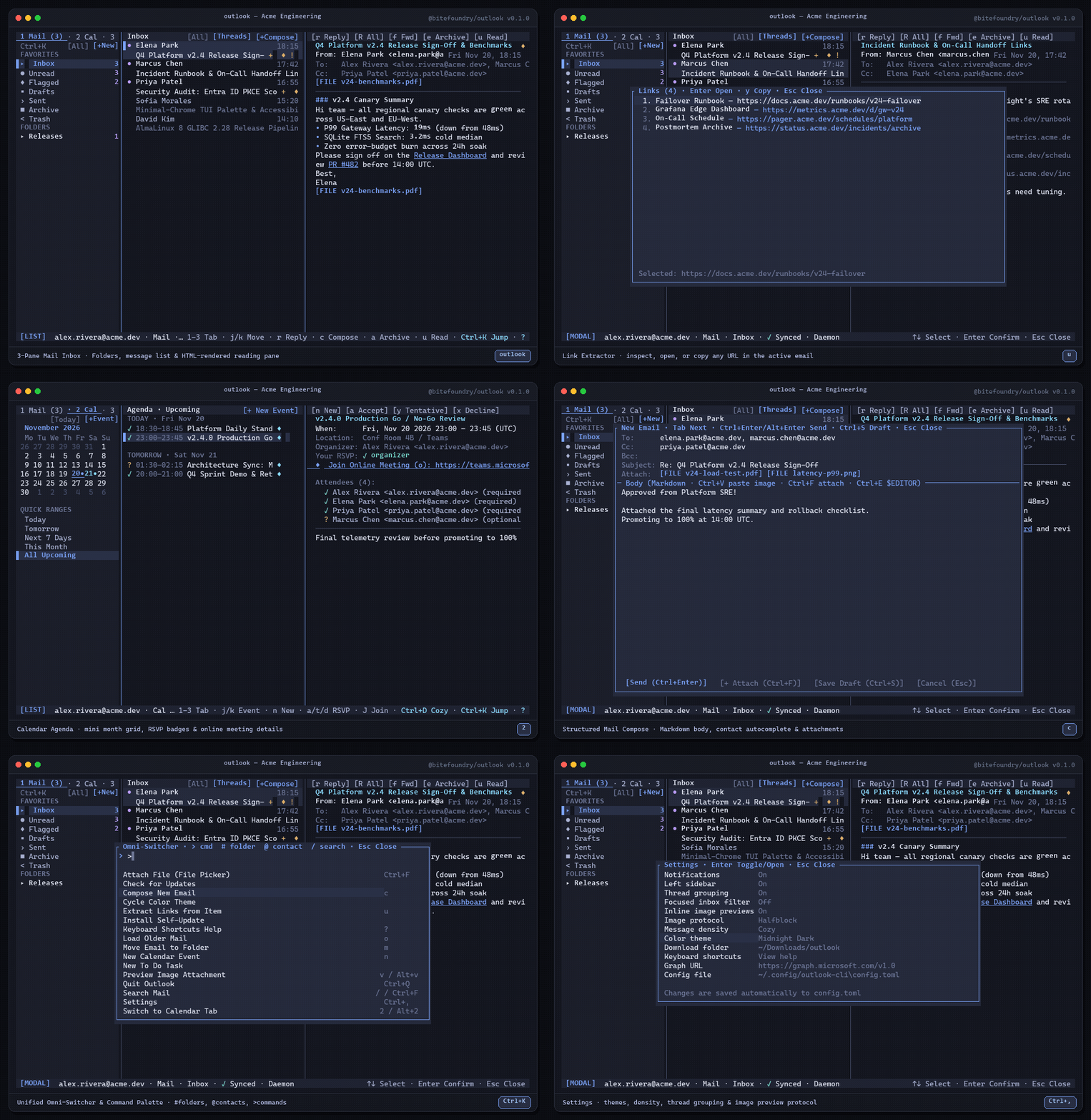
| Minimal-Chrome TUI | 3-tier responsive ratatui workspace across Mail (1), Calendar (2), and Microsoft To Do (3) with HTML-rendered email preview, inline href toggle (h), Link Extractor (u), quoted-reply folding (z), structured Compose modal (c), zoxide File Picker (Ctrl+F), and Ctrl+K Omni-Switcher. |
| High-Res Terminal Images | Native inline rendering for attached and cid:/https:// email images across Kitty, iTerm2 (OSC 1337), Sixel (DCS q), and 24-bit Half-Blocks (▀) fallback with live zoom (+/-/0) and protocol cycling (p). |
| Local SQLite FTS5 + IPC Daemon | Bundled SQLite WAL + FTS5 cache (cache.db) with incremental delta sync, $batch neighbor hydration, optimistic triage (archive, flag, mark-read, complete), offline search, and cached CLI reads via outlook daemon. |
| 4-in-1 Agent Interface | One static binary (Windows, macOS, Linux GLIBC 2.28 / AlmaLinux 8+) delivers TUI, scriptable CLI (--json), Axum HTTP REST API (outlook serve, :3939), and stdio MCP server (outlook mcp, 23 tools). |
Quick Start
# 1. Install the native CLI via npm
npm i -g @bitefoundry/outlook

# 2. Authenticate with Microsoft Entra ID (or automatically reuse your @bitefoundry/teams M365 session!)
outlook login

# 3. Launch the interactive TUI
outlook
outlook read MESSAGE_ID --json
Read a message and its attachment metadata. To save a file, use outlook download MESSAGE_ID --attachment ATTACHMENT_ID --dir .. For full detail, add --full in the CLI or pass compact: false to get_message in MCP.
For a company registration, use outlook login --client-id YOUR_CLIENT_ID --tenant-id YOUR_TENANT_ID. Without an override, Outlook uses the Microsoft Graph Command Line Tools client for its own interactive login. Register a desktop app · Outlook delegated permissions
Shared M365 Session & Token Brokers: When
share_m365_auth = true(default),outlookseamlessly reuses or upgrades an existing@bitefoundry/teamssession without a second browser login. Also supports--device-code,OUTLOOK_ACCESS_TOKEN,OUTLOOK_TOKEN_FILE,OUTLOOK_TOKEN_REFRESH_CMD(az account get-access-token), and custom Entra ID apps. Runoutlook whoamioroutlook doctor --onlinefor JWT scope diagnostics.
Corporate TLS proxies:
outlooktrusts the bundled Mozilla roots and the OS trust store. If your network re-signs HTTPS with a private root CA, export it as PEM and setOUTLOOK_EXTRA_CA_PEM(SSL_CERT_FILEandNODE_EXTRA_CA_CERTSalso work).outlook doctorshows which CA files were loaded. Details
Update a global npm install with npm install -g @bitefoundry/outlook@latest. For a standalone binary from GitHub Releases, use outlook update.
Keybindings Cheat Sheet
| Key | Context | Action |
|---|---|---|
1 / 2 / 3 (Alt+1..3) | Global | Switch Mail / Calendar / To Do Tasks tabs |
Ctrl+K | Global | Omni-Switcher / Command Palette (> commands, # folders, @ contacts, / search) |
j / k / ↑ / ↓ | Global | Navigate folders, message list, calendar agenda, tasks, or reading pane |
Tab / Enter / Esc | Global | Cycle pane focus (Folders ↔ List ↔ Reader) or close modal |
c / r / R / f | Compose / Reply / Reply-All / Forward (Markdown + Ctrl+F attach + Ctrl+V image) | |
C / Ctrl+S | Mail / Compose | Start a separate composition / save the current draft to Outlook |
e / g / m / Del | Archive / Flag / Move to folder / Delete (optimistic updates) | |
h / u / z | Mail Reader | Toggle inline href URLs / open Link Extractor / fold quoted reply history |
t / F / U | Toggle Thread grouping / Focused Inbox / Unread filter | |
v / Alt+v / d | Mail Reader | High-res Inline Image Preview / download latest attachment (A for picker) |
n / a / y / x | Calendar | New Event / RSVP Accept (a), Tentative (y), Decline (x) |
Space / n | Tasks | Toggle To Do completion (Space) / create new task or list (n) |
/ / Ctrl+D / Ctrl+B | Global | Search mail (FTS5 + Graph KQL) / toggle Cozy / Compact density / toggle sidebar |
Ctrl+, / ? / Ctrl+Q | Global | Settings / full help overlay / safe quit |
CLI, HTTP API & MCP
CLI Examples
# Mail: inspect inbox, read, reply, and send Markdown with attachments
outlook mail --folder inbox --unread --limit 20 --json
outlook read AAMkAGI2... --json
outlook read AAMkAGI2... --json --full
outlook read AAMkAGI2... --mark-read
outlook send --to elena.park@acme.dev --subject "v2.4 Release" \
  --body "**All canary checks passed.** See attached benchmarks." \
  --attach ./v24-benchmarks.pdf --importance high

# Calendar & To Do: view agenda, schedule Teams meeting, RSVP, and manage tasks
outlook calendar --days 7
outlook create-event --subject "Go / No-Go Review" \
  --start "2026-11-20T14:00:00Z" --end "2026-11-20T14:45:00Z" \
  --attendee elena.park@acme.dev --online
outlook add-task "Promote canary to 100%" --due 2026-11-20 --importance high
outlook daemon start
JSON output for mail, read, move, archive, search --remote, calendar, and event is compact by default. Pass --full with --json for full cached fields, HTML bodies, and attachment metadata (content_bytes_b64 is never embedded in CLI/MCP JSON; fetch attachment bytes with outlook download, or outlook download --offline for cached bytes). --compact remains a compatibility alias and conflicts with --full. Paginated JSON listings (mail, search --remote, folders, task-lists) include returned, has_more, and next_cursor; continue with --cursor <CURSOR>. Cursors are bound to the originating command, folder, query, and filter, while --limit and --full may change between pages. In mail --json, folder is the canonical folder ID string, and the first online listing of an uncached folder syncs the folder delta: up to 40 delta pages (about 2,000 messages) per call. A larger folder returns the newest messages right away with "sync_complete": false and continues the sync on the following listings (or in the TUI / serve background sync) until it is complete; the key is absent otherwise. In search --remote --json, hits holds local cache matches while remote holds Graph results, so the same message ID can appear in both arrays.
For read, message_id is an exact message ID; subject and ID-prefix resolution apply only to CLI read --offline (online callers should locate IDs with search first). Runtime failures with --json emit a structured JSON error object on stdout ({"ok": false, "error": {"code": ..., "message": ...}}) with exit code 1; exit code 2 indicates a CLI usage/parsing error printed as plain text on stderr. For sync --json (and doctor --online --json), check the ok field in the JSON output to determine overall success.
Use outlook mark for read and flag changes, and outlook move to change folders. MCP update_message supports both. In the TUI, Ctrl+S saves the current composition. Reopening and saving reuses the draft ID. Reply, reply-all, and forward drafts retain their source message relationship and quoted HTML.
outlook edit-draft DRAFT_ID --subject "Revised release notes" --json
outlook edit-draft DRAFT_ID --body 'The **final** checklist is attached.' --json
outlook update-event EVENT_ID --start 2026-11-23T09:00 --end 2026-11-23T09:30 --json
outlook update-task TASK_ID --list tasks --due 2026-11-25 --json
Each edit sends the specified fields. A draft subject change preserves the original body and its markup. Use --body-html to supply replacement HTML directly. Calendar edits leave the body, attendees, and recurrence out of the request. To Do edits leave the body and checklist out of the request. Message updates · Event updates · To Do updates
For create-event, RFC3339 times are exact instants and wall-clock times such as "2026-11-23 09:00" are read in the machine's time zone, or in --time-zone when given. --all-day needs YYYY-MM-DD for both --start and --end, with an exclusive end date (--start 2026-11-23 --end 2026-11-24 is one day).
For update-event, calendar wall-clock times such as 2026-11-23T09:00 use the event's original Graph time zone. Use date-only values with all-day events and give the exclusive end date. RFC3339 values such as 2026-11-23T09:00:00+09:00 are sent in UTC for timed events. Non-UTC recurring events require wall-clock times. To Do dates use midnight UTC, and RFC3339 To Do timestamps are converted to UTC. Event time and recurrence
Local HTTP REST API (outlook serve)
Start an Axum JSON server on 127.0.0.1:3939 (with live /openapi.json). Requests need a Bearer key: pass your own with --api-key, or use the random token the server prints to stderr at startup.
outlook serve --port 3939 --api-key "$OUTLOOK_API_KEY"
curl -H "Authorization: Bearer $OUTLOOK_API_KEY" \
  "http://127.0.0.1:3939/v1/mail/messages?folder=inbox&unread=true"
curl -X POST http://127.0.0.1:3939/v1/mail/send \
  -H "Authorization: Bearer $OUTLOOK_API_KEY" \
  -H "Content-Type: application/json" \
  -d '{"to":["elena.park@acme.dev"],"subject":"Build green","markdown":"All checks passed!"}'
--allow-keyless serves loopback clients without a key. Browser apps are refused unless their origin is passed with --cors-origin; see Security.
Full endpoint & schema docs: docs/API.md · docs/openapi.yaml
MCP Server (outlook mcp)
Exposes 23 Microsoft Outlook tools over newline-delimited stdio JSON-RPC 2.0, including update_draft, update_event, and update_task.
# Claude Code
claude mcp add outlook -- outlook mcp
// Claude Desktop / Cursor / Windsurf MCP config
{
  "mcpServers": {
    "outlook": {
      "command": "outlook",
      "args": ["mcp"]
    }
  }
}
Full tool schemas & client setups: docs/MCP.md · docs/NPM.md
@bitefoundry Enterprise Terminal Suite
| Package | Command | Domain | Interfaces |
|---|---|---|---|
@bitefoundry/teams | teams | Microsoft Teams (Chats, Channels, Threads, Presence) | TUI · CLI · HTTP · MCP |
@bitefoundry/outlook (this repo) | outlook | Microsoft Outlook (Mail, Calendar, To Do, Contacts) | TUI · CLI · HTTP · MCP |
@bitefoundry/onenote | onenote | Microsoft OneNote (Notebooks, Sections, Pages) | TUI · CLI · HTTP · MCP |
@bitefoundry/sharepoint | sharepoint, bitefoundry-onedrive | SharePoint & OneDrive (Sites, Drives, Lists, Files) | TUI · CLI · HTTP · MCP |
@bitefoundry/atlassian | atlassian, confluence, conf | Jira & Confluence (Issues, Boards, Sprints, Wiki) | TUI · CLI · HTTP · MCP |
@bitefoundry/notion | notion | Notion (Pages, Databases, Blocks, Comments) | TUI · CLI · HTTP · MCP |
@bitefoundry/obsidian | bitefoundry-obsidian | Obsidian (Local Vaults, Backlinks & Knowledge Graph) | TUI · CLI · HTTP · MCP |
License & Disclaimer
Licensed under the MIT License.
Unofficial terminal client for Microsoft Outlook. Not affiliated with, endorsed by, or sponsored by Microsoft Corporation.







