
SSH Manager
SSH server management for agents, with per-server read-only and allowlist security modes
Runs on your machine from its package; the steps are below.

What it does
- Reads
- Writes
- High impact
At most: moves money, runs code or commands, deletes data, or sends messages for you.
What it costs
FreeOdel charges nothing per call. The publisher may charge for its own service.
Runs locally over stdio
This server isn't hosted — your MCP client launches it from a package registry. Use one of the commands below, or drop the config into your client (e.g. Claude Desktop).
Run
npx -y mcp-ssh-manager
MCP client config
{
  "mcpServers": {
    "ssh-manager": {
      "command": "npx",
      "args": [
        "-y",
        "mcp-ssh-manager"
      ]
    }
  }
}


You give your agents a shell,
and you see what they do with it.
Let Claude Code and OpenAI Codex work on your real servers — run commands, move files,
query databases, take backups, check health — and watch over their shoulder while they do it.









Twenty seconds, unedited — watch full size. Real SSH, real SFTP, three throwaway hosts on the loopback.
The problem, in one line
An MCP SSH server is the most dangerous tool you can hand an agent: a shell on machines that matter. Today, when your agent runs something on production, you find out afterwards — if you find out at all.
This one lets you watch, and lets you say no. It is also, on the boring days, simply a very good way to let an assistant do the server work you were going to do yourself.
Choose your workspace
Desktop application (4.0.0): one installation with its own runtime,
terminal, file browser and server settings. No separate Node.js or npm
installation. Download it:
| Platform | File | Signature |
|---|---|---|
| macOS, Apple silicon / Intel | …-arm64.dmg / …-x64.dmg | Signed and notarized by Apple — opens normally |
| Windows x64 / arm64 | …-setup.exe | Not code-signed in 4.0.0. Windows shows "Windows protected your PC": More info → Run anyway. Check the file against the SHA-256 in release-manifest-win32.json on the release (ssh-manager app does it for you). Signing comes in a later release. |
| Linux x64 | .deb, .AppImage | Unsigned, as Linux packages usually are |
Already using npm / the CLI? npm update -g mcp-ssh-manager brings 4.0.0,
and the V4 engine runs without an interface, from your existing .env, TOML or
process variables — no automatic import, no forced wizard, no approval prompt
unless you enable one per server. The one behaviour that tightens is SSH
host-key verification; read that section of the
upgrade and rollback guide before upgrading. To stay on 3.8
for now, pin it: npm install -g mcp-ssh-manager@3.
From the engine to the application in one step. With a V4 engine installed,
ssh-manager app downloads the desktop application of the engine's own version,
checks it against the release (size and SHA-256 from the release manifest, and
on macOS Apple's signature and notarization), installs it and opens it — or just
opens it when it is already there. The browser interface of ssh-manager control
offers the same as one button. Your agents keep using the npm engine; the
application is the window on top of it. Nothing is downloaded unless you ask.
Without npm at all. The application carries the engine too, and your AI
tools can start that one: Options → AI tools lists Claude Code, Claude Desktop
and Codex, says which ssh-manager each one starts (npm's, the application's, or
none yet) and switches it in one click — no Node, no terminal. The same tab, in
ssh-manager control, shows npm users which version each tool really runs.
A switch rewrites that tool's one ssh-manager entry, keeps its environment
variables, and takes effect when the tool next starts; switching back is the
same click.
Updates. The application checks for a new version at launch and every six hours, downloads it when you click Update and installs it when it quits. The npm engine updates with npm, on its own schedule. A change to the interface reaches npm users with the next npm release and application users with the next application release.
Up and running with npm
npm install -g mcp-ssh-manager     # or: brew tap bvisible/mcp-ssh-manager https://github.com/bvisible/mcp-ssh-manager && brew install ssh-manager

ssh-manager server add             # guided: host, user, key or password
claude mcp add ssh-manager mcp-ssh-manager
That's it. Restart Claude Code and ask it something.
Using Codex, a source checkout, or a project-scoped install?
OpenAI Codex — same install, then two files. In ~/.codex/config.toml:
[mcp_servers.ssh-manager]
command = "mcp-ssh-manager"
env = { SSH_CONFIG_PATH = "/Users/you/.codex/ssh-config.toml" }
startup_timeout_ms = 20000
And your servers in ~/.codex/ssh-config.toml:
[ssh_servers.production]
host = "prod.example.com"
user = "admin"
key_path = "~/.ssh/id_rsa"
default_dir = "/var/www"
group = "production"
Everything below works identically from Codex — same 37 tools, same config fields.
From source:
git clone https://github.com/bvisible/mcp-ssh-manager.git
cd mcp-ssh-manager && npm install
cd cli && ./install.sh
claude mcp add ssh-manager node /absolute/path/to/mcp-ssh-manager/src/index.js
Scopes — --scope project writes an .mcp.json your team can commit; --scope user enables it everywhere for you.
Prerequisites — Node 18+, on Linux, macOS or Windows. rsync for ssh_sync, sshpass only if you sync with password auth (brew install hudochenkov/sshpass/sshpass, or apt-get install sshpass).
Then just ask
No syntax to learn. Your assistant already knows how to use the 37 tools; you talk to it in your own words.
| You say | What happens |
|---|---|
| "Why is production slow right now?" | CPU, memory, disk, load average and the top processes, in one round trip |
| "Back up the database before I deploy." | A compressed, timestamped MySQL/PostgreSQL/MongoDB dump with a retention policy |
| "Tail the nginx error log on staging." | Live output, streamed as it happens |
| "Push ./dist to production:/var/www and restart nginx." | The files out, then the restart — with ownership, permissions and a rollback copy handled |
| "Which of my servers is running out of disk?" | Every server in the group, checked in parallel |
| "Open a tunnel to the production database." | Local port forward, so your GUI client just connects |
"Run docker ps on everything tagged production." | One command, the whole group, sequential or parallel |
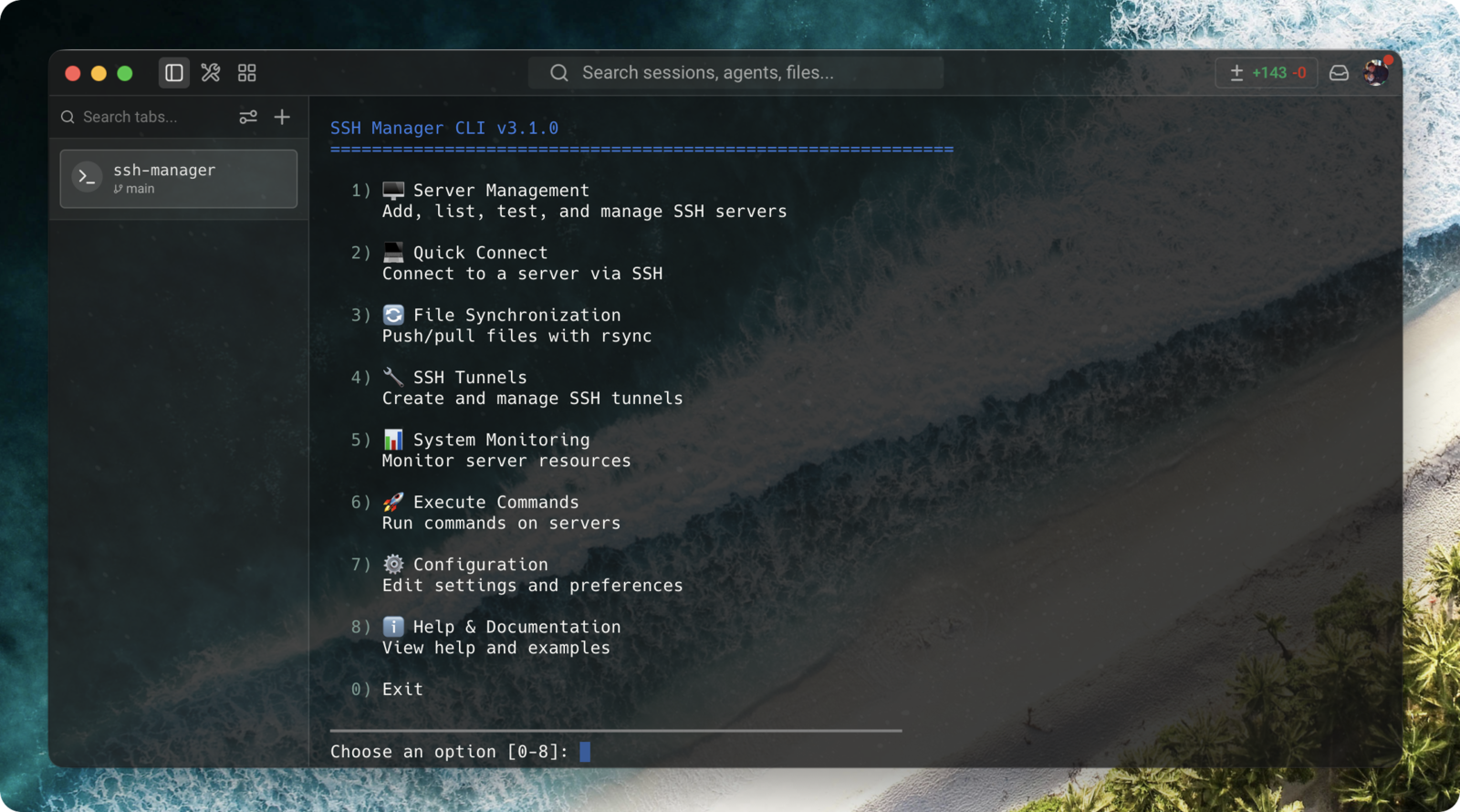
There is a CLI too, for when you'd rather do it yourself: ssh-manager with no arguments opens this.
Watch over its shoulder — the control plane
New in 4.0.0. The application is opt-in: with no vault and no approval enabled, the engine keeps working headlessly, exactly as 3.8.x. See the migration guide for host-key verification and recovery behaviour.
ssh-manager control # prints a local URL — or `ssh-manager app` for the desktop app
One thing in two wrappers. ssh-manager control runs the whole interface in a browser tab with nothing extra to install; the desktop builds for macOS, Windows and Linux are that same page with the engine inside them, so they need neither Node nor the npm package.
The desktop build adds the two things a browser tab cannot do:
- It lives in the menu bar. The icon carries a count when something is waiting, and its menu lists what is blocked on you, which shells and commands are open right now, and your servers — so "is anything waiting on me?" costs a glance instead of a window switch. Closing the window leaves it there rather than quitting.
- It posts real system notifications, with the application's own identity, so macOS and Windows show and route them properly. Destructive requests stay on screen instead of fading after four seconds. macOS asks your permission the first time it needs to.
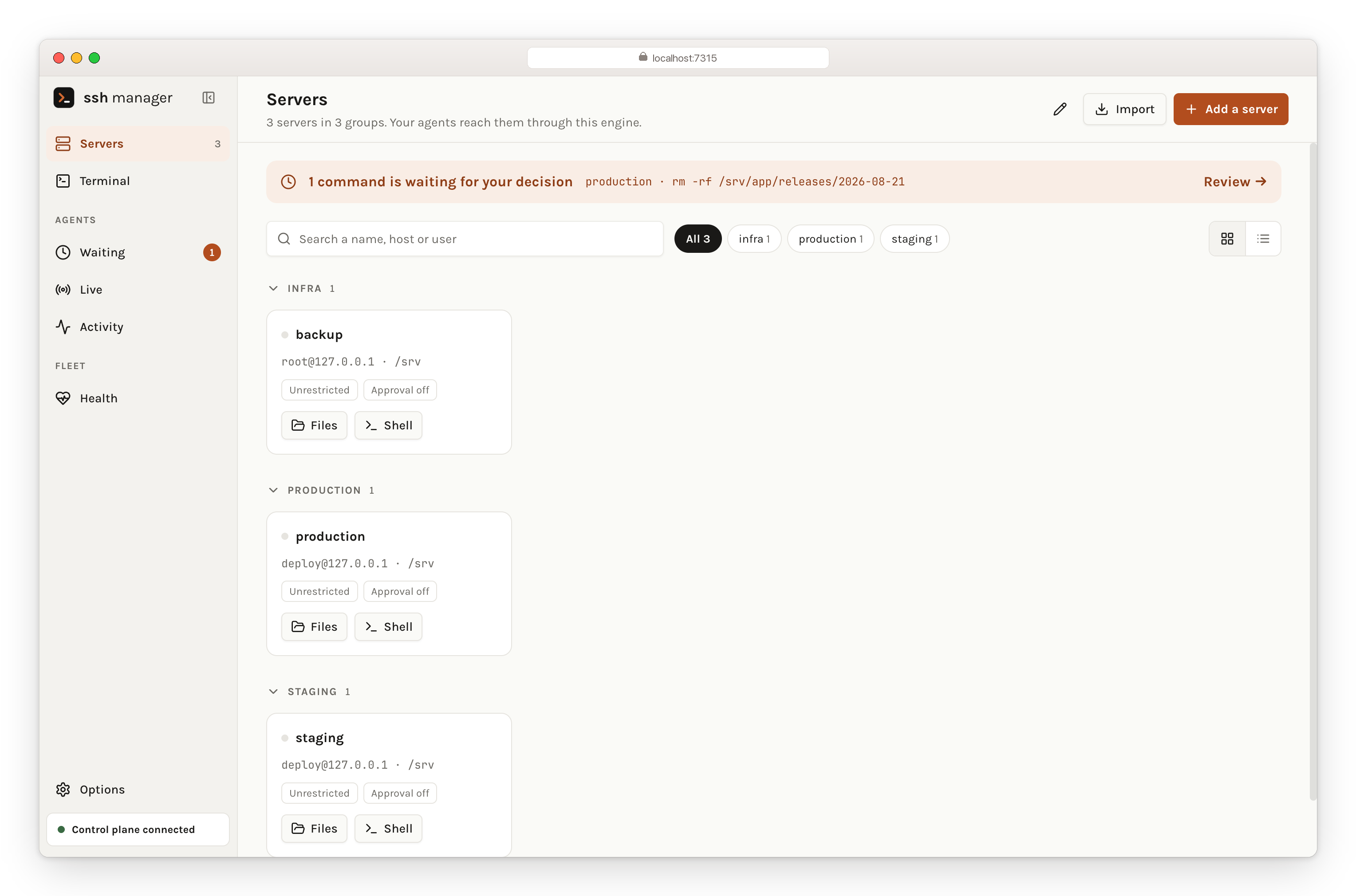
Stop it before it runs
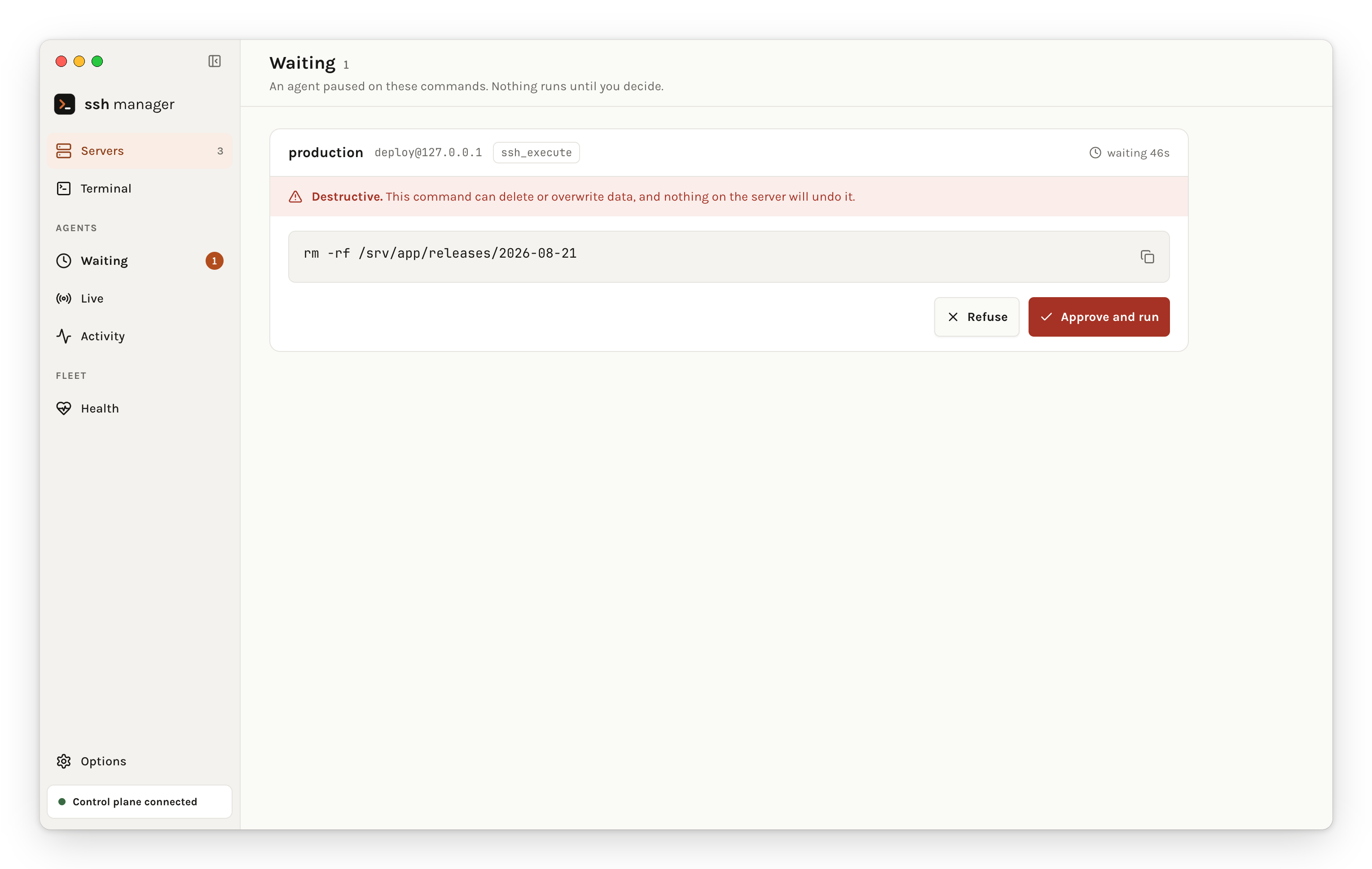
The agent pauses and waits. You see the machine, the user, the tool, and the command in full — wrapped, never truncated, because half a command is how you approve the wrong thing. A desktop notification fires when something is waiting, because the request that goes unseen is the one that times out and is denied.
Approval is switched on from the interface, per server — not from a file:
Servers → the server → Approval → never (default) | destructive | always
Approval is stored in the vault and cannot be overridden by .env or process
variables. Editing connection details preserves it. This prevents accidental
configuration overrides from disabling the gate; it is not a security boundary
against a process that already controls your local user account or vault files.
If you had SSH_SERVER_*_APPROVAL set in a file, the engine says
so on every start rather than quietly leaving you unprotected.
The destructive list is deliberately short. A prompt that cries wolf gets clicked through without being read, which is worse than no prompt at all: systemctl restart does not interrupt you, systemctl stop does.
When a request requires approval, a timeout, unreachable socket or disconnected control plane denies it. If nothing is listening, start ssh-manager control or the desktop app before retrying. Servers with approval disabled keep working headlessly.
See what it's doing, while it does it
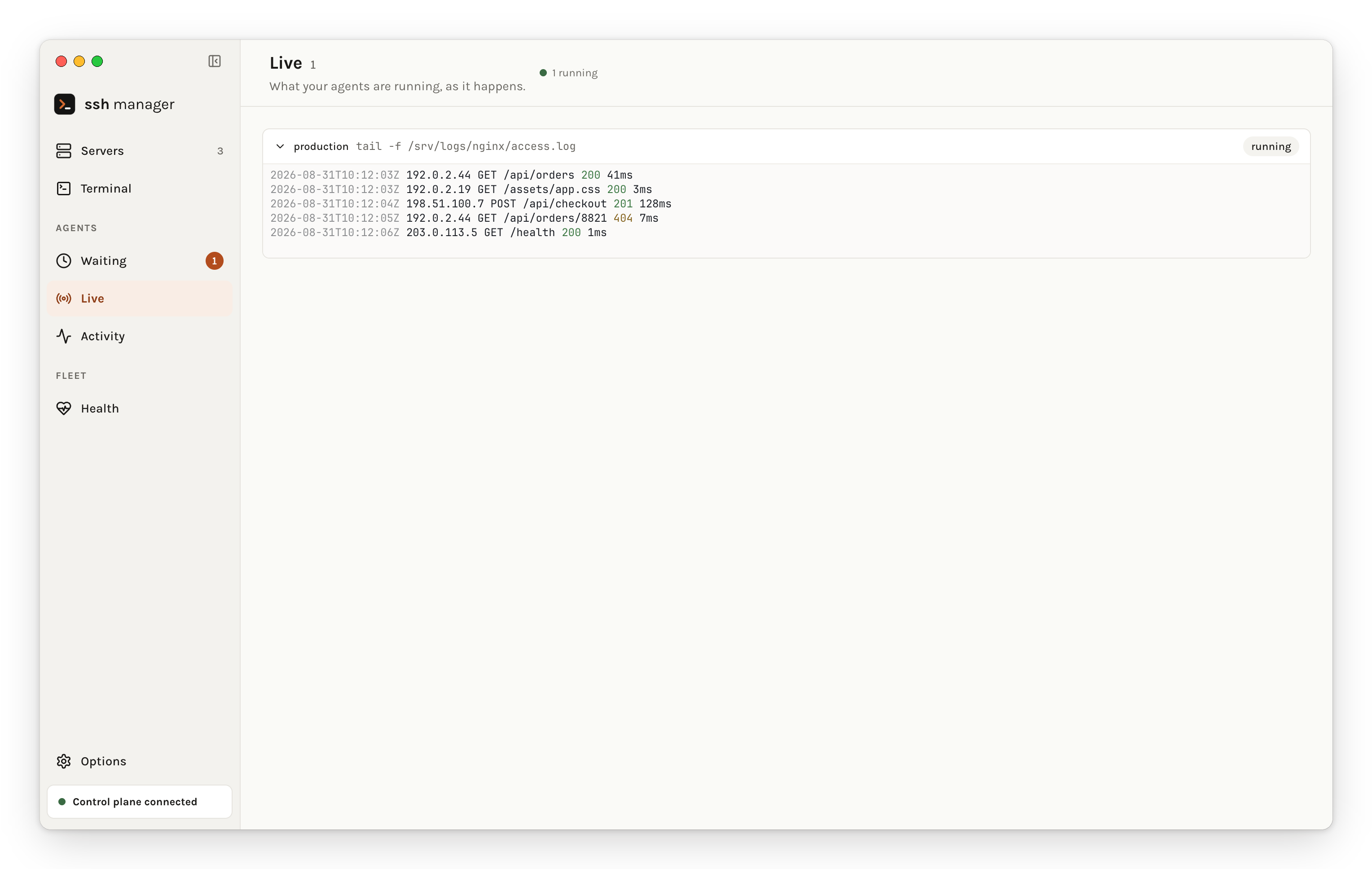
Output goes through a terminal emulator, not a <pre> tag — what your agent ran looks exactly like what you'd have seen had you typed it yourself, colours and all. Each stream keeps a bounded scrollback, so opening the screen mid-command shows what came before instead of starting blank.
Nothing here touches the disk. A stream can carry secrets — a config being catted, a token echoed by a deploy script — so it lives in memory, capped, and disappears with the window.
Both filesystems, side by side
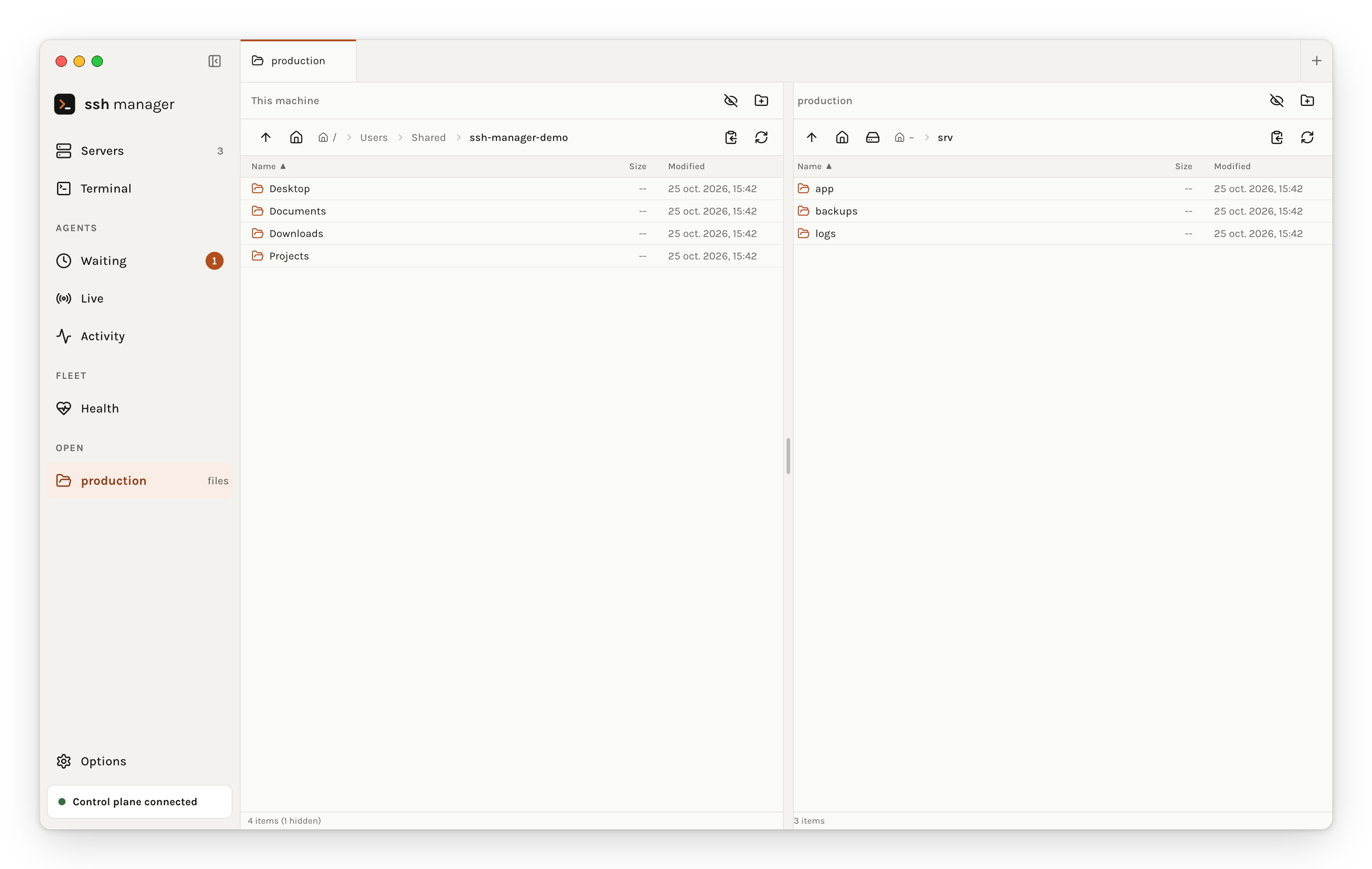
Drag a file across and it moves directly between your machine and the server through the control plane. The browser never holds the bytes — which is faster, and the only way a multi-gigabyte file works at all.
Health, when you ask for it
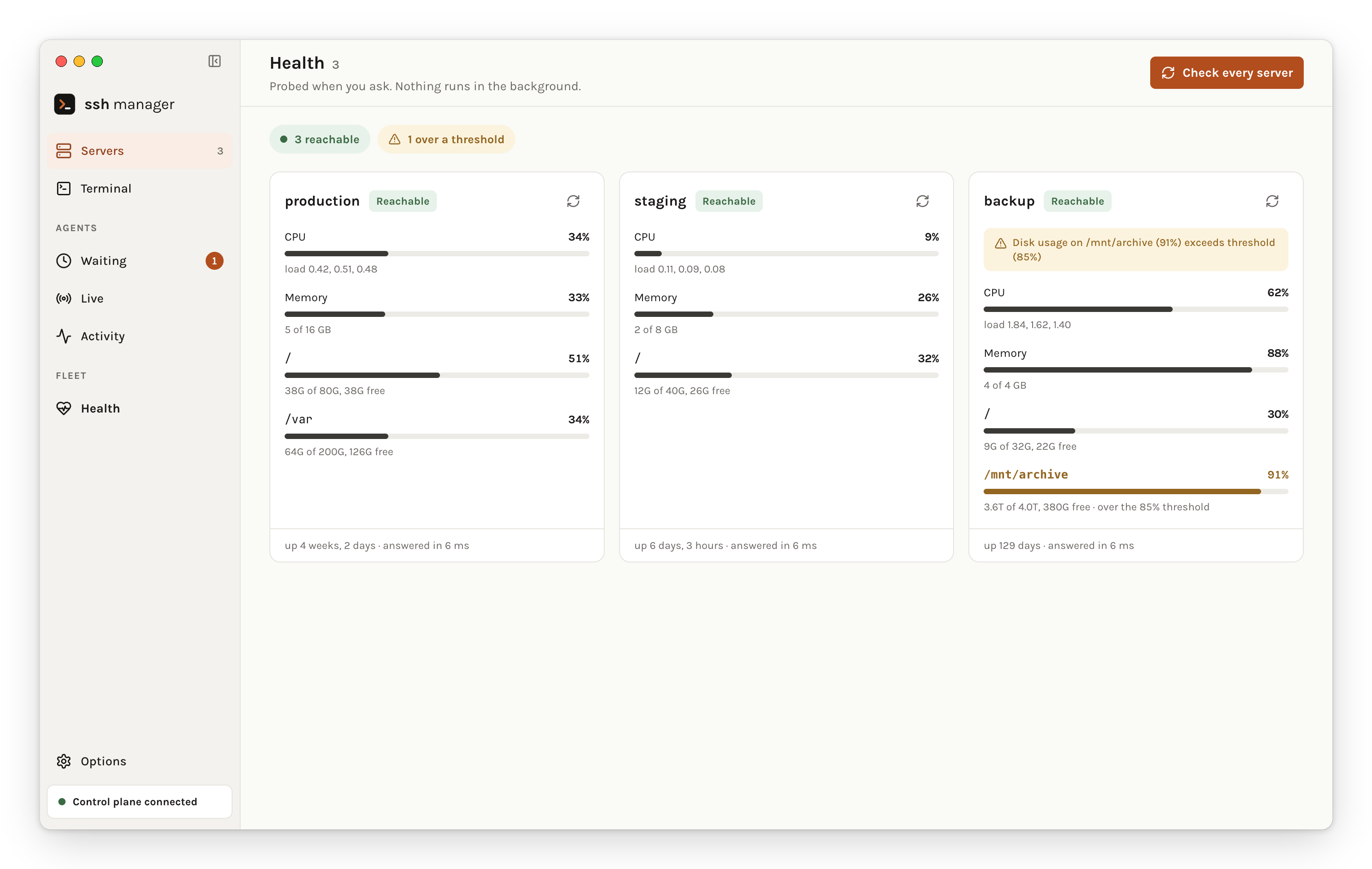
Nothing is probed in the background. Each check is an SSH handshake, and a dashboard that connects to every production box on a timer is worse than no dashboard. The button is the whole scheduling policy. Thresholds are yours to set, and crossing one is said in words rather than encoded in a colour.
A shell on any machine
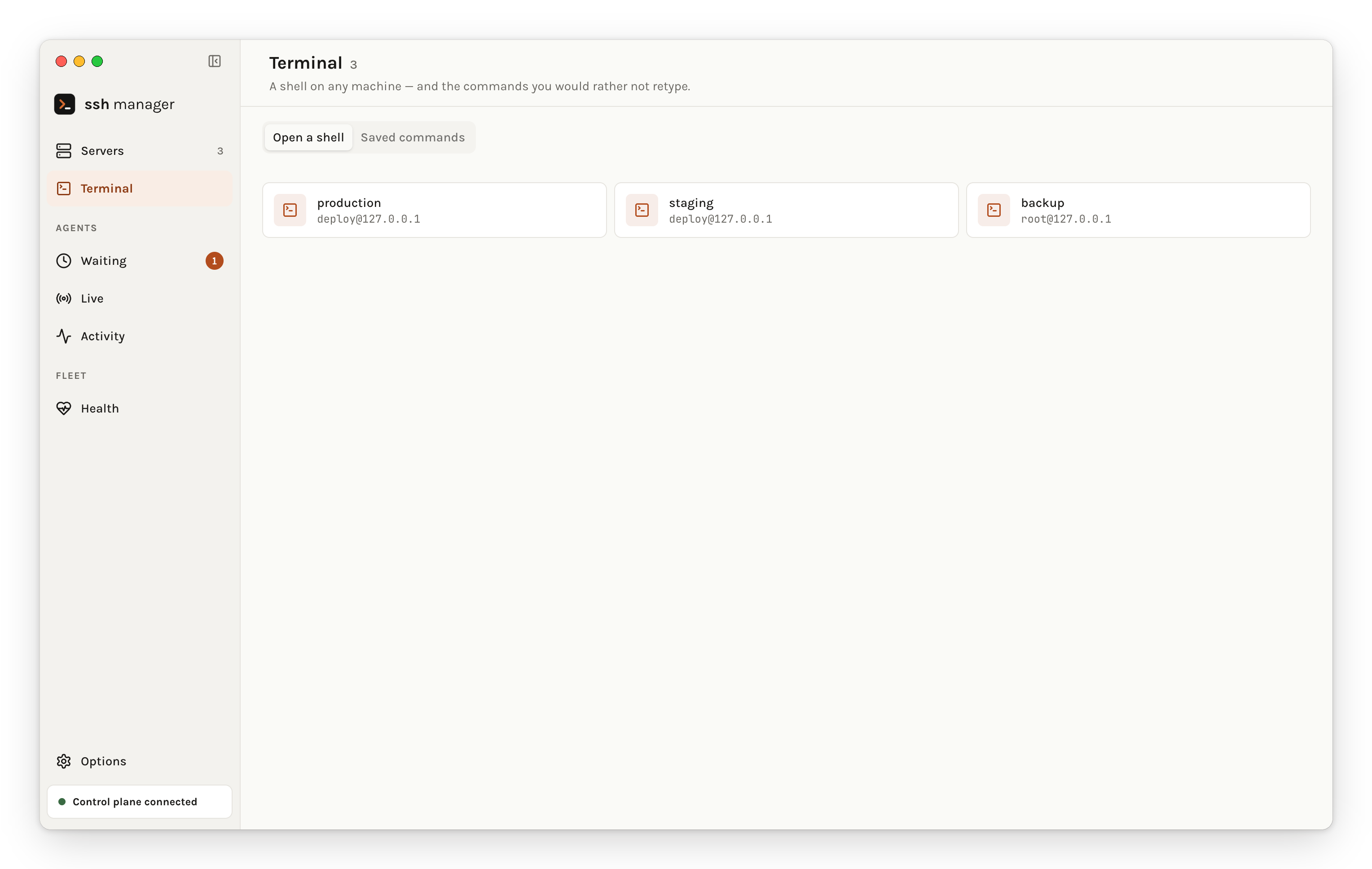
Pick a machine, get a shell — the same one an agent gets, with your keyboard on it. Useful for the ordinary reasons, and for the one people ask about most: running an agent on the server rather than pointing one at it.
Including this machine. The desktop application opens a shell on your own computer too, with your login shell and everything you have configured in it, so you are not switching to a different window to run the local half of the same job. Open as many as you like, on any mix of machines: each is a tab across the top and an entry in the rail, and switching away leaves it running.
Beside it, the commands you would rather not retype, saved per server or for all of them, and picked from a list inside any shell.
And the rest of it
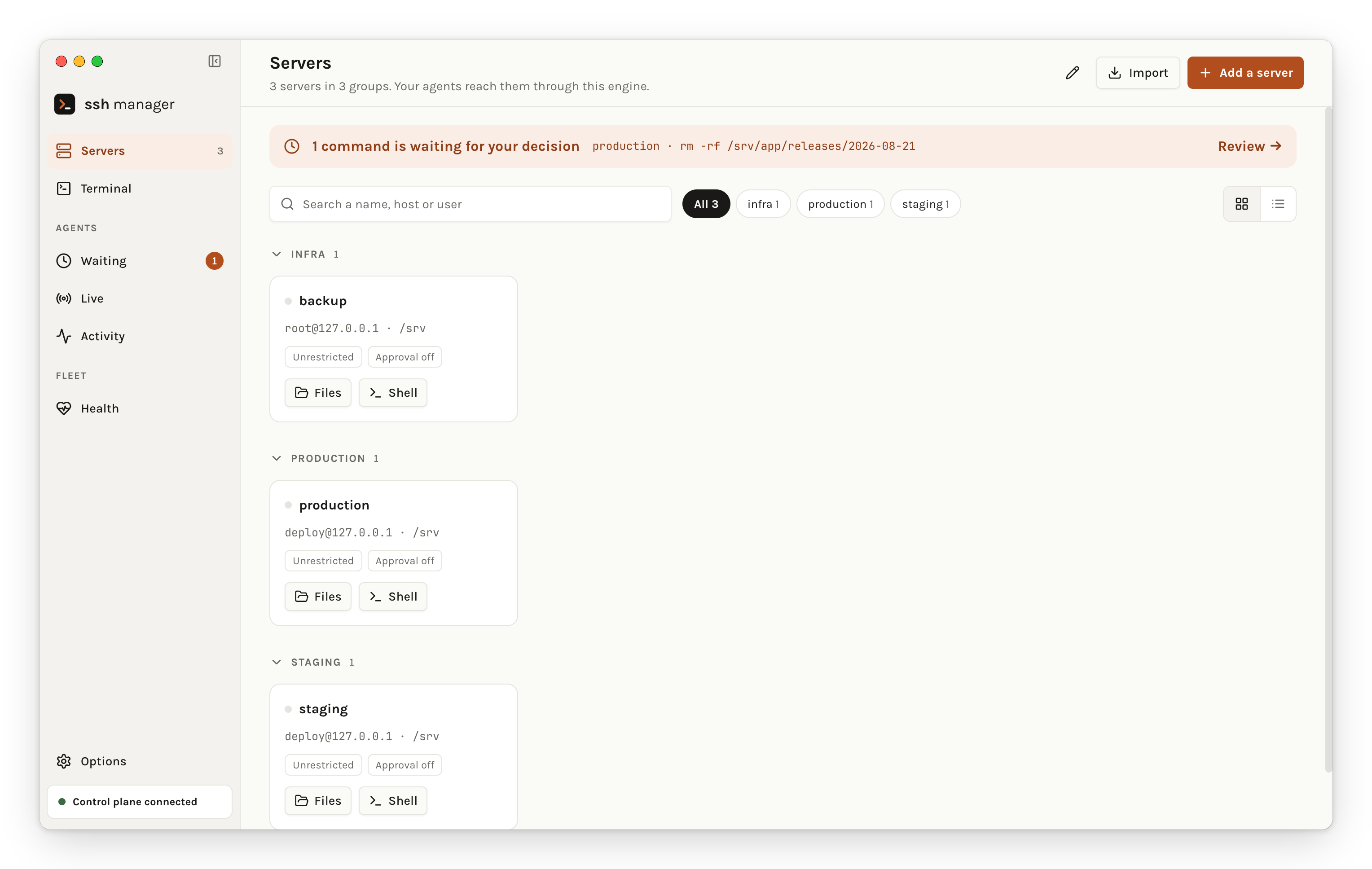
On the same page: an interactive shell on any server, saved commands you pick from a list instead of retyping, groups you can run one command across, the audit trail of what agents ran and what you decided, and your known host keys.
Every screenshot above is the desktop build; each has a browser twin in docs/images/. See ROADMAP-V4.md for what is built and what isn't.
Safe by default
Other SSH MCP servers hand the agent a shell and wish you luck. This one assumes you'd like some say in the matter.
Decide how far it can go — per server
| Mode | What the agent can do |
|---|---|
unrestricted (default) | Everything. Same as any other SSH MCP server, zero overhead. |
readonly | Mutating tools are refused outright — no deploy, no upload, no sudo, no database import. Reads still work. |
restricted | Every command must match an allow pattern and no deny pattern. Anything else is refused before it reaches the host. |
SSH_SERVER_PROD_MODE=readonly
SSH_SERVER_STAGING_MODE=restricted
SSH_SERVER_STAGING_ALLOW_PATTERNS=^systemctl (status|restart) myapp$;^tail -n \d+ /var/log/
SSH_SERVER_PROD_AUDIT_LOG=~/.ssh-manager/audit.jsonl
This is a second layer under Claude Code's autoApprove, which is all-or-nothing per tool: once ssh_execute is approved, anything goes. Useful when you're sharing the MCP with a third-party agent, a CI bot, or working on a client's machine. Full reference in docs/SECURITY_MODES.md.
Credentials out of the clear-text .env
ssh-manager vault import      # take what you already have, encrypted
ssh-manager vault list        # see it, without ever printing a secret
ssh-manager vault add prod    # add one interactively
ssh-manager vault backup FILE # a copy that survives a new machine
AES-256-GCM, master key in your OS keychain (a 0600 file where there is none — Windows, CI, containers). Only secret values are encrypted: hosts, users and modes stay readable, so the file can still be inspected and diffed. GCM is authenticated, so a tampered vault fails loudly instead of handing a wrong password to a production server.
The key belongs to this machine. A vault copied to a new laptop is ciphertext nobody can open — vault backup writes a copy encrypted under a passphrase you choose, which is what makes the move survivable. Your .env is never modified, not by import, not by the interface, and a setup half in each is a normal state rather than a broken one. Upgrading changes nothing on its own: see docs/MIGRATION.md.
The unglamorous parts, which are the ones that bite
- Your sudo password never reaches the remote command line. It travels on the SSH channel's stdin, so it isn't visible in
ps, in/proc/<pid>/cmdline, or in anauditdtrail — unlike theecho "$pass" | sudo -Spattern common in this category (#34). - Every shell argument is quoted through one central helper, with a test that drives 340 builder × argument × payload combinations through a real shell to prove none of them execute.
- Read-only SQL is enforced, not suggested.
ssh_db_queryrefuses anything that isn't aSELECT. - Vulnerabilities are published, not buried. SECURITY.md has the reporting process and every advisory already fixed — including the six in v3.8.6, among them a command injection on the machine running the server, triggered by any SSH server it connects to.
- Reproducible installs. The lockfile is committed, CI installs with
npm ci, and a test enforces that every dependency resolves to registry.npmjs.org with an integrity hash and no unreviewed install scripts.
Reference
All 37 tools
Core — always enabled
| Tool | What it does |
|---|---|
ssh_list_servers | Every configured server, with its group and mode |
ssh_execute | Run a command. Falls back to the server's DEFAULT_DIR when no cwd is given |
ssh_upload / ssh_download | Move a single file either way |
ssh_sync | Bidirectional rsync, with real transfer counts |
Backup & restore (v2.1+)
| Tool | What it does |
|---|---|
ssh_backup_create | MySQL, PostgreSQL, MongoDB or files — compressed, with metadata and retention |
ssh_backup_list | Everything available, with size, date and retention |
ssh_backup_restore | Restore one, including across databases |
ssh_backup_schedule | Put it on cron, with automatic cleanup |
See the Backup Guide and examples/backup-workflow.md.
Health & monitoring (v2.2+)
| Tool | What it does |
|---|---|
ssh_health_check | CPU, memory, disk, network, uptime, load — with an overall verdict |
ssh_service_status | nginx, mysql, docker… on systemd or sysv |
ssh_process_manager | List, inspect or kill; sort by CPU or memory |
ssh_alert_setup | Thresholds, and what happens when one is crossed |
ssh_monitor, ssh_tail | Live resource monitoring and log following |
Databases (v2.3+)
| Tool | What it does |
|---|---|
ssh_db_dump | MySQL, PostgreSQL, MongoDB; optional gzip, optional table subset |
ssh_db_import | Import a dump, .gz handled automatically |
ssh_db_list | Databases, or the tables inside one |
ssh_db_query | SELECT only — enforced, not suggested |
Deployment & sessions
| Tool | What it does |
|---|---|
ssh_deploy | Files out, with permissions, backup and restart handled — see the Deployment Guide |
ssh_execute_sudo | Sudo, with the password on stdin rather than the command line |
ssh_session_* | Persistent shells that keep their context between commands |
ssh_tunnel_* | Local, remote and SOCKS forwarding |
Organisation
| Tool | What it does |
|---|---|
ssh_alias | Short names for servers |
ssh_command_alias | Short names for commands you keep retyping |
ssh_group_*, ssh_execute_group | Run one thing across many machines |
ssh_hooks | Automation hooks around SSH operations — see Aliases and Hooks |
ssh_profile | Swap whole sets of aliases and hooks — default, frappe, docker, nodejs, or your own |
Spending less context — tool groups
All 37 tools cost roughly 43.5k tokens of context. Most people don't need all of them.
ssh-manager tools configure     # interactive wizard
ssh-manager tools list          # what's on right now
ssh-manager tools enable monitoring
ssh-manager tools disable backup
| Mode | Tools | Context | Good for |
|---|---|---|---|
| All (default) | 37 | ~43.5k | The full set |
| Minimal | 5 | ~3.5k | Just SSH, and 92% of the context back |
| Custom | 5–37 | varies | Whatever you actually use |
Groups: core (5, always on) · sessions (4) · monitoring (6) · backup (4) · database (4) · advanced (14).
Fewer tools also means fewer approval prompts and a faster start. ssh-manager tools export-claude writes the matching auto-approval block.
Bringing servers in from somewhere else
Nobody starts here. You have a ~/.ssh/config with forty hosts, or a FileZilla
site manager, or a spreadsheet a colleague sent you.
ssh-manager import ~/.ssh/config          # the format is worked out for you
ssh-manager import --from transmit        # or read where a tool keeps its list
ssh-manager import --template servers.xlsx   # or get a form to fill in
| Source | How |
|---|---|
Spreadsheet (.xlsx) | --template writes one with the columns filled in and three examples to type over |
| CSV | Comma or semicolon — Excel writes both, depending on where you live |
~/.ssh/config | Host, HostName, User, Port, IdentityFile, ProxyJump. Wildcards are skipped, aliases collapse to one server |
| FileZilla | sitemanager.xml. SFTP sites only — an FTP bookmark is not an SSH server |
| PuTTY | An exported .reg. A .ppk key is refused with the puttygen line that converts it |
| Termius | JSON export, groups included |
| MobaXterm | .mxtsessions, folder becomes the group |
| Transmit | Its favourites, read directly (macOS) |
Import is additive. A name you already have comes back as "already
configured — left alone", never a silent overwrite; --replace if that is what
you want. Two rows with the same name become web and web_2 rather than one.
No password is ever read. FileZilla keeps them base64-encoded, Transmit in the keychain, PuTTY not at all. Copying a credential out of another application's store is not a favour — it moves a secret you had forgotten into a second place you now have to think about. Hosts, users, ports and key paths come across; you are asked for a password once, when you first connect.
Going the other way:
ssh-manager export servers.xlsx # or .csv, .env, .toml
Exports carry no passwords, no passphrases, no sudo passwords — an export is a file people email each other and commit by accident.
Configuration — every field
Two interchangeable formats, read by the same loader: .env is the usual choice with Claude Code, TOML with Codex (from SSH_CONFIG_PATH, or ~/.codex/ssh-config.toml). Both can coexist — the loader merges them.
SSH_SERVER_[NAME]_HOST=hostname_or_ip
SSH_SERVER_[NAME]_USER=username
SSH_SERVER_[NAME]_PASSWORD=password          # or use a key
SSH_SERVER_[NAME]_KEYPATH=~/.ssh/key
SSH_SERVER_[NAME]_CERTPATH=~/.ssh/key-cert.pub # optional: OpenSSH certificate for KEYPATH
SSH_SERVER_[NAME]_PASSPHRASE=key_passphrase  # optional
SSH_SERVER_[NAME]_PORT=22                    # optional
SSH_SERVER_[NAME]_DEFAULT_DIR=/var/www       # optional working directory
SSH_SERVER_[NAME]_SUDO_PASSWORD=…            # optional, for automated deploys
SSH_SERVER_[NAME]_DESCRIPTION=…              # optional
SSH_SERVER_[NAME]_GROUP=production           # optional, free-form label
SSH_SERVER_[NAME]_PLATFORM=windows           # optional: linux (default) | windows
SSH_SERVER_[NAME]_PROXYJUMP=bastion          # optional: another server, as jump host
SSH_SERVER_[NAME]_PROXYCOMMAND=…             # optional: ncat, ssh -W, …
SSH_SERVER_[NAME]_FORWARD_AGENT=true         # optional, and a real security trade-off
SSH_SERVER_[NAME]_ANNOUNCE_AGENT=true        # optional: tell this host an AI agent is driving (off by default)
SSH_SERVER_[NAME]_MODE=readonly              # optional: unrestricted | readonly | restricted
# Approval is NOT a field here — it is set per server from the control plane and
# stored in the vault, so that a shell on one of your machines cannot switch off
# the gate that exists to stop it.
SSH_SERVER_[NAME]_AUDIT_LOG=~/audit.jsonl    # optional JSONL trail
The same thing in TOML:
[ssh_servers.production]
host = "prod.example.com"
user = "admin"
key_path = "~/.ssh/id_rsa"
port = 22
default_dir = "/var/www"
group = "production"
description = "Production server"

[ssh_servers.winhost]
host = "192.168.1.90"
user = "svc-ssh"
key_path = "~/.ssh/winhost_key"
port = 2222
platform = "windows"

[ssh_servers.internal]
host = "10.0.0.5"
user = "admin"
proxy_jump = "bastion"
OpenSSH user certificates — for servers that trust a certificate authority (TrustedUserCAKeys), point CERTPATH / cert_path at the certificate signed for KEYPATH (usually <key>-cert.pub). It is read on every connection, so a short-lived certificate renewed on disk needs no restart, and a missing file fails the connection instead of falling back to the bare key. It takes effect once ssh2 ships certificate support (mscdex/ssh2#1495); until then the plain key is offered, as before. ssh_sync uses the system ssh, which finds <key>-cert.pub next to the key on its own.
Loading order, highest priority first: process environment → .env → the encrypted vault → TOML. A credential you deliberately put in the vault beats one left in a .env; an operator overriding for a single run still beats both.
Profiles bundle aliases and hooks per project type. Set one with export SSH_MANAGER_PROFILE=frappe, or switch from your assistant, which remembers it in ~/.ssh-manager/profile. Ships with default, frappe, docker and nodejs; add your own in profiles/. Custom aliases and hooks also live in ~/.ssh-manager/, so an upgrade keeps them.
More examples: examples/codex-ssh-config.example.toml.
Getting to machines you can't reach directly
Through a bastion — the tunnel is transparent, every tool works as usual:
SSH_SERVER_BASTION_HOST=bastion.example.com
SSH_SERVER_BASTION_USER=jumpuser
SSH_SERVER_BASTION_KEYPATH=~/.ssh/bastion_key

SSH_SERVER_PRIVATE_HOST=10.0.0.5
SSH_SERVER_PRIVATE_USER=admin
SSH_SERVER_PRIVATE_PROXYJUMP=bastion
Chains work: if bastion itself has a PROXYJUMP, it's followed recursively. Circular references are detected and rejected.
Through a SOCKS proxy or a custom command — it runs locally and forwards to the host, with %h and %p for host and port:
SSH_SERVER_SOCKS_PROXYCOMMAND="ncat --proxy 127.0.0.1:1080 --proxy-type socks5 %h %p"
SSH_SERVER_WINPROXY_PROXYCOMMAND="C:\Windows\System32\OpenSSH\ssh.exe -W %h:%p user@jump-host"
Passphrase-protected keys — load the key into ssh-agent and nothing else is needed; SSH_AUTH_SOCK is picked up automatically, the same mechanism plain ssh uses. Storing PASSPHRASE in the config works too, and is the less good option.
Agent forwarding (FORWARD_AGENT=true, off by default, per server) lets a process on the remote host authenticate to other hosts with your local keys — git clone over SSH on a server without copying a private key there.
⚠️ Anyone who can read the forwarded socket on that host — root included — can impersonate you against other hosts for the life of the connection. Only for servers you trust, exactly as
ssh_config(5)advises.
Telling your servers an agent is driving (ANNOUNCE_AGENT=true per server, or SSH_MANAGER_ANNOUNCE_AGENT=true for all of them; off by default). Every command channel then carries AI_AGENT=mcp-ssh-manager, following the AI_AGENT over SSH convention, so a host that records it can tell a session an agent drives from one a person drives — SSH cannot otherwise: same key, same user either way. Contributed by @mthamil107 in #84.
- The server has to accept it. Stock OpenSSH ships
AcceptEnv LANG LC_*and drops anything else silently. AddAcceptEnv AI_AGENTtosshd_configand reload;$AI_AGENTis then set for every command and shell the agent runs, for a profile, a wrapper or an audit hook to record. - Off by default, for two reasons. Upgrading must not change what reaches your servers. And the request reaches every host whatever its
AcceptEnv— sshd only declines to store it — so a host you do not control would learn an agent is on the other end, and could shape its output for one.ANNOUNCE_AGENT=falsekeeps one host silent under the global switch. - Covered: commands,
ssh_tail --follow, interactive sessions, andssh_sync(viaSendEnv, supported since OpenSSH 3.9). Not covered: SFTP transfers — ssh2 would fail the whole SFTP session on a server that refuses the variable — and port forwards, which have no environment. - A person is never announced. Everything you do from the control plane — a shell, a file, a health probe, a command across a group — is yours, and reaches the server unlabelled.
Groups — tag servers and they become a group, with no extra file to maintain:
SSH_SERVER_WEB1_GROUP=production
SSH_SERVER_WEB2_GROUP=production
Groups created with ssh_group_manage live in .server-groups.json and additionally carry execution settings (strategy, delay, stop-on-error). When a name exists in both places, membership is the union and the stored settings apply. Names are case-insensitive. A group that exists only through the group field is read-only for ssh_group_manage — change membership by editing the servers.
When something goes wrong
Claude Code freezes or shows "Interrupted" — almost always an output too large for the context. Output is auto-truncated and the default timeout is two minutes, but you can tune it:
MCP_SSH_MAX_OUTPUT_LENGTH=5000    # default 10000 characters
MCP_SSH_DEFAULT_TIMEOUT=180000    # default 120000 ms
MCP_SSH_COMPACT_JSON=true         # fewer tokens per response
And prefer tail -n 100 huge.log over cat huge.log — the same advice you'd give a colleague.
Tools don't show up — claude mcp list, then restart Claude Code. /mcp inside Claude Code shows the live status.
Connection failed — ssh-manager server test <name> first; it tells you whether it's DNS, the firewall, or the credentials.
Permission denied — check chmod 600 ~/.ssh/your_key, then the username, then what that user is allowed to do on the host.
Still stuck? Open an issue — include the server's PLATFORM and what ssh-manager server test said.
Known limitations, honestly:
- Command timeouts are advisory. ssh2 can't kill a remote process; on Linux and macOS hosts a
timeoutwrapper does it properly. On Windows hosts setPLATFORM=windowsto skip that wrapper, which OpenSSH for Windows doesn't understand. ssh_syncwith password auth needssshpass. Keys are better anyway. On a Windows host, pass native paths likelocal:C:\project— drive-letter and UNC paths are converted to MSYS2 form, and a path already written as/c/...is passed through untouched rather than converted twice.- Connections are pooled and reused. A stale one reconnects on next use; force it with
ssh_connection_statusand thereconnectaction.
Working on the project
git clone https://github.com/bvisible/mcp-ssh-manager.git
cd mcp-ssh-manager && npm ci
./scripts/setup-hooks.sh      # pre-commit checks, including secret detection

npm test                      # 43 suites
npm run typecheck             # JSDoc through tsc, no build step
npm run test:all              # both, plus ./scripts/validate.sh
npm run test:preview          # isolated candidate fixture, restart and cleanup
The layout:
src/          index.js is the MCP server and its 37 tools; one module per domain
              (ssh-manager, config-loader, session-manager, backup-manager,
               health-monitor, database-manager, tunnel-manager, server-groups…)
cli/          the Bash CLI, plus the Node wrapper that makes it work on Windows
ui/           the control plane's React interface (v4)
desktop/      the Electron build (v4)
profiles/     frappe, docker, nodejs — and room for yours
scripts/      validation, and the rig that regenerates every screenshot and the video
docs/         guides, migration notes, security modes
Pull requests are welcome — CONTRIBUTING.md has the details. Shipping the desktop builds — signing, notarization, and why the Mac App Store is a different product rather than a further step — is in docs/DISTRIBUTION.md.
Nothing in this README's imagery is taken by hand. scripts/demo-env.mjs stands up three real ssh2 servers on the loopback with a seeded vault, a pending approval and a live stream; capture-screenshots.mjs and record-demo.mjs drive Chrome over the DevTools protocol against it; frame-screenshots.py draws the browser and application windows, and macbook-mockup.py draws the laptop. After a UI change, re-run them rather than editing an image.
The hero animation ships twice, light and dark, swapped by <picture> on prefers-color-scheme. A single transparent GIF would have been simpler, but GIF alpha is one bit and transparency defeats its inter-frame compression: the same clip came out at 11.4 MB transparent against 357 KB on a solid ground.
What's new
4.0.0 — the control plane. See what an agent is running on your servers, with its output, and stop it before it runs. A desktop application for macOS, Windows and Linux, installed from the engine with ssh-manager app; an encrypted vault for credentials; human approval per server; a shell on your own machine alongside the remote ones. Everything new is opt-in — an npm install upgraded from 3.8.x keeps behaving as 3.8.x, which a test installs from the registry and proves. The Windows application is not code-signed in this release. What changes and how to go back.
v3.8.7 — a security release; upgrade. Two advisories fixed: a partial server name or an alias escaped readonly and restricted mode (GHSA-mq9f-5385-rjf4), and ssh_backup_restore's backupId ran commands on the server (GHSA-2wjh-xm9c-7qf9). See the CHANGELOG.
v3.8.6 — a security release; upgrade. Six advisories fixed. The default on-error hook let any SSH server you connect to run a command on your machine; restricted mode only checked how a line started; ssh_db_query could write; host keys were never compared. See the CHANGELOG.
v3.8.5 — a security release. Three command-injection advisories fixed, one of which defeated readonly mode. Upgrade if you use ssh_backup_*, ssh_db_dump, ssh_service_status or ssh_tail.
- RCE bypassing
readonly/restricted(GHSA-m793-whw6-f537) —ssh_service_statusandssh_tailare read-only, so they stay enabled on servers you locked down, and neither quoted its arguments nor consulted the policy layer. A service name likenginx; id > /tmp/pwnedexecuted. - RCE through
ssh_db_dump(GHSA-796j-h5q5-jx6p) — thestatrun after the dump interpolated the output path raw. The v3.6.7 patch had stopped one line short. - RCE through every
ssh_backup_*tool (GHSA-qwwm-vrm9-4mw8) —backup-manager.jshad zero shell escaping across its nine builders whiledatabase-manager.jshad 95.
Quoting now lives in one module so "did this builder quote its inputs?" has a single answer.
Full changelog, every release back to v1.0.0 →
Documentation · Changelog · Security policy · Roadmap · Issues
Built on the Model Context Protocol, with ssh2 doing the hard part. MIT licensed — see LICENSE.
Made with ❤️ for the Claude Code community

Validation before a release
The V4 testing guide describes the offline suites, real npm 3.8.5 → V4 → rollback checks, browser flows, and platform release gates. Use the final V4 test guide to review the actual npm package or desktop candidate with a disposable profile before publication.