Listed from the MCP registry; nobody on Odel publishes it.

Free Crypto Trading Bot
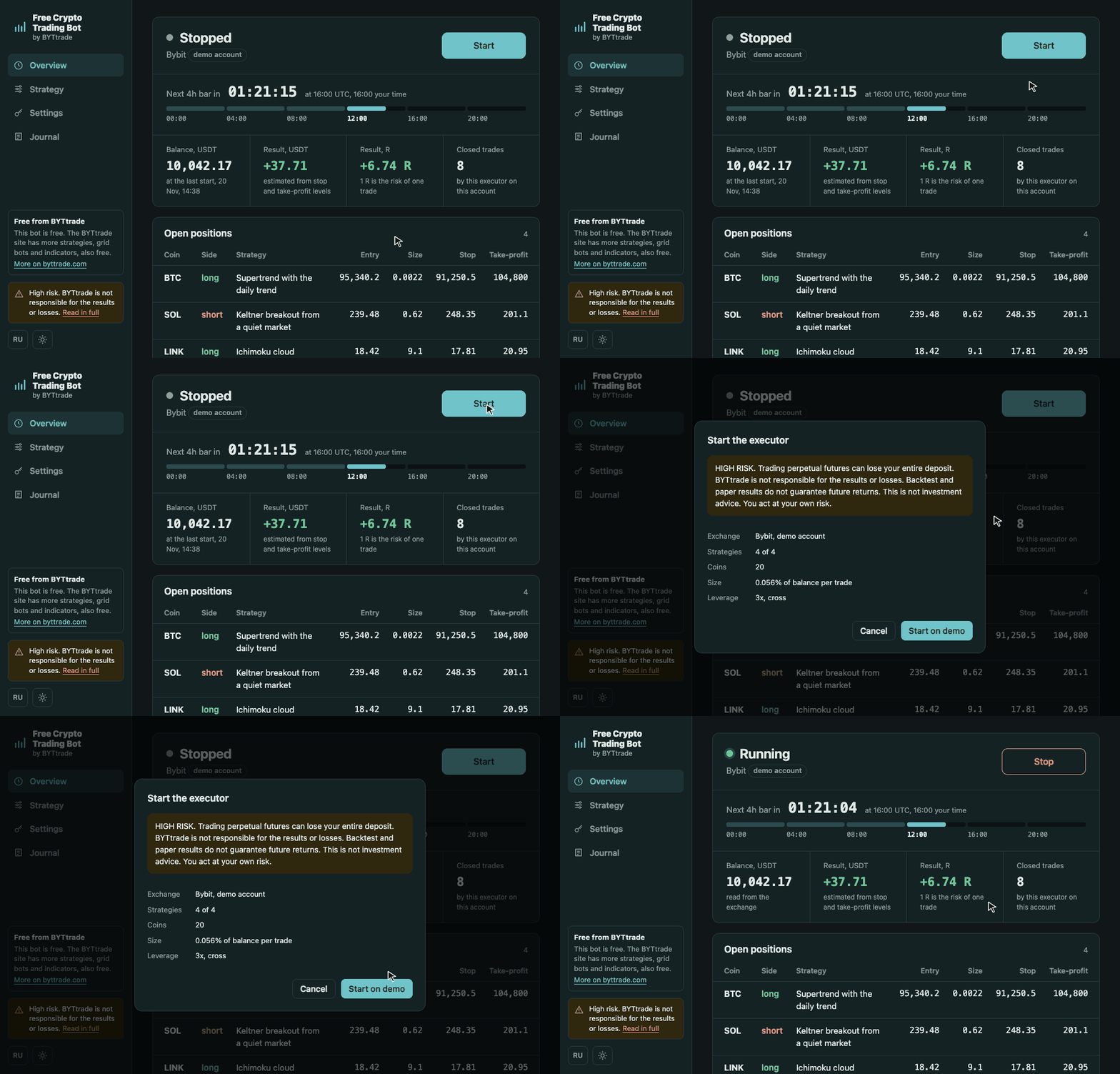
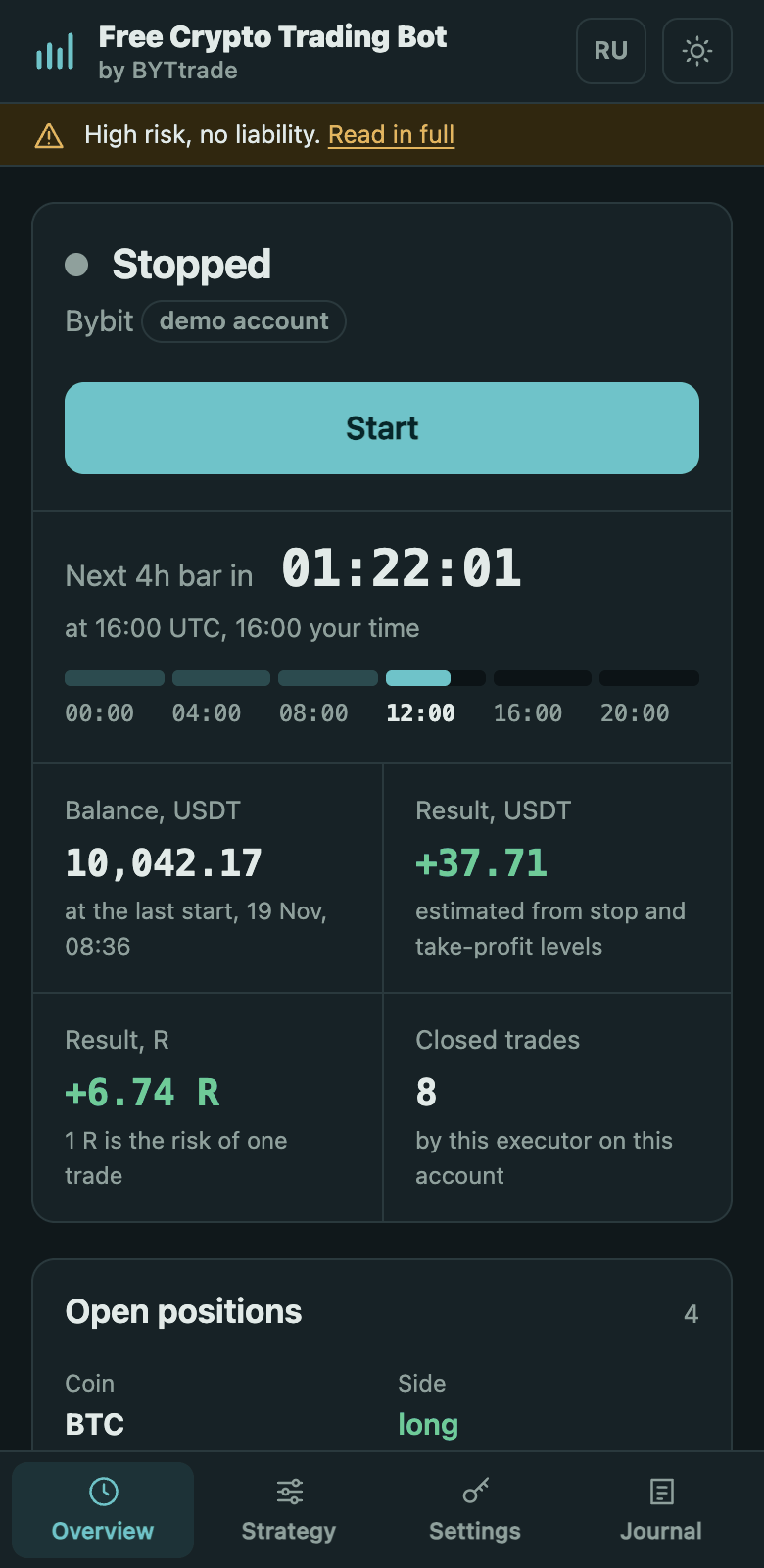
Status, positions, trades and demo-account control of the Free Crypto Trading Bot panel.
Runs on your machine from its package; the steps are below.
What it does
- Reads
- Writes
- High impact
At most: moves money, runs code or commands, deletes data, or sends messages for you.
What it costs
FreeOdel charges nothing per call. The publisher may charge for its own service.
Runs locally over stdio
This server isn't hosted — your MCP client launches it from a package registry. Use one of the commands below, or drop the config into your client (e.g. Claude Desktop).
Run
uvx free-crypto-trading-bot
MCP client config
{
  "mcpServers": {
    "free-crypto-trading-bot": {
      "command": "uvx",
      "args": [
        "free-crypto-trading-bot"
      ]
    }
  }
}
Free Crypto Trading Bot by BYTtrade
Four backtested 4h trend-following strategies for crypto futures, an open backtest you can re-run yourself,
a web panel and 11 exchanges. Free.



















Quick start · Panel · Backtest · How it works · AI agents · Limitations · Guide · Research · Русский
Risk warning and disclaimer. This is high-risk trading: perpetual futures can lose your entire deposit. BYTtrade is not responsible for the results you get or for any losses. Backtest and paper-trading results do not guarantee future returns. Nothing here is investment advice. You act at your own risk. The software comes without any warranty; see sections 8 and 9 of the LICENSE.
The panel with demo data: every balance, position and trade in the pictures on this page is invented.
🚀 What it is and who it is for
- 📈 Four strategies with an open backtest. Trend following on 4h candles for 20 large coins, chosen and checked on 3.5 years of history (2023–2026) with fees, slippage and funding. A later re-test on 2020–2022 came out weaker; both are shown below. Two commands recompute the 2023–2026 table on your computer.
- 🖥️ A web panel instead of a config file. Start and stop, positions, trades, settings and exchange keys in the browser, on a phone too, in English and Russian.
- 🛡️ Built to limit damage. Every position gets a stop-loss on the exchange, an order is never sent twice, and a real account starts only after you type a confirmation phrase.
- 🔌 11 exchanges, demo first. Binance, Bybit, OKX, BingX, KuCoin, Hyperliquid, Bitget, Gate, MEXC, HTX, BloFin. Start on a demo account where the exchange has one.
- 💸 Free. No subscription and no paid tier.
It is for people who want to try systematic trading on a demo account and check a backtest themselves. It is not for anyone who expects a guaranteed income: read the limitations first.
⚡ Install and start
pip (Python 3.10+), or uvx without installing anything:
pip install 'free-crypto-trading-bot[live]'
free-crypto-trading-bot panel          # open http://127.0.0.1:8790

uvx --from 'free-crypto-trading-bot[live]' free-crypto-trading-bot panel
Docker:
curl -O https://raw.githubusercontent.com/byttrade/free-crypto-trading-bot/main/docker-compose.yml
docker compose run --rm bot panel-user     # once: the login of the panel
docker compose up -d                       # open http://127.0.0.1:8790
From source:
git clone https://github.com/byttrade/free-crypto-trading-bot && cd free-crypto-trading-bot
pip install -e '.[live]'
python -m trend4h panel
In the panel: add the API keys of a demo account in Settings, look through Strategy, press Start. The guide covers every step, from creating keys to Docker and running on a server.
The command has three names that do the same: free-crypto-trading-bot, trend4h and python -m trend4h.
trend4h is the internal name of the project: the Python package and the name the LICENSE uses. Keys, settings,
state and downloaded data are kept in the folder you run the command from.
Only want the backtest? No keys and no account are needed:
pip install free-crypto-trading-bot
free-crypto-trading-bot fetch          # public Binance data, about 3 minutes, 11 MB
free-crypto-trading-bot report         # all four strategies on both periods
📊 The panel
| Overview | Strategy |
|---|---|
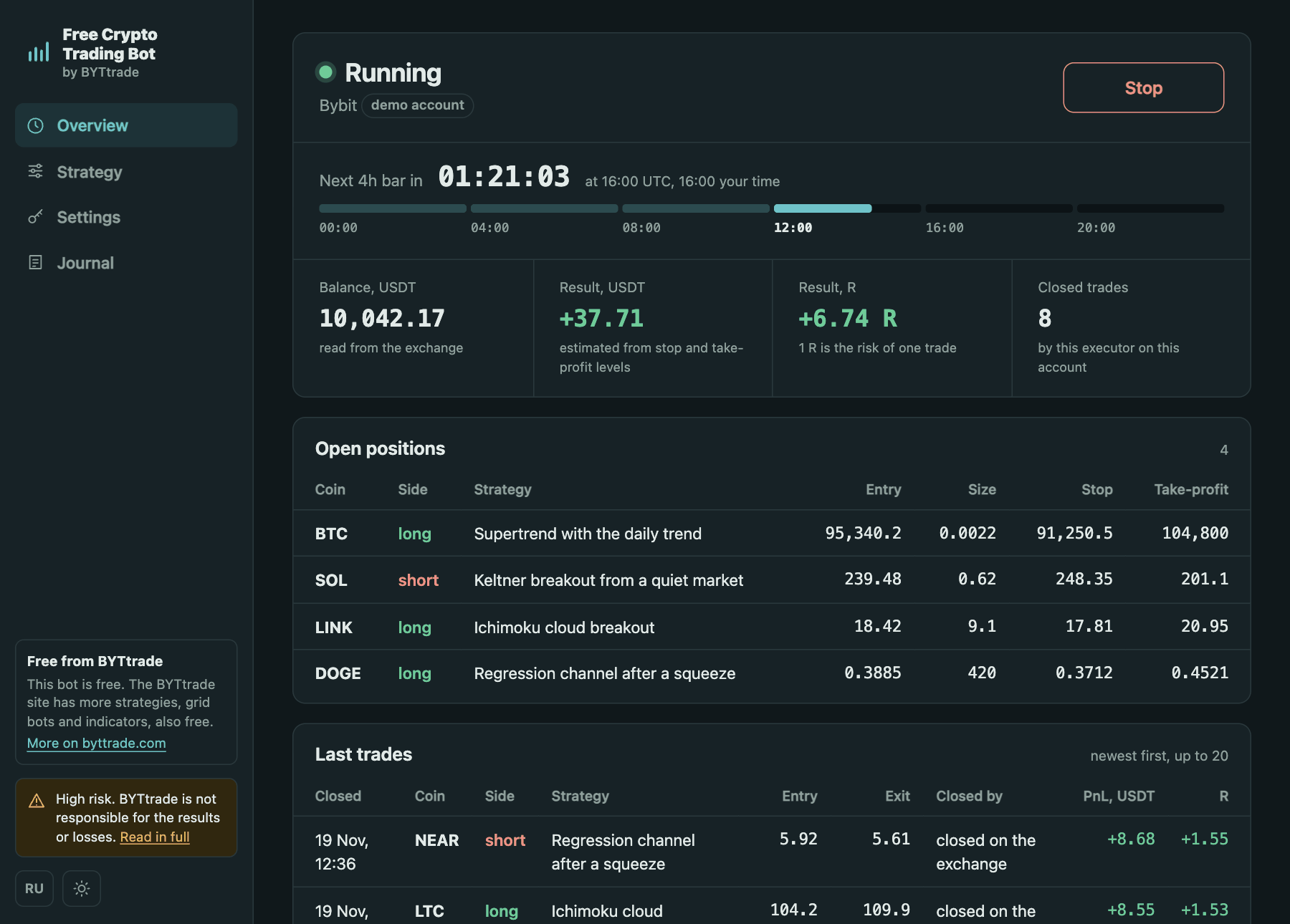 | 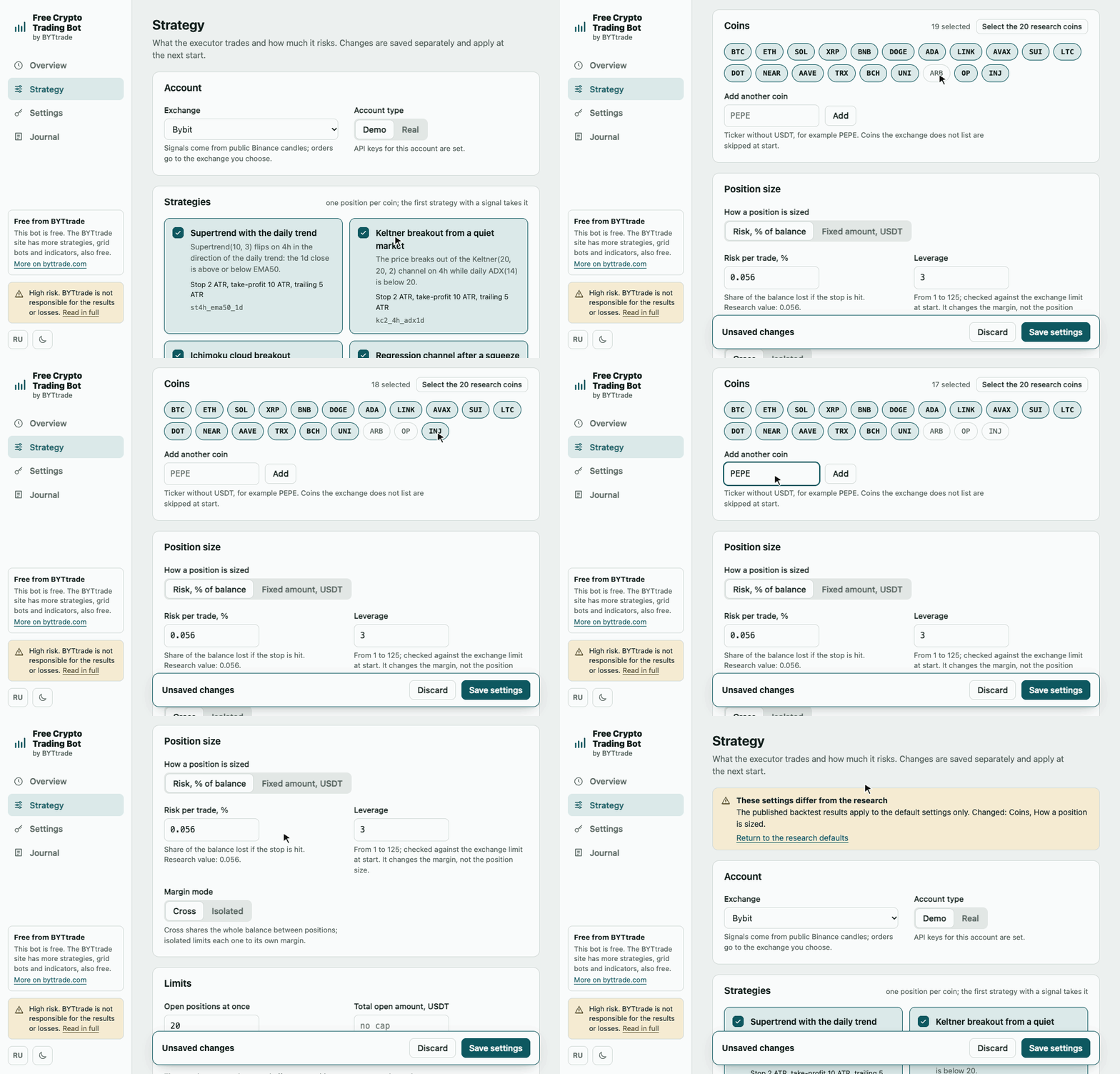 |
| State, time to the next 4h bar, balance, result, open positions and last trades. | Strategies, coins, position size, limits. The panel says so when the settings differ from the research. |
| Exchange keys | Your AI agents |
|---|---|
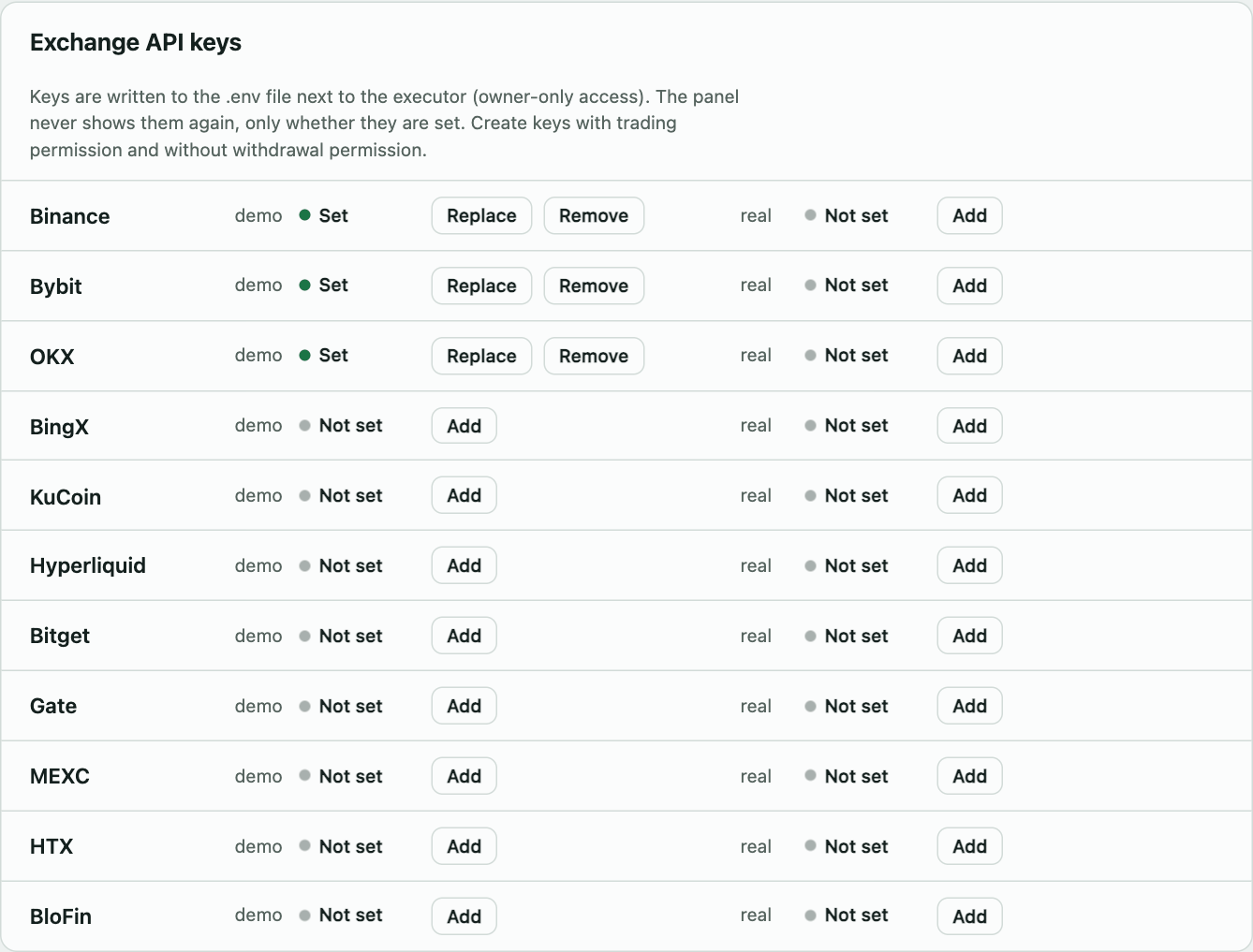 | 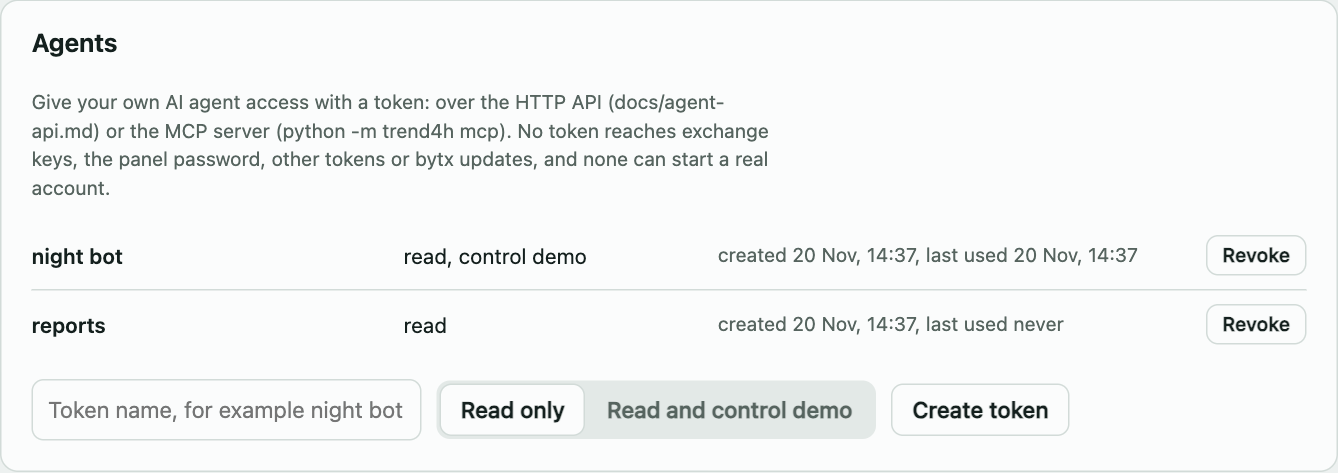 |
Keys go to .env on your machine and are never shown again. | Tokens with read or demo-control rights. |
| Journal | Start dialog | On a phone |
|---|---|---|
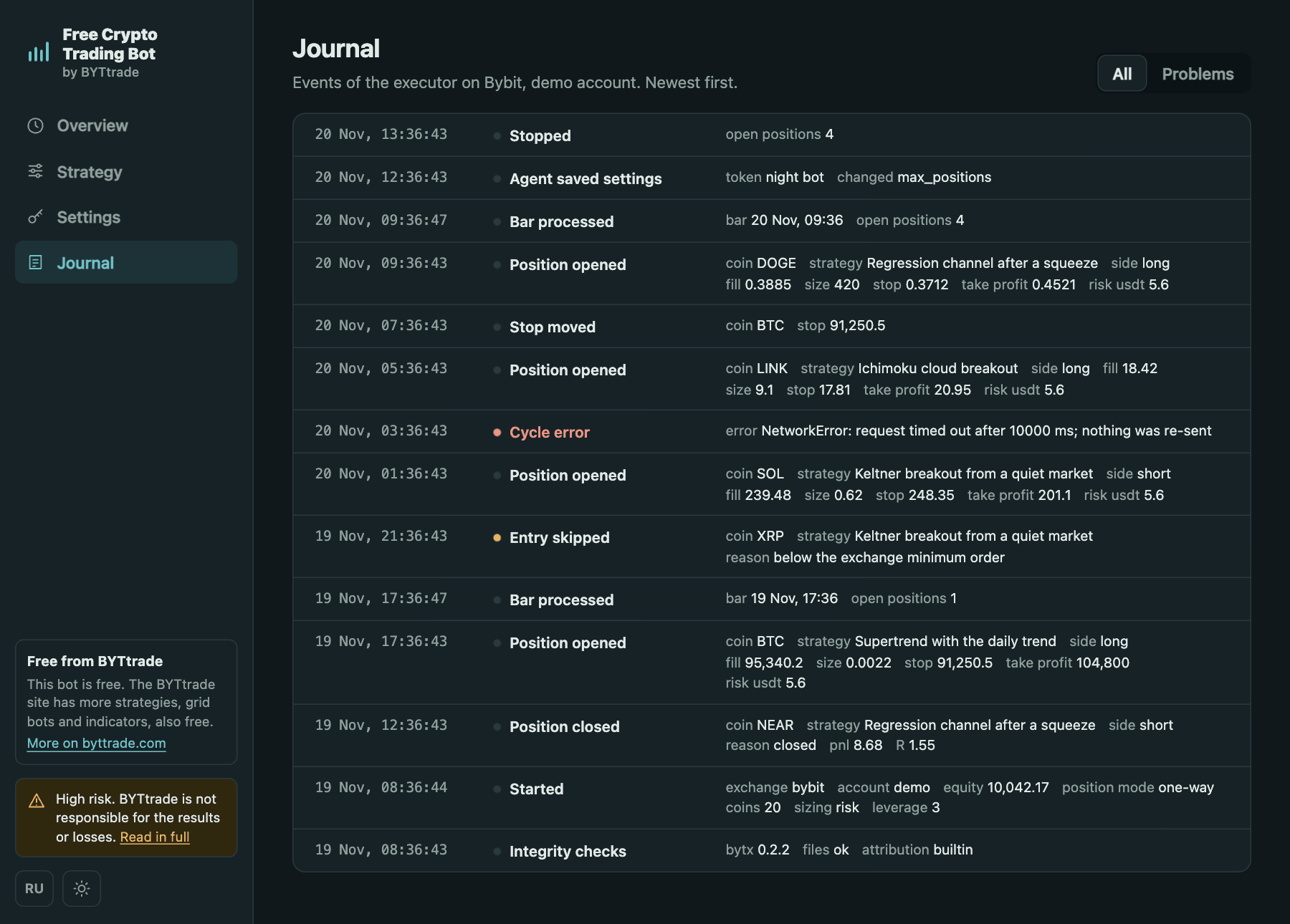 | 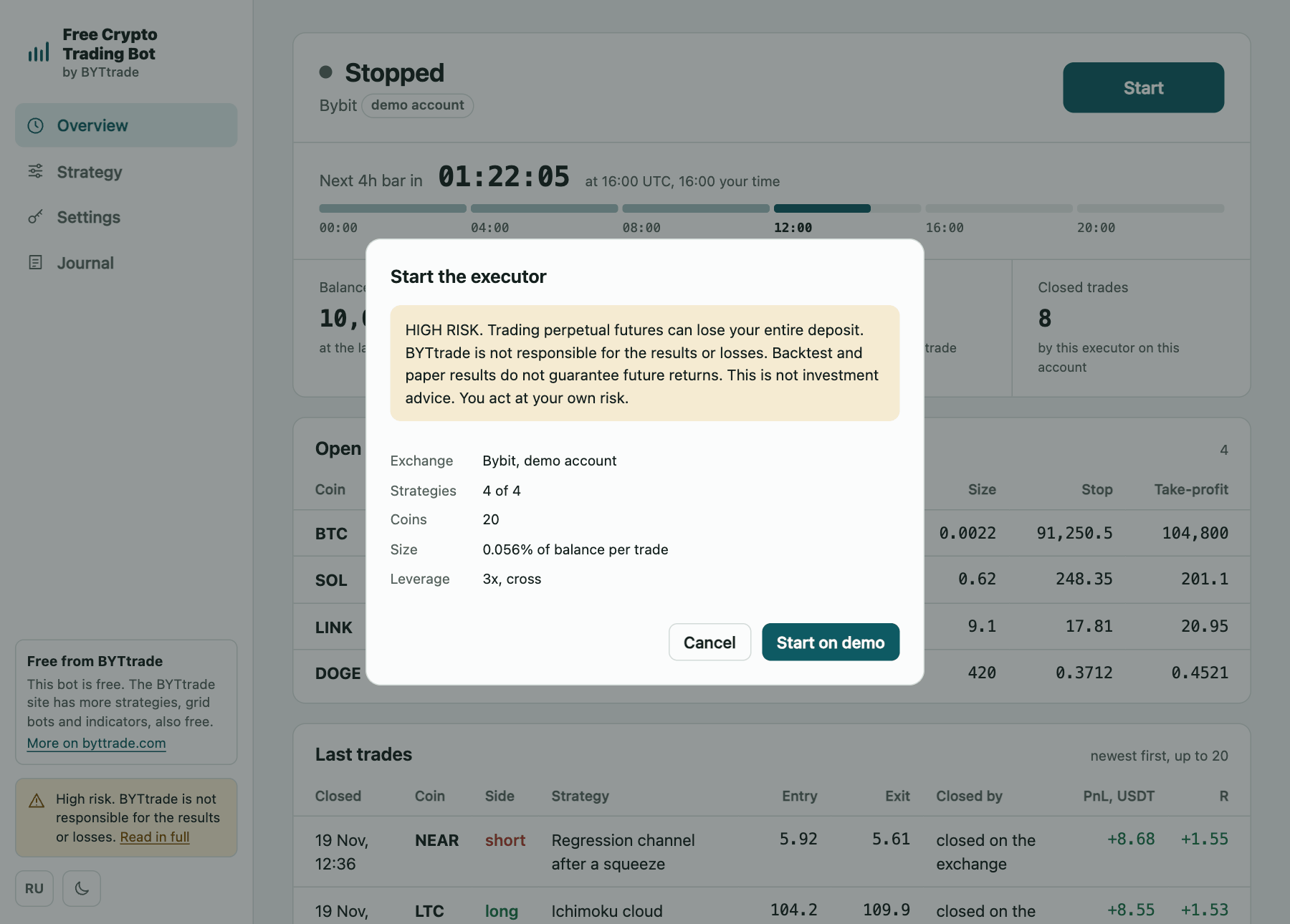 |  |
Demo data in every picture.
📈 Backtest results
20 large Binance USDT-M perpetuals, 4h and 1d candles. PF is gross profit over gross loss; Σ R is the total result in units of risk per trade; drawdown is in % of capital at 1 % risk per trade. The results come in two parts: the periods the rules were chosen on, and an earlier period the choice never saw.
Periods the rules were chosen on (2023-01 … 2026-06)
Rules were searched on 2023-01-01 … 2025-06-30 (selection). 2025-07-01 … 2026-06-30 is called verification, but it is not a blind test: results on it also took part in choosing these four strategies from about 3 000 variants.
| Strategy | Period | Trades | PF | Σ R | Drawdown, % |
|---|---|---|---|---|---|
Supertrend + daily EMA50 (st4h_ema50_1d) | selection | 839 | 1.33 | +180.6 | 41 |
| verification | 352 | 1.59 | +133.8 | 50 | |
Keltner breakout + daily ADX (kc2_4h_adx1d) | selection | 660 | 1.53 | +212.0 | 39 |
| verification | 266 | 1.74 | +119.2 | 51 | |
Ichimoku cloud + daily SMA75 (zmid1d_cloud4h) | selection | 793 | 1.41 | +168.4 | 42 |
| verification | 318 | 1.70 | +108.4 | 35 | |
Regression channel + daily Bollinger width (bbw1d_lr4h) | selection | 1 048 | 1.41 | +177.8 | 25 |
| verification | 466 | 1.53 | +111.4 | 69 |
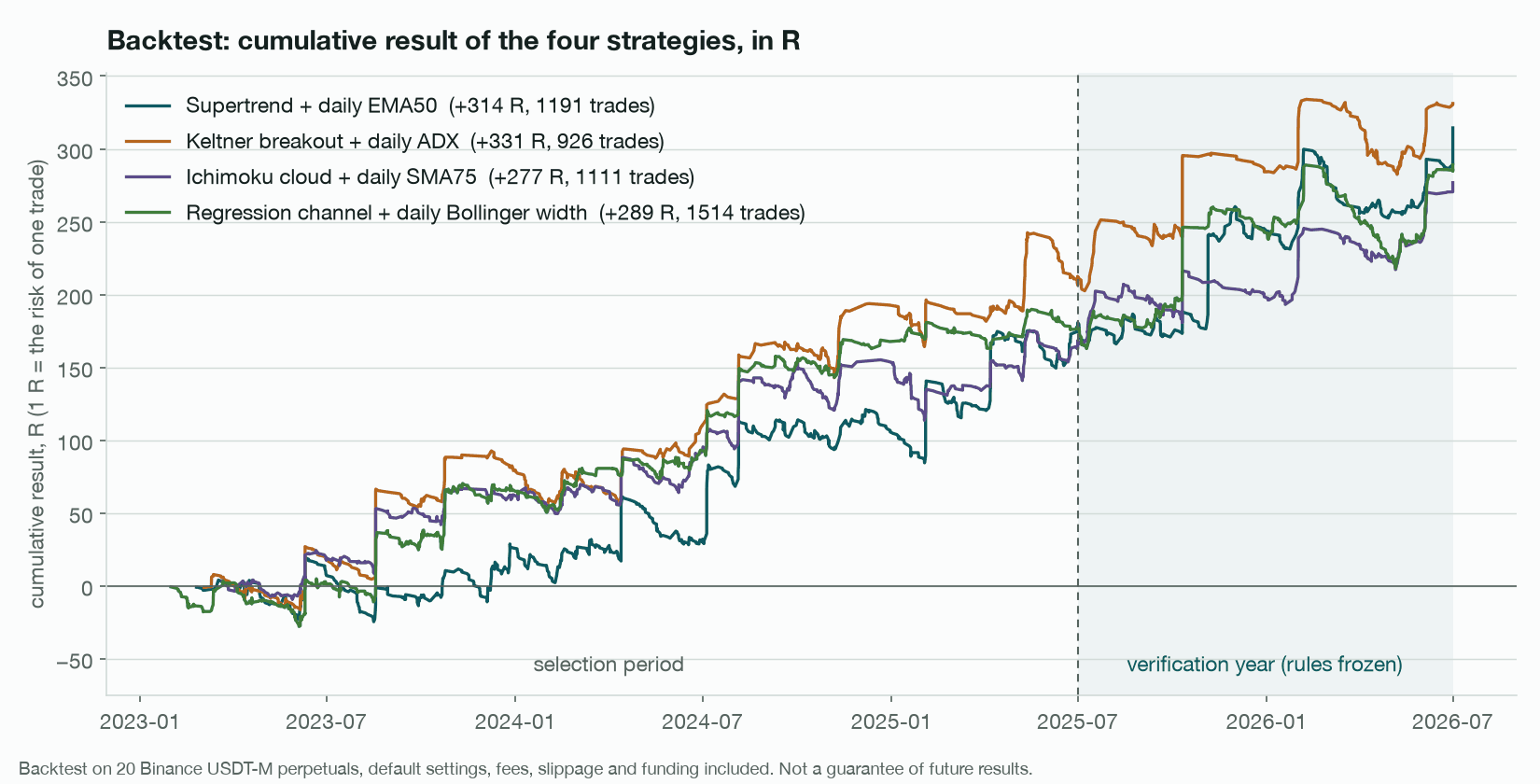
A backtest of 2023–2026 only, not a guarantee. The drawdowns are large: see the limitations below.
Earlier period the choice did not see (2020-07 … 2022-12)
In November 2026 an independent re-implementation ran two of the four strategies on 2020-07-01 … 2022-12-31 with
the same costs. These rows are recorded, not recomputed by this code (fetch starts at 2023-01-01).
| Strategy | Trades | PF | Σ R | 2020 | 2021 | 2022 |
|---|---|---|---|---|---|---|
Supertrend + daily EMA50 (st4h_ema50_1d) | 665 | 1.41 | +173.4 | +16.8 | +146.0 | +19.8 |
Keltner breakout + daily ADX (kc2_4h_adx1d) | 504 | 0.99 | −4.5 | +7.5 | +12.2 | −21.9 |
zmid1d_cloud4h, bbw1d_lr4h | not re-tested |
The year columns are Σ R per calendar year (2020 is the whole year available in the data, so the years do not add up to the period total).
kc2_4h_adx1dwas about break-even over the period and lost in 2022. Its ADX filter made it worse there: without the filter PF was 1.21.st4h_ema50_1dstayed positive, but most of the result came from 2021 alone. Without its daily filter it lost (PF 0.91).- At the position size used in the research (0.056 % of capital at risk per trade), the yearly result of these two strategies over 2020 … 2026 H1 was between −1.2 % and +8.7 % of capital per strategy. That is what happened in the past on these 20 coins; it is not an expected return.
Test conditions, costs, execution rules, the third period, parameter stability, controls without filters and reproducibility are in docs/research.md. The raw tables are in results/.
🧩 How it works
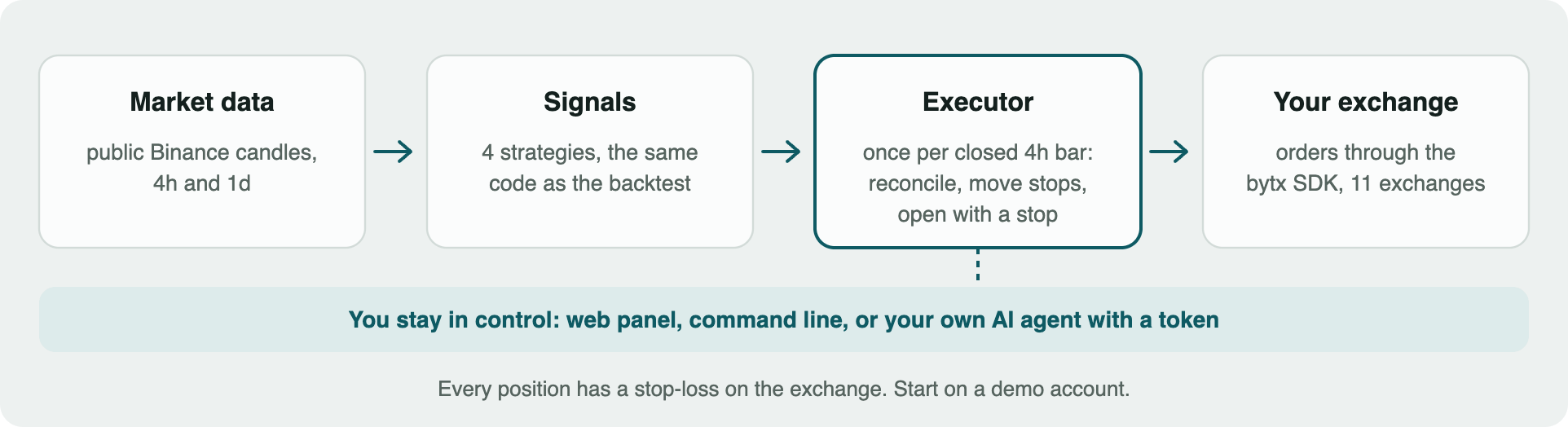
- Once per closed 4h bar the executor computes the signals with the same code as the backtest, on public Binance candles, whatever exchange you trade on.
- It enters with a market order sized by risk and places the stop-loss on the exchange together with the entry. If the stop cannot be placed, the position is closed.
- It never re-sends an order after a timeout: the outcome is looked up on the exchange.
- It holds one position per coin and does not touch positions it did not open.
- State and a journal are kept in local files, so a restart continues where it stopped.
Details: what the executor does step by step.
🔌 Exchanges
Binance, Bybit, OKX, BingX, KuCoin, Hyperliquid, Bitget, Gate, MEXC, HTX and BloFin, through the bytx SDK. Demo accounts work on Binance, Bybit, OKX, BingX, Hyperliquid, Bitget, Gate and BloFin; KuCoin, MEXC and HTX have no demo environment. See exchange keys.
🤖 Your own AI agent
Create a token in the panel and give it to your agent: over the HTTP API or the built-in MCP server. Agents and assistants start with AGENTS.md; there is also a skill file, llms.txt and an MCP registry entry (server.json). A token can read the state and, if you allow it, control the executor on the demo account. It never reaches exchange keys and cannot start a real account. An agent works through these public interfaces and does not change the code, which is what the license allows ("you may add, you may not modify"). See docs/agent-api.md and the guide.
🔍 Honest limitations
- One idea, not four. The strategies correlate (0.47–0.80), so drawdowns come together.
- It does not work outside the twenty coins. On 639 other perpetuals the result was close to zero.
- Shorts were stronger than longs. The market of the verification year was falling: random short entries with
the same exits made money in that year too (PF 1.36). In 2020–2022 the shorts of
kc2_4h_adx1dlost (PF 0.58). - Multiple testing, and no blind year. The four strategies were chosen from about 3 000 variants, and the verification year took part in the choice; part of the result is hindsight. The control without filters gave PF 1.2–1.3 on 2023–2026 and 0.91–1.21 on 2020–2022.
- Earlier history is weaker. On 2020–2022 one of the two re-tested strategies was about break-even and had a losing year; two strategies were not re-tested at all.
- Live differs from the backtest. One position per coin, simplified execution model, no modelling of liquidation or exchange outages.
All nine points with numbers: docs/research.md.
📚 Documentation
| Document | What is inside |
|---|---|
| docs/guide.md | installation, backtest, settings, keys, start, the panel, a server, agents, errors, FAQ |
| docs/research.md | test conditions, full results, controls, reproducibility, limitations |
| docs/agent-api.md | HTTP API and MCP server for your own agent |
| AGENTS.md | instructions for AI agents: what they may do for you and what they must not |
| CHANGELOG.md | what changed in each release |
| results/ | metrics recomputed by this code and recorded research tables |
📜 License
BYTtrade Source-Available License 1.3 (trend-4h edition), the same terms as bytx. In plain words:
- You may: run it on your own computers and servers, trade with it, add your own strategy specs, configs and your own code next to it.
- You may not: modify the code of this project or of bytx; disable or replace the broker attribution or the integrity checks, including through settings and environment variables (section 3(g)); distribute modified versions; offer it to third parties as a service.
The LICENSE text is what counts; this summary does not replace it. Dependencies and their licenses: NOTICE.
💚 BYTtrade
This bot is free and made by BYTtrade. On byttrade.com there are more strategies, grid bots, more indicators and a deeper history for backtests, with nothing to code by hand, and a large community. That is free as well.






