Listed from the MCP registry; nobody on Odel publishes it.
axross headless MCP
One MCP server for almost every file system: local, SFTP, SMB, NFS, WebDAV, S3, Azure, cloud drives.
Runs on your machine from its package; the steps are below.
What it does
- Reads
- Writes
- High impact
At most: moves money, runs code or commands, deletes data, or sends messages for you.
What it costs
FreeOdel charges nothing per call. The publisher may charge for its own service.
Runs locally over stdio
This server isn't hosted — your MCP client launches it from a package registry. Use one of the commands below, or drop the config into your client (e.g. Claude Desktop).
Run
uvx axross-headless-mcp
MCP client config
{
  "mcpServers": {
    "axross-headless-mcp": {
      "command": "uvx",
      "args": [
        "axross-headless-mcp"
      ]
    }
  }
}Run
docker run -i --rm ghcr.io/c0decave/axross-headless-mcp:0.15.183
MCP client config
{
  "mcpServers": {
    "axross-headless-mcp": {
      "command": "docker",
      "args": [
        "run",
        "-i",
        "--rm",
        "ghcr.io/c0decave/axross-headless-mcp:0.15.183"
      ]
    }
  }
}axross-headless-mcp
axross's headless MCP server: file tools on the local disk and on SFTP, SMB, WebDAV, S3 and more for any MCP client, over stdio or HTTP - without Qt.
- Your files for any MCP client - Claude Desktop, Claude Code, Cursor, VS Code: list, read, search and hash files.
- Almost every file system - the local disk, SFTP built in, and 40 backends from SMB, NFS and S3 to cloud drives, Git and databases as extras.
- Read-only by default - the write tools only with
--mcp-writeand an explicit--mcp-root. - Confined to one folder - every path stays under
--mcp-root; SSH and GnuPG keys and tokens are refused. - 50+ tools in groups - metadata, duplicates, archives, crypto, file types, transfers, remote profiles and more.
- stdio or HTTP - streamable HTTP with a bearer token, mTLS for anything but loopback.
- No GUI, no Qt - runs on a server, in a container or in CI:
pipx,uvxor Docker. - Current MCP - 2025-11-25: tool annotations, structured results, progress, cancellation, resources.
- An audit trail - what each tool did or refused, on stderr and in the log.
- The same code as axross - axross's settings and saved connection profiles, credentials from the keyring.
Contents
- Everything in detail: the extended README
- What changed: the CHANGELOG
- What it supports and does
- Install
- Connect a client
- Documentation
- Tests
- Licence
What it supports and does
- Almost every file system: the local disk plus 40 backends - protocols, cloud services, devices.
- Classic network storage: SFTP, SCP, SMB / CIFS with DFS namespaces, NFS, WebDAV, FTP / FTPS, rsync, iSCSI.
- Object storage and the cloud: S3 and S3-compatible stores, Azure Blob and Files, OneDrive, SharePoint, Google Drive, Dropbox.
- Code and data as folders: Git and Subversion repositories, PostgreSQL, SQLite, Redis, MongoDB GridFS, LDAP.
- Devices and mail: Android (ADB, MTP), IMAP, POP3, Exchange (EWS), NNTP, TFTP, Gopher, printers (PJL), WinRM, WMI, Cisco IOS.
- The same tools everywhere: listing, reading, searching, hashing and previews work alike on every backend.
- Your saved connections: axross's connection profiles, credentials from the system keyring, never shown to the model.
- Read-only by default: writing, moving and deleting need
--mcp-writeand an explicit--mcp-root. - Confined to one folder: every path stays under
--mcp-root, checked through the folder's own descriptors. - Secrets stay put: SSH and GnuPG keys, tokens and
.envfiles are refused; every stream is scanned for keys. - 52 tools in 14 groups, opt in: only the core tools are on until you name more groups or
all. - Search and grep across servers: name, size and date search, content grep, an offline index for repeated searches.
- Checksums without downloading: SHA-256 on the server where the backend offers it, recursive checksums of whole trees.
- Duplicate finder: duplicate groups by wasted space, dedupe to the trash, every copy re-verified first, a dry run by default.
- Metadata, read and removed: EXIF / GPS / XMP / IPTC, Office and PDF properties, media tags; removal writes a cleaned copy.
- Archives, safely: list and extract zip, tar.*, 7z and rar, guarded against zip-slip, bombs, link members and spoofing names.
- Packing: zip, tar.gz / .zst / .xz / .bz2 and 7z, optionally AES-256 with encrypted file names.
- Encryption: encrypt and decrypt files (AES-256-GCM, PBKDF2-SHA256).
- File types by content: magic-byte detection that flags files whose extension lies.
- Copy and move between any two backends: SFTP to S3, SMB to Google Drive - atomic, resumable, never half-written under the final name.
- Earlier versions: list and read previous versions where the storage keeps them.
- Remote commands, only if allowed: SSH, WinRM (PowerShell), ADB and more with
--mcp-allow-exec, off by default. - Current MCP over stdio or HTTP: protocol 2025-11-25, 2025-06-18, 2024-11-05; bearer token, mTLS off loopback, an audit trail.
- Runs anywhere, no GUI:
uvx,pipxor the container image; the same code as the axross desktop app and its tests.
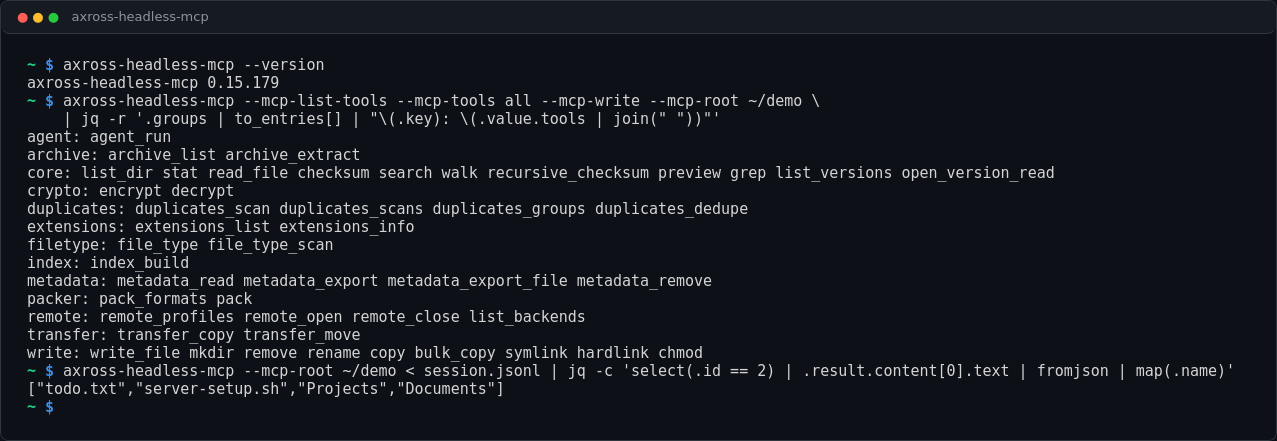
The 52 tools (only the file tools are on until --mcp-tools GROUP,... or all adds groups): files (always on) list_directory, get_path_info, read_file, compute_file_checksum, search_index, walk_tree, compute_tree_checksums, render_preview, search_content, list_file_versions, read_file_version; write (--mcp-write) write_file, create_directory, delete_path, move_path, copy_file, copy_tree, create_symlink, create_hardlink, set_permissions; metadata read_metadata, export_metadata, strip_metadata; duplicates scan_duplicates, list_duplicate_scans, list_duplicate_groups, trash_duplicates; archives list_archive_formats, create_archive, list_archive_members, extract_archive; crypto encrypt_file, decrypt_file; file types identify_file_type, scan_file_types; index build_index; transfers copy_path_to_backend, move_file_to_backend; remote profiles list_remote_profiles, open_remote_profile, close_remote_profile, list_backends; remote commands (--mcp-allow-exec) run_backend_command, run_backend_script; scripts (--mcp-allow-scripts) list_scripts, get_script_api, read_script, write_script, delete_script, run_script; agent run_llm_agent; extensions list_extensions.
Install
pipx install axross-headless-mcp            # or: pip install axross-headless-mcp
pipx install 'axross-headless-mcp[all]'     # with every remote protocol and format
axross-headless-mcp --mcp-list-tools --mcp-tools all   # what it would serve, as JSON
Connect a client
claude mcp add axross -- axross-headless-mcp --mcp-root ~/projects --mcp-tools all
Claude Desktop, Cursor, VS Code and other clients: the JSON configuration. Over HTTP (a bearer token, mTLS off loopback): Over HTTP. In a container:
docker run -i --rm -v "$PWD:/data" ghcr.io/c0decave/axross-headless-mcp:latest \
    --mcp-server --mcp-root /data --mcp-tools all
Documentation
| Page | What it covers |
|---|---|
| Extended README | every tool group, the protocol, HTTP, Docker, settings |
| docs/MCP.md | the full reference of axross's MCP server |
| docs/mcp-tools.json | the tool catalogue, generated from the manifest |
| llms-install.md | setup steps for AI agents (Cline and others) |
Tests
python -m pytest tests
Licence
Apache-2.0, as axross: the same code, written out by axross's
scripts/export_standalone.py. Everything in detail: the extended README.