fcvm
Disposable Firecracker microVM sandboxes for agents: run code, snapshot, fork. Needs Linux with KVM.
Runs on your machine from its package; the steps are below.
What it does
- Reads
- Writes
- High impact
At most: moves money, runs code or commands, deletes data, or sends messages for you.
What it costs
FreeOdel charges nothing per call. The publisher may charge for its own service.
Runs locally over stdio
This server isn't hosted — your MCP client launches it from a package registry. Use one of the commands below, or drop the config into your client (e.g. Claude Desktop).
Run
uvx fcvm-mcp
MCP client config
{
  "mcpServers": {
    "fcvm": {
      "command": "uvx",
      "args": [
        "fcvm-mcp"
      ]
    }
  }
}
fcvm: disposable, isolated microVMs with container ergonomics, for people and agents
fcvm runs workloads in Firecracker
microVMs, each with its own kernel, with the convenience of a container tool:
images, layers, volumes, published ports, exec, snapshots and fork. It is
self-hosted, starts VMs without root, and puts a real virtual-machine
boundary around code you don't trust. On top of that come optional jailing,
network isolation and egress allowlists. Drive it from the command line, a
browser console, an HTTP API, or your coding agent over MCP.
fcvm import python:3.13-slim
fcvm run python-3.13-slim --allow @pypi -- pip install requests   # a throwaway VM that can reach only PyPI
Why fcvm
Containers are convenient but share the host's kernel. Full VMs isolate properly but are slow to start and clumsy to manage. fcvm gives you both: Docker-style workflows, where every workload boots its own kernel in about half a second behind hardware virtualization.
It's built for:
- Sandboxes for AI coding agents. Agents get tools to create sandboxes, run commands, copy files and fork prepared environments. Each sandbox is jailed and network-restricted by the policy you set.
- Running code you don't trust. A dependency's install script, a downloaded tool, a build from someone else's repository.
- Throwaway and parallel environments. Prepare once, snapshot, then fork identical running copies in about 150 ms each.
- Dev machines and small services. Full Ubuntu VMs with systemd and your source tree mounted live, or containers that stay up across crashes and reboots.
What it isn't: a cluster orchestrator, a macOS or Windows tool (it needs Linux with KVM), or a way to run desktop GUIs.
What it can do
-
Any image. Run OCI images from any registry, a local
docker save, or your own Dockerfile. Or use full-OS system images that boot systemd, with Ubuntu 26.04 included. -
Container ergonomics.
run,exec,cp,logs, published ports, named volumes, live host directories,committo layered images, restart policies, and templates: saved launch recipes such as "Python sandbox, PyPI only, 2 GB". -
Speed. A new VM takes 0.1 s to create and about 0.5 s to boot. A fork from a snapshot takes about 150 ms.
-
Isolation.
- A VM boundary per workload, with an optional Firecracker jailer (separate uid, chroot, cgroups, network namespace).
- VMs can't reach each other or your host's services, and anti-spoofing pins each VM to its own address.
- Egress allowlists through a logging proxy.
-
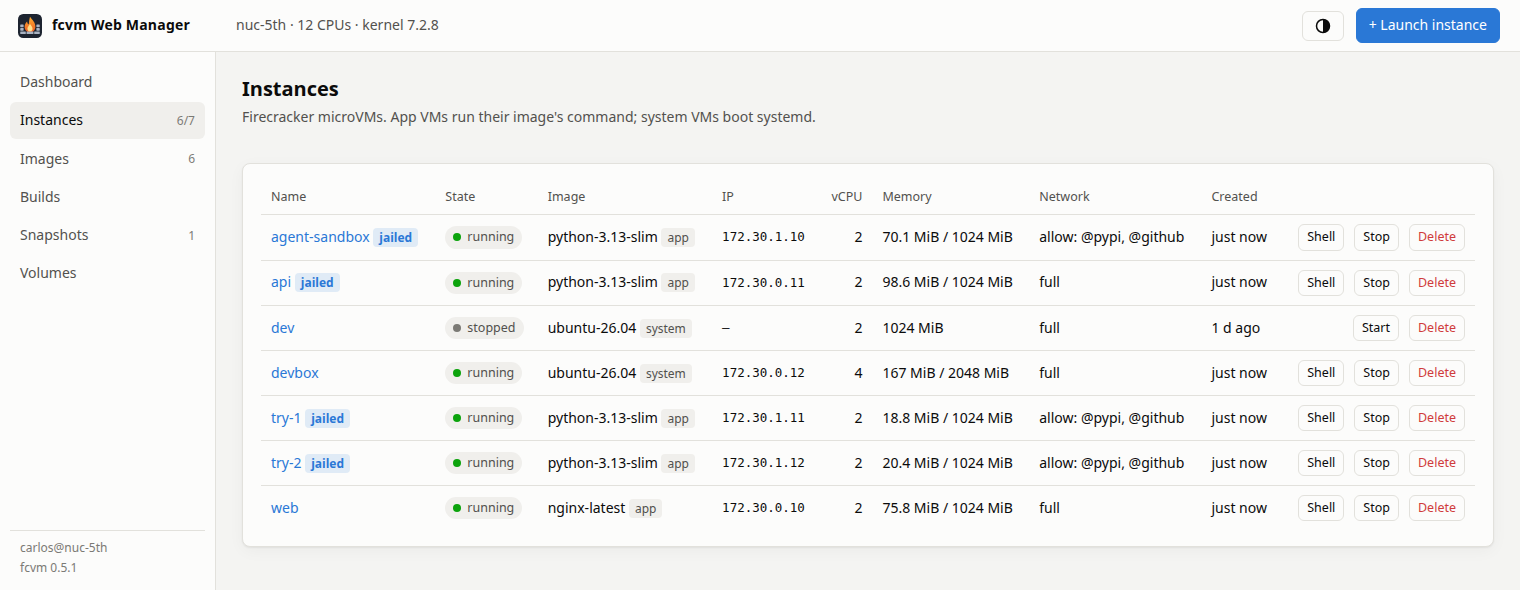
A web console. A cloud-console-like GUI for your host:
- a live dashboard, and per-VM charts for CPU, memory, disk and network, from the host and from inside the guest, with its processes and 24 h of history;
- launch forms, browser terminals and a file browser with an editor;
- image imports and Dockerfile builds;
- snapshots and forks.
Anything you can do from the CLI, you can do from the browser.
-
Other ways in. The CLI, an HTTP API for scripts with Python and Node clients, an MCP server for agents, and a Prometheus endpoint.
-
Stays up. A boot-time service brings VMs back after crashes and reboots.
-
Small and auditable. Bash and standard-library Python, a small static init in C, and a guest kernel you build yourself from kernel.org sources.
Requirements
- x86_64 Linux with KVM (
/dev/kvm). It's developed on Ubuntu 26.04, andhost-setupuses apt, so Debian and Ubuntu hosts are the easy path. - sudo for the one-time host setup: packages, the network bridges, and optionally the jailer helper and the boot service. VMs themselves start without root.
- A few GB of disk. A kernel build takes a few minutes, once.
Quick start
curl -fsSL https://raw.githubusercontent.com/carlosbravoa/fcvm/main/install.sh | sh
fcvm setup
The installer puts the latest release in ~/.local/lib/fcvm, and the
fcvm command in ~/.local/bin. It needs no root. Add --system (as
sh -s -- --system) to install for all users under /opt/fcvm.
- Your data (images, VMs, settings) lives in
~/.local/share/fcvmand~/.config/fcvm, not in the install. fcvm upgrademoves to a newer release later.fcvm versionshows what you run and where.
fcvm setup is a guided, interactive setup that takes about four minutes
on a fresh machine:
- It checks every step first, skips what's already done, and asks before anything optional: running at boot, the jailer, the Ubuntu image.
- The sudo steps come first, so you only need to be around for the first minute.
- It ends by booting a test VM.
It's safe to re-run, and -y accepts the defaults. Then:
fcvm run alpine-latest          # a shell in a throwaway VM (setup imported alpine); `exit` deletes it
fcvm import python:3.13-slim    # any OCI image; becomes the fcvm image "python-3.13-slim"
From a git checkout, or step by step
To run fcvm straight from a clone (for development), use ./fcvm, or link
it onto your PATH:
git clone https://github.com/carlosbravoa/fcvm ~/src/fcvm && cd ~/src/fcvm
ln -s "$PWD/fcvm" ~/.local/bin/fcvm && fcvm setup
The steps setup runs, by hand:
fcvm host-setup            # packages and /dev/kvm access (sudo, once)
fcvm net-up                # bridges, taps, NAT and isolation rules (sudo; `service install` makes it permanent)
fcvm firecracker           # download Firecracker into bin/
fcvm kernel                # build the guest kernel from kernel.org (a few minutes, once)
fcvm import alpine:latest  # a first image
Then pick how you want to drive it:
| Browser console: instances, images, launch forms, live charts, terminals, files | fcvm serve, then open the printed URL |
| Your coding agent: sandboxes as MCP tools (Claude Code shown; any MCP client works) | claude mcp add fcvm -- "$(command -v fcvm)" mcp |
| Keep it running: network and console at boot; VMs with a restart policy come back | fcvm service install (offered by setup) |
| Stronger isolation: run VMs under the Firecracker jailer | fcvm jail-setup (offered by setup), then --jail |
A few everyday commands:
fcvm run nginx-latest -d -p 8080:80                  # after `fcvm import nginx:latest`; curl localhost:8080
fcvm create box python-3.13-slim --idle              # a VM that stays up for exec (add --jail after jail-setup)
fcvm start box && fcvm exec box python -V
fcvm cp ./project box:/work && fcvm shell box
fcvm snapshot box ready && fcvm fork ready -n 3    # three running copies of box, as it is now
fcvm status                                          # health check: versions, updates, services, VMs
Documentation
Start with Getting started and Use cases. Then go as deep as you need:
| Using fcvm | Images · Running VMs · Networking and egress · Templates · Project files · Snapshots and fork · The fcvm service · Web console · Agents (MCP) |
| Reference | Commands · Configuration · HTTP API · Changelog |
| In depth | How it works · Security and isolation · Roadmap |
The documentation index describes each page. CONTRIBUTING covers working on fcvm and running its tests.
Feature checklist
Workloads
- ✅ OCI images from Docker Hub, ghcr.io, quay.io or any registry, digest-verified,
@sha256:pinning - ✅ Local images:
docker save/podman savetarballs, OCI layouts and archives - ✅ Out again:
fcvm export(an OCI archive fordocker loador another host) andfcvm pushto a registry - ✅ Dockerfile builds (common subset), cached per step, network-restricted if you like
- ✅ Full-OS system images with systemd and ssh (Ubuntu 26.04 base, built rootless)
- ✅ Docker semantics: ENTRYPOINT/CMD, env, workdir, user, exit codes passed through
Day-to-day
- ✅
run(throwaway),create/start/stop,exec(TTY or pipes, timeouts,-u,-w,-e,-dfor background jobs),shell,cp - ✅ Serial console with attach/detach, and logs
- ✅ Shared read-only images, a copy-on-write layer per VM,
committo new layers,squash - ✅ Named volumes and live host directories (at boot, or added to a running VM)
- ✅ Published TCP ports, bound to localhost by default, added and removed live (
publish/unpublish) - ✅ Snapshots of running VMs, and forks in ~150 ms with their own disk, IP, MAC and hostname;
snapshot export/importmove them between hosts - ✅ Restart policies (
no,on-failure,unless-stopped,always), recovery after crashes and reboots - ✅ Lifetimes:
--ttl 2hand--idle-stop 30mend forgotten sandboxes on their own - ✅ Secrets (
--secret API_KEY): into a tmpfs and the environment at boot, never onto the VM's disk - ✅ Credential forwarding (
--forward ssh-agent,git): the VM uses your keys and logins through the host, without holding them - ✅ Memory balloon (
fcvm balloon VM 512): take memory back from idle VMs without a restart - ✅
fcvm ssh-config --install:ssh fcvm-dev, scp, rsync and VS Code Remote-SSH into system VMs - ✅ Templates: saved launch recipes, built-in sandboxes for Python, Node and offline work, shared by the CLI, console and MCP
- ✅ Project files:
fcvm.tomlin a repository,fcvm up/fcvm down - ✅ Warm pools: VMs booted ahead of time, claimed in milliseconds (agents get instant sandboxes)
- ✅ JSON output everywhere (
--json,inspect) - ✅ One-line install (per user, or
--system),fcvm upgradewith rollback, versioned releases - ✅ Guided setup (
fcvm setup) and a health check (fcvm status) that says what to update and how
Isolation and control
- ✅ A hardware-virtualized VM per workload, with a minimal guest kernel you build yourself
- ✅ Rootless by default, and an optional Firecracker jailer: per-VM uid, chroot, cgroup limits, network namespace
- ✅ VMs isolated from each other and from host services
- ✅ Anti-spoofing (MAC and IP pinned per VM), no guest IPv6
- ✅ Egress allowlists with presets (
@pypi,@npm,@github, ...), changeable live, every request logged - ✅ A package mirror on the proxy (
--cache): the first sandbox downloads, the next ones get it from the host - ✅ No network at all, per VM
Interfaces
- ✅ CLI
- ✅ Web console (GUI): dashboard, live charts, launch forms, browser terminals, file browser and editor, image builds, snapshots
- ✅ Metrics from inside each VM (CPU, memory, disk, processes), 24 h of history, and a Prometheus endpoint
- ✅ HTTP API with token auth, and client libraries for Python and Node (sdk/)
- ✅ MCP server for agents, jailed by default, with an optional pinned network policy
- ✅ Boot-time systemd service
Not (yet): multi-host orchestration, remote multi-user access, IPv6 guests, disk and network rate limits, aarch64. See the roadmap.
License
fcvm is licensed under the Apache License 2.0. It downloads Firecracker (Apache 2.0) and builds the Linux kernel (GPL-2.0) on your machine, but doesn't redistribute either. The vendored xterm.js is MIT licensed (NOTICE).