Chaos Cypher
Local-first knowledge graphs from your documents: build, search (GraphRAG) and edit on your machine.
Runs on your machine from its package; the steps are below.
What it does
- Reads
- Writes
- High impact
At most: creates or changes data: records, files, settings.
What it costs
FreeOdel charges nothing per call. The publisher may charge for its own service.
Runs locally over stdio
This server isn't hosted — your MCP client launches it from a package registry. Use one of the commands below, or drop the config into your client (e.g. Claude Desktop).
Run
uvx chaoscypher-cli
MCP client config
{
  "mcpServers": {
    "chaos-cypher": {
      "command": "uvx",
      "args": [
        "chaoscypher-cli"
      ]
    }
  }
}Chaos Cypher Knowledge Engine





Turn your documents into a knowledge graph you can inspect, search, chat with, and take with you — all running on your own machine.
Chaos Cypher is a local-first GraphRAG platform — knowledge you can see,
trust, and own. Point it at your sources (documents, audio, video, images,
pasted text, web pages — 30+ formats, auto-detected), and it extracts entities
and relationships into a knowledge graph you can actually see and explore —
not a black-box vector blob. Search it, chat with it, refine it, and export the
result as a portable Lexicon knowledge package (.ccx) you can back up,
share, or load into another instance.
Why Chaos Cypher
- Local-first GraphRAG — sources → extraction → graph → search & chat, with embeddings generated on your own system. Bring your own LLM, or run fully offline with Ollama.
- Inspectable knowledge graphs — every entity and relationship is visible and traceable back to its source. You can correct extractions, not just trust them.
- Portable knowledge packages — import and export your graph as a self-contained package. Your knowledge is yours to move, version, and keep.
- MCP server built in — plug Claude Desktop, Cursor, or any MCP client straight into your graph: 36 tools for search, traversal, and graph building.
- Self-hosted control — you choose where data lives and which models touch it. The all-in-one container runs the whole stack on hardware you control.
Feature highlights
Core intelligence
- Knowledge graph canvas — typed, filterable, zoomable from corpus overview down to a single entity and its sources
- GraphRAG search — graph traversal fused with vector search (Personalized PageRank + Reciprocal Rank Fusion), plus keyword, semantic, and hybrid modes
- AI chat with citations — answers grounded in your content, traceable back to the sources that produced them
Data foundation
- Quality analysis — score graph richness on a 0–100 scale, with breakdowns that flag weak sources
- 30+ source formats — PDF, DOCX, Markdown, HTML, EPUB, audio (MP3/WAV/FLAC), video (MP4/MKV/MOV), images, ZIP archives, and more
- Mix-and-match LLMs — Ollama, OpenAI, Anthropic, or Gemini, configurable per operation
Automation & integration
- Automations — visual workflow builder with triggers and conditional logic
- MCP server — 36 tools for Claude Desktop, Cursor, ChatGPT, and other MCP clients
- Plugin system — drop-in Python document loaders, extraction domains, and workflow tools
What data leaves your machine?
By default, nothing leaves your machine except the LLM calls you configure. Embeddings are computed locally; your documents, graph, and exports stay on disk in a Docker volume you own. If you point Chaos Cypher at a hosted LLM provider (OpenAI, Anthropic, Gemini), the text sent for extraction and chat goes to that provider — choose a local model like Ollama to keep everything on-device.
Read the Self-Hosted Threat Model for exactly what Chaos Cypher defends against, what it accepts by design, and how to harden a LAN or internet-facing deployment.
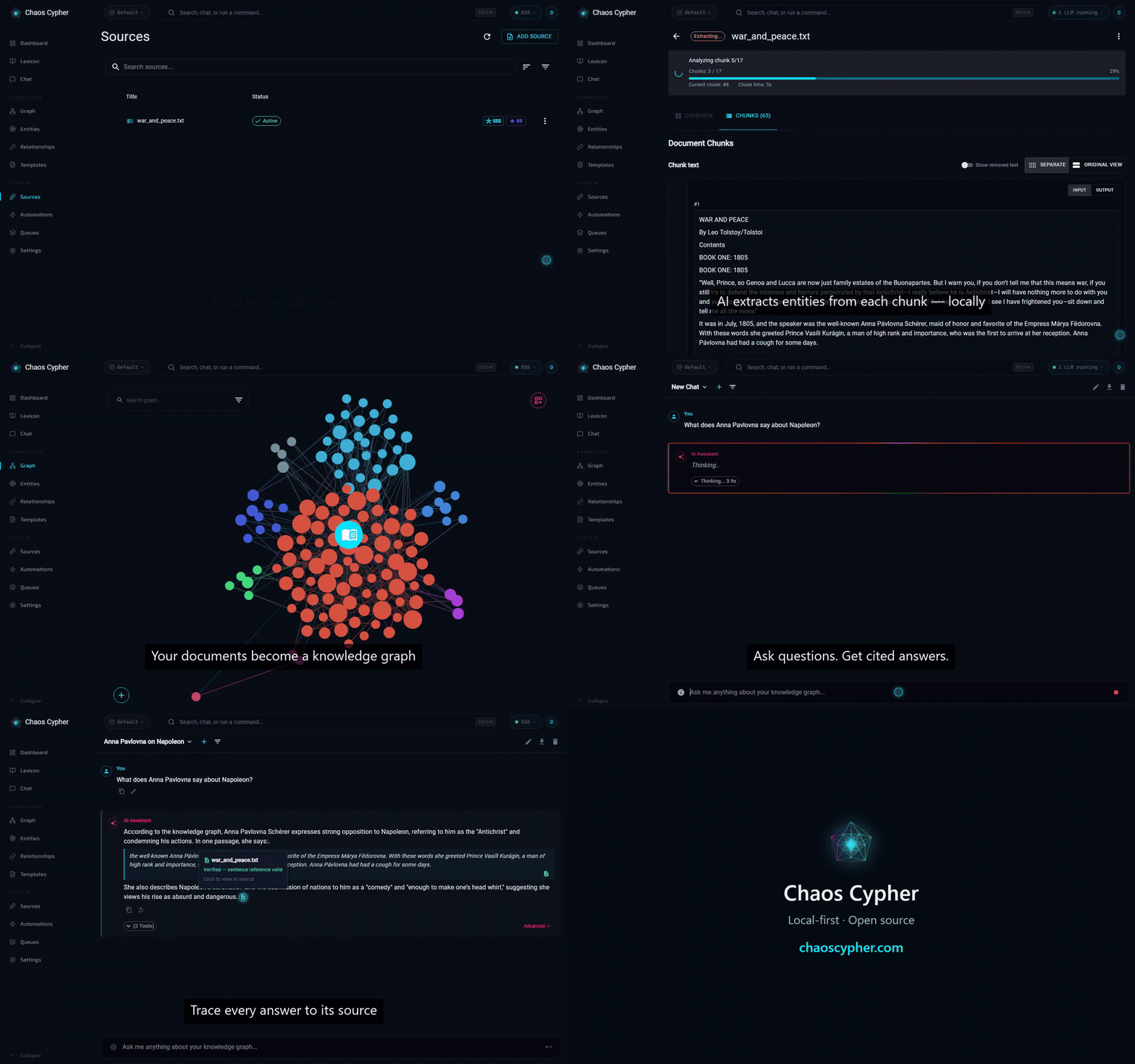
📸 See It in Action
A quick tour — from dropping in a document to asking a question and tracing the answer back to the exact highlighted sentence in your source:
▶️ Watch the full tour (with audio-free narration captions) on chaoscypher.com.
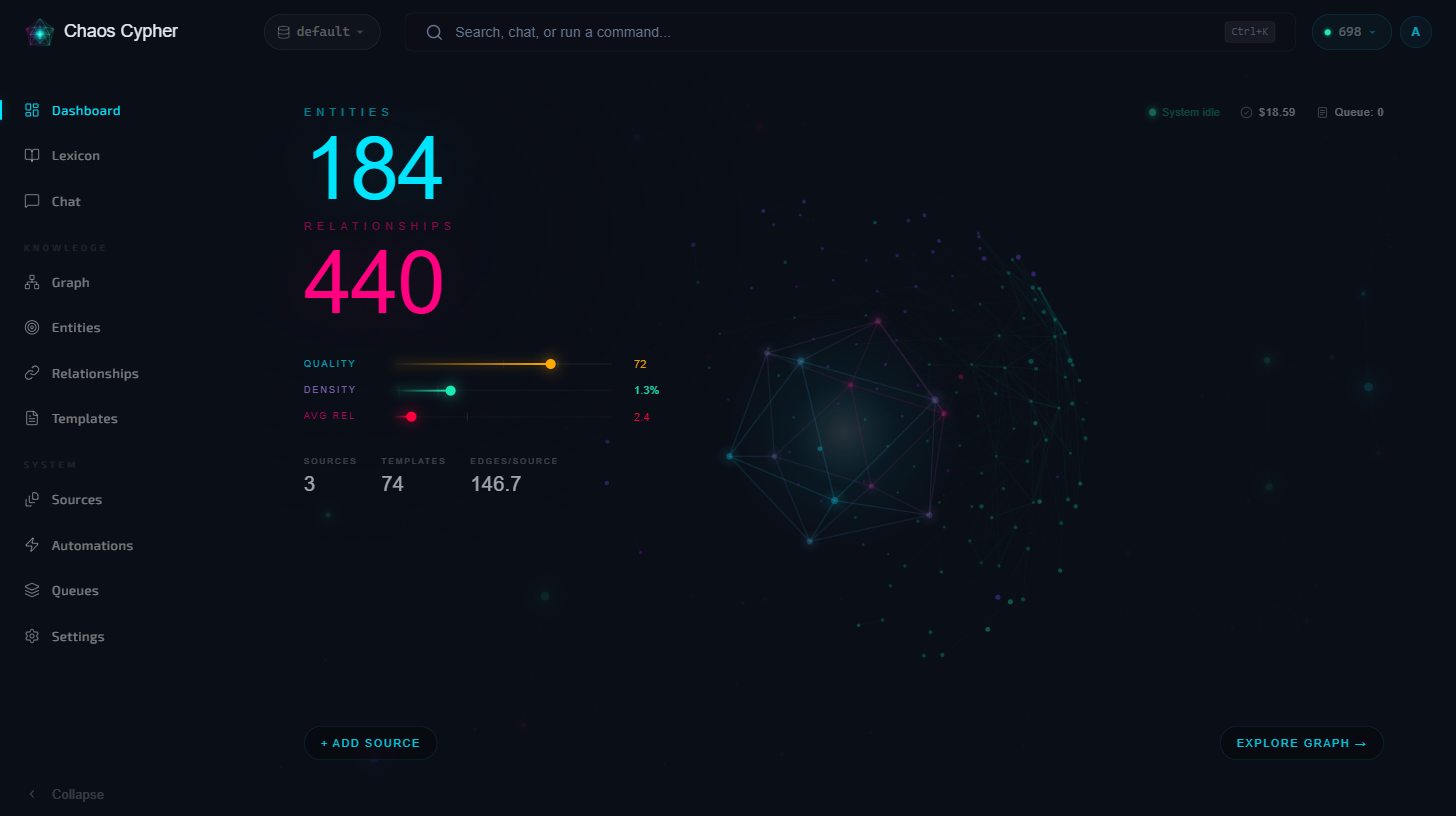
Dashboard — your knowledge base at a glance: entity and relationship counts, quality and density scores, and a live graph preview.
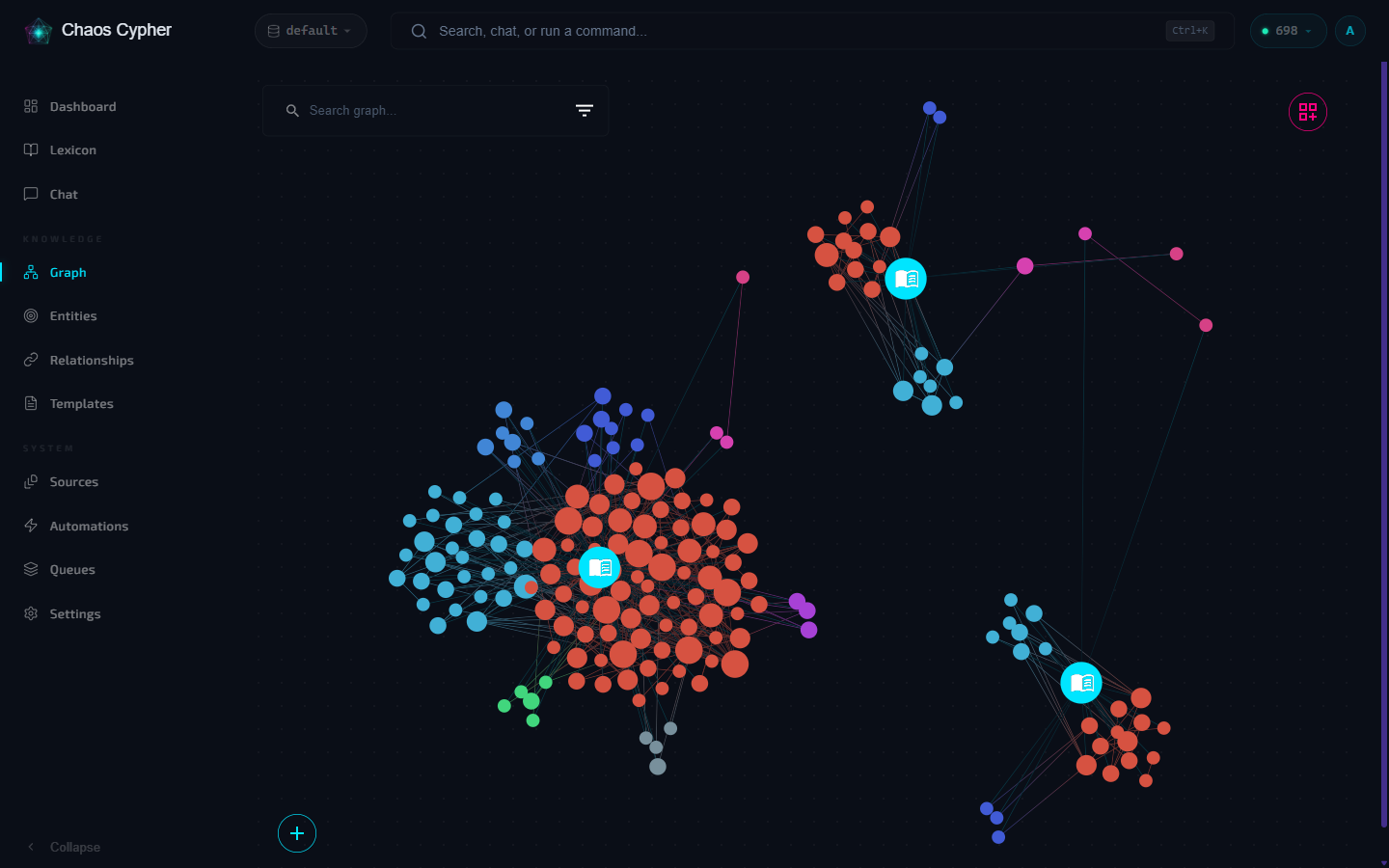
Knowledge graph — every source becomes an explorable, color-coded graph. Pan, zoom, search, and filter to see exactly what was extracted.
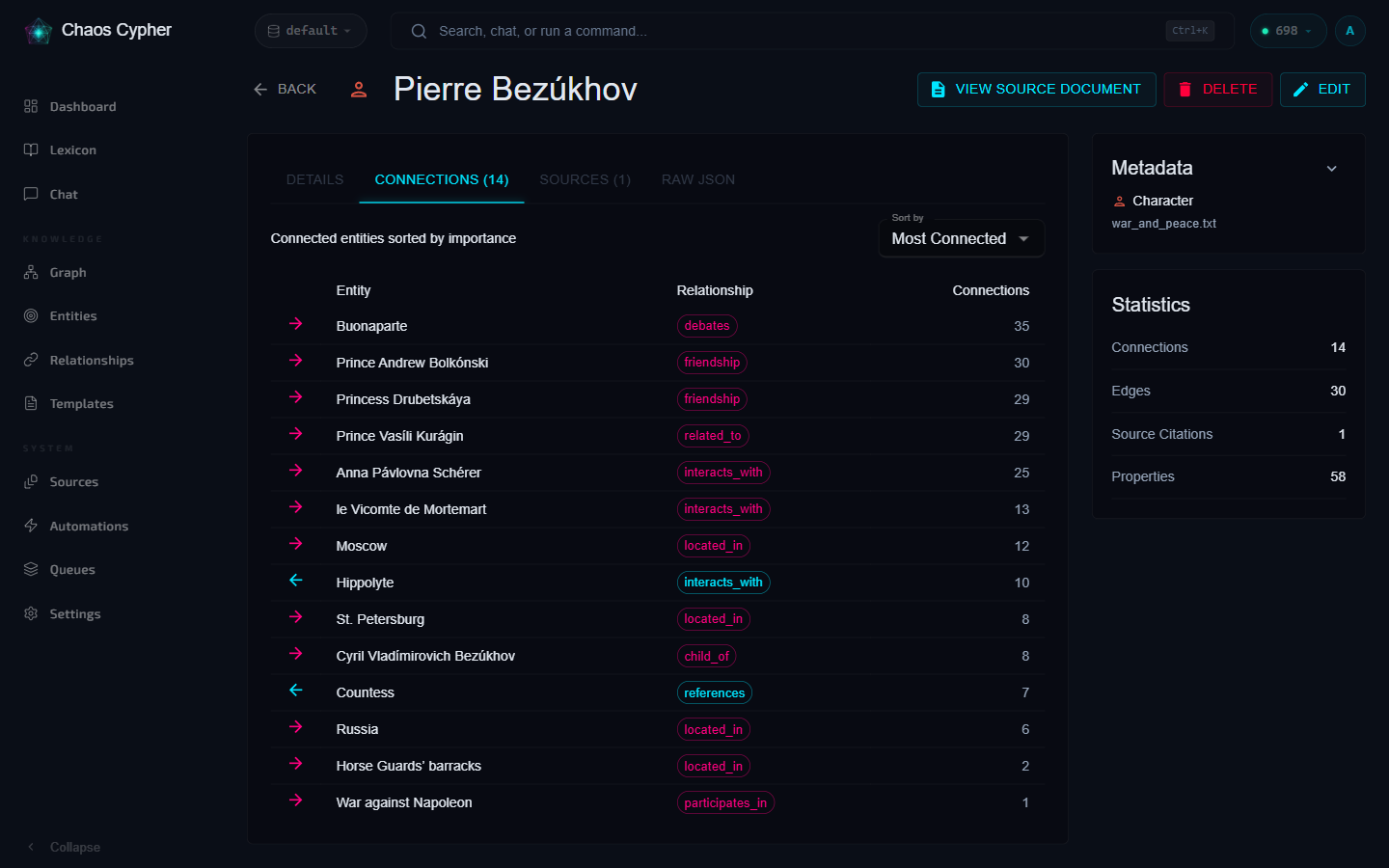
Entities — inspect any extracted entity: typed, directional relationships ranked by importance, with stats and provenance back to the source document.
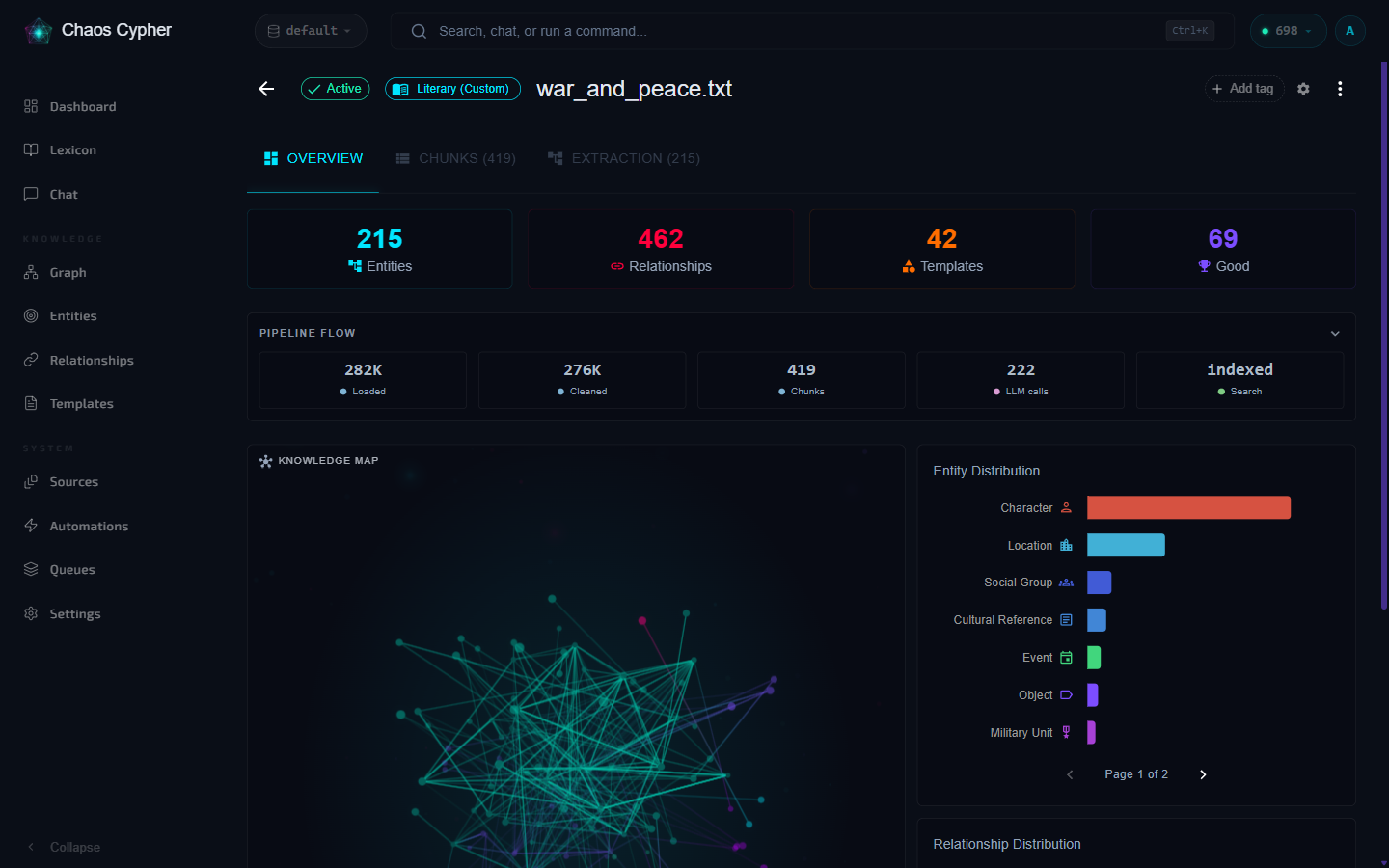
Sources — each document gets a transparent pipeline view: loaded → cleaned → chunked → extracted → indexed, plus per-source entity distribution.
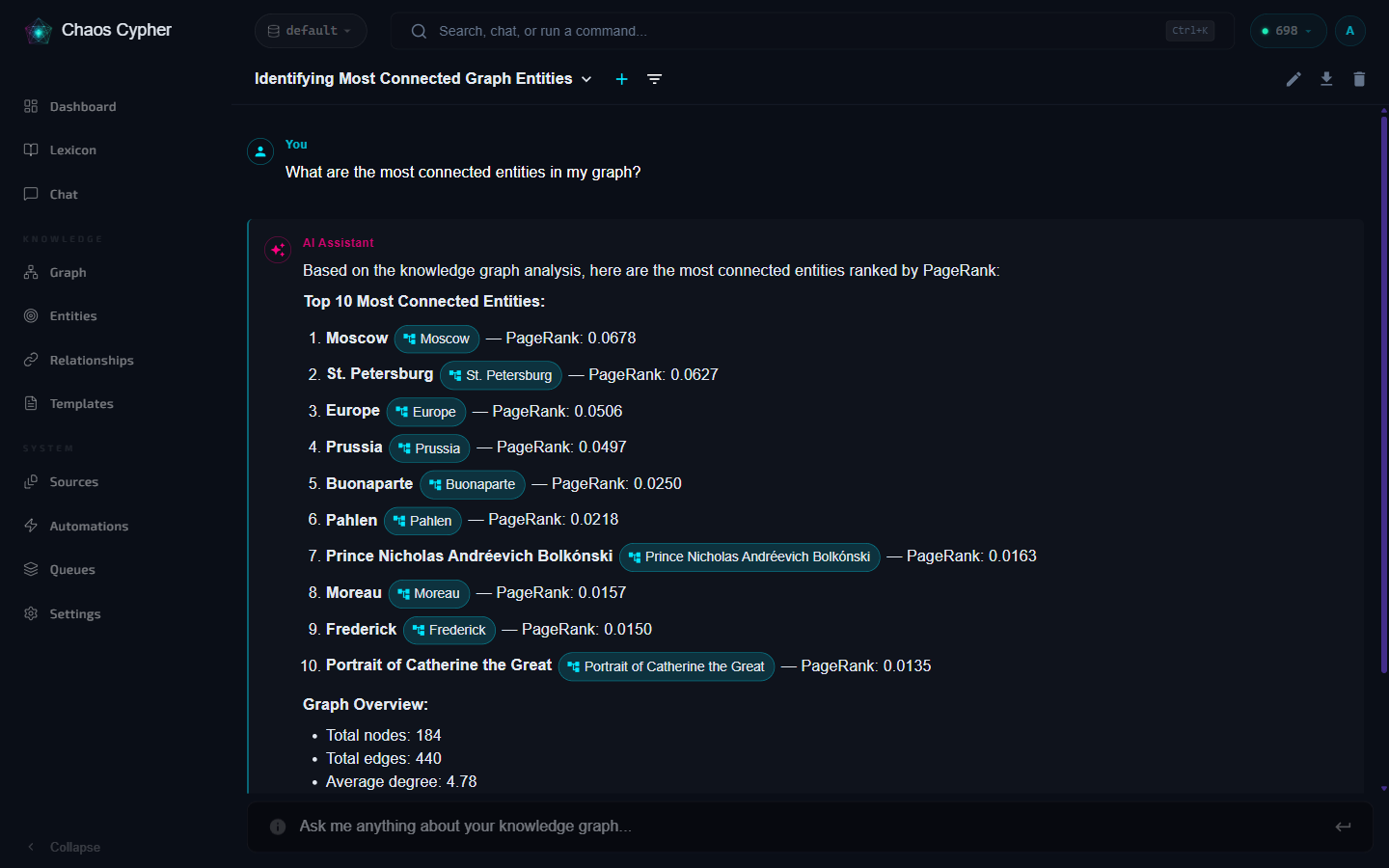
Chat — ask questions in plain language and get GraphRAG answers with inline entity citations you can click through to the graph.
🚀 Quick Start
Prerequisites: Docker (with Compose). That's it for end users — embeddings run locally on CPU. You'll also want an LLM provider; Ollama keeps everything on-device.
Run the published container (recommended)
The recommended install path is the all-in-one image published to the GitHub Container Registry:
docker run -d --name chaoscypher \
  -p 80:80 \
  -p 443:443 \
  -v chaoscypher-data:/data \
  --add-host=host.docker.internal:host-gateway \
  ghcr.io/chaoscypherinc/chaoscypher:latest

# Then open http://localhost  (443 is published so HTTPS works if you enable TLS)
Prefer Compose? Save this as docker-compose.yml and run docker compose up -d:
name: chaoscypher
services:
  chaoscypher:
    image: ghcr.io/chaoscypherinc/chaoscypher:latest
    container_name: chaoscypher
    ports:
      - "80:80"
      - "443:443"
    volumes:
      - chaoscypher-data:/data
    extra_hosts:
      # Lets the container reach an Ollama running on the host (Linux engines
      # don't resolve host.docker.internal without this)
      - "host.docker.internal:host-gateway"
    restart: unless-stopped
volumes:
  chaoscypher-data:
The image is built and pushed on every
vX.Y.Zrelease by.github/workflows/publish-ghcr.yml.
Install the CLI from PyPI
Terminal-first? The standalone CLI installs with pipx (or plain pip):
pipx install chaoscypher-cli
chaoscypher setup                 # wizard: pick an LLM provider
chaoscypher source add paper.pdf
All four Python packages (chaoscypher-core, -cortex, -neuron,
-cli) are published to PyPI on
every release — chaoscypher-core gives you the same extraction and search
engine as an embeddable library. See the
developer quickstart.
Build from source (alternative / development)
Clone and build the all-in-one image locally — no published image required:
git clone https://github.com/chaoscypherinc/chaoscypher.git
cd chaoscypher
make docker-up      # builds + starts the all-in-one container
# Open http://localhost
Try it in about 5 minutes
The quickstart covers this in detail — import and search work within about 5 minutes; extraction and chat come online once your LLM provider is set up (for Ollama, after a one-time model download).
- Start the app with one of the paths above and open http://localhost.
- Create your single-user login on the first-run setup page.
- Pick an LLM provider in Settings — point at a local Ollama model to stay fully offline, or add an API key for OpenAI / Anthropic / Gemini.
- Add a source — upload a document or paste text. Chaos Cypher extracts entities and relationships in the background (watch progress in the Queue Monitor).
- Explore the graph — open the knowledge graph view to see what was extracted, search across it, and chat with your sources.
- Export a knowledge package when you're happy with the result, so you can back it up or load it elsewhere.
Development setup (with hot-reload)
For contributors who need per-service hot-reload (requires Python 3.14+,
Node.js 24+, and uv 0.11+ — uv replaces pip and
reads the committed uv.lock):
make install      # First-time setup (packages + hooks + Docker test image)
make docker-dev   # Start multi-container dev environment
# Frontend: http://localhost:3000
# Cortex API: http://localhost:8080
📦 Monorepo Structure
chaoscypher/
├── packages/
│   ├── core/      # 🧠 Core (Brain) - Business logic & domain models
│   ├── cortex/    # 🎛️ Cortex (Processing Center) - Full backend API
│   ├── neuron/    # ⚡ Neuron (Worker Cells) - Background task processing
│   ├── interface/ # 💻 Interface (Interaction Layer) - Web UI
│   ├── cli/       # 🔧 CLI - Command-line tools
│   ├── docker/    # 🐳 Docker - Orchestration
│   └── docs/      # 📚 Docs - Docusaurus documentation site
├── e2e/           # Public end-to-end test suite
├── scripts/       # Public build/test helper scripts
└── tools/         # Public lint/license tooling
🛠️ Common Commands
Docker
make docker-up       # Start all-in-one container (http://localhost)
make docker-rebuild  # Rebuild and restart all-in-one
make docker-dev      # Start multi-container dev environment (hot-reload)
make docker-prod     # Start multi-container production
make docker-down     # Stop all Docker services
View Logs
# All-in-one
docker logs -f chaoscypher

# Multi-container
cd packages/docker/multi-container
docker compose -f docker-compose.dev.yml logs -f cortex
Testing
make docker-test     # Run tests in Docker (isolated)
make lint            # Python + frontend lint (make ci runs the full linter suite)
make ci              # Full CI pipeline
Individual Packages
cc-cortex start              # Backend API
cc-neuron                    # Unified worker
cd packages/interface && npm run dev  # Frontend UI
chaoscypher --help           # CLI
📖 Documentation
- Published Docs Site - Full user and developer documentation
- Contributor Guide - Contribution workflow, PR checklist, and review expectations
- AI Contributor Guide - Public guidance for AI coding assistants
- Core Architecture - Hexagonal architecture deep dive
- Documentation source - Docusaurus documentation site source
- Architecture Decisions - Public ADRs
- Self-Hosted Threat Model - What data stays local, and how to harden exposure
Documentation Site (Docusaurus)
cd packages/docs && npm run build    # Build static site
cd packages/docs && npm start        # Dev server (http://localhost:3000)
🏗️ Architecture Highlights
Chaos Cypher is organized using a brain-inspired metaphor, with each package mapped to a specialized role:
┌─────────────────────────────────────────────────────────────┐
│                      Interface (UI)                          │
│                  React + TypeScript + Vite                   │
└─────────────────────────┬───────────────────────────────────┘
                          │
                 ┌────────▼────────┐
                 │  Cortex (API)   │
                 │  FastAPI + VSA  │
                 └────────┬────────┘
                          │
                 ┌────────▼────────┐
                 │   Core (Brain)  │
                 │    Hexagonal    │
                 └────────┬────────┘
                          │
           ┌──────────────┼──────────────┐
  ┌────────▼────────┐    │    ┌────────▼────────┐
  │ Neuron LLM      │    │    │ Neuron Ops      │
  │ (1 concurrent)  │    │    │ (8 concurrent)  │
  └─────────────────┘    │    └─────────────────┘
                         │
                ┌────────▼────────┐
                │ Storage Adapters│
                │ SQLite / Files  │
                └─────────────────┘
- 🧠 Core (
packages/core/) — framework-agnostic business logic (hexagonal architecture) - 🎛️ Cortex (
packages/cortex/) — FastAPI backend with vertical-slice architecture - ⚡ Neuron (
packages/neuron/) — background workers for LLM and operations processing - 💻 Interface (
packages/interface/) — React + TypeScript web UI - 🔧 CLI (
packages/cli/) — standalone command-line interface - 🐳 Docker (
packages/docker/) — orchestration (docker-compose files)
In plain English: the UI talks to one API, the API delegates all the real work to a framework-agnostic core, and slow jobs (extraction, exports) run in background workers so the app stays responsive.
Vertical Slice Architecture (Cortex Backend)
Features are self-contained vertical slices with complete functionality from API → Service → Repository → Database.
packages/cortex/src/chaoscypher_cortex/features/{feature}/
├── __init__.py        # Barrel exports
├── models.py          # Pydantic DTOs (Request/Response)
├── repository.py      # Data access (SQLModel entities)
├── service.py         # Business logic
└── api.py             # REST endpoints + factory DI
Hexagonal Architecture (Core Library)
The packages/core/ library uses Hexagonal Architecture for maximum flexibility and reusability.
- Ports: Protocol definitions (contracts)
- Adapters: Storage implementations (SQLite, file, LLM, web)
- Services: Business logic (framework-agnostic)
- Repositories: Domain repositories using storage adapters
Queue System
- LLM Worker (1 concurrent) - Chat, embeddings, tool LLM calls
- Operations Worker (8 concurrent) - Source processing, exports, workflows
Monitor: http://localhost/queues (all-in-one; dev stack: http://localhost:3000/queues)
🔄 Development Workflow
# Make changes in any package
cd packages/cortex
# Edit code...

# Changes are immediately available (editable install)
# If using Docker, hot-reload will restart services

# Run tests
pytest

# Commit changes (Conventional Commits — see CONTRIBUTING.md)
git add .
git commit -m "feat(cortex): add new feature"
git push
🤝 Contributing
- Fork the repository
- Create a feature branch (
git checkout -b feature/amazing-feature) - Make changes and add tests
- Ensure all tests pass
- Commit your changes following Conventional Commits (
git commit -m 'feat(scope): add amazing feature') - Push to the branch (
git push origin feature/amazing-feature) - Open a Pull Request
💬 Community & Support
- Questions, ideas, show-and-tell → GitHub Discussions
- Bugs and feature requests → Issue Tracker
- What's shipping → Blog · Changelog · Roadmap
If Chaos Cypher is useful to you, a ⭐ on the repo genuinely helps other self-hosters find it.
📄 License
Chaos Cypher is licensed under the GNU Affero General Public License v3.0 only
(AGPL-3.0-only) — see the root LICENSE file. A separate
proprietary enterprise edition is available; external contributions are accepted
under the project CLA.







