Listed from the MCP registry; nobody on Odel publishes it.

Codeledger
Local context and engineering evidence for AI coding agents.
Runs on your machine from its package; the steps are below.
What it does
- Reads
- Writes
- High impact
At most: only reads or looks up information.
What it costs
FreeOdel charges nothing per call. The publisher may charge for its own service.
Runs locally over stdio
This server isn't hosted — your MCP client launches it from a package registry. Use one of the commands below, or drop the config into your client (e.g. Claude Desktop).
Run
npx -y @codeledger/cli
MCP client config
{
  "mcpServers": {
    "codeledger": {
      "command": "npx",
      "args": [
        "-y",
        "@codeledger/cli"
      ]
    }
  }
}CodeLedger developer preview · 0.10.84
Find committed code, tests, and documentation containing a literal term. Each result carries the Git commit, path, line number, and matching text. Use the CLI directly or connect an MCP client over local stdio.
Quickstart
Use Node.js 20 or newer, Git on PATH, and a local worktree with a committed HEAD.
npm install --global @codeledger/cli@0.10.84
codeledger --version
cd /path/to/worktree
codeledger activate --task "Find how Retry-After determines the delay" --query "Retry-After"
Use a literal term that appears in your repo. To check a citation, copy the result’s source_revision and path into git show '<source_revision>:<path>', then compare the cited line. That checks the excerpt against Git.
For MCP, configure the client to launch the installed codeledger executable with these arguments. Use an absolute executable path if your client does not inherit your terminal’s PATH.
{
  "command": "codeledger",
  "args": ["mcp", "start", "--repo", "/absolute/path/to/worktree", "--profile", "core"]
}
Call get_activation_payload with task and query. Choose a worktree you have authorized the client to read. The tool returns matching lines verbatim.
Known limitations
- Lookup is stateless, literal, and limited to committed
HEAD. Use your normal tools for uncommitted changes and semantic search. - Results are capped at 20 matches. The
truncatedstatus means you can narrow the literal. - Git can substantiate a citation. Automated verification of changes, test execution, and policy enforcement are outside this preview. The preview supports
activateand the core MCP tool. Full-runtime commands such asreadyandverifyare unavailable. - Managed writes remain an opt-in full-runtime workflow. Context refresh remains archived.
- Exact-package install and stdio smoke tests passed on Ubuntu 24.04, Windows, and macOS 15 Apple Silicon with Node 22. The representative-task check used the TypeScript MCP SDK on macOS Apple Silicon. Interactive coding-client testing is deferred.
Uninstall
npm uninstall --global @codeledger/cli
Remove the preview’s MCP server entry from your client. If you used the portable ZIP, delete the extracted folder. The lookup does not create a .codeledger directory.
Feedback
Open a preview feedback issue. Include your OS, Node and client versions, a public or sanitized example, and what you expected to find. Keep private code, credentials, and raw MCP payloads out of public issues. Report security issues privately.
Earlier full-runtime documentation
CodeLedger
Give AI coding agents the right repo context before they start - then verify what changed.
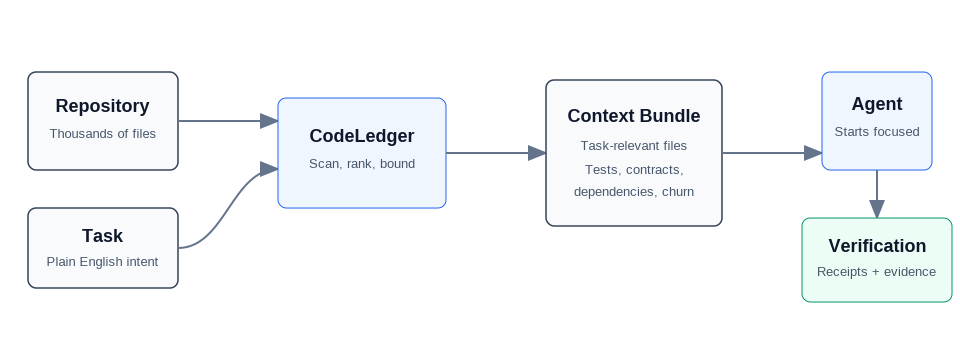
CodeLedger is local-first context control for AI coding agents. It scans a repository, selects a bounded task-relevant set of files, and writes an evidence-backed context bundle before the agent begins work.
Works with Claude Code, Codex, Cursor, GitHub Copilot, Gemini CLI, and other CLI or MCP-compatible coding agents.
Try It
npm install -g @codeledger/cli
cd your-project
codeledger ready --task "Fix null handling in user service"
CodeLedger initializes the repo if needed, refreshes the index, and creates the
task-specific bundle at .codeledger/active-bundle.md. Your agent reads that
artifact first so it starts with the files most relevant to the task.
Runtime analysis is local by default. Installing or updating may fetch packages or release artifacts from npm and GitHub Releases; CodeLedger runtime analysis does not send your source code through CodeLedger telemetry by default.
Example Benchmark
Example result from a mid-sized Node.js service. Results vary by repository, task, agent, and scenario.
| Metric | Without CodeLedger | With CodeLedger | Change |
|---|---|---|---|
| Tests Passed | 78% | 94% | +16% |
| Iterations | 4 | 2 | -50% |
| Files Changed | 17 | 9 | -47% |
| Time to Finish | 6m 12s | 3m 40s | -41% |
| Token Usage | 28k | 18k | -36% |
Do not take the benchmark on faith - measure CodeLedger on your own repo:
codeledger compare \
  --scenario .codeledger/harness/scenarios/auth-rate-limit.json \
  --guided
If CodeLedger improves your coding-agent workflow, star the repo to follow releases and help other developers discover it.
Start Here
- Getting Started
- CLI Reference
- How It Works
- MCP Server
- Feature Tiers
- Security
- Contributing
- Latest Release
- npm package
How It Works
- CodeLedger scans the repo for deterministic local signals such as dependency structure, churn, tests, contracts, and task keywords.
- It ranks and packs a bounded set of task-relevant files.
- It writes
.codeledger/active-bundle.mdfor your coding agent. - After work, verification, receipts, and session summaries help show what changed and whether the selected context was useful.
Same task plus same repo state produces the same file ranking behavior.
Core Capabilities
- Give agents the right context: deterministic file selection, scope inference, bounded budgets, blast-radius hints, and co-change context.
- Keep work continuous: session summaries, checkpoints, mid-session refine, and handoff/recovery commands.
- Keep agents inside the task: scope contracts, intent governance, loop detection, and multi-agent conflict checks.
- Prove what happened: review intelligence, receipts, provenance, audit exports, and release evidence.
For the full command surface, see the CLI Reference.
Agent Integration
Claude Code can use CodeLedger hooks after codeledger ready initializes the
repo. Cursor, Codex, GitHub Copilot, Gemini CLI, Aider, Windsurf, and other
agents can read CLAUDE.md plus .codeledger/active-bundle.md, or use the
repo-local wrappers when available.
CodeLedger also includes an MCP server for supported tiers:
codeledger mcp start
codeledger mcp status
See MCP Server and Feature Tiers for setup and tier details.
Trust And Verification
- Runtime source analysis runs locally by default.
- Source code is not sent through CodeLedger telemetry by default.
- No account is required for the local CLI flow.
- Public releases include
SHA256SUMSand release-evidence artifacts. codeledger doctorchecks the local install, hooks, config, index, and ledger health.- The public wrapper, docs, harness, and scanning surface are inspectable in
this repo; the protected hardened runtime is covered by
LICENSE-CORE.
Install
npm install -g @codeledger/cli
codeledger --version
Or use the release zip:
- Download the latest release.
- Extract it.
- Run
install.sh.
The installer uses the bundled package from the zip, so the installed wrapper version matches the release. The wrapper then fetches the matching hardened binary from the GitHub release unless your environment already provides it.
Everyday Flow
cd your-project
codeledger ready
codeledger ready --task "Fix null handling in user service"
Inside an initialized repo, you can also use:
codeledger activate --task "Fix null handling in user service"
codeledger doctor
Browser, cloud, and sandboxed environments can use the repo-local runtime
deployed under .codeledger/bin/ after initialization or vendoring.
Architecture
CodeLedger has an open public surface and a protected hardened runtime:
PUBLIC:    CLI wrapper, types, repo scanner, harness, reports, docs, hooks
PROTECTED: Scoring engine, selection algorithm, confidence internals
Use codeledger about, codeledger doctor, and command-specific --explain
output to inspect behavior and evidence without exposing protected
implementation internals.
Privacy
- Installation may use npm and GitHub Releases.
- Runtime analysis runs on your local machine by default.
- Runtime analysis makes zero source-code telemetry calls by default.
- Your source code is not required to leave your machine for the local CLI flow.
- Uninstall at any time.
License
- Public wrapper, types, repo scanning, harness, reports, docs, and examples: MIT
- Downloaded hardened binary: CodeLedger Core License
GitHub may classify the combined licensing structure as "Other" because the repo includes both MIT-covered public files and separately licensed protected runtime terms. Changing the license files should be a human legal decision.
Part Of ContextECF
CodeLedger applies Intelligent Context AI's context-control architecture to software engineering. For enterprise-wide governed context across applications and agents, see ContextECF.
CodeLedger is produced by Intelligent Context AI, Inc. See codeledger.dev.







