Listed from the MCP registry; nobody on Odel publishes it.

Codesurface
Indexes your codebase's public API and serves it via compact MCP tool responses.
Runs on your machine from its package; the steps are below.
What it does
- Reads
- Writes
- High impact
At most: only reads or looks up information.
What it costs
FreeOdel charges nothing per call. The publisher may charge for its own service.
Runs locally over stdio
This server isn't hosted — your MCP client launches it from a package registry. Use one of the commands below, or drop the config into your client (e.g. Claude Desktop).
Run
uvx codesurface
MCP client config
{
  "mcpServers": {
    "codesurface": {
      "command": "uvx",
      "args": [
        "codesurface"
      ]
    }
  }
}codesurface









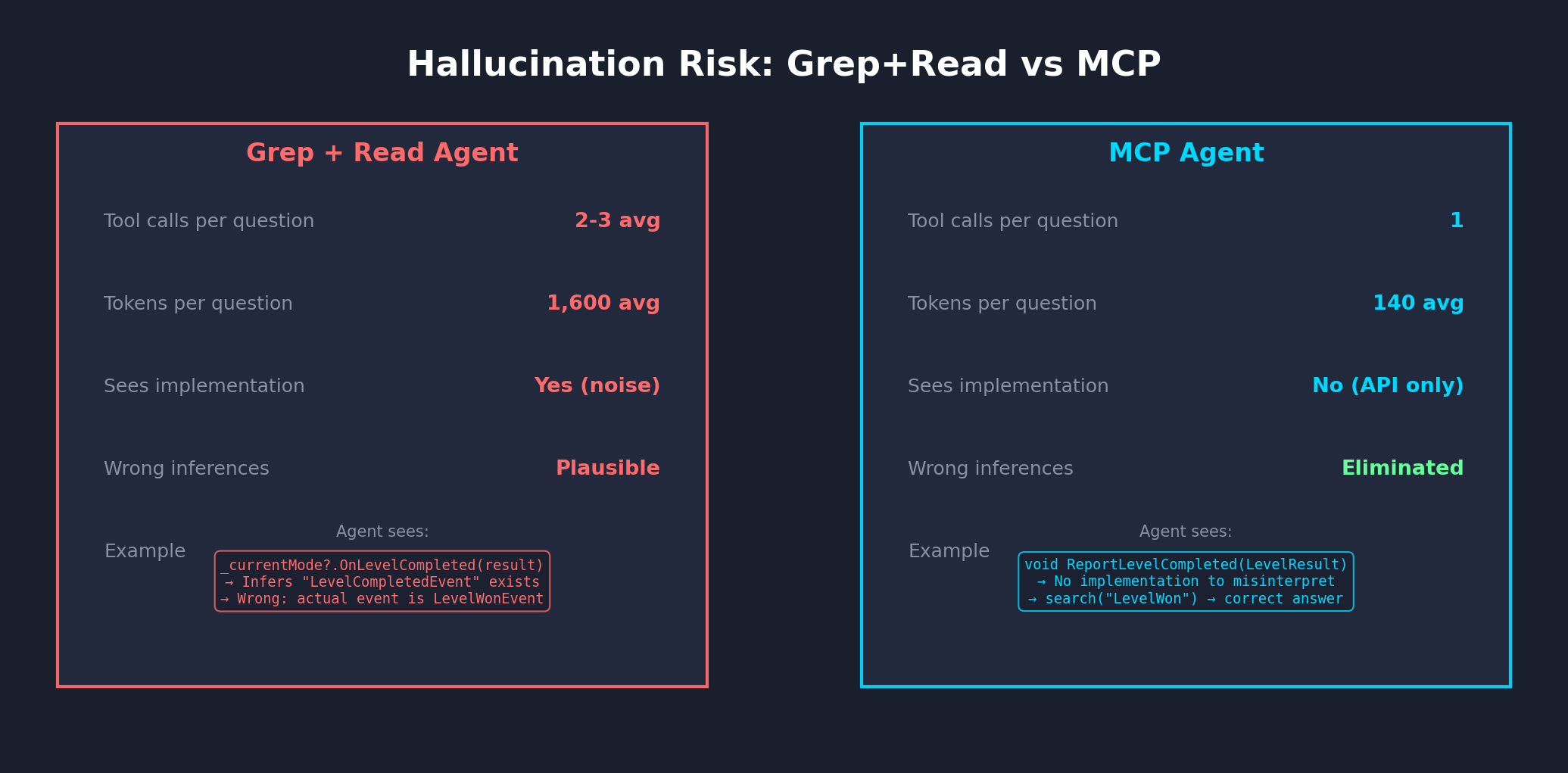
MCP server that indexes your codebase's public API at startup and serves it via compact tool responses, saving tokens vs reading source files.
Parses source files, extracts public classes/methods/properties/fields/events, and serves them through 5 MCP tools. Works with Claude Code, Cursor, Windsurf, or any MCP-compatible AI tool.
Supported languages: C# (.cs), C++ headers (.h, .hpp, .hxx, .h++), Go (.go), Java (.java), Python (.py), TypeScript/JavaScript (.ts, .tsx, .js, .jsx)
Quick Start
Add to your .mcp.json:
{
  "mcpServers": {
    "codesurface": {
      "command": "uvx",
      "args": ["codesurface", "--project", "/path/to/your/src"]
    }
  }
}
Point --project at any directory containing supported source files (a Unity Assets/Scripts folder, a Spring Boot project, a .NET src/ tree, a Node.js/React project, a Python package, etc.). Languages are auto-detected.
Restart your AI tool and ask: "What methods does MyService have?"
CLAUDE.md Snippet
Add this to your project's CLAUDE.md (or equivalent instructions file). This step is important. Without it, the AI has the tools but won't know when to reach for them.
## Codebase API Lookup (codesurface MCP)

Use codesurface MCP tools BEFORE Grep, Glob, Read, or Task (subagents) for any class/method/field lookup. This applies to you AND any subagents you spawn.

| Tool | Use when | Example |
|------|----------|---------|
| `search` | Find APIs by keyword | `search("MergeService")` |
| `get_signature` | Need exact signature | `get_signature("TryMerge")` |
| `get_class` | See all members on a class | `get_class("BlastBoardModel")` |
| `get_stats` | Codebase overview | `get_stats()` |

Every result includes file path + line numbers. Use them for targeted reads:
- `File: Service.cs:32` → `Read("Service.cs", offset=32, limit=15)`
- `File: Converter.java:504-506` → `Read("Converter.java", offset=504, limit=10)`

Never read a full file when you have a line number. Only fall back to Grep/Read for implementation details (method bodies, control flow).
Tools
| Tool | Purpose | Example |
|---|---|---|
search | Find APIs by keyword | "MergeService", "BlastBoard", "GridCoord" |
get_signature | Exact signature by name or FQN | "TryMerge", "CampGame.Services.IMergeService.TryMerge" |
get_class | Full class reference card with all public members | "BlastBoardModel" → all methods/fields/properties |
get_stats | Overview of indexed codebase | File count, record counts, namespace breakdown |
reindex | Incremental index update (mtime-based) | Only re-parses changed/new/deleted files. Also runs automatically on query misses |
search, get_signature, and get_class accept two optional filters:
file_path: scope results to a directory prefix or exact file (e.g."src/services/"or"src/services/MergeService.ts")include_tests: include test files in results (defaultfalse). Detects__tests__/,tests/,test/,*.test.*,*.spec.*,*_test.*,test_*
Tested On
| Project | Language | Files | Records | Time |
|---|---|---|---|---|
| vscode | TypeScript | 6,611 | 88,293 | 9.3s |
| Paper | Java | 2,909 | 33,973 | 2.3s |
| client-go | Go | 219 | 2,760 | 0.4s |
| langchain | Python | 1,880 | 12,418 | 1.1s |
| pydantic | Python | 365 | 9,648 | 0.3s |
| guava | Java | 891 | 8,377 | 2.4s |
| immich | TypeScript | 919 | 7,957 | 0.6s |
| fastapi | Python | 881 | 5,713 | 0.5s |
| ant-design | TypeScript | 2,947 | 5,452 | 0.9s |
| dify | TypeScript | 4,903 | 5,038 | 1.9s |
| crawlee-python | Python | 386 | 2,473 | 0.3s |
| flask | Python | 63 | 872 | <0.1s |
| cobra | Go | 15 | 249 | <0.1s |
| gin | Go | 41 | 574 | <0.1s |
| Unity game (private) | C# | 129 | 1,018 | 0.1s |
Line Numbers for Targeted Reads
Every record includes line_start and line_end (1-indexed). Multi-line declarations span the full signature:
[METHOD] com.google.common.base.Converter.from
  Signature: static Converter<A, B> from(Function<...> forward, Function<...> backward)
  File: Converter.java:504-506          ← multi-line signature

[METHOD] server.AlbumController.createAlbum
  Signature: createAlbum(@Auth() auth: AuthDto, @Body() dto: CreateAlbumDto)
  File: album.controller.ts:46          ← single-line
This lets AI agents do targeted reads instead of reading full files:
# Instead of reading the entire 600-line file:
Read("Converter.java")                     # 600 lines, ~12k tokens

# Read just the method + context:
Read("Converter.java", offset=504, limit=10)  # 10 lines, ~200 tokens
Benchmarks
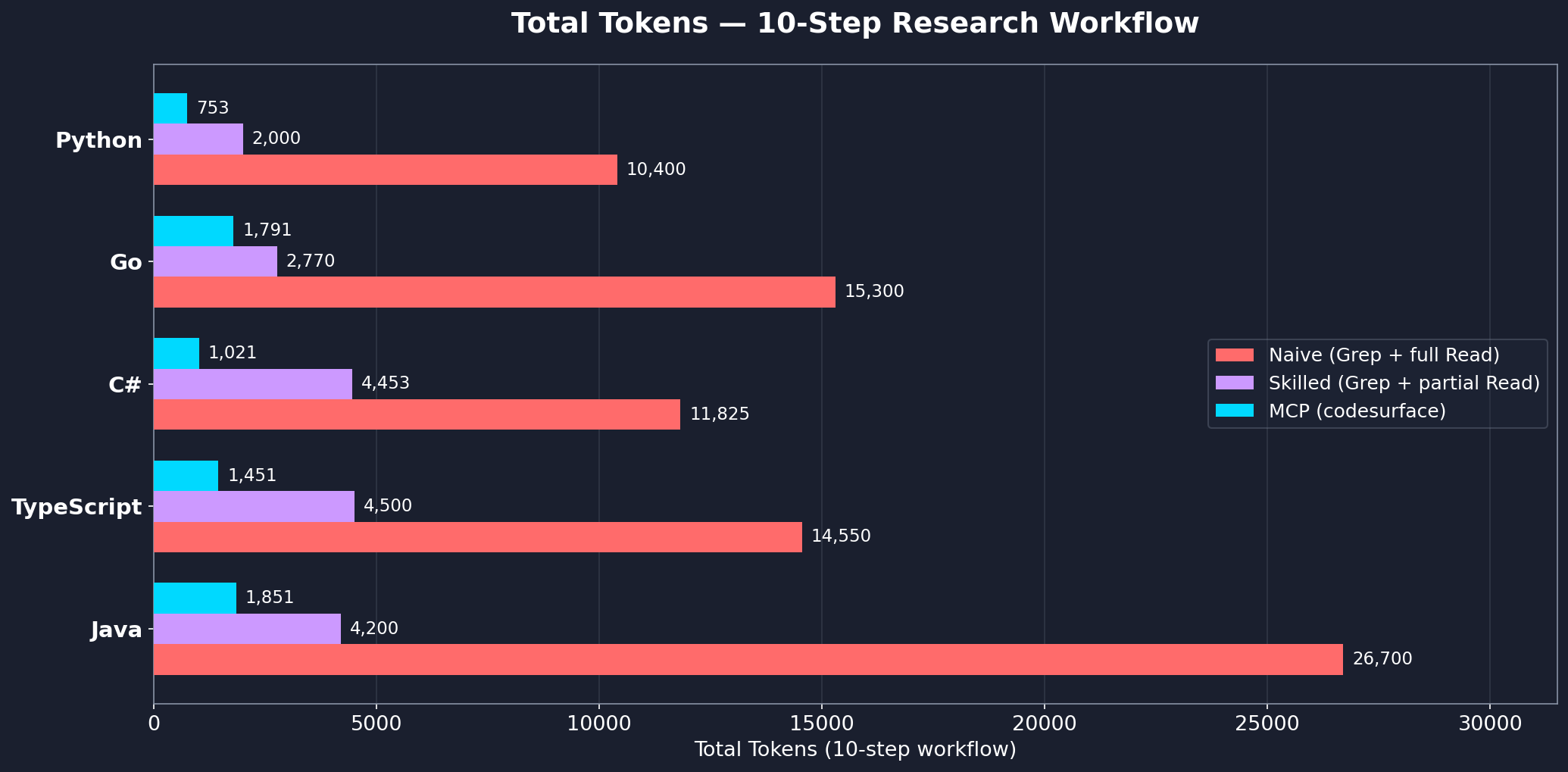
Measured across 5 real-world projects in 5 languages, each using a 10-step cross-cutting research workflow.
| Language | Project | Files | Records | MCP | Skilled | Naive | MCP vs Skilled |
|---|---|---|---|---|---|---|---|
| C# | Unity game | 129 | 1,034 | 1,021 | 4,453 | 11,825 | 77% fewer |
| TypeScript | immich | 694 | 8,344 | 1,451 | 4,500 | 14,550 | 68% fewer |
| Java | guava | 891 | 8,377 | 1,851 | 4,200 | 26,700 | 56% fewer |
| Go | gin | 38 | 534 | 1,791 | 2,770 | 15,300 | 35% fewer |
| Python | codesurface | 9 | 40 | 753 | 2,000 | 10,400 | 62% fewer |
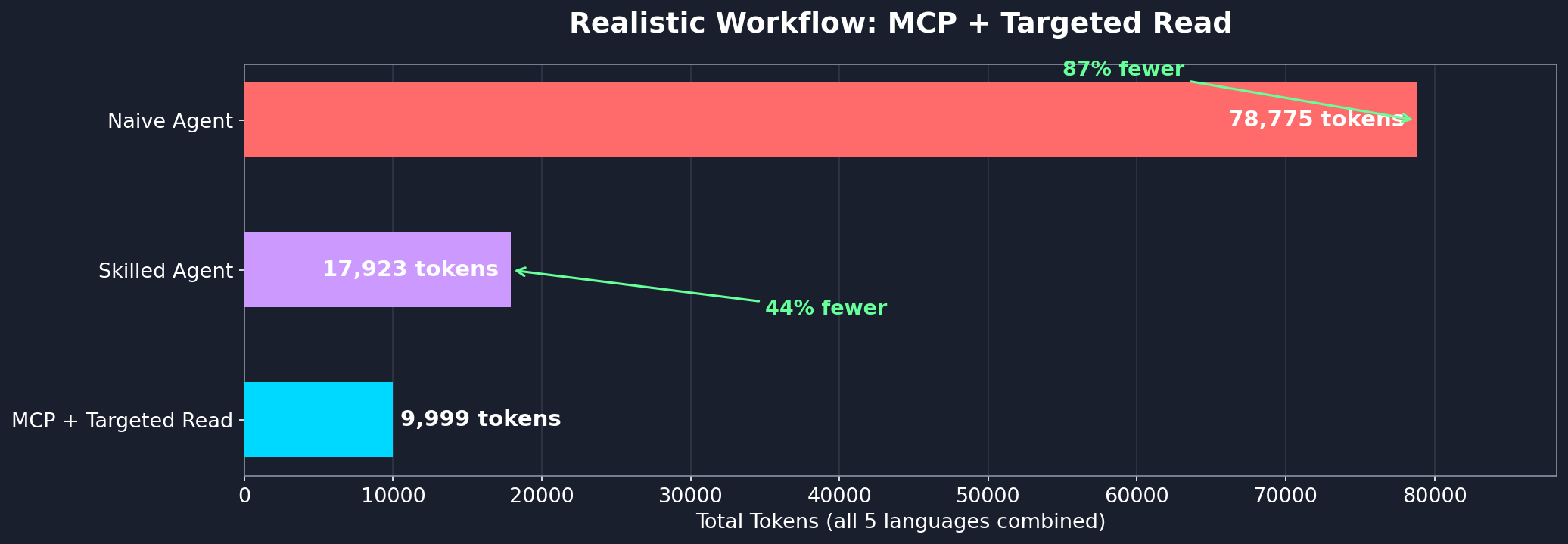
Even with follow-up reads for implementation detail, the hybrid MCP + targeted Read approach uses 44% fewer tokens than a skilled Grep+Read agent and 87% fewer than a naive agent:
Per-question breakdown
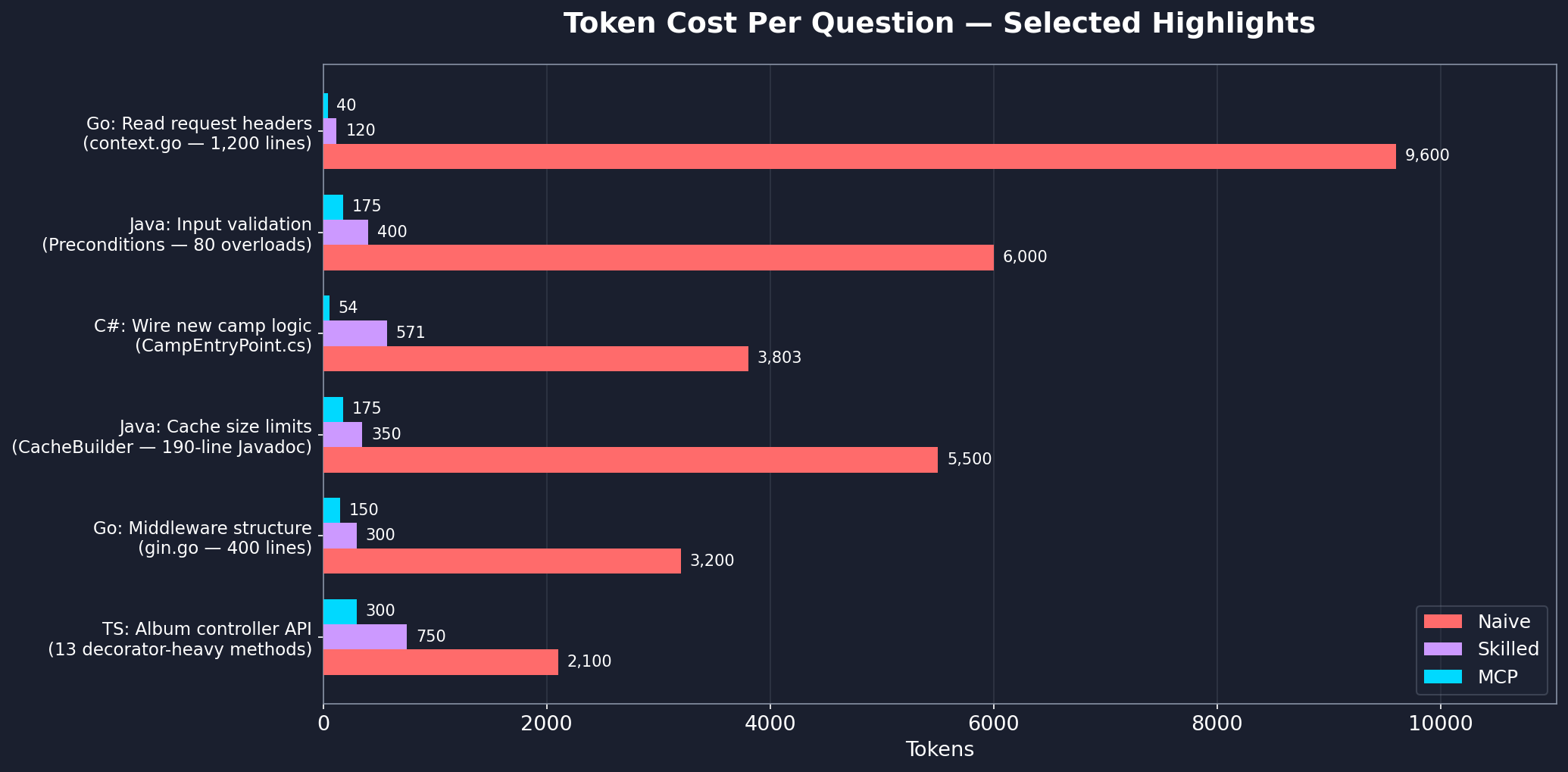
See workflow-benchmark.md for the full step-by-step analysis across all languages.
Filtering What Gets Indexed
By default, codesurface skips common vendored, build, and VCS directories: node_modules, vendor, bin, obj, dist, build, target, .git, .venv, __pycache__, and a few dozen others. Git worktrees and submodules are also skipped.
To exclude additional paths:
Project-level (committed): create a .codesurfaceignore file at your project root with one glob per line.
generated/**
docs/**
**/*.pb.go
Per-instance (CLI): pass --exclude with comma-separated globs.
{
  "command": "uvx",
  "args": ["codesurface", "--project", "src", "--exclude", "generated/**,vendor/**"]
}
Other indexing flags:
--include-submodules: index git submodules (skipped by default)--language <name>: pin to a single parser (e.g.--language cpp) instead of auto-detecting
Multiple Projects
Each --project flag indexes one directory. To index multiple codebases, run separate instances with different server names:
{
  "mcpServers": {
    "codesurface-backend": {
      "command": "uvx",
      "args": ["codesurface", "--project", "/path/to/backend/src"]
    },
    "codesurface-frontend": {
      "command": "uvx",
      "args": ["codesurface", "--project", "/path/to/frontend/src"]
    }
  }
}
Each instance gets its own in-memory index and tools. The AI agent sees both and can query across projects.
Setup Details
Alternative installation methods
Using pip install:
pip install codesurface
{
  "mcpServers": {
    "codesurface": {
      "command": "codesurface",
      "args": ["--project", "/path/to/your/src"]
    }
  }
}
Project structure
codesurface/
├── src/codesurface/
│   ├── server.py           # MCP server with 5 tools
│   ├── db.py               # SQLite + FTS5 database layer
│   ├── filters.py          # PathFilter (default exclusions, .codesurfaceignore, --exclude)
│   └── parsers/
│       ├── base.py         # BaseParser ABC
│       ├── cpp.py          # C++ header parser
│       ├── csharp.py       # C# parser
│       ├── go.py           # Go parser
│       ├── java.py         # Java parser
│       ├── python_parser.py # Python parser
│       └── typescript.py   # TypeScript/JavaScript parser
├── pyproject.toml
└── README.md
Troubleshooting
"No codebase indexed"
- Ensure
--projectpoints to a directory containing supported source files (.cs,.h,.hpp,.go,.java,.py,.ts,.tsx,.js,.jsx) - The server indexes at startup. Check stderr for
[codesurface] scanning N files...and[codesurface] done:lines
Server won't start
- Check Python version:
python --version(needs 3.10+) - Check
mcp[cli]is installed:pip install mcp[cli]
Stale results after editing source files
- The index auto-refreshes on query misses. If you add a new class and query it, the server reindexes and retries automatically
- You can also call
reindex()manually to force an incremental update







