Listed from the MCP registry; nobody on Odel publishes it.

Garmin
Ask your AI assistant about your Garmin training, sleep and recovery data
Runs on your machine from its package; the steps are below.
What it does
- Reads
- Writes
- High impact
At most: only reads or looks up information.
What it costs
FreeOdel charges nothing per call. The publisher may charge for its own service.
Runs locally over stdio
This server isn't hosted — your MCP client launches it from a package registry. Use one of the commands below, or drop the config into your client (e.g. Claude Desktop).
Run
npx -y garmin-mcp
MCP client config
{
  "mcpServers": {
    "garmin": {
      "command": "npx",
      "args": [
        "-y",
        "garmin-mcp"
      ]
    }
  }
}garmin-mcp


Ask your AI assistant about your health, sleep, recovery and training in any sport, using your own Garmin data. It's an MCP server that gives Claude, ChatGPT and other assistants read-only access to your Garmin Connect data through Garmin's official Personal API.
Run it whichever way suits you. The tools are identical:
- Local. Runs on your computer, started by your AI app. About a minute to set up, and all you need is your Garmin key. In Claude Desktop it's a one-click install.
- Cloud. Runs on your own Cloudflare account (the free plan is plenty),
behind GitHub sign-in. About 10 minutes to set up with
npm run setup, and it then works on all your devices: web, desktop and phone.
It works with Claude, ChatGPT, Claude Code, Codex, Gemini CLI, Cursor, VS Code and other MCP clients. See Local or cloud? for which apps each option covers.
Either way, you get:
- Insight, not another chart. Ask a question and get an answer based on your own data.
- No password. It uses Garmin's official API key, which you can revoke at any time, not your Garmin login.
- No middleman. Data goes straight from Garmin to your computer or your own Cloudflare account. No third-party service stores it.
- Always current. It fetches from Garmin when you ask, so there's no sync to remember.
- No extra cost. It uses the AI subscription you already have, and the cloud option fits Cloudflare's free plan.
Ask things like:
- "Am I ready to train hard today?"
- "Which day of the week do I sleep worst?"
- "How have my resting heart rate and HRV changed since May?"
- "How stressed was I this month compared with last?"
- "How much did I train each month this year, by sport?"
- "Am I building up too fast?"
- "What was my best 20-minute power on Sunday's ride?"
- "Is my bench press going up?"
- "How far have I swum since January?"
- "Give me my km splits for Sunday's race. Did I negative split?"
- "What are my 5k and 10k PBs this year, and what could I run a half in?"
- "Compare my last two long hikes."
Ask in any language: Claude answers in yours.
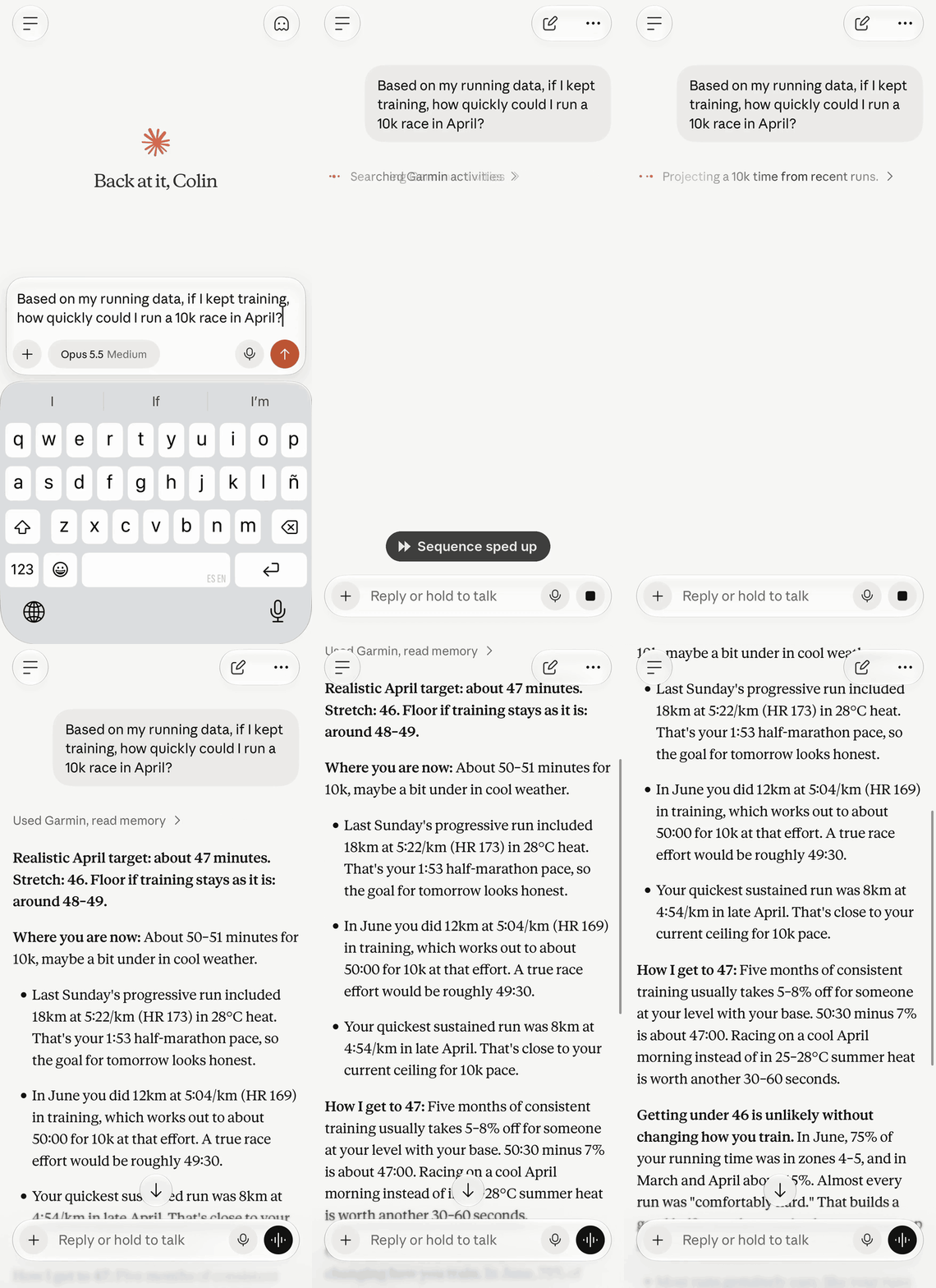
Here it is in Claude on a phone (cloud version), answering a running question: what 10k time recent runs point to.
Not affiliated with or endorsed by Garmin. "Garmin" and "Garmin Connect" are trademarks of Garmin Ltd. or its subsidiaries.
Local or cloud?
| Local | Cloud | |
|---|---|---|
| Claude Desktop (one-click install), Claude Code | ✅ | ✅ |
| Codex (CLI, and in the ChatGPT desktop app) | ✅ | ✅ |
| Gemini CLI, Cursor, VS Code | ✅ | ✅ |
| The ChatGPT app: web, desktop chat and phone | ✅ | |
| Claude on the web | ✅ | |
| AI apps on your phone or tablet | ✅ | |
| Works when your computer is off | ✅ | |
| Set up in about 1 minute | ✅ | |
| No Cloudflare or GitHub account needed | ✅ | |
| Garmin key stored only on your computer | ✅ | |
| Nothing listening on the network | ✅ | |
| Free to run | ✅ | ✅ |
| All 29 tools and 6 prompts | ✅ | ✅ |
Still deciding?
I use Claude Desktop or Claude Code on one computer
Go local. You get everything, in about a minute. In Claude Desktop it's a single download: no Node, no config file.
I want to ask from my phone, say right after a workout
Go cloud. Phone apps can't start a local process, so they need a server they can reach over the internet.
I use ChatGPT
Go cloud. The ChatGPT app itself (web, desktop chat and phone) connects to remote MCP servers only. Codex is the exception: the Codex CLI, and Codex in the ChatGPT desktop app, can run it locally.
I use more than one computer
Go cloud. Local means installing it on each computer; cloud means setting it up once and adding the URL to each app.
I'm not sure yet
Start local. If you later want it on your phone, set up cloud. There's nothing to migrate, because your data stays in Garmin.
Can I run both?
Yes. They can share a Garmin key.
Which is more secure?
Both are locked down, in different ways. Local has no sign-in because there's nothing to sign in to: only the app that started it can talk to it, and your key sits in that app's config on your computer. Cloud is reachable from the internet, so it's locked to your GitHub account, and your key sits in Cloudflare secrets. See Security model.
How comfortable with a terminal do I need to be?
Local: you paste one command or one config snippet. Cloud: four commands
(git clone, cd, npm install, npm run setup), then the setup script asks
you questions and does the rest. You fill in one form on GitHub and create a
key in Garmin Connect along the way.
Running locally
Your AI app starts the server as a local process and talks to it directly. There's no Cloudflare or GitHub setup.
All you need is a Garmin Personal API key (see Create a Garmin Personal API key).
Claude Desktop: one click
- Download garmin-mcp.mcpb.
- Double-click it, paste your Garmin key when asked, done.
Claude Desktop runs the extension itself, so you don't need Node or a config file, and your key is stored in your system keychain. To turn off the update check and usage counting, untick "Check for updates" in the extension's settings.
Claude Desktop warns before installing it. It shows that warning for every extension that isn't installed from Anthropic's directory, not because of anything in this one. This extension only connects to Garmin's API (plus small downloads from GitHub for the update check and usage counting; see Security model), and its source is all in this repo. To check that your download was built from this repo by its release workflow, and not changed since, run this with the GitHub CLI:
gh attestation verify garmin-mcp.mcpb --repo colincooperio/garmin-mcp
Claude Code, Cursor, VS Code and other apps
These need Node 22 or newer. There's nothing to install separately: your app
runs the garmin-mcp package with
npx.
Claude Code:
claude mcp add garmin --env GARMIN_API_KEY=<your key> -- npx -y garmin-mcp@latest
Cursor, VS Code and other apps (or Claude Desktop, if you'd rather not use the extension): add this to the app's MCP config:
{
	"mcpServers": {
		"garmin": {
			"command": "npx",
			"args": ["-y", "garmin-mcp@latest"],
			"env": {
				"GARMIN_API_KEY": "<your key>"
			}
		}
	}
}
VS Code's mcp.json uses "servers" instead of "mcpServers".
Codex
For the Codex CLI and Codex in the ChatGPT desktop app, which share one
config. Add this to ~/.codex/config.toml (needs Node 22 or newer):
[mcp_servers.garmin]
command = "npx"
args = ["-y", "garmin-mcp@latest"]
env = { GARMIN_API_KEY = "<your key>" }
Gemini CLI
Add this under "mcpServers" in ~/.gemini/settings.json (needs Node 22 or
newer):
"garmin": {
	"command": "npx",
	"args": ["-y", "garmin-mcp@latest"],
	"env": { "GARMIN_API_KEY": "<your key>" }
}
Restart the app, then try "Am I ready to train today?".
Running in the cloud
MCP client ──OAuth──▶ Worker (/mcp) ──Bearer JWT──▶ Garmin Personal API
                         │
                         └─ /authorize ──▶ GitHub sign-in ──▶ allowed user ID? ──▶ token
Each person deploys their own copy to their own Cloudflare account. It's locked to a single GitHub account, so your Garmin data is only ever reachable by you.
What you need
- A Garmin Connect account and a Garmin device
- A Cloudflare account (free plan)
- A GitHub account
- Node 22 or newer
- About 10 minutes
Quick setup
git clone https://github.com/colincooperio/garmin-mcp.git
cd garmin-mcp
npm install
npm run setup
npm run setup walks you through the rest and does most of it itself. It
logs you in to Cloudflare in your browser, asks what to call the Worker
(garmin-cloud-mcp unless you choose otherwise; it's part of the URL, and it
warns you if your account already has a Worker by that name), creates the
storage the server needs, locks it to your GitHub account, stores your secrets in Cloudflare and
deploys. Along the way you do two things in your browser:
- Create a GitHub OAuth app, which is how sign-in works. The script prints a link to GitHub's form and the exact Homepage and callback URLs to paste into it, then asks for the client ID and secret.
- Create a Garmin Personal API key (see below) and paste it in.
What you type for secrets isn't shown on screen. It goes straight to
Cloudflare and is never written to disk. If a step fails, the script says
which one and how to fix it. Run npm run setup again and it skips the steps
that are done, and asks before replacing anything.
When it's done it prints your server URL. Then connect your AI apps.
Create a Garmin Personal API key
Go to Garmin Connect → Personal API Token → Create Key. Pick 1 year and copy the key; Garmin shows it only once.
Connect your AI apps
Your server URL is https://garmin-cloud-mcp.<your-subdomain>.workers.dev/mcp
(npm run setup prints it). Every app opens a GitHub sign-in the first time;
sign in and approve.
- Claude: Settings → Connectors → Add custom connector, and paste the URL. The connector follows your Claude account onto every device.
- ChatGPT: add it as a custom connector (MCP server) with OAuth authentication. Custom connectors need developer mode and depend on your plan; see OpenAI's help pages for the current steps.
- Claude Code:
claude mcp add --transport http garmin <url>, then run/mcpto sign in. - Cursor, VS Code and other MCP apps: add a remote (HTTP) MCP server with the URL. Apps that support MCP OAuth handle the sign-in themselves.
Try "Am I ready to train today?". In apps that show MCP prompts, such as Claude's connector menu, you can also pick a ready-made prompt.
Setting it up by hand instead
Run all commands from the repo folder.
1. Install and log in to Cloudflare
git clone https://github.com/colincooperio/garmin-mcp.git
cd garmin-mcp
npm install
npx wrangler login
cp wrangler.example.jsonc wrangler.jsonc
wrangler.jsonc is git-ignored, so your settings never get committed.
2. Create the KV namespace
npx wrangler kv namespace create garmin-cloud-mcp-OAUTH_KV
Paste the id it prints into wrangler.jsonc, replacing YOUR_KV_NAMESPACE_ID.
The binding stays OAUTH_KV; the title just names the namespace after the
Worker, so it can't clash with another deployment's in the same account.
3. Lock it to your GitHub account
Open https://api.github.com/users/<your-github-username> and copy the numeric
id. Put it in wrangler.jsonc as ALLOWED_GITHUB_USER_ID.
It uses the numeric ID rather than your username because usernames can be changed and then claimed by someone else.
4. Work out your Worker's URL
It will be https://garmin-cloud-mcp.<your-subdomain>.workers.dev. Your
workers.dev subdomain is on the Workers & Pages overview in the Cloudflare
dashboard. The server works its URL out by itself, so there's nothing to set;
you need it for the next step. (Serving it on a custom domain as well? Set
MCP_RESOURCE in wrangler.jsonc to the URL clients should use, with /mcp
on the end.)
5. Create a GitHub OAuth app
Go to GitHub → Settings → Developer settings → OAuth Apps → New OAuth App and fill in:
- Homepage URL:
https://garmin-cloud-mcp.<your-subdomain>.workers.dev - Authorization callback URL:
https://garmin-cloud-mcp.<your-subdomain>.workers.dev/callback
Then generate a client secret.
6. Create a Garmin Personal API key
See Create a Garmin Personal API key.
7. Store the secrets
Each command prompts you to paste the value.
npx wrangler secret put GITHUB_CLIENT_ID
npx wrangler secret put GITHUB_CLIENT_SECRET
npx wrangler secret put COOKIE_ENCRYPTION_KEY   # paste output of: openssl rand -hex 32
npx wrangler secret put GARMIN_API_KEY
If wrangler asks to create the Worker first, say yes.
8. Deploy
npm run deploy
This type-checks and runs the full test suite before it deploys. If anything
fails, nothing ships. The test output includes a few labelled expected error
lines: those come from tests that check the Worker refuses bad requests.
Then connect your AI apps.
Why this one
Compared with password-based Garmin MCP servers
Most Garmin MCP servers predate the Personal API. They log in with your Garmin email and password and call Garmin Connect's private web endpoints, running on your own machine.
| Password-based | This, local | This, cloud | |
|---|---|---|---|
| Garmin access | Your email + password, session tokens on disk | Official Personal API key: revocable, expires (30 days to 1 year) | Same as local |
| Breaks when Garmin changes its login or MFA | Yes, regularly | No, it uses the documented API | No |
| Works in web and phone apps | No | No | Yes |
| If the credential leaks | Your whole Garmin account | Read-only health data, until you delete the key | Same as local, and the key sits in Cloudflare secrets, not on a laptop |
The trade-off: the Personal API covers less. It has no golf scorecards, training plans, Garmin Training Status, Garmin's race predictor or personal records, gear, courses or write access. (This server computes its own personal bests and race estimates from your activity files.) The server tells the model this up front, so it says it isn't available instead of hunting for it.
Compared with a basic wrapper of the API
A one-tool-per-endpoint wrapper works, but it's slow and expensive in tokens: Garmin returns 100+ fields per activity and a reading every two minutes for heart rate. This server does the heavy lifting itself:
- Questions answered in one call.
get_readiness,summarize_wellnessandsummarize_activitiesfetch, join and aggregate in the server. Five months of activities comes back as about 1,000 characters instead of about 190,000. - Compact by default. Readable units, flattened rows, hourly heart rate
instead of every reading. Every tool has
detail: "full"for the raw data. - Garmin's per-call limits handled. Some endpoints only allow 28 or 31 days per request. Longer ranges are split and fetched in parallel, so the model makes one call, not four plus a failure.
- Named periods in your time zone.
last_30_days,this_week,last_month,today,yesterdayresolve using the time zone in your Garmin profile. - Times in your local time, even on DST nights. Garmin sends times as raw
epochs, GMT strings and "local" values, and its local values are an hour out
on the nights the clocks change. Every time comes back as your local
YYYY-MM-DD HH:MM, worked out from the exact moment and your profile's time zone, or from your watch's time zone when you're travelling. - Partial results. If one source fails (say HRV for a night), the rest still comes back with a short note, so the model doesn't retry everything.
- Caching. Data at least 3 days old has settled, so it's cached for 7 days, and activity details for a day. Activity analyses never change, so they're cached indefinitely (only the derived tables, never the file). Follow-up questions skip Garmin. Locally, the cache is kept on disk, so it survives restarts (see Security model).
- Things Garmin's API doesn't give you directly:
- Any sport: training load (acute:chronic ratio, and its trend week by week), weekday patterns, side-by-side activity comparison, and time in heart-rate zones (for one activity, the watch's own figures with the zones you had then, so they match Garmin Connect).
- Distance sports: per-km/mile splits and best efforts, computed from the activity's FIT file in the server, so a two-hour activity comes back as a few KB of tables, not 7,000 samples.
- Cycling: best power from 5 s to 60 min, normalized power, and TSS from your FTP.
- Strength: progress per exercise, top sets and estimated 1RM.
- Running: personal bests with race time estimates, and how sleep, HRV and Body Battery relate to how you run.
- Prompt templates for apps that support MCP prompts (such as Claude's connector menu): Am I ready to train today?, Sleep report, Training review, Weekly check-in, Compare recent sessions, Strength review.
Tools
All tools are read-only. Ranges can be up to 92 days (366 for the
summarize_* tools). Every range tool also takes period, and single-day
tools take today or yesterday. For the summarize_* tools, a start_date
on its own means "since then": the range ends today.
By sport
Health and recovery tools work whatever you do. For activities, you get:
| Sport | What you can ask about |
|---|---|
| Every activity | Totals and trends, heart rate and time in zones, training load, the watch's laps, side-by-side comparison |
| Running, walking, hiking | Also pace, splits, best efforts, first- vs second-half drift, personal bests; power when recorded. Running adds race time estimates and the link between recovery and performance |
| Cycling, including e-bikes | Also speed, splits, best efforts, drift, power, and IF and TSS if you give your FTP |
| Strength | Also sets, reps, weight and volume per exercise, top sets and estimated 1RM |
| Swimming, rowing and others | Pool swims: totals and the watch's laps. Open-water swims with GPS: splits and best efforts. Rowing: splits, best efforts, and first- vs second-half drift (speed and heart rate). |
Some tools are built around running because pace, splits and race times suit it. They say so below.
Start here
These answer common questions in one call with a small response:
| Tool | Answers |
|---|---|
get_readiness | "How recovered am I?", "How did I sleep?": that night's sleep, HRV vs baseline, resting HR, Body Battery, each against your previous 7 days; training load; the last 3 days of training |
summarize_wellness | Sleep, resting HR, HRV, stress, steps and Body Battery trends: by week, month, weekday or overall |
summarize_activities | Training totals: distance, time, pace, HR, training load and time in HR zones, by week, month, weekday or overall. By week or month, also the load trend: change on the previous period, acute:chronic ratio and flags for a fast build |
compare_activities | 2–5 activities of any kind, side by side |
get_activity_analysis | One activity from its original FIT file, with what fits its sport: time in HR zones as the watch recorded it, the watch's laps and workout reps, per-km or per-mile splits, best efforts (1 km to marathon), first- vs second-half drift, and power (average, normalized, best 5 s to 60 min; for rides, IF and TSS if you give your FTP) |
get_personal_bests | Running by default: your fastest 1 km, 1 mile, 5 km, 10 km, half and marathon across many activities, with the next two best, plus race time estimates (Riegel). Computed from your activity files, not Garmin's official records |
get_strength_progress | "Is my bench going up?": sets, reps, max weight and volume per exercise and session, with the trend; optionally each session's sets, top set and estimated 1RM. See Strength training |
analyze_recovery_impact | Running by default: whether sleep, HRV or Body Battery relate to how you run: runs after your best third of nights against your worst third, compared at the same heart rate (against your own speed-for-HR line), with each group's HR, a correlation, and an honest "not enough data" |
Detail
Compact by default; pass detail: "full" for Garmin's raw data.
| Tool | Data |
|---|---|
get_daily_summaries | One row per day: steps, calories, HR, intensity minutes, stress, Body Battery |
get_sleep_summaries / get_sleep | Sleep hours by stage, score, HR, respiration, SpO2, sleep need and what drove it, over a range or for one night |
get_hrv_summaries / get_hrv | HRV over a range, or one night's readings |
get_body_battery, get_stress, get_steps | Daily series over a range (Body Battery includes the day's key readings) |
get_heart_rate | One day, as hourly min/avg/max, plus every reading in a from/to window if given |
get_spo2, get_fitness_age | Single-day detail |
get_weight, get_weight_goals, get_hydration, get_wellness_activity_summaries | Ranges |
search_activities | Individual activities, filterable by type, subtype, race, distance, duration, elevation gain, name and area, sortable by distance or speed |
get_activity, get_activity_workouts | One activity in detail |
get_nutrition, get_menstrual_cycle | Single-day detail |
get_profile | Units, time zone and heart-rate zones |
Together these cover every endpoint in
Garmin's Personal API spec,
including the activity file download that get_activity_analysis,
get_personal_bests and get_strength_progress read.
There's deliberately no "GET any path" tool: with one, the model guessed at
endpoints that don't exist and wasted calls.
Training load
The acute:chronic ratio compares the last 7 days with the average week of the last 28. Garmin's own Training Status isn't in the Personal API, so the server computes it from the best measure every activity in the window has, and says which it used:
- Garmin's per-activity training load, on watches that record it
- Heart-rate zone load (minutes in each zone × zone number), on any watch or strap with heart rate
- Moving minutes, when there's no heart-rate data
It uses one measure for the whole window, because mixing them would make the ratio meaningless. Treat it as a guide, not Garmin's figure.
summarize_activities by week or month shows the same ratio at the end of each
period, with the load's change on the previous period. It flags a ratio above
1.3 or a rise of more than 30%, and fetches the 28 days before your range so
the first period's ratio is real.
Strength training
Log reps and weight on the watch, or add them to the activity in Garmin Connect afterwards. Use a Connect workout, or on watches that support it, choose the exercise when you finish a set: without one, sets often have no name and are listed as unidentified.
Trends come from Garmin's summary of each session, so they include edits made in Connect. Individual sets, top sets and estimated 1RM come from the watch's own file, which never changes. If the two differ, you get the summary's figures and a note instead. The targets in a planned workout are never counted as done.
Running: personal bests and race estimates
The Personal API has no personal records, so get_personal_bests works them
out from your activity files: the fastest continuous stretch of each distance
within each activity, then the fastest across them. It reads the newest 150 matching
activities per call and skips manual entries and imports, which have no file.
The first call over a long range is slow, because each activity's file is
downloaded once (later calls use the cache). If it runs out of time, or Garmin
rate-limits it, the result starts with "complete": false and a status line,
and the bests are labelled provisional, so your AI app knows to call again (it
carries on where it stopped) rather than present them as final. The cloud
version downloads at most 15 files per call to stay within Cloudflare's
free-plan limits, so filling the cache for a full year takes several calls.
Race estimates look at the last 90 days of the range. If you ran the race distance itself, your best time there is shown, since an actual result beats any formula. Otherwise the estimate uses Riegel's formula (T2 = T1 × (D2/D1)^1.06) from your fastest effort at the closest distance you ran (5 km or more), because it's most accurate over short jumps. When two distances are about equally close, the more recent effort is used. It never projects more than 4× up or down. They're estimates, not Garmin's race predictor.
Running: recovery and performance
analyze_recovery_impact pairs each run with the night before it and asks
whether you run differently after your best nights than after your worst.
Comparing raw pace or "metres per heartbeat" would mostly measure what kind of
run you chose: easy days after good nights look "less efficient" simply
because both speed and heart rate are lower. So it fits your own line of speed
against heart rate across the runs and compares how far above or below that
line each group was: the difference in s/km at the same heart rate. It
reports each group's average heart rate, warns when they differ by more than
about 8 bpm, needs about 8 runs per group, and only calls a relationship
meaningful from a correlation of 0.3. It's still correlation, not proof.
Looking after it
Rotating the Garmin key. Garmin emails you before the key expires. Create a new key, then:
- Local: replace
GARMIN_API_KEYin your AI app's MCP config and restart the app. For Claude Code, runclaude mcp remove garminand add it again. For the Claude Desktop extension, paste the new key into the extension's settings in Claude Desktop. - Cloud: run
npx wrangler secret put GARMIN_API_KEY(or rerunnpm run setupand say yes when it asks to replace the Garmin key). It takes effect immediately, and cached data is tied to the key that fetched it.
Then delete the old key in Garmin Connect.
Updating. When a new version is out, your AI app mentions it once, with how to update your kind of install (see the update check in Security model).
- Claude Desktop extension: download the new garmin-mcp.mcpb from the latest release and double-click it.
- Local with
npx: just restart your AI app. Withgarmin-mcp@latestin your config,npxfetches the newest version each time the app starts the server. (A config with plaingarmin-mcpkeeps reusing the copynpxalready has: change it togarmin-mcp@latest.) To stay on a fixed version, usegarmin-mcp@x.y.zinstead. - Cloud: run
npm run updatein the repo folder. It pulls the latest version, reinstalls, lists any new settings inwrangler.example.jsoncthat yourwrangler.jsonclacks (it never edits your file), runs the tests and deploys, then says which version is now deployed and which it replaced. If a deploy goes wrong,npx wrangler rollbackreturns to the previous one. Set up before 1.4.0? Rungit pullandnpm installonce to getnpm run update.npm run updatealso works on a fork: it pulls from colincooperio/garmin-mcp (added as theupstreamremote) and never pushes.
Watch the repo (Watch → Custom → Releases) to get an email when there's a new version.
Updating the cloud server by hand
From the repo folder: git pull, then npm install and npm run deploy.
Your wrangler.jsonc isn't touched by updates. If wrangler.example.jsonc
gains a new setting, copy it across.
Logs. Locally, the server logs to your AI app's MCP log. In the cloud, run
npm run tail, or use Workers → garmin-cloud-mcp → Logs in the Cloudflare
dashboard. Logs record errors and rejected logins, never your Garmin data.
Cutting off all access at once. Delete the Garmin key in Garmin Connect;
that stops both local and cloud. For cloud, you can also set
ALLOWED_GITHUB_USER_ID to "0" and run npx wrangler deploy: every
connected app is refused on its next request.
Rolling back a bad cloud deploy. npx wrangler rollback.
A value is empty? Some fields depend on your device. Ask again with
detail: "full" to see everything Garmin sent. If the field is there, the
compact answer is missing it: please open an issue.
Security model
Both
-
Read-only, fixed paths. Every tool calls a fixed Garmin path with GET. There's no tool that writes to Garmin or fetches an arbitrary URL.
-
Your data's path. Garmin → your computer or your Worker → your AI app. It ends up in whichever chats you use the tools in, under that provider's data policies.
-
Update check and usage counting. Apart from Garmin, the only network requests are small file downloads from this project's GitHub releases:
- Once a day, a small version file, so your AI app can tell you (once) when there's a new version.
- Once a week, once a month, and once when it first runs, another small file. GitHub counts how many times each file is downloaded, which is how I count how many people use garmin-mcp.
Nothing about you or your Garmin data is sent: no key, no account, no ID, just plain downloads, so GitHub sees the IP address they come from (your computer's, or Cloudflare's for the cloud version). They happen in the background and never slow a tool call. To record which ones have been done, a few tiny files are kept in a
statefolder inside the cache folder (see below; in the cloud, a few keys in KV).To turn it all off: in the Claude Desktop extension, untick "Check for updates" in its settings. Everywhere else, set
GARMIN_MCP_NO_UPDATE_CHECK=1: locally in the sameenvblock asGARMIN_API_KEY; in the cloud as a var inwrangler.jsonc(it's there, commented out), then redeploy.
Local
- No network listener. The server talks over stdin and stdout to the app that started it, and nothing else can connect. That's why there's no sign-in. Never wrap it in an HTTP proxy or expose it on a network; use the cloud version for remote access.
- Garmin credentials. The key lives in your AI app's MCP config on your computer. The bearer token is held in memory only and gone when the process exits; neither the key nor the token is ever written to disk.
- Cache on disk. Derived data (cached past-date responses such as daily
summaries, and activity analyses: split and lap tables, never the FIT file or
GPS positions) is cached so it survives restarts, in a folder only your user
can read:
~/.cache/garmin-mcpon macOS and Linux (or$XDG_CACHE_HOME/garmin-mcp),%LOCALAPPDATA%\garmin-mcp\cacheon Windows. It's capped at 200 MB, oldest first out. To clear it, delete that folder. To use a different folder, setGARMIN_MCP_CACHE_DIR; to keep your Garmin data in memory only, setGARMIN_MCP_NO_CACHE=1(both go in the sameenvblock asGARMIN_API_KEY). The update check's tinystatefolder is still kept then, unless the update check is off too.
Cloud
- Only you can get a token. After GitHub sign-in, the callback compares
GitHub's numeric user ID with
ALLOWED_GITHUB_USER_ID. Anyone else gets a 403 before an MCP token exists. Every/mcprequest re-checks the ID, so changing it revokes existing sessions. - Fails closed. An unset,
"0"or non-numeric allowed ID lets nobody in. - Minimal GitHub access. The GitHub token is requested with no scopes, used once to read your user ID, and discarded.
- Standard OAuth. OAuth 2.1 with PKCE (S256), CSRF-protected consent, and
tokens bound to the
/mcpresource, via@cloudflare/workers-oauth-provider. - Garmin credentials. The key lives only in Cloudflare secrets. The 24-hour bearer token is cached in KV under a hash of the key, never the key itself. Cached past-date responses live in the same KV namespace, in your Cloudflare account only, and expire after 7 days. Activity analyses (split and lap tables, never the FIT file or GPS positions) are kept there indefinitely, since an activity's file never changes.
- No private addresses.
global_fetch_strictly_publicblocks the Worker from fetching private addresses.
Found a security problem? Please report it privately through GitHub's Security → Report a vulnerability on this repo rather than opening an issue.
Contributing
Bug reports and pull requests are welcome; see CONTRIBUTING.md for how to report issues, run the tests and cut a release.
Known limits
- One Garmin account per cloud deployment or local install. To share with family, each person sets up their own copy with their own Garmin key.
- Personal API coverage only. No golf, training plans, Garmin Training
Status, Garmin's race predictor, VO2 max history, gear, courses, badges or
social. Garmin's official personal records aren't available either, but
get_personal_bestscomputes them from your activity files. - Read-only. It can't log activities, weight, hydration or food, or change goals, settings or workouts. The Personal API has no write access, so your AI app can read your Garmin data but never change it.
- No raw activity files or GPS tracks.
get_activity_analysisreads the FIT file in the server and returns only derived tables (get_strength_progressadds the sets you logged); the file, samples and positions never reach the model. Manual entries and GPX/TCX imports have no FIT data, so the tool says so instead. - Rate limits unpublished. Garmin hasn't published Personal API rate limits. A 429 comes back as a clear tool error.
Credits
The OAuth flow is adapted from Cloudflare's
remote-mcp-github-oauth
demo. src/workers-oauth-utils.ts is vendored from it under its MIT licence.
Author
Built by Colin Cooper.