Listed from the MCP registry; nobody on Odel publishes it.
Is this yours? Claim it
i40Pilot
Manufacturing BI from your AI client: dashboards, OEE, spreadsheets, scheduling, text-to-CAD.
One address for any MCP client. You sign in at api.i40pilot.app once, after adding it.
What it does
- Reads
- Writes
- High impact
At most: creates or changes data: records, files, settings.
What it costs
FreeOdel charges nothing per call. The publisher may charge for its own service.
Tools
None listed · checked 5 Nov 2026Odel could not list its tools without signing in.
i40Pilot MCP server




Build manufacturing dashboards, OEE reports, schedules and 3D parts from Claude, ChatGPT, Cursor or any MCP client.
i40Pilot is an industrial BI platform. This repository documents its hosted Model Context Protocol server. Point your client at one URL, sign in, and your AI assistant can read and build in your i40Pilot project.
https://api.i40pilot.app/mcp
No install, no API key to copy: the server uses OAuth 2.1 (PKCE, dynamic client registration). You choose the project and read-only or read-write access on the consent screen, and you can revoke it at any time.
🇫🇷 Serveur MCP hébergé d'i40Pilot : collez l'URL ci-dessus dans votre client IA, connectez-vous, choisissez le projet et le niveau d'accès. Votre assistant peut alors lire et construire tableaux de bord, TRS/OEE, plannings et pièces 3D.
Try it in 60 seconds
- Connect — in Claude.ai: Settings → Connectors → Add custom connector →
https://api.i40pilot.app/mcp→ Connect. Sign in or create a free account, pick a project. - Ask — paste one of these into a new conversation. The first two need no data at all:
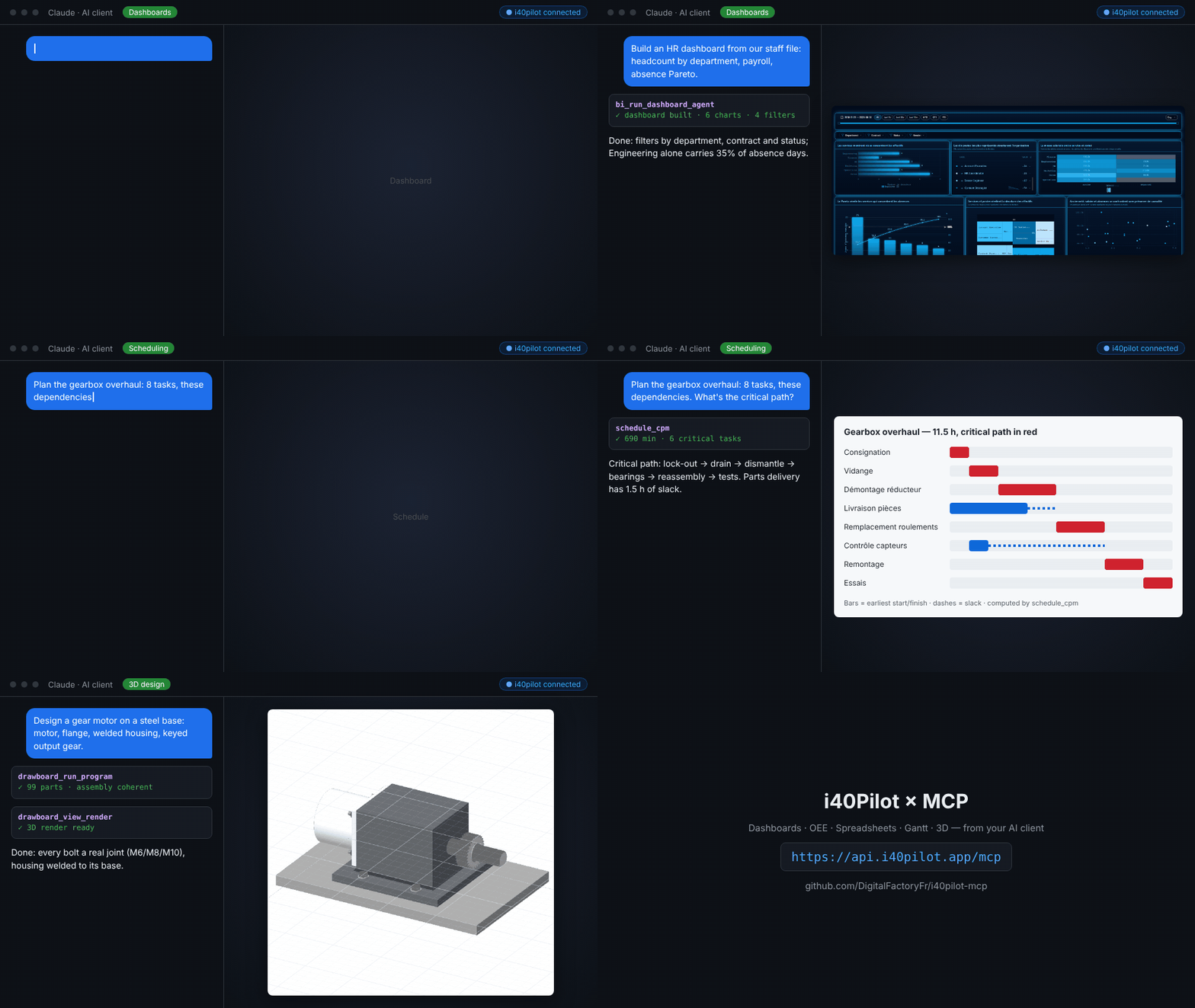
Schedule — Plan a gearbox overhaul with i40Pilot: lock-out 1 h, drain 1.5 h, dismantle 3 h, bearings 2.5 h (needs dismantle and the parts delivery, 4 h, which starts at once), sensor check 1 h after lock-out, reassembly 2 h after bearings and sensors, tests 1.5 h. What is the critical path, and how much slack does each task have?
3D — With i40Pilot, model a gear motor on a steel base: motor, flange, cast-iron housing welded to its foot, keyed output gear, every bolt a real joint. Then show me a render.
Dashboard — first bring the sample data in: download
examples/data/machine-downtime-sample.xlsx(199 stops, 9 machines, 3 lines, September) and import it in i40Pilot → Spreadsheets. Then ask: Using my i40Pilot workbook "machine-downtime-sample", build a downtime dashboard: total stop minutes, a Pareto of causes, minutes per line and machine, planned vs unplanned.
In Claude Code or Cursor, skip the manual import: the agent can upload the file itself (
drive_create_upload_url, thenspreadsheet_create_workbook_from_file). The Claude.ai chat cannot send a file to a URL, hence the import step there.
One connection, every i40Pilot app
| App | Ask your AI client… |
|---|---|
| 📊 Dashboards & OEE | "Connect my production database and build an OEE cockpit per line: availability, performance, quality, a Pareto of stop causes." |
| 📈 Spreadsheets | "Read the downtime workbook I uploaded and add a column with the stop duration in minutes." |
| 🗓️ Gantt & scheduling | "Plan the gearbox overhaul: these 8 tasks, these dependencies — what is the critical path and where is the slack?" |
| 🧊 3D design (text-to-CAD) | "Model a gear motor on a steel base, every bolt a real joint, and show me a render." |
| 📅 Calendar | "Book the overhaul on the maintenance calendar and invite the two technicians." |
| 📝 Forms | "Add a 'root cause' dropdown to the stop-declaration form." |
| 🔄 Power BI | "Export this dashboard to Power BI." |
Ask for a result and Claude can show it right in the conversation with i40pilot_show — a dashboard, a 3D drawing, a Gantt — with a button to open it in i40Pilot.
Connect your client
| Client | How |
|---|---|
| Claude.ai / Claude Desktop | Settings → Connectors → Add custom connector → paste the URL → Connect |
| ChatGPT | Settings → Connectors → Create → paste the URL → OAuth |
| Claude Code | claude mcp add --transport http i40pilot https://api.i40pilot.app/mcp then /mcp to sign in |
| Cursor | add examples/cursor-mcp.json to .cursor/mcp.json |
| VS Code | add examples/vscode-mcp.json to .vscode/mcp.json |
| Scripts / services | a static project token, see docs/static-token.md |
You need an i40Pilot account — create one free.
Free to try
All 58 tools work on the free plan — no credit card:
- 500 MCP calls per month
- 100 AI credits per month — 20 tools (reading, describing, scheduling) cost nothing; most tools that create or change something cost 1 credit; the automatic dashboard builder costs 10.
Need more? Paid plans raise both limits — see i40pilot.app.
Tools
58 tools across 9 areas. Full list: docs/tools.md.
| Area | Examples |
|---|---|
| Find | brain_search — search or list every resource of the project: drawings, Gantt plannings, dashboards, documents, forms… |
| Show & follow | i40pilot_show — display a resource in the conversation; i40pilot_job_status — status of a long job |
| Dashboards (BI) | bi_create_dashboard, bi_add_widget, bi_run_dashboard_agent, bi_export_powerbi |
| Data sources | bi_create_data_source_from_template, bi_introspect_schema, bi_create_dataset, bi_add_computed_column |
| Spreadsheets | spreadsheet_create_workbook_from_file, spreadsheet_read_context, spreadsheet_update_rows |
| Scheduling | schedule_cpm, schedule_dates, gantt_create_plan, gantt_get_context, gantt_append_task |
| 3D CAD (text-to-CAD) | drawboard_run_program, drawboard_view_render, drawboard_inspect_part |
| Calendar, forms, files | calendar_create_events, forms_append_field, drive_create_upload_url |
The tool list is served live by the server (tools/list): new capabilities appear without any update on your side.
Security
- Read-only by default. Write tools only appear when you grant write access.
- Scoped to one project. A token can never reach another project.
- Runs as you. OAuth calls execute under your own row-level permissions.
- Revocable. Remove the connection from your client or from Connections in i40Pilot.
Found a vulnerability? Use Security → Report a vulnerability on this repository (private) — please do not open a public issue.
Feedback
Bug, missing tool, client that doesn't connect? Open an issue. Tell us which client and what you asked.
License
The documentation and examples in this repository are MIT-licensed. The i40Pilot service itself is proprietary.