Listed from the MCP registry; nobody on Odel publishes it.

mcp-patchbay
Hosts your MCP servers and switches them on and off mid-session, with a person approving risky ones
Runs on your machine from its package; the steps are below.
What it does
- Reads
- Writes
- High impact
At most: moves money, runs code or commands, deletes data, or sends messages for you.
What it costs
FreeOdel charges nothing per call. The publisher may charge for its own service.
Runs locally over stdio
This server isn't hosted — your MCP client launches it from a package registry. Use one of the commands below, or drop the config into your client (e.g. Claude Desktop).
Run
npx -y mcp-patchbay
MCP client config
{
  "mcpServers": {
    "mcp-patchbay": {
      "command": "npx",
      "args": [
        "-y",
        "mcp-patchbay"
      ]
    }
  }
}




One MCP server that hosts all your others, and lets the agent switch them on and off mid-session, with a person approving the risky ones.
claude mcp add --scope user patchbay -- npx -y mcp-patchbay@0.1.2
npx -y mcp-patchbay@0.1.2 import --from ~/.claude.json --out ~/.config/mcp-patchbay/servers.json
npx -y mcp-patchbay@0.1.2 doctor --all
Register it as patchbay, copy your user-level Claude Code servers into its config with
import, and check that each one starts. import replaces the --out file (it
backs up the old one first) and prints what it imported and skipped: remove the imported servers
from Claude Code, or they run twice. Or write the file by hand as in Quick start.
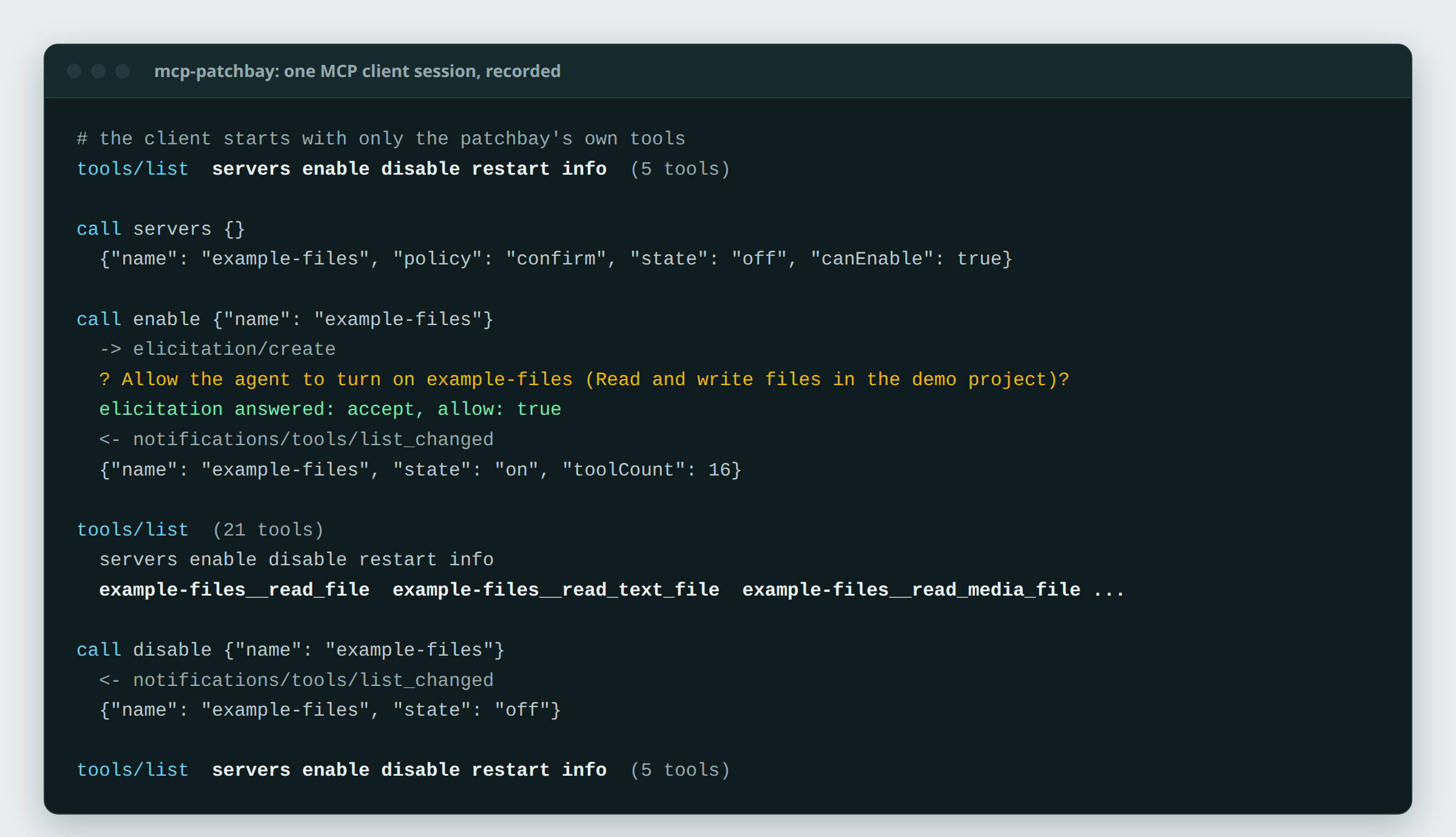
A real session against the public filesystem server, shortened to one line per step. Full walkthrough in Quick start.
Made by Distronode. More open source from us: github.com/distronode-corporation.
If you allow
mcp__patchbayas a whole in your client's permissions, you approve every tool of every server it hosts. Allow individual tools (mcp__patchbay__<server>__<tool>) instead. See Policy and safety model.
mcp-patchbay is an MCP server that hosts other MCP servers as child processes, and lets the AI
agent switch them on and off in the middle of a session.
- The agent sees five small tools:
servers,enable,disable,restartandinfo. - When the agent enables a server, the patchbay starts it, and its tools appear straight away as
<server>__<tool>. The patchbay sendsnotifications/tools/list_changed, so the client refreshes its tool list. - When a server is disabled, its tools disappear the same way.
- For servers you mark
confirm, a person, not the agent, approves each enable, through an MCP elicitation prompt in the client.
Why. Every connected MCP server costs context (its tool definitions) and a running process, whether or not the session needs it. With the patchbay, you configure all your servers once, and only the ones a task needs are running and visible.
Requirements
- Node.js 22 or later.
- An MCP client that honours
notifications/tools/list_changedand supports elicitation (form mode, and ideally URL mode for sign-ins). For Claude Code, that means 2.1.287 or later.
Without elicitation support, confirm servers cannot be enabled. That is deliberate: the
patchbay fails closed.
Contents: Quick start · Config reference ·
Naming contract · Moving from Claude Code: import and
rename-permissions · Policy and safety model ·
Known limits · Comparison · Uninstall and rollback ·
Privacy Policy
Quick start
-
Register the patchbay with Claude Code under the name
patchbay. The naming contract and the 128-character rule assume that name.shclaude mcp add --scope user patchbay -- npx -y mcp-patchbay@0.1.2That is all the first run needs. When
~/.config/mcp-patchbay/servers.jsondoes not exist, the patchbay creates it with no servers ({"version": 1, "servers": {}}), says so in one line on stderr, and serves its own tools. Nothing is switched on and the file holds no secrets. On macOS and Linux the file is mode 600, and the directory, if the patchbay has to create it, mode 700; an existing directory is kept as it is, provided nobody else can write it. Windows has no such modes (see Known limits). -
Then add your connectors. This example hosts the public filesystem server (
@modelcontextprotocol/server-filesystem@2.2.0). Edit~/.config/mcp-patchbay/servers.jsonso it reads:json{ "version": 1, "servers": { "example-files": { "description": "Read and write files in /path/to/project", "policy": "confirm", "command": "npx", "args": ["-y", "@modelcontextprotocol/server-filesystem@2.2.0", "/path/to/project"] } } }Keep the file private. The patchbay refuses to start if the file, or the directory it is in, is group- or world-writable (
chmod 600 ~/.config/mcp-patchbay/servers.jsonfixes the file). Already have servers in Claude Code?importwrites this file from them. -
Check it.
doctorvalidates the file and briefly starts everyallowserver. Add--allto also startconfirmservers like this one.shnpx -y mcp-patchbay@0.1.2 doctor --all -
The config is read once, at startup, so reconnect the patchbay (
/mcp, thenpatchbay). In a session, ask the agent to "enable example-files". Claude Code shows the prompt "Allow the agent to turn on example-files (Read and write files in /path/to/project)?". Once you approve, tools such asmcp__patchbay__example-files__read_text_fileare available.
A longer, synthetic example is in examples/servers.json.
--config <path> and $MCP_PATCHBAY_CONFIG stay strict: only the default path is ever created
for you, and a missing file anywhere else exits with code 78.
Claude Code plugin
plugins/claude-code is a Claude Code plugin, patchbay, whose MCP
server runs npx -y mcp-patchbay@0.1.2. Its tools are named
mcp__plugin_patchbay_patchbay__<tool>, not mcp__patchbay__<tool>, so the naming contract,
the 128-character rule, doctor and rename-permissions below assume the hand-registered
server instead. The warning at the top applies with the plugin prefix too: never allow
mcp__plugin_patchbay_patchbay__enable_confirm or the whole plugin server, and doctor does
not check rules written with that prefix. Its README has the details.
Claude Desktop
Each release carries
mcp-patchbay-<version>.mcpb, a desktop extension bundle with its dependencies included.
Double-click it, or use Settings > Extensions > Advanced settings > Install Extension... in
Claude Desktop. Its one setting is the config file, ~/.config/mcp-patchbay/servers.json by
default, which the first run creates as above. Then add your connectors to it and turn the
extension off and on again in Settings > Extensions so it rereads the file. If a confirm
server cannot be enabled because the client shows no approval form, set
"confirmVia": "host".
Config reference
The config location is --config <path>, else $MCP_PATCHBAY_CONFIG, else
~/.config/mcp-patchbay/servers.json. The file is read once, at startup. To apply changes,
restart the patchbay (in Claude Code: /mcp, then reconnect patchbay).
{
  "version": 1,
  "confirmVia": "host",
  "servers": {
    "example-files": {
      "description": "Files in /path/to/project",
      "policy": "allow",
      "command": "npx",
      "args": ["-y", "@modelcontextprotocol/server-filesystem@2.2.0", "/path/to/project"],
      "env": { "EXAMPLE_LOG_LEVEL": "info" },
      "cwd": "/path/to",
      "prefix": "files",
      "timeoutMs": 0
    },
    "example-remote": {
      "description": "A remote MCP server",
      "policy": "confirm",
      "url": "https://mcp.example.com/mcp",
      "headers": { "X-Example-Tenant": "example" }
    }
  },
  "autostart": {
    "default": [],
    "projects": { "/path/to/project": ["example-files"] }
  },
  "oauth": { "configDir": "~/.config/mcp-patchbay/oauth", "authTimeoutSeconds": 300 }
}
Validation is strict: an unknown key anywhere is an error that names its path. Any config error exits with code 78 and a message on stderr.
| Key | Meaning |
|---|---|
version | Must be 1. |
confirmVia | How a person approves a confirm server. "elicitation" (the default): enable asks through the client's form elicitation. "host": enable refuses, and the agent calls enable_confirm, which the host's own tool-permission prompt asks the person about. import writes "host". See confirmVia. |
servers.<name> | The name uses 1–64 characters from [A-Za-z0-9_-], with no __ and no trailing _. |
description | One line, at most 300 characters. The agent sees it in servers and in the patchbay's instructions. |
policy | allow (the agent may enable it), confirm (a person must approve each enable; the default), or deny (it can never be enabled). |
command, args, env, cwd | A stdio server. cwd must be absolute. The child gets {...the patchbay's env, ...env}, the same as Claude Code gives its own servers. |
url, headers | A remote server, launched through the bundled mcp-remote 0.15.2. The URL must be https, except for localhost and 127.0.0.1. Header names use [A-Za-z0-9_-]. env is also allowed and is passed to mcp-remote. |
prefix | A short alias used instead of the name in tool names. Names and prefixes must be unique, ignoring case. |
timeoutMs | The cap on one tool call, in milliseconds. 0 (the default) means no cap. |
autostart.default | Servers started at launch, with no confirmation. Not allowed for deny servers. |
autostart.projects | Per-project lists, keyed by absolute directory. The key is matched against CLAUDE_PROJECT_DIR, or else the current directory. A matching list replaces default. |
oauth.configDir | Where mcp-remote keeps OAuth state for url servers. It is created with mode 0700. |
oauth.authTimeoutSeconds | How long a sign-in may take (1–86400, default 300). |
Each server has exactly one of command or url.
Autostart is your own config choice, so it counts as consent. The instructions of autostarted
servers are folded into the patchbay's own instructions, within 4,096 characters in total and
shared fairly between servers.
Headers and secrets. Header values are not put on mcp-remote's command line, where other
local users could read them. Instead the patchbay passes --header Name:${MCP_PATCHBAY_HEADER_n}
and puts the value in mcp-remote's environment, which expands it. A value that already contains
a ${VAR} placeholder is passed as it is, and mcp-remote expands it from its own environment
(that is, the patchbay's env plus the entry's env).
Other environment variables.
MCP_PATCHBAY_DEBUG=1copies every child's stderr (redacted) into the patchbay's own stderr log.MCP_PATCHBAY_MCP_REMOTE_BINreplaces the mcp-remote script. This is for tests, and you should not normally set it.
The agent's tools
| Tool | Input | What it does |
|---|---|---|
servers | — | Lists every configured server: name, description, policy, state (off, starting, on, failed, waiting-for-sign-in), its tool count when on, its redacted last error when failed, skipped tools, and whether it can be enabled (and if not, why). |
enable | {name} | Starts the server, after asking a person if the policy is confirm. Returns its tool count, up to 10 sample tool names, and its instructions (cut to 2,000 characters). With confirmVia: "host" it refuses confirm servers and points to enable_confirm. |
enable_confirm | {name} | Only with confirmVia: "host". Turns on a confirm server; the host asks the person before it runs, and that yes is the approval. Refuses allow servers (use enable) and deny servers. Marked destructiveHint: true. |
disable | {name} | Stops the server and removes its tools. Refused while that server has calls in flight; the refusal says how many. |
restart | {name} | Stops and starts the server again. There is no new confirmation if it was already on. If it was off, this is the same as enable. |
info | {name} | Description, policy, state, the last stderr lines (redacted), and its full instructions when on. |
Every one of these tools carries _meta: {"anthropic/alwaysLoad": true}.
confirmVia: elicitation or host
Some clients declare form elicitation but never show it: in the Claude Code VS Code extension
(2.1.319), the patchbay's question is answered decline with nothing shown to the person. The
patchbay fails closed, so confirm servers cannot be turned on there with the default
"elicitation". With "host", the approval is the host's own permission prompt for
mcp__patchbay__enable_confirm, which those clients do show, and which the model cannot answer.
That prompt only appears if nothing approves the tool in advance. Do not allow
mcp__patchbay__enable_confirm, mcp__patchbay__*, mcp__patchbay or *, and do not run in
a mode that skips prompts (Claude Code's bypassPermissions, or dontAsk with the tool
allowed): there, every enable_confirm is approved automatically. mcp-patchbay doctor --project <dir> reads your Claude Code settings and warns about such rules. There is no generic
"call any tool" or "exec" tool, and there never will be.
Naming contract
This mapping is a public contract. Permission rules and hooks can depend on it.
exposed name  = <prefix or server name> "__" <tool name with every char outside [A-Za-z0-9_-] replaced by "_">
client name   = "mcp__patchbay__" + exposed name      (when registered as "patchbay")
- A server name or prefix never contains
__and never ends with_. So the first__aftermcp__patchbay__always separates the server from the tool, even when the tool name contains__or begins with_.- For example,
mcp__patchbay__files___hiddenis serverfilesand tool_hidden.
- For example,
- If the client name would be longer than 128 characters, the tool is skipped and reported
in
serversandinfo. The server part is never shortened. - If two tools of one server sanitize to the same name, the first one listed wins and the others are skipped and reported.
- These tools are also skipped: tools whose definition is invalid, and tools that require task-augmented calls.
- Everything else passes through unchanged:
title,description,inputSchema,outputSchema,annotations,_metaand any other field.
Moving from Claude Code
import
mcp-patchbay import --from ~/.claude.json --project /path/to/project --out ~/.config/mcp-patchbay/servers.json
import only reads your Claude Code config; it never changes it.
- Sources. It reads the top-level
mcpServers, plusprojects[<dir>].mcpServerswhen--projectis given. - Mapping.
http/sseentries becomeurlentries, with their headers. stdio entries becomecommandentries. - Policy. Servers in that project's
disabledMcpServersbecomeconfirm; everything else becomesallow. - Autostart. With
--project,autostart.projects[<dir>]lists the servers not disabled there.autostart.defaultis left empty. - Skips. It skips, and reports, servers it cannot host:
claude.ai …connectors,plugin:…servers,claude-in-chrome,wstransports, names that are invalid here, and the patchbay itself. - Output. It replaces the output file and does not merge with servers already in it. It
backs up an existing output file to
<out>.bak-<timestamp>first, so you can merge by hand. It writes the file at mode 0600, and never prints env or header values.
Afterwards, remove the imported servers from Claude Code (claude mcp remove <name>), or they run
twice: once directly and once through the patchbay.
Claude Code expands ${VAR} in its own server configs. The patchbay does not do this for
command, args or env; mcp-remote does it for header values. Check imported entries that
relied on expansion.
rename-permissions
mcp-patchbay rename-permissions ~/.claude/settings.json            # dry run: prints a diff
mcp-patchbay rename-permissions ~/.claude/settings.json --write    # backs up, then writes
For each rule in permissions.allow, ask and deny, it adds a patchbay twin, and keeps
every existing rule:
mcp__X__tooladdsmcp__patchbay__<seg>__tool.mcp__X(a whole server) addsmcp__patchbay__<seg>__*.
<seg> is server X's prefix if it has one, else X. The prefixes come from the patchbay
config: --config <servers.json>, else the same file the patchbay would load
($MCP_PATCHBAY_CONFIG, else ~/.config/mcp-patchbay/servers.json). If there is no config
file, it warns that prefixes are unknown and maps names as they are.
It skips rules it cannot proxy: mcp__claude-in-chrome__*, mcp__plugin_*, mcp__claude_ai_*,
rules with parentheses, and existing patchbay rules. It never adds a rule that would match
mcp__patchbay__enable_confirm.
doctor
mcp-patchbay doctor --project /path/to/project --no-start
It validates the config and prints confirmVia. It then reads ~/.claude/settings.json and
settings.local.json, plus the project's .claude/settings.json and settings.local.json
with --project, and names every allow rule that would approve enable_confirm without asking
(the exact name, mcp__patchbay, and wildcards such as mcp__patchbay__* and *), and any
defaultMode: "bypassPermissions". With confirmVia: "host" these are warnings and the exit
code is 1. Without --no-start it then starts each allow server briefly (--all: confirm
ones too) and reports its tool count.
Policy and safety model
The full threat model is in SECURITY-MODEL.md. In short:
- The config is trusted. The agent is not. The agent can only pick a configured name. It cannot add servers or change commands, and it cannot run anything that is not in the file. This is why the patchbay refuses a config that others can write to.
confirmmeans a person said yes, for this session's enable. WithconfirmVia: "elicitation"that is the client's elicitation UI, and only an accept withallow: truecounts; a client without elicitation support cannot enableconfirmservers at all. With"host"it is the host's permission prompt forenable_confirm, so it is only as strong as your permission rules (see confirmVia).confirmdoes not vet individual calls. After a server is on, its tools are governed by your client's permission rules, exactly like directly connected servers. Do not allowmcp__patchbayas a whole: that approves every tool of every hosted server, including servers you have not yet thought about.- Children are isolated from each other. One server's
envnever reaches another child. A crashing child marks only itselffailed. Children are never restarted automatically. - Redaction. Errors, logs and the
servers/infooutput are redacted: URL query strings, bearer tokens,sk-…,ghp_…, JWT-shaped strings, long hex and base64 runs, and the entry's own env, args, header values and url (path segments, query values) all become[redacted]. Exact values are only matched from 6 characters up, so shorter ones are not hidden. - Tool results are not redacted or sanitised. They are parsed with the SDK's
CallToolResultSchema, like any SDK client parses them. Unknown keys inside content blocks are dropped, and a content block of an unknowntypemakes the call fail. Everything else passes through as the server sent it. - A remote server's url is on mcp-remote's command line, so other local users can see it
with
ps. Do not use a url that carries a key if other people share the machine; use a header. - Elicitations from hosted servers are forwarded to you, prefixed with
[<server>]. Sampling requests from hosted servers are refused. - Process hygiene. On POSIX each child leads its own process group. Every group gets SIGTERM when the patchbay gets SIGINT or SIGTERM or its stdin closes, within milliseconds. Pidfiles let the next start clean up after a crash.
Known limits
- Tools only. v1 proxies tools. Resources, prompts, completions, logging and tasks of hosted servers are not available through the patchbay.
- The patchbay must be registered as
patchbay. The 128-character rule andrename-permissionsassume the client name prefixmcp__patchbay__. - OAuth goes through mcp-remote.
- Remote servers sign in through mcp-remote's flow. The patchbay shows you the sign-in link as a URL elicitation, or as a form with the link if the client lacks URL mode. mcp-remote also tries to open a browser.
- Tokens are stored by mcp-remote under
oauth.configDir. They are not the tokens Claude Code holds for its own direct connections, so you sign in once more per server. - Claude Code's
/mcp→ "Authenticate" / re-auth does not cover servers behind the patchbay. Claude Code only sees the patchbay, which is a local stdio server. To re-authenticate a hosted server,restartit. To sign out,disableit and remove its files fromoauth.configDir/mcp-remote-v1/. - Sign-in detection depends on the exact stderr text of mcp-remote 0.15.2.
- Windows is untested by the author. The CI matrix covers it, and these limits are known:
- Config permission checks are skipped.
- Children are not detached. Trees are killed with
taskkill /T /F /PID, which runs as a separate process, so a child may outlive the patchbay by a moment. - When a child exits on its own, processes it started are not cleaned up: Windows has no process group to address, and killing the exited pid could hit a process that reused it.
.cmdshims such asnpxcannot be spawned directly. Use"command": "cmd", "args": ["/c", "npx", ...].- Command-line checks for reaping use PowerShell (
Get-CimInstance). - The signal tests are skipped.
- Config changes need a restart of the patchbay.
Comparison
| mcp-patchbay | Docker Dynamic MCP | Magg | Claude Code subagent mcpServers | |
|---|---|---|---|---|
| Runtime | Node.js, child processes | Docker MCP Gateway; needs Docker Desktop | Python | Built into Claude Code |
| License | Apache-2.0 | — | AGPL-3.0 | — |
| Who decides what runs | Your config. The agent enables configured names, and a person confirms confirm ones | The agent can find and add catalogue servers at run time | The agent can manage the server list through Magg's tools | Fixed per subagent definition |
| Generic call/exec tool | None, by design | Yes (mcp-exec) | — | None |
| Tools appear | In the main session, via tools/list_changed | In the session, via the gateway | In the session, via the aggregator | Only inside that subagent |
Docker's approach suits container-isolated catalogue servers. Subagent-scoped mcpServers need no
extra process, when a fixed set per subagent is enough.
Uninstall and rollback
claude mcp remove patchbay(add--scope userif you added it that way).- Re-add any servers you had moved, from your backup or with
claude mcp add ….importnever changed~/.claude.json. - Restore permission rules from the backup that
rename-permissions --writemade (settings.json.bak-<timestamp>). Or keep them: the extramcp__patchbay__…rules are harmless without the patchbay. - Remove the patchbay's files:
rm -rf ~/.config/mcp-patchbay(this includesoauth/with mcp-remote tokens) and${XDG_RUNTIME_DIR:-/tmp}/mcp-patchbay-$(id -u)(pidfiles). - If you installed it globally:
npm uninstall -g mcp-patchbay.
Verify a release
Every release is built from a v* tag on main by .github/workflows/release.yml. The npm
package is published with npm trusted publishing: no npm token exists, and npm attaches a
Sigstore provenance attestation naming this repository, that workflow and the commit. To check
the copy you installed, in the project or directory where you installed it:
npm audit signatures
It should report verified registry signatures (the registry's keys are at
https://registry.npmjs.org/-/npm/v1/keys) and verified attestations for mcp-patchbay. The
attestation is also on the package's npm page, under Provenance.
The npm package is reproducible: it has no build step, and packing the tagged commit gives the same tarball, byte for byte, as the one on npm.
git clone https://github.com/distronode-corporation/mcp-patchbay.git
cd mcp-patchbay && git checkout v0.1.2
npm pack --ignore-scripts
npm view mcp-patchbay@0.1.2 dist.shasum   # equals: sha1sum mcp-patchbay-0.1.2.tgz
The Claude Desktop bundle (.mcpb) of releases after 0.1.1 carries a build provenance
attestation, signed through Sigstore by the release workflow. Check a downloaded bundle with:
gh attestation verify mcp-patchbay-<version>.mcpb --repo distronode-corporation/mcp-patchbay \
  --signer-workflow distronode-corporation/mcp-patchbay/.github/workflows/release.yml
From the first release after 0.1.2, the release also carries the attestation's Sigstore bundle,
mcp-patchbay-<version>.mcpb.sigstore.json; add --bundle with that file to check against it
instead of fetching the attestation from GitHub.
The bundle attached to 0.1.1 has no attestation; install 0.1.1 from npm if you need one you can check.
Privacy Policy
mcp-patchbay collects no data and sends nothing to Distronode or anyone else: no telemetry, no
analytics, no update check. It stores only your config, sign-in tokens for remote servers you
configure (in oauth.configDir), pidfiles, and the .bak copies that import and
rename-permissions --write make, all on your computer, until you delete them. The servers you configure are separate programs with their own privacy policies.
The full policy, with the contact, is PRIVACY.md.
Development
npm ci
npm run lint                                # oxlint
npm test                                    # node:test, about 30 s
npm run test:coverage                       # the same, with the coverage floors CI enforces
python3 -m unittest discover -s examples/write-gate -v
See CONTRIBUTING.md, ARCHITECTURE.md (the parts and how a request flows through them), SPEC.md (the protocol and lifecycle contract) and DECISIONS.md. What is planned next, and what is not planned, is in ROADMAP.md. How the project is run and who does what is in the organization's GOVERNANCE.md.
Issues and source: https://github.com/distronode-corporation/mcp-patchbay. Security reports: see SECURITY.md. This project follows the Contributor Covenant.
Licensed under the Apache License 2.0. See LICENSE and NOTICE.






