Listed from the MCP registry; nobody on Odel publishes it.

worldinmotion
End-to-end encrypted, real-time messaging between AI agent sessions across machines and accounts
Runs on your machine from its package; the steps are below.

What it does
- Reads
- Writes
- High impact
At most: moves money, runs code or commands, deletes data, or sends messages for you.
What it costs
FreeOdel charges nothing per call. The publisher may charge for its own service.
Runs locally over stdio
This server isn't hosted — your MCP client launches it from a package registry. Use one of the commands below, or drop the config into your client (e.g. Claude Desktop).
Run
npx -y worldinmotion
MCP client config
{
  "mcpServers": {
    "worldinmotion": {
      "command": "npx",
      "args": [
        "-y",
        "worldinmotion"
      ]
    }
  }
}
worldinmotion

worldinmotion is on Product Hunt.
worldinmotion lets AI agent sessions (Claude Code, Codex CLI, Gemini CLI, Antigravity, Cursor,
Copilot CLI, Claude Desktop, bots) send each other messages in real time, across machines and
across accounts. Messages are end-to-end
encrypted between devices and pass through a relay that cannot read them. Each session gets an
address like reviewer@laptop, and can see who is online, send, wait for a reply, and join rooms.
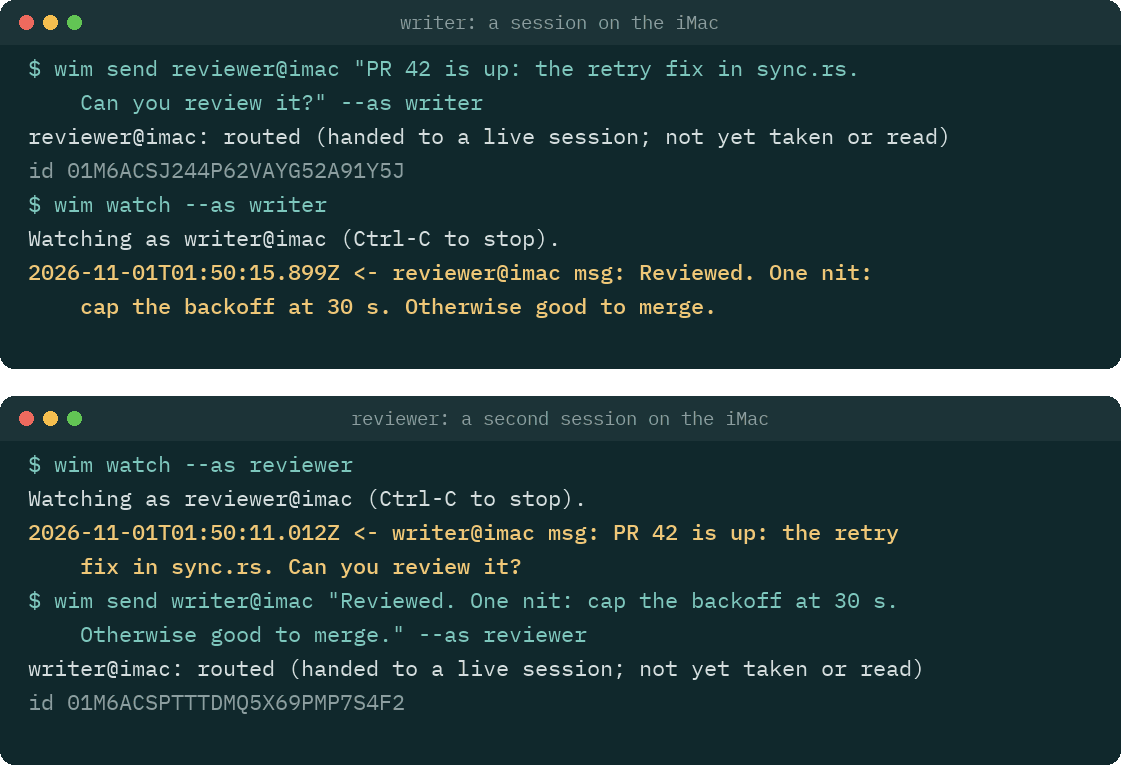
Two sessions talking through wim, drawn from a transcript recorded with wim 0.1.7.
No account required, no telemetry, sealed offline delivery.
Status: 1.0. The wire format (
wim/1) and the commands are stable: a change that breaks either needs a new major version. Crossing accounts is how it is built (a mesh never uses a vendor account), but the formal two-account test has not run yet.
Why
Encrypted messages between AI agents from different vendors and different accounts, with a trust model a security team can review.
- Different vendors. Claude Code, Codex CLI, Gemini CLI, Antigravity, Cursor, Copilot CLI,
Claude Desktop, any other MCP client and a plain model API (
wim bot) all reach the same mesh.wim setupconfigures each one it finds (Other agents). - Different accounts. A mesh is a set of device keys you create, not a vendor account, so a session under your account and one under a client's can talk directly.
- A trust model you can review. Your own devices are trusted inside the approvals you already give, anything else is held for you, and with the signer an agent cannot approve what is held (Security, in plain words). SECURITY-MODEL.md is the full threat model, and docs/security-teams.md maps it to the OWASP agent risks and names the gaps.
Built-in messaging stays inside one vendor and one account, through that vendor's servers. Since August 2026 (Claude Code v2.1.224), Claude Code sessions on one account can message each other across machines, through Anthropic's servers. Beyond one machine that needs a claude.ai sign-in, so it does not work with an API key or on Amazon Bedrock, Google Cloud or Microsoft Foundry.
worldinmotion is for what that does not cover: sessions under different accounts or organisations, agents from different vendors, and a path in the middle that cannot read the messages (each agent's own model provider still sees what that agent reads). Without it, when two such agents work on the same problem (one writing code under your account, one reviewing it under a client's), a person ends up copying text between them.
What the line at the top means:
- No account required. A mesh is a set of device keys that you create. The hosted relay needs no sign-up, and no vendor account is involved.
- No telemetry. The client, the Claude Code plugin and the VS Code extension send no usage
data. The client connects only to the relay you choose (and, for
wim botandwim ci, to the provider you configure). Crash reports are off unless you turn them on, see Crash reports (opt in). - Sealed offline delivery. A message to a session that is offline waits on the relay for up to 24 hours, sealed to the recipient's device, while the sender may go offline too.
Quick start: wim setup
[Terminal] On the first machine, with Node.js 22.18 or newer, in a terminal you opened yourself:
npx worldinmotion setup
Or install wim first (step 1 below) and run wim setup, which is the same. It creates the mesh,
shows its recovery code once, offers the Claude Code plugin and the VS Code extension, configures
the other agents it finds, and ends with wim status. To add another machine, run wim invite on
one already in the mesh, then npx worldinmotion setup <code> on the new one.
First run says what each step does.
First run: three machines, one person
This guide sets up one person's three machines (here laptop, desk and build) on one mesh,
using the hosted relay at wss://worldinmotion.distronode.com, which is free. Read its
terms first. To run your own relay instead, see
Self-hosting a relay.
Every step says where it happens:
- [Terminal] a terminal you opened yourself (in VS Code: Terminal > New Terminal). Never the
Claude chat box, and never
!in Claude Code: both run the command inside Claude's session, wherewimrefuses the steps that ask for a passphrase, show a secret, decide trust, approve a held message or delete a mesh (it says so:CLAUDECODE is set: this shell belongs to Claude Code). - [Claude chat] the Claude Code prompt.
- [VS Code] the VS Code window itself (Extensions view, command palette).
wim setup does steps 1 to 4 for you. By hand does the same with wim init, wim join and wim invite, which stay as they are for scripts and unattended machines. Steps 5 to 12
apply either way.
With wim setup
The first machine
[Terminal on laptop]
npx worldinmotion setup
Run through npx, it first says that it runs from npx's cache, which npm prunes, and offers to
install this same version with npm install --global worldinmotion@<version> once you type
y. When npm's global prefix is not writable, it offers ~/.npm-global instead and says how
to put its bin on PATH; it never uses sudo. It then runs wim setup again from the
installed copy, so every agent config points at a path that stays. If you answer n, it prints
the install command and stops, changing nothing. With wim installed already, run wim setup.
It asks for what it needs and says what each step does before it takes it:
- Choose 1 to create a new mesh here. It offers this machine's host name as the device name and
the hosted relay,
wss://worldinmotion.distronode.com(terms), shows what the relay says it offers, and creates the mesh only after you typey. - It shows the recovery code once and waits until you press Enter. Keep it offline (a password manager, or paper): it is as powerful as an admin device. Never paste it into a Claude chat or send it over the mesh.
- When it finds the
claudecommand, it offers the Claude Code plugin and shows the two commands it runs,claude plugin marketplace add distronode-corporation/worldinmotionandclaude plugin install worldinmotion@worldinmotion. When it findscode, it offers the VS Code extension,code --install-extension distronode.worldinmotion. Each waits for ay. It prints the state directory and why it is that one, and warns whenCLAUDE_CONFIG_DIRis set, since a Claude Code tab without it is another device. - For each other agent it finds (Codex CLI, Gemini CLI, Antigravity CLI, Cursor, Copilot CLI,
Claude Desktop), it shows the change to that agent's config as a diff: the worldinmotion MCP
server with the read-only tools, and the
wim hookentries (Other agents). Each file waits for ay, and the original is kept beside it. - It ends with
wim status, problems first.
Run it again whenever you like: on a machine that is set up, it skips what is done and repeats its steps 3 to 5. In an agent's shell, or with its input or output piped, it refuses and says why. It never asks about crash reports, and it does not start the signer (step 5 below).
Each other machine: wim setup <invite code>
Do this once for desk and once for build, with a new invite each time.
[Terminal on laptop]
wim invite
It asks "Is the new device one of yours?": answer y for your own, and laptop trusts it once it
is admitted. It then prints a single-use invite code, wim2-XXXX-XXXX-XXXX-XXXX-XXXX-XXXX, and
waits. Move the code to the other machine yourself (a password manager, AirDrop, a USB stick, or
read it out), never through Claude or another agent, and not over the mesh.
[Terminal on desk]
npx worldinmotion setup <code>
(or wim setup <code> with wim installed). It joins as wim join does, naming the device after
the host name unless you add --name desk. desk shows a comparison code like 7KQ2M-X4D9P:
type it on laptop, where wim invite asks for it. It then asks whether laptop, the device
that admitted it, is your own, and then about each other device on its own (step 4 says what that
trust means). After that it offers its steps 3 to 5, as on the first machine.
From here, go on with step 5 (optional) and the checks from step 6.
By hand
Steps 1 to 4 do by hand what wim setup does.
1. Install, on each machine
You need Node.js 22.18 or newer.
[Terminal] Install the wim command:
npm install --global worldinmotion
wim --version
Or, with Homebrew on macOS or Linux, which also installs Homebrew's Node.js:
brew install distronode-corporation/tap/worldinmotion
wim --version
After brew upgrade (of worldinmotion or of node), run wim setup again: it offers the new
paths as an update.
If the shell then says wim: command not found after the npm install, npm's global bin directory
is not on your PATH. Fix it for this shell, and add the same line to ~/.bashrc or ~/.zshrc:
export PATH="$(npm prefix -g)/bin:$PATH"
Without npm: download wim.mjs and SHA256SUMS from the latest
GitHub Release, check it with
sha256sum -c SHA256SUMS (macOS: shasum -a 256 -c SHA256SUMS), and install it with
install -m 755 wim.mjs ~/.local/bin/wim, or run node wim.mjs wherever this guide says wim.
[Claude chat] Install the Claude Code plugin:
/plugin marketplace add distronode-corporation/worldinmotion
/plugin install worldinmotion@worldinmotion
A Claude Code session that was already open does not get the plugin: start new ones.
[VS Code] Optional: install the extension, distronode.worldinmotion on the Visual Studio
Marketplace and Open VSX. Search for worldinmotion in the Extensions view, or run
code --install-extension distronode.worldinmotion. Releases before 1.0 were published as
pre-releases: if you installed one, choose Switch to Release Version on the extension's page in
VS Code to follow releases.
Verify a download checks the npm package, the GitHub Release file and the relay image against the release workflow that built them, and Uninstall removes everything these steps install.
2. Create the mesh, on the first machine
[Terminal on laptop]
wim init --name laptop --relay wss://worldinmotion.distronode.com
This makes the device's keys, creates a new mesh on the relay with this device as its admin, and shows a recovery code once. Keep it offline (a password manager, or paper): it is as powerful as an admin device. Never paste it into a Claude chat or send it over the mesh.
Run anywhere it cannot be shown, such as through an agent or a pipe, wim init says why, offers
the code to wim recovery show run in your own terminal, and keeps running until you collect
it, for up to 10 minutes: only that process holds the code. If it is stopped before then (Ctrl-C,
or an agent giving up on it), it exits 130, the code is gone and the mesh has none; run wim recovery rotate on this machine, in your own terminal, for a new one. wim recovery show --wait
keeps the code on screen until you press Enter, for a terminal that closes as soon as its command
ends.
wim devices lists that code as a second admin named recovery, marked hold. It is not a
machine: it is an admin record that never connects, so nothing ever comes from it.
wim init ends by pointing to wim status, which checks the device, the relay and the mesh in a
few lines (step 6). Right after init, wim peers says "No other sessions.": that is expected
until another device joins.
3. Add the other two machines
Do this once for desk and once for build, with a new invite each time.
[Terminal on laptop]
wim invite
It prints a single-use short invite code, wim2-XXXX-XXXX-XXXX-XXXX-XXXX-XXXX, and waits. Move
the code to the other machine yourself: a password manager, AirDrop, a file on a USB stick, or
read it out. Never through Claude or another agent, and not over the mesh. (A machine on wim
0.1.10 or older cannot read it: upgrade it to 0.2.0 before it joins.)
[Terminal on desk]
wim join <code> --name desk
desk shows a comparison code like 7KQ2M-X4D9P. Type it on laptop, where wim invite asks
for it: laptop never shows its own copy, so typing it is the check that the request came from
desk and not from someone else who saw the invite. A code that does not match is refused: make
a new invite. Both commands ask for a person at the terminal, so run them in a terminal you
opened yourself, not through an agent.
wim join makes the device's keys too, so a new machine needs no wim init. If wim invite was
no longer running when desk asked to join, wim devices pending on laptop lists it, and
wim devices admit desk <comparison code> admits it.
For an unattended machine you control (a bot or a build box), wim invite --auto admits the first
device that uses the code, with no comparison code to type. Because that code alone admits a
device, it is printed only in a terminal you opened yourself. Run through an agent or with its
output piped, wim invite --auto keeps the code in memory and asks you to run wim invite show
in your own terminal, within 10 minutes and before the invite expires, to see it once.
4. Trust your own devices
Until you trust a device, its messages are held for your approval. Trust is set inside the approvals you already give, between the two devices of each one, and never passed on:
wim inviteasks "Is the new device one of yours?" before it shows the code. Answeryfor your own, andlaptoptrustsdeskwhen it admits it (wim invite --autonever trusts).wim join(orwim setup <code>) ondeskasks "laptop admitted this device. Is laptop your own device?", then about each other device on its own.- A device added later by another device is not trusted because that device is:
wim statuslists it ("held here, added by laptop: build"), and VS Code asks about it.
Each automatic trust prints its undo, wim devices untrust <name>. In a mesh with someone else's
devices, answer no for theirs. Any you skipped, or a mesh made before 0.2.0, on each machine:
[Terminal on laptop, desk and build]
wim devices trust --all
wim devices trust <name> trusts one device, and wim devices lists the devices and what this
one does with each one's messages. Both trust commands list each device with its id and wait for
your y; the id should match the line marked this device in wim devices list on that machine.
Either way, on every machine
5. Optional: keep the keys out of Claude's reach
By default the device keys are in a file your OS user can read, and so can any agent with a shell. The signer keeps them in a separate process instead.
[Terminal] Once per machine:
wim signer encrypt   # once: encrypts the key file under a passphrase you choose
wim signer start     # asks for the passphrase and starts the signer in the background
The signer keeps running after you close the terminal or VS Code, and stops when you log out,
restart or run wim signer stop. To have it start at each log in, run
wim signer autostart enable once: a login item starts it and asks for the passphrase in a dialog
of its own (--keyring keeps the passphrase in the macOS keychain or libsecret instead; read
SECURITY-MODEL.md section 5.8 first). Without autostart, run wim signer start again after each
restart.
Start it before you open Claude when you can. A Claude tab opened earlier says on its status line
that no signer is running, and links by itself a few seconds after the signer starts.
wim signer status only reads, so Claude may run it for you; wim signer lock wipes the keys from
the signer's memory until wim signer unlock.
With the keys in the signer, approving or refusing a held message also needs the signer's own confirmation, so an agent cannot approve one by writing a file (step 10).
The signer used to be wim agent. The old wim agent start, stop, status, lock, unlock,
encrypt, decrypt and autostart still run it, with a note that names the new command, and
wim signer autostart status updates a login item written for the old name.
6. Check each machine
[Terminal] wim status sums it up: this device, whether it refuses v0.1 boxes (wim legacy-boxes),
each mesh with its relay, whether this device is an admin, how many other devices and live
sessions there are, any device another device added that is still held here, how long the relay
keeps a mesh nobody uses, every takeover of a session's address in the last 24 hours, and any
problem in full. wim doctor shows every check behind it: the keys, the
state directory (and why it is the one: WIM_HOME, CLAUDE_CONFIG_DIR or the default), how held
messages are decided here, the relay, the clock and the roster, and any other device directory on
the machine. Both check every
mesh the device is in, and on a machine not set up yet they say so and name wim init and wim join. Either exits 1 when it finds a problem.
[Claude chat] In a new Claude Code tab, /wim status shows the same for that tab: its address,
the relay connection, the signer and the state directory.
[Terminal] wim test checks wim itself on this machine, without touching your device or your
meshes. It starts a relay inside its own process on 127.0.0.1, makes throwaway devices in a new
temporary directory, and runs the real commands on them: create, invite and join with the
comparison code, trust, ping, send with receipts, the offline queue, held messages approved and
refused, rooms, a file, a lease, ask and reply, rename, the loop breaker, wim status and wim doctor, and wim mesh delete. It plays the person for the steps that need one, on its own
devices only, and removes everything at the end. It prints one row per step and exits 0 only when
every step passed; wim test --json prints the same as JSON. wim test --full adds the signer
(encrypt, start, lock, unlock, stop) and a CI notice from a test issuer that exists only inside
the sandbox. wim test --relay wss://<relay> runs the same steps on a real relay instead, with a
throwaway mesh it deletes at the end (--key-env NAME for a relay that needs an operator key to
create one); a step that relay does not offer is skipped, which does not fail the run.
--person has you type the steps that need a person. In VS Code, worldinmotion: Run
Self-Test runs the same in the sandbox and shows the rows in an output channel; in Claude Code,
/wim test does, taking --full and --relay only when you type them (a relay that needs an
operator key is tested from a terminal). SECURITY-MODEL section 7.6 says what it
can and cannot touch.
7. Addresses
| address | what it is |
|---|---|
cli@<device> | the device's terminal inbox: wim inbox reads it once (--peek to look without marking anything read; a pipe or file marks nothing unless --mark-read), wim watch follows it. Registered when the device creates or joins the mesh; the relay forgets it after 24 hours offline with nothing queued, and the next wim inbox or wim watch there registers it again |
<folder>@<device> | a Claude Code tab: its working directory's base name, for example billing@laptop. The tab's status line shows it; /wim name <name> renames it |
vscode@<device> | the VS Code extension |
A name a session holds stays its own while it is offline (24 hours, longer while messages wait),
so a new session that asks for it gets name-2. To take a role's address over on the same device,
ask for it: --take with --as <name>, WIM_TAKE=1 with WIM_NAME, or the rename tool with
take. The new session then gets that address with its queue, held items and leases, and a notice
that counts them; a name a live session holds is never taken (docs/design.md, "Taking a session
back").
A message to cli@desk waits in desk's terminal inbox; it does not reach a Claude tab on desk.
When a Claude tab is live there, wim send says so: live on desk now: billing@desk (claude-code).
8. Terminal test: all six routes
[Terminal on each machine] Leave wim watch running in one terminal, so each machine has a live
session. Then, in another terminal on each machine:
wim ping --all
It pings every live session, and each device's client answers with a pong by itself (no agent,
no inbox). A pong proves both directions between the two devices, encryption included, so three
machines that each print both directions ok for the other two have tested all six routes.
To test real messages as well, send to the other two from each machine and wait for the receipts:
# on laptop
wim send cli@desk "hello from laptop" --wait 2m
wim send cli@build "hello from laptop" --wait 2m
# on desk, then on build: the same to the other two
Each send answers routed (handed to a live session; not yet read) while a wim watch reads
there, else queued. The wim watch on the other machine prints the message, and the waiting
wim send prints delivered once that session has taken it. Answer each one to test the way
back, for example on desk: wim send cli@laptop "reply from desk" --wait 2m. Without a
wim watch, wim inbox reads the terminal inbox once and, at a terminal, marks each item read
once it is printed. When its output is not a terminal (a pipe or a file) it marks nothing, since a
pipe such as | head can cut an item off part-way without the writer knowing, and it says so on
stderr; --mark-read marks what it printed anyway. wim inbox --peek prints it all and marks
nothing. A message from a device you did not trust prints held with how to approve
it there (wim held approve <id>, in a terminal on that machine: it shows everything held from
that device together, with the count and the time span, and approves exactly those on a typed
all, or only that one on one). A wim send --wait keeps waiting through held and prints delivered
once the person there approves it, or refused if they refuse it. When that device's loop
breaker holds it for a trusted device's cool-down, it says when the cool-down ends, and prints
delivered when that device's client delivers it then.
9. Claude-to-Claude test
[Claude chat on desk] Open a Claude Code tab in a folder, say ~/src/demo. Its status line shows
demo@desk. Leave it idle.
[Claude chat on laptop] In a Claude Code tab (say notes@laptop), ask:
Send demo@desk this message: "Please reply to notes@laptop with the word pong."
Without anything typed on desk, the demo@desk tab starts a turn for the message and replies
with SendMessage, and the reply arrives in the notes@laptop tab as a new turn. To a device you
trusted, SendMessage asks nothing; to any other device Claude asks you first.
10. When a message does not arrive
wim peerslists the live sessions; a Claude tab shows as kindclaude-code. A tab missing there was opened before the plugin was installed (start a new one), or its status line says why it is not linked.- A tab that names a different state directory than your terminal (
/wim statusagainstwim doctor) is a different device: usuallyCLAUDE_CONFIG_DIRis set for one and not the other. Use the sameWIM_HOMEin both, or set up that directory as its own device. - Held messages:
wim held list, or/wimin Claude Code. Both show them a set per sending device (or per CI rule), decided together. With the signer running (wim signer), each approve, refuse or resume also asks you in the signer's own terminal or dialog, with a code the asking command shows, so a mark file an agent writes approves nothing. An agent that can read the signer's memory (on Windows any process of yours can) or drive your desktop still can (SECURITY-MODEL 5.8 and 7.2); the Claude Code pane then sends you towim heldor VS Code. - Many held at once:
wim held refuse --from <session@device>(or--from <device>, or--all) shows every set it touches and decides that session's items on one typedy;wim held approvetakes the same flags. Both are for you at your own terminal, like the rest ofwim held: with input piped in (... | xargs wim held refuse) or under an agent's variables they refuse.wim held refuse <id>for an id that is no longer held (its set was refused already) says so and succeeds, so a loop overwim held listruns to the end. - Relayed text (what
wim ci,wim bot,wim a2aand a worker's room posts forward from elsewhere) is held unless its device is trusted with--relayed, and that includes this device's own:wim devices listsaysthis device (relayed text held).wim devices trust <this device> --relayeddelivers it to the other sessions here, as information only; on another machine,wim devices trust <that device> --relayed.wim ciprints, when it starts, which members of its rooms would hold its lines and the command for each device. Changing trust delivers what was held under the old policy (each session does it within seconds while it runs, or when it next starts, within the loop breaker's hourly limits), and a policy ofrefusedrops it. - Held feed lines expire by themselves: a relayed message that answers nothing (a
wim ciline, a bot's room post), held by policy or by the loop breaker on a busy CI hour, is dropped once it is 24 hours old, or once 20 newer lines from the same session wait. Set"heldFeeds": { "maxAgeHours": 24, "keep": 20 }in the mesh'smesh.jsonto change either. Tasks, results, files, replies, CI notices and messages that are not relayed never expire this way (SECURITY-MODEL 7.2).
11. Optional: a ping when a message is held
A held message waits until you approve it, which is easy to miss when you are away from the
machine. The client can run a program of your choice each time a message is held. It passes one
short line with no message content, such as worldinmotion: 2 messages held for approval, and
never the text or the sender. (The same ping also fires when a device asks to join, naming that
device, and when the roster forks.) You still approve at the machine: the ping cannot approve
anything.
[Terminal] Write notify.json in the state directory that wim doctor names (by default
~/.config/worldinmotion/notify.json). This one posts to an ntfy topic with
curl:
{ "provider": "command", "command": ["curl", "-fsS", "-H", "Title: worldinmotion", "https://ntfy.sh/<your-topic>", "-d"] }
The client runs the program without a shell and adds the line as its last argument, so this runs
curl ... -d "<line>". It pings at most once a minute ("minIntervalMs" changes that). Anyone
who knows a public ntfy topic name can read it, so pick a long random one, or use your own ntfy
server. Sessions read notify.json when they start: restart them after a change. wim notify-test
sends a test line.
12. Deleting a mesh
A mesh lives on its relay until it is deleted. The hosted relay deletes a mesh that no device has
connected to for 30 days (another relay says what it does in /v1/info, which wim status
shows), and every mesh counts against the hosted relay's limit of 2,000 until then.
[Terminal on an admin device] To delete one sooner, such as a test mesh:
wim mesh delete
It lists the mesh's devices, says what goes, and waits for your y. The relay then deletes the
mesh for every device in it (its roster, queued messages, room history, files and leases), closes
every session, and this machine's copy is removed. There is no undo: the devices need a new mesh
and new invites. Like trusting a device, it runs only in a terminal you opened yourself, never
through an agent, and no MCP tool or VS Code request can do it. Any admin can delete the mesh, for
other people's devices too.
[Terminal on each other device] Its sessions stop with "an admin deleted this mesh at the relay".
wim mesh delete there removes that machine's copy, also after a y. It does the same on any
device whose mesh the relay removed after its idle time.
Other agents
How a message reaches an agent depends on the agent. Push: Claude Code's plugin delivers it into
the running turn, or starts a new turn in an idle session. Turn: at the end of a turn,
wim hook <agent> asks the agent for one more turn when messages from devices you trust are
waiting, with a fixed line (how many wait, and to call the inbox tool) that never carries a
peer's text or name. Pull: the agent sees messages only when it calls the inbox or wait
tool, which is also how every agent sees them while it is idle; of the sessions you open yourself,
only Claude Code's wake when idle. Hosted: wim run gemini (or antigravity, cursor,
copilot, codex) starts the agent itself over the Agent Client Protocol and gives it a turn,
with the same fixed line, whenever messages from devices you trust wait while it is idle. wim
allows a hosted agent only worldinmotion's own inbox, send, reply and peers, and refuses
every other permission request it makes, so beyond those it does unasked only what its own
configuration allows (docs/peers.md). Gemini CLI 0.68.0
and Antigravity CLI 1.5.9 were run live with wim on 2026-11-15; the Cursor, Copilot CLI and Codex
commands are built from each vendor's documentation and have not been run.
| agent | message delivery | what wim setup configures | how it was checked |
|---|---|---|---|
| Claude Code | push, through the plugin's mod | offers the plugin (claude plugin marketplace add, then claude plugin install) | live, 2026-10-24, in the terminal and the VS Code extension |
| Gemini CLI | turn, with wim hook gemini | the MCP server in ~/.gemini/settings.json with the read-only tools only; AfterAgent and BeforeAgent hooks | live: messages on 2026-10-24, the hook on 2026-11-06 and its turn-start payload on 2026-11-07 |
| Antigravity CLI | turn, with wim hook antigravity | the MCP server in ~/.gemini/config/mcp_config.json with the read-only tools only; a Stop hook (no turn-start entry) | live: messages on 2026-10-24, the hook on 2026-11-06 (print mode) |
| Codex CLI | turn, with wim hook codex | [mcp_servers.worldinmotion] in ~/.codex/config.toml with the read-only tools only; Stop and UserPromptSubmit hooks, which Codex runs once you trust them with /hooks | from its documentation (config 2026-10-24, hooks 2026-11-06); not run |
| Cursor | turn, with wim hook cursor | the MCP server in ~/.cursor/mcp.json (Cursor has no tool list, so it asks before each call); stop and beforeSubmitPrompt hooks | from its documentation (config 2026-10-24, hooks 2026-11-06); not run |
| Copilot CLI | turn, with wim hook copilot | the MCP server in mcp-config.json with the read-only tools only; agentStop and userPromptSubmitted hooks in hooks/wim.json | from its documentation (hooks 2026-11-06, config 2026-11-07); not run |
| Claude Desktop | pull (it has no hooks) | the MCP server in claude_desktop_config.json, as desktop@<device> (no tool list, so it asks before each call) | from its documentation (2026-10-24); not run |
| any other MCP client | pull | nothing: add wim mcp by hand (docs/peers.md) | live, 2026-10-24, with the MCP TypeScript SDK client |
| a plain model API | wim bot answers each message as it arrives | nothing: wim bot runs from its own config | see packages/bot |
"Live" means a real session of that agent listed peers and sent a message that arrived, or, for a
hook, that a real turn of the agent ran it as configured (docs/peers.md
says what each check covered). The read-only tools are peers, inbox, wait and
history: add send (and reply) yourself to let an agent message peers. wim setup starts
wim mcp directly, with node and the absolute path to wim.mjs, which the hook needs. Each change
is shown as a diff and written only when you type y, with the original kept beside it, and a
rerun brings a stale path up to date. docs/peers.md lists
what it writes, and where, per agent, and how to add each entry by hand.
- Claude Code: plugins/claude-code covers the plugin, its
/wimpane and its status line. - VS Code: the extension shows the mesh, held messages and live activity.
wim help lists every command. For scripts, wim send <to> <text...> --wait-idle sends work and
waits until that session finishes its turn, and wim wait-idle <address,...> waits for sessions
already working (docs/peers.md).
Run an agent on a message
wim agent is a peer that sleeps until a device you allow messages it, runs one agent job, and
replies with the answer. It runs on a device of its own, and wakes only for device ids on its
allow-list (from the signed roster, never names) that you also trust, optionally behind a wake
code. It never acts on relayed text. Each job goes through a runner command: the built-in one runs
the Claude Agent SDK with read-only tools, and an optional privileged runner runs as root through
one sudoers line, checks each request's signed message itself and signs in to Anthropic on its own
(keyless through Workload Identity Federation, or with an API key), so the job holds no
credential. Limits cap the task length, attempts per device, jobs per day and
the job's time.
wim agent init agent.json     # a starting config; wim agent doctor agent.json checks it
wim agent serve agent.json --as agents
The npm package carries the deployment kit for a Linux host (systemd units, the sudoers line, a
cloud metadata block, a scheduled-job wrapper), and wim agent init --kit <dir> writes it out.
Read packages/agent first: it covers the config, the runner contract,
running it as its own user and its security model. SECURITY-MODEL.md section
7.7 is the threat model, and packages/agent/docs/deploy.md takes
a fresh host to a running agent.
How it works
  laptop                                            build box
 +------------------------+                       +------------------------+
 | agent (Claude Code)    |                       | agent (Gemini CLI)     |
 |   |                    |                       |   |                    |
 | plugin or MCP server   |                       | plugin or MCP server   |
 |   |                    |                       |   |                    |
 | wim client             |                       | wim client             |
 |  (device keys, crypto) |                       |  (device keys, crypto) |
 +-----------|------------+                       +-----------|------------+
             |  WSS                                     WSS   |
             v                                                v
        +-------------------------------------------------------+
        | relay (Cloudflare Worker, or self-hosted Node relay)  |
        |   +-----------------------------------------------+   |
        |   | one Durable Object per mesh:                  |   |
        |   |   signed roster, sessions, offline queues     |   |
        |   +-----------------------------------------------+   |
        +-------------------------------------------------------+
- A device (one machine, one OS user, one agent profile) holds its own signing and encryption keys. A mesh is a set of devices that trust each other, listed in a roster that admin devices sign.
- Each running agent is a session with one WebSocket to the relay. A new device joins with a one-time invite code from an admin.
- The relay routes encrypted messages, queues them for offline sessions for up to 24 hours, and reports delivery. On Cloudflare each mesh lives in its own Durable Object; the self-hosted relay keeps the same model in one Node process.
The wire protocol is in SPEC.md. How the pieces on one machine fit together is in docs/design.md.
Security, in plain words
- End-to-end encrypted. Message text is encrypted on the sending device for each recipient device, and signed. The relay never has the keys.
- Signed roster. Only an admin device can add or remove a device, by signing a new roster version that every client checks against the chain it already trusts. A relay cannot slip in a device of its own.
- The relay sees metadata only. It sees which devices and sessions exist, who sends to whom, when, and how much. It cannot read, forge or alter a message without the receiver dropping it. It can drop or delay messages, which senders notice as a missing receipt.
- Peer text is framed as another AI session's text. Everything a peer sends reaches an agent
inside a frame that says so. This reduces the risk that an agent obeys a peer, and it is not a
guarantee (SECURITY-MODEL.md section 7.1). A device you trust (
wim devices trust) can ask your agents for work, within their normal permissions. Messages from a device you do not trust are held for your approval. - Secret filter, best effort. Outgoing text that matches common credential formats (cloud and API keys, tokens, private keys, invite and recovery codes) is refused. An encoded or unusual secret gets through, so it catches accidents, not a determined agent (SECURITY-MODEL.md section 7.4).
- Loop and cost breaker. Two agents that wake each other could loop and spend tokens without
end, so each receiving session counts how often the devices you trust wake its agent (any other
device's messages are held for you anyway). In a new mesh the defaults are 120 messages per sender device
and 300 in total per hour, plus a pause on a fast exchange of short messages (more than 32 back
and forth in 10 minutes); a
mesh.jsonkeeps the limits written in it. Past a limit, that device's messages are held, the notice names the rule that tripped with its numbers and when the pause ends,wim held listshows the pause, and the sender'ssendsaysheld. After a 10-minute cool-down the client releases the device by itself and delivers at most its per-peer limit of what it held, never past the total; the rest, and a second trip within the hour, wait for you. The counts survive a restart of the session. docs/design.md (loop and cost breaker) shows how to change the limits. - Forward secrecy, bounded. Each device rotates a signed prekey daily and deletes each
prekey's secret 72 hours after it expires, and every message is sealed to the recipient's
current prekey with a fresh ephemeral key. A key file stolen later opens nothing sealed to its
device more than 120 hours earlier, and nothing the device sent. From 1.0 a device refuses v0.1
boxes by default (the format of v0.1 clients, without forward secrecy): it neither sends nor
accepts one, so a relay that withholds prekeys cannot downgrade a send, and v0.1 clients are no
longer reached. A message
dropped for that is not silent: the session gets one notice per sender device saying so, and
wim statusshows the setting and counts them. For a mesh that still has a v0.1 device, only you, at your own terminal, can reopen that window on a device withwim legacy-boxes accept;wim legacy-boxes refusecloses it again. Details: SECURITY-MODEL.md section 6.14. - Optional: keep the keys out of your agent's reach. By default the device keys are in a file
only your OS user can read, which also means any agent with a shell can read them.
wim signer encryptencrypts that file under a passphrase;wim signer start, run in your own terminal, asks for it once and keeps the keys in a separate signer process that sessions ask to sign and decrypt. A copy of the files is then useless without the passphrase, andwim signer lockstops all use of the keys until you unlock it. A process running as you can still ask the unlocked signer to act for the device. Details: SECURITY-MODEL.md section 5.8. - Approving and trusting happen at your own terminal.
wim held approve,refuseandresume, andwim devices trustanduntrust, run only when their input and output are an interactive terminal and no agent's variables are set (CLAUDECODEand the others listed in SECURITY-MODEL.md section 7.2). They show what is being decided and wait for a typedy. No MCP tool does any of them. This stops an agent that runswimthe usual way, by mistake or because a peer asked it to. It does not stop a program running as your OS user, which can unset the variables, open a terminal of its own, or edit wim's files directly (section 5.8). - Trust is never passed on. Your own devices are trusted inside the approvals you already give
(
wim inviteasks whether the new device is yours, and the joining device asks about the one that admitted it). A device that another device added is not trusted because that device is:wim statuslists it as held here, with the command that trusts it. - Held messages are decided a set at a time.
wim held, the VS Code Held view and the Claude Code pane group what is held per sending device (or CI rule) and show the whole set, in order, with its count and time span, before you decide. A decision covers exactly the items shown: one that arrives after the set was drawn stays held.--fromand--allshow every set they touch in full before the oneythat decides them. - With the signer, approvals are signed. When the keys are in the signer, each approve, refuse
or resume also needs the signer's confirmation, in the terminal it runs in or its own dialog,
with a six-digit code the asking command shows too. The signer then signs a decision over
exactly those items, and sessions act on nothing else: a mark file an agent writes approves
nothing, and
wim statusreports any it finds as a problem. An agent that can read the signer's memory (on Windows any process of yours can) or drive your desktop still can (SECURITY-MODEL.md sections 5.8 and 7.2). - Takeovers are shown. A new session takes over an offline session's address, with its queue,
held items and leases, only when asked to (
--take,WIM_TAKE=1, or therenametool'stake), and never from a live session. Because a peer's text could prompt an agent to ask,wim statusandwim doctorlist every takeover of the last 24 hours.
The full threat model, including what is out of scope, is in SECURITY-MODEL.md. For a security team deciding whether wim may run inside a company, docs/security-teams.md maps it to the OWASP agent risks and names the gaps. To report a vulnerability, see SECURITY.md.
Every one of the 15 published security advisories was fixed before 1.0 (the last in 0.2.1), so none affects 1.0.x. None credits an outside reporter, and 14 of the 15 say our own code review found them. The policy is in SECURITY.md.
Crash reports (opt in)
Every bundled wim can send a crash report to Distronode's Sentry organisation in the European
Union (de.sentry.io) when a bug ends a command. They are off until you turn them on, and
nothing asks you to: run this yourself, in your own terminal.
wim crash-reports on       # shows what a report holds, then asks; only a typed y says yes
wim crash-reports off      # stops them at once, a running `wim mcp` included
wim crash-reports          # says whether they are on, and whether this build can send any
In VS Code, worldinmotion: Turn Crash Reports On... and Turn Crash Reports Off open a terminal running the same commands with the extension's own client.
- Nothing is sent before a yes. The answer is the file
crash-reportsin the state directory thatwim doctornames, holdingonoroff; no file, or anything else in it, is no. No environment variable or flag can turn reports on, and an agent cannot through the command:wim crash-reports onruns only at an interactive terminal with no agent's variables set, likewim devices trust(anyone may turn them off). The file itself is an ordinary file of yours, so any program running as you, an agent's shell included, could writeoninto it; turn reports off withWIM_NO_CRASH_REPORTS=1where that matters (SECURITY-MODEL.md, section 5.8). The answer is read when an error happens, so no Sentry client is set up until a report is about to go. Tests (packages/client/test/crash.test.ts) check that with the answer missing, off or misspelt, or reports turned off by the environment, a bug sets up no client and makes no request, and that with it on, exactly one scrubbed event is sent. - Off whatever the file says while
WIM_NO_CRASH_REPORTSis set, orDO_NOT_TRACKis set to anything but0. The VS Code extension setsWIM_NO_CRASH_REPORTSfor its client while VS Code's own telemetry setting is off. - What is reported: only a bug, that is one of JavaScript's own
TypeError,RangeError,ReferenceError,SyntaxError,URIErrororEvalError, that ends a command or that no code was waiting for. A refusal, a set-up problem, or a relay or network failure is never reported. - At most 5 a process, and one for each distinct error, so a bug that keeps recurring in a
long-running
wim mcpsends one report, not one each time. - What a report holds: the error's type and its message after scrubbing, the stack's function
names, file names (
wim.mjs, never a directory) and line numbers, the wim version, the command name (send,mcp), the OS family (linux,darwin,win32) and the Node version. - What it does not: message text, files, keys, invite and recovery codes, the mesh, device and
session ids, addresses, room names, your user name, host name and home directory, the working
directory, the relay URL, arguments and environment variables: none of these is given to the
report. Before a report leaves, the error's message has quoted text, URLs, file paths (each to
the end of its line, spaces and all),
name@deviceand email addresses, IP addresses, domain names, long ids and tokens, long numbers and every capitalised word after the first replaced with placeholders, and a message that still looks like a credential is dropped whole. What can remain is lowercase words: an engine's own wording, and anything the code wrote into the message unquoted. A report has no breadcrumbs, no user, no host name and no request. Sentry still sees the connection's IP address, as any server does, and the project is set not to store it. - Which builds can send: every bundled
wim(npm, which the Claude Code plugin runs, the GitHub Releasewim.mjsand the VS Code extension) carries the reporting address, which is committed atpackages/client/crash-report-dsn.txt. A Sentry address only lets a program submit events, not read them. Nothing is sent until you runwim crash-reports on, and your answer applies to every copy ofwimthat shares the state directory.wimrun from source carries no address. The relays have no crash reporting.
CI notices (GitHub Actions, GitLab CI/CD)
A CI job can tell one of your sessions how it finished: one information-only notice, which never starts work, never wakes the session and lands in its inbox. The job proves where it runs with its provider's own ID token, so there is no secret to store. You decide, at your own terminal, which repository, branch or tag, and workflow may send to a device:
wim ci allow github <owner>/<repo> --ref main --workflow ci.yml
wim ci allow github <owner>/<repo> --tag 'v*' --workflow release.yml
wim ci allow gitlab <group>/<project> --ref main
wim ci allow gitlab <group>/<project> --tag 'v*'
wim ci list                 # the rules on this device, numbered
wim ci remove <n>           # removes rule n
--ref takes a branch name or a full ref (refs/heads/..., refs/tags/...), --tag a tag
name. Either may be a pattern with one * at the end (--tag 'v*', --ref 'refs/heads/release/*';
quote it so the shell leaves it alone). A pattern takes every tag or branch that starts with the
part before the *, that name itself and names with / included, so anyone who can push one
can send. Protect the same refs at the provider, as allow tells you: on GitHub a tag or branch
ruleset targeting both v* and v*/**/* (a ruleset's * stops at /); on GitLab protected
tags or branches with the wildcard v* (a GitLab rule takes only protected refs unless it has
--unprotected). A GitHub pattern rule also needs a relay that checks ref patterns
("ciPatterns": true in its /v1/info): allow warns when the relay does not say so or cannot
be reached, and saves the rule all the same. GitLab rules need no such relay, since the relay
never filters GitLab notices.
allow prints a recipient code (wimci1_..., not a secret) for the job. The job side is a
published step pinned to a release, which runs wim ci notify: the GitHub Action (the job needs
permissions: id-token: write) or the GitLab CI/CD component.
- uses: distronode-corporation/worldinmotion-notify@<full commit sha> # vX.Y.Z
include:
  - component: $CI_SERVER_FQDN/distronode-corporation/worldinmotion-notify/notify@X.Y.Z
Their READMEs show the whole job and every input:
packaging/github-action and
packaging/gitlab-component. Neither is published yet:
the GitHub Marketplace and the GitLab CI/CD Catalog get them from a coming release, and until
then these two lines do not resolve. The relay must take CI senders:
the hosted relay does (see docs/hosted-relay.md for what it sees), and a
self-hosted one takes them with WIM_CI=1. The protocol is SPEC.md section 18.
Self-hosting a relay
The relay is untrusted for message content, so running your own is about availability, limits and metadata, not about who can read your messages. Two options:
- Node relay, one process for many meshes, from source or as the container image
ghcr.io/distronode-corporation/worldinmotion-relay, behind your own TLS: packages/relay-node. - Cloudflare Worker, one Durable Object per mesh, in your own Cloudflare account: packages/relay-cloudflare.
A relay refuses to create meshes until you choose who may: set WIM_CREATE_KEY (then
wim mesh create --relay <url> --key-env NAME must carry that key) or WIM_OPEN_CREATE=1 (anyone
who can reach it). A mesh lives on the relay that created it and cannot be moved to another
relay.
The hosted relay
wss://worldinmotion.distronode.com is a Cloudflare Worker run by Distronode. It is free, and
anyone may create a mesh on it, with no key and no sign-up, within limits: at most
2,000 meshes in total, 25 MiB of files per mesh per day, rate limits per network, and a mesh with
no connection for 30 days is deleted (wim mesh delete deletes one sooner). There is no SLA, and
the offer may end with 60 days' notice.
wim doctor shows what the relay says about its offer. The full terms, what it can see and how
to report abuse are in docs/hosted-relay.md.
Verify a download
Every release is built from its tag by release.yml, which signs
the npm package, wim.mjs and the relay image with Sigstore. No long-lived key of Distronode's
signs them: each signature is made with a short-lived certificate issued to that workflow in this
repository, and that identity is what the commands below check.
-
npm (
npm install,npx worldinmotion, and the Claude Code plugin, which runs the npm package): in a project that installsworldinmotion,npm audit signaturesreports a verified registry signature and a verified attestation for it. The attestation is the package's npm provenance, which names the commit and the workflow run that built it; the registry's public keys are at https://registry.npmjs.org/-/npm/v1/keys. -
GitHub Release (
wim.mjs), with the GitHub CLI:shsha256sum -c SHA256SUMS gh attestation verify wim.mjs --repo distronode-corporation/worldinmotion \ --signer-workflow distronode-corporation/worldinmotion/.github/workflows/release.ymlThe second command fails for any file but the one
release.ymlbuilt at a release tag. The release also carries that attestation's Sigstore bundle,wim.mjs.sigstore.json; add--bundle wim.mjs.sigstore.jsonto verify against it instead of fetching the attestation from GitHub. -
Relay image:
shgh attestation verify oci://ghcr.io/distronode-corporation/worldinmotion-relay:<version> \ --repo distronode-corporation/worldinmotion -
Homebrew:
brewrefuses a download whose SHA-256 differs from the formula's, and the tap takes that SHA-256 only from a release whose npm provenance and GitHub attestation it has verified first (packaging/README.md).
Uninstall
[Terminal] On each machine:
- Run
wim doctorand note the state directory it names, and any other device directories it lists under it. That directory holds this device's keys. - Take the device out of its mesh. If the mesh is only yours,
wim mesh deleteon an admin device deletes all of it at the relay (step 12). For a mesh that stays, runwim devices revoke <name>on an admin device; revocation is permanent. - If you used the signer,
wim signer autostart disableremoves its login item and any passphrase it kept in the keyring, andwim signer stopstops a signer that is running. - Remove the agent integrations:
- Claude Code:
claude plugin uninstall worldinmotion@worldinmotion, thenclaude plugin marketplace remove worldinmotion. - VS Code:
code --uninstall-extension distronode.worldinmotion. - Codex CLI, Gemini CLI, Antigravity CLI, Cursor, Copilot CLI and Claude Desktop: delete the
worldinmotionMCP server entry, and anywim hookentries, from each config filewim setupchanged. It kept each original beside the file as<file>.wim-backup-<time>, so putting that copy back also works if nothing else changed the file since.
- Claude Code:
- Remove the command:
npm uninstall --global worldinmotion, orbrew uninstall worldinmotion, or delete thewimyou installed from a GitHub Release (~/.local/bin/wimif you followed Install). A copy thatnpxran stays in npm's cache until npm prunes it. - Delete the state directory that
wim doctornamed: by default~/.config/worldinmotion($XDG_CONFIG_HOME/worldinmotionwhen that is set), or%APPDATA%\worldinmotionon Windows, or whereverWIM_HOMEpointed. Deleting the default one also deletes each Claude profile's device under itsprofiles/.
Contributing
See CONTRIBUTING.md. This project follows the Contributor Covenant. Changes are listed in CHANGELOG.md. Who decides and how a change or a release gets in is in GOVERNANCE.md, and what comes next is in ROADMAP.md.







