Listed from the MCP registry; nobody on Odel publishes it.

Blender Optics Simulator
Build, align & render a real optical bench in Blender; drivable by an AI agent over MCP.
Runs on your machine from its package; the steps are below.

What it does
- Reads
- Writes
- High impact
At most: creates or changes data: records, files, settings.
What it costs
FreeOdel charges nothing per call. The publisher may charge for its own service.
Runs locally over stdio
This server isn't hosted — your MCP client launches it from a package registry. Use one of the commands below, or drop the config into your client (e.g. Claude Desktop).
Run
uvx blender-optics-mcp
MCP client config
{
  "mcpServers": {
    "blender-optics-simulator": {
      "command": "uvx",
      "args": [
        "blender-optics-mcp"
      ]
    }
  }
}




An optical bench you lay out in Blender, trace with real optics, and can hand to an AI agent.
Place lasers, mirrors, lenses, waveplates, gratings, crystals and detectors in 3-D. A live engine traces the beam through them — rays, Gaussian beams, polarization, dispersion — mounts everything on real opto-mechanics, and renders it in Cycles. The whole optical state is readable and writable over a localhost MCP bridge, so an agent works from measured geometry instead of guesses.
Sixteen seconds, rendered from a scene the add-on built. Full-quality MP4.

Install
Requires Blender 4.2 LTS or newer (4.2+ / 5.x).
One-click, keeps itself updated. Open the install page and drag the “⤓ Drag this into Blender to install” button onto an open Blender window. That installs the add-on and subscribes you to updates in one gesture. Turn on Edit ▸ Preferences ▸ System ▸ Network ▸ Allow Online Access first.
From a zip. Download optical_alignment_sim-<version>.zip from
Releases and use Edit ▸ Preferences
▸ Add-ons ▸ Install from Disk…. Updates then come from the add-on's own Updates panel.
Open the Optics tab in the 3-D viewport sidebar (press N).
Quick start
- Setup ▸ Browse Examples… — pick Michelson to get a complete bench.
- Simulate ▸ Trace — press Live. Move any part and the beam follows.
- Setup ▸ Element — select an optic and change what it is: focal length, glass, coating, wavelength. Expand More for the rest.
- Place ▸ Mount & Adjustment — put it on a real mount and turn the knobs, with − / + steps.
- Inspect ▸ Optical Report — read power, polarization, path length and alignment error per detector; Align All walks the mounts until the beam lands where it should.
Headless, the same thing from Python:
import optics_api                                  # inside Blender: blender -b --python your.py
optics_api.build_example("michelson")              # a full bench in one call
optics_api.set_mount("MI_M_fixed", "KM100")        # put a mirror on a kinematic mount
optics_api.set_dof("MI_M_fixed", "TIP", steps=40)  # turn a knob: the beam walks off
optics_api.align_element("MI_M_fixed")             # and back: 2.51 -> 0.0012 mrad
print(optics_api.inspect_beam("MI_D"))             # power, w(z), polarization, coherence
examples/ holds runnable scripts: michelson.py,
mach_zehnder.py, agent_align.py,
bell_entanglement.py,
hong_ou_mandel.py.
What it does
- Traces a real beam. Ray paths plus Gaussian-beam propagation, Jones/Stokes polarization, Fresnel losses, dispersion, nonlinear conversion, interference and wavefront error. → what is modelled, and what is not
- 35 element types, 26 one-click benches. Mirrors through OPAs, prisms, gratings, crystals, spectrometers, adaptive optics. → element reference · full feature list
- Mounts on real hardware. Kinematic mounts, posts, cage systems, lens tubes and rails, with mechanical limits and collision checks. → hardware
- Measures like a bench. Detector power and polarization, beam profiles, path length, group delay and GDD, spectra, wavefront sensors. → dispersion, cylinders and spectra
- Aligns itself. Influence-matrix solvers walk the mounts: re-centre a beam, null a tilt, close an adaptive-optics loop.
- Renders what you built. Cycles/EEVEE with detailed optomechanics, animation renders, and SVG schematics. → how beams are drawn
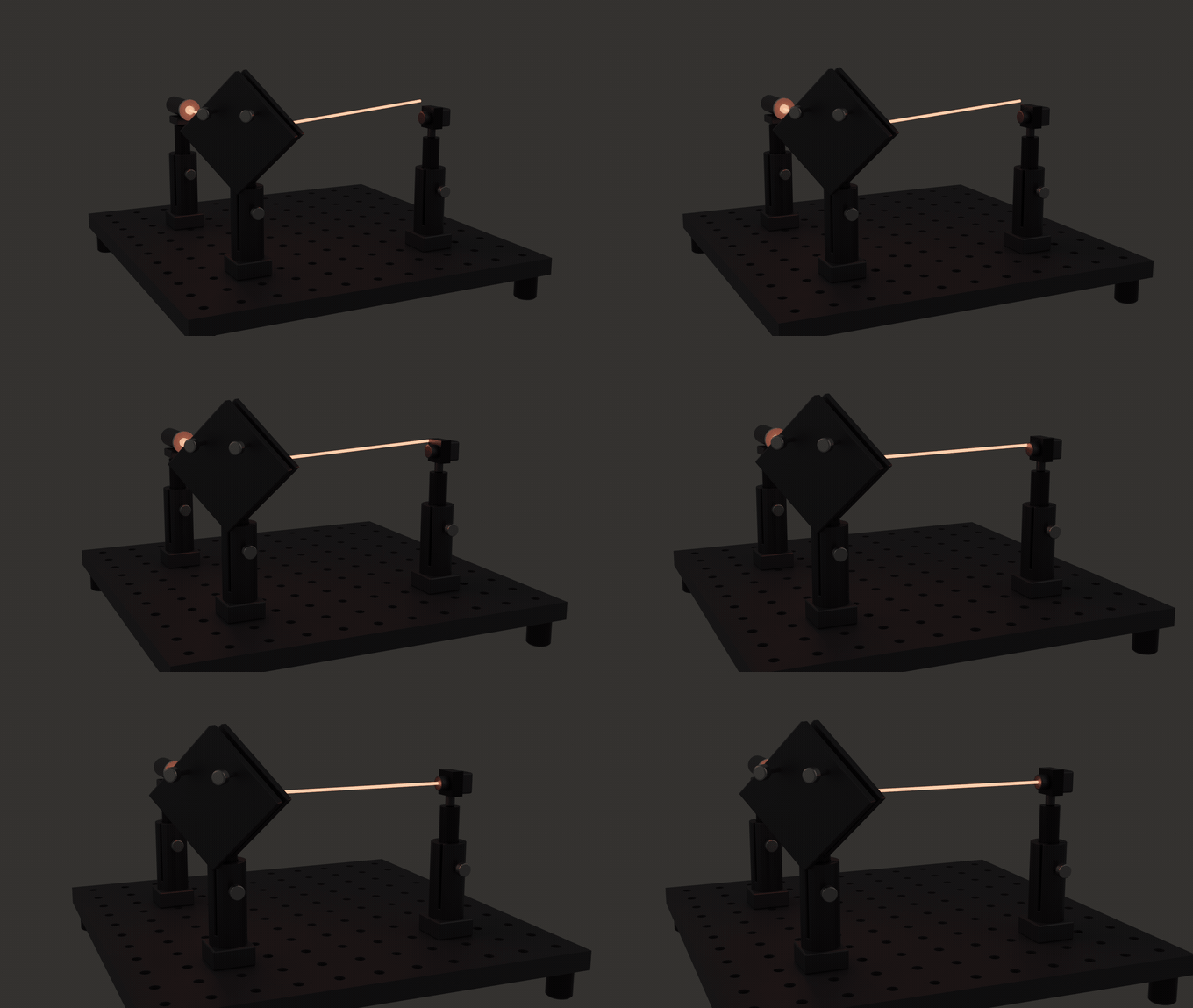
A mirror knocked 2° out of alignment, then one align_element() call: pointing residual 7.02 → 0.0008 mrad. examples/agent_align.py reproduces it headlessly.
Drive it with an AI agent
The add-on exposes its full state as JSON over a localhost bridge and ships an MCP server, so an agent can read the bench and act on it:
get_state()   → every element's pose, ports, mount limits, beam path, detector readings
    ↓ decide
set_param() · place_relative() · set_dof() · align_element() · ao_close_loop() · render()
    ↓ the beam re-traces
get_state()   → read the result, not a guess
Start it from Present ▸ Tools & Integration ▸ Start MCP Bridge. → agent guide · MCP server · tool list
Physics, honestly
Every push runs the physics: 341 textbook checks (Malus, Fresnel, Snell, the grating equation, Gaussian ABCD, Zernike orthonormality, energy conservation) plus a 618-check regression suite on both Blender 4.2 and 5.x. The core formulas were also verified against an external symbolic and numerical oracle; where that has not been done, the code and the docs say so. Every run builds the same benches in millimetre and metre scenes and requires the readouts to agree.
What is not claimed matters as much: this is a chief-ray engine with wave-optics overlays, not a full-wave solver. Thin elements carry no thickness, a grating has no blaze-efficiency model, and anything phenomenological says so where you read it. Model limits are written next to each feature.
→ scope and limits · element-by-element provenance · where the data comes from
Documentation
| Features, examples, release history | The long version of this page |
| Capabilities | Every panel, API call and MCP tool |
| Optical elements | Per-element model, parameters and provenance |
| Scope | What the engine does and does not simulate |
| Dispersion, cylindrical lenses, spectra | Gratings, white light, group delay, spectrometers |
| Realistic hardware | Mounts, cages, rails and render detail |
| Beam rendering | How baked beams are drawn, and what that is not |
| Data sources | Catalog and material provenance |
| Agent guide · MCP server | Driving the bench from outside |
| CHANGELOG | What changed in each release |
How to cite
A machine-readable CITATION.cff is included, so GitHub shows a Cite this
repository button with ready-to-paste APA / BibTeX.
@software{cobanoglu_blender_optics_simulator,
  author  = {Çobanoğlu, Muhammet Emir},
  title   = {Blender Optics Simulator},
  year    = {2026},
  version = {0.31.0},
  doi     = {10.5281/zenodo.20778997},
  license = {GPL-3.0-or-later},
  url     = {https://github.com/emircbngl/blender-optics-simulator}
}
The DOI above is the concept DOI and always resolves to the latest version; each release also mints
its own version DOI (listed in CITATION.cff).
License & credits
GPL-3.0-or-later — see LICENSE. Vendor CAD and meshes are not included and remain the
property of their owners; this project ships original metadata, procedural geometry and tooling.
Contributors
- Tengfei Ma — ShanghaiTech University · ORCID 0009-0008-4556-4682 · @Harca-Yita. Reports from a working optical bench in #1 drove wavelength-true beam colours and the shutter, the unit-scale work, shaped apertures, reflection at the coated mirror face, the Porro prism and polished mirror substrates, the OPA and group-delay work, and the groove-oriented grating, cylindrical lens and spectrum detector.
Built in the spirit of Bigweld's maxim from Robots (2005) — "See a need, fill a need."