Listed from the MCP registry; nobody on Odel publishes it.

LaTeX Look
Compile a LaTeX page, see it rendered, map a PDF point back to source, and diff builds.
Runs on your machine from its package; the steps are below.
What it does
- Reads
- Writes
- High impact
At most: moves money, runs code or commands, deletes data, or sends messages for you.
What it costs
FreeOdel charges nothing per call. The publisher may charge for its own service.
Runs locally over stdio
This server isn't hosted — your MCP client launches it from a package registry. Use one of the commands below, or drop the config into your client (e.g. Claude Desktop).
Run
npx -y @fffangchenghao/dsh-latex-look
MCP client config
{
  "mcpServers": {
    "latex-look": {
      "command": "npx",
      "args": [
        "-y",
        "@fffangchenghao/dsh-latex-look"
      ]
    }
  }
}latex-look — teach an agent to see your LaTeX




English · 简体中文
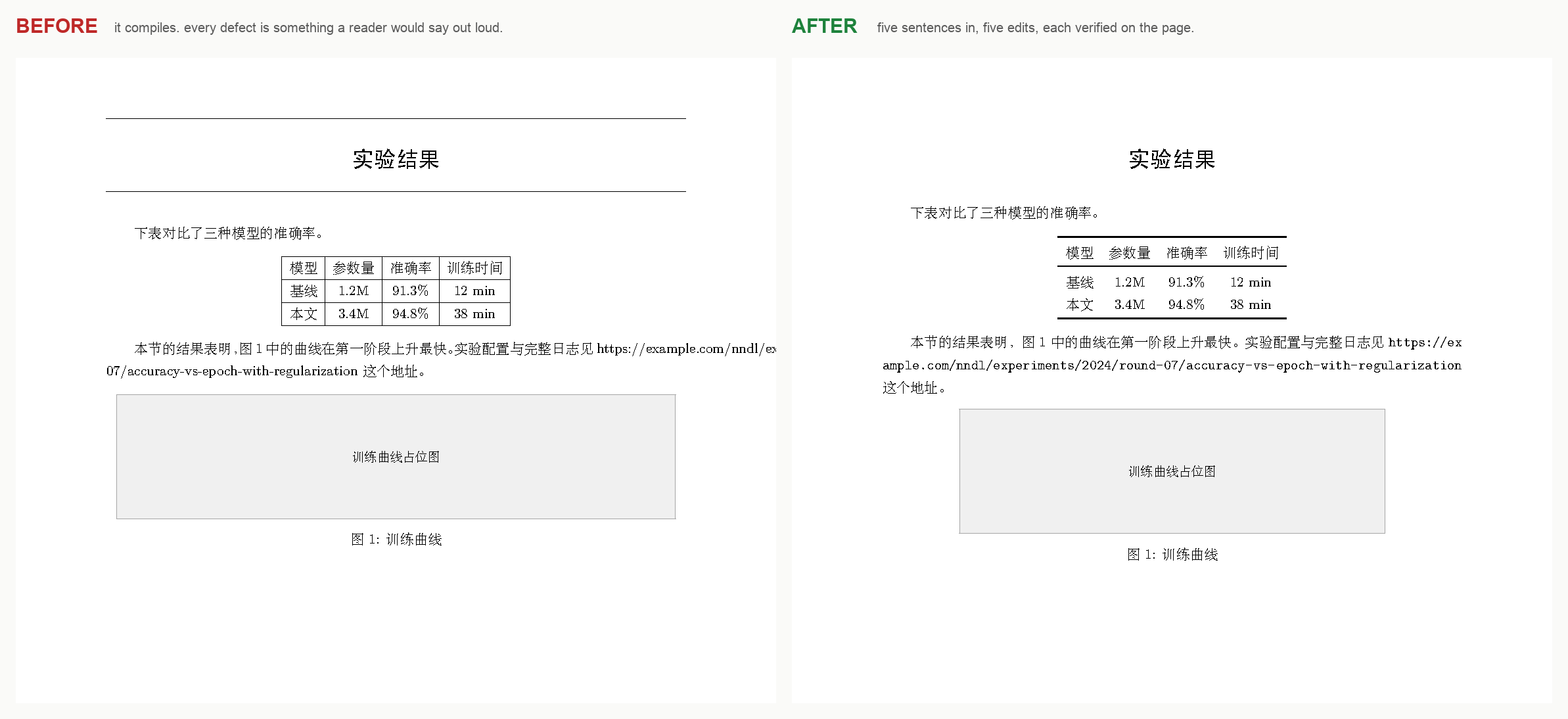
Left: compiles with zero errors. Right: after five sentences a reader could say out
loud — "remove the rules around the title", "this table is a grid, make it a
booktabs table", "that link runs off the page", "the figure is too wide". Try it
yourself in examples/broken-layout.
A DeepSeek Harness plugin that adds exactly one tool: latex_look.
A LaTeX document can compile with zero errors and still look wrong. latex_look renders the requested page, uses SyncTeX to locate nearby source, and shows what changed since the previous build.
        ┌─────────────┐   latex_look   ┌──────────────┐
        │   agent     │ ─────────────► │  pdf → png   │
        │ (edits .tex)│                │  synctex     │
        └─────────────┘ ◄───────────── │  pixel diff  │
              ▲          image + line  └──────────────┘
              └─────────────── verification ───────────┘
Read the case study: a 215-page LaTeX book, read the way a reader reads it — 163 figures, 129 equations, six classes of defect that compile cleanly.
Why one tool, not three
Rendering, locating, and diffing are the implementation. The agent needs one coherent verb — "look at this page" — the same way a person does. latex_look compiles, renders, resolves, and diffs in a single call, so the loop is:
look → diagnose → edit .tex → look again → confirm the change → report
Install
Requires Node ≥ 18, a TeX engine (xelatex/lualatex/pdflatex/latexmk or tectonic), synctex, and ghostscript.
This repository is the bundle: package.json declares dsh.bundle.patch, and cordis.patch.yml inserts one row.
git clone https://github.com/fangchenghao/latex-look
Then install it into the current profile (in the Harness, via the plugin manager):
plugin_manager action: install_bundle target: /absolute/path/to/latex-look
That adds the row latex-look and registers the latex_look tool. Replacing the sources of an already-installed package needs a Harness restart to load a fresh module generation.
Published on npm as @fffangchenghao/dsh-latex-look, so the same row also installs straight from the registry:
plugin_manager action: install_bundle target: @fffangchenghao/dsh-latex-look
Updating
Two different facts, and the plugin reports them separately because confusing them is how an update goes missing:
A newer release exists. The registry is asked once a day, in the background; when something newer is published, one line is appended to a tool reply. An offline machine sees nothing at all, and an unreachable registry is never reported as "up to date".
A newer release is already installed. This is the one that silently bites. An
updater replaces the package directory while the old code keeps running, so the
running code goes on reading its version out of a package.json that was swapped
underneath it — it reports the new number while executing the old code, and
everything looks current. The plugin therefore remembers the version it started with,
re-reads the disk at most once a minute, and when the two disagree says so:
note: @fffangchenghao/dsh-latex-look 0.4.2 is installed on disk, but this process is
still running 0.4.1 — restart DeepSeek Harness to load it.
The plugin does not update itself. Replacing the files of a running process is the
profile's job, not a tool's: an updater plugin already installed in the profile does
it, or you do it by hand. When the plugin can tell which profile it was installed
into, it prints the exact command — the profile name is read off its own path,
because they are called desktop and web and a guess sends you to an install that
does nothing:
dsh plugin --profile desktop add @fffangchenghao/dsh-latex-look@latest
core.mjs is not hot-reloaded, so a plugin update takes effect on the next start of
the harness, never mid-session.
From a checkout, both questions are available directly:
node bin/latex-look.mjs --version
node bin/latex-look.mjs --check-update
Releasing
Tagging v* runs the platform and MCP suites on Ubuntu with TeX and Ghostscript installed, verifies the tag matches package.json, and publishes to npm. The full npm test suite is the local gate. The token comes from the NPM_TOKEN repository secret.
Optional: the knowledge skill
The tool gives the agent eyes. SKILL.md gives it the LaTeX knowledge to act on what it sees — a symptom → cause → fix playbook (a rule you want gone is usually \pagestyle/fancyhdr, not a stray \hline). Copy or symlink it into the skills root:
mkdir -p ~/.dsh/skills/latex-look
ln -sf "$PWD/SKILL.md" ~/.dsh/skills/latex-look/SKILL.md
CLI, for humans and for testing
node bin/latex-look.mjs book.tex --page 37
node bin/latex-look.mjs book.tex --text "表3.1"
node bin/latex-look.mjs book.tex --page 12 --compare previous --json
node bin/latex-look.mjs book.tex --page 1 --audit   # what did the last edit break, anywhere?
The CLI runs the same engine as the plugin and needs no Harness, which makes it the fast way to check a change without reloading anything.
MCP server, for Claude Desktop, Cursor and Codex
The same engine ships as a Model Context Protocol server, so a client that has never
heard of DSH can use it. It is the same look() and the same words in the reply — the
plugin is the Harness shape, this is the universal one.
{
  "mcpServers": {
    "latex-look": {
      "command": "npx",
      "args": ["-y", "@fffangchenghao/dsh-latex-look", "mcp"]
    }
  }
}
Put that in claude_desktop_config.json (Claude Desktop), ~/.cursor/mcp.json
(Cursor), or as a TOML block in ~/.codex/config.toml:
[mcp_servers.latex-look]
command = "npx"
args = ["-y", "@fffangchenghao/dsh-latex-look", "mcp"]
It exposes one tool, latex_look, with the same parameters as everywhere else:
file, page, text, pointX/pointY, compare, audit, sequence, dpi.
Pages come back as image content blocks, so the model sees the page itself.
Requirements are the usual ones — a TeX engine and ghostscript on PATH:
brew install --cask mactex-no-gui ghostscript     # macOS
sudo apt install texlive-xetex ghostscript        # Debian/Ubuntu
winget install MiKTeX.MiKTeX ArtifexSoftware.GhostScript   # Windows
On Windows nothing has to be added to PATH: the plugin asks for gswin64c
(that is Ghostscript's real name there), and when that is not found it looks in
C:\Program Files\gs\gs*\bin, plus the TeX Live, MiKTeX and TinyTeX install
directories. If you would rather be explicit, point PATH at
C:\Program Files\gs\gs10.05.1\bin and it is used first.
Nothing is uploaded: every call compiles the document that is already on your disk.
Listed in the official MCP Registry as io.github.fangchenghao/latex-look, so clients that search the registry can install it by name, and on awesome-mcp-servers.
Tests
Ten suites run on a clean checkout. Integration cases create their own fixtures and
compile real documents; unit cases and two CLI option/error probes use controlled
inputs or stubs. Expect a few minutes (npm test runs these, in this order):
node test/platform.mjs        # win32 branches of PATH/PATHEXT/Ghostscript lookup, on any OS
node test/smoke.mjs           # unit level: problem parsing, PPM, raster diff, aux detection
node test/scenarios.mjs       # 52 end-to-end cases driven through index.js
node test/scenarios-deep.mjs  # 34 cases: multi-file papers, beamer, twocolumn, images,
                              #   engine switching, the build cache, hostile inputs
node test/cli.mjs             # the CLI's own argument handling, through the real binary
node test/mcp.mjs             # the MCP server on the wire: handshake, schema, real call
node test/review-core.mjs     # restored timestamps, concurrent renders, snapshots, inputs
node test/review-sequence.mjs # complete label scans and TOC pass semantics
node test/review-audit.mjs    # blank/failed builds must not become clean baselines
node test/review-update.mjs   # loaded version vs disk, semver precedence
node test/render-diff.mjs     # PNG filters, pixel counts and the side-by-side preview
Optional book suites (not part of npm test):
node test/book-scenarios.mjs  # 15 cases against a real 208-page book (164 .tex files)
node test/book-tasks.mjs      # 18 real editing tasks on the same book (see below)
LATEX_LOOK_BOOK=/pristine/copy node test/book-tasks.mjs   # point it at an unedited copy
The book suite needs a real book and is skipped unless you point it at one:
LATEX_LOOK_BOOK=/path/to/book node test/book-scenarios.mjs
These two suites matter most, because a real book is root → \input{main} →
\input{chap1}, with a custom .sty, 181 figures, a glossary and fancyhdr page
furniture.
book-scenarios checks the machinery on that book. book-tasks checks the
requests: each case is a sentence a user would say, applied to the copy and then
verified the way an agent verifies it — look, diff against the previous build, and
confirm the change is where the edit acts:
| user says | measured |
|---|---|
| 把页眉那条横线去掉 | 0.09%, bbox y=52 h=1 (a thin band at the top) |
| 页眉的线太细,加粗到 2pt | 0.27%, bbox y=52 h=3 |
| 链接的蓝色去掉 | 0.29%, bbox over the contents page |
| 行距调大一点 | 10.53%, 208 → 248 pages |
| 表格行距加大 | 9.07% |
| chap2 那个总结框太窄,放宽 | 7.39% |
| chap1 那个图太小,放大 | 10.57% |
| chap4 那组图对齐时右边空着 | 8.81% |
| 段落首行不要缩进 | 14.07% |
| 页边距太窄 | 13.32%, 208 → 226 pages |
| 正文字号改成 12pt | 11.63%, 208 → 226 pages |
| 目录只显示到章 | 2.19%, 208 → 207 pages |
Nothing in these cases is asserted about how the change looks — that is what the image is for. The assertions are: the build succeeded, a diff exists, and its bounding box is in the region the edit acts on.
Both end-to-end suites stub only @deepseek-ai/dsh-tools (it exists solely inside
the Harness) and call the real execute with real arguments, so they exercise the
argument handling and the exact text the model reads — not just lib/core.mjs.
That matters: several bugs found this way lived only in the formatting layer.
The page SyncTeX names is not always the page it is on
SyncTeX records the page a box was built on. A float that TeX moves to the next
page gets the previous page's number, so text: "Version 0.5" used to answer
"page 205" for a table that ships on 206 — and page 205 is a different chapter.
The tool now checks the PDF's own text layer (gs -sDEVICE=txtwrite, ~0.12 s a page)
and looks up to two pages either side. If the text is on a different page, the
tool reports the corrected page and leaves x and y empty. Supplying both
page and text restricts the source matches to the requested PDF page.
One picture, not two
The plugin compares the pixels in the two preview PNGs at the requested DPI.
When pixels change, images.sideBySide shows the old page on the left and the
new page on the right. The difference box uses PDF points at every resolution,
so its centre can be passed directly to pointX and pointY.
Performance
Verifying an edit always costs a real compile; there is no way around that. But browsing pages of the same build should not:
| operation | 208-page book |
|---|---|
| first look (3 passes + glossary) | ~17 s |
| every look after that, sources unchanged | ~0.2 s |
A build is reused when the document, everything it \input/\includes (three
levels), its \includegraphics files and its aux files are unchanged. Signatures
include content hashes as well as metadata; the output PDF is also checked against
its recorded digest. Restored timestamps and equal-size edits cannot reuse stale
observations. A failing build is never reused. Pass fresh: true to bypass it.
Two consequences worth knowing:
- The before-snapshot belongs to the build, not to the call. After an edit, the first look records what the page looked like before it; every later look at that same build reuses the same snapshot, so an agent inspecting three pages of its own edit still sees a diff on the second and third. A failed compile can write a partial PDF. Retrying still compares against the last successful build.
- One build per document at a time. Two compiles of the same file share its
.aux/.tocand corrupt each other — racing two processes on the 208-page book, one of them died with no error message at all. Builds are now serialised in-process by a promise queue and across processes by a lock file that carries the owner's PID, so a killed run cannot wedge the document. The lock covers the snapshot, compile and observations together, not just the engine invocation.
-draftmode on the intermediate passes was measured and rejected: it saves about
2%, because the time is typesetting, not PDF writing. The ~16 s is TeX itself.
The tool
latex_look({
  "file": "book.tex",       // main .tex (required)
  "page": 37,               // optional, defaults to 1
  "text": "表3.1",          // optional, find this text on the selected page
  "pointX": 240,            // optional, with pointY: PDF points → source line
  "pointY": 610,
  "compare": "previous.pdf",// optional: diff against an earlier PDF
  "dpi": 200,               // optional, 50-300
  "engine": "xelatex",      // optional
  "maxPasses": 3,           // optional
  "timeoutSeconds": 300,    // optional
  "fresh": false,           // optional: ignore the build cache
  "audit": false,           // optional, compare whole-document layout at this threshold
  "auditBlankMm": 30,       // minimum bottom gap in millimetres
  "sequence": "图"            // optional: check that numbered labels stay in reading order
})
Returns:
- compile status, pass count, page count, and structured
problems— each withfile,line,message warnings: LaTeX/Package/Class warnings plus Overfull/Underfull boxes, the usual cause of an ugly pagetoc: whether the document declares\tableofcontentsand how many entries it actually produced (an empty TOC is reported as a problem, not a success). The declaration is found across\input/\include, so a one-line root that wraps\input{main}still worksaux: external tools it ran —makeglossaries,makeindex,biber,bibtex— chosen from the artifacts the first pass produced, not from the root file's text, so multi-file projects that keep\makeglossariesin an included preamble are handled too- PNG path(s) for the rendered page — hand these to an image reader
located:{ file, line, page }for the text anchor or point you asked aboutdiff:changedPixelscounts RGB pixels that differ in the returned previews atdiff.dpi.changedRatiois their fraction of the page. The bounding box uses PDF points at every resolution, ready to feed back intopointX/pointY.sequence: reading order of labels that start a line ("图 1-1", "Figure 3.2", …). A float is placed later than an inline object that follows it in the source, so floating one member of a numbered run makes the numbers go backwards — the one defect a per-page diff can never showauditcompares the PDF with the previous distinct PDF audited at the sameauditBlankMm.newFindingslists new issues and existing gaps whose increase exceeds both 8 mm and 40% of their former depth. For those gaps,previousMmgives the former depth. Opening another page of the same PDF reuses the report. The first measurable audit at each threshold establishes its baseline.
How the locating works
SyncTeX records the source locations associated with boxes in the typeset document.
- point → source:
synctex edit -o page:x:y:file.pdf - text → source: search the
.texsources for the string, thensynctex vieweach hit to get its page and coordinates - diff bbox → source: pass the bbox centre as
pointX/pointY
Coordinates are PDF points (72/inch) with the origin at the top-left of the page.
Honest limits
pageis the PDF page index, not the number printed on the page. In the test book those differ by 10 (printed 130 = index 140), and the offset is different again in the roman-numbered front matter. PDF page labels would let the tool translate, but LaTeX only writes them on request, so an agent that takes a page number from a user must confirm it against the rendered page first.- SyncTeX resolves a point to the nearest box. For a horizontal rule, the plugin checks whether a nearby drawing command maps to the observed height on that page. When it cannot confirm the command, the result gives the nearest box and marks the rule's origin as unknown.
- Text anchors match a literal substring on one source line. SyncTeX may return only one placement of a file included several times. For other placements, select the PDF page and use
pointXandpointY. - Multi-pass convergence is checked by hashing
.aux/.toc/.out/… — a document with\tableofcontentsneeds ≥ 2 passes, andlatex_lookreports a problem if the TOC comes out empty. - Source lookup follows nested literal
\inputand\includereferences and ignores LaTeX comments. A main-file\includeonlylist limits which chapters contribute to the TOC check. - Cross-engine pixel parity is impossible: TeX vs Word, or two different TeX engines, have different line-breaking engines. This tool verifies your engine's output, not another format's.
- A
%in a file name defeats the TeX engine itself (! Emergency stop.), so no tool can help there. A%in a directory name is fine. - If the compile fails without writing a new PDF, the stale PDF on disk is not rendered and no diff is reported — the tool says so instead. Otherwise an unchanged file would read as "0% changed", i.e. "your edit did nothing".
engineaccepts only the engines in this tool's list (autoor a known name); it is never passed tospawnunchecked.- Rendered PNGs stay under
TMPDIR/latex-look-<pid>/<hash of the document path>/because the agent opens them after the call returns. Nothing prunes that directory. The per-document level exists because two projects whose main files are bothmain.texotherwise wrote to one PNG path, and the second look silently replaced the image the first call had already handed back. - Returned PNG paths are unique per render, including repeated looks at the same document, so a later call cannot replace an image already handed to the reader.
compare: nulldisables comparison but still records the next build's baseline. A missing/unreadable baseline or different page dimensions gets a reason, not a diff.- XeLaTeX, LuaLaTeX, pdfLaTeX and latexmk record the project files TeX actually opened in
.fls. The cache checks their contents on subsequent looks, including styles, classes and inputs selected by macros. All engines also check literal source, image, local style and bibliography references, aux files and the PDF itself. Usefresh: trueafter changing a system package or another dependency outside this coverage. maxPasses: 1on a classic-engine document with\tableofcontentsis an error when the previous.tochad no entries (even if it contained setup commands), and a warning when a populated old.tocwas typeset.latexmkcounts as one invocation while managing its own passes.- Sequence checks support complete two-integer labels separated by
-,–,—,., or·. Zero matches or any unsupported numeric label with that prefix declines the scan; suffixes such as3.2aare not silently truncated. - An audit without a reference text block, or a failed compile, cannot replace the last usable audit baseline. Failed auxiliary tools make the build fail too.
License
MIT