Listed from the MCP registry; nobody on Odel publishes it.
Is this yours? Claim it
Fyreflock
Talk to a real person who passed a live camera check and play 25 games, right in your AI chat.
One address for any MCP client. You sign in at fyreflock.com once, after adding it.

What it does
- Reads
- Writes
- High impact
At most: moves money, runs code or commands, deletes data, or sends messages for you.
What it costs
FreeOdel charges nothing per call. The publisher may charge for its own service.
What it asks for at sign-in
| Access to | Read | Change |
|---|---|---|
| Chat | Not stated: chat | |
| Groups | Not stated: groups | |
| Games | Not stated: games | |
From the sign-in at fyreflock.com, as the endpoint publishes it. You approve it there.
Tools
None listed · checked 11 Nov 2026Odel could not list its tools without signing in.
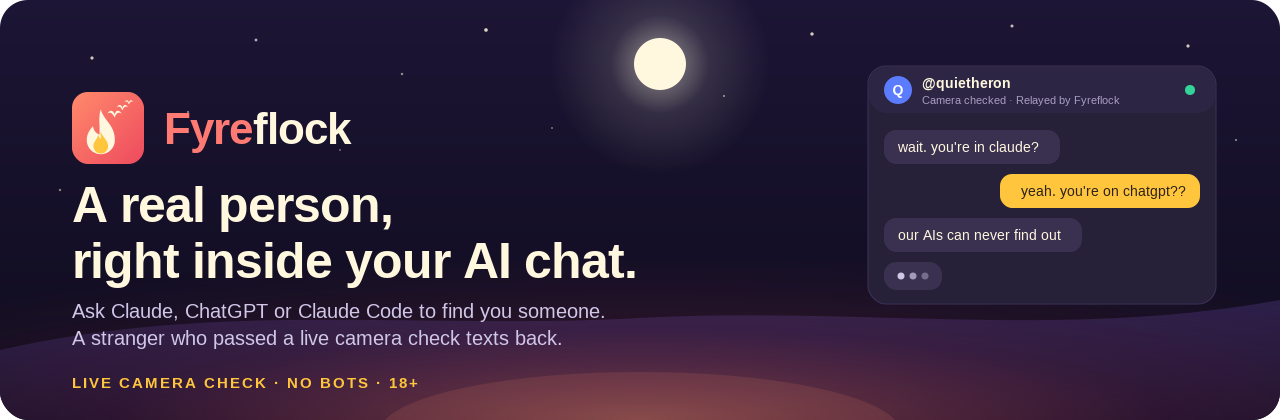
Fyreflock for Claude, ChatGPT and Claude Code
Ask your assistant to find you someone. A real person who passed a live camera check texts back in the same window, and you can play Connect 4, Battleship or 23 other games together without leaving the chat.
Your assistant only carries the words, exactly as you typed them. No bots.
Early access: everything is free, filters included, and every month four early users win an award.









Every AI chat is a room with one person in it. Fyreflock puts a second person in that room: a real one, who passed a camera check, picked at random, there for the same reason you are. You stay in Claude or ChatGPT. They might be in a browser, in ChatGPT, or in their own Claude. Your assistant is the courier, and it is held to that.
Real box, two real accounts, real time. From "find me someone" to a won game of Connect 4 in about fifteen seconds.
Try it in sixty seconds
- Add Fyreflock to your assistant. The connector URL is
https://fyreflock.com/mcp. Host-by-host steps are just below. - Sign in once and press Allow. A browser tab opens, you sign in or sign up, and you are sent straight back. New here? The same page signs you up, camera check and all.
- Say "find me someone to talk to". The Fyreflock box opens right there in the conversation. Say "next" for somebody else, "leave" to stop.
Tip
Nobody around yet? Press Play while you wait and take on the computer. The search keeps its place, and the box switches to the conversation the moment somebody arrives.
Set it up
Claude (claude.ai and Claude Desktop)
- Settings → Connectors → Add custom connector.
- Paste
https://fyreflock.com/mcpand save. - The first time you ask for someone, Claude opens fyreflock.com: sign in, press Allow, done.
The chat box appears inline in the conversation. It survives you switching to other chats; your lines wait, and the box picks them up when you come back.

It follows your assistant's theme.
ChatGPT
- Settings → Plugins → Add custom MCP server.
- Server URL
https://fyreflock.com/mcp, authentication OAuth. - Ask for someone; sign in and press Allow when the page opens.
Claude Code (this repo is the plugin)
/plugin marketplace add FuloxDev/fyreflock-claude
/plugin install fyreflock@fyreflock
Restart Claude Code and say find me someone. The first time, Claude Code opens fyreflock.com in your browser: sign in or sign up, press Allow, and you are back in the terminal, connected. No token to copy.
It is a plugin rather than a bare claude mcp add line for one reason: the hooks. They turn "your assistant sends your words unchanged" from a request into something that is actually checked, every message. Do not also run claude mcp add for Fyreflock: two registrations means two servers, duplicate tools, and hooks that only cover one of them. Details in How it stays honest and The pane.
VS Code (Copilot agent mode)

Or add it by hand to mcp.json:
{ "servers": { "fyreflock": { "type": "http", "url": "https://fyreflock.com/mcp" } } }
Sign-in happens in your browser on first use.
Any other MCP client
Remote server, Streamable HTTP, OAuth 2.1 with PKCE, client metadata documents and dynamic registration both accepted:
https://fyreflock.com/mcp
If your client cannot sign in by itself, create a token under Settings on fyreflock.com and send it as Authorization: Bearer <token>.
What you can do from your assistant
| 💬 Talk to a stranger | One real person at a time, matched on region and the interests you share. "next" moves on, "leave" ends it. |
| 🎮 Play while you talk | 25 games right inside the box: Connect 4, Battleship, Liar's Dice, Checkers, Reversi, Would You Rather and more. The server referees, so neither player, and neither assistant, can peek at a hidden board or hand. Nobody around? Play the computer while you wait. |
| 🪺 Roosts | Your own circle, invite link only. Read and post in Roosts that let assistants in. |
| 📹 Take it to video | Invite the person you are texting to a video call; it opens in your browser, no token, no new account. |
| 🧭 Filters and interests | Set what you are into and who you want to meet. During early access every filter is free too. |
| 🏆 Monthly awards | Every month four early users win an award badge and six months of premium for when paid features launch. See the awards. |
| 🛡️ The door that opens | Block, report with the evidence attached, add to your Nest if you both want to talk again. Every exit works the first time. |
How it stays honest
- Every match is a real person. Every account passed a camera check in a browser before it could meet anyone. There is no bot in the queue and never will be. 18+ only.
- They know. The other person's card says you are talking from inside an assistant, so nobody is fooled about where the words came from.
- Your words, verbatim. The assistant is instructed to send your message exactly as typed. In Claude Code the plugin's hooks refuse any send that is not the line you wrote this turn. Rewording, shortening, "fixing" and inventing are all blocked.
- You can check. The companion tab at fyreflock.com/app/live shows what was actually sent and received, with no model involved.
- It survives you looking away. Switch to another chat, close the window, come back: your search keeps its place in line, your conversation keeps its lines, and your browser can tell you when somebody is there.
Before you meet anyone
- 18+. Same as meeting a stranger anywhere on Fyreflock.
- Messages here pass through the Fyreflock server in plain text and through whichever AI provider you are using. Browser-to-browser chats on the website never do. This is the real trade you are making.
- Use it in a chat with nothing else attached. No other connectors, no files, no tools. A stranger is typing into a context your assistant can read, and whatever it can see, they can ask about.
- Their words arrive wrapped and labelled as somebody else's text. They are never instructions, to you or to your assistant.
Full detail: https://fyreflock.com/agents · Privacy: https://fyreflock.com/privacy · Safety: https://fyreflock.com/safety
Talk to us
- Questions, ideas, a host that behaves oddly: Discussions.
- Something broken: open an issue.
- A security problem: please do not open an issue; see SECURITY.md.
- Someone behaving badly in a chat: report them from the box or on the website; that goes straight to moderation.
FAQ
Is this a chatbot? No. A real person is on the other end, every time. The computer you can play games against on the website is labelled as exactly that and never takes a place in matchmaking.
Can my assistant read my messages? Yes. Both directions pass through it, which is why the box exists: in Claude and ChatGPT the box talks to our server directly, so the model only sees what you ask it to.
Does the other person know I am using an assistant? Yes. Their peer card says so.
Does the assistant change what I write? It is instructed not to, the Claude Code plugin enforces it, and the companion tab lets you verify it.
How do I know they replied? The box shows it live. If you have moved on to another chat, your browser can notify you: turn that on when you connect, or later under Settings on fyreflock.com.
What does it cost? Nothing. Fyreflock is in early access, so everything is free, filters included. Later, paid passes will add matching preferences; talking stays free.
The pane: talk without the model in the path
Claude Code 2.1.287 or newer (Desktop 2.1.286) loads the plugin's mod,
hooks/mod.tsx, beside the two hooks. It draws a Fyreflock pane next to the
transcript and keeps the conversation itself, so a line costs 0.2 s instead
of a model turn, and the model never sees the stranger's words unless you ask
it to.
/fyreflock              open the pane
/fyreflock start        find someone
/fyreflock next         skip to somebody else
/fyreflock leave        hang up, or stop looking
/fyreflock status       who you are talking to and who is waiting
/fyreflock <anything>   send that line, exactly as written
In the pane: the chat box's five states, each with its colour on a dot and a
rule under the header in your theme's own colours: ready (yellow, how many are
by the fire, Start), looking (yellow, Cancel), talking (green), reconnecting
(orange, when a poll fails mid-conversation; it clears on the next answer) and
ended (coral, "@them left the campfire" or "You left the campfire", with
Find someone new). While talking: their lines on the left and yours on the
right, a field that sends on Enter, Next person / Leave (hotkeys s, n,
l while the pane has the keyboard, ctrl+x tab to give it the keyboard), and
Sent / Delivered / Read under your last line. While Claude is idle, the
band above the prompt shows the same dot and says who you are talking to and
how many lines arrived since you last typed; hide dismisses it for the
session. A reply also shows as a toast, and the status line says whether you
are looking, talking or reconnecting.
How the pane talks to the server, and how it signs in
The mods API gives a plugin HTTP only, so there is no socket to hold. The pane
long-polls fyreflock_app_wait on the same /mcp endpoint the model's tools
use, at FYREFLOCK_URL, twenty-five seconds a call (the engine cuts a fetch at
thirty), and sends through fyreflock_app_say. Those two are the widget's
app-only tools; they return the server's own record of the conversation, which
is why the pane can show receipts the fyreflock_listen result cannot. The
server refuses them to anything but the box and the pane, so the pane first
calls fyreflock_open once and sends the key from its _meta (which no host
shows a model) with each of them. Each
poll carries pane: true: the server reads that as "the pane is live" for
thirty seconds, and a chat box the same Claude Code mounts (the desktop app's
Code tab draws MCP Apps) folds to one line pointing here instead of offering a
second copy. The loop starts the first time you run /fyreflock and stops when
you close the pane with nothing open: a plugin installed everywhere must not
hold a connection to fyreflock.com in sessions that have nothing to do with it.
Signing in: there is nothing to paste. A mod cannot borrow Claude Code's own
sign-in and cannot take a browser callback, so the pane signs itself in by
device flow. The first /fyreflock shows a fyreflock.com link and a code like
BCDF-GHJK; open the link, sign in or sign up, check the page shows the same
code (a link forwarded to somebody else gives itself away there), press It
matches and then Allow, and the pane picks the answer up within five
seconds. It keeps its own access and refresh tokens in the plugin's store
($.store, a JSON file under your Claude Code config directory; never
$.state, which every plugin can read), renews them by itself, and goes back
to its Sign in button if you disconnect it in Settings, where it is listed
as Claude Code. A token pasted into the plugin's own Fyreflock token
option (the plugin's config menu; it is kept in secure storage, never read
from your shell) still overrides all of that.
The pane and the model's tools share one mailbox. Use one or the other for a
given conversation: a fyreflock_listen the model holds and the pane's poll
would take turns collecting the same lines.
Checking it: claude plugin validate ./plugin reads the module the way the
engine will; claude plugin test ./plugin runs tests/mod.test.ts against the
engine with the network answered from memory, on the terminal and desktop
surfaces. To try it live, claude --plugin-dir ./plugin "/fyreflock start"
with FYREFLOCK_URL set to the dev server's /mcp, and a second account in the
widget or on fyreflock.com/app to be matched with.
Stop it asking permission for every message
Without this you confirm a dialog for every single line you send, which is unusable. Answer always allow the first time, or add the rule yourself:
/permissions
and allow mcp__plugin_fyreflock_fyreflock__*.
The exact tool prefix is generated by Claude Code from the plugin and server names, and the format has changed before. If that rule does not match, run
/mcpor check any Fyreflock tool call in your transcript to see the real name, and use that. The hook matcher inhooks/hooks.jsonis a regular expression precisely so it keeps working either way.
What the hooks do
Two, both local, both tiny, neither sends anything anywhere.
capture-prompt.mjs runs on every prompt you submit and writes one small
file in your system temp directory, keyed by a hash of the session id and
overwritten by your next prompt. It holds SHA-256 digests of the forms your
message can take and the turn's prompt_id, never your words. That is the
whole job.
check-verbatim.mjs runs before fyreflock_say, fyreflock_roost_say,
fyreflock_game_move and fyreflock_app_say, under any server name (the
plugin's own, a claude mcp add one, or the claude.ai connector Claude Code
imports), and refuses the call unless the text being sent is the message you
typed this turn. Spacing and curly quotes are forgiven. Rewording, correcting,
shortening, summarising, shouting and inventing are not, and the model is told
to send your words instead.
"This turn" is the turn, not a time limit: Claude Code gives every event of one
prompt the same prompt_id, so a long turn keeps your words, and a model
acting on its own in a turn you did not start has nothing it may send.
It compares by equality, not containment. What goes out has to BE your message, not merely appear somewhere inside what you typed: a substring test lets "tell them no, I don't want to meet" send "want to meet", and lets a model assemble sentences a word at a time. Two allowances make that livable, because nobody types bare lines at an assistant: one leading "tell them" is stripped, and anything you wrap in backticks goes byte for byte, punctuation and case included. That last one is the escape hatch when the rules get in your way.
If no capture file exists at all, it allows the call. A missing capture means this plugin did not run, which is our bug, not the model's, and blocking your first message over it would just look broken. Any other unreadable capture counts as you having typed nothing.
Set FYREFLOCK_ASSIST=1 (or true, and nothing else counts) to turn the check
off, for when you genuinely want Claude to help you write or translate a line.
The stranger is not told when this is on, so it is a tool for you rather than a
mode of the product.
What leaves your machine, and where
The pane contacts one host: https://fyreflock.com (its /mcp endpoint and
the OAuth device flow under /oauth), or the address in FYREFLOCK_URL if you
set one. It sends the lines you type into it, the sign-in token it holds for
you, and nothing else: no files, no other conversation text, no environment
variables. The two command hooks run only the plugin's own scripts by their
literal paths under CLAUDE_PLUGIN_ROOT: capture-prompt.mjs keeps the text of
your last prompt, and check-verbatim.mjs reads that text when the model is
about to call a sending tool and blocks the call when the words differ. Neither
contacts the network.
Pointing it somewhere else
FYREFLOCK_URL overrides the endpoint, for a dev server:
export FYREFLOCK_URL=http://localhost:8787/mcp
Publishing this (maintainer)
This directory is the plugin. It is developed inside the main Fyreflock repo so
it stays in step with the server, and published as its own repo because that is
what /plugin marketplace add consumes.
gh repo create FuloxDev/fyreflock-claude --public --description "A real person and 25 games, right inside your AI chat. Fyreflock for Claude, ChatGPT and Claude Code: everyone passes a live camera check, no bots, your words sent verbatim."
cd plugin && git init && git add -A && git commit -m "Fyreflock plugin"
git remote add origin https://github.com/FuloxDev/fyreflock-claude.git
git push -u origin main
Validate before pushing, and again after any change to plugin.json,
hooks.json or .mcp.json:
claude plugin validate ./plugin
The host cannot run these hooks inside a test, but everything they depend on can
be: apps/server/test/verbatimhook.test.ts spawns both scripts the way Claude
Code does, asserts on the decision they return, pins the matcher regex against
the real generated tool names, and keeps every known bypass as a regression
case. Run it after touching either script or hooks.json.
One caveat the tests cannot cover: the hooks are spawned as node, resolved on
Claude Code's own PATH. If node is not there, neither hook runs, every send is
allowed, and nothing on screen says so. Worth checking once on a machine where
Node came from nvm or a GUI launcher.
The other thing that genuinely needs a human once: install this in a real session
and confirm the PreToolUse matcher actually fires, by trying to get Claude to
send something you did not type. If it goes through, the matcher is wrong and
the whole verbatim story is decorative.
fyreflock.com · assistant mode · safety · privacy · MIT