Listed from the MCP registry; nobody on Odel publishes it.

Runs on your machine from its package; the steps are below.

What it does
- Reads
- Writes
- High impact
At most: moves money, runs code or commands, deletes data, or sends messages for you.
What it costs
FreeOdel charges nothing per call. The publisher may charge for its own service.
Runs locally over stdio
This server isn't hosted — your MCP client launches it from a package registry. Use one of the commands below, or drop the config into your client (e.g. Claude Desktop).
Run
uvx punk-records
MCP client config
{
  "mcpServers": {
    "punk-records": {
      "command": "uvx",
      "args": [
        "punk-records"
      ]
    }
  }
}




One brain for all your AI agents. Persist every CLAUDE.md, AGENTS.md, napkin, and rules file
from every project and machine in a single versioned store. Sync it over any git remote, or carry it
across an air gap on a USB stick. Agents can read and write it live over MCP.
On Egghead, Dr. Vegapunk keeps one shared brain, the Punk Records. His satellites each go off and learn things, and whatever they learn flows back into that shared brain. This project does the same for your agents: each project and machine is a satellite, and
~/.punk-recordsis the brain.The name is a nod to One Piece (the linked wiki pages contain spoilers). This is a fan-named project, not affiliated with Eiichiro Oda, Shueisha or Toei Animation.
Why
Agent memories are scattered across dozens of repos and dotfiles. Many of them are deliberately
uncommitted (CLAUDE.local.md, napkins, ~/.claude/CLAUDE.md). They get lost when you wipe a
laptop, they diverge between your work and home machines, and they can't follow you into an
offline network.
How it compares
- Committing
CLAUDE.mdto each repo. Keep doing it for conventions your team shares. It does not cover the memories you keep out of git on purpose (CLAUDE.local.md, napkins,~/.claude), notes you would rather not push to a team repo, or a machine that cannot reach the repo host. Punk Records stores those too, alongside the committed ones. - Dotfiles managers (chezmoi, yadm, GNU Stow). They are built for files at fixed paths in your home directory. Most agent memories live inside project checkouts, at different paths on each machine. Punk Records finds them by itself, matches checkouts by their git remote, merges edits made on two machines, scans for secrets before storing, and serves everything to agents over MCP. The two work together: a global memory that is a symlink into your dotfiles repo is followed (see below).
What it picks up
| Scope | Files |
|---|---|
| Any project | CLAUDE.md, CLAUDE.local.md, AGENTS.md, AGENT.md, GEMINI.md, napkin.md, CONVENTIONS.md, .cursorrules, .windsurfrules, .clinerules, .goosehints (anywhere in the tree) |
.claude/*.md (napkins, commands, agents), .claude/skills/*, .cursor/rules/*, .windsurf/rules/*, .clinerules/*, .roo/rules/*, .kiro/steering/*, .github/copilot-instructions.md, .github/instructions/*.md | |
Claude Code auto memory, ~/.claude/projects/<project>/memory/*.md (stored as @claude-memory/...; restored into the matching folder for the project's path on each machine, and shared by its worktrees) | |
Global ($HOME) | ~/.claude/CLAUDE.md, ~/.claude/napkin.md, ~/.claude/{commands,agents,skills}/*, ~/.codex/AGENTS.md, ~/.gemini/GEMINI.md, ~/.config/goose/.goosehints |
Run punk scan to see what would be captured. To add your own patterns, put globs in punk.json
inside the store ({"include": ["docs/ai/*.md"], "exclude": []}).
To leave Claude Code auto memory out, use {"exclude": ["@claude-memory/*"]}. CLAUDE_CONFIG_DIR
is honoured; a custom autoMemoryDirectory setting is not read yet.
Install
Requires Python 3.9+ and git. No other dependencies.
pipx install punk-records                 # or: pip install punk-records
brew install gablooge/tap/punk-records    # Homebrew on macOS or Linux; brings its own Python
uv tool install punk-records              # with uv
Quickstart
punk init                       # creates ~/.punk-records and tracks your global memories
punk track ~/code/app ~/code/api
punk save                       # snapshot every memory file into the store
punk context ~/code/app         # everything an agent should know there, as one document
Online sync (any git host)
Create a private repo (GitHub, GitLab, Gitea, a bare repo on your NAS, anything git can reach):
punk git remote add origin git@github.com:you/my-punk-records.git
punk sync                       # save -> pull -> push -> restore
On another machine:
punk init git@github.com:you/my-punk-records.git
punk track ~/src/app            # matched to the same records through the project's git remote
punk sync
Projects get their identity from their git remote (github.com/you/app), so the same repo checked out
at different paths on different machines shares one set of memories. Projects without a remote get
local/<dirname>; you can override it with punk track --id.
Encrypted remote (untrusted host)
If the host should not see your memories at all, let punk encrypt them with age
(install age first; still no Python dependencies):
punk encrypt init git@github.com:you/my-punk-records.git   # makes ~/.config/punk/age.key if missing
punk sync
Your store stays plain text on each machine; the remote only ever holds one file,
punk-records.bundle.age, replaced on every push. On another machine, copy ~/.config/punk/age.key
(keep it private and backed up; without it the remote cannot be read) and run
punk init --encrypted <url>. A machine can also keep its own key: run
punk encrypt add-recipient <its age1... public key> on a machine that can already read the remote,
then sync there. punk encrypt status shows the key and recipients. If an encrypted store also has a
plain git remote, punk sync refuses to run rather than push anything unencrypted.
Team brain (read-only)
Read another Punk Records store too, for example your team's shared conventions:
punk subscribe acme git@github.com:acme/team-punk-records.git
punk subscriptions               # what you read, and when it was last updated
punk unsubscribe acme
For any project, punk context (and the MCP get_context tool and punk-context prompt) then shows the
team's general rules, your global memories, the team's notes for that repo (matched by its git
remote, even if you don't track it), and your project memories last, so your own notes have the final
word. punk search labels team hits @acme/.... Subscriptions are read-only: nothing from them is
written into your projects or your store, or pushed anywhere. punk sync and the Claude Code
session-start hook fetch them, and an unreachable one never blocks your own sync. Subscriptions are
per machine; run punk subscribe on each machine that should read them.
Air-gapped sync
punk export /media/usb/records.bundle     # on the connected side
punk import /media/usb/records.bundle     # on the air-gapped side (and back again)
A bundle is a standard git bundle file. It carries full history and can be verified on arrival, and
imports merge the same way online pulls do.
Use it with your AI tools
Let your agent set it up
Paste one of these into Claude Code, Cursor, Codex or any agent that can run shell commands:
Install https://pypi.org/project/punk-records with pipx, run
punk init, track this repo withpunk track ., save, and register its MCP server for Claude Code for all my projects (claude mcp add --scope user punk-records -- punk mcp). Then runpunk scanand tell me which memory files it found.
I'm setting up a new laptop. Use https://pypi.org/project/punk-records to bring back my agent memories:
punk init git@github.com:me/my-punk-records.git, then track every repo under ~/code and runpunk sync.
Use punk-records (https://pypi.org/project/punk-records) to keep this project's CLAUDE.md and AGENTS.md in sync across my machines automatically: run
punk install-hooks.
Claude Code
The plugin sets up both the MCP server and the session hooks (punk itself still comes from
pipx install punk-records). Add this repository as a plugin marketplace, then install the plugin
from it:
/plugin marketplace add gablooge/punk-records
/plugin install punk-records@punk-records
Claude Code 2.1.275 or newer also does both in one step:
/plugin install punk-records --marketplace gablooge/punk-records. From a shell, the same commands
start with claude plugin instead of /plugin.
Or do the same by hand:
claude mcp add --scope user punk-records -- punk mcp   # all projects; without --scope: this project only
punk install-hooks                                     # restore at session start, save + sync at the end
Use one or the other: with both, memories are restored and saved twice. The plugin's setup skill
(/punk-records:setup) walks through installing punk, punk init and tracking the project, and
removes hooks left by punk install-hooks.
There is no server to keep running: Claude Code starts punk mcp when a session begins and talks to
it over stdin/stdout. Run punk init once first. If punk is not found, use the full path from
which punk.
Cursor, Codex and other MCP clients
Cursor: add to ~/.cursor/mcp.json (all projects) or .cursor/mcp.json (one project):
{ "mcpServers": { "punk-records": { "command": "punk", "args": ["mcp"] } } }
Codex (CLI, IDE extension and ChatGPT desktop share this):
codex mcp add punk-records -- punk mcp # or [mcp_servers.punk-records] in ~/.codex/config.toml
Any other MCP client works the same way: a stdio server with "command": "punk" and
"args": ["mcp"].
Clients that browse the MCP Registry find it as
io.github.gablooge/punk-records; they start it with uvx punk-records mcp, which needs
uv instead of a pipx install. Run uvx punk-records init once first.
VS Code
- Punk Records extension: a status bar item (in sync, to save, to restore, conflicts), the
commands, "Compare with store" in the side-by-side diff, and a view of every tracked project and
team store. Install it from the
Marketplace
(
code --install-extension gablooge.punk-records) or, for VSCodium and Cursor, Open VSX. It needs punk 0.4.0 or newer; source at punk-records-vscode. - Claude Code extension: nothing extra to do. It shares
~/.claude/settings.jsonand the MCP configuration with the CLI, sopunk install-hooksandclaude mcp add --scope user punk-records -- punk mcpapply inside VS Code too. - VS Code agent mode (Copilot): run MCP: Add Server from the Command Palette, choose
Command (stdio) and enter
punk mcp.
Things to ask your agent
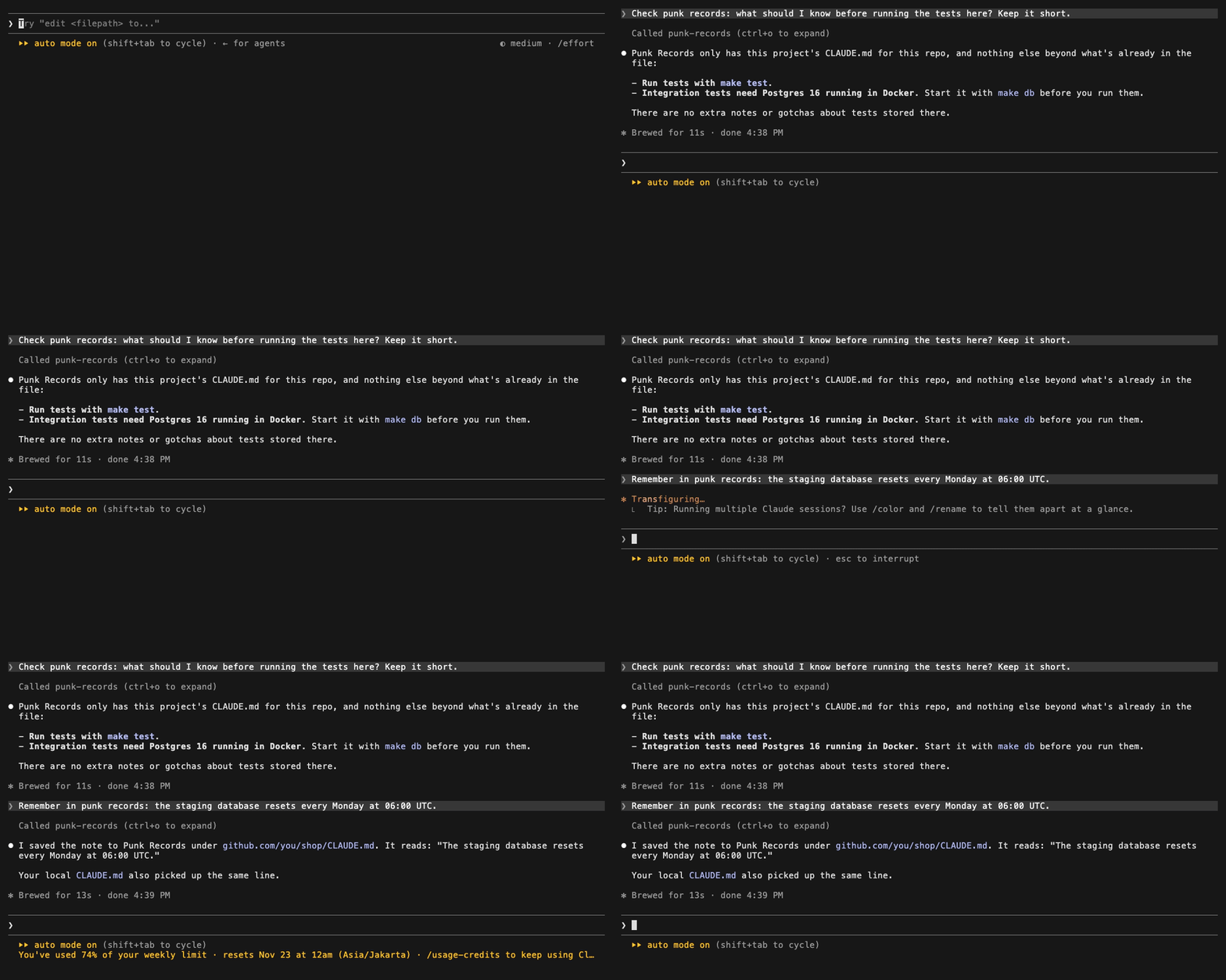
| You say | The agent uses |
|---|---|
| "Before you start, check punk records for what I already know about this repo." | get_context |
| "Search punk records across all my projects: how did I set up GitHub Actions caching?" | search_memories |
| "Which projects do I have memories for?" | list_satellites, list_memories |
| "Show me the napkin for github.com/me/api." | read_memory |
| "Remember in punk records: integration tests need Docker running." | append_memory |
| "Before we finish, save the gotchas you hit today to this project's CLAUDE.md in punk records." | append_memory |
| "Tidy up this project's CLAUDE.md in punk records: merge duplicates and group by topic." | read_memory, write_memory |
| "Sync punk records." | sync (only with punk mcp --allow-sync) |
append_memory and write_memory write to the store, commit, and update the local file. Secrets are
refused, and only memory files (CLAUDE.md, AGENTS.md, napkins, rules) are written. write_memory
replaces a whole file, so it needs the sha256 that read_memory reports and is refused if the file
changed since, or if you have unsaved edits on this machine. sync reaches the network and is off
unless you register the server as punk mcp --allow-sync.
Clients that show MCP resources and prompts also get every memory file as a resource
(punk-records:///<satellite>/<path>) and a punk-context prompt that starts a conversation with
your global and project memories. The server speaks both the current MCP revision (2026-07-28) and
older initialize-based clients.
AI tools without MCP
ChatGPT, Claude.ai, Gemini on the web or a local model can still use your memories as plain text:
punk context . | pbcopy          # macOS; on Linux: | xclip -selection clipboard
punk context ~/code/api > notes.md
Then start the conversation with something like:
Here are my notes for this project (global preferences first, then project rules). Follow them, and tell me if anything you do contradicts them.
Sync automatically with Claude Code
punk install-hooks              # all projects (~/.claude/settings.json)
punk install-hooks --project    # only this project (.claude/settings.local.json)
This adds two Claude Code hooks: when a session starts, punk
restores your global memories and the current project's (pulling first when a remote is set); when
it ends, punk saves them and syncs. Nothing is printed into the conversation unless something needs
your attention, such as a conflict or a blocked secret. Your other settings and hooks are left alone,
the previous file is kept as .punk-bak, and punk install-hooks --uninstall removes only punk's
entries. Only tracked projects are synced.
Save as you go
punk watch                      # save memory files a moment after they change (Ctrl+C to stop)
punk watch --sync-every 300     # ...and pull/push every 5 minutes when a remote is set
punk watch checks the memory files it knows every 2 seconds (--interval) and saves once they have
been quiet for 2 seconds (--debounce), so a burst of edits becomes one commit. New memory files are
found by a full rescan every 30 seconds (--rescan). No file-system events, no extra dependencies.
From the shell: punk remember "- integration tests need docker running" appends to the current
project's CLAUDE.md (use -f .claude/napkin.md to target another file).
Agent fleets (cron, CI, schedulers)
Agents that run unattended can keep what they learn between runs: one command before the run, one after.
punk --agent acme/support session start --project ~/agents/support   # pull, then restore
/opt/agent-runner/run.sh support                                      # the agent itself
punk --agent acme/support session end --project ~/agents/support     # save, then pull and push
- Exit codes the runner can act on: 0 done (a remote that cannot be reached is only a warning:
the next run may get through); 2 a person has to act: a conflict or blocked file (local files are
never overwritten), a store that cannot merge its remote, or
agemissing for an encrypted store; 1 it could not run (no store, project not tracked, store busy, a usage error). Whether the agent still runs after 1 or 2 is the runner's choice. - One store, cloned. Start the first machine's store with
punk init <url>and every other one with the same command once the remote has the store, so they share one history. Two stores started separately against an empty remote never merge;sessionsays so and exits 2. - Which agent learned what. With
--agent(orPUNK_AGENT), each commit ends withPunk-Agent: acme/support, so the store's history names the agent behind every change. - Many agents, one store. Commands that change the store take a lock, so agents on one machine
can overlap without losing a change (they wait up to 60 s;
PUNK_LOCK_TIMEOUT). - No shell? Agents that only speak MCP use
punk --agent acme/support mcp. - Dashboards read the store repository directly, using its documented layout. Gatherlane, an office view of agent fleets, is one.
How sync works
- The store is a git repo. Every save is a commit, so
punk git log -pshows how your agents' knowledge changed over time, and nothing is ever truly lost. - Three-way per file. Punk records the local and store hash of each file at its last sync, which
lets it tell "edited here" apart from "edited on another machine". When both sides changed, it
reports a conflict and leaves both copies alone.
punk diff <satellite> <path>shows what differs (-store,+local). You resolve it withsave --force(local wins) orrestore --force(store wins, and your local copy is kept as.punk-bak). - Concurrent appends merge. Memory files use git's
unionmerge driver, so when two machines add lines to the sameCLAUDE.md, the result contains both sets of lines. The catch: if both machines change the same line, the merged file keeps both versions, one after the other. Nothing is lost, but read the file after such a sync and delete the line you no longer want;punk git log -pshows which machine wrote which. When two machines add the same line in different places, both copies stay;punk dedupelists them andpunk dedupe --applykeeps only the first (blank lines, code blocks, indented lines and headings are never touched). - Deletes propagate on save. Locally removing a file that was synced removes it from the store.
Deletions coming from the store are only reported, unless you pass
restore --prune. - Symlinked memories are kept as links. If
AGENTS.md -> CLAUDE.md, the content is stored once and the link is recorded insatellites/<id>.json, then recreated on other machines. Only links that resolve to a memory file inside the same project are recorded. Links that point outside the project are never followed.punk scanandpunk savewarn about them instead. - Dotfiles work. For global memories, a link such as
~/.claude/CLAUDE.md -> ~/dotfiles/claude/CLAUDE.mdis followed: the content is stored, and restores write through the link into your dotfiles repo. Only non-executable Markdown/text files (or files with the same name as the link) inside$HOMEare followed, never anything under.git,.ssh,.gnupg,.awsand similar.
Tools that read a store without running punk (a dashboard reading it through the GitHub API, for example) can rely on its layout, described in docs/store-format.md.
Safety
- Secret scanning. Before a file enters the store it is checked for API keys (Anthropic, OpenAI,
AWS, GitHub, Slack, Google, Stripe), private keys, and
password=...-style assignments. A matching file is blocked by default. You can pass--redactto store it with secrets replaced, or putpunk:allowon a line to mark a false positive. - Restricted writes.
restoreonly writes paths that match the memory patterns. It never writes into.git/, outside the project, through.., or through an existing symlink. Recreated symlinks must point from one memory path to another inside the project, so a tampered store or bundle can't plant hooks or scripts in your repos. - Keep the remote private. Memories describe your code and habits. On a host you do not trust,
use
punk encrypt(above): the host then sees one age-encrypted file. Encryption hides content but does not prove who wrote it; the restricted-write rules above still apply to anything synced in. - One writer at a time. Commands that change the store take a lock (
.git/punk.lock), so agents run from cron, hooks and the MCP server can overlap without losing a change. A command waits up to 60 seconds for another one to finish (PUNK_LOCK_TIMEOUTchanges that; hooks wait 20, inside Claude Code's 30-second limit), then stops with an error and changes nothing. The lock goes away with the process that held it, even if it crashed.
Commands
init [URL]        create a store, or clone an existing one
track [DIR...]    start persisting a project      untrack ID [--purge]
list | scan       what is tracked / what would be captured
save | restore    store <-> local projects (--dry-run, --force)
status            what save/restore would do
diff [ID] [PATH]  unified diff of local memories vs the store
dedupe [ID] [PATH] duplicate lines left by merges (--apply removes them)
sync              save, pull/push remote, restore
export | import   air-gapped bundle files
search | show | context | remember
git ...           run git inside the store
mcp               MCP server on stdio
encrypt ...       encrypted remote: init URL | add-recipient KEY | status
subscribe NAME URL  read another store read-only (unsubscribe NAME, subscriptions)
install-hooks     sync automatically when Claude Code sessions start and end
session start|end for agent runners (cron, CI): restore before a run, save + sync after it;
                  exits 0 done, 2 a person must act (a conflict, a store that cannot merge), 1 failed
watch             save automatically when memory files change
Every command takes --home DIR (or PUNK_HOME) for another store, and --agent ID (or
PUNK_AGENT) to record which agent made a change: its commits end with Punk-Agent: ID, which
tools such as a fleet dashboard can read from the store's history
(store format).
Roadmap
- Semantic search and deduplication across projects (today
punk searchmatches text or a regex, andpunk deduperemoves exact duplicate lines) - Small web UI for browsing memory history
Shipped from earlier versions of this list: encryption for untrusted remotes (punk encrypt),
saving on change (punk watch) and read-only team stores (punk subscribe).
Development
python -m unittest discover -s tests -v
See CONTRIBUTING.md for the rules (no runtime dependencies, Python 3.9 syntax, tests for every change). Report security problems privately as described in SECURITY.md.
Support
If Punk Records saves you from losing what your agents learned, you can support its development:

MIT licensed.







