Listed from the MCP registry; nobody on Odel publishes it.

fLMCP — FL Studio
Control FL Studio 2024–2026: transport, mixer, channels, plugins, piano roll, generators.
Runs on your machine from its package; the steps are below.
What it does
- Reads
- Writes
- High impact
At most: moves money, runs code or commands, deletes data, or sends messages for you.
What it costs
FreeOdel charges nothing per call. The publisher may charge for its own service.
Runs locally over stdio
This server isn't hosted — your MCP client launches it from a package registry. Use one of the commands below, or drop the config into your client (e.g. Claude Desktop).
Run
uvx flmcp-studio
MCP client config
{
  "mcpServers": {
    "flmcp-fl-studio": {
      "command": "uvx",
      "args": [
        "flmcp-studio"
      ]
    }
  }
}fLMCP — FL Studio MCP server




Let Claude, Cursor, VS Code Copilot, Codex — any MCP client — drive FL Studio 2024 / 2025 / 2026. Transport, patterns, the channel rack and step sequencer, mixer (including loading effects by name), plugin parameters, piano-roll note writing, playlist, arrangements, automation, undo, rendering — plus high-level music generators, voice-to-MIDI humming and audio-file analysis.
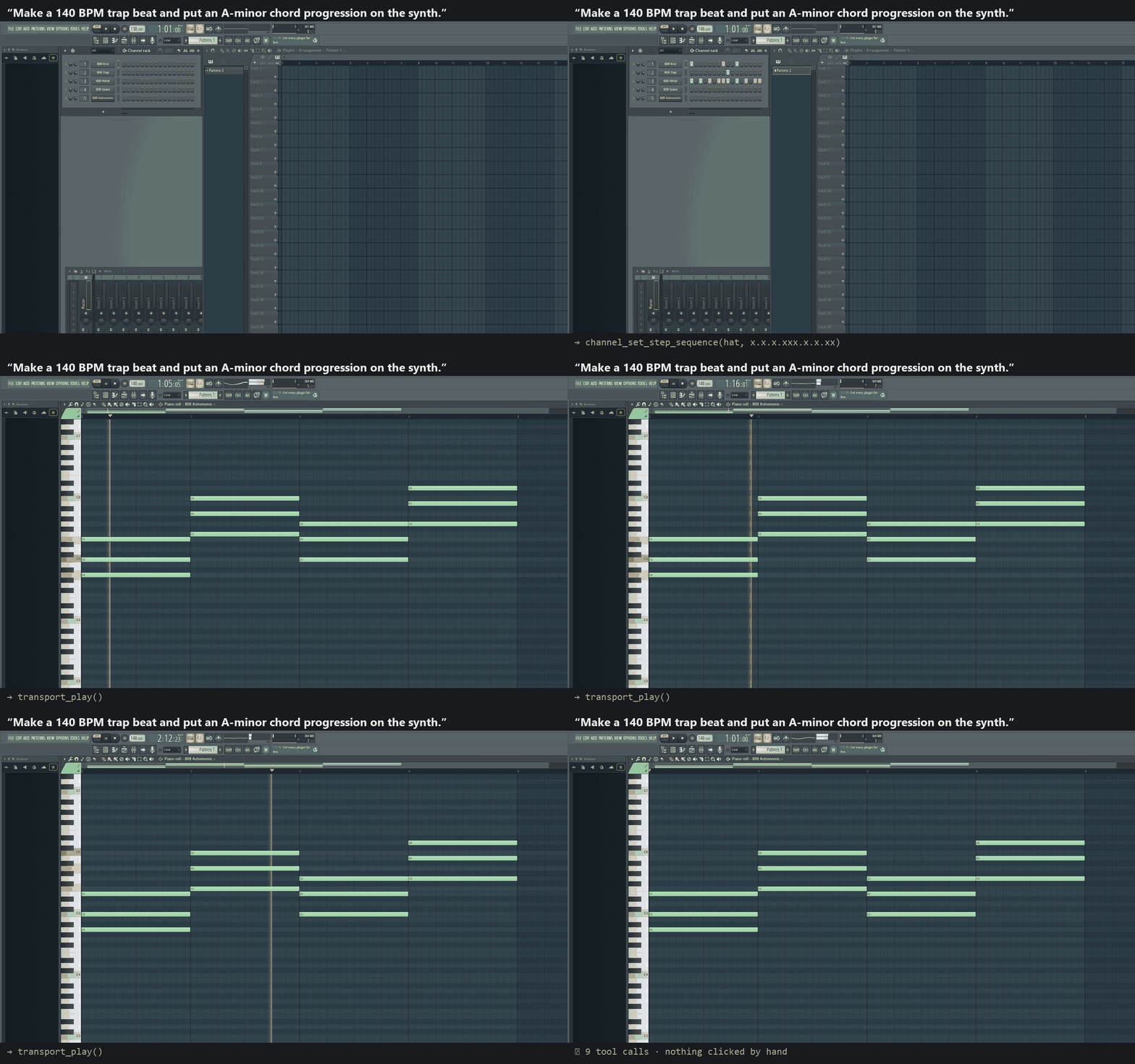
Recorded on FL Studio 2026 with the tool calls shown below the window; nothing was clicked by hand.
- 176 tools, 7 resources, 6 guided prompts, with MCP tool annotations (read-only / destructive) so clients can auto-approve safe calls.
- Works in FL Studio 2025 and 2026's sandboxed Python. No sockets or threads inside FL — a file transport with an optional MIDI wake-up (see Architecture).
- One-command setup:
uvx flmcp-studio installcopies the FL scripts, wires the MIDI port and registers the server with your AI apps.flmcp doctortells you exactly what is wrong when something is. - Mix diagnosis:
mixer_diagnoseplays the song, holds every track's peak and lists clipping, headroom, routing, solo and bypass problems with the exact tool call that fixes each one. - Toolsets keep the tool list small for clients with tool limits
(
FLMCP_TOOLSETS=lean).
fLMCP is an independent community project, not affiliated with or endorsed by Image-Line.
Quickstart
Requirements: Windows 10/11 (macOS works for most tools, see platform support), FL Studio 2024 or newer (any edition with MIDI scripting), and uv or Python 3.10+.
1. Install — close FL Studio first, then:
uvx flmcp-studio install
This:
- copies
device_FLStudioMCP.pyintoDocuments\Image-Line\FL Studio\Settings\Hardware\fLMCP Bridge\andComposeWithLLM.pyscriptinto...\Settings\Piano roll scripts\(it reads FL's own user data folder setting, so relocated folders work); - creates a loopMIDI
port named
fLMCPif loopMIDI is installed (recommended, and required on FL 2026: it gives the controller script a MIDI input to live on and wakes it for every command); - on Windows, with FL closed, assigns the fLMCP Bridge controller to that MIDI input in FL's settings and enables it, so there is nothing to click;
- registers the
flmcpserver with Claude Desktop, Claude Code, Cursor and VS Code where it finds them (existing configs are backed up to*.flmcp.bak). Limit it with--client cursor, or skip with--no-clients.
2. Start FL Studio. The bridge loads with FL; uvx flmcp-studio doctor should say
All good.
If FL was running during the install (FL rewrites its MIDI settings on exit, so
the installer leaves them alone then), either close FL and re-run the install,
or enable the bridge by hand once: Options → MIDI Settings → Input → select
the fLMCP row (or any MIDI input) → Controller type = fLMCP Bridge →
make sure the row is enabled.
Piano-roll writing needs no setup on Windows: the server runs the
ComposeWithLLM script from the piano roll's Tools menu itself, without
taking over the mouse, the keyboard or the window focus. On macOS, run
Tools → Scripts → ComposeWithLLM (or Cmd+Opt+Y after the first run) when a
tool says the edits are queued.
3. Restart your AI app and say "ping FL Studio". If it can't connect:
uvx flmcp-studio doctor
Claude Desktop: one-click bundle
Each release has a
flmcp-<version>.mcpb file. Double-click it (or drag it onto Settings →
Extensions in Claude Desktop) to add the server without editing any config.
Claude Desktop runs it with uv and lets you pick the tool groups and the
timeout in the extension's settings. You still need the FL side once: close
FL Studio, run uvx flmcp-studio install --no-clients, and start FL again. To build
the bundle yourself: npx @anthropic-ai/mcpb pack mcpb.
Other clients / manual config
uvx flmcp-studio config prints ready-to-paste snippets for every client. The
canonical entry is:
{
  "mcpServers": {
    "flmcp": { "command": "uvx", "args": ["flmcp-studio"] }
  }
}
| Client | Where |
|---|---|
| Claude Desktop | %APPDATA%\Claude\claude_desktop_config.json → mcpServers |
| Claude Code | claude mcp add --scope user flmcp -- uvx flmcp-studio |
| Cursor | ~/.cursor/mcp.json → mcpServers |
| VS Code | %APPDATA%\Code\User\mcp.json → servers (with "type": "stdio") |
| Codex CLI | ~/.codex/config.toml → [mcp_servers.flmcp] command = "uvx", args = ["flmcp-studio"] |
Without uv: pip install flmcp-studio, then use "command": "python", "args": ["-m", "fl_studio_mcp"]
(flmcp install --command python writes that for you).
What you can ask for
"Make a new pattern called Verse, put a boom-bap groove on channels 0–2, a C-minor octave bassline on channel 3 and an i–VII–VI–V progression on channel 4, then play it."
"Give me an overview of the project and tell me which mixer tracks are clipping-prone or unrouted."
"Put Fruity Limiter and a reverb on the vocal track, set the reverb to 30 % wet and tell me if the master clips while the drop plays."
"I'll hum a riff for 8 seconds — snap it to C minor, quantize to 1/16 at 120 BPM and write it into the open piano roll."
"Analyse
C:\samples\break.wav, detect key and tempo, and flip it into a 174 BPM drum & bass loop with the track's own melody on top."
The built-in prompts (Make a Beat, Write a Chord Progression, Hum to
Melody, Flip Audio to Drum & Bass, Review a Mix, Project Overview)
appear in clients that support MCP prompts (e.g. the / menu in Claude).
Tools
| Group | Tools | Highlights |
|---|---|---|
meta | 6 | ping/health, reconnect, bridge info, API introspection, raw action, toolsets |
transport | 16 | play / stop / record, position, tempo, time signature, metronome, count-in, loop record, overdub |
patterns | 14 | create, rename, clone, clear, color, set length (FL 2026), find by name |
channels | 22 | channel rack, step sequencer get/set, rack swing, routing, note trigger |
mixer | 25 | volume / pan / mute / solo / arm, faders in dB, sends, EQ, load effects by name, FX slot on/off and mix, peak meters, held peaks over playback, mix diagnosis |
plugins | 15 | search installed plugins, parameters get / set / search, set parameters in real units ("-6 dB", "2.5 kHz"), presets, editor windows |
piano_roll | 11 | add / read / clear notes, chords, quantize, transpose, humanize |
playlist | 14 | tracks, markers, clip capability report |
arrangement | 5 | list / select arrangements, jump to markers |
automation | 5 | record tempo, channel, mixer and plugin automation |
project | 11 | metadata, save, undo / redo history, render |
ui | 8 | show / hide / focus windows, plugin picker (FL 2026), hints |
generators | 12 | scales, chords, progressions, arpeggios, basslines, melodies, drum styles |
voice | 6 | record + transcribe humming (mono or polyphonic), GUI |
audio | 6 | analyse tempo / key / onsets / melody, slice, DnB flip |
Full reference: docs/TOOLS.md.
Resources (read without a tool call): fl://status, fl://project,
fl://transport, fl://channels, fl://mixer, fl://patterns,
fl://playlist.
Index conventions (the server also tells the model this): channel indices are global and 0-based, pattern numbers are 1-based, mixer track 0 is Master.
Toolsets
Some clients cap the number of tools (or get worse with 160+ of them). Choose groups at startup with environment variables:
| Variable | Example | Effect |
|---|---|---|
FLMCP_TOOLSETS | lean · core · transport,mixer,piano_roll | Presets: all (default, 176), lean (41 composing essentials), core (27). Groups can be combined with presets. |
FLMCP_DISABLE_TOOLS | fl_call_raw,project_render | Remove individual tools. |
FLMCP_USER_DATA_DIR | D:\Image-Line | FL's user data folder, when it isn't found automatically (registry, OneDrive Documents). |
FLMCP_BRIDGE_DIR | The bridge folder, when it isn't under the user data folder. |
fl_ping and fl_list_toolsets are always available; fl_list_toolsets shows
what is enabled.
"flmcp": { "command": "uvx", "args": ["flmcp-studio"], "env": { "FLMCP_TOOLSETS": "lean" } }
How it compares
There are several FL Studio MCP servers, and each takes a different approach. This table is based on each project's README as of November 2026. Corrections are welcome.
| fLMCP | karl-andres | rosasynthesiz | Rtur2003 | |
|---|---|---|---|---|
| Tools | 176 in 15 groups, with toolset presets (lean 41, core 27) | 61 | 90 | 14 multi-action tools (about 4k tokens) |
| Install | uvx flmcp-studio install from PyPI, the MCP Registry, a one-click .mcpb for Claude Desktop | from source | from git (the PyPI package is the older v1) | from source, fl-mcp onboard |
| Windows MIDI ports | one loopMIDI port, used only to wake the bridge; commands travel as files | loopMIDI | two loopMIDI ports | one loopMIDI port |
| Piano-roll notes | the script runs by itself through window messages, with no manual step | hotkey, after one manual run | run MCP_Apply by hand once per session | opt-in desktop macro, or by hand |
| Load effects | by name, through FL's own API (ui.launchAudioEditor) | not possible, per its README | suggests; you load them | through UI automation |
| Patterns, playlist, arrangements | create, clone, clear, color, set length, playlist tracks and markers, arrangements | notes and steps only (no pattern tools) | list, select, rename, length | as part of song generation |
| Mix analysis | mixer_diagnose, mixer_peak_watch, faders in dB, parameters in real units | — | Mix Doctor with more checks, gain staging, reference match, rollback of every change | fl_mix doctor / fix, BS.1770 loudness, real units |
| Automation recording | ✅ tempo, channel, mixer and plugin | — | — | — |
| Undo | FL's undo history (list, undo, redo) | — | every change reversible, with a rollback log | undo |
| Voice and audio | hum into the mic → MIDI, file analysis, slicing, DnB flip | — | melody, chords and drums to MIDI from audio files | transcription, loudness, spectrum |
| Project files and rendering | save; render through FL's dialog | — | — | writes .flp projects, renders from the command line |
| FL versions | 2024, 2025, 2026 (checked live on 26.1) | 20.7+ | 2025+ (tested on 26.1) | 2024+ (checked live on 2025) |
| Tests | offline suite against FL's API stubs; CI on Windows, macOS and Linux with Python 3.10, 3.12 and 3.13 | — | test suite and CI | fl-mcp selftest, a fake FL |
Where fLMCP is ahead:
- Breadth. It covers the most of FL's scripting API: transport, patterns, channel rack, mixer, plugins, piano roll, playlist, arrangements, automation, undo, UI and project.
- No manual steps. Piano-roll writing works without running a script by hand, and effects load by name.
- Setup. One PyPI package and one install command, plus
flmcp doctorfor when something is wrong. - Live humming. Hum into the microphone and get MIDI.
Where others go further:
- rosasynthesiz has a reversible change log, reference matching and processing intents.
- Rtur2003 generates
.flpprojects, renders, and measures LUFS. - CryptoJones edits
.flpfiles offline. - giang17 runs on Linux under Wine.
Optional extras
Voice-to-MIDI and audio analysis need heavier libraries (numpy, librosa, sounddevice…). The core server never imports them; the tools return an install hint until they are present.
uvx --from "flmcp-studio[audio,gui]" flmcp install # or: pip install "flmcp-studio[audio,gui]"
Polyphonic transcription (polyphonic=True: chords, strums, full mixes via
Spotify Basic Pitch on the ONNX runtime):
pip install "flmcp-studio[polyphonic]"
pip install basic-pitch --no-deps   # its metadata pins a TensorFlow that has no 3.12 build
MP3 decoding needs ffmpeg on PATH.
Architecture
 AI app ──stdio──► flmcp server ──writes──► mcp_command.json ─┐
   ▲                   │                                       │  FL Studio
   │                   └─(optional) MIDI CC wake via loopMIDI ─┤  device_FLStudioMCP.py
   │                                                           │  OnIdle / OnMidiMsg
   └──────────── result ◄── mcp_response.json ◄── executes FL API on FL's main thread
                            mcp_heartbeat.json (≈1 s, liveness + versions)

 Piano roll:  server stages fLMCP_request.json → Tools menu → ComposeWithLLM.pyscript
              edits notes through flpianoroll → writes fLMCP_state.json
- Why files? FL Studio 2025+ runs controller scripts in a sandboxed
interpreter: no sockets, no threads, unreliable
osfile operations — butopen()works. The bridge reads a command file when FL calls it back and writes the response. Commands carry a protocol version and unique id, stale commands from an earlier session are ignored, and calls are serialized with a cross-process lock. - Why MIDI wake? A CC 119 message on channel 16 sent to the
fLMCPloopMIDI port triggersOnMidiMsgimmediately, so round-trips stay in the tens of milliseconds (median ≈ 40 ms measured on FL 2026). FL 2026 does not call the script'sOnIdleat all in our tests, so there the wake port is required, not just faster. - Why a piano-roll script?
flpianoroll(the only API that adds/removes notes) exists only inside piano-roll scripts, so the server stages a request and triggers the script with FL's script hotkey.
Details: docs/ARCHITECTURE.md · what FL's API can't do:
docs/LIMITATIONS.md · FL 2026 API changes:
docs/FL_API_2026.md.
Platform support
| Windows | macOS | |
|---|---|---|
| Controller bridge (transport, mixer, channels, plugins…) | ✅ | ✅ (set FLMCP_BRIDGE_DIR if auto-detection fails) |
| MIDI wake (required on FL 2026) | ✅ loopMIDI | ❌ not yet: relies on OnIdle, which FL 2026 did not call on Windows (untested on macOS) |
flmcp install client registration | ✅ | ✅ |
| Automatic controller assignment | ✅ | manual |
| Piano-roll writing (script runs automatically) | ✅ | manual: Tools → Scripts → ComposeWithLLM |
| Voice / audio tools | ✅ | ✅ |
Troubleshooting
Run flmcp doctor first — it checks the installed scripts (and whether they
are outdated), the MIDI port and controller assignment, whether FL is running,
the bridge heartbeat, a live ping and version mismatches.
| Symptom | Fix |
|---|---|
bridge offline / no heartbeat | FL isn't running or the controller isn't enabled. Close FL and re-run uvx flmcp-studio install, or set it by hand: Options → MIDI Settings → Input, Controller type fLMCP Bridge. Check View → Script output for [fLMCP] lines. |
| Calls time out or run twice | Doctor warns about several FL instances: they share the bridge folder and race for commands. Close all but one. |
| Calls time out while FL shows a dialog | A modal dialog (save prompt, plugin error, "Confirm") blocks FL's UI thread and the bridge with it. Close the dialog. |
| Doctor says the script is outdated | uvx flmcp-studio install, then restart FL (or MIDI Settings → Update scripts). |
| Commands are slow (~0.5–1 s) | Install loopMIDI and re-run flmcp install so the MIDI wake port exists. |
| Piano-roll edits don't apply | Pass channel so the tool opens that piano roll, and close any FL dialog. The result's note says why the script didn't run. As a last resort run Tools → Scripts → ComposeWithLLM in the piano roll yourself. |
playlist_place_pattern returns an error | FL's API doesn't expose clip placement — see docs/LIMITATIONS.md. |
voice_* / audio_* say a module is missing | Install the [audio] extra. |
Upgrading from 0.3 (fl-studio-mcp) | uvx flmcp-studio install replaces the old fl-studio-mcp client entries and the old TCP bridge script. |
Development
git clone https://github.com/geezoria/FLStudioMCP.git && cd FLStudioMCP
python -m venv .venv && .venv/Scripts/activate      # source .venv/bin/activate on macOS
pip install -e ".[dev]"
pytest && ruff check .
python -m fl_studio_mcp install --command python    # copy your working-tree bridge into FL
The test suite runs offline: the bridge transport is faked and the FL-side
script is imported against the official FL API stubs. See
CONTRIBUTING.md and AGENTS.md.
Credits
Earlier community projects that showed the way:
karl-andres/fl-studio-mcp,
ohhalim/flstudio-mcp,
veenastudio/flstudio-mcp.
Contributors are listed in CHANGELOG.md.
MIT licensed — see LICENSE.