GeoLens
Read-only access to a self-hosted GeoLens spatial catalog: datasets, features, maps, sandboxed SQL.
Runs on your machine from its package; the steps are below.
What it does
- Reads
- Writes
- High impact
At most: only reads or looks up information.
What it costs
FreeOdel charges nothing per call. The publisher may charge for its own service.
Runs locally over stdio
This server isn't hosted — your MCP client launches it from a package registry. Use one of the commands below, or drop the config into your client (e.g. Claude Desktop).
Run
uvx geolens-mcp
MCP client config
{
  "mcpServers": {
    "geolens": {
      "command": "uvx",
      "args": [
        "geolens-mcp"
      ]
    }
  }
}

GeoLens
A self-hosted spatial data catalog and map builder that keeps track of where every dataset came from.
Live demo · Install · Documentation · Connect QGIS or code · Discussions




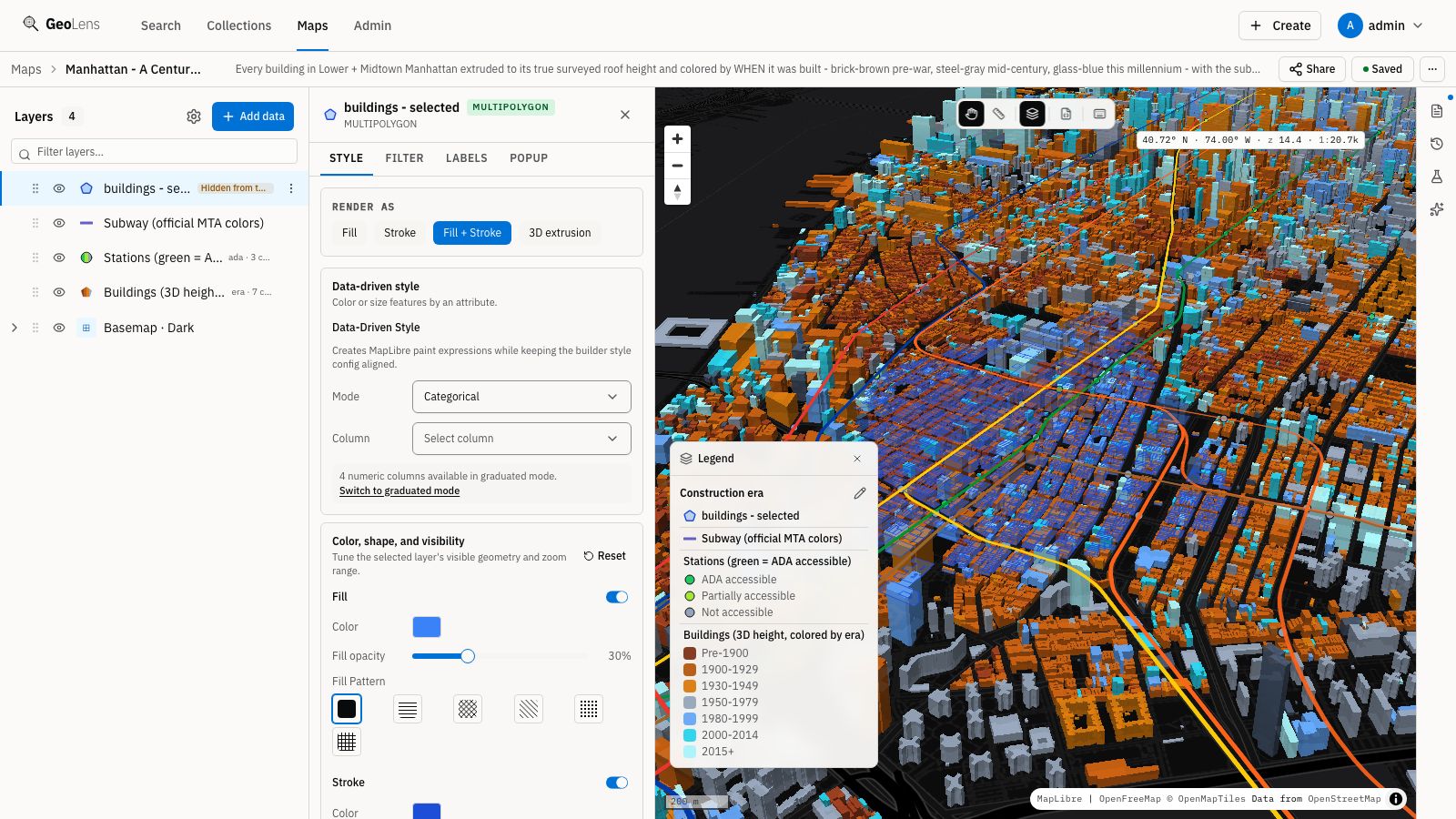
Manhattan's buildings at their surveyed roof heights, colored by construction era, with the subway network. Browse the demo's maps.
GeoLens is for teams whose spatial data is spread across file shares, PostGIS databases, web services and STAC catalogs. It puts that data in one searchable catalog, records where each dataset came from and checks whether the source is still current. Teams build and share maps in the browser, and QGIS, scripts and AI agents read the same data through OGC API and STAC. It runs on your own servers with Docker Compose, sends no telemetry and is licensed under Apache 2.0.
The demo needs no install or account; sign in with Google, GitHub or Microsoft to use the map builder. Demo data may be wiped at any time.
A closer look

Search by meaning: "where storms hit the coast" finds hurricane tracks and coastal exposure layers. |

Each dataset has a page with its metadata and source, plus a map preview when it has an extent. |

Before you import a service layer, GeoLens previews its columns and first rows. |

Each replacement is recorded in the history, and you can restore the previous version. |

Layers render as points, symbols, heatmaps or clusters, and the ramp list can be limited to colorblind-safe ones. |

3D terrain from your own elevation data, here the Matterhorn from swissALTI3D lidar. |

Sentinel-2 scenes referenced from a STAC catalog. The imagery stays where it is and is tiled on request. |

Keep a map to yourself, open it to your team, or make it public with a link and embed code. |

The admin overview shows service health next to dataset and storage totals. |

Viewer, editor and admin roles, with each capability switched on or off per role. |
How it fits together
flowchart LR
    subgraph IN ["Bring data in"]
      F["Files<br/>GeoPackage · Shapefile · GeoParquet<br/>GeoTIFF · COPC · 3D Tiles"]
      DB["Existing PostGIS tables"]
      SVC["Services<br/>ArcGIS · WFS · OGC API Features"]
      ST["Remote STAC assets"]
    end
    subgraph GL ["GeoLens"]
      CAT["Catalog<br/>search · metadata · provenance"]
      MB["Map builder<br/>styles · 3D · analysis · sharing"]
      STD["Open APIs<br/>OGC API · STAC · DCAT · tiles"]
    end
    subgraph OUT ["Use it anywhere"]
      WEB["Browsers and embeds"]
      GIS["QGIS · ArcGIS · CesiumJS"]
      CODE["curl · Python · TypeScript · DuckDB"]
      AG["AI agents via MCP"]
    end
    F & DB & SVC & ST --> CAT
    CAT --> MB --> WEB
    CAT --> STD --> GIS & CODE & AG
One catalog for scattered data
- Upload Shapefile, GeoPackage, GeoJSON, GeoParquet, FlatGeobuf, KML/KMZ, zipped File Geodatabase, CSV, Excel or GeoTIFF (converted to Cloud-Optimized GeoTIFF). 3D Tiles and COPC point clouds are hosted for CesiumJS, QGIS and Potree.
- Serve tables already in GeoLens's PostGIS database in place, import WFS, ArcGIS and OGC API Features layers and refresh them on demand, or reference remote STAC assets without copying them.
- Draw new datasets in the browser.
- Find data with fuzzy search, or by meaning once an embedding provider is configured. Filter by type, place and time, group datasets into collections, edit metadata and restore a dataset's previous version after a replacement.
Know where every dataset came from

A dataset imported from the USGS earthquake service.
Each dataset records where it came from: an uploaded file, a database table, a service, a STAC item or a drawing in the browser. Imported datasets also record when they were last refreshed, and with an update cadence GeoLens marks them fresh, due or overdue. For services and STAC sources, GeoLens also checks that the source still answers, and for services it flags upstream schema changes before they reach your maps. If a service disappears, the imported copy keeps working.
Build and share maps
- Point, symbol, heatmap, cluster, line, arrow, fill, 3D extrusion, raster and hillshade layers, with data-driven styles, labels, icons, patterns, filters and popups. Terrain comes from your own elevation models.
- Buffer, centroid, clip, dissolve, spatial join, select by location, measure and intersect. Most operations preview on the map, and each result is saved as a new dataset, from the builder or the CLI.
- Public links show the map's title and image when pasted into Slack, Teams or social posts, and maps embed in other sites with private tokens.
- The interface is in English, Spanish, French, German and Simplified Chinese.
Use the data from anywhere
Vector datasets are OGC API Features collections, the catalog is OGC API Records and STAC, and
every layer has a tile URL. You can try this against the demo without an account (the second
command needs jq):
# Search the catalog (OGC API Records)
curl "https://demo.getgeolens.com/api/collections/datasets/items?q=volcanic%20eruptions"

# Read the top match with a CQL2 filter (OGC API Features): eruptions of VEI 6 or larger
ID=$(curl -s "https://demo.getgeolens.com/api/collections/datasets/items?q=volcanic%20eruptions&limit=1" | jq -r '.features[0].id')
curl -G "https://demo.getgeolens.com/api/collections/$ID/items" \
  --data-urlencode "filter=vei >= 6" -d limit=3
QGIS adds the same API as an OGC API Features connection, as the QGIS guide shows. The GeoLens plugin for QGIS adds catalog search, private datasets and edits that sync back to GeoLens.
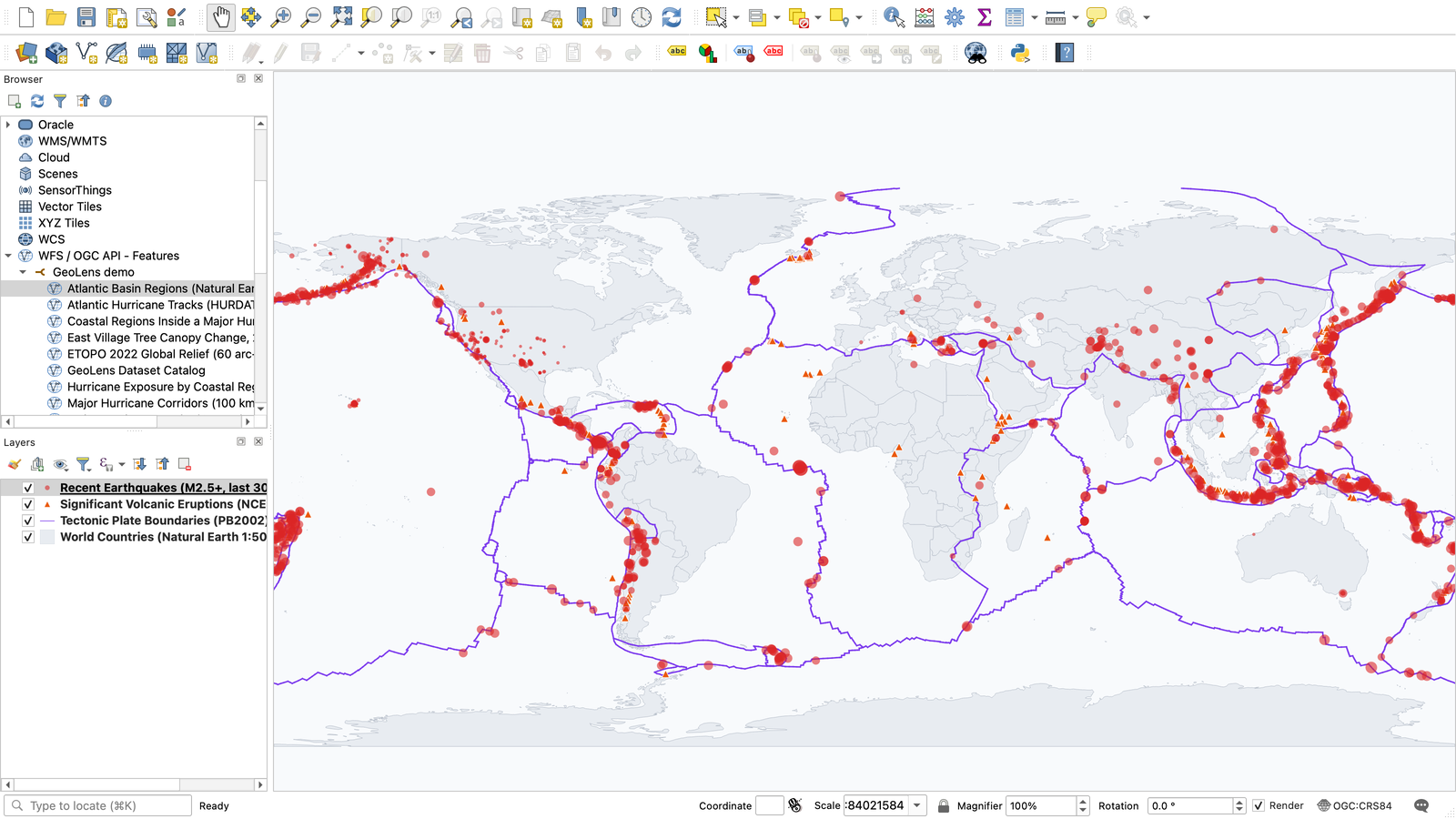
QGIS reading the demo over OGC API Features, without a plugin.
| Standard | Where | Use it with |
|---|---|---|
| OGC API Features, with CQL2 filtering and queryables | /api/collections/{id}/items | QGIS, ArcGIS, GDAL/OGR and other OGC API clients |
| OGC API Records | /api/collections/datasets/items | Catalog search from other portals and tools |
| STAC API 1.0 | /api/stac/ | STAC clients such as pystac-client and STAC Browser |
| DCAT 3, DCAT-US 3.0 and GeoDCAT-AP as JSON-LD | /api/datasets/dcat/, /api/datasets/dcat-us/3.0/, /api/datasets/geodcat-ap/ | Harvesting into national and EU open-data portals |
| Vector tiles and COG raster tiles | a tile URL on every layer | MapLibre, OpenLayers, Leaflet |
| 3D Tiles and COPC | each 3D dataset's page | CesiumJS, QGIS, Potree |
Data exports as GeoJSON, Shapefile, GeoPackage, CSV, FlatGeobuf, GeoParquet, PMTiles or Cloud-Optimized GeoTIFF.
The geolens CLI publishes files and applies catalog manifests, Python and TypeScript SDKs cover
the API, and a read-only MCP server lets AI agents search the catalog. The
API reference and
SDK guides document them, and the
examples gallery has runnable code for
MapLibre, Leaflet, OpenLayers, the ArcGIS Maps SDK, QGIS and DuckDB.
Optional AI

"How many of these hurricanes made landfall?" returns the count, a table and the assumption the answer rests on.
GeoLens can answer questions about a dataset, edit maps from plain-language requests, draft metadata and search in natural language. It works with any OpenAI-compatible endpoint, including a local server such as Ollama, and with Claude through Anthropic, Microsoft Foundry, Amazon Bedrock or Google Vertex AI. AI stays off until an administrator configures a provider, and every workflow works without it.
Install
You need Git, curl and Docker with the Compose plugin. The Install Guide lists the versions, memory and ports it expects.
curl -fsSL https://getgeolens.com/install.sh | sh    # clone, generate secrets, start the stack
cd geolens
grep '^GEOLENS_ADMIN_PASSWORD=' .env                  # the generated admin password
Open http://localhost:8080 and sign in as admin with that password. Each
release includes a SHA256SUMS file for checking
install.sh before you run it. To build from source instead, clone the repository and run
bash scripts/install.sh; the first build takes 5-10 minutes.
For production, read the cloud deployment guide, which also lists what an external database needs. Docker Compose is the supported path, and geolens-deployments has a community-maintained Helm chart and Terraform recipes for AWS ECS Fargate and Azure Container Apps.
The bundled database is backed up daily, and the backup guide covers off-site copies and restores. UPGRADING.md covers upgrades and rollback, RUNBOOK.md covers operations, and the Configuration Reference lists every setting.
Your first dataset
With the CLI installed, publish the sample file from the install directory:
geolens login http://localhost:8080/api               # your admin username and password
geolens publish examples/manifests/first-catalog/city-parks.geojson --name "City Parks"
geolens publish prints the new dataset's URL. To manage a whole catalog, describe the sources in
a geolens.yaml manifest and run geolens apply; examples/manifests/ has
templates.
To load the demo's maps and datasets, export GEOLENS_ADMIN_PASSWORD from .env and run
python scripts/seed-showcase.py --username admin. The script needs Python 3.10+ and httpx and
downloads public data from about a dozen sources; scripts/README.md has the
sizes and options.
Privacy and access
- GeoLens sends no telemetry. Apart from the default basemap tiles and the remote services or STAC sources your users register, it makes outbound calls only for features an administrator turns on. EGRESS.md lists them and explains how to run air-gapped.
- Your data stays readable without GeoLens. Vector datasets are ordinary PostGIS tables in a
dataschema, rasters are Cloud-Optimized GeoTIFFs in your own storage (local disk, S3/MinIO or Azure Blob), and the catalog exports through OGC API, STAC and DCAT. - Sign-in uses local accounts or OAuth 2.0/OIDC (Google, Microsoft, GitHub or a generic provider), with roles, per-dataset permissions, per-user API keys and an audit log. Self-registration is off by default.
- Features released in this repository stay free. EDITIONS.md describes the optional paid support and add-ons.
Known limitations
- The supported install, Docker Compose, runs on one host. For high availability, run several replicas of the API, worker, frontend and Titiler against a managed PostgreSQL with automatic failover, shared object storage and one Valkey or Redis cache. With Azure Blob or local storage, API and worker replicas also need a shared staging volume, since only S3 keeps uploads in the bucket. Local storage keeps every file on that volume, so Titiler replicas mount it too. geolens-deployments has a community-maintained Helm chart, Terraform recipes for AWS and Azure, and guides for AWS, Azure, Google Cloud and DigitalOcean. GeoLens itself doesn't cluster the database or read from replicas.
- One organization per deployment.
- Terrain rendering assumes elevation in meters; other vertical units render exaggerated.
- GeoLens's own REST API can change between minor releases (the standards endpoints follow their specifications). The CHANGELOG lists contract changes, and a breaking change keeps the old form working for one more minor release.
Contributing
Bug reports, fixes, translations and docs are welcome. CONTRIBUTING covers setup and tests, and ARCHITECTURE maps the code. The QGIS plugin, examples and deployments repositories take issues and pull requests too. Ask questions in GitHub Discussions, report bugs in Issues, and report security problems privately as described in SECURITY.md. The roadmap shows what's planned.
Built on
GeoLens is built on these open source projects. Thanks to everyone who maintains them.
- PostgreSQL and PostGIS hold the catalog and every vector dataset, and pgvector stores the embeddings behind search by meaning.
- GDAL reads the files and services GeoLens imports and writes the formats it exports, and PROJ handles coordinate transformations.
- TiTiler serves raster tiles from Cloud Optimized GeoTIFFs.
- FastAPI serves the API, and Procrastinate runs background jobs with PostgreSQL as the queue.
- MapLibre GL JS draws the maps, deck.gl and loaders.gl render 3D Tiles and point clouds, and Terra Draw handles drawing and editing.
- The web app is written in React.
These names belong to their owners, and listing them doesn't mean they endorse GeoLens; see TRADEMARKS.md.
License
GeoLens is licensed under the Apache License 2.0. The GeoLens name, logo and brand
assets are not covered by this license; see TRADEMARKS.md. Sample-data
attribution is in THIRD_PARTY_DATA.md. The web app serves the license notices for the
code it bundles at /third-party-licenses.txt, and the backend image's copyleft notices are in
backend/licenses.
Project policies: editions · support · governance · maintainers · security · release process · egress & air-gap