Listed from the MCP registry; nobody on Odel publishes it.
Is this yours? Claim it
Automata
Scoped, revocable access to your WhatsApp, Telegram, IMAP email and PostgreSQL for AI agents.
One address for any MCP client. Your key stays in your Odel vault.
What it does
- Reads
- Writes
- High impact
At most: moves money, runs code or commands, deletes data, or sends messages for you.
What it costs
FreeOdel charges nothing per call. The publisher may charge for its own service.
Tools
None listed · checked 22 Nov 2026Odel could not list its tools without signing in.

Website · Sign up · Documentation · Contact

Automata — PostgreSQL, WhatsApp, Telegram & Email MCP Server
Automata is a free, open-source PostgreSQL, WhatsApp, Telegram and email (IMAP) MCP server that connects Claude, ChatGPT, Cursor and other AI agents to your database, chats and mailbox. Every connector token is scoped table by table, chat by chat and folder by folder, so the AI sees only what you shared, whether you use the hosted version or self-host it.
Many MCP servers give the AI everything the account can reach. Automata issues a connector token for one connection at a time and limits it to the actions, chats, email folders or tables you choose, so the AI sees only what you shared. It is for individuals and teams who want an AI assistant to read, search and (only if allowed) reply in their messages, mail or database. It is MIT-licensed: use the hosted version or run it yourself.
Why Automata: read-only and scoped by default
- PostgreSQL MCP server with table-by-table allowlists. Every statement's
query plan is checked against the token's tables before a row is read;
queries run read-only, and writes need the
run-statementtool granted. - WhatsApp and Telegram MCP server with chat-by-chat scoping. A token can be limited to listed chats and groups; sending needs the send tool and reaches only chats in scope.
- Read-only IMAP email access. The AI can list, search and read mail and attachments in the folders you choose. It cannot send, move, flag or delete; at most it saves drafts for you to review.
- One token, one connection. No tool takes an account or database argument, and tokens can expire, be rotated or be revoked.
MCP tools reference · plain-text docs for AI tools: llms.txt, llms-full.txt
What you can connect
Automata is a PostgreSQL MCP server, a WhatsApp MCP server, a Telegram MCP server and an email (IMAP) MCP server in one deployment. It connects four kinds of account; each connection gets its own connector token.
| Connector | Status | What the AI can do | How it connects | More |
|---|---|---|---|---|
| Available | List chats, read and search messages (groups included), send text | Your number paired by QR code as a linked device, through Evolution API | WhatsApp MCP server | |
| Telegram | Available | List chats, read and search messages, send text | Your personal account linked by QR code as an extra device (not the Bot API) | Telegram MCP server |
| Email (IMAP) | Available | List folders, list, search and read email, fetch attachments, save drafts. Cannot send, move, flag or delete | IMAP username and app password | Email setup guide |
| PostgreSQL | Available | List and describe tables, run read-only queries, and run writes only when the write tool is granted | A connection string, ideally for a least-privilege role | PostgreSQL MCP server |
Supported AI clients
The PostgreSQL MCP server, WhatsApp MCP server, Telegram MCP server and email MCP server work with Claude, ChatGPT, Cursor and any other AI client or agent that supports custom (remote) MCP connectors over streamable HTTP. These have step-by-step guides:
- Claude (Claude.ai, Claude Desktop, Claude Code): WhatsApp, Telegram, email, PostgreSQL
- ChatGPT: WhatsApp
- Cursor: WhatsApp
- Grok: WhatsApp, Telegram
- Meta Muse: WhatsApp, Telegram
- Hermes Agent: WhatsApp
All clients and connection methods: https://www.getautomata.app/docs/clients.
Quick start
Use the hosted version, or self-host with Railway or Docker.
-
Hosted: sign up at mcp.getautomata.app. The MCP endpoint is
https://mcp.getautomata.app/mcp. -
Railway (one click):
-
Docker (single container):
bashdocker run -d --name automata --restart unless-stopped --stop-timeout 30 \ -p 3000:3000 -v automata_data:/data \ -e NUXT_PUBLIC_APP_URL=https://automata.example.com \ ghcr.io/ju-li/automata-mcp-aio:1
Then create a connection, mint a connector token on its dashboard, and add the connector URL to your AI client. Full steps: https://www.getautomata.app/docs/getting-started.
How permissions work
Every connector token is bound to exactly one connection and can do only what it was granted.
- One token, one connection. No tool takes an account or database argument, so the AI cannot address another number, mailbox or database.
- Actions. A token gets all tools or a chosen few. Tools outside its scope are not registered for that request, so calling one fails. New PostgreSQL and email tokens start read-only.
- Chats, folders and tables. A token can be limited to listed WhatsApp or Telegram chats, email folders, or database tables. Anything outside is refused by name. Searches, and the Telegram, email-folder and table listings, exclude it in the query itself; the WhatsApp chat list drops out-of-scope chats from each page it reads.
- Database checks. Read queries run one statement at a time in a read-only transaction. Every statement's query plan is checked against the table allowlist before a row is read. The real security boundary is the database role in the connection string, so use a least-privilege role.
- What the AI cannot do. It cannot send without the send tool, write to a
database without
run-statement, or send email at all (it can only save drafts). It cannot widen its own scope. - Token handling. Tokens are shown once and stored only as a SHA-256 hash.
They can expire, be rotated or be revoked. Clients send them as
Authorization: Bearer <token>, or in the URL path (/mcp/<token>) for clients that cannot set headers.
Details: https://www.getautomata.app/docs/permissions.
MCP tools
Automata has 26 MCP tools; a connection only exposes the tools for its kind. Full reference: https://www.getautomata.app/docs/reference/mcp-tools.
| Connector | Tool | What it does |
|---|---|---|
get-connection-status | Whether the account is paired and connected | |
list-chats | Chats in scope, most recently active first | |
read-messages | One chat's messages, newest first, paged, with optional date range | |
search-messages | Messages containing every word of a query | |
send-text-message | Send a text message (write) | |
send-whatsapp-image | Send a JPEG or PNG image with an optional caption (write) | |
download-whatsapp-media | The photo, video, voice note or file a message carries (opt-in) | |
| Telegram | get-telegram-status | Whether the account is linked and online, and sync progress |
list-telegram-chats | Synced chats in scope: private chats, groups, supergroups, channels | |
read-telegram-messages | One chat's messages, newest first, paged | |
search-telegram-messages | Messages and captions containing every word of a query | |
send-telegram-message | Send plain text to a chat, @username or phone number (write) | |
send-telegram-image | Send a JPEG or PNG photo with an optional caption (write) | |
download-telegram-media | The photo, video, voice message or file a message carries (opt-in) | |
get-mailbox-status | Which mailbox, whether sync works, when it last ran | |
list-mail-folders | Folders in scope with synced and unread counts | |
list-emails | Email headers, newest first, with filters | |
search-emails | Search by sender, recipient, subject, date or body text | |
read-email | One email's body as plain text and its attachment list | |
get-email-attachment | One attachment, fetched live from the mail server | |
create-email-draft | Save an unsent plain-text draft in Drafts (write, never sends) | |
| PostgreSQL | get-database-info | Server version, database, role, and the token's scope |
list-tables | Tables in scope | |
describe-table | Columns, keys, constraints, indexes and comments | |
run-query | One read-only query, paged; explain: true returns the plan instead | |
run-statement | One INSERT / UPDATE / DELETE / MERGE, rolled back if it exceeds a row cap (write) |
FAQ
What is Automata? Automata is a free, open-source MCP server that lets AI clients such as Claude and ChatGPT use your WhatsApp, Telegram, email and PostgreSQL, limited to the chats, folders and tables you grant each connector token.
Is Automata free? Yes. The code is MIT-licensed and free to self-host. The hosted version has a free plan with one connection, one connector token and one user; Pro has unlimited connections and tokens and starts with a 7-day trial.
Does it use the official WhatsApp Business API? No. Automata pairs your own WhatsApp number as a linked device through Evolution API (the Baileys integration), the way WhatsApp Web links. Pairing a real number carries a risk of restriction or bans, so use a spare number for testing.
Can the AI read WhatsApp groups? Yes. Group chats are listed and readable like one-to-one chats, and a token can be limited to specific groups or chats.
Can the AI send messages? Yes, but only if the token is granted the send tool, and only to the chats in its scope. Email is different: the AI can save drafts for you to review, but it cannot send email.
Is it safe to give Claude database access?
Yes, when you use a least-privilege database role. Queries are read-only by
default, run one statement at a time, and are checked against the token's table
allowlist through the query plan; writes need the run-statement tool granted
explicitly. The database role is the real boundary, so do not connect a
superuser. See https://www.getautomata.app/docs/connections/postgresql.
Should I self-host or use the hosted version? Use the hosted version to start in minutes without running servers. Self-host if you want your messages and credentials on your own infrastructure, want full WhatsApp history import without a paid plan, or want to use your own Evolution API server or Telegram bridge, which only self-hosted deployments allow.
Screenshots
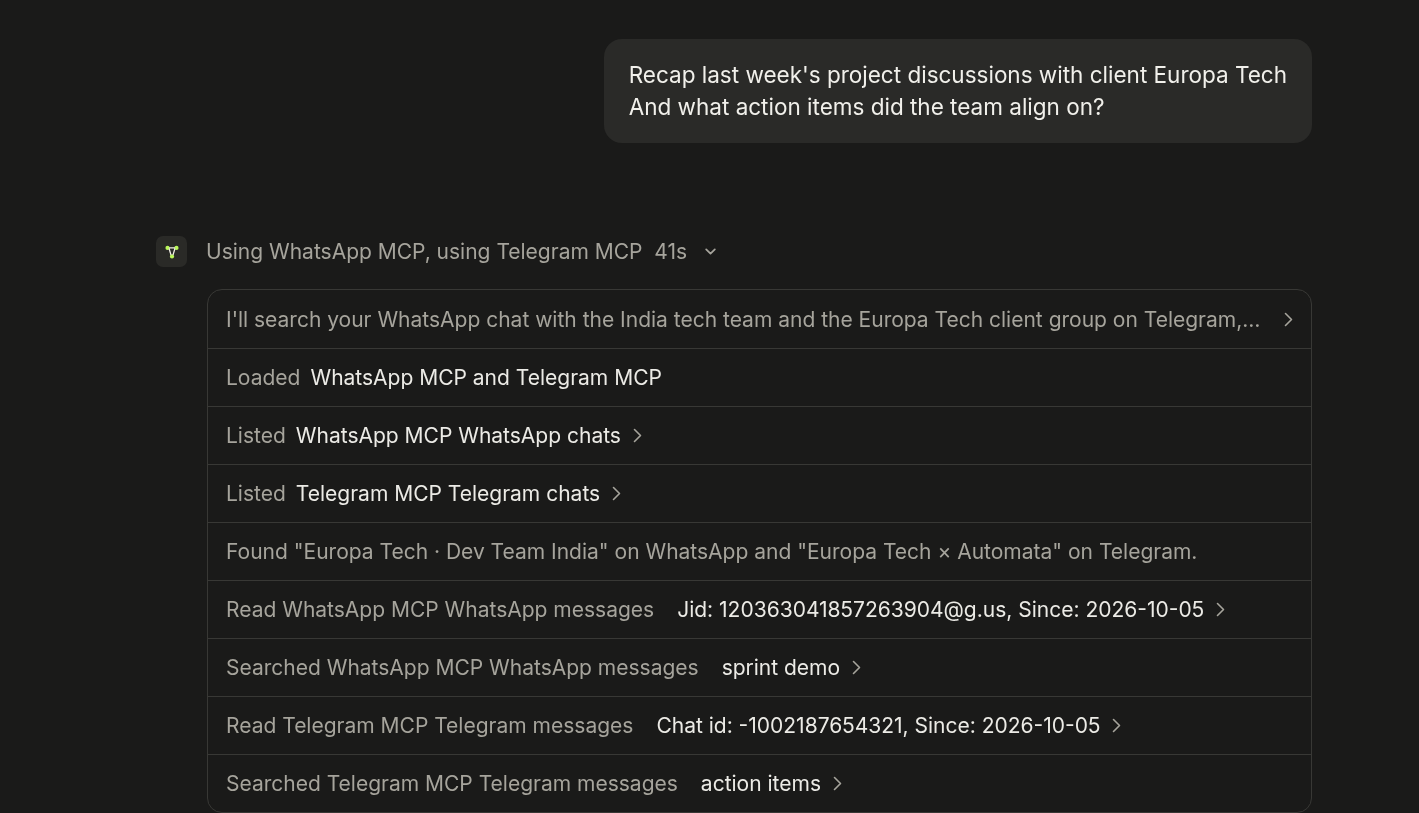
Claude recaps a client project from a WhatsApp group and a Telegram group, in one answer.
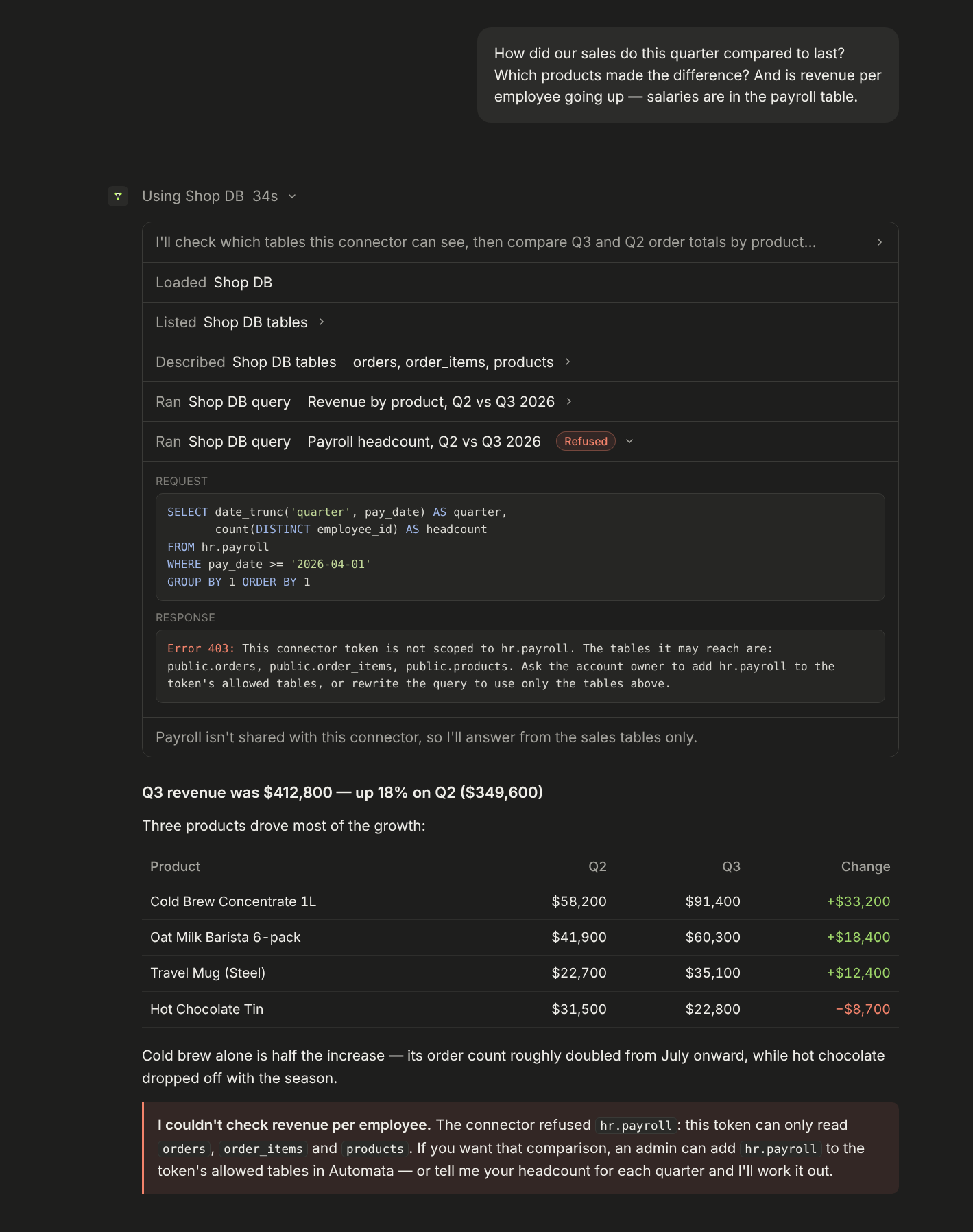
Tables you didn't share, like payroll, stay out of reach.
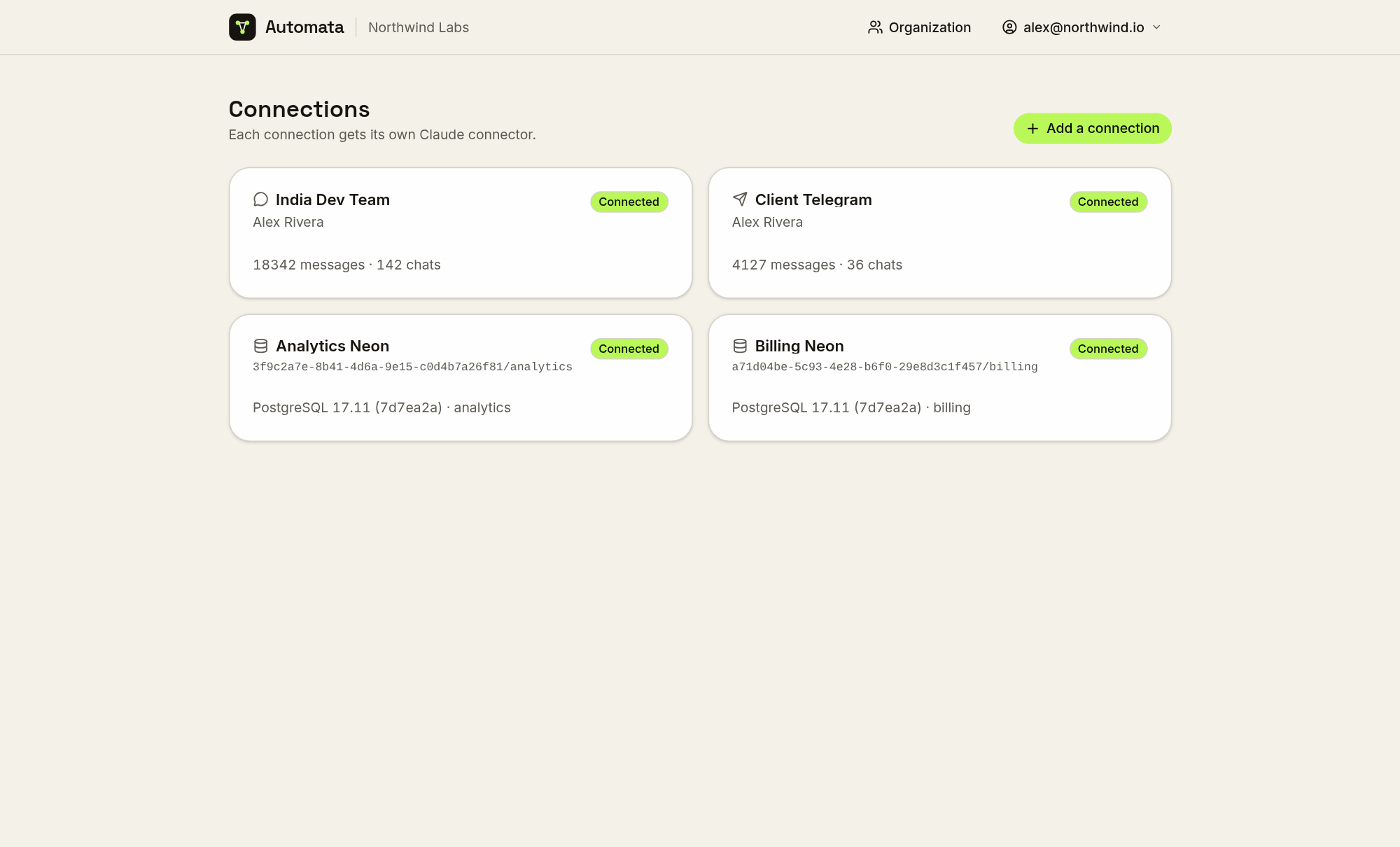
Every connection gets its own connector.
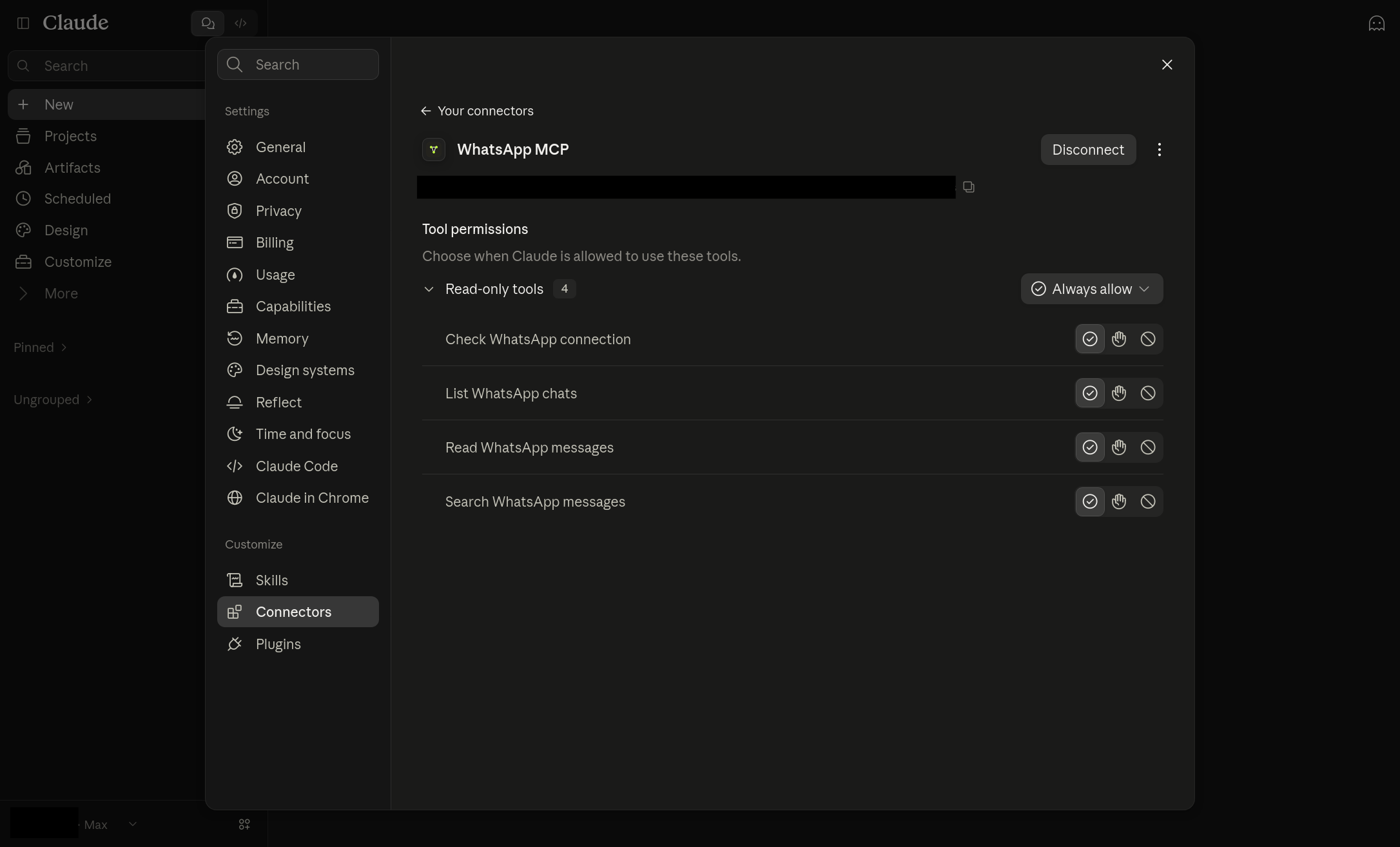
Added to Claude as a custom connector, with per-tool permissions.
Other features
- History, not just new messages. Recent WhatsApp history is imported when a number is paired, full history on request; Telegram chats are synced and backfilled; email headers are synced while bodies and attachments are fetched live and never stored.
- Complete-or-labelled answers. Every page says when there is more; reactions and WhatsApp control records are filtered and counted; duplicate copies of a message are collapsed; @-mentions are resolved to names.
- Teams. Organizations with admins and members, email invitations, and connections assigned to the people who use them.
- Visibility. Each token lists the MCP clients that connected with it, and optional telemetry keeps every tool call for 30 days with the one-line reason the AI gave for it.
- Two-factor sign-in with authenticator apps, passkeys and security keys.
- Disconnect alerts by email when a WhatsApp or Telegram connection drops, and again when it recovers.
- Bring your own backend (self-hosted only): point a connection at your own Evolution API server or Telegram bridge.
Hosted plans
Sign up at mcp.getautomata.app. Free covers one connection, one connector token and one user, with telemetry always on, only recent WhatsApp history imported and Telegram history back 90 days. Pro is $19/month after a 7-day trial, with unlimited connections and tokens and five users included ($10/user after).
Self-hosting
Automata is a Nuxt application. A self-hosted deployment runs the web app and Postgres; Evolution API with Redis is needed only for WhatsApp, and the bundled Telegram bridge only for Telegram.
Railway
- Deploy the template.
- Open the web service's domain and sign up. The first account is the admin.
- Optional: set
TELEGRAM_API_ID/TELEGRAM_API_HASHon the bridge for Telegram, and theNUXT_SMTP_*variables on the web service for email.
Every service and variable: Deploying to Railway.
Single container
The docker run command in Quick start runs Postgres, Redis,
Evolution API, the web app and the Telegram bridge in one container. Secrets are
generated into the volume on first boot. Back up the volume; see
Single container.
Docker Compose
git clone https://github.com/ju-li/automata-mcp.git && cd automata-mcp
cp .env.selfhost.example .env
for k in POSTGRES_PASSWORD WEBHOOK_SECRET EVOLUTION_API_KEY TELEGRAM_BRIDGE_ADMIN_KEY TELEGRAM_SESSION_ENCRYPTION_KEY; do
  echo "$k=$(openssl rand -hex 32)"; done >> .env

docker compose up -d                                         # database and email connections
docker compose --profile whatsapp up -d                      # + WhatsApp
docker compose --profile whatsapp --profile telegram up -d   # + Telegram
Open http://localhost:3000 and sign up. Set NUXT_PUBLIC_APP_URL in .env to
the public https:// address before your AI client connects; connector URLs are
built from it. See Self-hosting.
Warning
Pairing binds a real WhatsApp number, and numbers that pair and unpair
repeatedly can be banned. Use a spare SIM. Never run docker compose down -v
or delete the single container's volume: either deletes every paired session.
Connecting a client
-
Create a connection and pair it, link it, or enter its credentials.
-
On its dashboard, create a connector token and choose what it may reach.
-
Add the connector URL to your AI client:
-
Claude: open Settings → Customize → Connectors → Add → Add custom connector, paste the
/mcpURL, choose No sign-in, and under Request headers addAuthorizationwith the valueBearer <token>. Request headers is still rolling out; without it, paste the connector URL (/mcp/<token>) instead. In a Team or Enterprise organization every member uses that one token. For Claude Code:claude mcp add --transport http <name> <app-url>/mcp --header "Authorization: Bearer <token>". -
ChatGPT: turn on developer mode (Settings → Apps & Connectors → Advanced settings), create a custom connector, paste the connector URL (the
/mcp/<token>form, since ChatGPT cannot set a header) and choose no authentication. Guide: ChatGPT. -
Cursor: add the server to
~/.cursor/mcp.json(or.cursor/mcp.jsonin a project) and setAUTOMATA_TOKENin your environment:json{ "mcpServers": { "automata": { "url": "https://mcp.getautomata.app/mcp", "headers": { "Authorization": "Bearer ${env:AUTOMATA_TOKEN}" } } } }Self-hosted: replace the URL with your own
https://<your-domain>/mcp.
Other clients: https://www.getautomata.app/docs/clients.
-
Development
The repository is a pnpm workspace: apps/web (the Nuxt app and MCP server),
apps/telegram-bridge (the Telegram service) and apps/cloud (hosted billing
only). One .env at the repo root serves everything; .env.example documents
every variable.
pnpm install
pnpm services:up            # Postgres (add :whatsapp or :telegram for those stacks)
pnpm dev                    # web app on http://localhost:3000
pnpm typecheck              # also: pnpm bridge:typecheck, pnpm cloud:typecheck
pnpm test:emails            # account-email snapshot tests
Local setup, networking and the Linux firewall rule are in Development. Configuration reference: https://www.getautomata.app/docs/self-hosting/configuration.
Documentation
- Product documentation: https://www.getautomata.app/docs
- Running and developing this repository: docs/ — self-hosting, Railway, using Automata, WhatsApp, Telegram, email, PostgreSQL, alerts, two-factor, releases, development
Contributing
Issues and pull requests are welcome at
https://github.com/ju-li/automata-mcp. Before opening a pull request, run
pnpm typecheck, pnpm bridge:typecheck, pnpm cloud:typecheck,
pnpm test:emails and pnpm listings:check; these are the repository's
automated checks.
License
Links





