Listed from the MCP registry; nobody on Odel publishes it.

agent-in-browser
Real browser for any agent: Chrome/Edge/Brave via CDP, Firefox via BiDi. Refs, forms, console, net.
Runs on your machine from its package; the steps are below.
What it does
- Reads
- Writes
- High impact
At most: moves money, runs code or commands, deletes data, or sends messages for you.
What it costs
FreeOdel charges nothing per call. The publisher may charge for its own service.
Runs locally over stdio
This server isn't hosted — your MCP client launches it from a package registry. Use one of the commands below, or drop the config into your client (e.g. Claude Desktop).
Distributed as an MCP bundle (`https://github.com/Gwakko/agent-in-browser/releases/download/v0.1.2/agent-in-browser-0.1.2.mcpb`) — download it and import the bundle in your MCP client.


A real browser for any AI agent, any model, and any test runner — one dependency-free binary.
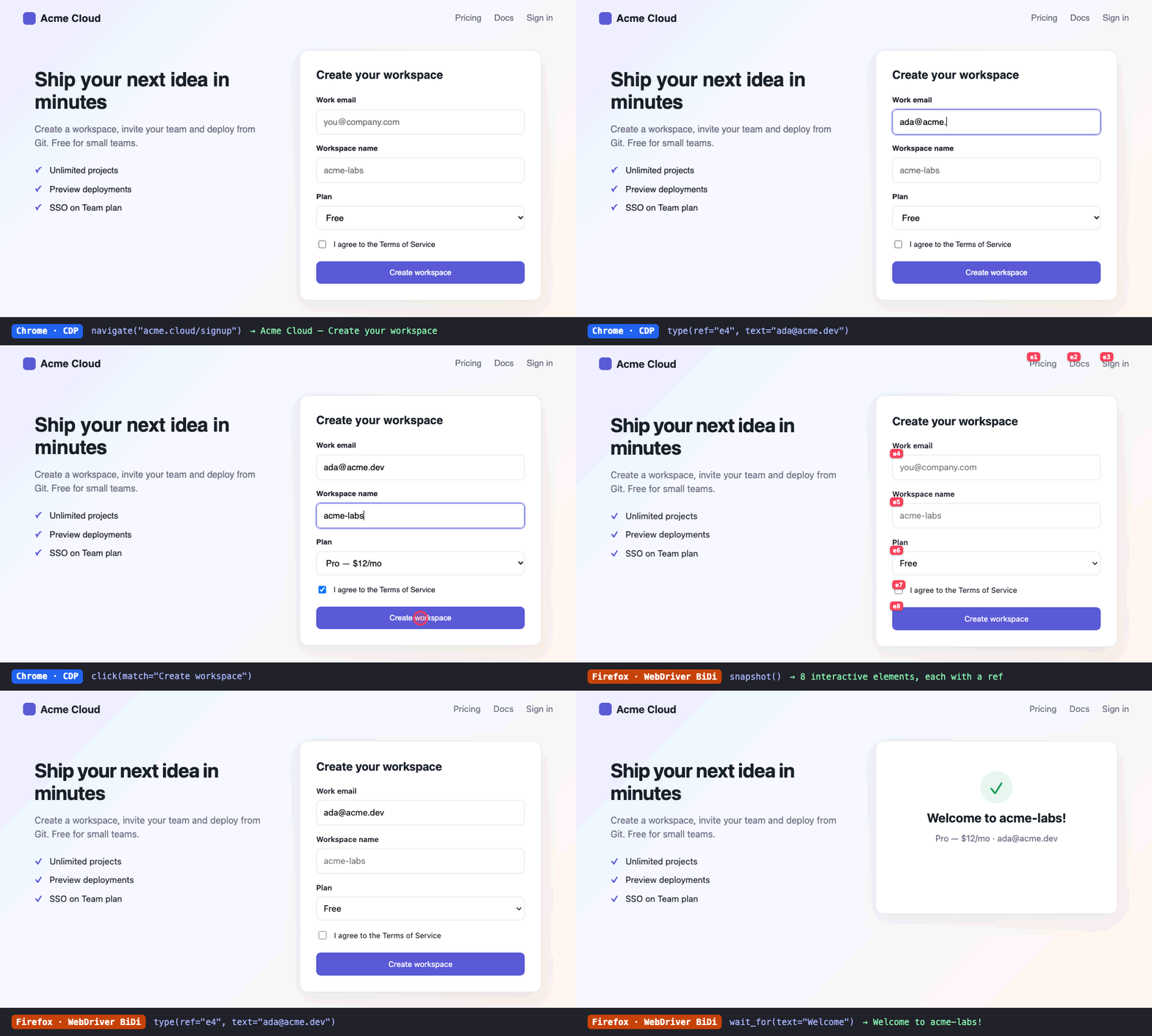
Real recording, not a mock-up. The agent reads the page as a snapshot with element refs, types, fills the form and clicks, first in Chrome (CDP), then in Firefox (WebDriver BiDi). Regenerate it with task demo.
agent-in-browser is an open take on "Claude in Chrome". It doesn't need an extension or a vendor-specific runtime. It drives the browsers you already have through their native automation protocols:
| Browser | Protocol | Status |
|---|---|---|
| Chrome, Chrome Beta/Canary, Chromium, Edge, Brave, Vivaldi, Opera | Chrome DevTools Protocol (CDP) | ✅ |
| Firefox, Firefox Developer Edition / Nightly | WebDriver BiDi | ✅ |
| Safari | WebDriver (safaridriver) | 🛣 detected, roadmap |
It's available three ways, all backed by the same tool catalogue:
- MCP server (
agent-in-browser mcp): plugs into Claude Code, Claude Desktop, Cursor, Codex, Gemini CLI, Windsurf, VS Code/Copilot, Zed, opencode and any other MCP client, whatever model sits behind it. - Shell CLI (
agent-in-browser call <tool> …): for agents without MCP, for scripts, and for humans. Calls share one persistent browser. - Scenario runner (
agent-in-browser run test.yaml --browser chrome,firefox): replays tool calls as automated tests across a browser matrix, with JUnit/JSON reports.
An agent skill (skills/agent-in-browser/SKILL.md) ships inside the binary and teaches agents the workflow.
Install
# macOS / Linux
curl -fsSL https://raw.githubusercontent.com/Gwakko/agent-in-browser/main/scripts/install.sh | sh

# Windows (PowerShell)
irm https://raw.githubusercontent.com/Gwakko/agent-in-browser/main/scripts/install.ps1 | iex

# Homebrew (macOS / Linux)
brew install gwakko/tap/agent-in-browser

# With Go
go install github.com/gwakko/agent-in-browser/cmd/agent-in-browser@latest

# From a checkout (needs Task: https://taskfile.dev)
task install            # → ~/.local/bin/agent-in-browser + alias `aib`
Connect your agent
agent-in-browser setup claude-code --write    # runs `claude mcp add --scope user …`
agent-in-browser setup cursor --write         # merges ~/.cursor/mcp.json (a .bak is kept)
agent-in-browser setup codex --write          # appends to ~/.codex/config.toml
agent-in-browser setup gemini --write         # ~/.gemini/settings.json
agent-in-browser setup vscode                 # prints the snippet for .vscode/mcp.json
agent-in-browser skill install --for claude   # ~/.claude/skills/agent-in-browser (also: codex, agents, --dir)
Claude Desktop, one click: download agent-in-browser-<version>.mcpb from the latest release and open it. It also appears in the MCP Registry as io.github.Gwakko/agent-in-browser.
Without --write, setup only prints the config. Pass browser options through with --args "--browser firefox --headless". See docs/integrations.md for every client.
Use it from the shell
agent-in-browser call navigate url=localhost:3000
agent-in-browser call snapshot
#   - textbox "Email" [ref=e3] (required, type=email)
#   - button "Sign up" [ref=e7]
agent-in-browser call type ref=e3 text=me@example.com
agent-in-browser call click ref=e7
agent-in-browser call wait_for text=Welcome
agent-in-browser call console_messages level=error
agent-in-browser call screenshot            # → prints PNG path
agent-in-browser stop
Useful flags (they work anywhere on the command line): --browser firefox, --headless, --instance work for a second, independent browser, --endpoint http://127.0.0.1:9222 to attach to a browser you started yourself, and --viewport 390x844.
Test scenarios
name: signup
browsers: [chrome, firefox]
steps:
  - navigate: http://localhost:3000/signup
  - fill_form:
      fields:
        - { selector: "#email", value: "qa@example.com" }
        - { match: "I accept the terms", value: true }
  - click: Sign up
  - wait_for: { text: "Welcome" }
  - assert: { url_contains: "/dashboard", no_console_errors: true }
agent-in-browser run tests/*.yaml --browser chrome,firefox,edge --junit report.xml
Full format: skills/agent-in-browser/references/scenarios.md.
Tools
browser_status · browsers_installed · tabs_list · tab_new · tab_select · tab_close · navigate · snapshot · find · click · hover · type · press_key · fill_form · scroll · wait_for · get_text · screenshot · evaluate · console_messages · network_requests · resize · browser_close
Arguments are documented in docs/tools.md, which task docs:tools generates.
How it works
 agent ──MCP/stdio──┐
 shell ──call───────┼──▶ tools ──▶ session ──▶ Driver ──CDP──────▶ Chrome / Edge / Brave / …
 CI ────run yaml────┘     (one catalogue)  (attach|launch)  └─BiDi─────▶ Firefox
                                                            page lib (injected JS):
                                                            snapshot · refs · fill · find
- The browser runs on a dedicated profile (
~/.agent-in-browser/profiles/<instance>-<browser>) and is detached, so it survives MCP server restarts. Separate CLI calls reuse it through~/.agent-in-browser/instances/<name>.json. - Page understanding (snapshot, refs, form filling) is injected JavaScript that works the same in every engine. Trusted input, screenshots, tabs and console/network capture come from each protocol's driver.
- Details: docs/architecture.md · browser notes: docs/browsers.md · plans: docs/roadmap.md.
Development
task build      # bin/agent-in-browser
task test       # unit tests
task test:e2e   # scenario on every installed browser
task smoke      # CLI scenario run, chrome+firefox
task inspect    # MCP Inspector against the local build
task build:all  # cross-compile 6 targets into dist/
task release TAG=v0.1.0   # tag → GitHub Actions → goreleaser
Security notes
- The debugging endpoint listens on
127.0.0.1only. Even so, any local process can drive that browser, so don't sign it into accounts you wouldn't hand to the agent. - Since Chrome 136, remote debugging is refused for your default Chrome profile. agent-in-browser always uses its own profile. To reuse your logins, sign in once inside the agent's browser window and the profile keeps them.
License: MIT







