
phone-sms
Read and send SMS through your own Android phone over KDE Connect on your LAN. No cloud relay.
Runs on your machine from its package; the steps are below.
What it does
- Reads
- Writes
- High impact
Not assessed yet.
What it costs
FreeOdel charges nothing per call. The publisher may charge for its own service.
Runs locally over stdio
This server isn't hosted — your MCP client launches it from a package registry. Use one of the commands below, or drop the config into your client (e.g. Claude Desktop).
Run
uvx phone-sms
MCP client config
{
  "mcpServers": {
    "phone-sms": {
      "command": "uvx",
      "args": [
        "phone-sms"
      ]
    }
  }
}Site: https://phone-sms.vercel.app · Repo: https://github.com/h-3303/phone-sms
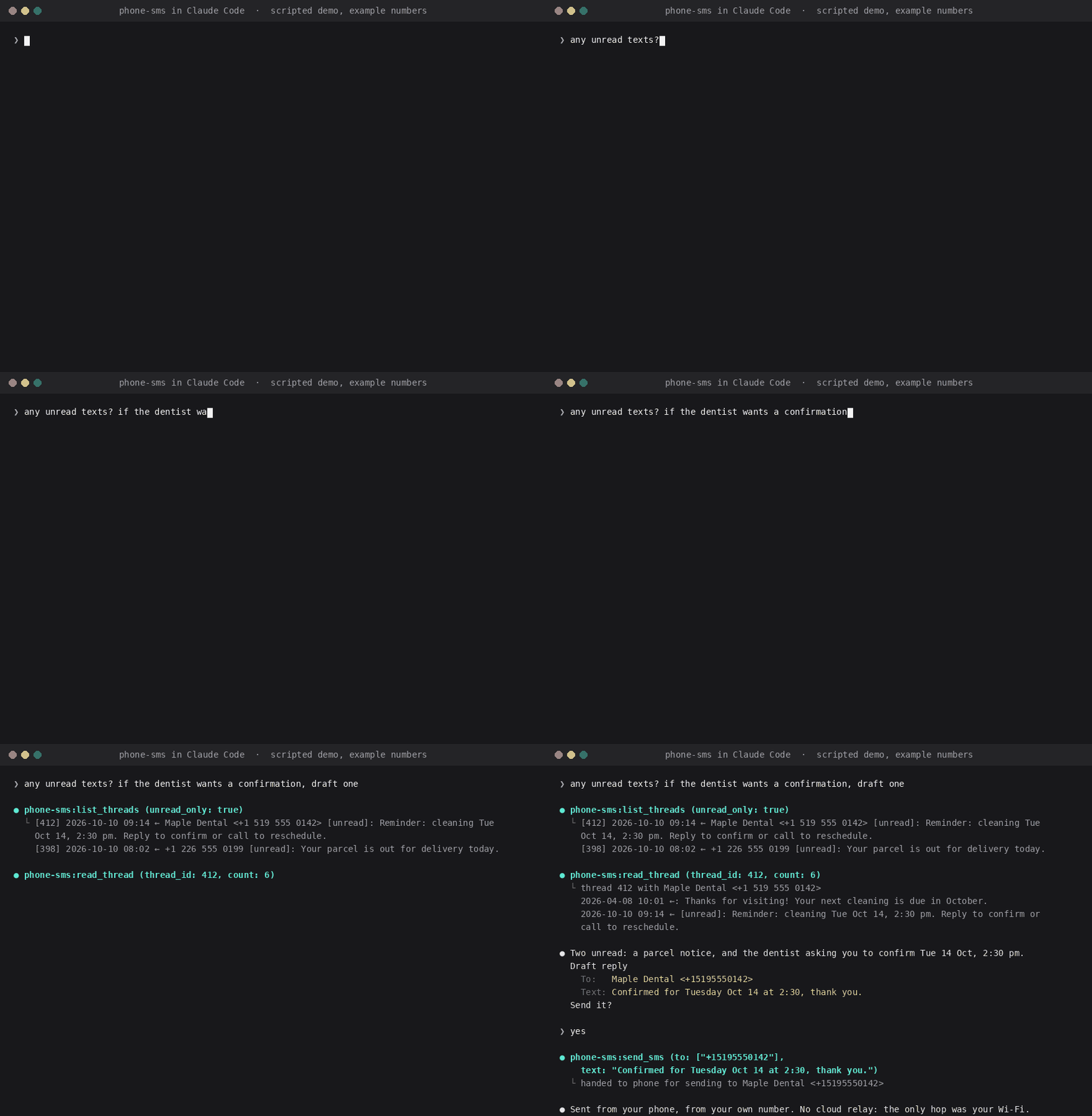
An MCP server that lets Claude (or any MCP client) read and send SMS through your own Android phone, from your own number. It talks to the phone over KDE Connect on your local network: no cloud relay, no SMS gateway account, no app to install beyond KDE Connect itself.
agent ──MCP──▶ phone-sms ──D-Bus──▶ kdeconnectd ──LAN──▶ KDE Connect (Android) ──▶ SMS
Tools:
| Tool | Does |
|---|---|
list_threads | conversations, newest first, with the latest message; filter by contact or unread |
read_thread | the last n messages of one conversation |
find_contact | look up a contact by name or number fragment (from the phone's synced contacts) |
send_sms | send a text, or a group text to several numbers |
send_sms carries MCP's destructiveHint, and the server tells the model never to send until you
have approved the exact recipient and text in the conversation. Message contents never leave your
machine except as the model's context.
Requirements
- Linux with a D-Bus session bus and KDE Connect (
kdeconnectd, a current release; packagekdeconnect). It does not need the Plasma desktop; it runs fine under GNOME, Hyprland, Sway… - An Android phone with the KDE Connect app (F-Droid / Play), paired with the computer. On the phone, enable the SMS plugin (and Contacts if you want names) and grant the SMS and contacts permissions it asks for.
- uv and Python 3.12+.
Check the pairing: kdeconnect-cli -l should list your phone as paired and reachable.
Install
Claude Code, as a plugin (one step):
/plugin marketplace add h-3303/phone-sms
/plugin install phone-sms@phone-sms
Claude Code, as a plain MCP server:
claude mcp add --scope user phone-sms -- uvx phone-sms
Any other MCP client (Claude Desktop config shape, Cursor, Zed, …):
{
  "mcpServers": {
    "phone-sms": {
      "command": "uvx",
      "args": ["phone-sms"]
    }
  }
}
The skill (tells the agent when and how to use the tools, with the approval rule, an OTP recipe and a digest recipe). The Claude Code plugin above includes it; for Cursor, Codex, Copilot, Gemini CLI and the rest:
npx skills add h-3303/phone-sms
The skill file is MIT (see plugin/skills/phone-sms/); it is also listed on skill marketplaces.
The server stays GPL and is installed from PyPI by the commands above.
Why this and not a relay
| phone-sms | TextBee, SimLink, SMS8 | ADB / Termux servers | Twilio-style MCP | mac Messages MCP | |
|---|---|---|---|---|---|
| Your own number | yes | yes, your SIM | yes | no, a rented number | yes, via iPhone |
| Cloud relay | none | their server, or self-host it | none | yes | none |
| Needs | Linux + KDE Connect | Android app + account or API key | USB debugging, or Termux on the phone | account, A2P 10DLC registration for US traffic, per-message fees | macOS, Full Disk Access |
| Reads your inbox | yes | yes | yes | only the rented number's traffic | yes |
Pick a relay if you need a phone number for a product. Pick phone-sms if you want your agent to read and answer your texts and you run Linux.
From a checkout: uv run --directory /path/to/phone-sms -q phone-sms.
The server uses the first paired, reachable device. With several phones, pin one with
PHONE_SMS_DEVICE=<id> (the id kdeconnect-cli -l prints).
CLI
The same code paths, for checking things by hand:
phone-sms threads [-n 20] [--unread]
phone-sms read <thread_id> [-n 20]
phone-sms contact <name>
phone-sms send <number>... -m "text"
phone-sms                              # MCP server on stdio
How sending works
find_contact <name>gives the number;send_smstakes numbers, ideally in E.164 (+14375551234).- The model shows you recipient and text and waits for your yes.
send_smsanswers handed to phone… oncekdeconnectdhas accepted the request. That is not delivery: the sent message shows up inlist_threads/read_threadonce the phone syncs it, usually within a minute.
Security and privacy
- Local only. The server talks to the D-Bus session bus and nothing else. The one network hop is KDE Connect's own encrypted link between your computer and your phone on your LAN. The server opens no sockets, has no accounts, no API keys and no telemetry.
- What the model sees. Only what a tool returns for what you asked: thread listings and the
messages you have it read. Contact names come from the vCards KDE Connect already synced to
~/.local/share/kpeoplevcard/. Nothing is written to disk by the server. - Sending is gated twice.
send_smsis annotateddestructiveHint, the server instructions and the skill both require the model to show you the exact recipient and text and wait for a yes in the conversation, and in Claude Code the tool permission prompt is a second gate. A group text to a few people is supported; bulk sending to lists is deliberately not. - Supply chain. Pure Python, two dependencies (
mcp,dbus-next), published from GitHub Actions with PyPI trusted publishing; the plugin pins the exact version. Audit it: 340 lines insrc/. - Privacy page: https://phone-sms.vercel.app/privacy. Report problems in the issue tracker.
Troubleshooting
- "no paired, reachable device": open KDE Connect on the phone, same Wi-Fi,
kdeconnect-cli -l. - Sent, but nothing arrives: on the phone, check that the SMS plugin is enabled for this computer
and that Android granted KDE Connect the SMS permission. Watch the request leave the server with
dbus-monitor --session "interface='org.kde.kdeconnect.device.conversations',member='sendWithoutConversation'". - Names missing: enable the Contacts plugin on both ends; vCards land in
~/.local/share/kpeoplevcard/kdeconnect-<device>/. - The
kdeconnectdjournal line Unimplemented conversation of type 'r' comes from the notification-forwarding plugin, not SMS.
Notes for hackers
It uses org.kde.kdeconnect.device.conversations, the interface the kdeconnect-sms app uses.
The daemon object's introspection XML has duplicate methods, so device discovery is a raw D-Bus
call. requestConversation first emits only cached messages, so read_thread waits for count
messages or conversationLoaded, not for a quiet gap.
License
GPL-3.0-or-later for the server, like KDE Connect. The skill file in plugin/skills/phone-sms/
is MIT so skill marketplaces can redistribute it.
Built by Moirai Digital.




