Listed from the MCP registry; nobody on Odel publishes it.
Is this yours? Claim it
HiddenJobs — Remote Tech Job Search MCP
Search remote tech jobs, inspect descriptions, compare roles, and retrieve application links.
One address for any MCP client. No sign-in needed on this server.
What it does
2 read1 other
Grouped by tool name. At most: creates or changes data: records, files, settings.
What it costs
FreeOdel charges nothing per call. The publisher may charge for its own service.
Tools
3 · grouped by tool name · checked 22 Nov 2026Read · 2Look things up
- search_jobs
- get_job
Other · 1Neither hinted nor named
- open_application_link
Job Search MCP
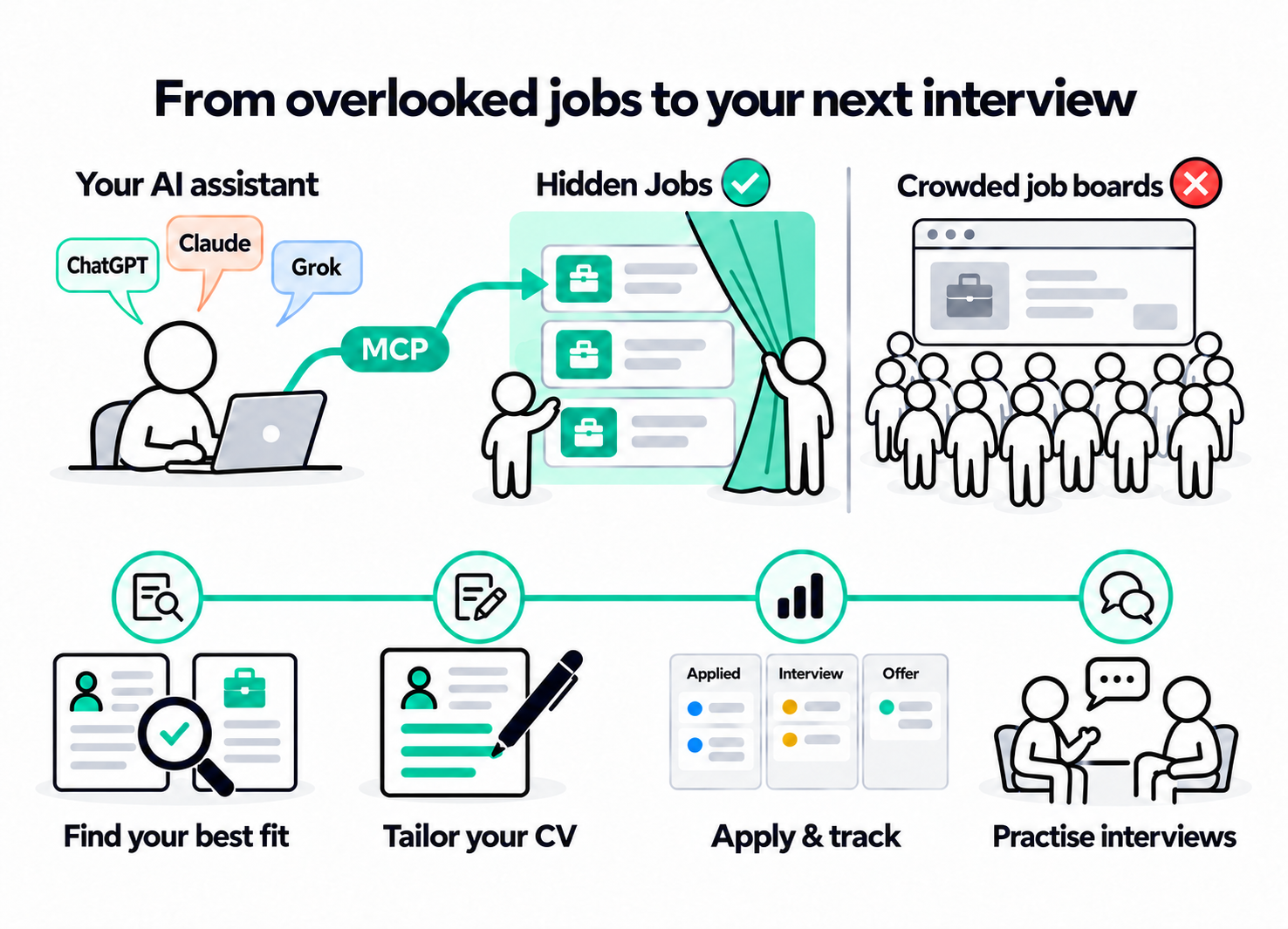
Your job search, with your AI assistant.

Find overlooked remote jobs, evaluate your fit, tailor your CV and cover letter, prepare for interviews, research missing salaries and track every application. Connect your assistant to Hidden Jobs and keep your profile, CV versions, email alerts and application history together in your account.
Connect · Sources · Skills · Tools · Resources · Documentation
How it works
Your profile + selected CV
            ↓
 Find jobs in your sources
            ↓
      Compare + choose
            ↓
 Tailor CV + cover letter
            ↓
    Review + export PDF
            ↓
   Send your application
            ↓
   Track + prep interviews
Your assistant does the analysis and writing. Hidden Jobs supplies the offers and saves the profile, documents and progress you ask to keep. Use the same saved information from the connected clients you authorize.
Quick start
1. Connect your assistant
| Setting | Value |
|---|---|
| MCP URL | https://hiddenjobs.dev/mcp |
| Authentication | OAuth |
| Account | Your Hidden Jobs account |
Add a custom remote MCP server in your assistant, enter the URL, sign in to Hidden Jobs and approve the connection.
Claude Code
claude mcp add --transport http hidden-jobs https://hiddenjobs.dev/mcp
claude mcp login hidden-jobs
Codex CLI
codex mcp add hidden-jobs --url https://hiddenjobs.dev/mcp
codex mcp login hidden-jobs
Complete sign-in in your browser, then return to your client. See client configuration for graphical clients, terminal verification and troubleshooting.
2. Set up your profile and CVs
Once connected, ask your assistant to build your profile and save your CVs.
Set up my profile from this CV. Save it as Backend English and ask me about any missing details.
Keep multiple CVs, such as Backend English and Manager Spanish, with immutable version history. Choose the CV and exact version for each application, or ask your assistant to choose the best match for the offer. Transfer files through your client's supported file capability, select the original PDF or DOCX in the in-chat upload panel, or upload them in Profile.
3. Find and compare jobs
Search Hidden Jobs and Remote OK for TypeScript roles open to applicants in Spain. Compare three offers against Backend English, version 3, and explain the best match.
The assistant searches all job sources by default. search_jobs requires an
explicit sources array. Reading an offer or opening its
link also requires the returned source. Use open_application_link to retrieve original application links. External offers are queried through
public APIs/feeds and are not stored in Hidden Jobs. You can compare them and prepare documents;
saved job evaluations, activity, application tracking and email alerts use Hidden Jobs offers.
When an offer does not publish pay, your assistant researches public salary references and shows a cited market estimate, clearly separated from the employer’s confirmed salary. This uses the assistant’s native web search; if reliable references are unavailable, it leaves the salary field out.
Find remote Data Scientist roles open to applicants in Spain. For offers without published pay, research a local salary range and show the references, marking it as an estimate.
4. Prepare your application
For this Hidden Jobs role, use Backend English, version 3, to tailor my CV and write a cover letter. Review both, save the application and export the final CV as a PDF.
Compare all my saved CVs against this offer, choose the best match, explain why, and use it to tailor my CV and prepare the application.
Your assistant compares the content of your saved CVs against the role and uses the exact selected version. You can name a specific CV instead, and your default CV stays unchanged.
The assistant saves a snapshot of the offer and the chosen CV version, drafts documents from confirmed facts, reviews them and links the final documents to the application. Creating version 4 later does not replace the version already selected for that application.
Review the documents and authorize submission on the employer's website when your client supports it. The assistant automatically records a verified submission and its next step. If you submit yourself, report the outcome so it can record it.
5. Track and prepare for interviews
I submitted this application today. Mark it as applied and save the next step.
Prepare me for the first interview using the role, company information and the CV I used.
Open Applications to see your pipeline, filter statuses and review history, documents, notes and next steps. Use Profile for your experience, CV library and connected applications.
Follow a search daily
Repeat this search every day at 09:00 Europe/Madrid using the same sources and my saved CV. Notify me only when new relevant jobs appear.
Your assistant can offer to schedule this with its own task system when that system supports unattended MCP calls. It confirms the search, timezone and notification criteria before scheduling. The task belongs to your assistant; Hidden Jobs does not create or run it. Support depends on the client. If unavailable, Hidden Jobs email alerts are an alternative for Hidden Jobs offers.
Email job alerts
Create a daily alert for Backend or DevOps jobs in Europe matching TypeScript.
Change that alert to weekly. Pause it for now, then show me my other alerts.
Manage the same alerts as the dashboard: up to five saved searches, daily or weekly emails, and multiple filter selections. Creating, modifying or resuming requires a confirmed account email. You can also pause all alerts or delete them. See job alerts for filters, version conflicts and examples.
Skills
15 portable skills guide the complete workflow. Each directory contains a SKILL.md with
instructions your assistant can follow.
| Skill | What it helps you do |
|---|---|
alerts | Create daily or weekly email alerts, change filters, and pause or resume delivery. |
setup | Build your profile — Import a CV, confirm your experience and preferences, and choose a default CV. |
expand | Add depth to your profile — Capture achievements, responsibilities and examples that make applications specific. |
search | Search selected sources, check location eligibility and preserve provider attribution. |
match | Compare your matches — Evaluate requirements against your chosen CV and explain the ranking. |
apply | Tailor an application — Draft a tailored CV and cover letter, preserve the base CV version, and save the application. |
review | Review before sending — Check facts, relevance, clarity and unsupported claims in the draft. |
export | Download a PDF — Generate a PDF from a saved document and check its text and layout limits. |
interview | Prepare for interviews — Practise likely questions and evidence-based answers using the offer and your experience. |
upskill | Build a learning plan — Turn requirements you want to develop into exercises and milestones. |
outcome | Track applications — Record confirmed submissions, interviews, offers, rejections and next steps. |
email-sync | Review email updates — Use your separately connected email to synchronize verified outcomes when authorized. |
report | Review your progress — Summarize your pipeline, recent activity and next actions; save a report when requested. |
add-template | Use your own structure — Save document structure and supported PDF layout settings. |
reset | Manage saved data — Preview deletion and open your account for explicit confirmation. |
For example: “Use apply to prepare this application, then review to check it.”
Install the selected skill directories using your client's skill support. A remote MCP connection
does not automatically install local skill files. You can also request the same instructions as MCP
prompts, workflow resources or through get_workflow; this supports clients with different
interfaces.
See the skills guide for examples, the tools each workflow uses and how to run it from a remote chat.
Tools
43 tools expose job search, email alerts, private career data and document operations. Tools read or save information; your assistant evaluates offers, personalizes your CV, writes letters and leads interview practice.
| Area | Tools |
|---|---|
| Jobs and companies | search_jobs, get_job, open_application_link, get_company |
| Job alerts | get_job_alerts, create_job_alert, update_job_alert, delete_job_alert, pause_job_alerts, resume_job_alerts |
| Workflow instructions | get_workflow |
| Profile | get_candidate_profile, save_candidate_profile |
| CV library | list_cvs, get_cv, save_cv, update_cv, set_default_cv, select_application_cv |
| CV upload panel | upload_cv, get_cv_upload |
| Documents | list_documents, get_document, get_document_download_url, save_document, delete_document, render_document, check_document |
| Search and evaluations | get_search_history, save_search_history, list_job_activity, update_job_activity, get_job_evaluations, save_job_evaluation |
| Applications | list_applications, get_application, save_application, update_application, get_application_report |
| Learning | get_learning_plan, save_learning_plan |
| Data controls | export_user_data, reset_user_data |
For example, preparing an application uses get_cv → save_application → save_document →
update_application. PDF export adds render_document, check_document and
get_document_download_url.
See the complete tool reference for arguments, examples, permissions and errors.
Resources
Resources give your assistant reusable instructions, templates and access to your saved career information.
| Resource URI | Contents |
|---|---|
hiddenjobs://workflows/{name} | The 15 workflows listed above, such as apply, interview and outcome |
hiddenjobs://guides/{name} | job-evaluation, document-review, interview, ats-checks |
hiddenjobs://templates/{name} | cv, cover-letter, interview |
hiddenjobs://me/profile | Your confirmed profile and preferences |
hiddenjobs://me/cvs/{id} | A saved CV and its versions |
hiddenjobs://me/applications/{id} | A saved application and its history |
hiddenjobs://me/documents/{id} | A document's saved text and metadata |
For example, hiddenjobs://workflows/interview explains how to prepare for an interview;
hiddenjobs://me/applications/{id} supplies the saved application to work from. Private resources
enforce the same OAuth and account-ownership checks as the tools. Use resources/templates/list to
discover private URI patterns and the list/get tools to obtain record IDs.
The 15 MCP prompts use the workflow names: alerts, setup, expand, search, match, apply, review,
export, interview, upskill, outcome, email-sync, report, add-template, reset. See
the resources and prompts reference.
Your data and documents
- Profile facts, CVs, immutable CV versions, drafts, evaluations, interview notes, learning plans and application history are stored privately in your Hidden Jobs account, rather than relying on a local project folder.
- Your OAuth-authorized applications can work with your saved career data. Export your data or confirm deletion from your account.
- PDF, DOCX and UTF-8 text/Markdown uploads support up to 2 MiB per file and 20 PDF pages. PDF export supports Latin text and validated layout settings. Review the final PDF before sending it.
- Application states are
saved,preparing,prepared,applied,interview,offer,rejectedandwithdrawn. Prepared documents are not sent automatically; verified progress and outcome changes are recorded automatically during an authorized workflow. - Email updates require your authorization to synchronize using a separately connected email provider. Hidden Jobs keeps minimal references and factual summaries, not mailbox credentials or email bodies.
See the career workspace guide for storage, document transfer, application tracking and templates.
Documentation
This repository contains the MCP protocol, REST implementations of every tool, external-source adapters
in src/sources/, skills, resources and client connection guides. The remote connector uses the HTTP adapter published here.
- Client configuration
- REST adapter and tool routes
- Skills and workflow examples
- Complete tool reference
- Resources and prompts
- Career workspace
- Protocol
- Architecture
- Development
- Security · Contributing
License
MIT. See LICENSE.
Employer names and identifying job slugs are withheld from search and detail results. get_company
provides anonymous company context using a job ID. If an operation requires account action, the assistant receives a link to the account settings.