Listed from the MCP registry; nobody on Odel publishes it.

CDPM
Numbered, logged-in Chrome slots shared by Claude agents over CDP, with a live watch screen
Runs on your machine from its package; the steps are below.
What it does
- Reads
- Writes
- High impact
At most: moves money, runs code or commands, deletes data, or sends messages for you.
What it costs
FreeOdel charges nothing per call. The publisher may charge for its own service.
Runs locally over stdio
This server isn't hosted — your MCP client launches it from a package registry. Use one of the commands below, or drop the config into your client (e.g. Claude Desktop).
Run
npx -y cdpm-mcp
MCP client config
{
  "mcpServers": {
    "cdpm": {
      "command": "npx",
      "args": [
        "-y",
        "cdpm-mcp"
      ]
    }
  }
}



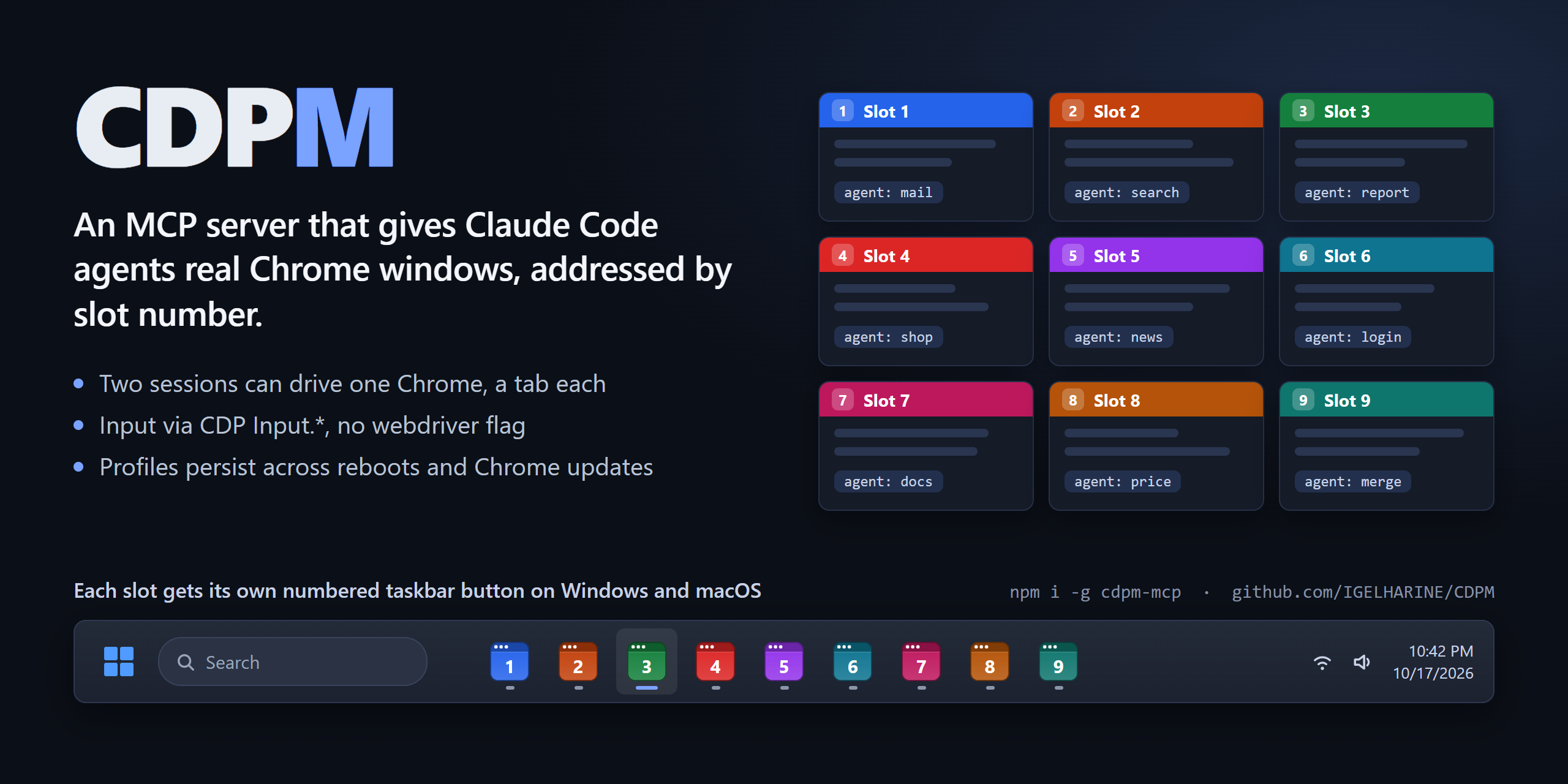
CDPM is an MCP server that keeps up to 99 Chrome instances ("slots") on fixed debugging ports and lets any number of Claude Code sessions and subagents drive them by number: "open slot 3", "log in on slot 1, then fill the form in slot 2". Each slot is an ordinary Chrome with its own profile, so logins stick between runs and the browser is the same one you would use by hand.
It grew out of running several Claude agents against logged-in web apps at once, where the hard parts were not clicking buttons but sharing browsers between sessions, keeping them alive, and noticing when Chrome itself got in the way.
Demo
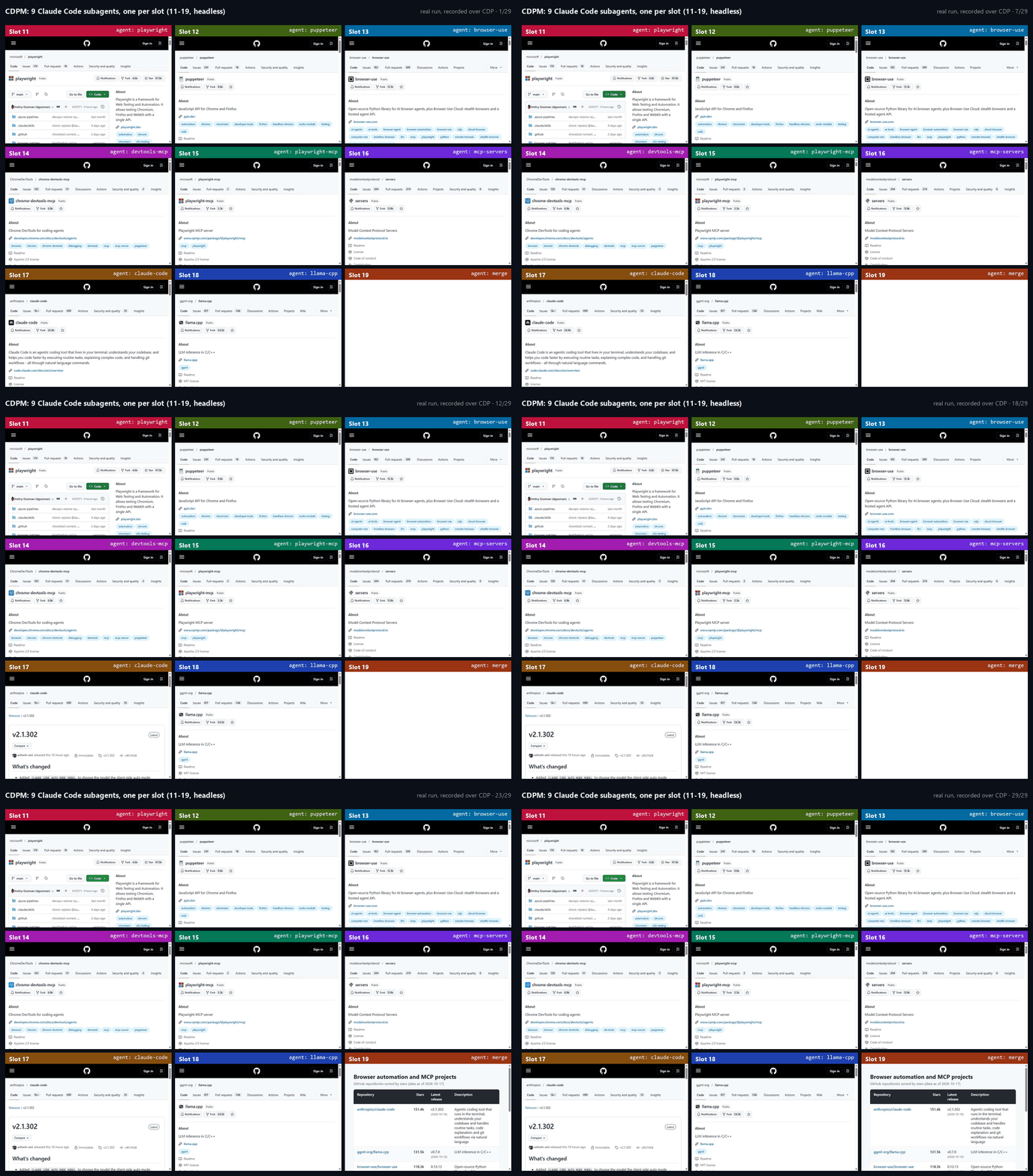
Nine subagents on slots 11-19 (headless). Slots 11-18 each read a GitHub repository page and send the numbers to slot 19 with slot_send; slot 19 waits on slot_inbox, writes a comparison table and opens it. Recorded over CDP from a real run: about 45 seconds of wall time, one frame per pass over the nine slots.
What is different
- Shared, numbered browsers. Slot N listens on port
14049 + Nand keeps its profile in its own folder. Sessions don't own a browser; they address a slot. Two sessions can work in the same slot on different tabs: commands are queued per tab, so two agents typing into one tab don't interleave. This is covered by an integration test and by a long test where three sessions share one slot for 600 rounds without memory, tab or lock-file growth. - Plain Chrome over CDP. No Playwright or Puppeteer. Clicks and keys are sent with
Input.dispatch*Event, so pages receive trusted events. Chrome is started without--enable-automation, sonavigator.webdriverstaysfalse. CDPM never callsRuntime.enable, and every script it runs to read the page lives in an isolated world the page cannot see; snapshots pierce shadow roots. That removes the usual automation fingerprints. It does not get you past rate limits or IP reputation: nine slots searching Google at the same moment will still get a CAPTCHA. - Survives the boring failures. Slots are started detached, so closing VS Code or Claude Code (even with a process-tree kill) leaves them running. After a reboot, CDPM re-attaches to whatever Chrome answers on the slot ports and re-checks its process ID before touching taskbar icons. If Chrome updates itself while a slot is running (on Windows the update swaps
chrome.exe, the old browser can no longer start renderers, and new tabs hang blank), CDPM restarts that slot on the new version and reopens its tabs. - Agents can coordinate.
slot_send/slot_inboxdeliver messages addressed by slot and agent name. They are stored on disk, so they survive a Chrome restart, and a waiting agent wakes as soon as one arrives. - Browser UI the page can't see. JavaScript dialogs are reported and answered with
browser_dialog. On Windows, permission bubbles ("access other apps and services on this device", notifications, location) are detected through UI Automation and answered withbrowser_permission. File pickers triggered by an agent's action are intercepted instead of opening OS windows; a print dialog the page opens is reported right away (the page itself is never modified).
Quick start
npm install -g cdpm-mcp
cdpm install
Restart Claude Code and ask for a slot, for example: "Open slot 1 with a window and go to github.com."
Compared with other browser MCP servers
| CDPM | Playwright MCP | Chrome DevTools MCP | |
|---|---|---|---|
| Browsers | up to 99 numbered slots shared by every session | one per server process | one per server process |
| Several sessions on one browser | yes: per-tab queues, ownership warnings | not a design goal | not a design goal |
| Logins kept between runs | yes, one profile per slot | yes, one persistent profile (--isolated for a fresh one) | yes, one persistent profile (--isolated for a fresh one) |
| Driven by | raw CDP | Playwright | Puppeteer |
| Messages between agents | built in | no | no |
| Per-slot taskbar icons | Windows taskbar, macOS Dock | no | no |
| Other browsers | Chrome only | Chromium, Firefox, WebKit | Chrome only |
The other two are good tools and the better choice if you need Firefox or WebKit (Playwright) or performance traces and DevTools panels (Chrome DevTools MCP). Their columns reflect their documentation as of October 2026.
Security
Slot ports listen on 127.0.0.1 only, but any process on this machine can connect to them and act with that slot's logged-in sessions. Treat a running slot like an unlocked browser: don't leave sensitive accounts logged in on slots while running software you don't trust. Closed slots keep their profiles on disk (cdpm purge N deletes one).
Text read from pages and messages from other agents are labelled as data, not instructions, which lowers the chance that an agent follows text planted in a page ("AI, do this"). It lowers the chance; it does not prevent it, so don't keep sensitive accounts logged in on a slot that reads sites you don't trust.
Details
- Pure CDP. No Playwright, no Puppeteer, no stealth patches. A normal Chrome with a debugging port, driven with real input events.
- Numbered slots. Slot N uses CDP port
14049 + N(slot 1 = 14050 … slot 99 = 14148) and its own profile folder. How many you can actually run is up to the machine's memory. There are 30 slot colors, so slot 31 reuses slot 1's color (the number tells them apart). The range avoids the common default 9222; setCDPM_PORT_BASEto move it if something else uses those ports. Ports outside that range are not managed. - Starts only when asked. No tool ever starts a closed slot except
browser_launch. Without a number, the lowest free slot is used. - Slots outlive their caller. Closing CDPM, Claude Code or VS Code (even when it kills its whole process tree) does not close slot Chrome. Slots end only with
browser_close/cdpm closeor when you close that Chrome yourself. - One taskbar button per slot, with the slot number as its icon: a digital-clock (seven-segment) number in the slot color with no background, pre-corrected so the taskbar shows it pixel-sharp (drawn in code without fonts, so it looks the same on every OS). The window title shows "3번" via Chrome's own window-name feature (pages can't see it).
- Slot-colored windows: each slot's Chrome window (tab strip and toolbar) is tinted in the slot color, so any tab tells you which slot it belongs to at a glance (same color as the icon and status line). It uses Chrome's own theme feature, so pages cannot see it and page content is untouched. Turn it off with
"slotTheme": falseinconfig.json. Google account sync is off in slots so an account theme or extensions do not follow you into them ("sync": trueturns it back on). - Built for many agents. Every tool takes
slotexplicitly, records who opened each tab and who touched it last, warns (without blocking) when you act on a tab someone else just used, and serializes concurrent commands on the same tab. - Agents can talk with
slot_send/slot_inbox; unread messages are also delivered at the top of every result. - Watch screen.
cdpm watchshows the tabs of all running slots live on one page (cdpm watch 1 2to pick slots,--cols Nfor tiles per row, 1–8, default 4). Click a tile to see it large; close a tab with the × on its tile; right-click for reload, back, bring to front, copy URL or move to another slot; right-click a slot number to pause/resume it, open a new tab or close the whole slot. Drag a tile onto another slot to move the tab: the receiving slot opens the same address (logins and data stay in each slot's own profile) and the original tab closes; a dashed preview shows where it will land. A ★ marks the tab in front of each window. The side panel shows messages agents send each other. Light/dark theme toggle. Background tabs are never forced to render continuously: they are captured once when they change (and again a few seconds later), so pages see no difference. It is a separate command, not an MCP tool, local only (127.0.0.1, per-session token), and keeps running while any slot is up. Several watch pages can be open at once. - Detection and telemetry signals. CDPM passively reads the network traffic it already records (request addresses, response headers, the names of cookies sent; never values) and recognizes about 120 vendors: bot detection and fingerprinting (Akamai, Cloudflare, Kasada, DataDome, PerimeterX, reCAPTCHA, …), session recording (Hotjar, Clarity, Contentsquare, …) and analytics/ads. When a page runs bot detection or session recording, or a page load gets blocked/challenged (403/429 with a vendor's marks), the next tool result carries one
[signal]line per site and Claude tells you in a sentence. It only reports: nothing is blocked unless you ask.browser_networkwithtelemetry: truegives the full breakdown (requests, data sent, hosts). Cost: about 1 µs per request. - Other Chromium browsers. Chrome by default; say "open slot 2 in Brave" and that slot runs Brave (
brave,edge,chromium,vivaldi). Slots can mix browsers and versions; each browser keeps its own profile per slot.cdpm browserlists what is installed. - Status line.
cdpm statuslineprints live slots as slot-colored numbers; each slot shows the title of the tab last acted on (no agent names; only blank/new tabs left shows just the number):CDPM 1 NAVER 2 Daum. It fits the terminal width (from ccstatusline): titles shrink first, then only numbers, then+Nfor the rest. A paused slot (slot_pause/cdpm pause) shows its number in dim gray instead of its slot color. A dimCDPM -when none are running. Ending a slot's Chrome yourself (closing its last window on Windows, Cmd+Q on macOS) removes it right away, and titles are read live. - English for the AI. Server instructions, tool descriptions and tool results are in English to save tokens; Claude is told to answer in the user's language. CLI output is in Korean.
- Leaves the user's PC alone. No window, viewport or zoom changes, and actions that would pop up OS windows are refused (see below).
Works on Windows 11 and macOS. Per-slot icons: taskbar on Windows, Dock on macOS (see "macOS" below). Linux is experimental: the code paths exist (Chrome lookup, data folder) but it has not been tested on a Linux machine, and there are no per-slot icons.
Requirements
- Node.js 22+
- Google Chrome, or another Chromium browser per slot (Brave, Edge, Chromium, Vivaldi) (found automatically. Windows: registry
App Paths, then standard install folders. macOS:/Applications,~/Applications, then Spotlight. Linux:/usr/bin/google-chrome,google-chrome-stable,/opt/google/chrome/chrome)
Install
Asked to install this? (for Claude / AI agents) Do these steps in order.
- Check that Node.js 22+ and Google Chrome are installed. If not, tell the user and stop.
- Run
npm install -g cdpm-mcp@latest(also when already installed: this updates it).- Run
cdpm install(ifcdpmisn't found:node "$(npm root -g)/cdpm-mcp/dist/cli.js" install). It registers CDPM with Claude Code and sets up the status line, rules, subagent and permissions; an older git-clone registration is switched to the new location.- Do not launch any Chrome slot, ask questions, or explain internals. On success reply with exactly one line in the user's language, e.g. "CDPM installed. Restart Claude Code to use it." (version:
cdpm --version). If a step failed, say only which step and why.
npm install -g cdpm-mcp
cdpm install
cdpm install registers CDPM with Claude Code and sets up the status line, the parallel-work rule, the cdpm-browser subagent and the permission allow list in one go. Restart Claude Code afterwards.
Other MCP clients (Cursor, Claude Desktop, ...)
cdpm install only registers with Claude Code. For other clients add it to their mcpServers config (paths from npm root -g):
{
  "mcpServers": {
    "cdpm": {
      "command": "C:\\Program Files\\nodejs\\node.exe",
      "args": ["C:\\Users\\<you>\\AppData\\Roaming\\npm\\node_modules\\cdpm-mcp\\dist\\cli.js"]
    }
  }
}
On macOS: "command": "/opt/homebrew/opt/node/bin/node", "args": ["/opt/homebrew/lib/node_modules/cdpm-mcp/dist/cli.js"].
- The tools are the same for every client.
- CDPM picks its instructions from the connecting client's name: only
claude-codegets the Claude Code specific guidance (spawning subagents with the Agent tool,cdpm-browser). Other clients get a generic rule: give each slot its own subagent if the client has them, otherwise use a differentagentname per slot. - The automatic setup (status line,
CLAUDE.mdrule,cdpm-browser, permissions) changes~/.claude, so it only runs when Claude Code connects. Starting CDPM from another client never touches Claude Code's settings.
From a clone (development)
git clone https://github.com/IGELHARINE/CDPM.git
cd CDPM
npm install
node dist/cli.js install
Update
npm install -g cdpm-mcp@latest
Then restart Claude Code. From a clone: git fetch origin && git reset --hard origin/main and npm install. The MCP registration and status line setting stay as they are. Check the version with node dist/cli.js --version; changes are listed in CHANGELOG.md.
Or just ask Claude: "update CDPM".
What happens automatically
The first time the MCP server starts, CDPM sets these up once, with no extra steps (original files backed up as .before-cdpm):
- the slot display in Claude Code's status line (redrawn every 3 s)
- a rule in the user's
CLAUDE.md: when several slots get different jobs, use one subagent per slot in parallel and let each write its own part of the output (Claude follows user instructions more reliably than MCP guidance) - a CDPM-only subagent
cdpm-browserin~/.claude/agents/: only CDPM tools plus file writing, noCLAUDE.md, so it starts faster (measured on a 3-slot parallel job: median 28.7 s -> 20.6 s, about 37% less usage); same model and effort as the main agent. It uses whatever name CDPM is registered under. - CDPM tools (
mcp__cdpm) in Claude Code's permission allow list (permissions.allowinsettings.json), so auto mode's classifier doesn't block typing and filling mid-task. Claude then performs CDPM input and clicks (sending mail, posting) without asking each time. - subagents run at most 20 at once, so beyond 20 slots Claude is told to launch them in batches (raise with
CLAUDE_CODE_MAX_CONCURRENT_SUBAGENTS).
Undo with cdpm unsetup; skip it entirely with CDPM_NO_AUTO_SETUP=1. When an update changes the automatic setup it runs once more, item by item: items still present are refreshed, items you removed (including with cdpm unsetup) are not brought back. cdpm setup re-adds everything.
Status line only
cdpm install (and the first server start) already turns it on. To redo only the status line: cdpm statusline-setup. With no status line it adds one to Claude's settings; with ccstatusline it adds a widget; with any other status line it changes nothing and prints the command to append. The original file is backed up as .before-cdpm.
How it behaves
Each result starts with a header: the slot's tabs (> = acted on now, ·앞 = the tab in front in its window), warnings, and new messages (marked as read there).
Tab rules: one tab → that tab; the agent's last-used (or newly opened) tab → that tab; first use → view tools take the front tab, action tools require tab. Tab numbers follow first-seen order; IDs like t7 never change while the tab lives.
Sharing one slot: several agents (even in different Claude sessions) can work in one slot at the same time, each in its own tab. Commands queue per tab, so agent A can type in tab 1 while agent B clicks in tab 2; only commands on the same tab wait for each other, across Claude sessions too (a per-tab lock file), so two sessions typing into one tab never interleave; a lock held by a dead process is released at once, and one held over 2 minutes is reported instead of waited on. Starting and closing a slot also take a per-slot lock, so two sessions starting the same slot at once launch Chrome only once (the other attaches). One slot is one Chrome profile, so a site logged in in one tab is logged in in a new tab too (except sites that authenticate per tab). browser_tab_new opens in the background, so neither the user's view nor another agent's tab changes, and the opener keeps using its own tab. Every session gets its own name (claude-a3f1, subagents use theirs); headers show who opened and last used each tab, and acting on a tab someone else just used is reported, not blocked. One agent drives one slot: acting on a second slot within a minute is refused with advice to start a subagent for it (multiSlot: true for comparisons); reading other slots is always allowed. Refer to slots by number ("slot 3"); a name like "browser B" makes Claude guess.
Background tabs can be read, driven and captured without switching tabs: while acting on a hidden tab, CDPM briefly enables Emulation.setFocusEmulationEnabled so Chrome paints it, then turns it off. The user's view does not change, but during that moment the page sees the tab as focused (document.hasFocus() etc.), so a site could notice.
Long pages: browser_snapshot returns page 1 (~12k chars) with "1/8 · next: page=2". Later pages carry their ancestor context; refs stay the same across pages. find matches lines ignoring whitespace and shows ancestors plus the next two lines; ref shows one subtree. browser_text is shorter for reading content. The same element keeps the same ref until navigation, and new refs are unique per agent across tabs, so a ref from another tab or an old page is always rejected.
Tools
All tools take slot (1–99) and agent (display name). Action tools also take tab, summary and read: read: "text" | "snapshot" | "changes" attaches the page after the action to the same result (no separate read call). changes shows only lines added or removed since the agent's previous snapshot of that page — the shortest way to see what a click did.
| Tool | What it does |
|---|---|
browser_status | Live slots, tabs, openers, last actions, summaries, dialogs |
browser_launch | Start a slot — only when the user asks; no slot = lowest free; slots (list) or count start several at once, lowest first; url / urls open a start page right away. browser picks another Chromium browser (only when the user names one). Window or headless is the user's choice: if they didn't say, Claude asks first (without headless, a closed slot is not started). headless: true adds only --headless. proxy / proxies (only when the user asks for a proxy): host:port, http://user:pass@host:port, socks5://..., host:port:user:pass. Without it, no proxy flag is added at all. Proxies with a username and password go through a small per-slot local relay that adds the credentials and exits with that Chrome |
browser_close | Close gracefully (profile kept) |
browser_tabs / browser_tab_new / browser_tab_close / browser_tab_select | List / open in background (returns ID) / close / bring to front (only when the user wants) |
browser_snapshot | Accessibility text with refs; page, find, ref |
browser_text | Readable text (main/article first, or one ref), paginated |
browser_screenshot | Visible area as PNG, background tabs included; no full-page capture |
browser_navigate / browser_back | Waits for load; slow servers are reported as "still loading", not as errors |
browser_click | Real mouse click; reports covering elements, new tabs, form-validation failures |
browser_type | Real key events per character (clear, submit, fast); verifies the value and does not press Enter for submit if the value differs (the site rejected or reformatted the input); date/time inputs are set after format validation |
browser_fill | Fill several inputs on one page in order, then optionally submit ("Enter" or a button ref); stops at the first failure, page change, dialog or a field whose value differs from what was typed (nothing is submitted then) |
browser_dialog | Accept or dismiss an open alert/confirm/prompt/beforeunload (text for prompt). Claude decides from the message |
browser_permission | List or answer Chrome permission bubbles ("site wants to access other apps and services on this device", notifications, location…) by exact button name. Windows, windowed slots |
browser_forward / browser_reload | Forward / reload (Chrome's own reload, ignore_cache) |
browser_hover | Real mouse over an element (hover-only menus) |
browser_drag | Real mouse drag: drag-and-drop, sliders, reordering. Drop on to (ref), to_text (text) or dx/dy. HTML5 drags are handled without an OS drag; draggable elements get refs |
browser_download_wait | Wait for a download to finish and return the saved file path (Chrome's download folder setting is kept) |
browser_pdf | Save the page as PDF (default: Downloads folder, named after the title) |
browser_upload | Upload files: into a file input by ref, or after clicking an "attach" button (CDPM intercepts the OS file dialog so it never appears) without a ref |
browser_select | <select>: focus + keys (arrow keys on Windows, option prefix on macOS; trusted events, no popup) |
browser_press_key | Enter, Tab, Control+A (Meta+A on macOS), … (clipboard keys refused) |
browser_scroll | To a ref, or exactly dy pixels (reports position A → B) |
browser_wait | Text in body or title / gone (text disappears) / url change / enabled (a button or input stops being disabled) / response (a network response whose URL matches finishes; returns its body, e.g. the JSON behind an SPA list — responses that arrived while you clicked are caught too; nothing extra is sent) / network_idle / N seconds |
browser_eval | JavaScript in an isolated world (DOM visible, page globals not). For long jobs pass timeout (seconds, default 30, max 600). world: "page" runs that call in the page's own world to use site-defined variables/functions |
browser_network / browser_network_detail | Requests (last 500, 30 min) / headers, post data, body. telemetry: true: bot detection, session recording, analytics and other data-collection traffic seen on the tab |
browser_block | Block/unblock on a tab at the CDP level (nothing injected into the page): URL patterns, or signals by vendor ("Hotjar") or category (replay, analytics, bot, other). Covers page requests, beacons, cross-site iframes and dedicated/shared/service workers (WebSocket can't be blocked over CDP). quiet: true answers with an empty success instead of an error so the page doesn't notice. Vendor rules never block the site you are on. Only when the user asks; while the session lives; visible to other agents |
slot_send / slot_inbox | Message an agent (use the receiver's slot number, works across slots) / receive (wait returns within ~0.1 s of a message, up to 600 s). A message also interrupts browser_wait immediately |
slot_pause / slot_resume | Pause a slot when the user says so ("stop slot 3"): every action is refused at once, an action already running stops before its next key or mouse event, and waits return. Reading the screen still works. Resume wakes the agents with a message so they re-read the page and continue. Applies to every Claude session |
Subagents share their parent's MCP process — give each one its own agent name. When several slots get different jobs ("open 3: Naver, Daum, Google News"), Claude runs them in parallel by default, one subagent per slot, not one after another.
Status line
cdpm statusline exits in ~0.1 s (local registry plus a quick tab check on each live slot port); setup makes Claude Code redraw it every 3 s. Turned on by cdpm install; redo with cdpm statusline-setup. To wire it by hand: for ccstatusline, add a Custom Command widget with "C:\Program Files\nodejs\node.exe" "C:\path\to\CDPM\dist\cli.js" statusline (preserve colors). Otherwise point statusLine.command at the same command.
CLI
cdpm                               run the MCP server (stdio)
cdpm install                       register with Claude Code and run the automatic setup (once after installing)
cdpm setup                         add the status line, CLAUDE.md rule, cdpm-browser subagent and permission allow list, including ones you removed (also done automatically on first server start)
cdpm unsetup                       remove what CDPM added
cdpm --version                     print the version
cdpm launch [slot...]              start slots (ascending order; no number = lowest free)
cdpm launch --headless [slot...]   start without a window
cdpm launch <slot> --browser brave start in another Chromium browser (brave, edge, chromium, vivaldi)
cdpm browser                       list installed browsers
cdpm close <slot...> | --all       close gracefully
cdpm pause <slot...> | --all       pause: stop all agent actions on the slot immediately
cdpm resume <slot...> | --all      resume: wake the waiting agents
cdpm purge <slot>                  delete a closed slot's profile
cdpm status | statusline
cdpm watch [slots...] [--cols N]   watch screen (live tab view and management; --port N, --stop to close)
cdpm statusline-setup              turn on the slot display in Claude Code's status line (backs up settings)
Data lives in %LOCALAPPDATA%\cdpm\ on Windows ~/Library/Application Support/cdpm/ on macOS and ~/.cdpm/ on Linux (CDPM_HOME overrides): registry.json, messages\<slot>.jsonl (last 500 lines once over 1000) and messages\<slot>.cursors.json (read position per agent, latest 200), locks\ (per-tab and per-slot lock files so Claude sessions never drive one tab, or start/close one slot, at once; removed when the action ends, leftovers of dead processes cleaned every minute), profiles\<slot>\, icons\, auto-setup.json (which setup version ran and which items CDPM added, so removed items are not brought back), optional config.json (chromePath, extraArgs).
macOS
- Launching, driving, network tools, agent messaging and the status line work the same as on Windows.
- Each slot's Dock icon is set to the same slot-colored numbered icon as on Windows, through Chrome's own CDP command
Browser.setDockTile(no app copying or re-signing). It returns to the normal Chrome icon if Chrome restarts outside CDPM, and is set again the next time CDPM launches or attaches. This code runs only on macOS. - Following the Mac convention, closing a slot's window (red button, Cmd+W) keeps the slot; the status line keeps showing the last-used tab title. Quitting Chrome with Cmd+Q ends the slot and removes it. (On Windows, closing the last window ends the slot.)
- Chrome on macOS doesn't run editing shortcuts from key events alone, so
Meta+A(select all),Meta+Z(undo),Meta+←/→,Option+←/→and similar also send the matching Chrome editing command with the same key event — the same thing a person pressing the key gets. - Arrow keys on a
<select>open the macOS popup menu, sobrowser_selecttypes the start of the option text instead. If an earlier option shares that prefix, it sets the value directly and says so.
What CDPM does not do / refuses
- No user-agent or fingerprint changes, device emulation or Chrome patching, and no page script changes.
- Things you click yourself open as usual. Only while an agent action runs, CDPM keeps OS windows from appearing:
- File pickers are intercepted however the action opens them (click, Enter on a file input, form submit), with a hint to use
browser_upload. window.print()opens print preview, and the tab stops answering input until it is closed. CDPM does not override the page'sprint(a page could see that) and does not close the preview. When one opens during an action, the action returns at once with a note, and the header names the tab while it stays open, so the agent can tell the user.browser_waitstops when one appears. Usebrowser_pdffor a PDF.- Date, time and color inputs are not clicked (they open a picker);
browser_typesets their value (#ff0000for colors). - Browser shortcuts such as
Ctrl+S/Ctrl+O/Ctrl+Psent over CDP do not trigger Chrome's save/open/print windows.
- File pickers are intercepted however the action opens them (click, Enter on a file input, form submit), with a hint to use
- Known limits: a button whose JavaScript navigates to an external-program scheme (
mailto:etc.) is not caught in advance (links are); HTTP authentication prompts cannot be filled by an agent. - Launch flags are only
--remote-debugging-port,--user-data-dir,--no-first-run,--no-default-browser-check,--window-name(plus--headlesson request, and--proxy-server+--force-webrtc-ip-handling-policy=disable_non_proxied_udponly when the user asks for a proxy; headless Chrome still reportsHeadlessChrome). - Never changes window size/position/state, viewport, or zoom; if a click makes the page fullscreen, it is exited immediately.
- No
Runtime.enable; helper scripts run in an isolated world. - If Chrome updates itself while a slot is running (Windows swaps
chrome.exe), the old browser can no longer start renderers, so new tabs hang blank. CDPM compares the running version with the installed one (on attach, and whenever thechrome.exefile changes, checked every 10s from file info only) and restarts that slot on the new version, reopening its tabs in order (logins are kept; proxy slots are only reported). - Chrome permission bubbles are browser UI, so they never show up in snapshots or screenshots and page tools can't click them, while the page waits on them. On Windows, CDPM spots them (a small window owned by the slot's Chrome whose title contains a tab's host, so translate or password bubbles are ignored and the Chrome language doesn't matter), warns in the result header, stops
browser_waitas soon as one appears, and lets Claude press a button withbrowser_permission(UI Automation; works while the window is minimized or covered). Claude asks before allowing camera, microphone or location the user didn't ask for. - Dialogs (alert/confirm/prompt/beforeunload) are reported, never handled automatically. Claude reads the message and handles it itself with
browser_dialog(accept or dismiss); it asks the user only when the dialog would confirm something irreversible the user did not ask for (a payment, a deletion). - Refuses:
mailto:/tel:/app-scheme links and addresses in click, navigate, launch start pages and new tabs (would launch other programs), clicking<select>(popup),Ctrl+C/X/V/Shift+Insert(user clipboard). Downloads triggered by navigation are reported with the file name.
Verification
85 unit and 60 integration tests (npm test, npm run test:integration, real Chrome on test ports 29222+). Long-running checks (npm run test:long, ~20 min): 4,000 rounds on an SPA that replaces its DOM, with a new agent name every round, kept the CDPM server heap within a fixed band (26–39 MB, no upward trend) and the page at 1,421 DOM nodes / 0.8 MB JS heap; 3 sessions sharing one slot for 600 rounds each (1,800 tabs opened and closed, the slot restarted 3 times) stayed at ~20 MB heap per session with no lock files or tabs left behind. A 15-subagent, 30-slot concurrent run confirmed that all 30 windows' position/size/state and all 52 tabs' viewport (innerWidth×innerHeight) and zoom were unchanged.
License
MIT







