
AppWrangler
Per-app CPU, efficiency-core and memory control for Apple Silicon Macs, with suggestions and undo.
Runs on your machine from its package; the steps are below.
What it does
- Reads
- Writes
- High impact
At most: moves money, runs code or commands, deletes data, or sends messages for you.
What it costs
FreeOdel charges nothing per call. The publisher may charge for its own service.
Runs locally over stdio
This server isn't hosted — your MCP client launches it from a package registry. Use one of the commands below, or drop the config into your client (e.g. Claude Desktop).
Distributed as an MCP bundle (`https://github.com/IntarsO/AppWrangler/releases/download/v1.7.0/AppWrangler-mcp-1.7.0.mcpb`) — download it and import the bundle in your MCP client.

AppWrangler
Keep every app on your Mac in check — CPU, efficiency cores and memory, per app.
A free, open-source menu bar app for Apple Silicon Macs.




Helps the app you're using stay fast, even on an 8 GB Mac with lots of apps open.
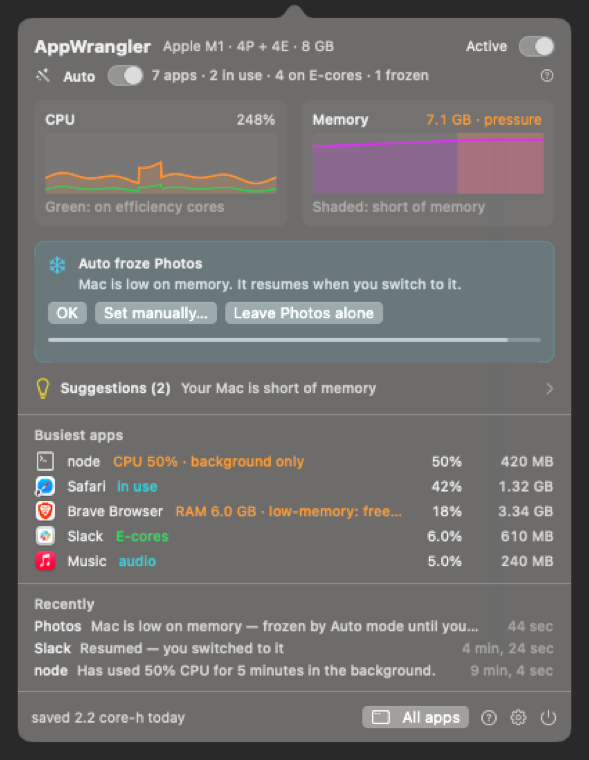
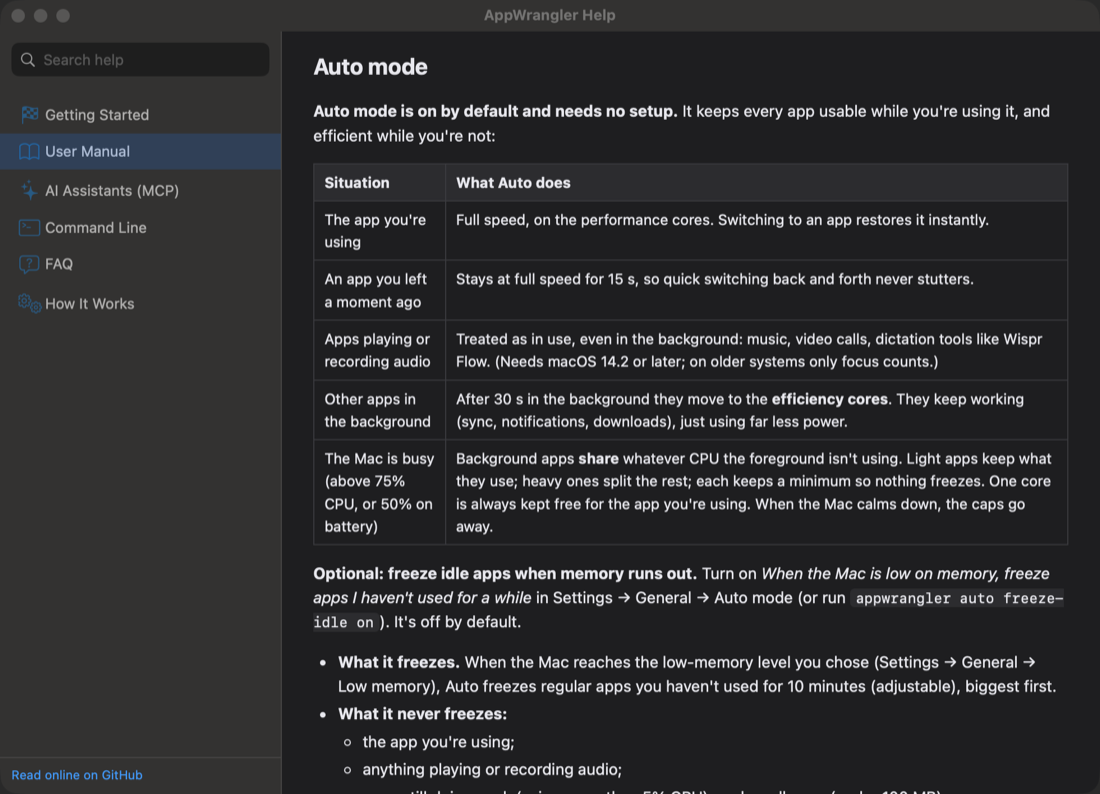
- 🪄 Works on its own. Auto mode keeps the app in front at full speed and moves everything in the background to the efficiency cores. No rules needed.
- 🧊 Rescues low-memory Macs. When memory runs short, it can freeze the apps you haven't touched for a while, and each one wakes the moment you click it. It also tells you which app is eating your RAM and what to do about it.
- 🎛 Puts you in charge when you want it. Per-app CPU limits, efficiency cores and memory limits, with conditions such as "only on battery". You can also ask Claude to tune your Mac for you.
Free and open source (GPL-2.0), for macOS 13+ on Apple Silicon. It uses well under 1% of one core and never connects to the network.
brew tap intarso/appwrangler https://github.com/IntarsO/AppWrangler
brew install --cask appwrangler
Or download the zip from Releases. AppWrangler isn't notarized yet, so the first time, right-click it → Open.
What it does
| 🪄 Auto mode | On by default. The app you're using runs at full speed. Background apps move to efficiency cores, and only when your Mac is busy do they share the CPU fairly, so everything stays usable. Optionally, when memory runs out, it freezes apps you haven't used for a while, and they resume the moment you switch back. It adapts to what the Mac needs: background work runs free when there's room or you're away, apps are held sooner on battery or when hot, low-priority work like updaters is paused while you need the resources, and it learns which apps you usually use around now (kept on your Mac). |
| 🎛 CPU limit | Cap an app and all of its helper processes (Chrome tabs, Electron helpers, Safari web content…) at any share of the CPU. Optionally limit it only while it's in the background. |
| 🍃 Efficiency cores only | Move an app onto the Apple Silicon E-cores, with slower disk and network access. It stays usable while saving battery and heat. |
| 🧠 Memory limit | When an app's memory stays above your limit, get notified, or freeze, quit or force-quit it. (macOS doesn't let one app hard-cap another's memory, so AppWrangler watches and acts.) |
| 🚨 Low-memory protection | When your Mac runs short of memory, automatically freeze or quit apps you've marked as expendable, and resume them afterwards. Free memory now does it on demand. |
| ⏱ Conditions | Make any rule apply only on battery or on the charger, in Low Power Mode, when the Mac is hot, or during set hours and days. |
| 🔥 Runaway alerts | "Chrome Helper has used 150% CPU for 3 minutes" — a card in the panel and a notification with Limit, E-cores and Ignore buttons. |
| 📞 Calls and meetings | When an app records from the microphone, it gets everything it needs until the call ends, and everything else steps back; nothing touching the call is slowed or frozen. Make room for any app for 30 minutes, an hour or three from the menu bar, and mark apps Prioritized or Can wait. |
| ❄️ Freeze, quit, force quit | Suspend any app instantly and resume it later. |
| 📊 Impact | How much CPU time and energy it saved, how often your Mac ran short of memory and how much it swapped, and what AppWrangler itself cost to run. |
| 💡 Suggestions | "Brave uses more than your 8 GB of RAM — here's what to do." Concrete recommendations, each with the reason, the benefit and a one-click fix. appwrangler undo takes changes back. |
| 🤖 AI assistants (MCP) | Ask Claude or OpenAI Codex what's slowing your Mac down and have it fix it, with your OK. Set up with one command: appwrangler mcp install. |
| ⌨️ Command line & links | appwrangler suggest, show Slack, set Slack efficiency_cores=on, stats, prefs… and appwrangler:// links for Shortcuts. |
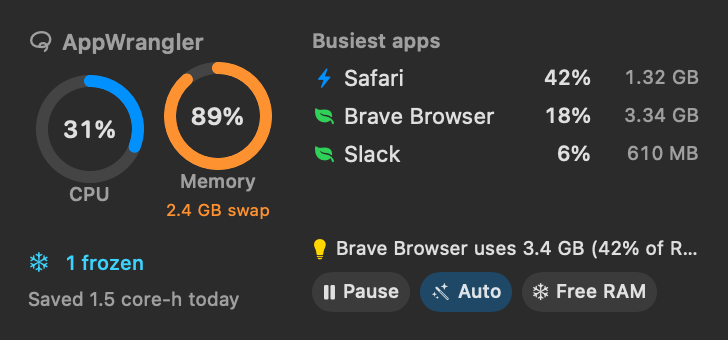
| 🖥 Desktop widget | CPU, memory, Auto mode, the busiest apps and suggestions on your desktop (macOS 14+), with Pause, Auto and Free memory buttons. |
| 📖 Built-in help | The full manual inside the app, searchable and offline, with a ? next to every setting. |
How it compares
| AppWrangler | App Tamer | AppPolice | Activity Monitor | |
|---|---|---|---|---|
| Price | Free | $14.95 (15-day trial) | Free | Free (built in) |
| Apple Silicon native | ✅ | ✅ | ❌ (2016, Intel-era) | ✅ |
| Move apps to efficiency cores | ✅ | ✅ | ❌ | ❌ |
| Per-app CPU limit | ✅ | ✅ | ✅ | ❌ |
| Per-app memory limit (notify / freeze / quit) | ✅ | ❌ | ❌ | ❌ |
| Automatic background management | ✅ Auto mode | ✅ | ❌ | ❌ |
| Freeze idle apps when memory runs low | ✅ | ❌ | ❌ | ❌ |
| AI assistants (MCP) / command line | ✅ / ✅ | ❌ / AppleScript | ❌ | ❌ |
| Open source | ✅ GPL-2.0 | ❌ | ✅ GPL-2.0 | ❌ |
| Last updated | 2026 | 2024 (2.8.4); 3.0 in beta | 2016 | with macOS |
App Tamer is a polished, long-standing commercial app, and if you already use it, it does its job well. AppWrangler is for people who want something free and open source with memory handling and AI control. Facts checked in October 2026 against each project's own pages; tell us if something has changed.
Get started
- Install with Homebrew (above), the zip from Releases, or build it with Apple's free Command Line Tools:
./build.sh --install --run. - Click the lasso icon in the menu bar. Auto mode is already working; the Auto line shows what it's doing, and Suggestions point out anything worth changing.
- Want more control? Click an app and turn on Limit CPU, Efficiency cores only or Memory limit. It applies at once and every time the app runs.
👉 Read the full Getting Started guide.
Documentation
- Getting Started: install, first limit, launch at login, uninstall
- User Manual: every feature and setting explained (also built into the app: ? → Help)
- Command-line reference
- AI assistants via MCP: Claude Desktop, Claude Code, OpenAI Codex, Agents SDK
- FAQ & Troubleshooting
- How it works: architecture, for the curious and for contributors
Built on AppPolice
AppWrangler is a fork of AppPolice by Maksym Stefanchuk (2013–2015), a menu bar app that let you throttle an app's CPU with a slider. That project inspired AppWrangler, and its source is where AppWrangler began.
The original no longer built on modern macOS and its limiter didn't work on Apple Silicon. AppWrangler is a ground-up rewrite (Swift + C) that keeps the idea and adds:
- an Apple Silicon–correct real-time CPU limiter that covers helper processes;
- efficiency-core mode;
- memory limits and low-memory protection;
- conditional rules;
- runaway detection;
- "what is this?" descriptions;
- a CLI;
- a test suite.
See NOTICE.md and the CHANGELOG for details. AppPolice 1.x limits and AppPolice 2.x rules are imported automatically.
Support the project
AppWrangler is free and always will be. If it saves your battery or your sanity, you can buy me a coffee ☕. Thank you!
Building and contributing
xcode-select --install     # Command Line Tools — full Xcode is not required
./build.sh                 # → build/AppWrangler.app
./test.sh                  # unit + integration tests
./Tests/e2e/run.sh         # end-to-end tests against the built app
Contributions are welcome — see CONTRIBUTING.md and our Code of Conduct. Please report security issues privately as described in SECURITY.md.
License
AppWrangler is free software, licensed under the GNU General Public License v2 (LICENSE), the same license as AppPolice. Original AppPolice code © 2013–2015 Maksym Stefanchuk; AppWrangler © 2026 AppWrangler contributors.




