Listed from the MCP registry; nobody on Odel publishes it.

Flow Music (fmusic)
Unofficial MCP server for Google Flow Music (Lyria): generate, remix, stem-split and download songs.
Runs on your machine from its package; the steps are below.
What it does
- Reads
- Writes
- High impact
At most: creates or changes data: records, files, settings.
What it costs
FreeOdel charges nothing per call. The publisher may charge for its own service.
Runs locally over stdio
This server isn't hosted — your MCP client launches it from a package registry. Use one of the commands below, or drop the config into your client (e.g. Claude Desktop).
Run
uvx flowmusic-cli
MCP client config
{
  "mcpServers": {
    "flow-music-fmusic": {
      "command": "uvx",
      "args": [
        "flowmusic-cli"
      ]
    }
  }
}flowmusic-cli
Make music with Google Flow Music (Lyria) from your terminal, your scripts, or your AI agent.
fmusic is a command-line client and MCP server for flowmusic.app. You sign in once with your own Google account. After that it works without a browser: you describe a song, and a few minutes later you have a WAV file plus a JSON file with its details.
mcp-name: io.github.JvanLeeuwen4/flowmusic-cli
Important
Unofficial project. It is not affiliated with, endorsed by, or supported by Google. It uses the same endpoints as the flowmusic.app website, so it can break when the site changes. You use your own account and credits. Follow the Flow Music terms and the generative AI use policy, and don't use it for spam or mass generation.
Quick start
uv tool install flowmusic-cli        # 1. install (or: pipx install flowmusic-cli)
fmusic auth login                    # 2. a browser opens once: sign in with Google
fmusic generate "dreamy synthwave, airy female vocals, 100 bpm"   # 3. make a song
Example output:
♪ take 1 (audio__create_song) Dreamy synthwave, airy female vocals, lush pads, 100 bpm
  queued "Neon Drift" 3e2b2139-… (~35s)
  ✓ rendered "Neon Drift"
⬇ ~/Music/flowmusic-cli/2026-11-04/neon-drift_3e2b2139.wav
Neon Drift  1:44  3e2b2139-2783-4171-a2b4-a51d03bc4504
continue with: fmusic chat 13001945-… "…"
What you need:
- Python 3.10+, via uv or pipx.
- Google Chrome or Edge, for the one-time sign-in.
- A Google account with Flow Music access. A Google AI subscription gives the most credits.
What you can do
| I want to… | Command |
|---|---|
| Make a song from a description | fmusic generate "folk ballad about the sea, male vocals" |
| Use my own lyrics | fmusic generate "upbeat k-pop" --lyrics lyrics.txt |
| Make an instrumental | fmusic generate "lofi beat, 80 bpm" --instrumental |
| Change a song I just made | fmusic chat <conversation_id> "make it faster, add a bridge" |
| Restyle my own audio | fmusic generate "turn this into a jazz trio" --audio demo.mp3 |
| Split a song into stems | fmusic stems <clip_id> (vocals, drums, bass, other) |
| See my songs | fmusic clips list |
| Download, rename or delete songs | fmusic clips download/rename/delete <clip_id> |
| Make looping game music | fmusic generate "cozy village theme" --instrumental --loop (more) |
| Loop a song I already have | fmusic loop <clip_id or file> (no credits) |
| Check my credits | fmusic credits |
The full reference for every command and flag is in docs/commands.md.
How generation works
Flow Music has an AI co-producer. Your prompt goes to it, and it decides what to make: often one or two takes. It rewrites your prompt into a detailed "sound prompt" and may suggest next steps. Each generation belongs to a conversation, and fmusic chat <conversation_id> "…" continues that conversation, for example to tweak, extend or remix a take.
If you want exact control without the co-producer, use the experimental --direct mode. Your prompt goes to the song model as-is, and -n sets the number of takes:
fmusic generate "minimal techno, 126 bpm, hypnotic" --direct -n 2 --title "Night Drive"
Game music: seamless loops
Lyria songs have an intro and a real ending, so looping the raw file jumps from the final chord straight back to the start. --loop fixes that:
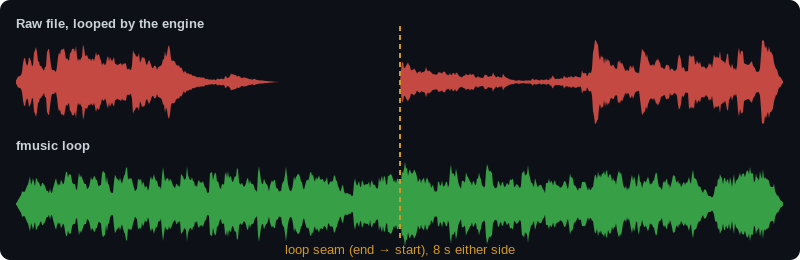
Listen to 16 seconds around the seam of a 1-minute Lyria jingle: 🔊 raw file, looped · 🔊 fmusic loop. The seam is at 0:08.
uv tool install --force "flowmusic-cli[game]"     # once: adds numpy + soundfile (no ffmpeg needed)
fmusic generate "cozy pixel-art village theme, acoustic guitar, 90 bpm" --instrumental --loop
⬇ ~/Music/flowmusic-cli/2026-11-05/peaceful-village_467c790b.wav
  ⟳ loop 0:24 → 1:44 (length 80.0s, similarity 0.96 good)
⬇ ~/Music/flowmusic-cli/2026-11-05/peaceful-village_467c790b_loop.ogg
- The prompt gets a short "loopable: steady groove, no intro, no ending" instruction.
<name>_loop.oggis cut and crossfaded so it loops cleanly when you turn looping on in any engine (Godot, Unity, web audio). Use--loop-format wav|bothfor WAV.- The full WAV keeps its intro and gets the loop points as a
smplchunk. In Godot, import it with Loop Mode: Detect From WAV to play the intro once and then loop. - The JSON gets
loop: {start_s, end_s, length_s, start_sample, end_sample, similarity, quality}. Whenqualityispoor, the seam may be audible; try the other take. - Songs you already have don't cost credits:
fmusic loop <clip_id>orfmusic loop theme.wav.
How the loop is found is described in docs/how-it-works.md.
Install
| Method | Command |
|---|---|
| uv (recommended) | uv tool install flowmusic-cli |
| pipx | pipx install flowmusic-cli |
With game loops (--loop) | uv tool install "flowmusic-cli[game]" |
| Latest from GitHub | uv tool install git+https://github.com/JvanLeeuwen4/flowmusic-cli |
| Update | uv tool upgrade flowmusic-cli |
The package installs two equivalent commands, fmusic and flowmusic.
Sign in
fmusic auth login      # opens Chrome/Edge: sign in with Google; the window closes by itself
fmusic auth status     # shows email, subscription tier, credits (exit code 0 = OK)
fmusic auth logout
- You sign in once. Tokens refresh automatically, so you won't need to sign in again unless you log out or the session is revoked.
- To use several accounts, add
--profile work(or setFMUSIC_PROFILE=work) to any command. - Can't open a browser (for example on a server)? Sign in on flowmusic.app on another machine. In the browser's DevTools, open the Network tab and copy the
Cookieheader of any__apirequest. Then run:bashfmusic auth import "sb-sb-auth-token.0=base64-…; sb-sb-auth-token.1=…"
Use it from AI agents
fmusic is built to be driven by agents. There are three ways:
1. Claude Code plugin (skill + MCP server)
/plugin marketplace add JvanLeeuwen4/flowmusic-cli
/plugin install fmusic@flowmusic-cli
Then run fmusic auth login once in a terminal. The plugin starts the MCP server through uvx, so you don't need to install anything else.
2. Any MCP client (Claude Desktop, Cursor, VS Code, Codex, …)
Add this to the client's MCP configuration. It only needs uv:
{
  "mcpServers": {
    "fmusic": { "command": "uvx", "args": ["--from", "flowmusic-cli[game]", "fmusic", "mcp", "run"] }
  }
}
If fmusic is already installed, this command writes the config for you:
fmusic mcp setup --target claude-code # or: claude-desktop, print
The tools and their parameters are listed in docs/mcp.md.
3. The CLI with --json
Every command accepts --json:
- Results go to stdout as one JSON object:
{"status":"ok","data":…}or{"status":"fail","error":{…}}. - Progress messages go to stderr.
- Exit codes are stable. See docs/troubleshooting.md.
fmusic --json generate "calm piano, 70 bpm" --instrumental | jq '.data.clips[].files'
Agents working on this repository should read AGENTS.md.
Where files go
By default, songs are saved to ~/Music/flowmusic-cli/<date>/. Use -o DIR to choose a folder; the files then go directly in it. Each clip produces:
neon-drift_3e2b2139.wav     # audio (or .m4a with --format m4a; both with --format both)
neon-drift_3e2b2139.json    # title, duration, sound prompt, lyrics, ids, URLs
neon-drift_3e2b2139.jpg     # cover art (only with --cover)
Configuration
All settings are optional environment variables.
| Variable | Default | Purpose |
|---|---|---|
FMUSIC_PROFILE | default | Which saved account to use |
FMUSIC_OUTPUT_DIR | ~/Music/flowmusic-cli | Where downloads go |
FMUSIC_HOME | OS user-data dir | Where sessions are stored |
FMUSIC_TIMEOUT | 60 | HTTP timeout in seconds |
Troubleshooting
The most common issues:
- Uploads with vocals fail with "not available in your region". In some regions, including the EU, Flow Music doesn't allow uploading tracks with vocals or removing vocals from them. Upload instrumentals instead.
Session expired(exit code 3). Runfmusic auth loginagain.- Google won't let you sign in. Make sure Chrome or Edge is installed. You can also use
fmusic auth importinstead.
Everything else is in docs/troubleshooting.md.
Documentation
| Doc | For |
|---|---|
| docs/commands.md | Every command, flag and JSON shape |
| docs/mcp.md | MCP tools and client setup |
| docs/troubleshooting.md | Errors, exit codes, fixes |
| docs/how-it-works.md | Architecture and the flowmusic.app API |
| AGENTS.md | Contributors and coding agents |
| llms.txt | A compact summary for LLMs |
Contributing
Issues and pull requests are welcome. See AGENTS.md for the layout and test commands:
uv run --extra dev pytest
The sign-in approach is inspired by gflow-cli. MIT licensed.