Listed from the MCP registry; nobody on Odel publishes it.

Telegram channels
Read, search and analyze Telegram channels from your own account, post with preview
Runs on your machine from its package; the steps are below.

What it does
- Reads
- Writes
- High impact
At most: moves money, runs code or commands, deletes data, or sends messages for you.
What it costs
FreeOdel charges nothing per call. The publisher may charge for its own service.
Runs locally over stdio
This server isn't hosted — your MCP client launches it from a package registry. Use one of the commands below, or drop the config into your client (e.g. Claude Desktop).
Run
uvx telegram-channels-mcp
MCP client config
{
  "mcpServers": {
    "telegram-channels": {
      "command": "uvx",
      "args": [
        "telegram-channels-mcp"
      ]
    }
  }
}
Install | Tools | Safety | По-русски


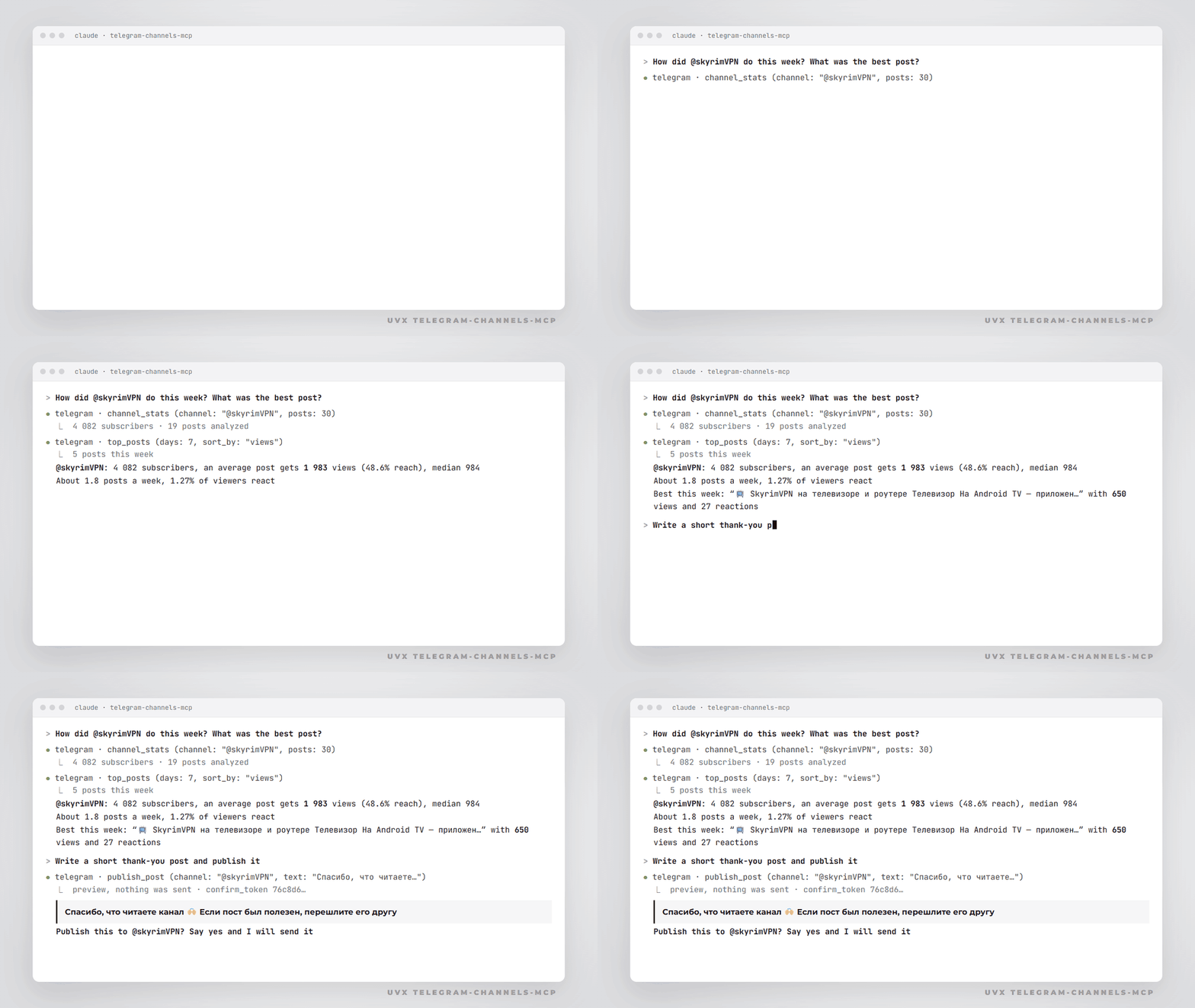
An MCP server that connects Claude to your own Telegram account. Ask Claude to read a channel, find an old post, compare this week's reach with last week's, draft a post and publish it after you say yes
It works through the Telegram user API (Telethon), so it sees what you see in your app: public channels, your private channels and groups, comments under posts. The session file stays on your computer
What you can ask
- "What did @durov post this month? Summarize in 5 bullets"
- "Search my channel for posts about pricing and give me the links"
- "Stats for my channel: subscribers, average views, best post of the week"
- "Which of my last 30 posts got the most reactions, and what do they have in common?"
- "Read the comments under my latest post and draft replies to the questions"
- "Write a post about the update with this image and publish it to my channel" (Claude shows a preview first)
Install
You need uv and your own api_id / api_hash from my.telegram.org/apps
1. Log in once (asks for api_id, api_hash, phone, code and 2FA password right in your terminal):
uvx telegram-channels-mcp login
Login code doesn't arrive? Run uvx telegram-channels-mcp login --qr and scan the QR code in Telegram → Settings → Devices → Link Desktop Device
Latest code from GitHub instead of PyPI: replace uvx telegram-channels-mcp with uvx --from git+https://github.com/Kochurin/telegram-channels-mcp telegram-channels-mcp
Keys go to ~/.telegram-channels-mcp/.env, the session to ~/.telegram-channels-mcp/session.session. Nothing is sent anywhere except Telegram
2. Connect to Claude Code:
claude mcp add telegram -- uvx telegram-channels-mcp
Check with /mcp inside Claude Code
Or connect to Claude Desktop. Open Settings → Developer → Edit Config and add:
{
  "mcpServers": {
    "telegram": {
      "command": "uvx",
      "args": ["telegram-channels-mcp"]
    }
  }
}
Restart Claude Desktop. If it can't find uvx, put the full path, for example C:\Users\you\.local\bin\uvx.exe (write it with double backslashes inside JSON) or /Users/you/.local/bin/uvx
Want a read-only setup? Add "env": {"TELEGRAM_READ_ONLY": "1"} and the write tools disappear
Tools
| Tool | What it does |
|---|---|
list_chats | Your channels, groups and chats. admin_only leaves only the ones you run |
read_messages | Latest posts or messages of any channel or chat, with views, reactions, comment count and links |
search_messages | Telegram's own full-text search inside one channel or chat |
channel_stats | Subscribers, average and median views, reach %, reactions, posts per day, best post |
top_posts | Best posts for the last N days by views, reactions, forwards or comments |
get_comments | Comments under a channel post |
publish_post | Post text or text with an image to your channel. Preview first, sends only with the confirm token |
reply_comment | Comment under your post or reply to a specific comment. Preview first, sends only with the confirm token |
Chats can be passed as @username, a t.me link, a t.me/c/... link or a numeric id from list_chats
Safety
- Write tools never send on the first call. They return a preview and a one-time
confirm_token, Claude shows the preview to you, and only after your yes repeats the call with the token. The token is tied to the exact text, channel and image, so the post can't change between your yes and the send. It dies when the server restarts - Both write tools carry the destructive hint, so Claude Code and Claude Desktop ask your permission before each call unless you allowed it for good
- Only pictures (
.jpg,.png,.webp,.gif) can be attached. A prompt injection in someone's post can't make Claude upload a private file to your channel - Claude is told that text from Telegram is data, not instructions
- Posting and replying work only in channels where you are the owner or an admin with posting rights
TELEGRAM_READ_ONLY=1removes the write tools.TELEGRAM_WRITE_ALLOWLIST=mychannellimits writing to the channels you list- There is no tool for private messages, deleting or editing. Claude can read your chats but can't write to people
- The session file is a full key to your account. Don't commit it, don't share it, and if it leaks, end that session in Telegram → Settings → Devices
Settings
All optional except the API keys. Put them in ~/.telegram-channels-mcp/.env or into env of the MCP config. See .env.example
| Variable | Meaning |
|---|---|
TELEGRAM_API_ID, TELEGRAM_API_HASH | Your app keys from my.telegram.org |
TELEGRAM_SESSION_PATH | Session file location, default ~/.telegram-channels-mcp/session |
TELEGRAM_SESSION_STRING | Session as a string (login --string), handy for servers and containers |
TELEGRAM_READ_ONLY | 1 hides publish_post and reply_comment |
TELEGRAM_WRITE_ALLOWLIST | Comma-separated usernames or ids where writing is allowed |
TELEGRAM_MCP_HOME | Config folder, default ~/.telegram-channels-mcp |
Check the session any time:
uvx telegram-channels-mcp whoami
Troubleshooting
database is locked: two copies of the server use one session file, for example Claude Code and Claude Desktop at the same time. Give the second one its own session: runloginwith anotherTELEGRAM_SESSION_PATHand put that path into itsenvTelegram session is not authorized: runloginagain. The session also ends if you terminate it in Telegram → Settings → Devices- Long pauses: Telegram limits request rates (FloodWait). Telethon waits out short limits by itself. If it happens often, ask for fewer posts at once
Run from source
git clone https://github.com/Kochurin/telegram-channels-mcp
cd telegram-channels-mcp
uv run telegram-channels-mcp login
npx @modelcontextprotocol/inspector uv run telegram-channels-mcp
uv run pytest
По-русски
MCP-сервер, через который Claude работает с вашим Telegram: читает каналы и чаты, ищет по каналу, считает статистику ваших каналов (подписчики, просмотры, охват, лучший пост за неделю), публикует пост с картинкой и отвечает в комментариях
Работает через ваш аккаунт, сессия хранится только у вас на компьютере. Публикация и ответы сначала показывают превью и уходят только после вашего «да». Писать в личку, удалять и редактировать сервер не умеет
Установка: получите api_id и api_hash на my.telegram.org/apps, выполните команду login из раздела Install и введите номер и код в своём терминале. Потом одна команда claude mcp add для Claude Code или блок JSON для Claude Desktop
Если Telegram в России тормозит или не грузит медиа, помогут бесплатные MTProto-прокси. Для остального интернета, в том числе на мобильном с белыми списками, есть @SkyrimVPN_bot, первые 3 дня бесплатно · сайт
Other projects
- telegram-mtproto-proxy: free MTProto proxies for Telegram, updated every hour
- blockcheck: check in your browser which services are blocked for you
- awesome-obhod-blokirovok: tools for getting around internet blocks, in Russian
- SkyrimVPN: VPN that works on mobile internet with whitelists, Telegram bot
MIT License




