Listed from the MCP registry; nobody on Odel publishes it.
Is this yours? Claim it
agent-bom
AI supply-chain BOM: agents, MCP servers, packages and recorded reach. Scan and investigate via MCP.
One address for any MCP client. You sign in at keycloak-production-c86c.up.railway.app once, after adding it.
What it does
- Reads
- Writes
- High impact
At most: only reads or looks up information.
What it costs
FreeOdel charges nothing per call. The publisher may charge for its own service.
What it asks for at sign-in
| Access to | Read | Change |
|---|---|---|
| Read |
From the sign-in at keycloak-production-c86c.up.railway.app, as the endpoint publishes it. You approve it there.
Tools
None listed · checked 15 Nov 2026Odel could not list its tools without signing in.
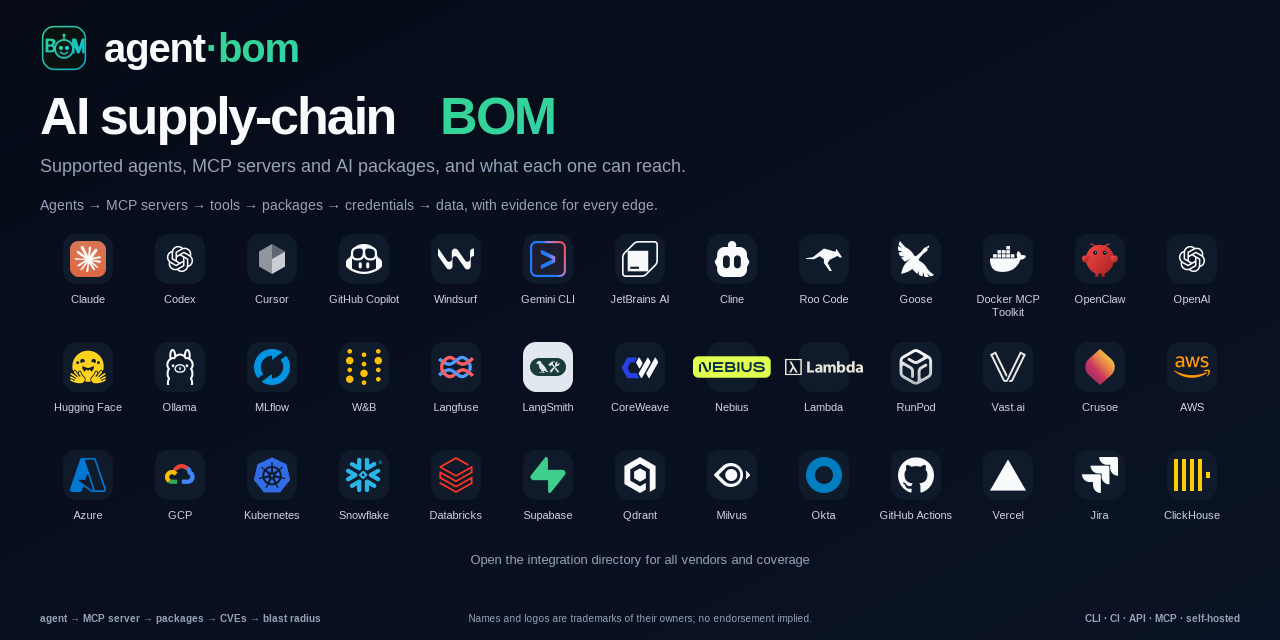





AI supply-chain BOM: supported agents, MCP servers and AI packages, and what each one can reach.
agent-bom maps the chain your AI tools create, agent → MCP server → tool → package → credential, and what each link can reach in code, cloud and data. For AppSec, platform and AI teams who run Claude Code, Cursor, Codex or any MCP client: findings are ranked by that reach on one graph that runs on your machine or your own infrastructure. Local scans need no account.
Quick start · Start by role · Try in browser · Laptop → team → org · Product tour · Docs
Quick start
From the repository you want to inspect, with uv installed:
uvx agent-bom scan . -f html -o agent-bom-report.html
Open agent-bom-report.html for inventory, findings and fix guidance. Run it
again later to see what changed. No MCP configuration in the project? Package
findings still apply. To explore the same chain as a graph, see
open the sample graph.
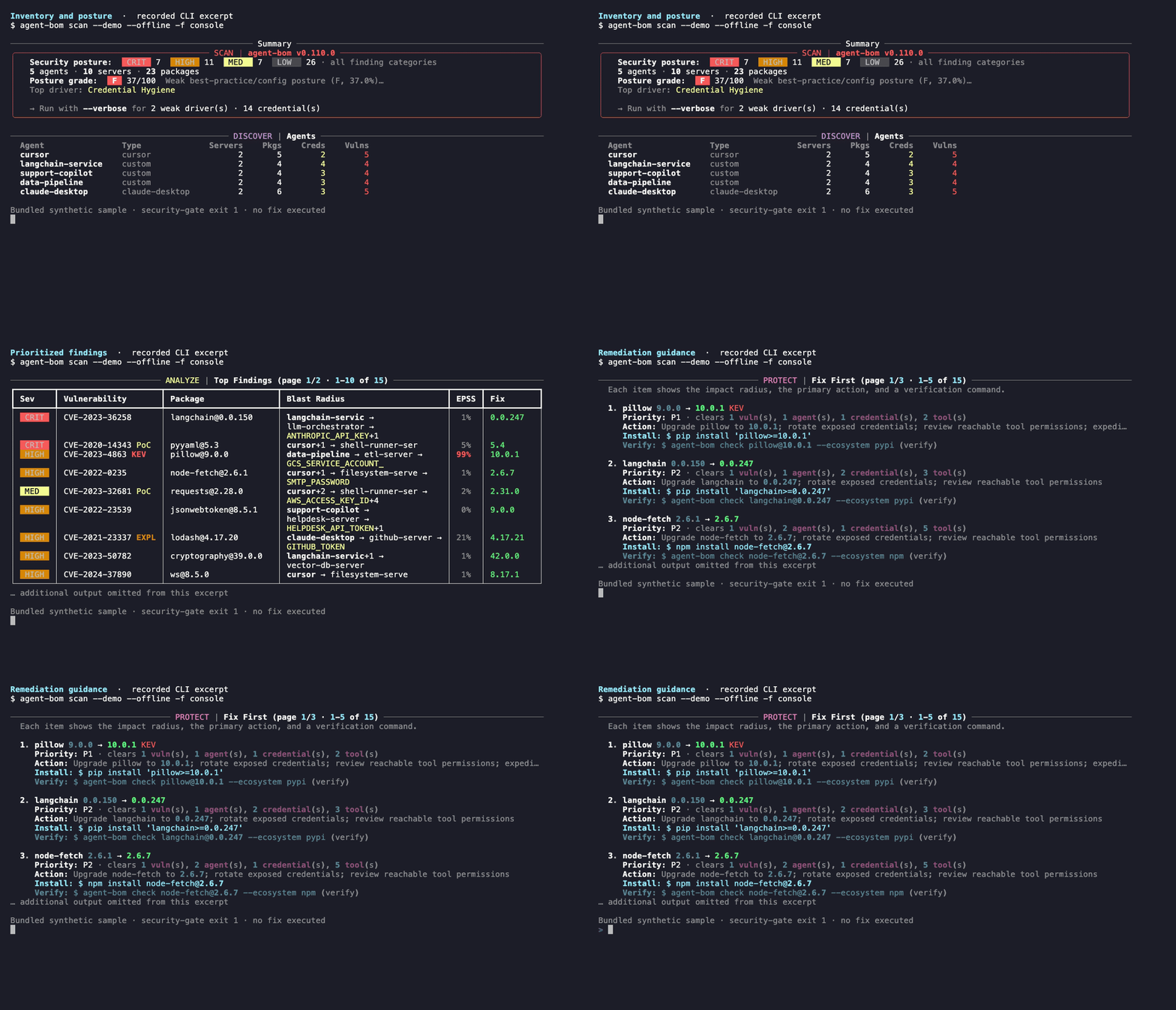
No project handy? uvx agent-bom scan --demo --offline scans a bundled sample.
Exit 1 is expected there: the sample trips the security gate. Elsewhere, a
non-zero exit can mean a security gate or incomplete assessment; inspect the
report and coverage (exit codes,
first-run guide).
What the scan reads and what it does not establish
The scan stays inside this repository: packages, MCP configuration, secrets and personal data, skills and IaC. It does not read agent configuration elsewhere on the machine. Missing evidence is reported as partial, not clean. See what a scan does and does not establish.
From laptop to team to org
- On your laptop:
uvx agent-bom scan .for findings with fixes and a delta on every rescan;claude mcp add agent-bom -- uvx agent-bom mcp serverto use agent-bom as a tool inside your coding agent (MCP server, plugins). - In your team:
uses: koda-ai-studio/agent-bom@v0on pull requests and a weeklyschedule:for a PR gate with a findings comment, SARIF in code scanning and a weekly rescan that catches new CVEs in unchanged code (GitHub Action). - Across your org:
agent-bom uplocally, then Docker Compose or the Helm chart fromoci://ghcr.io/koda-ai-studio/charts/agent-bomfor retained scans, one graph of agents, MCP servers, packages and credentials, SSO and audit in your own infrastructure (self-host).
All three are free under Apache-2.0 and are adoption paths, not editions. There is no managed cloud offering today; community support runs on GitHub (deployment chooser, support model).
Why an AI supply-chain BOM
Why now. Coding agents and MCP servers give software new reach: they start local processes, load packages, hold API tokens and call tools on your behalf, often from configuration nobody reviews. Package inventories stop at the package, so nothing records which agent can use which credential through which server.
A CVE in an AI package, a poisoned tool description or an over-scoped credential matters by what the agent that loads it can reach. agent-bom records the chain, agent → MCP server → tool → package → credential → data, keeps the evidence for every edge, and ranks findings by that reach. Start with the five-minute path for your role.

Sample data. What the sample shows
What it covers
Agents and MCP servers, models and AI platforms, dependencies, code, containers and IaC, cloud and data platforms, and a runtime MCP proxy and gateway. Exports are SARIF, CycloneDX, SPDX, JSON and HTML.
Coverage by area
| Area | What you get |
|---|---|
| AI agents and MCP | Agents, MCP servers, tools and credentials from local configs and agent frameworks, linked to what they can reach. |
| Models and AI platforms | Supported OpenAI, Hugging Face, Ollama, MLflow and W&B assets, with available model provenance beside dependencies and agent context. |
| Runtime | An MCP proxy and gateway that alert on poisoned tools and injected results, or block them with --injection-mode enforce. |
| SBOM, AI-BOM and Agent-BOM | Software SBOMs in CycloneDX or SPDX. CycloneDX AI components carry collected model metadata. Native agent-bom JSON connects agents, MCP servers, tools, credential references and packages. |
| Dependencies | Lockfiles and manifests across Python, JavaScript, Go, Java, .NET, Rust and more, matched against OSV, GitHub advisories and NVD with KEV and EPSS. |
| Code | Findings imported from any SARIF producer, plus native analysis of AI code (prompt-injection sinks, guardrails, tool exposure) and whether your code reaches the vulnerable function. |
| Containers and IaC | Images scanned in bounded memory and time; Dockerfile, Terraform, Kubernetes, Helm and compose risks with exact lines in SARIF. |
| Cloud and data platforms | Read-only collection from AWS, Azure, GCP, Kubernetes, Databricks and Snowflake, with provider-specific posture checks and graph context. Per-lane rule counts are generated from code in the capability matrix. |
| GPU and AI infrastructure | AI workloads on CoreWeave, Nebius, Lambda, RunPod, Vast.ai and Crusoe; GPU containers and Kubernetes GPU nodes. Collection depth varies by provider. |
Findings map to OWASP LLM Top 10, OWASP Agentic Top 10, OWASP MCP Top 10, MITRE ATLAS, EU AI Act and NIST AI RMF.
Generate a BOM from a project, or inspect an agent inventory with sample data:
agent-bom scan --project . -f cyclonedx -o sbom.cdx.json
agent-bom scan --project . -f spdx -o sbom.spdx.json
agent-bom scan --demo --offline -f json -o agent-bom.json
Model metadata appears when the source supplies it.
All supported sources and evidence destinations, by category
| Area | Integrations |
|---|---|
| AI clients + IDEs | Claude, Codex, Cursor, GitHub Copilot, Windsurf, Cortex Code, Gemini CLI, JetBrains AI, Junie, Amazon Q, Cline, Roo Code, Continue, Zed, Goose, Snowflake CLI, Docker MCP Toolkit, Tabnine, Sourcegraph Cody, Aider, Void, Aide, Trae, Pieces, OpenClaw, mcp-cli |
| AI platforms + model hubs | OpenAI, Hugging Face, Ollama, MLflow, W&B, Langfuse, LangSmith |
| GPU + neo clouds | CoreWeave, Nebius, Lambda, RunPod, Vast.ai, Crusoe, GPU containers + K8s GPU nodes |
| Hyperscalers + Kubernetes | AWS, Azure, GCP, Kubernetes |
| Data + vector stores | Snowflake, Databricks, Supabase, Pinecone, Qdrant, Weaviate, Chroma, Milvus |
| Identity + SaaS + dev | Okta, GitHub Actions, Vercel, Microsoft Entra ID, Jira, ServiceNow, Slack, Jamf |
| Evidence out | ClickHouse, BigQuery, S3, GCS, Azure Blob, Jira tickets, Slack alerts, Vanta, Drata, OCSF syslog |
Product names and logos are trademarks of their owners, used only to identify supported evidence sources. Their use does not imply endorsement or partnership.
Investigate context and exposure
Select an agent such as Document Intake Agent, open CVE-2023-4863 (high, KEV-listed) and follow each arrow back to its source evidence. Take the proposed remediation, then rescan the changed pin and compare snapshots; the comparison verifies the changed input, not a running deployment.
Am I affected by a new CVE?
Match it against stored scans, including CVEs only NVD has published. You get affected assets with their patch target, possibly affected distro packages to verify, and the blast radius (walkthrough):
agent-bom db update                                   # refresh OSV, NVD, KEV and EPSS
agent-bom db advisory affected CVE-2026-109618        # most recent saved scan
agent-bom db advisory affected CVE-2026-109618 --report <scan-report.json> --format json   # a JSON report written by an earlier scan
From an MCP client, the read-only affected_assets tool (graph and full
profiles) takes the same advisory_id. In CI, run uvx agent-bom db update
before the GitHub Action step (its auto-update-db default only refreshes
feeds that missed the daily freshness target). To explain a finding to your team,
create an impact brief.
More sample graphs: package evidence, repository and cloud (3)
One package, three parsed inputs. A repository pin, an image SBOM and a
modeled Kubernetes workload resolve to one pillow@9.0.0.

Repository. Source imports, deployment configuration and CI traced to a published container and its vulnerable packages:

Cloud. A public API gateway into a vulnerable workload, its role and a PII bucket:

Sample data. Context, correlation and reachability · Run the reference lab · Reproduce these screenshots
Open the sample graph
Try the demo in your browser on labelled sample data, with no install. To open the same graph locally:
pip install 'agent-bom[ui]==0.115.4'
agent-bom quickstart --run --offline
Run the server command it prints, then open its graph URL, or add --open to
start the server and open the graph in one step. Offline quickstart
skips package-CVE lookup, so zero CVEs is not a clean verdict; use the bundled
demo for advisory-backed findings or populate the advisory database.
Self-host in your environment
Your infrastructure, identity, database and audit boundary. Start a local pilot from a published release checkout:
git clone --depth 1 --branch v0.115.4 https://github.com/koda-ai-studio/agent-bom.git && cd agent-bom
AGENT_BOM_IMAGE_TAG=0.115.4 docker compose up -d
Open http://localhost:3000, then Connections or New Scan. The pilot binds to loopback and retains state in a Docker volume. Before sharing access, move to the authenticated deployment.
Deployment options (5): CLI, local dashboard, Compose pilot, authenticated host, Helm
| Deployment | First step | Result and next step |
|---|---|---|
| CLI or CI job | agent-bom scan --demo --offline -o report.json | Labelled sample findings in JSON; scan your own inventory or configure a CI gate. |
| Local API and dashboard | agent-bom quickstart --run --offline | Sample report and persisted graph; run the printed loopback server command and open its graph URL. |
| Docker Compose pilot | Release checkout and docker compose up -d above | Loopback API/UI with retained state; connect a read-only source and run a scan. |
| Authenticated single host | Platform Compose setup | Login-gated API/UI and PostgreSQL; configure TLS, identity, secrets and backups before sharing access. |
| Kubernetes / EKS | Helm deployment | Control plane in your cluster; provision role-separated secrets and storage, then validate authentication and health. |
For cloud accounts, add a scoped read-only connection, verify access, then start a scan.
Operating modes (5): scan, fleet inventory, MCP server, runtime proxy, runtime gateway
Modes can be combined:
| Mode | What it does | Start |
|---|---|---|
| Scan | Collect inventory and findings on demand or in CI; retain reports and graph evidence. | First run |
| Fleet inventory | Endpoints or collectors sync inventory to the control plane; review last-seen evidence. | Fleet sync |
| MCP server | agent-bom mcp server exposes security tools to an MCP client. | Tool profiles |
| Runtime proxy | Wrap selected local stdio MCP servers to inspect tool calls; verify decisions in the audit trail. | Proxy setup |
| Runtime gateway | Relay selected remote MCP traffic through a shared service; validate client auth, policy and upstream connectivity. | Gateway setup |
Console terms: Sources, Assets, Findings, Issues
- Sources describes recorded evidence: local scans, fleet inventory, cluster scans, CI/CD, imported evidence, or mixed sources. It does not select a deployment type or enable runtime enforcement. Demo data marks labelled sample inventory.
- Assets are inventoried resources; Findings are detections on those resources; Issues group related findings for investigation or remediation.
- Affected assets counts distinct resources only when that count is available. One finding may belong to several security areas, so area counts must not be summed. Repeated observations across scans are shown separately.
Preview and community deployment paths have separate support boundaries.
Docker pilot guide · Compose with PostgreSQL · Choose a deployment · Enterprise controls · Connect cloud accounts
Integrations
Claude Code and Codex plugins: ask your coding agent instead of reading a report
In Claude Code:
/plugin marketplace add koda-ai-studio/agent-bom
/plugin install agent-bom@agent-bom
In Codex, run codex plugin marketplace add koda-ai-studio/agent-bom, then
install agent-bom-local from the Plugins Directory. Both plugins run the
pinned agent-bom release locally and send nothing to an agent-bom service.
| Ask | Skill |
|---|---|
| "Is this project safe to ship?" | checkup: one verdict and the three fixes that matter most |
| "Am I affected by CVE-2025-29927?" | affected: affected or not found in what was scanned, never "safe" |
| "What have my agents been doing?" | activity: MCP usage, unused servers, risky commands from local session history |
| "Are my agent settings too permissive?" | audit-mcp and audit-skills |
| "Give me an AI-BOM" | bom: CycloneDX or SPDX for this machine, a project, an image or a cloud account |
Add /plugin install agent-bom-guard@agent-bom to block malicious and
typosquatted package installs before Claude runs them.
All skills and their permissions ·
Guard details
Work with your existing tools
Use CLI or GitHub Action, REST API, or MCP; export SARIF, CycloneDX, SPDX, JSON and HTML. Cloud connectors and fleet sync collect inventory; proxy and gateway deployments add runtime evidence.
For other MCP clients, run agent-bom mcp server.
Start with eight focused tools in the default profile.
Choose an MCP profile for graph, cloud, runtime or audit work.
Try three investigations: affected agents, exposure receipts and a before/after scan comparison.
Import existing scanner reports without replacing their source evidence.
Check a dependency before installing it with
uvx agent-bom check requests@2.33.0 --ecosystem pypi. Add
pre-commit and CI setup for repeated checks.
Proxy, gateway and fleet · Integration capability matrix · MCP client setup · Smithery migration
Show your scan status in your own README
The GitHub Action writes a job summary with severity counts, the top findings
and their fixes, and says when a scan was partial. To link your README to your
own workflow, add a standard GitHub workflow badge (replace OWNER/REPO and the
workflow file name); the Action's badge: input also writes shields.io badge JSON:
[](https://github.com/OWNER/REPO/actions/workflows/agent-bom.yml)
Trust and evidence
Discovery uses read-only access by default. Explicit disk side-scans create temporary cloud resources. Missing evidence stays unavailable or partial; control mappings are not audit certification.
What the graphs and mappings do and do not establish
- Screenshots use sample data; what the sample shows covers which links are modeled rather than observed.
- Retained scans correlate by exact, tenant-scoped identities.
- A graph path does not prove exploitation. Credential references are names, not secret values.
- Persisted runtime, proxy and gateway activity retains source receipts and bounded time windows in the graph. Exact inventory references can bind records; unresolved identities and collection gaps remain explicit. Recorded activity does not prove execution or grant access. See the runtime evidence boundaries.
- MITRE technique associations provide investigation context, not proof of an attack. ATLAS mapping receipts retain the weakness association and source catalog hashes.
- A BOM is an inventory, not proof of safe execution or complete collection.
Measured matcher proof · Product boundaries · Permissions · Threat model · Release verification · Graph data model
Contributing and support

Start with the first PR guide
or a good first issue.
Ask in GitHub Discussions (or Discord), share feedback,
or follow the maintainer path (review owners).
Contributing · Capabilities and roadmap · Support · Report an inaccurate finding · Apache-2.0
Source version: v0.115.5 · Latest release: v0.115.4 · Changelog