
looktap
Let AI agents drive iPhone and Android devices: read the screen as text, tap, type and screenshot.
Runs on your machine from its package; the steps are below.
What it does
- Reads
- Writes
- High impact
Not assessed yet.
What it costs
FreeOdel charges nothing per call. The publisher may charge for its own service.
Runs locally over stdio
This server isn't hosted — your MCP client launches it from a package registry. Use one of the commands below, or drop the config into your client (e.g. Claude Desktop).
Run
npx -y @looktap/mcp
MCP client config
{
  "mcpServers": {
    "looktap": {
      "command": "npx",
      "args": [
        "-y",
        "@looktap/mcp"
      ]
    }
  }
}
Let AI agents drive iPhone and Android devices from the shell
Read the screen, tap, type, swipe, screenshot, and read logs and crashes. No server to start and no dependencies.






Website · Quick start · Commands · For AI agents · Benchmark · Troubleshooting
looktap is a small command-line tool for driving a mobile app on an iPhone or Android device, real or simulated.
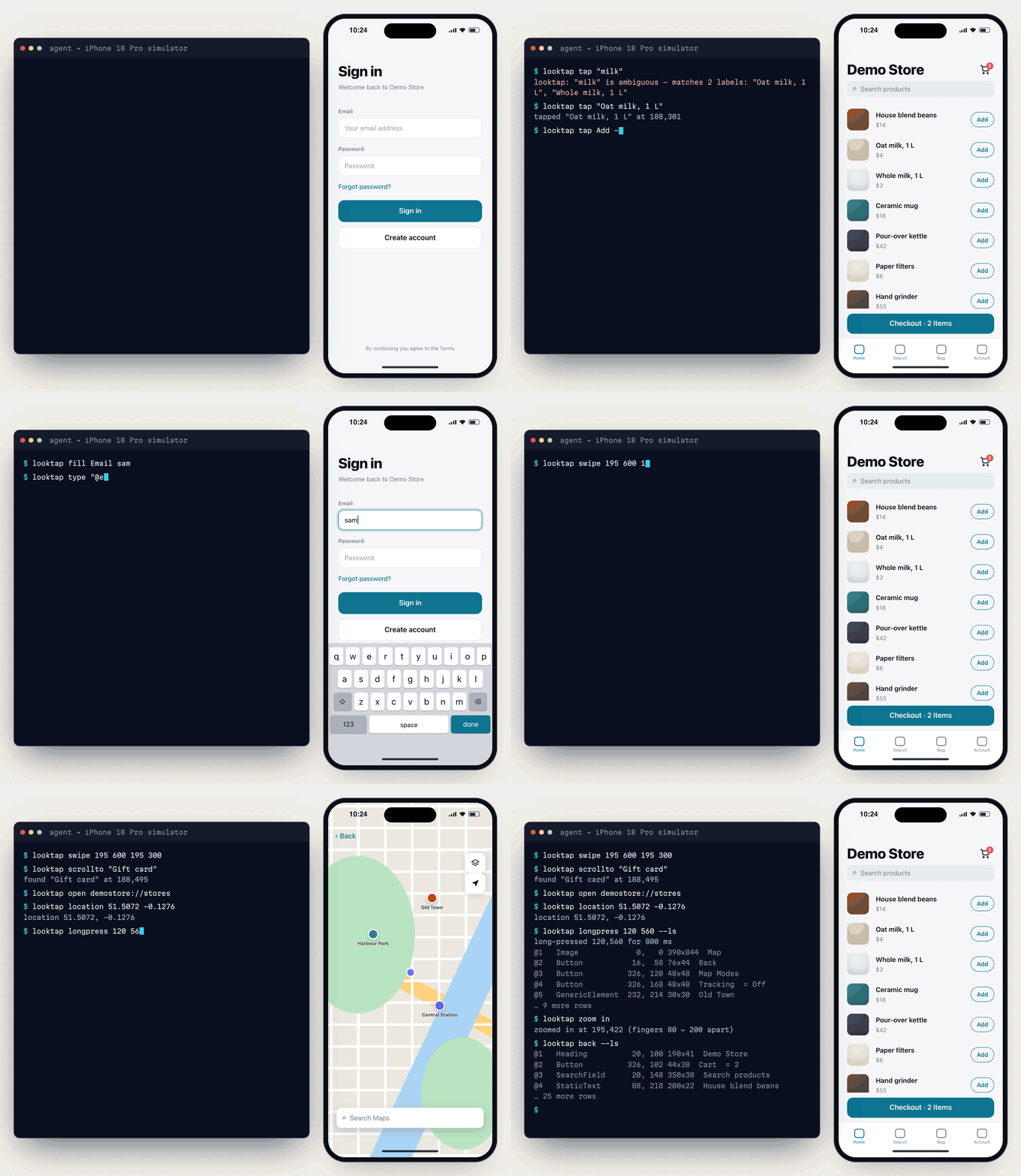
Each command does one thing and prints a few lines of plain text:
That makes it a good fit for an AI coding agent (Claude Code, Cursor, Codex, opencode, …) that needs to see and use the app it's building:
- Small output. A screen read is 1–2 KB of text, not 50–120 KB of XML. A screenshot is a file path, not 200 KB of base64.
- One call per step. Add
--lsto an action and its result comes back in the same call. - Fast. Taps take about 0.1 s and screen reads 0.1–0.2 s on both platforms, with no session to set up first.
It's just as handy by hand, or in a shell script for screenshot sweeps and bug repros.
Contents
- What you get: everything looktap does today
- looktap vs Appium: the measured comparison
- Quick start: install, boot a device, first commands
- 🤖 Kickstart with your AI agent: one prompt and your agent takes it from there
- Requirements
- How it works
- Examples: tap by label, forms, waiting, scrolling, debugging, bursts and video, several devices
- For AI agents
- Commands · Options & config
- Troubleshooting · FAQ · Roadmap
- Safety rules · Contributing · License
What you get
| What you get | |
|---|---|
| 👀 | Read the screen as text. ls lists what's visible, one row per element: @ref type x,y w×h label = value. It reads native screens, React Native screens and web content (Safari, in-app browsers, web views) |
| 👆 | Tap by label. Exact match first, then a prefix or substring that names exactly one label. An ambiguous match is an error, never a guess. Also by @ref from the last ls, or by x y coordinates |
| ⌨️ | Type and fill. type into the focused field, fill to clear a field and type, key return|escape|delete|tab|…, and hidekb, which never reports success while the keyboard is still up |
| 🧭 | Navigate and gesture. swipe, scrollto <label>, back, open <deep link>, launch <app>, longpress, and two-finger zoom in|out |
| ⏱️ | Wait instead of sleep. wait "Welcome", wait "Loading" --gone. Actions already wait up to 3 s for their target |
| 📸 | Screenshots. shot saves a PNG and prints its path, with --scale 0.5 for fewer image tokens. On Android emulators it also captures FLAG_SECURE screens |
| 🎞️ | Burst capture and video. burst saves a frame each time the screen changes, to catch spinners, toasts and transitions. record start … record stop saves an MP4 of everything in between |
| 🪵 | Logs. logs shows the app's log since your last look. --errors and --grep narrow it, and on iOS Apple-framework chatter is filtered out |
| 💥 | Crashes. crashes reads iOS crash reports (exception, reason, top frames) and Android crashes, ANRs and low-memory kills, so "the app vanished" always comes with a reason |
| | Biometrics. bio match|nomatch simulates Face ID or a fingerprint |
| 🌍 | Simulated conditions. location <lat> <lon>, appearance dark, textsize xxl (Dynamic Type / font scale), statusbar clean (9:41 for screenshots), rotate landscape (ls, taps and screenshots follow the turned screen), Android network offline, and iOS push notifications |
| 🧹 | App state for repros. install a build, reset an app to a fresh install, uninstall, and permission grant|revoke|reset camera|location|photos|…, with the same names on both platforms |
| 🤖 | Built for agents. --ls on any action, run to batch steps, --json, and a Claude Code skill you install with one command |
| 🧩 | Nothing to install on simulators, emulators or Android phones, no server to run, no npm dependencies. The helpers start on first use. A real iPhone gets a small test runner, built for you |
| ⚠️ | Honest failures. A tap that's covered by a toast prints a warning, a stale @ref is an error rather than a wrong tap, a system prompt over the app is reported as one, and an app that dies is named the moment looktap notices |
looktap vs Appium
Measured on the same devices (iPhone 14 simulator, Pixel 9a emulator), 10 runs per action, median time. Full method, raw data and the earlier runs are in BENCHMARK.md.
| looktap | Appium (raw HTTP) | Appium MCP | |
|---|---|---|---|
| Setup before the first command | 0.04–0.13 s | 7–17 s | 23–39 s |
| Read the screen (Android · iOS) | 131 ms · 202 ms | 114 ms · 915 ms | 1.87 s · 1.21 s |
| …and its size | ~1 KB of text | 41–51 KB XML | 101–124 KB XML |
| Tap by label (Android · iOS) | 112 ms · 121 ms, 1 call | 77 ms · 1.51 s, 2 calls | 344 ms · 1.63 s, 2 calls |
| Fill a field (Android · iOS) | 792 ms · 782 ms | 1.32 s · 2.33 s | 513 ms · 2.51 s |
| Screenshot | ~130 ms, a ~70 B file path | 130 ms–1.7 s, 78–221 KB base64 | 165–339 ms, 210–225 KB inline |
| Restart the app (Android · iOS) | 186 ms · 513 ms | 753 ms · 4.26 s | 735 ms · 4.81 s |
| Failed operations (of 123 per platform) | 2 · 0¹ | 10 · 10 | 12 · 10 |
| Biometrics | ✓ | ✓ | ✗ no tool |
| Logs and crash reports | ✓ | via separate APIs | ✗ |
¹ Not counting hidekb on the iOS 26 search keyboard, which has no key to dismiss it: every tool fails there,
and looktap is the only one that reports the failure instead of claiming success.
Raw Appium is slightly faster at reading and tapping on Android, because its helper app answers in-process. But it returns about 50× more bytes per read and needs two calls per tap.
Where Appium is still the better choice: it runs on real iOS devices, plugs into existing WebDriver test suites and CI grids, and supports many more platforms. looktap drives iOS simulators (not iPhones) and Android emulators and devices, and it isn't a test framework.
Quick start
# 1. install (Node 18+; zero dependencies)
npm install -g @looktap/cli

# 2. check the toolchain
looktap doctor

# 3. boot a device: an iOS simulator…
xcrun simctl boot "iPhone 16" && open -a Simulator
#    …or an Android emulator
$ANDROID_HOME/emulator/emulator -avd Pixel_9a &

# 4. drive it
looktap launch com.apple.Preferences --ls     # (Android: com.android.settings)
looktap tap "General" --ls
looktap shot general
Or try it without installing anything: npx @looktap/cli doctor (any command works the same way).
To teach Claude Code how to use looktap, install the plugin. In Claude Code:
/plugin install looktap --marketplace lakpriya1s/looktap
It adds the looktap skill. Then run /looktap:setup: it installs the CLI, checks your
toolchain and gets a device ready. Or copy the skill in by hand:
looktap skill --install # → ~/.claude/skills/looktap/SKILL.md
Other ways to install
The latest from GitHub, ahead of the npm release:
npm install -g github:lakpriya1s/looktap
From a checkout:
git clone https://github.com/lakpriya1s/looktap.git
cd looktap && npm install -g .
As a tarball you can hand to someone (it includes both prebuilt helpers):
npm pack                                  # → looktap-cli-<version>.tgz
npm install -g looktap-cli-<version>.tgz  # on their machine
Without installing: node bin/looktap.js --help.
Uninstall: npm uninstall -g @looktap/cli && rm -rf ~/.looktap.
🤖 Kickstart with your AI agent
Paste this into your AI coding agent (Claude Code, Cursor, Codex, opencode, …) and let it set things up and start using the app with you:
Install looktap (https://github.com/lakpriya1s/looktap) so you can drive
my app in the iOS simulator / Android emulator:

1. Run `npm install -g @looktap/cli`, then `looktap doctor`,
   and fix anything it reports (boot a simulator or emulator, or connect a device, if none is up).
2. Run `looktap skill --install` and read the skill it installs.
3. Find my app's bundle id / package name in this repo and write a
   looktap.config.json with it at the repo root.
4. Launch the app with `looktap launch --ls` and tell me what screen it's on.

Rules: never type real credentials, OTPs or card numbers. When the app needs a
sign-in, stop and let me do it, then continue from there.
Requirements
| For | You need |
|---|---|
| Everything | Node 18+ (node -v) |
| iOS | A Mac with Xcode (command-line tools selected) and at least one simulator runtime. Apple Silicon or Intel |
| Android | Android SDK platform-tools (adb on your PATH), and an emulator (AVD) or a USB-debugging device |
| A real iPhone or iPad | The iOS row, plus an Apple ID signed in to Xcode (a free one works) and the device paired with the Mac, with Developer Mode on. See Using a real iPhone |
Tested with Xcode 26 / iOS 26 (iPhone 14 simulator) and Android 16 / API 36 (Pixel 9a emulator).
How it works
looktap ships its own small helper for each platform. Nothing is installed on simulators, emulators or Android devices. A real iPhone or iPad is the exception: it gets a small test runner (Using a real iPhone).
| iOS simulator | Android emulator / device | |
|---|---|---|
| Read the screen | looktap-sim, a macOS helper that reads the simulator's accessibility tree through Apple's simulator frameworks (CoreSimulator, AccessibilityPlatformTranslation). Web content is found by probing the screen | looktap-server.jar, an 8 KB helper pushed to /data/local/tmp and run with app_process. It keeps one UiAutomation connection open |
| Tap, type, swipe, keys | The same helper, as touch and keyboard events through SimulatorKit | The same helper, as input events through UiAutomation |
Screenshots, burst | The simulator display's framebuffer, read in-process | Emulators: the emulator's gRPC API, which also gets past FLAG_SECURE. Devices: the helper |
Video (record) | simctl io recordVideo | screenrecord on the device |
Orientation (rotate) | The orientation event Simulator.app sends to the guest. Coordinates and frames are converted, so everything looktap prints and takes is as the user sees the screen | settings (user rotation, auto-rotate off). The helper reports the turned display size |
| Logs, crashes | log show inside the simulator, and its .ips crash reports | logcat (by app uid), the crash buffer, and dumpsys activity exit-info |
| Deep links, launch, biometrics | xcrun simctl | adb and the emulator console |
Each helper starts on first use, keeps running in the background, and is replaced automatically when looktap is
upgraded. looktap setup starts it ahead of time, and looktap teardown stops it. The CLI talks to it over a
local socket, using JSON lines.
iOS: private frameworks and Xcode versions
The iOS helper uses Apple's private simulator frameworks, the same ones idb uses. They can change between Xcode
releases. looktap doctor checks they're present and shows which input path applies:
- Xcode 26 and earlier (CoreSimulator below 1155.4): touches and keys go through SimulatorKit's HID client ("indigo"). Tested.
- Xcode 27 (CoreSimulator 1155.4 and later): touches and keys go as XPC messages to the simulator's
dtuhiddservice ("dtuhid"), the same way idb does it. Implemented, not yet tested against Xcode 27. Reading the screen and screenshots don't depend on it.
LOOKTAP_IOS_HID=indigo|dtuhid overrides the choice. It applies when the helper starts, so run
looktap teardown first.
Using a real iPhone
A simulator can be driven from the Mac with nothing installed in it; a real iPhone or iPad can't. So the first
command aimed at one builds a small XCUITest runner (native/ios-device), signs it with your Apple ID, and installs
it. It reads the screen and taps, types and swipes through XCUITest, and looktap reaches it through usbmuxd, over
USB or Wi-Fi. Every looktap user signs the runner with their own Apple ID. A free one is enough; the paid
Developer Program isn't needed.
Once per Mac and device:
- In Xcode → Settings → Accounts, sign in with your Apple ID. That gives you a "Personal Team".
- Pair the device with the Mac (connect it with a cable once and tap Trust; Wi-Fi works after that), and turn on Developer Mode on it: Settings → Privacy & Security → Developer Mode.
- Unlock the device and run any command against it, for example
looktap -d <hardware UDID> ls(looktap deviceslists the UDID). The first run builds the runner, which takes about a minute. - With a free Apple ID, the device asks you to trust the developer the first time: Settings → General → VPN & Device Management → your Apple ID → Trust. Then run the command again.
If Xcode is signed in to more than one team, choose the one to sign with:
LOOKTAP_TEAM=<team id>, or {"ios": {"team": "<team id>"}} in looktap.config.json. The error message
lists your teams and their ids.
Picking the device: -d <hardware UDID> always picks it. Without -d, a paired device is used only when no
simulator or emulator is running, so nothing changes for simulator workflows.
Signing expiry: a runner signed with a free Apple ID stops launching after 7 days, and one signed with a paid team after a year. looktap reads the expiry date and builds and signs the runner again before it lapses. If iOS refuses to launch it anyway (for example, after a certificate was revoked), looktap rebuilds it once and retries. Free Apple IDs have Apple's own limits too: about 3 devices and 10 app ids per 7 days, and at most 3 apps signed by the free account installed on one device at a time. The runner counts as one, so if the device is full, looktap names the apps it found and you delete one.
What works on a device: ls, tap, longpress, type, fill, key, hidekb, swipe, scrollto,
zoom (around the screen's centre), back, wait, shot, burst (screenshots in a loop), launch, open,
rotate, appearance, install (a device .app or .ipa), uninstall and app. location, push,
statusbar, textsize, bio, record, permission, reset, logs and crashes aren't available, and say so.
A command takes about 1–1.5 s, slower than on a simulator, because XCUITest takes longer to read the screen.
The device must be unlocked while the runner starts. It keeps running until looktap teardown, or until the
device is restarted.
Android: the fallback path
If the helper can't start (for example, another tool holds UiAutomation), looktap falls back to plain adb +
uiautomator dump. That works everywhere but takes about 2.5 s per screen read. LOOKTAP_ANDROID_HELPER=0
forces that path.
Examples
Look, then act
looktap ls
@1   Button           16, 285 358x54  General
@2   Button           16, 339 358x54  Accessibility
@3   TextField        33, 773 324x38  Search  = Search
Each row shows a ref (@1), the element type, its x,y position and width×height (iOS points /
Android dp, the units tapxy and swipe take), its label, and = value for fields that hold text. Unlabelled
buttons are listed too, as (no label), so you can tap them by ref. The on-screen keyboard is a single row.
Tap by label, not by coordinates
looktap tap "Open menu"              # exact label (or identifier on iOS)
# tapped "Open menu" at 30,62
looktap tap "Messages"               # no exact match → the one label starting with it
# tapped "Messages, 2 unread" at 342,62
looktap tap "Wi"                     # matches two different labels → refuses
# looktap: "Wi" is ambiguous — matches 2 labels: "Wi-Fi", "Wi-Fi hotspot"
looktap tap --exact "Messages"       # exact only
looktap tap @7                       # row @7 of the last ls
looktap tapxy 205 874                # when ls doesn't list it at all
- A ref works only while its element is still where
lssaw it. If the screen changed,tap @7fails ("no longer on screen — run: looktap ls") rather than tapping something else. - If another element covers the tap point (a toast, a dev-warning banner, a floating bar),
tapprints a warning, because the tap probably landed on the cover instead.
Long press and pinch-zoom
looktap longpress "Photo"               # context menus, drag handles, "edit" modes (default 800 ms)
looktap longpress @4 1500               # by ref, held 1.5 s
looktap longpress 120 470               # a point, e.g. to drop a pin on a map
looktap zoom in                         # two fingers spreading at the screen centre (maps, photos, PDFs)
looktap zoom out 200 400 --scale 4      # pinch around a point; --scale is how far the fingers travel
zoom is a real two-finger gesture on both platforms. On Android it needs looktap's helper, because
adb input has no multi-touch.
Fill a form and capture its validation errors
looktap fill "Email" not-an-email
looktap fill "Name" ""               # empty: just clears the field
looktap hidekb
looktap shot profile__validation
fill finds the field by its label (on iOS also its identifier), or else the first field at or below a matching
label. It clears the field and types. On Android it also presses Enter, because React Native fields only show
validation on blur.
hidekb tries, in order:
- the keyboard's Done/Return key;
- on iOS, the ✓ on a web form's Previous/Next bar;
- a tap on plain text above the keyboard.
It checks after each. If the keyboard is still up, it exits 2 rather than reporting success.
Wait instead of sleeping, and scroll
looktap wait "Welcome"                  # until it's on screen (default up to 10 s; --wait 30)
looktap wait "Loading" --gone           # until it's gone
looktap scrollto "Privacy & Security"   # swipe until fully on screen; fails at the end of the list
looktap scrollto "General" --up
looktap swipe 200 700 200 250           # scroll down (finger moves up); optional 5th arg: ms
looktap back                            # Android: system Back · iOS: the navigation bar's back button
Debug: logs, crashes, "where did my app go?"
looktap tap "Pay"                       # something goes wrong…
looktap logs --errors                   # the app's errors since the last `logs`
# 15:41:06.700 E [com.example:api] POST /payments failed: 422 amount_too_small
looktap logs --grep payment             # everything it logged that matches
looktap app --app com.example           # is it still running?
# front: com.android.launcher3  pid 1205
# com.example: not running — if it was, check: looktap crashes
looktap crashes
# com.example (pid 14001) exited at 14:56:06.724 while in the background: LOW_MEMORY — killed by the system to free memory, not a crash
When the app dies, looktap says so. After an action, and at the next ls, looktap checks whether the
app that was in front still has its process. If not, it prints:
looktap: warning: com.example is no longer running — it crashed or was killed. See: looktap crashes com.example
- It also catches an Android app that crashed and was restarted at once, because the check is by process id.
- Switching to another app, going home, or uninstalling doesn't trigger it.
- On iOS the crash report is written up to a minute after the crash. Until then,
crashesalready shows the signal (e.g.SIGTRAP) and says the full report is coming.
Each logs call starts where the previous one ended, so a loop of act → logs only ever shows what's new.
--since 5m sets a fixed window instead.
What's in the log:
- iOS: what the app's own code logged, plus errors and faults from anything in its process. The simulator's
own noise (low-level networking, the keyboard) is hidden.
--allshows everything, Apple frameworks included. A read takes about 1–2 s. - Android: everything logcat has for the app's uid, so restarts are covered. A read takes about 0.1 s.
What crashes reports:
- iOS: each crash report as exception, reason (such as an uncaught
NSException), the crashed thread's top frames, and the path to the full.ipsreport. - Android: Java crashes, native tombstones, ANRs, and exits that leave no crash report, low-memory kills above all.
React Native: in development builds, JS console.* output and uncaught JS errors are in logs on both
platforms:
- iOS: as
[com.facebook.react.log:javascript]lines. - Android: as
ReactNativeJSlines.
A red box is also on screen, so ls reads its message and call stack.
Swift: print() writes to stdout, not to the log. Use os.Logger or NSLog for messages logs should see.
Catch a spinner, toast, or transition (burst)
Start the burst in the background, then trigger the action:
looktap burst ./frames 5 &              # 5 s: a frame each time the screen changes
looktap swipe 200 250 200 700           # pull to refresh
wait
# 61 frames, 23 distinct, in ./frames
For a video of a whole flow, record it. The recording runs in the background between the two commands:
looktap record start checkout           # → ./shots/checkout.mp4
looktap tap "Add to cart" --ls
looktap tap "Checkout" --ls
looktap record stop                     # prints the path and the length
- Android records with the device's
screenrecord: at most 3 minutes, andFLAG_SECUREscreens come out black. - iOS records with
simctl io recordVideo. A recording started in landscape is marked to play turned.
Start from a clean state: install, reset, permissions
looktap install build/MyApp.app          # iOS: a simulator build · Android: an .apk (keeps the app's data)
# installed com.example.myapp
looktap reset com.example.myapp          # as if freshly installed: data and permissions cleared
looktap permission grant location com.example.myapp    # no prompt
looktap permission revoke photos com.example.myapp     # test the "denied" path
looktap permission reset camera com.example.myapp      # it asks again on next use
looktap uninstall com.example.myapp
reset:- iOS: looktap copies the app's own bundle aside, uninstalls it and installs the copy, so documents, caches, app groups and permissions all go. The keychain survives, just as it does on a real iPhone, so an app that keeps its sign-in token there may still be signed in.
- Android:
pm clear.
- Permission names are the same on both platforms:
camera,microphone,location,location-always,photos,contacts,calendar,notifications,motion,all.- Android also takes any
android.permission.*, and acts only on permissions the app declares. Aresetalso clears "don't ask again". - The iOS simulator can't set
cameraornotifications; looktap says so.
- Android also takes any
- These commands never guess the app from the screen.
uninstall,resetandpermissiontake the app id as an argument, or from--app/looktap.config.json.
Simulated conditions: location, dark mode, text size, orientation, network, push
looktap location 51.5072 -0.1276        # GPS (Android: emulators) · `location clear` on iOS
looktap appearance dark                 # or light; no argument prints the current one
looktap textsize ax2                    # Dynamic Type / font scale: xs s m l xl xxl xxxl ax1…ax5
looktap statusbar clean                 # 9:41, full battery and Wi-Fi, for screenshots · `statusbar live`
looktap rotate landscape --ls           # or left, right, upsidedown, portrait; no argument prints it
looktap network offline                 # Android: airplane mode · `network online`
looktap push com.example.myapp "Your order has shipped"          # iOS: an alert
looktap push com.example.myapp '{"aps":{"alert":"Hi"},"orderId":7}'   # or any payload / a .json file
textsizeuses the iOS Dynamic Type sizes. On Android each size maps to the nearest font scale, from 0.8 to 2.0, the default beingl/largeon both.statusbar cleanuses iOS status-bar overrides, and Android's System UI demo mode.rotateturns the device the way Simulator's Rotate Left/Right does, or locks Android's rotation.landscapeisleft: the device turned counter-clockwise.lscoordinates, taps and screenshots follow the turned screen, so read the screen again afterwards. An app that doesn't support the orientation stays as it is, androtatesays so. On Android it leaves auto-rotate off.network offlineturns on Android's airplane mode and waits until the device has no route out. The iOS simulator shares the Mac's network, so it can't go offline or slow by itself.pushdelivers a remote notification the way APNs would. The app needs notification permission, as on a device.- A payload without
"aps"is sent as a silent (background) push carrying that data. - Android pushes can't be simulated locally. They come through Firebase (FCM), so send them from your backend or the Firebase console.
- A payload without
Biometrics
looktap bio match       # iOS: Face ID success · Android: enrolled finger 1
looktap bio nomatch     # iOS: Face ID failure · Android: unknown finger
On Android, enrol a fingerprint once first: Settings → Security → Fingerprint, using a screen-lock PIN, and touch
with looktap bio match when it asks.
Same screen on several devices
looktap devices
# ios      42E41FA7-…  iPhone 14
# ios      F9213EDC-…  iPhone 16 Pro
# android  emulator-5554

for d in 42E41FA7-EA40-45C1-8C6E-13A70BAF1FD6 F9213EDC-180D-412B-B24C-2FD69A37D3AC; do
  looktap -d $d open myapp://home
  looktap -d $d wait "Home"
  looktap -d $d shot -o shots/$d home
done
Passing both -p and -d (or exporting LOOKTAP_PLATFORM and LOOKTAP_DEVICE) makes every command about
0.2 s faster, because looktap then skips listing devices.
A repeatable screenshot sweep
#!/bin/sh
set -e
looktap launch
for route in home search messages profile settings; do
  looktap open "myapp://$route" --ls > /dev/null
  looktap shot "$route"
  looktap swipe 200 700 200 250
  looktap shot "${route}__scrolled"
done
Android screenshots of secure screens
Apps that set FLAG_SECURE (common in banking and payment apps) make normal Android screenshots come out black. On
emulators, looktap shot takes the frame from the emulator itself, which gets past that. --plain takes a normal
on-device screenshot, for example to check that a screen is secure.
For AI agents
Pick the route that fits your agent:
| Your agent | Use | Set up |
|---|---|---|
| Claude Code | The plugin: the CLI plus a skill that teaches the loop | /plugin install looktap --marketplace lakpriya1s/looktap, then /looktap:setup (details) |
| Other agents with a shell (Codex, Cursor's agent, opencode, …) | The CLI plus the skill file | looktap skill --install (or looktap skill prints it) |
| Chat apps without a shell (Claude Desktop, …) | The MCP server | npx -y @looktap/mcp (details) |
An agent spends seconds per turn, so turns matter more than milliseconds. looktap is built to save them:
-
--lson any action prints the screen once it has settled, so acting and looking take one turn instead of two:bashlooktap tap @3 --ls looktap fill "Email" a@b.co --ls -
waitinstead of guessingsleeps. After an action that loads data,--lscan return a loading skeleton, so wait for the text you expect. -
runbatches steps you already know into one call and one process. It prints each step as$ <step>, stops at the first failure, and names it:bashlooktap run 'tap General; wait About; tap About --ls' looktap run - < steps.txt # one step per line, # for comments -
logs/crashesafter a step that misbehaved. Eachlogsshows only what's new since the last one. -
ls --jsonfor structured output:{screen, elements: [{ref, label, type, x, y, w, h, value}]}. -
shot --scale 0.5costs a quarter of the image tokens when the agent needs to see the screen (layout, colours, images). Usuallylsis enough and the PNG is never opened. -
Hints when the screen isn't what it seems. When a passcode or permission prompt covers the app,
lsprints a hint rather than an empty list.
Claude Code plugin
In Claude Code, run:
/plugin install looktap --marketplace lakpriya1s/looktap
- What it adds:
- the looktap skill, which teaches Claude the look-act loop, how to pick targets, when to wait, when a screenshot is worth it, how to debug a crash, and the safety rules;
/looktap:setup, which gets the machine ready: it installs the CLI (asking first), runslooktap doctorand explains each fix, offers to boot a simulator or emulator, walks you through a real iPhone's one-time steps, and finishes with a workingls. Addios,androidoriphoneto set up just that.
- What it doesn't install: Xcode, the Android SDK and the Apple ID sign-in are yours to do;
/looktap:setuptells you exactly what's missing. - What it costs: about 150 tokens per session for the skill's description, and about 4.5k tokens each time Claude loads the skill.
- Staying current: every push to this repo is a new plugin version. Claude Code doesn't auto-update
third-party plugins unless you turn it on (
/plugin→ Marketplaces → looktap → Enable auto-update); otherwise run/plugin marketplace update looktapnow and then. - The CLI: the skill runs
looktapcommands. Install them withnpm install -g @looktap/cli, or the skill falls back tonpx @looktap/cli. - No MCP server inside, on purpose: with a shell, the CLI and the skill do the same job with fewer tokens, and
an MCP server would add its 16 tool definitions to every session. Add
@looktap/mcpseparately if you want it anyway.
MCP server, for clients without a shell
Agents with a shell (Claude Code, Codex, Cursor's agent, …) are best served by the CLI and the skill above.
For chat apps and other clients without a shell, such as Claude Desktop, looktap is also an MCP server,
published as @looktap/mcp and listed in the
MCP Registry as io.github.lakpriya1s/looktap. Nothing to install first:
{ "mcpServers": { "looktap": { "command": "npx", "args": ["-y", "@looktap/mcp"] } } }
If your client can't find npx (desktop apps start servers with a minimal PATH), install the CLI and let it
write the config with absolute paths:
looktap mcp --config # prints a ready-to-paste client config with absolute paths
{
  "mcpServers": {
    "looktap": {
      "command": "/path/to/node",
      "args": ["/path/to/looktap/bin/looktap.js", "mcp"],
      "env": { "PATH": "/path/to/node/bin:/path/to/Android/sdk/platform-tools:/usr/bin:/bin" }
    }
  }
}
- Where to paste it:
- Claude Desktop:
~/Library/Application Support/Claude/claude_desktop_config.json - Cursor:
~/.cursor/mcp.json - Claude Code:
claude mcp add looktap -- npx -y @looktap/mcp(no install needed: it runs the latest version from npm). Or the absolute paths:claude mcp add looktap -- <node> <looktap.js> mcp
- Claude Desktop:
- Why absolute paths: desktop apps start servers with a minimal
PATH.looktapalso findsadbin the Android SDK by itself. - The tools:
ls,tap,tap_xy,long_press,fill,type,key,hide_keyboard,swipe,scroll_to,backandwait;screenshot, which returns the image itself;logsandcrashes;looktap, for any other command line, or several separated by;.
- Actions return the settled screen unless
ls: false. - The device is remembered: name a
platform(ordevice) once when both an iPhone and an Android are booted. - Speed: the server keeps each device's helper connection open, so a warm
lstakes a few milliseconds.
Why a CLI first? Any agent with a shell can use it with no configuration, and its output is already as small as it gets.
Commands
| Command | What it does |
|---|---|
| Look | |
looktap ls [--all] [--json] | Visible elements with a label, plus unlabelled buttons, each with an @ref. --all includes everything. --json prints {screen, elements}. While the screen is still loading (nothing labelled yet), waits up to --wait |
looktap wait <label|@ref> [--gone] | Until it's on screen (with --gone, until it isn't). Default up to 10 s, or --wait. Exits 2 on timeout |
looktap scrollto <label> [--up] | Swipes until the element is fully on screen. Fails at the end of the list, or after 15 swipes |
looktap shot <name> [--plain] [--scale f] | Saves <out>/<name>.png and prints its path |
looktap burst <dir> <seconds> | A frame each time the screen changes. Only distinct frames are kept |
looktap record start [name] · record stop | An MP4 of everything in between, saved to <out>/<name>.mp4; stop prints the path and the length. Android: at most 3 minutes, FLAG_SECURE screens black |
Act (add --ls to print the settled screen afterwards) | |
looktap tap <label|@ref> [--exact] | @ref from the last ls, or a label: exact, else a prefix/contains match that names a single label (ambiguous → exit 2). Prints what it tapped |
looktap longpress <label|@ref|x y> [ms] | Holds the touch for ms (default 800). Same targets as tap, or a point |
looktap zoom in|out [x y] [--scale f] | Two-finger pinch around a point (default: the screen centre). --scale sets how far apart the fingers end up (default 2.5) |
looktap tapxy <x> <y> | Taps a point (iOS points / Android dp) |
looktap type <text> | Types into the focused field. Text the keyboard can't type (accents, emoji, CJK) is pasted, which replaces the clipboard |
looktap key <name> … | return, escape, delete, tab, space. Android also back, home, any KEYCODE_*. iOS also selectall, paste |
looktap fill <label|@ref> <text> [--exact] | Focuses the field, clears it, types. Empty text just clears |
looktap hidekb | Dismisses the keyboard, checking after each method. Exits 2 if it's still up |
looktap swipe <x1> <y1> <x2> <y2> [ms] | Default 150 ms on iOS, 300 ms on Android |
looktap back | Android system Back · iOS: the navigation bar's back button, else a top-left "Back" button |
looktap open <url> | Opens a deep link |
looktap launch [app] | (Re)starts the app |
looktap bio match|nomatch | Face ID (iOS) or fingerprint (Android) |
looktap rotate [portrait|landscape|left|right|upsidedown] | Turns the device (landscape = left, turned counter-clockwise). ls, taps and screenshots follow the turned screen. Says so if the app doesn't support the orientation. Without an argument, prints the current one |
Debug ([app] defaults to --app / config, else the app in front) | |
looktap logs [app] [--errors] [--grep re] [--since 5m] [--lines n] [--all] | The app's log since the last logs (the first call covers the last minute). At most 80 lines, newest kept |
looktap crashes [app] [--since 1h] | Crashes, ANRs and low-memory kills since the last crashes (the first call covers the last hour) |
looktap app [app] | The app in front and its pid, and whether [app] is running |
App state (<app> from the argument or --app / config, never the app in front) | |
looktap install <path> [--grant] | iOS: a simulator .app. Android: an .apk, replacing an installed copy and keeping its data (--grant: all runtime permissions). Prints the app id |
looktap uninstall <app> | Removes the app |
looktap reset <app> | As if freshly installed: data and permissions cleared. iOS: the keychain survives |
looktap permission grant|revoke|reset <name> [app] | camera, microphone, location, location-always, photos, contacts, calendar, notifications, motion, all, … Android also takes android.permission.* |
| Conditions | |
looktap location <lat> <lon> · location clear | Simulated GPS. Android: emulators only, and the emulator keeps its last fix (no clear) |
looktap appearance [dark|light] | Dark mode. Without an argument, prints the current mode |
looktap textsize [size] | Dynamic Type (iOS) / font scale (Android): xs s m l xl xxl xxxl ax1…ax5, or iOS names such as accessibility-large. Without an argument, prints the current size |
looktap statusbar clean|live | A screenshot-clean status bar (9:41, full battery and Wi-Fi), or back to live values |
looktap network [offline|online] | Android only: airplane mode on or off, waiting until the device has lost (or regained) its connection. Without an argument, prints the current state |
looktap push <app> <payload> | iOS: a remote notification. The payload can be a .json file, inline JSON, or plain text for an alert |
| Batch, setup & info | |
looktap mcp [--config] | Serves these commands over MCP (stdio) for clients without a shell. --config prints a client config |
looktap run '<cmd>; <cmd> …' | Several commands in one process. run - reads them from stdin. Stops at the first failure and names it |
looktap skill [--install] | Prints the AI-agent guide, or installs it as a Claude Code skill |
looktap devices | Booted simulators and adb devices |
looktap doctor | Checks Node, Xcode and the simulator frameworks, adb, and booted devices |
looktap setup | Starts the helper ahead of time. Android: also adb reverse tcp:8081 for Metro |
looktap teardown | Stops the helper. Android: also removes adb reverse rules |
--ls works on tap, longpress, zoom, tapxy, fill, type, key, hidekb, swipe, back, open, launch, bio,
rotate and scrollto. After the action it waits for the screen to change (up to 1.5 s, or 6 s for launch/open), then for
it to stop changing, then prints it like ls.
Exit codes: 0 means OK. 2 means a usage problem: bad arguments, element not found, no device, or the
helper can't start. 1 means anything else failed. A script can set -e and stop at the first missing element.
Options, environment variables, config file
| Option | Meaning |
|---|---|
-p, --platform ios|android | Default: whichever has a booted device. Required when both do |
-d, --device <udid|serial> | Default: the only booted one |
-o, --out <dir> | Folder for screenshots and videos (default shots) |
--wait <seconds> | How long tap, fill and back look for their target (default 3). An ambiguous match fails at once |
--app <id> | App id for launch, open, logs, crashes, app, uninstall, reset and permission |
-h, --help · -v, --version |
| Environment variable | Meaning |
|---|---|
LOOKTAP_PLATFORM, LOOKTAP_DEVICE, LOOKTAP_OUT, LOOKTAP_WAIT | Defaults for -p, -d, -o, --wait |
LOOKTAP_SCALE | Override Android's px-per-dp (normally read from wm density) |
LOOKTAP_ANDROID_HELPER=0 | Plain adb + uiautomator dump instead of the helper (slower) |
LOOKTAP_EMULATOR_GRPC=0 | Don't take emulator frames over gRPC: use the emulator console |
LOOKTAP_IOS_HID=indigo|dtuhid | Force the iOS input path. Takes effect when the helper starts |
LOOKTAP_HOME | Where sockets, logs and state live (default ~/.looktap) |
Config file. looktap uses the nearest looktap.config.json, walking up from the current folder. Put it at
the root of your app's repo:
{
  "out": "shots",
  "wait": 3,
  "ios": { "app": "com.example.myapp" },
  "android": { "app": "com.example.myapp" }
}
Precedence: command-line option, then environment variable, then config file, then built-in default.
Files looktap writes
| Path | What |
|---|---|
~/.looktap/sim-<udid prefix>.sock, .log | The iOS helper's socket and log |
~/.looktap/helpers.json | Which local port reaches each Android device's helper |
~/.looktap/refs/<device>.json | What @1…@N meant in the last ls on that device |
~/.looktap/marks/<device>.json | Where the last logs / crashes stopped |
~/.looktap/recordings.json | Recordings in progress, so record stop can find them |
~/.looktap/rec-<udid prefix>.log | The iOS recorder's output |
~/.looktap/shots/ | Where the MCP server saves screenshots unless -o / LOOKTAP_OUT / config says otherwise |
/data/local/tmp/looktap-server.jar (device) | The Android helper |
/data/local/tmp/looktap-recording.mp4 (device) | An Android recording in progress, removed when it's copied off |
<out>/<name>.png, <out>/<name>.mp4 | Your screenshots and videos |
Troubleshooting
| Symptom | Fix |
|---|---|
iOS: SimulatorKit not found … / … has no Indigo HID builders | Run looktap doctor. Point xcode-select at a full Xcode: sudo xcode-select -s /Applications/Xcode.app |
iOS: input unavailable (dtuhid): dtuhidd did not answer | The simulator is still booting, or its input service is restarting. Retry in a few seconds |
iOS: an element you can see is missing from ls | Some containers hide their children from accessibility. looktap probes for them, but tapxy is the fallback |
only the status bar is readable — a system prompt … may be covering the app | A passcode, permission or alert prompt drawn by iOS. looktap shot to see it |
both iOS and Android devices are up — pass -p ios|android | Add -p, or export LOOKTAP_PLATFORM=… |
not found: <label> | Run looktap ls and copy the label. If the screen is slow to load, raise --wait |
"<label>" is ambiguous — matches N labels | Use more of the label, a @ref, or --exact |
keyboard is still up (iOS) | Search keyboards have no Done key. Tap the screen's Cancel/close control |
Android ls fails right after boot | Wait until adb shell getprop sys.boot_completed prints 1 |
Android ls fails after Appium was used | Appium still holds UiAutomation: adb shell am force-stop io.appium.uiautomator2.server |
Appium / uiautomator fail after looktap was used | looktap's helper holds UiAutomation: looktap -p android teardown |
Android helper did not start — falling back to uiautomator dump | Something else holds UiAutomation (see above). looktap keeps working, just slower |
| Android keyboard never appears | Set hw.keyboard = no in the AVD's config.ini, then cold-boot the emulator |
| Android screenshot is black | That screen is FLAG_SECURE: use shot without --plain on an emulator. System PIN and biometric sheets stay black in every mode |
| App sits on the splash screen (Android, React Native) | Metro isn't reachable: looktap setup (adds adb reverse tcp:8081), make sure Metro runs, then looktap launch |
launch says no launchable activity | The app isn't installed or the id is wrong: adb shell pm list packages, or xcrun simctl listapps booted |
FAQ
Is this a test framework?
No. It has no assertions, spec files or reporters. It's for looking at and using an app: by an agent while it builds a feature, by you while you debug, or in a script that sweeps screenshots. Checks that should run on every build belong in your app's own test suite (XCTest, Espresso, Detox, Maestro, …).
Does it work on a real iPhone?
Yes. looktap installs a small XCUITest runner on it, signed with your own Apple ID (a free one works). See Using a real iPhone for the one-time setup and what works there.
On Android it works with emulators and with USB-debugging devices. (On a device, screenshots go through the
device, so FLAG_SECURE screens are black.)
Does it install anything on my device or in my app?
Nothing on the iOS simulator. On Android it copies an 8 KB helper to /data/local/tmp and runs it with
app_process, the way scrcpy does. No APK is installed, no app is modified, and there's no SDK to add to your app.
looktap teardown stops the helper.
Does it work with React Native, Flutter, SwiftUI, Compose, web views?
It reads the platform accessibility tree, so anything that exposes accessibility labels works. That includes React
Native (it was built while driving RN apps), SwiftUI, UIKit, Compose and Views. It also reads web content in
Safari, in-app browsers and web views. Flutter isn't tested yet: it exposes elements through its semantics tree,
so it should work wherever that is enabled. Elements without a label show as (no label) and can be tapped by @ref.
Linux or Windows?
iOS needs a Mac. The Android side is plain Node + adb and should work anywhere they do. It's developed and tested
on macOS.
Will an Xcode update break it?
It can. The iOS helper uses private simulator frameworks, like idb does. looktap doctor tells you if something
it needs has moved. Reading the screen and screenshots have held steady. Input changed in Xcode 27, and looktap
already has a path for that, though it isn't tested yet.
Can my agent sign in to my app with it?
It can type, but it shouldn't type real credentials. Have a person sign in (and enter OTPs), then let the agent continue. The skill tells agents exactly that. See Safety rules.
Roadmap
- Verified Xcode 27 input
- Rotation verified on iPad simulators
Ideas and votes welcome in Issues.
Safety rules
- Never script a sign-in with real credentials, whether from a shell script or an AI agent. A person signs in and enters OTPs, then looktap takes over.
- Never
burstorrecorda sign-in or passcode screen. The frames capture what's typed. - Against a live backend, every tap is real. Use the smallest amounts, then undo what you created.
- Logs can contain tokens and personal data. Quote only the lines that matter, and don't commit screenshots of real customer data.
Contributing
git clone https://github.com/lakpriya1s/looktap.git
cd looktap
npm test                          # unit tests, no device needed
native/ios/build.sh               # rebuild the iOS helper (needs Xcode)
native/android/build.sh           # rebuild the Android helper (needs the Android SDK + a JDK)
node bin/looktap.js --help      # run from source
npm run site:serve                # build the website and serve it on http://127.0.0.1:4173
bin/looktap.js        CLI: arguments, device selection, commands
lib/ios.js              iOS driver: helper client, simctl, logs, crash reports
lib/android.js          Android driver: helper client, adb fallback, logcat, exits
lib/screen.js           ls rows, @refs, wait, scrollto, settle (platform-neutral)
lib/logs.js             logs/crashes windows and formatting
lib/helper.js           the JSON-lines socket protocol both helpers speak
lib/emulator.js         Android emulator gRPC frames, no dependencies
lib/mcp.js              the MCP server (stdio)
lib/png.js · lib/mp4.js · lib/util.js · lib/conditions.js · lib/permissions.js
lib/assets/             built helpers (looktap-sim, looktap-server.jar)
native/ios/             iOS helper source (Objective-C)
native/android/         Android helper source (Java)
skills/looktap/       the AI-agent guide
site/                   the website: landing page (site/src) and docs generated from this README,
                        SKILL.md and BENCHMARK.md (site/build.mjs); published by .github/workflows/pages.yml
Notes for contributors:
- Zero dependencies, on purpose. Use only Node built-ins. The helpers use only what ships with macOS/Xcode and Android.
- Helpers are versioned by content hash. After you rebuild one, the next command replaces the running copy.
Commit the rebuilt file in
lib/assets/. - A new command needs:
- a method on both
IosandAndroid, or, if it only reads the screen, code inlib/screen.js; - a
caseinbin/looktap.js; - a row in this README;
- a line in
skills/looktap/SKILL.mdif agents should use it; - a scene that shows it in
site/src/scenes.js(itscoverslist).npm run site:buildfails until the README row and the scene are there.
- a method on both
Issues and PRs welcome. If looktap saved your agent some tokens, a ⭐ helps others find it.
License
AGPL-3.0 © Lakpriya Senevirathna. You're free to use, modify and self-host it. If you run a modified version as a service for others, you must publish your changes under the same license.
looktap is an independent open-source project, not affiliated with, endorsed by or sponsored by Apple Inc., Google LLC or the Appium project. iOS, iPhone, Xcode and Face ID are trademarks of Apple Inc. Android is a trademark of Google LLC.