Listed from the MCP registry; nobody on Odel publishes it.

Fuse
Local .NET compiler verification, change impact, and typed wiring for AI agents.
Runs on your machine from its package; the steps are below.
What it does
- Reads
- Writes
- High impact
At most: moves money, runs code or commands, deletes data, or sends messages for you.
What it costs
FreeOdel charges nothing per call. The publisher may charge for its own service.
Runs locally over stdio
This server isn't hosted — your MCP client launches it from a package registry. Use one of the commands below, or drop the config into your client (e.g. Claude Desktop).
Published to NuGet as `Fuse` — run it with your .NET MCP host.
 Fuse





Fuse gives AI coding agents a faster .NET build and test loop.
AI agents check their work by running dotnet build and dotnet test, often dozens of times in one task. Each run is slow, and it prints far more than the agent needs. When several subagents build, the builds use a lot of memory and fail on files that another build locked.
Fuse fixes that. It keeps your solution loaded in the background. After each edit, it tells the agent:
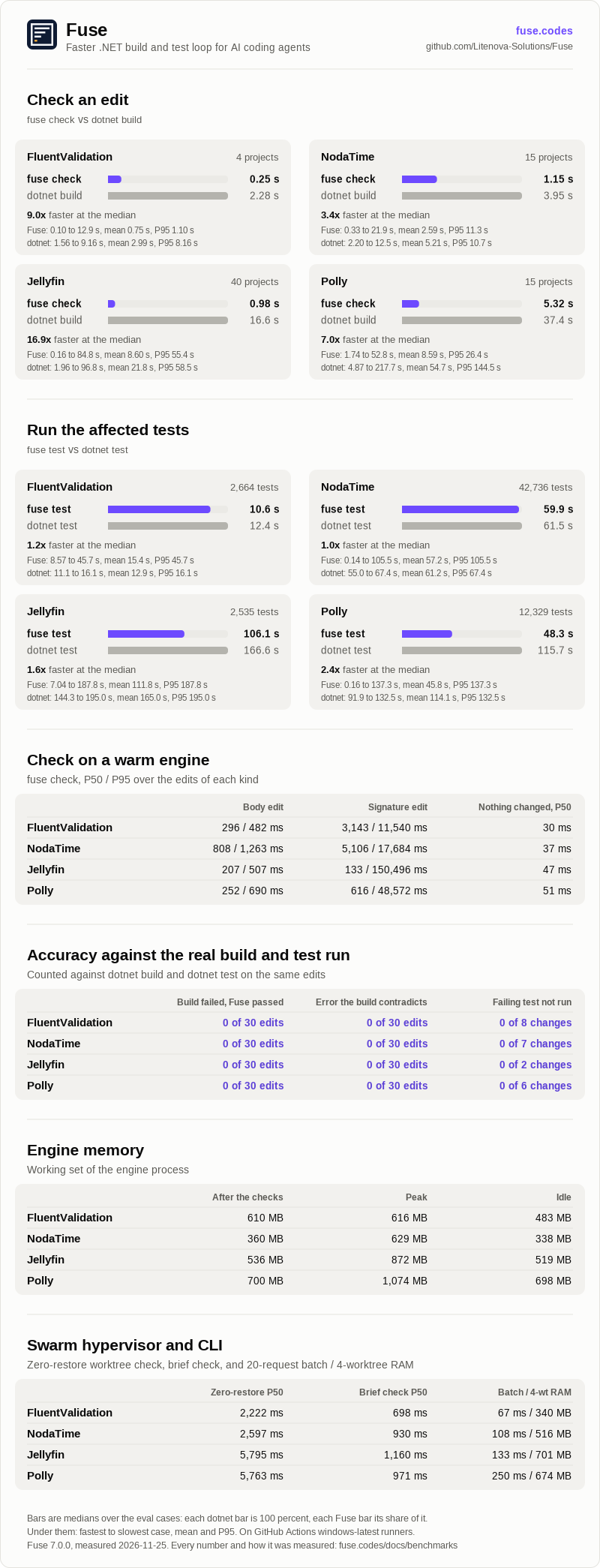
- which compiler errors the edit introduced, 8.1x to 27.7x faster than
dotnet buildat the median on 4 open-source repositories - which affected tests fail, up to 2.9x faster than
dotnet test
Run fuse init once. After that, the harness, the program your agent runs in (Claude Code, Cursor, Codex and others), runs Fuse by itself.
Website | Documentation | Getting started | Benchmarks | Changelog
What you get
- Only introduced errors. Fuse leaves out every error that was already in HEAD, the commit you have checked out, so the agent does not chase problems it did not cause.
- Breaks in other projects. When you rename a method, Fuse lists every broken caller in every project, with the change that broke it.
- Only affected tests. Tests the change cannot reach do not run. When only
.csfiles changed, the tests run without a rebuild. - Short output. A check prints at most 20 errors, and a test run prints at most 10 failures, plus one summary line. When the edit is clean, Fuse prints nothing at all.
- Made for subagents. All agents in a repository share one Fuse process, so Fuse loads the solution once. Builds through Fuse take turns, so parallel builds do not fail on locked files. Each git worktree gets its own process.
- Made for judges and workers. External writers register their paths as sessions. The judge checks one slice with
fuse check <folder>. The--jsonerrors split into briefs. - Safe. If Fuse cannot answer, the hook stays silent and the agent carries on. Fuse never edits your code, runs locally and has no telemetry.
- No configuration.
fuse initis the only setup.
What it costs
- Memory. Fuse keeps the loaded projects in memory until it has been idle for 30 minutes. That costs 319 MB to 512 MB once idle in the benchmarks, up to 1,091 MB while it checks, and more on a machine with more memory. Each git worktree uses its own.
- A slow first check across projects. The first edit that affects other projects has to load them. On Jellyfin (40 projects) that took up to 68.9 s. The median signature edit took 58 ms.
- Many agents, one engine. Checks and test plans from several sessions run at the same time on pinned generations, each answered about its own edits. A worker without hooks sets
FUSE_SESSION; a judge canfuse watcha worker and route errors bycausedBy. - Not a full build. Fuse checks C# only and picks tests by reading the code, so a few cases still need
fuse buildorfuse test --all. Limits lists them.
Supported harnesses
| Harness | Integration |
|---|---|
| Claude Code | Hooks |
| Cursor | Hooks |
| Gemini CLI | Hooks |
| Codex | Hooks |
| GitHub Copilot CLI | Hooks |
| OpenCode | Plugin |
| Muse Code | Plugin bundle, which you install and approve once |
| VS Code agent mode | MCP server, since VS Code runs no hooks |
fuse init detects each harness by its folder or file in the repository root. When it finds none, it sets up Claude Code. Connect your agent lists what it writes for each one.
Getting started
Requirements
- Install the .NET 10 SDK.
- Use a git repository with at least one commit.
- Restore your projects. Fuse never runs
dotnet restoreon its own.
Install
dotnet tool install -g Fuse
This command installs fuse in ~/.dotnet/tools (%USERPROFILE%\.dotnet\tools on Windows). That folder must be on your PATH and on your agent's.
Set up a repository
In the root of your repository, run:
fuse init
wrote .claude/settings.json
wrote .gitignore
fuse: hooks registered by Fuse 6.0.0; after each edit your agent gets the compiler errors the edit introduced, `dotnet test` runs the affected tests, and `dotnet build` prints only its errors
That is the whole setup. The agent now hears from Fuse only when an edit introduced an error.
Try it from the command line
The commands print exactly what the agent receives, so you can try Fuse in a terminal. For example, after renaming Calc.Add in a library, fuse check lists the callers the rename broke in other projects:
$ fuse check
removed: public int Add(int a, int b) (2 error(s))
App/Program.cs(3,30): error CS1061: 'Calc' does not contain a definition for 'Add' and no accessible extension method 'Add' accepting a first argument of type 'Calc' could be found (are you missing a using directive or an assembly reference?)
Lib.Tests/CalcTests.cs(6,54): error CS1061: 'Calc' does not contain a definition for 'Add' and no accessible extension method 'Add' accepting a first argument of type 'Calc' could be found (are you missing a using directive or an assembly reference?)
fuse: 2 error(s) introduced in 2 file(s) (App, Lib.Tests); Lib declarations changed, 2 dependent project(s) checked; tree 9f2c41aa07b3 over 1 changed file(s)
| Command | Action |
|---|---|
fuse init [--instructions] | Registers Fuse's hooks with the harnesses this repository uses. --instructions also adds a Fuse section to AGENTS.md |
fuse uninit | Removes what fuse init wrote, keeping every other entry, then stops this repository's engine and deletes its state |
fuse check [paths...] | Reports the errors your changes introduced since HEAD, in every project. With directories or patterns, it checks one slice |
fuse test [args...] | Runs the tests affected by your changes |
fuse test --all | Runs every test |
fuse test --failed | Reruns the tests that failed in the last run |
fuse build [args...] [--changed] | Runs dotnet build and prints its errors. --changed builds only the changed projects and their dependents |
fuse status [--json] | Shows the engine and the changed files |
fuse session begin <name> [--pid <pid>] --paths <pattern>... | Registers an external writer as a session for its paths, so a judge's stop leaves the writer's errors to the writer; --pid ends it when that process exits |
fuse session begin --from <file> | Registers every session in a file of name, tab and pattern lines |
fuse watch --session <name> | Streams that session's newest errors each time the engine checks them |
fuse session end <name> | Ends the registration |
fuse stop [--all] | Stops this repository's engine, or every engine. The next command starts a new one |
fuse mcp | Serves fuse_check, fuse_test and fuse_build over stdio to an MCP host |
Getting started shows each command's output and what the hooks send the agent.
Documentation
- Getting started: set Fuse up in your repository and see what it reports.
- Commands: every command, its output and its exit codes.
- Messages and fixes: what each message means when Fuse cannot answer, and the fix.
- Connect your agent: what
fuse initsets up for each harness, and how an MCP host runs Fuse. - Subagents and parallel agents: several agents in one repository, and what each is told.
- How it works: how Fuse checks an edit, selects tests and runs them.
- Limits: what a check cannot see, and what to do about it.
- Troubleshooting: why Fuse is silent, slow or failing, and where its logs are.
- Benchmarks: benchmarked speed and accuracy on 4 repositories.
- All documentation
Contributing
Report bugs, request features and send pull requests on GitHub, and ask questions in Discussions. Contributing describes how to build, test and submit a change. Every commit needs a Developer Certificate of Origin sign-off. AI-assisted contributions follow the AI policy, and everyone follows the code of conduct.
To report a vulnerability, follow Security instead of opening a public issue.
License
Fuse is licensed under the Apache License 2.0.







