
Screenshotline
Screenshot any web page, or read it as clean Markdown, with consent banners, ads and popups removed.
One address for any MCP client. No sign-in needed on this server.
What it does
1 read1 other
Grouped by tool name. At most: only reads or looks up information.
What it costs
FreeOdel charges nothing per call. The publisher may charge for its own service.
Tools
2 · grouped by tool name · checked 9 Oct 2026Read · 1Look things up
- read_page
Other · 1Neither hinted nor named
- screenshot
A screenshot API that survives production. URL in, image out.



curl "https://api.screenshotline.com/take?url=https://example.com&block_cookie_banners=true" -o shot.png
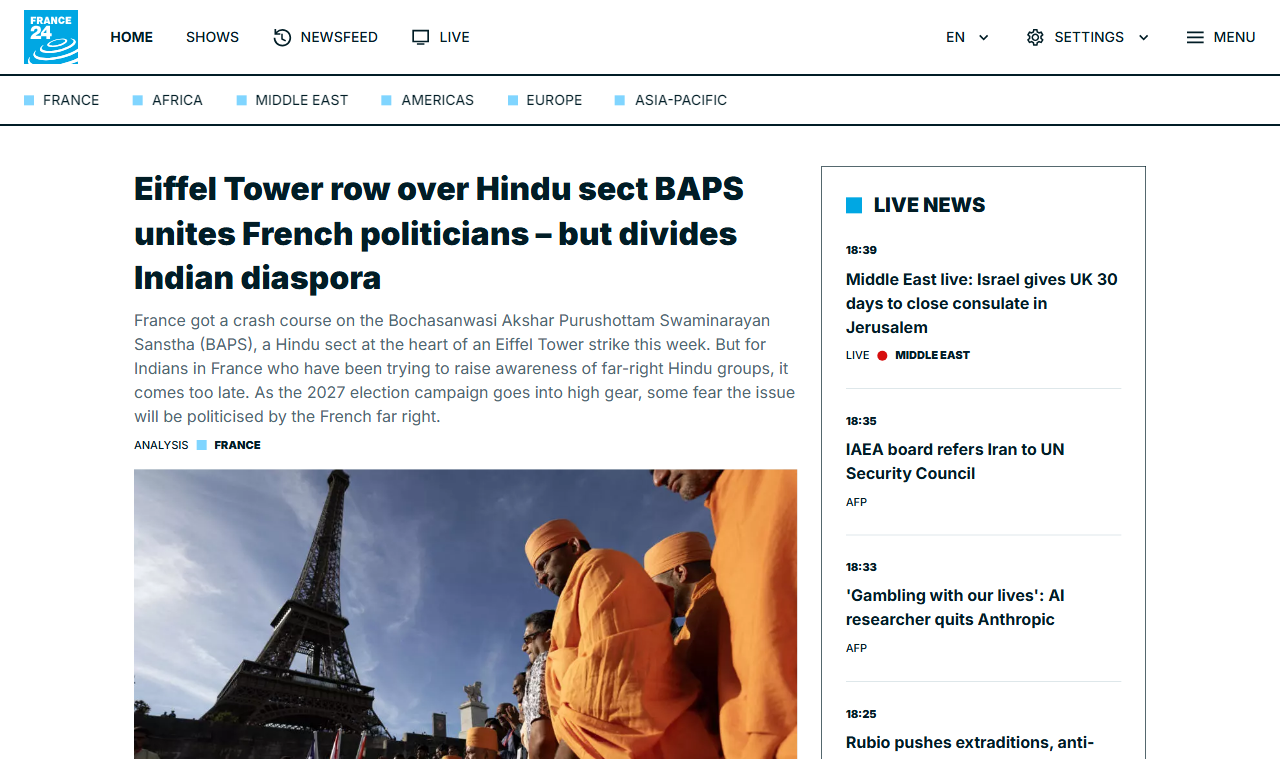
Above: france24.com, captured by this API. The consent wall is gone, the empty ad slot has been collapsed rather than left as a grey hole pushing content below the fold, and the lazy-loaded hero image has actually loaded. Most screenshot failures are not crashes — they are a 200 with the wrong picture.
Two ways to use it
Hosted — screenshotline.com. Free tier, 500 renders a month, no card. Warm browser pool, cache, and someone else's pager.
Self-hosted — docker compose up -d. The same renderer, nothing held back.
See SELF-HOSTING.md, which is honest about what running
headless Chrome at scale actually costs you.
Why this exists
Taking one screenshot with Puppeteer is twenty lines. Taking ten thousand is a different job, and it is the job people pay to avoid:
| Symptom | Cause | What this does about it |
|---|---|---|
| Memory climbs, container OOM-killed | Chrome does not release memory across navigations — 200MB becomes 1GB+ | Recycles each browser after MAX_RENDERS_PER_BROWSER renders |
<defunct> processes, pool slots never free | Chrome crashes mid-render; nothing reaps the orphans when your app is PID 1 | tini as PID 1 in the image, init: true in compose |
| Crashes on image-heavy pages | Docker gives /dev/shm only 64MB | --disable-dev-shm-usage plus shm_size: 1gb |
| p99 latency spikes to 30s+ | One page with a resource that never loads holds a slot | Hard wall-clock timeout, then SIGKILL — not page.close(), which waits on the thing that hung |
| First request after idle takes 3–5s | Chromium cold start | Pool warmed at boot, never scaled to zero |
| Full-page captures miss below-fold images | Lazy loading never fired because nothing scrolled | Scrolls the document, waits, returns to top |
| Server dies mid-sweep | A failed browser launch leaves Puppeteer's temp-profile cleanup to throw EBUSY, unhandled | Launch retries with backoff; background failures can never exit the process |
| 200 OK with a blank white image | Bot wall, or a challenge script we blocked | Two-signal blank detection, reported in X-Blank-Suspected |
Plus the one that is not a performance problem: an endpoint that fetches arbitrary URLs is an SSRF engine by default. Private and reserved ranges are refused, and every redirect hop is re-checked, not just the submitted URL.
Quick start
Docker (recommended)
docker compose up -d
curl "http://localhost:3000/take?url=https://example.com" -o out.png
Node 22+
npm install
npm start          # http://localhost:3000
npm run smoke      # 30 checks against the real render path
Open http://localhost:3000 for a demo with no signup.
API
One endpoint. GET or POST /take, returning binary image data — no JSON
envelope, no second round trip. That is deliberate: the URL has to work
directly inside an <img src>.
GET /take
  ?url=https%3A%2F%2Fexample.com
  &format=webp
  &full_page=true
  &block_cookie_banners=true
  &viewport_width=1440
  &cache=true&cache_ttl=86400
Parameters
| Parameter | Default | Notes |
|---|---|---|
url | required | http/https only. Private and reserved addresses refused. |
format | png | png, jpeg, webp, pdf |
quality | 80 | jpeg/webp only, 1–100 |
full_page | false | Scrolls first so lazy images load |
selector | — | Capture one element. Mutually exclusive with full_page |
viewport_width / viewport_height | 1280 / 800 | |
device_scale_factor | 1 | 2 for retina |
block_ads | false | Blocks known ad and analytics hosts |
block_cookie_banners | false | Blocks CMP scripts, then sweeps leftover overlays |
omit_background | false | Transparent PNG/WebP |
color_scheme | light | light or dark |
delay | 0 | Extra wait in ms before capture |
wait_until | domcontentloaded | load, domcontentloaded, networkidle0, networkidle2 |
settle | 5000 | Budget after navigation for load, network quiet and image decode |
timeout | 30000 | Wall-clock ceiling in ms |
ignore_tls_errors | false | Accept expired, self-signed and mismatched certificates |
basic_auth | — | user:password for HTTP basic auth |
headers | — | JSON object of extra request headers |
fail_on_http_error | false | Return an error instead of an image when the target returns 4xx/5xx |
fail_on_blank | false | Return an error instead of a blank image when nothing rendered |
cache / cache_ttl | false / 86400 | Serve from the store when warm |
access_key | — | Or the X-Access-Key header |
signature | — | HMAC. See below. |
Response headers
| Header | Meaning |
|---|---|
X-Cache | HIT, MISS or BYPASS |
X-Render-Ms | Server-side render time |
X-Upstream-Status | HTTP status the target page returned |
X-Blocked-Requests | Requests blocked by the ad/consent filters |
X-Wait-Fallback | true if the page never went network-idle and we captured anyway |
X-Blank-Suspected | true if the capture looks blank - see below |
X-Text-Length | Characters of visible text found in the page |
Errors
JSON, with a message that says how to fix it.
{
  "error": {
    "code": "render_timeout",
    "message": "Render exceeded 30000ms. Heavy ad and tracking scripts are the usual cause - try block_ads=true, or a longer timeout (up to 60000)."
  }
}
The silent failure this API tries hard to avoid
A blank white image returned with HTTP 200 is worse than an error: the customer's pipeline records a success and nobody notices for a month. Bot walls, blocked challenge scripts and pages that render nothing without JavaScript all produce exactly that.
Every response therefore carries X-Blank-Suspected, decided from two
independent signals - an empty DOM, and encoded bytes-per-pixel far below what
a real screenshot produces. Pass fail_on_blank=true to turn it into a 502
instead, and fail_on_http_error=true if an upstream 403 should be your
problem rather than a picture of a bot wall.
Measured on the 202-page suite: 7 pages returned a technically successful but visually empty capture before this existed.
Reading a page instead of photographing it
GET or POST /extract runs the exact same render — JavaScript executed, the
adaptive settle, consent banners swept, ad slots collapsed, lazy images loaded
— and then reads the DOM as Markdown instead of photographing it.
GET /extract?url=https%3A%2F%2Fexample.com
# Example Domain

This domain is for use in documentation examples without needing permission.

[Learn more](https://iana.org/domains/example)
| Parameter | Default | Notes |
|---|---|---|
strip_chrome | true | Drop nav, header, footer and sidebars. Falls back to the whole body if stripping would leave nothing. |
max_chars | 0 | Truncate, for a fixed context budget. 0 means no limit. |
response | markdown | json returns {url, title, chars, upstream_status, markdown} instead. |
Everything from /take still applies — block_ads, basic_auth, headers,
settle, timeout, signed URLs, the SSRF guards.
Why this is not just curl | html2md: by the time we extract, we are holding a
fully rendered, consent-swept DOM. Two things follow from that which a
server-side HTML parser cannot do.
- Client-rendered pages work. A plain fetch of
app.netlify.comyields 121 characters of visible text, and they read "The Netlify dashboard needs JavaScript :(". Rendered first, the same URL extracts the actual login page. - Layout disambiguates the text.
danluu.comwrites<d>09/26</d><a ...>title</a>with no whitespace between them and styles<d>as a 4em flex item. Parsed as markup that concatenates to09/26[title]; read with the computed layout it becomes09/26 [title].
Open shadow roots are walked too, so pages built out of web components extract as text rather than as nothing. Closed roots are unreachable by design.
MCP server
Agents get both halves of this over the Model Context Protocol: the screenshot for when the layout is the answer, the Markdown for when the text is.
Hosted, nothing to install — connect by URL with a free key (500 renders a month, no card):
claude mcp add --transport http screenshotline https://api.screenshotline.com/mcp --header "X-Access-Key: sl_live_..."
Self-hosting, it runs locally over stdio from a clone, owning a single browser:
claude mcp add screenshotline -- node /path/to/screenshotline/mcp/server.js
Two tools:
| Tool | Returns |
|---|---|
screenshot | The rendered image, plus an explicit warning if the capture looks blank rather than a silent empty picture. |
read_page | The page as Markdown. |
Point either one at an instance you already run — with its warm pool, cache
and rate limit — by setting SCREENSHOTLINE_BASE_URL, plus
SCREENSHOTLINE_ACCESS_KEY if that instance requires a key.
The SSRF guards apply here too. An agent cannot talk this server into scanning
127.0.0.1 or a cloud metadata endpoint.
Wait strategy
wait_until defaults to domcontentloaded, not networkidle2. That is a
deliberate reversal of the obvious choice, and it came from measurement rather
than taste:
| Strategy | Result on the 202-page suite |
|---|---|
networkidle2 | 18 hard timeouts. Worst single source of failure. |
load | SaaS category 19/20, but p50 23s - 16 of 20 never fired load |
domcontentloaded + settle | SaaS 20/20, whole suite p50 3.6s |
Modern sites hold analytics sockets and websockets open forever and never go
idle. Blocking on an event they will never emit costs a pool slot for 25
seconds and then fails anyway. Get to interactive quickly, then spend one
bounded settle budget on: waiting for load, letting the network go quiet,
and letting in-viewport images finish decoding. None of those can fail the
request.
Signed URLs
If a capture URL will appear in public HTML, sign it. A plain access key in
a <img src> is visible in view-source, and anyone who finds it can drain the
quota it belongs to.
export SIGNING_SECRET=your-secret
node tools/sign.js "https://example.com" full_page=true format=webp
The signature covers every query parameter except signature itself, sorted by
key — so the URL and the options cannot be tampered with while keeping it valid.
Set REQUIRE_SIGNATURE=true to reject anything unsigned.
Configuration
| Variable | Default | |
|---|---|---|
PORT / HOST | 3000 / 0.0.0.0 | |
POOL_SIZE | 2–4 by CPU count | Concurrent renders |
MAX_RENDERS_PER_BROWSER | 50 | Recycle threshold |
MAX_BROWSER_AGE_MS | 1800000 | Recycle on age too |
RENDER_TIMEOUT_MS | 30000 | Then SIGKILL |
RATE_LIMIT_PER_MINUTE | 60 | Per key or IP |
ACCESS_KEYS | — | Comma-separated. Empty = open mode |
SIGNING_SECRET | — | Enables signed URLs |
REQUIRE_SIGNATURE | false | Reject unsigned requests |
CACHE_DIR | .cache | Swap for S3/R2 in production |
ALLOW_PRIVATE_HOSTS | false | Never enable in production |
CHROME_PATH | — | Use a system Chrome instead of the bundled one |
Benchmark
The hard part of this business is not the endpoint, it is whether your output is actually correct on pages that fight back. So test that first:
npm start
node bench/run.js                                    # 20 renderer-breaking pages
node bench/run.js --suite real-world                 # 33 use-case pages
node bench/run.js --suite 200 --concurrency 3        # 202-page hardening sweep
node bench/run.js --provider screenshotone --key sk_...  # free tier, 100/mo
node bench/compare.js                                # side-by-side HTML
Three suites, three jobs. bench/urls.js breaks the renderer.
bench/real-world.js covers the use cases people buy this for.
bench/suite-200.js is breadth: 202 pages across 15 categories - news,
commerce, SaaS, docs, 13 languages in 10 scripts, WebGL, government, TLS edge cases and
HTTP semantics - so a customer's first request is unlikely to be a shape we
have never rendered.
The number that matters is not the pass rate, it is the SURPRISES block. A
page marked ok that fails is a bug. A page marked known-hard that passes
means an assumption changed. A raw percentage tells you neither.
Current: of the 182 pages marked ok, all 182 capture correctly, p50 5.7s
and p90 11.2s on the benchmark machine. The other 20 are marked known-hard -
bot walls, captchas and paywalls. 14 of those return something, and all 14 were
opened by eye rather than trusted: 11 are genuinely the real page, 2 are
captchas a naive pass rate would have counted as wins, and 1 was a dead URL in
the suite itself. Pages that come back blank are flagged by X-Blank-Suspected
rather than passed off as successes.
Never quote the two groups as one percentage. A pass rate that mixes pages expected to work with pages expected to fail describes neither.
bench/urls.js holds 20 pages chosen to break renderers — consent walls, lazy
images, late-rendering SPAs, sticky headers, WebGL canvases, redirect chains —
each annotated with what it is meant to break. Open bench/out/compare.html
and look at every row.
If your output is not competitive here, stop. No amount of launch sequencing or SEO fixes bad captures, and finding out in week two costs you two weeks instead of six months.
Architecture
Rendering is the only expensive step. Everything else exists to reach it as rarely as possible.
request → auth / rate limit → cache key → cache lookup → render → store → respond
          (free)              (free)      (near-free)    (costly)
In production, put a CDN edge worker in front doing auth, rate limiting and first-level caching, with this service as the origin. A cache hit then costs approximately nothing and is faster than any competitor's cold render — which makes the cache simultaneously your margin and your latency benchmark.
The cache key deliberately excludes access_key and signature, so two
customers requesting the same page with the same options share a hit.
What this does not do
Deliberately, for now: video capture, GPU rendering, proxy rotation and IP geolocation, async jobs with webhooks, a usage dashboard, teams and seats, official SDK packages. None of them are why anyone buys a screenshot API. They come after revenue, not before it.
Contributing
Read CONTRIBUTING.md for the support boundary, and CLA.md — a bot will ask you to sign on your first pull request. Prefer not to sign? Open an issue instead; a good reproduction is often worth more than a patch.
Issues and PRs welcome, with one boundary stated up front: we do not debug your deployment. Self-hosting is self-service. Bug reports about this code are always welcome; questions about your particular server are not something a small team can absorb for free.
Scope is narrow on purpose. If a feature request would widen what this does beyond "URL in, image out", the answer is probably no, and that is not personal.
See CONTRIBUTING.md.
License
AGPL-3.0-or-later. You can run it, modify it and self-host it freely; offering it as a hosted service means publishing your modifications.
If you would rather it were MIT or BSD, that is a legitimate preference — Healthchecks.io has run BSD-3 for a decade without being hurt by it. Change it now if you are going to, and take a CLA from contributors before the first outside pull request: relicensing later requires copyright over every contribution, and retrofitting that is close to impossible.







