Jet Browser Verifier
Verify an isolated WPE WebKit runtime with native-input, DOM, PNG, and cleanup evidence.
Runs on your machine from its package; the steps are below.
What it does
- Reads
- Writes
- High impact
Not assessed yet.
What it costs
FreeOdel charges nothing per call. The publisher may charge for its own service.
Runs locally over stdio
This server isn't hosted — your MCP client launches it from a package registry. Use one of the commands below, or drop the config into your client (e.g. Claude Desktop).
Run
docker run -i --rm ghcr.io/masakaai/jet-browser-mcp:0.9.0
MCP client config
{
  "mcpServers": {
    "jet-browser-verifier": {
      "command": "docker",
      "args": [
        "run",
        "-i",
        "--rm",
        "ghcr.io/masakaai/jet-browser-mcp:0.9.0"
      ]
    }
  }
}
English · 简体中文 · 日本語 · 한국어 · Deutsch · Français · Español · Português





Jet Browser packages WPE WebKit and a Rust WebDriver bridge as a standalone runtime. One container runs one isolated browser session; your harness sends ordered JSONL commands and receives machine-readable results.
Bring any harness or deterministic test runner. No account, API key, model, database, or hosted control plane is required.
Product overview · Technical report · GitHub Marketplace Action · Official MCP Registry · Hermes integration · MCP verifier · Method · Stability method · Raw samples
Pick Jet Browser when
Jet Browser is the execution layer for runs that need a clear, inspectable browser boundary:
- Isolation matters: one disposable browser session per container, with explicit lifecycle and resource limits.
- Evidence must agree: native input, DOM state, and a fresh screenshot come from the same runtime instead of separate replay paths.
- The harness should stay replaceable: ordered JSONL works with any model, agent loop, CI job, or deterministic test runner.
- You need a non-Chromium runtime: WPE WebKit provides a second engine without shipping another browser-agent framework.
Keep Playwright, CDP, or your current browser stack when you need their browser matrix, extension ecosystem, or an existing signed-in Chrome profile. Jet Browser does not attach to daily Chrome and does not include a model or agent.
Run the verified smoke test → · See the protocol →
Reproducible runtime benchmark
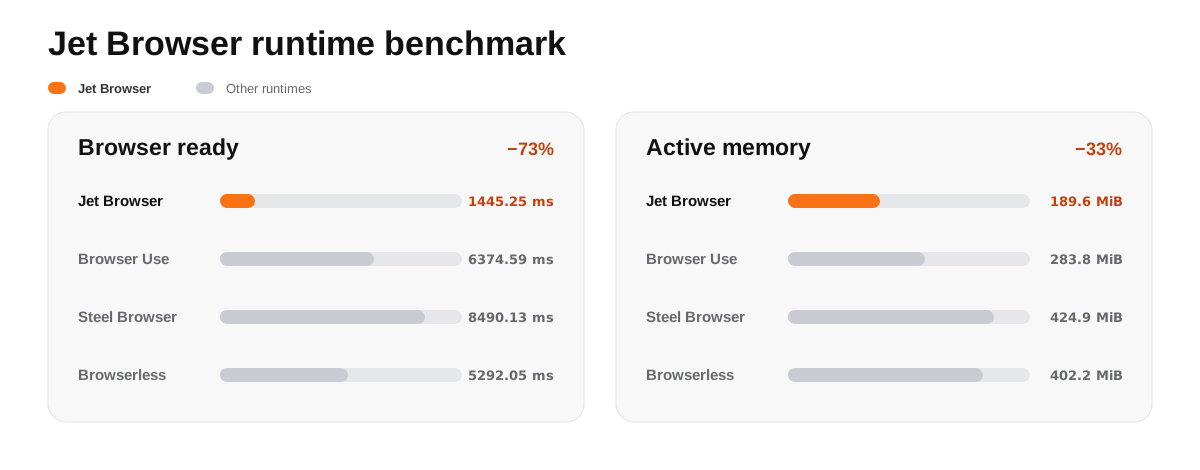
Jet Browser reached a verified page in 1,445.25 ms with 189.6 MiB of active memory—72.7% lower ready time and 33.2% lower memory than the next result. Method · Raw data
Let your coding agent verify it
Paste this single line into Codex, Claude Code, or another repository-aware coding agent. GitHub code blocks include a one-click copy action.
Install or upgrade Jet Browser to the latest main for this repository from https://github.com/masakaai/jet-browser. Read README.md and use its native marketplace instructions when Codex or Claude Code plugin commands are available; otherwise register .agents/skills/jet-browser/SKILL.md as a repository skill. Confirm Docker is available, run curl -fsSL https://raw.githubusercontent.com/masakaai/jet-browser/main/scripts/try-jet.sh | sh, and report whether browser startup, native input, DOM verification, and PNG capture passed. Do not attach to my daily Chrome profile or start a persistent Chrome daemon. Only source builds require Node.js 24+; follow docs/demo.md if setup or verification fails.
Quick start
1. Prove the runtime with one command
Docker only—no clone, Node.js, account, API key, or outbound browser network:
curl -fsSL https://raw.githubusercontent.com/masakaai/jet-browser/main/scripts/try-jet.sh | sh
The reviewable script downloads the release-pinned seccomp policy, verifies its SHA-256, selects native linux/amd64 or linux/arm64 from the immutable multi-platform image, and exercises browser startup, native input, DOM state, and PNG capture. It starts a disposable, resource-bounded container with networking disabled and does not mount the Docker socket or a host directory.
Successful output ends with:
{"status":"passed","version":"0.9.0","network":"disabled","nativeInput":"verified","dom":"verified","screenshot":"verified PNG"}
The full source checkout and SDK paths below require Docker and Node.js 24+.
2. Install the coding-agent plugin
Codex:
codex plugin marketplace add masakaai/jet-browser --ref main && codex plugin add jet-browser@masaka
Claude Code:
claude plugin marketplace add masakaai/jet-browser && claude plugin install jet-browser@masaka
Hermes Agent:
hermes plugins install masakaai/jet-browser/integrations/hermes
hermes plugins enable jet-browser
MCP clients:
{
  "mcpServers": {
    "jet-browser": {
      "command": "docker",
      "args": [
        "run", "--rm", "-i", "--network=none",
        "--mount", "type=bind,src=/var/run/docker.sock,dst=/var/run/docker.sock",
        "ghcr.io/masakaai/jet-browser-mcp:0.9.0"
      ]
    }
  }
}

VS Code opens a review prompt before adding the server. The link uses VS Code's official MCP install URI and preserves the same pinned image, disabled network, and Docker-socket boundary shown above.
Cursor users can install this exact configuration in one click. Cursor opens a review prompt before adding it; the Docker-socket warning below still applies.
The Codex and Claude Code paths install the Jet Browser skill, which teaches coding agents how to check requirements, run the verified standalone flow, integrate the versioned tool schemas, and preserve the runtime's safety boundaries. The same repository-local skill is available at .agents/skills/jet-browser/SKILL.md for agents that discover project skills directly.
The Hermes plugin registers one bounded verification tool that runs the immutable public image with browser networking disabled and returns startup, native-input, DOM, and PNG evidence. It is deliberately a runtime verifier rather than a CDP browser provider.
The MCP verifier is published as io.github.masakaai/jet-browser in the official MCP Registry. It exposes the same bounded proof through a local stdio server and a versioned OCI package, advertises the immutable runtime contract, and runs the network-disabled acceptance without accepting a URL, profile, credential, or arbitrary command. Docker socket grants host-level control, so install it only for a trusted local MCP client.
3. Run the verified standalone flow
Published from a tagged GitHub release, one multi-platform manifest provides native linux/amd64 and linux/arm64 images with per-platform provenance. The smoke test disables outbound networking, starts a real browser, opens a local page, types through the native input path, verifies the DOM, captures a PNG, and closes the session.
git clone https://github.com/masakaai/jet-browser.git
cd jet-browser
docker pull ghcr.io/masakaai/jet-browser:0.9.0
JET_BROWSER_IMAGE=ghcr.io/masakaai/jet-browser:0.9.0 npm run standalone:smoke
Docker selects the matching native image from the manifest on x86_64 and ARM64 Linux hosts. Pin the manifest digest in production. To build and verify the checked-out source for the host architecture instead, run npm run standalone.
Successful output includes:
{
  "status": "passed",
  "network": "disabled",
  "title": "Jet Browser Ready",
  "input": "open-source runtime"
}
Run the same acceptance check with the GitHub Marketplace Action without repository or account secrets:
permissions:
  contents: read

jobs:
  verify-browser-runtime:
    runs-on: ubuntu-latest
    steps:
      - name: Verify Jet Browser
        uses: masakaai/jet-browser@v0.9.0
The Action selects the runner's native linux/amd64 or linux/arm64 release image, prepares the WPE sandbox on GitHub-hosted Linux runners, starts a real browser with outbound networking disabled, verifies native input and DOM state, captures a PNG, and cleans up the container. Self-hosted runners must already permit unprivileged user namespaces; the Action fails with the required setting instead of changing self-hosted runner settings.
For a bounded multi-page run, use npm run stability. The default 10-second scenario creates three isolated pages across two churn cycles, verifies native input, JavaScript state, semantic DOM, and a fresh PNG on every page, samples memory and runtime-process health, and writes a machine-readable report. See the stability method and scope.
4. Embed the runtime boundary
Each input line is one JSON command; each output line is one JSON response. A supervisor in any language can own the container lifecycle and keep the model or harness replaceable.
printf '%s\n' \
  '{"op":"create","proxy":null,"profile_dir":null,"page_load_strategy":"none"}' \
  '{"op":"navigate","url":"http://127.0.0.1:8080/"}' \
  '{"op":"document_state"}' \
  '{"op":"snapshot"}' \
  '{"op":"screenshot"}' \
  '{"op":"close"}' |
docker run --rm -i --network=none --cap-drop=ALL \
  --env=JET_BROWSER_SMOKE=1 \
  --cap-add=SETUID --cap-add=SETGID \
  --security-opt=apparmor=unconfined \
  --security-opt=systempaths=unconfined \
  --security-opt=seccomp=./seccomp_profile.json \
  --security-opt=no-new-privileges --memory=1g --cpus=2 \
  --pids-limit=256 --shm-size=256m ghcr.io/masakaai/jet-browser:0.9.0
For model-facing tools, use the versioned declarations in sdk/tools.mjs and the framework-neutral binding pattern in Agent tool catalog.
Python applications can supervise the same container and ordered JSONL boundary without third-party packages:
python3 -m pip install "jet-browser @ git+https://github.com/masakaai/jet-browser.git@main#subdirectory=integrations/python"
python3 examples/python_quickstart.py
The Python quickstart verifies native input, DOM state, a fresh PNG, and cleanup with browser networking disabled. The Python supervisor guide documents the embedding API, resource limits, and the explicit double opt-in required before enabling public-web access.
Why Jet Browser
| Design choice | What it gives an agent system |
|---|---|
| A browser runtime, not a bundled agent | Bring any model, tool loop, orchestration framework, or deterministic test runner. |
| One isolated session per container | Clear lifecycle, resource limits, profile ownership, and failure cleanup. |
| Ordered JSONL over stdin/stdout | A small integration boundary with no required daemon, database, account, or cloud API. |
| Native input plus semantic and visual evidence | Pointer, keyboard, touch, tabs, DOM capture, JavaScript results, and screenshots share one runtime. |
| Versioned tool schemas | Bind Jet to an agent harness without letting model/tool naming changes mutate the execution contract. |
| Standalone core, optional distributed layer | Start locally; add preview, takeover, persistence, regional scheduling, and fleet control only when needed. |
What ships
| Capability | Open-source implementation |
|---|---|
| Real browser | WPE WebKit 2.54 on a headless Wayland compositor |
| Automation bridge | Rust binary with an ordered line-delimited JSON protocol |
| Native interaction | Pointer, keyboard, text, touch, wheel, drag, navigation, and tabs |
| Page inspection | Title, URL, JavaScript evaluation, screenshots, and semantic DOM capture |
| Session state | Cookie and web-storage import/export helpers with explicit profile paths |
| Downloads | Bounded download lifecycle and metadata |
| Live viewing | Visual-frame and Live DOM components for an optional direct data plane |
| Agent integration | Versioned JSON Schema tool declarations plus a dependency-free Python container supervisor |
The standalone image contains only the browser runtime and operating-system libraries it needs. It does not install an application server, JavaScript package tree, database client, tunnel, payment SDK, or vendor agent framework.
Pick the right layer
These projects solve different parts of browser automation. The table labels the boundary instead of turning unlike products into a feature-score contest.
| Project | Primary layer | Browser/control boundary | Included in this runtime benchmark |
|---|---|---|---|
| Jet Browser | Standalone browser runtime | WPE WebKit + ordered JSONL | ✓ |
| Browser Use | Agent framework with browser automation | Chromium through its runtime/SDK | ✓ |
| Steel Browser | Self-hosted browser API | Chromium through HTTP and WebSocket APIs | ✓ |
| Browserless | Browser execution service | Chromium through CDP/WebSocket | ✓ |
| Stagehand v4 | Model-backed automation SDK | Extension/CDP action layer | — different boundary |
Read the deployment and competitor comparison for the source links, inclusion rules, and the capabilities Jet deliberately leaves to the embedding harness.
Architecture
agent or test process
        │  JSONL over stdin/stdout
        ▼
    jet-wpe (Rust)
        │  WebDriver
        ▼
  WPE WebKit + Weston
This boundary is intentionally small. A local process, container scheduler, CI job, or agent framework can supervise it without adopting a particular control plane. Distributed preview, human takeover, persistence, and scheduling are optional components built around the same runtime; they are not required for standalone use.
See Architecture and the standalone demo.
Protocol example
Each input line is one JSON command. Each output line is one JSON response.
{"op":"create","proxy":null,"profile_dir":null,"page_load_strategy":"none"}
{"op":"navigate","url":"https://example.com"}
{"op":"document_state"}
{"op":"snapshot"}
{"op":"screenshot"}
{"op":"close"}
Use a dedicated container per mutually untrusted session. Treat evaluate, imported profiles, downloads, and outbound network access as privileged capabilities in your own integration.
The smoke-only loopback page starts only when JET_BROWSER_SMOKE=1. The included seccomp profile permits the user and mount namespace operations required by WPE WebKit's own bubblewrap sandbox. On AppArmor hosts, the outer container profile is disabled because it blocks that inner sandbox; the process still receives no SYS_ADMIN capability, no effective capabilities after startup, and no privileged mode.
Develop and verify
npm ci
npm test
cargo test --all-targets
Build only the standalone runtime:
docker build -f Dockerfile.standalone -t jet-browser:local .
Build the optional distributed worker:
docker build -f Dockerfile.wpe-worker -t jet-browser-worker:local .
Project map
- rust/ — native WebDriver bridge and browser helpers
- src/ — optional distributed worker, preview, input, state, and safety boundaries
- sdk/ — client transports and agent tool declarations
- scripts/standalone-smoke.mjs — offline end-to-end verification
- test/ — Node regression tests; Rust tests live beside their modules
- docs/ — protocol, architecture, and integration notes
Scope
Jet Browser is browser infrastructure, not an LLM or agent framework. The core exposes its JSONL action protocol rather than pretending WPE implements Chromium-only extension, policy, or CDP contracts.
Jet Browser is licensed under Apache License 2.0. Read Contributing and Security before deploying or changing the protocol.