
rea-captcha
Authorized verification actions in an agent's existing browser session with fresh-evidence resume.
Runs on your machine from its package; the steps are below.
What it does
- Reads
- Writes
- High impact
Not assessed yet.
What it costs
FreeOdel charges nothing per call. The publisher may charge for its own service.
Runs locally over stdio
This server isn't hosted — your MCP client launches it from a package registry. Use one of the commands below, or drop the config into your client (e.g. Claude Desktop).
Run
npx -y rea-captcha
MCP client config
{
  "mcpServers": {
    "rea-captcha": {
      "command": "npx",
      "args": [
        "-y",
        "rea-captcha"
      ]
    }
  }
}English · العربية · Deutsch · Ελληνικά · Español · فارسی · Français · Bahasa Indonesia · Italiano · 日本語 · 한국어 · Polski · Português (Brasil) · Русский · ไทย · Türkçe · Українська · Tiếng Việt · 简体中文 · 繁體中文
rea-captcha
Local-first verification challenge intelligence for browser agents.






Install · Live demo · Agentic matrix · How it works · MCP catalog · Cases · Architecture
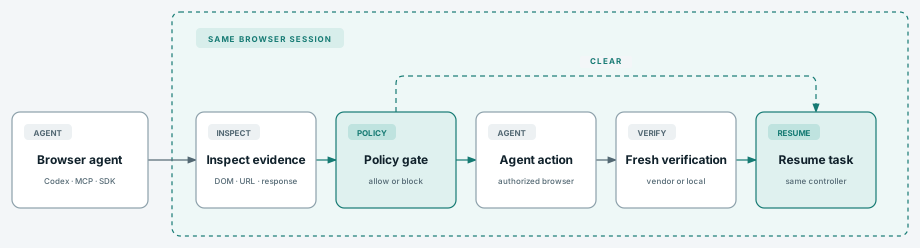
When a Browser Use task hits a CAPTCHA halfway through, rea-captcha keeps the block and recovery inside the browser session the agent already owns. It detects supported verification challenges, coordinates an authorized action or human handoff, requires fresh server-validated evidence, and then returns control to the same task. It ships a TypeScript SDK, local stdio MCP server, browser-use plugin, Vercel-compatible Agent Skill, and optional authorized-origin local OCR.
Official source: install from
masakaai/rea-captchaand npm packagerea-captcha. The project has no hosted solver, telemetry, stealth claim, or dependency on Jet Browser. It reuses the agent's existing browser; the provider examples use documented non-production credentials only.
Run the four live verification cases
If this fixes a handoff you have actually hit, a star helps other Browser Use builders find it.
Agentic verification matrix
Google reCAPTCHA v2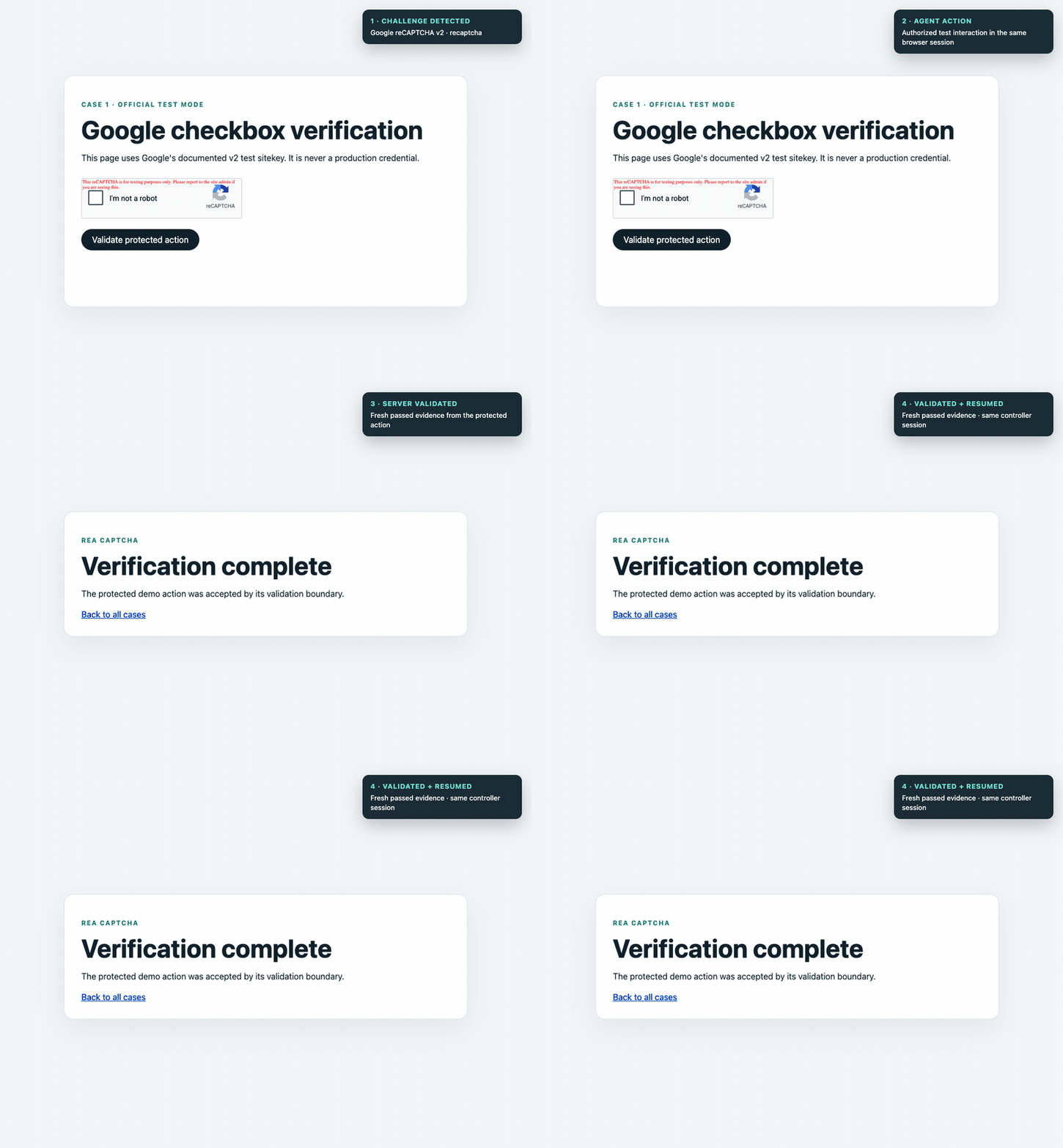
|
Cloudflare Turnstile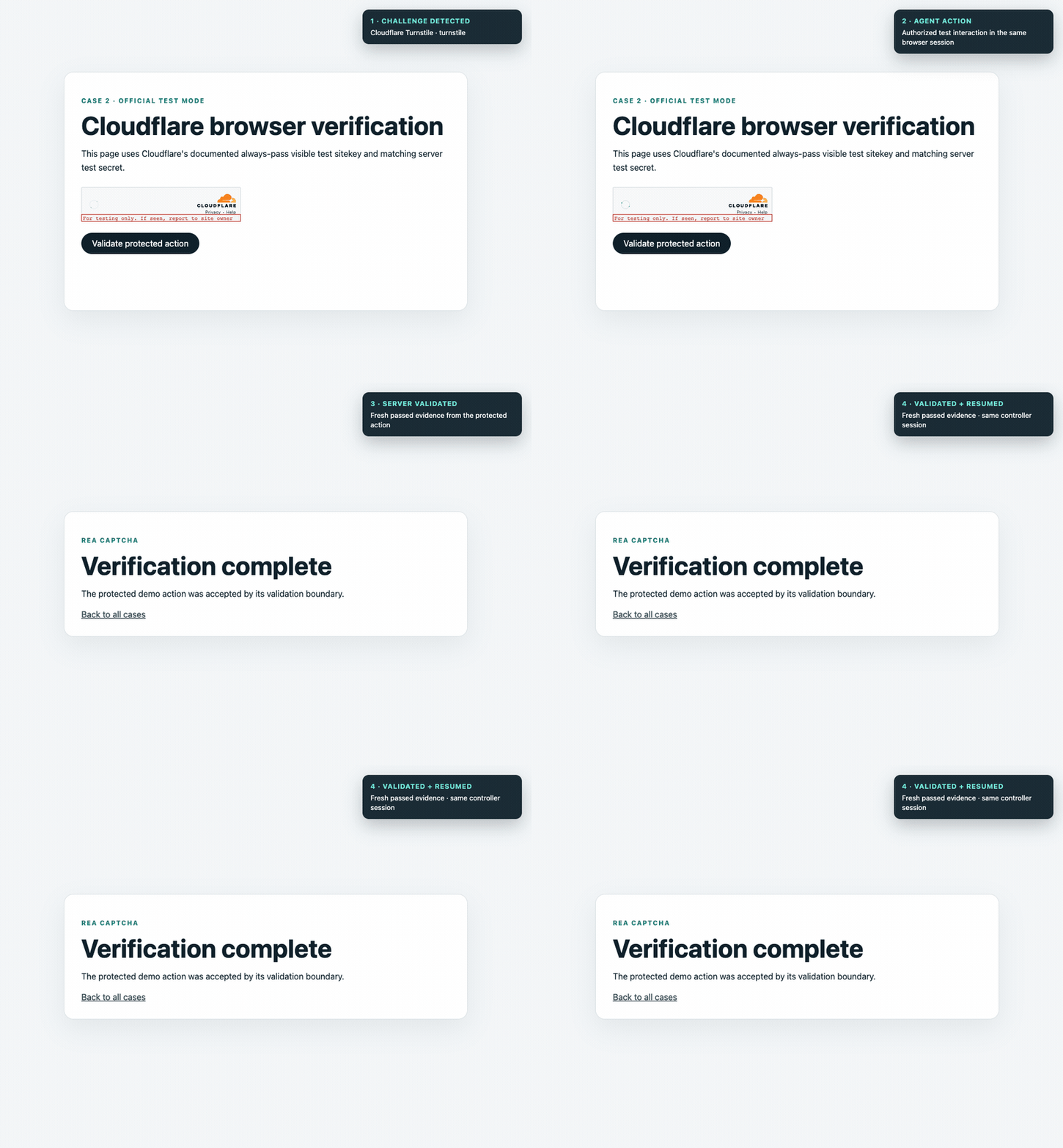
|
hCaptcha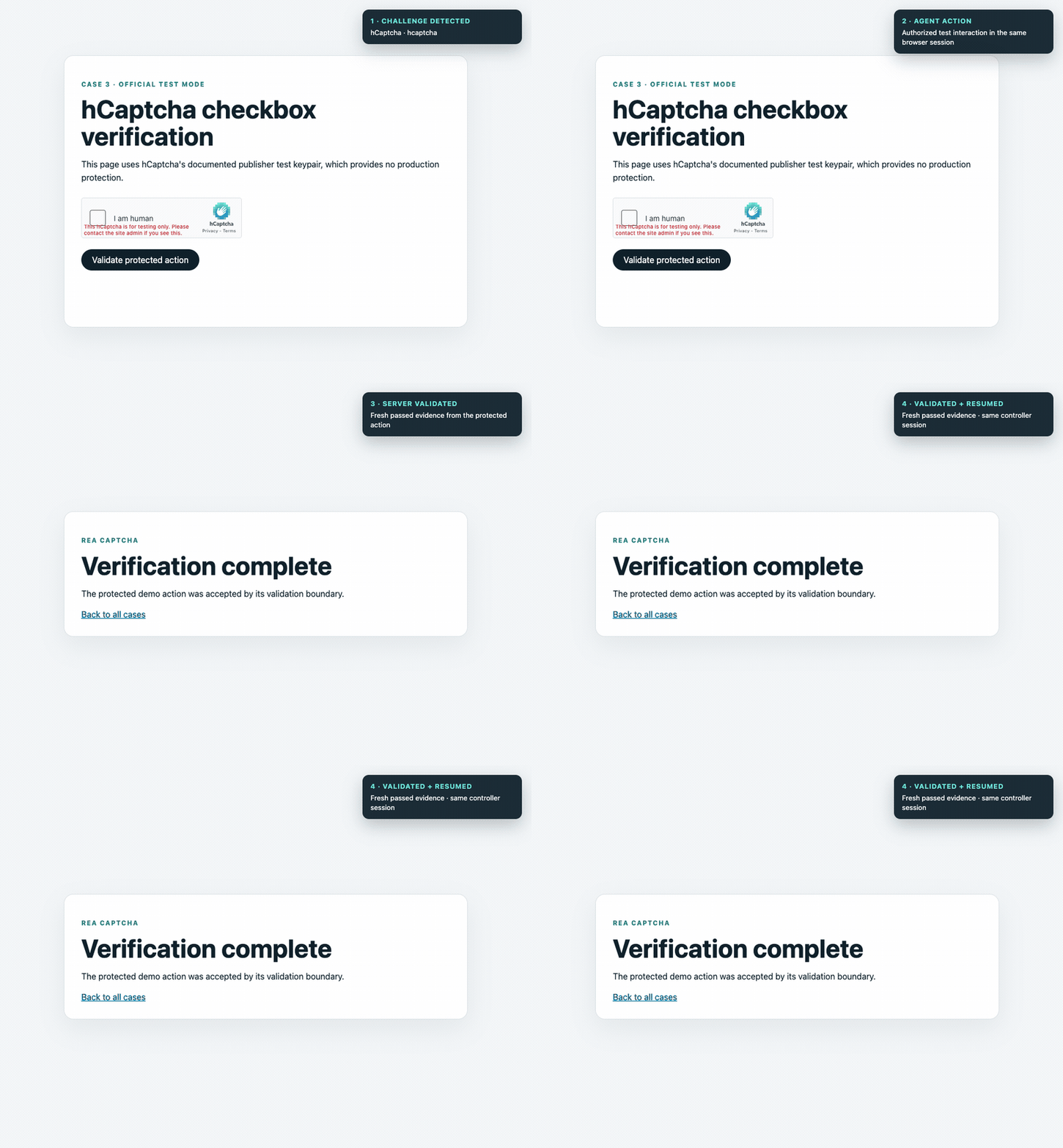
|
Owned image/text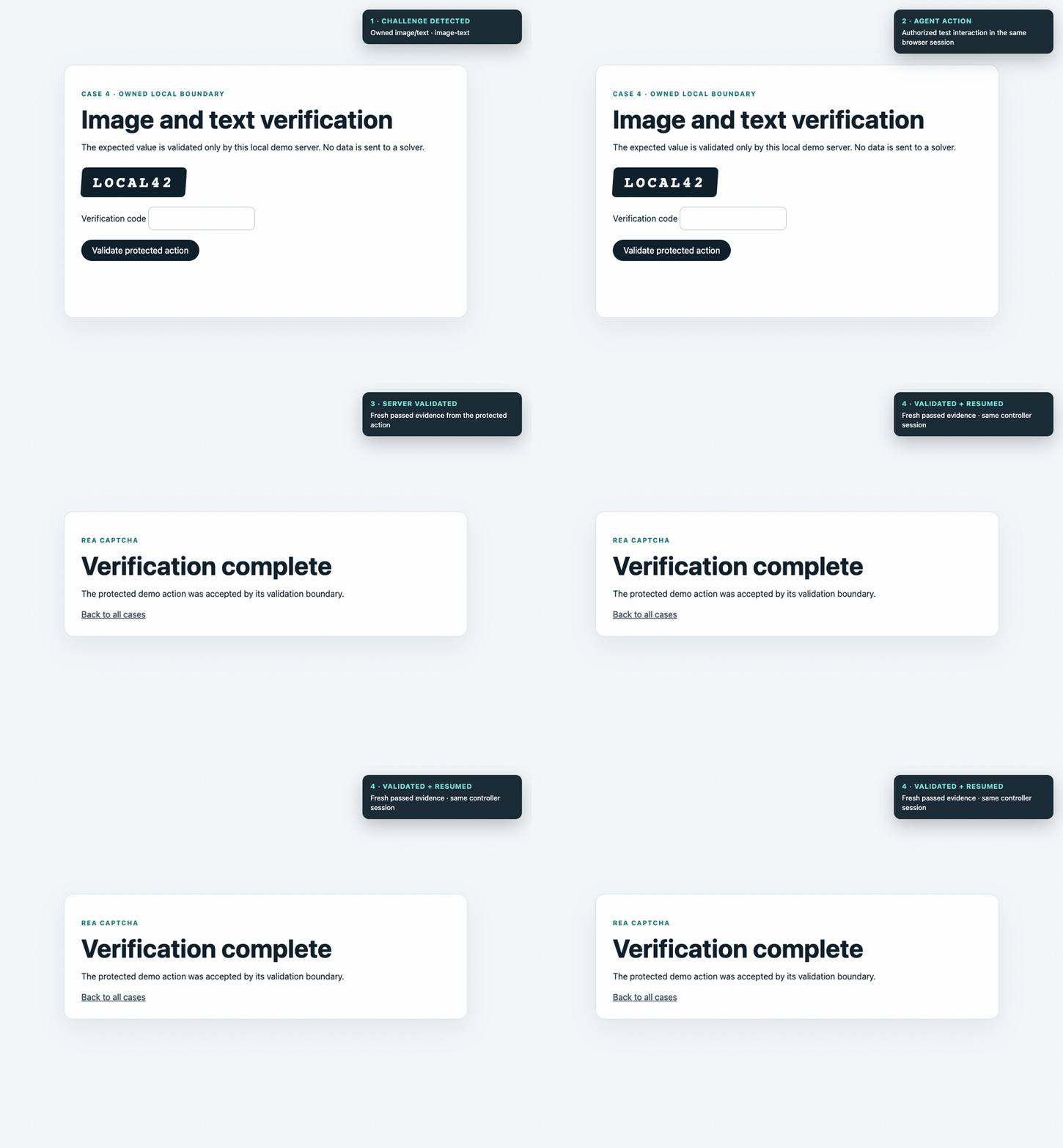
|
These are complete agent-driven protected-action flows, not DOM-only fixtures. Each run detects a challenge, performs the authorized browser interaction in the same page, submits to the real validation boundary, observes fresh passed evidence, verifies the session cookie, and resumes the same controller. Google reCAPTCHA v2, Cloudflare Turnstile, and hCaptcha use their documented test modes plus vendor Siteverify endpoints; the owned image/text case uses an explicitly authorized local path and local server validation.
The first three cases load vendor-hosted JavaScript and accept the protected action only after the server receives success: true from the vendor verification endpoint. They use the vendors' documented non-production credentials: Google test keys, Cloudflare dummy keys, and hCaptcha test keys.
npm run demo:web       # interactive local demo
npm run test:web-demo  # all four live validation paths
Install
Paste one sentence into Codex, Claude Code, Cursor, or another coding agent:
Install rea-captcha in this project and connect it to the browser session this agent already uses.
How it works
MCP and coding agents
The official Registry entry is io.github.masakaai/rea-captcha and launches the zero-configuration stdio server through npm:
npx rea-captcha@0.2.4 mcp --stateless
Review the pinned package version and approve npm's install prompt only when it matches the release you intend to run. The command does not suppress that prompt.
It exposes six tools: captcha_analyze, captcha_inspect, captcha_complete, captcha_handoff, captcha_wait, and captcha_resume. captcha_complete performs only a policy-authorized action in the configured existing browser and waits for fresh validation evidence. See the tool catalog for inputs and lifecycle semantics.
For a stateful local session, run setup and print a host configuration:
npx rea-captcha agent-config --agent codex
npx rea-captcha agent-config --agent mcp-json
rea-captcha adds verification intelligence and bounded completion actions; it does not replace an agent's navigation tools. Both integrations must refer to the same browser session.
Hermes Agent users can inspect the Portable Agent Plugins v1 package. Its catalog-safe default is stateless evidence analysis; same-session browser actions still require an explicit stateful rea-captcha configuration.
TypeScript SDK
import { ChallengeController, ChallengePolicy } from 'rea-captcha';
import { PlaywrightChallengeAdapter } from 'rea-captcha/playwright';

const authorizedOrigin = 'https://fixture.example';
const controller = new ChallengeController({
  browser: new PlaywrightChallengeAdapter({
    id: 'checkout',
    page,
    agentActions: {
      authorizedOrigins: [authorizedOrigin],
      allowProviderTestAutomation: true,
      submitSelector: 'button[type="submit"]'
    }
  }),
  policy: new ChallengePolicy({
    authorizedOrigins: [authorizedOrigin],
    allowProviderTestAutomation: true
  })
});

const inspection = await controller.inspect();
if (inspection.policy.decision === 'agent-action' || inspection.policy.decision === 'local-processing') {
  await controller.complete({ timeoutMs: 30_000 });
  await controller.resume();
}
The controller borrows page; it does not create or close the browser.
Browser providers
The recommended cross-agent provider is a browser already exposing CDP:
{
  "version": 1,
  "sessions": {
    "local-chrome": {
      "adapter": "playwright-cdp",
      "endpoint": "http://127.0.0.1:9222",
      "allowProviderTestAutomation": true,
      "submitSelector": "button[type=submit]",
      "authorizedOrigins": ["https://fixture.example"]
    }
  }
}
Generic Playwright Page, Playwright-over-CDP, browser-use, and optional Jet Browser managed/standalone adapters are implemented. Jet Browser must be selected explicitly and is neither installed nor started by the default path. Configuration examples and provider boundaries are documented in architecture and cases.
browser-use and local OCR
Install the version-aligned Python adapter from the tagged repository source:
python -m pip install 'rea-captcha[browser-use] @ git+https://github.com/masakaai/rea-captcha.git@v0.2.4#subdirectory=python'
The Python adapter is not published on PyPI yet, so an unqualified pip install rea-captcha will not work. The pinned source install keeps the adapter and repository release aligned without relying on an unpublished distribution.
For agent-driven completion, point rea-captcha's Playwright/CDP session at the same existing browser used by browser-use. The MCP lifecycle detects the block, performs an authorized action, verifies the result, and returns control without replacing the browser or task context.
The Python plugin remains a lightweight detection and manual-recovery fallback for browser-use integrations that do not expose a compatible CDP action surface:
from browser_use import Agent
from rea_captcha import ChallengePlugin

agent = Agent(task="Complete the authorized workflow", llm=llm)
challenge = ChallengePlugin(mode="local", human_handoff=True)
await challenge.attach(agent)
Local ddddocr is an optional primitive only for simple image/text challenges on an exact authorized origin. It is disabled unless both allowLocalImageText and authorizedOrigins are configured. No model weights are redistributed, and an OCR prediction remains untrusted evidence.
What is implemented
- Evidence detection for reCAPTCHA, hCaptcha, Turnstile, GeeTest, DataDome, PerimeterX, AWS WAF, image/text inputs, and generic verification pages.
- Deterministic states with bounded timeout, cancellation, and fresh-evidence resume checks.
- Six stdio MCP tools, CLI/MCP parity, TypeScript SDK, browser-use hooks, and a Vercel-compatible Agent Skill.
- Borrowed Playwright/CDP sessions plus optional Jet Browser adapters.
- Local JSONL events with explicit ownership and no telemetry.
- npm Trusted Publishing/provenance workflow and GitHub OIDC publication to the official MCP Registry.
Documentation
- Architecture and trust boundaries
- Case matrix and fixture rationale
- MCP tool catalog
- Validation evidence
- Release and Trusted Publisher procedure
- Ecosystem and awesome-list intake
- Security policy
- Contributing
Community
Ask integration questions and share same-session agent examples in GitHub Discussions. For real-time chat, join the MASAKA Discord and use the dedicated #rea-captcha channel. Use GitHub Issues for reproducible bugs and follow the private security policy for vulnerabilities. Never post browser profiles, cookies, challenge tokens, API keys, or private page evidence.
Scope and disclaimer
rea-captcha is for owned or explicitly authorized workflows. Provider automation is accepted only when the adapter confirms the vendor's documented non-production test key. It does not bypass production interactive protection. Commercial solver APIs, credential transfer, stealth claims, and automatic completion of third-party production challenges are outside scope.
Inspired by morluto/rea.
License
Core code and integrations are MIT licensed. Optional dependencies and model artifacts keep their own terms; see Third-party notices and model licenses.