Listed from the MCP registry; nobody on Odel publishes it.

Glazyr
Zero-copy browser perception for AI agents over MCP. ~13x fewer tokens than CDP or Playwright.
Runs on your machine from its package; the steps are below.
What it does
- Reads
- Writes
- High impact
Not assessed yet.
What it costs
FreeOdel charges nothing per call. The publisher may charge for its own service.
Runs locally over stdio
This server isn't hosted — your MCP client launches it from a package registry. Use one of the commands below, or drop the config into your client (e.g. Claude Desktop).
Run
npx -y @glazyr/mcp
MCP client config
{
  "mcpServers": {
    "glazyr": {
      "command": "npx",
      "args": [
        "-y",
        "@glazyr/mcp"
      ]
    }
  }
}Glazyr MCP
Zero-copy browser perception infrastructure for AI agents.
npm: @glazyr/mcp · Site: glazyr.com · Benchmark: report and drivers
Glazyr is a patched Chromium whose page-content producer writes the page's semantic tree directly into shared memory. An external process reads that state in microseconds — no CDP round-trip, no accessibility-tree dump, no screenshot guessing. The MCP bridge curates the tree for token cost and exposes it to agents as nine tools.
How it works
Everything runs on your machine — the same machine your agent runs on:
- Your MCP client starts the Glazyr server (
npx @glazyr/mcp). On first run it downloads the browser bundle (~106 MB) from this repo's Releases and sets up an isolated Python environment under~/.glazyr. - The server launches your local copy of the Glazyr browser (patched Chromium 158) and manages it for the session.
- On page load, the browser itself extracts the page's semantic tree and writes it into a shared-memory region. The bridge reads it from there in ~1–50µs and curates it for token cost: summary-first navigation, find/subtree zoom, sibling collapse, unchanged-state stubs.
- Actions (click, type, scroll) go back to the browser over CDP, addressed by node id with layout geometry from the browser itself — no coordinate guessing.
There is no hosted service in the loop: no account, no API key, no telemetry, nothing phones home. Your agent never touches the publisher's computers, and the publisher never touches yours — each install is an independent local browser, like Playwright's, just built for agents instead of test scripts.
Benchmark
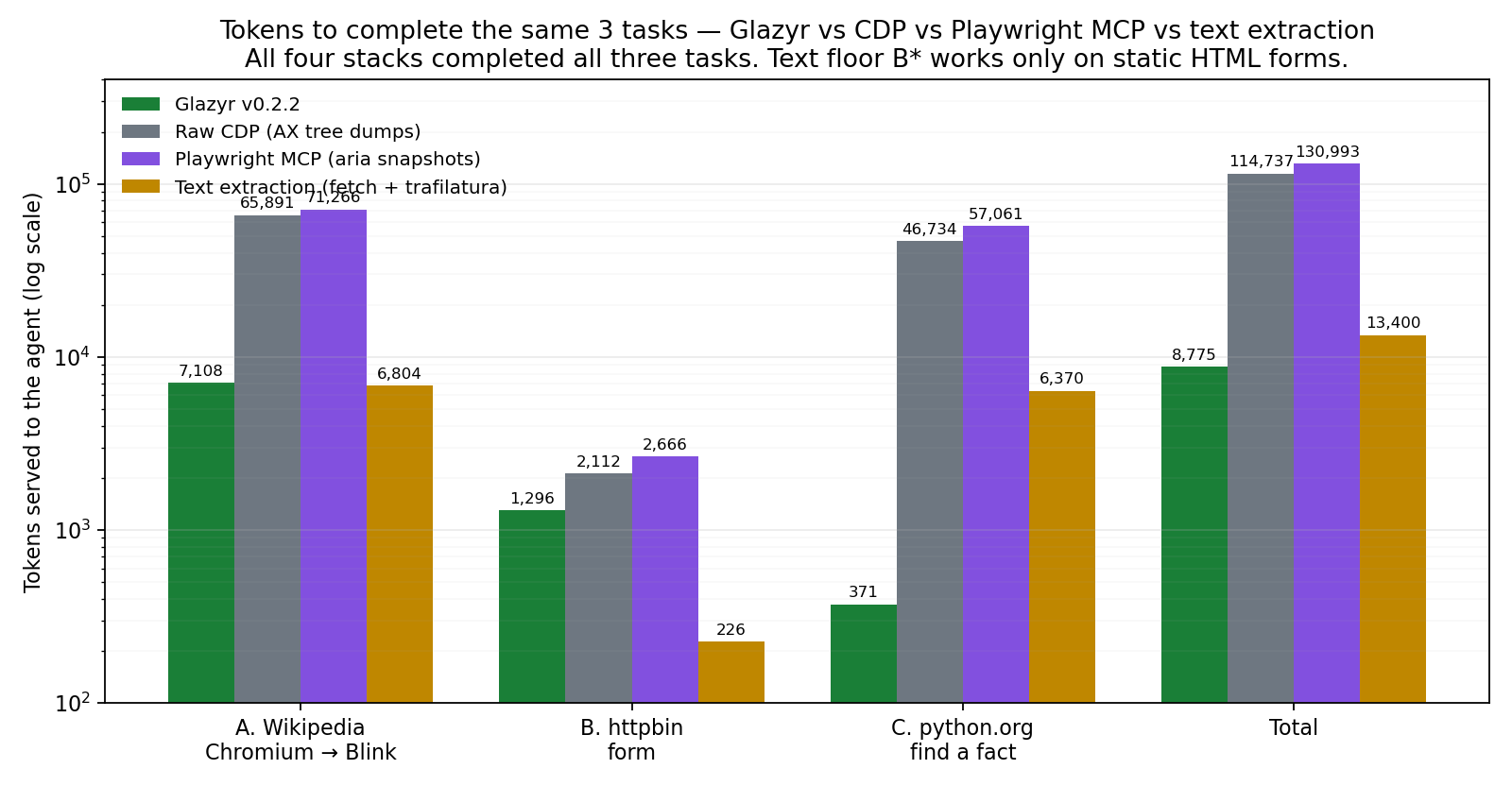
Measured on identical tasks, same machine (Nov 21, 2026; every token
served to the agent counted with tiktoken cl100k_base):
| Flow | Glazyr | Raw CDP | Playwright MCP | Text extraction |
|---|---|---|---|---|
| Wikipedia → Blink | 7,108 | 65,891 | 71,266 | 6,804 |
| httpbin form | 1,296 | 2,112 | 2,666 | 226* |
| python.org fact | 371 | 46,734 | 57,061 | 6,370 |
| Total | 8,775 | 114,737 | 130,993 | 13,400 |
13× fewer tokens than raw CDP, 15× fewer than Playwright MCP. Honest caveat: text extraction wins pure article reading by a hair — it cannot click, type, or act on JavaScript-driven pages. Glazyr can.
Full report, method notes, and the driver scripts for all four stacks: benchmarks/comparison-2026-11-21.md
Install
Add to your MCP client config (Claude Code, Claude Desktop, Cursor, Antigravity, any MCP client):
{
  "mcpServers": {
    "glazyr": {
      "command": "npx",
      "args": ["-y", "@glazyr/mcp"]
    }
  }
}
First run downloads the browser bundle (~106 MB) and creates a Python
environment under ~/.glazyr — expect a minute or two. After that,
startup is silent and the browser launches and manages itself.
Windows: run Glazyr inside WSL2 and point your client at it:
{
  "mcpServers": {
    "glazyr": {
      "command": "wsl.exe",
      "args": ["-d", "Ubuntu", "-u", "root", "--", "npx", "-y", "@glazyr/mcp"]
    }
  }
}
(adjust the distro name and user to yours).
Requirements
- Linux x64, or Windows with WSL2
- Node.js 18+
- Python 3.10+ (the bridge runs in an isolated venv it creates itself)
- ~450 MB disk for the browser bundle
macOS builds do not exist yet.
The nine tools
| Tool | What it does |
|---|---|
glazyr_status | Browser state, process, shared-memory region status |
glazyr_navigate | Navigate; returns a summary map first (245 tokens on Wikipedia) |
glazyr_peek | Filtered page state (~13–14K tokens on a large article) |
glazyr_peek_raw | Unfiltered state — the escalation path |
glazyr_peek_subtree | Zoom into one container or element subtree |
glazyr_find | Search page structure for matching nodes or text |
glazyr_click | Click by node id, using layout geometry from the browser itself |
glazyr_type | Focus an element and type |
glazyr_scroll | Scroll the viewport |
Repeat reads of unchanged state return a short stub instead of the full payload. Click and type acknowledgments carry their asserted result inline.
What we do not claim yet
- On-demand re-extraction: the producer currently writes on page load; a DOM-change command channel is next.
- Pixel streaming: the compositor's shared-memory region carries a live header; the pixel payload pipeline is on the roadmap.
Notes
- Everything runs locally. No account, no API key, no cloud session — your agent pays only its own token bill, which is the bill Glazyr cuts.
- The browser binary is a patched build of Chromium 158 (BSD-licensed, Copyright The Chromium Authors). This package's launcher and bridge code are MIT-licensed.
- Environment overrides:
GLAZYR_HOME(install root),GLAZYR_SHELL(use your own build),GLAZYR_BUNDLE_URL(bundle mirror).







