Listed from the MCP registry; nobody on Odel publishes it.

Logoloom
AI logo design → SVG → full brand kit. Text-to-path, optimize, export PNG/ICO/WebP.
Runs on your machine from its package; the steps are below.
What it does
- Reads
- Writes
- High impact
At most: creates or changes data: records, files, settings.
What it costs
FreeOdel charges nothing per call. The publisher may charge for its own service.
Runs locally
This server runs on your machine over stdio, but its source registry didn't list a distribution package. Check the source repository for setup instructions.
One command. Full brand kit. Zero cost. Stop juggling 5 tools for your logo.



The Problem
Getting a logo for your side project shouldn't cost $96 (Looka) or require juggling Canva + favicon generator + OG image maker + manual PNG exports. Logo is the #1 shipping blocker for indie devs — not because it's hard, but because the tooling sucks.
The Solution
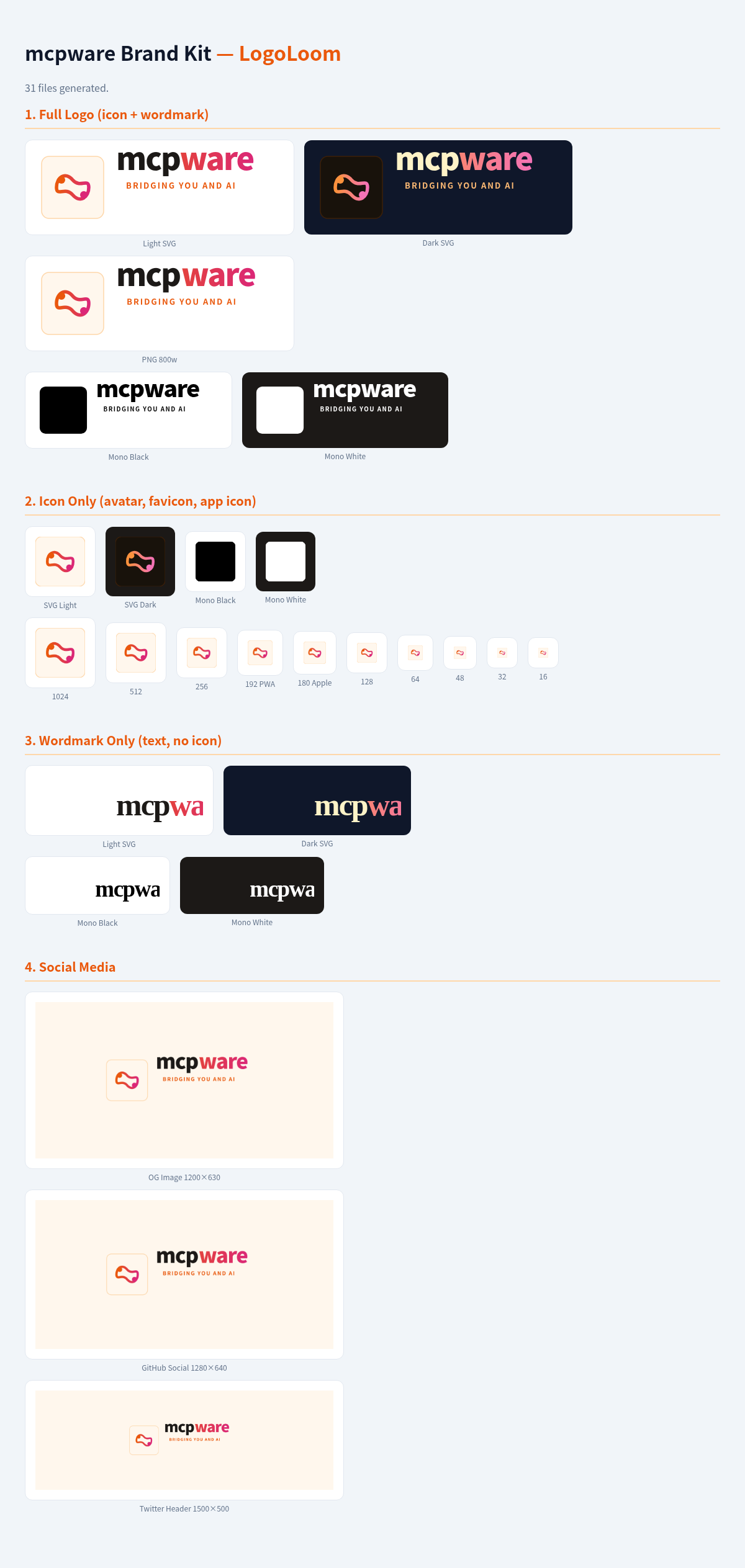
AI designs your logo as clean SVG code (not messy auto-traced paths), then post-processes into a complete brand kit — 31 files, one command:
- SVG — full logo, icon only, wordmark only (light/dark/mono variants)
- PNG — 10 standard sizes (16px favicon → 1024px App Store)
- ICO — browser favicon
- WebP — web optimized
- Social — OG image (1200×630), GitHub preview (1280×640), Twitter header (1500×500)
- BRAND.md — color codes, typography, usage guidelines
Zero API cost. Everything runs locally. Free forever.
Why Not Use Existing Tools?
| Tool | Price | SVG? | Full brand kit? | MCP? | Local? |
|---|---|---|---|---|---|
| LogoLoom | Free | ✅ clean code | ✅ 31 files | ✅ | ✅ |
| Looka | $65-96 | ✅ | ✅ (templates) | ❌ | ❌ |
| Brandmark | $35-95 | ✅ | ✅ ($95) | ❌ | ❌ |
| Canva | $15/mo for SVG | raster only free | ✅ (Pro) | ❌ | ❌ |
| Recraft V3 | Free = no commercial use | ✅ | ❌ | ❌ | ❌ |
| SVGMaker MCP | credits ($) | ✅ cloud | ❌ | ✅ | ❌ |
What it does
- AI designs your logo — Claude reads your codebase, understands your brand, writes SVG
- Text → Path — converts
<text>to<path>so fonts render everywhere (opentype.js) - Optimize — cleans SVG, removes bloat, compresses paths (SVGO)
- Export brand kit — 31 files across 3 categories (full logo + icon only + wordmark only) × (light/dark/mono) + all PNG sizes + social media sizes + BRAND.md
Quick Start
npx @mcpware/logoloom
Claude Code / Cursor .mcp.json
{
  "mcpServers": {
    "logoloom": {
      "command": "npx",
      "args": ["-y", "@mcpware/logoloom"]
    }
  }
}
Then ask Claude: "Design a logo for my project"
Tools
| Tool | What it does |
|---|---|
text_to_path | Convert SVG <text> elements to <path> using font outlines. Font-independent rendering. |
optimize_svg | Clean and compress SVG (30-60% smaller). Remove metadata, merge paths. |
export_brand_kit | Export full brand kit: PNG sizes, ICO, WebP, OG image, mono variants, BRAND.md. |
image_to_svg | Convert PNG/JPG to SVG vector (vtracer). Best for logos and flat graphics. |
Example Output
brand/
├── logo-full-light.svg      # Primary logo
├── logo-full-dark.svg       # Dark mode variant
├── icon-light.svg           # Icon only
├── icon-mono-black.svg      # Single-color (print)
├── icon-mono-white.svg      # White on dark
├── icon-256.png             # Small
├── icon-512.png             # Medium
├── icon-1024.png            # Large (app stores)
├── icon-512.webp            # Web optimized
├── favicon.ico              # Browser favicon
├── favicon-16.png           # 16px favicon
├── favicon-48.png           # 48px favicon
├── og-image.png             # Social share (1200×630)
└── BRAND.md                 # Colors, typography, usage rules
How it works
You: "Design a logo for mcpware"

Claude:
  1. Reads your README + package.json
  2. Asks brand questions (audience, feel, color)
  3. Generates 6-8 SVG concepts in HTML preview
  4. You pick → Claude iterates → you approve

LogoLoom MCP:
  5. text_to_path → font-independent SVG
  6. optimize_svg → clean, compressed
  7. export_brand_kit → all sizes, all formats, brand guidelines

Output: brand/ folder, ready to use everywhere
Why not just use Recraft / SVGMaker?
| LogoLoom | Recraft V3 | SVGMaker | |
|---|---|---|---|
| Price | Free | Free (no commercial) / $10/mo | $8+ |
| Commercial use | Yes | Paid only | Yes |
| Runs locally | Yes | No (cloud) | No (cloud) |
| MCP native | Yes | No | Yes |
| Full brand kit | Yes | No (SVG only) | No |
| Codebase-aware | Yes | No | No |
Tech Stack
All open source, all running locally:
- opentype.js — font parsing, text → SVG path conversion
- SVGO — SVG optimization and compression
- sharp — SVG → PNG/WebP/ICO rasterization
- vtracer — bitmap → SVG vectorization (optional, needs system install)
Requirements
- Node.js 18+
- For
image_to_svg: install vtracer (cargo install vtracer) or potrace (apt install potrace)
More from @mcpware
| Project | What it does | Install |
|---|---|---|
| Instagram MCP | 23 Instagram Graph API tools — posts, comments, DMs, stories, analytics | npx @mcpware/instagram-mcp |
| Claude Code Organizer | Visual dashboard for Claude Code memories, skills, MCP servers, hooks | npx @mcpware/claude-code-organizer |
| UI Annotator | Hover labels on any web page — AI references elements by name | npx @mcpware/ui-annotator |
| Pagecast | Record browser sessions as GIF or video via MCP | npx @mcpware/pagecast |
License
MIT