Listed from the MCP registry; nobody on Odel publishes it.
Gone. Gone from the registry since 23 Nov.




figma-mcp
Figma to pixel-perfect code: deterministic HTML/React, then a render + pixel-diff verify loop.
Runs on your machine from its package; the steps are below.
What it does
- Reads
- Writes
- High impact
At most: creates or changes data: records, files, settings.
What it costs
FreeOdel charges nothing per call. The publisher may charge for its own service.
Runs locally over stdio
This server isn't hosted — your MCP client launches it from a package registry. Use one of the commands below, or drop the config into your client (e.g. Claude Desktop).
Run
npx -y @mehmoodqureshi/figma-mcp
MCP client config
{
  "mcpServers": {
    "figma-mcp": {
      "command": "npx",
      "args": [
        "-y",
        "@mehmoodqureshi/figma-mcp"
      ]
    }
  }
}figma-codekit-mcp
Figma → code that is actually checked against the design. The pixel-diff verifier for Figma-to-code: it renders the output and diffs it against the frame until it converges — and it can verify your own running app the same way, so it works alongside Figma's official MCP server or Framelink rather than replacing them.
Most Figma-to-code tools stop at the moment of generation: they hand you JSX and walk away. Nobody ever renders the output and compares it to the frame, so the result stalls at "90% there" and you spend the afternoon nudging padding by eye.
This MCP server closes that loop. It converts a frame to self-contained HTML deterministically (no LLM, no hallucinated layout), then renders your code in Chromium, pixel-diffs it against the Figma reference, measures every element's box, and tells the agent exactly what is missing or misplaced. The agent edits, calls verify again, and repeats until the diff is at the anti-aliasing floor.
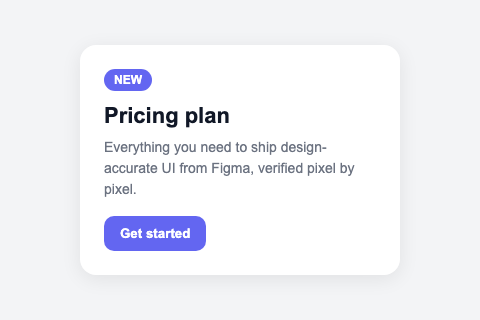
| Figma reference | First pass — 5.18% off | Pixel diff | Converged — 0.00% |
|---|---|---|---|
| 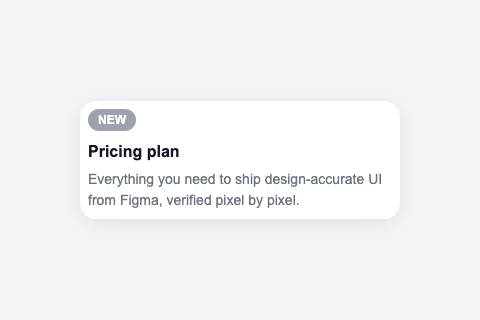 | 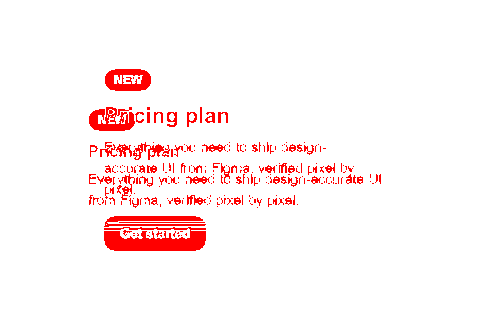 | 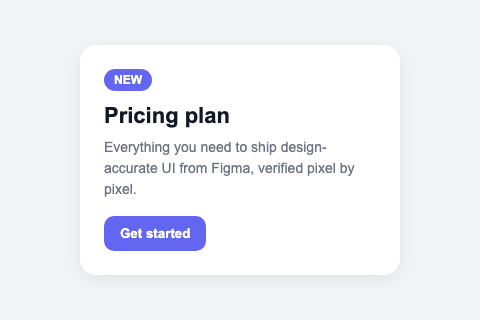 |
Those are real artifacts from npm run example, which runs the loop end to end
with no API key. The generate callback in that demo is a scripted stand-in
for an LLM, so it shows the loop mechanics honestly — the measuring is real, the
"model" is not.
Why the verify step matters
A Figma node tree tells you what the designer declared. It does not tell you what a browser will do with your CSS. Those diverge constantly — a flex gap that collapses, a font that falls back, an absolute child that escapes its parent. The only way to know is to render it and look.
figma_verify gives the agent three independent signals per pass:
- Pixel diff — the overall mismatch ratio plus the worst regions, so it knows how wrong and where.
- Element bounding-box IoU — every IR node is tagged
data-ir-id, measured in the live DOM, and matched against its Figma box. This is what turns "the bottom-left looks off" into "the CTA button is missing" or "the price label is 40px too low". - Paint order and clipping — Figma lists children back-to-front, so a node's
pre-order index is its paint order;
elementsFromPointover a sample grid gives the rendered order wherever two elements actually overlap. This catches the class of bug the other two signals are blind to by construction: elements present, in exactly the right box, stacked the wrong way round — or cut off by an ancestor'soverflowwhere the design lets them overhang. Neither moves a box, and on a tall frame neither moves the diff ratio much, but a decorative overlay drawn over a photo instead of under it is the first thing a person sees. Reported asWRONG STACKING/OVER-CLIPPED, and reported even when the pixel diff has converged.
Tools
| Tool | What it does | Network |
|---|---|---|
figma_convert | Fetch a frame → HTML + ir.json + images as files in assets/ (or data URIs with inlineAssets: true) + reference.png + design tokens (tokens.json in W3C DTCG format, tokens.css, a Tailwind v4 tailwind.theme.css). Optional react: true (component + the components/ it imports), next: true (a runnable App Router project) and tailwind: true (React/Next.js output as Tailwind classes), plus a responsive variant. | Figma API (cached) |
figma_verify | Render HTML in Chromium, pixel-diff vs the reference, IoU-check every element, check paint order and clipping, return targeted fix instructions. Pass url (and optionally selector) to verify a running page instead — your own app at http://localhost:3000, in any framework — against the frame. | none (or your dev server) |
figma_inspect | Print the IR as an indented outline (role, box, layout, text, tokens), filterable — read the structure without dumping raw Figma JSON into context. | none |
Responsive output depends on what the design actually declares
responsive: true reads Figma's sizing intent — FILL becomes flex/100%, HUG becomes
fit-content, FIXED keeps its px. That only exists where the designer used Auto Layout.
A frame with no Auto Layout on the root is a canvas: every child is position:absolute at a
coordinate on a 1440px artboard. There is nothing to relax, so making the root width:100% does not
reflow it — the children stay pinned at their canvas coordinates and the right-hand side disappears
under overflow:hidden. That reads exactly like a page breaking when you zoom.
For those frames the converter keeps the exact canvas and scales it to the viewport instead, so the
design stays intact at every width and zoom level (down to 0.5x, after which the page scrolls).
figma_convert tells you which strategy it used. If you want real reflow rather than proportional
scaling, add Auto Layout in Figma — that is the signal the converter needs.
Every tool returns file paths and numbers, never large blobs. A converted frame is often 100+ KB of HTML; pushing that through a tool result would burn the agent's context for nothing. The agent reads and edits the files directly.
Figma responses are cached per frame, so after the first figma_convert the
whole loop runs offline and free — including when you are rate-limited.
Quick start
You need a Figma personal access token: Figma → Settings → Security → Personal
access tokens, scope File content: read.
export FIGMA_TOKEN=figd_REPLACE_WITH_YOUR_TOKEN
Add it to Claude Code:
claude mcp add figma --env FIGMA_TOKEN=$FIGMA_TOKEN -- npx -y figma-codekit-mcp@latest
Or for any MCP host that reads a JSON config:
{
  "mcpServers": {
    "figma": {
      "command": "npx",
      "args": ["-y", "figma-codekit-mcp@latest"],
      "env": { "FIGMA_TOKEN": "figd_REPLACE_WITH_YOUR_TOKEN" }
    }
  }
}
Then, in the agent: copy a frame link out of Figma (right-click the frame → Copy link to selection) and say "convert this frame and verify it until it converges."
Check your setup
FIGMA_TOKEN=$FIGMA_TOKEN npx -y figma-codekit-mcp@latest --check
It checks Node, whether a token was found (and where, never its value), whether
Figma accepts it, and whether the Chromium figma_verify renders in is
installed, then prints READY or what to fix. Exit code 0 means all three tools
will work. If Chromium is missing (a skipped download, or CI), install it with
npx -y figma-codekit-mcp@latest --install-browser.
Windows
npx resolves to npx.cmd, which some MCP hosts cannot spawn directly. If the
server fails to start, point at the shim explicitly:
{
  "command": "cmd",
  "args": ["/c", "npx", "-y", "figma-codekit-mcp@latest"]
}
The loop, concretely
figma_convert  →  generated.html, reference.png, ir.json   (deterministic, no LLM)
      ↓
figma_verify   →  "NOT CONVERGED — 4.93% of pixels differ.
                   Elements: 22/26 match — 1 missing, 3 misplaced.
                   MISSING: button 'Get started'
                   MISPLACED: h1 'Pricing plan' — 6px too high"
      ↓
  agent edits generated.html
      ↓
figma_verify   →  "CONVERGED — 0.31% of pixels differ (threshold 2.00%)."
The refine loop runs through the calling agent, not through an LLM inside the
server. That means no ANTHROPIC_API_KEY, no second model billing, and the agent
keeps full context on what it already tried. A headless refine loop
(src/refine/) still exists for library use.
Watch the loop without an agent
The same pipeline has a one-page local web front end, split in two: a chat on the left, the generated app on the right. You send a frame link, it asks what to build — HTML, React or Next.js; exact or responsive — and then converts, renders and diffs in front of you. The right pane carries the running app, its source files, the verify numbers and the pixel diff.
npm run site # http://localhost:5173
It uses the same .figma-token and the same .figma-cache/, so a frame you have
already converted re-runs offline in about a second. Useful for checking a frame
converts cleanly before pointing an agent at it — and for showing someone what
"verified against the design" means rather than describing it. Details in
site/README.md.
Configuration
| Variable | Purpose |
|---|---|
FIGMA_TOKEN | Required. Also read from a .figma-token file in your project directory. FIGMA_API_KEY is accepted as an alias. |
FIGMA_MCP_CACHE_DIR | Where converted frames are cached. Defaults to .figma-cache/ in the directory the server is started from. |
ANTHROPIC_API_KEY / GEMINI_API_KEY | Optional, headless refine loop only. The MCP server never calls an LLM. |
FIGMA_MCP_SKIP_BROWSER_DOWNLOAD=1 | Skip the Chromium download on install. figma_convert and figma_inspect still work; figma_verify will not. |
See .env.example. Add .figma-cache/ to your project's
.gitignore — a cached frame keeps the original bitmaps and can be tens of megabytes.
FIGMA_FILE_TIMEOUT_MS (default 90000) caps how long figma_convert waits for
Figma's whole-file download, which it falls back to when the per-node endpoint is
rate-limited. When Figma will not answer, the tool says so within that time and,
if the frame is already cached anywhere, builds from the cached copy and marks the
result STALE CACHE instead of hanging.
Verify your own app, not just the generated HTML
figma_convert  url=<frame link>                      → .figma-cache/<frame>/ (reference.png)
figma_verify   dir=<that dir>  url=http://localhost:3000/pricing  selector="#plans"
Build the page however you like — Figma's official MCP server, Framelink, by hand —
then point figma_verify at it. It screenshots the page (or just the selected
element) at the frame's size and pixel-diffs it against Figma. Element-box and
layering checks need the converter's data-ir-id markers, so for a URL only the
pixel diff runs.
What it does not do
Being straight about the edges, because they are Figma's, not bugs:
- Token names are derived, not designed, unless you are on Enterprise. The
Figma Variables REST API is Enterprise-only. Without it the converter still
collects every colour, font, size and spacing value into
tokens.json/tokens.css/tailwind.theme.css, but names them after the value (--color-c8960c) because it cannot know intent. Rename them in your theme. - Figma rate-limits by cost. A very large file fetched repeatedly can lock a
token out for hours (free accounts hit this sooner). Cached frames keep working
offline;
figma_converttells you when the limit lifts. - Component prop bindings need Code Connect. Components are matched by name and reported, but the API does not expose which instance prop drove which value.
- The diff has a floor. Anti-aliasing and font hinting keep the ratio around
0.5–1.5% even on a perfect match.
thresholddefaults to 2% for that reason — chasing 0 is chasing rendering noise. - One frame at a time. No whole-file crawling, by design: it keeps token spend and Figma rate-limit pressure predictable.
Use it as a library
The verify loop is framework-agnostic and does not need the MCP layer:
import { verifyLoop } from 'figma-codekit-mcp';
import fs from 'node:fs';

const result = await verifyLoop({
  initialCode: firstPassHtml,
  referencePng: fs.readFileSync('frame.png'),
  ir,                                   // enables element-level IoU findings
  viewport: { width: 1440, height: 900, deviceScaleFactor: 2 },
  threshold: 0.02,
  maxIterations: 5,
  generate: async ({ code, correction }) => callYourModel({ code, correction }),
});

console.log(result.converged, result.diffRatio);
fs.writeFileSync('diff.png', result.bestDiffPng);
The loop keeps the best iteration seen, so a later regression never makes the
result worse. To verify a React component on a dev server instead of an HTML
string, pass render: () => renderUrl('http://localhost:3000/preview', viewport).
Develop
git clone https://github.com/Mehmoodqureshi/figma-codekit-mcp.git
cd figma-codekit-mcp
npm install          # also downloads Chromium via postinstall
npm test             # full chain against a mocked Figma API — no token, no network
npm run example      # the verify loop end to end; watch the diff ratio fall
npm run serve        # run the MCP server on stdio
| Path | Role |
|---|---|
src/mcp/ | MCP server, Figma REST source, frame loading, asset export |
src/ir/ | Figma node tree → normalized IR (roles, boxes, auto-layout, style, tokens) |
src/codegen/ | IR → HTML / React / CSS |
src/render.js src/diff.js src/elementDiff.js src/paintOrder.js | Playwright render, pixel diff, bounding-box IoU, z-order + clipping |
src/correction.js src/verifyLoop.js | Turn a diff into fix instructions; drive the loop |
src/refine/ | Optional headless LLM refiners (Anthropic, Gemini) |
example/ | Runnable demos and the offline test suite |
example/ doubles as the test suite — npm test runs the full
loadFrame → figmaToIR → generateHtml chain against a mocked Figma REST API,
including rate-limit handling and rotation/mirror transforms. No token, no
network, no browser, so it runs in CI on every push.
Upgrading from an earlier package name
Replace the package in your MCP client command with npx -y figma-codekit-mcp@latest. Existing environment settings and saved data remain compatible.
Related
- MCP Browser Extension (mcp-browser-extension): let Claude, Cursor or any MCP agent use the Chrome you are already logged into, with a deny-all domain allowlist.
License
MIT © Mehmood Ur Rehman Qureshi