Listed from the MCP registry; nobody on Odel publishes it.

Git QA
Open-source human-in-the-loop QA runner: an AI agent works the test sheet, a person signs off.
Runs on your machine from its package; the steps are below.
What it does
- Reads
- Writes
- High impact
At most: moves money, runs code or commands, deletes data, or sends messages for you.
What it costs
FreeOdel charges nothing per call. The publisher may charge for its own service.
Runs locally
This server runs on your machine over stdio, but its source registry didn't list a distribution package. Check the source repository for setup instructions.
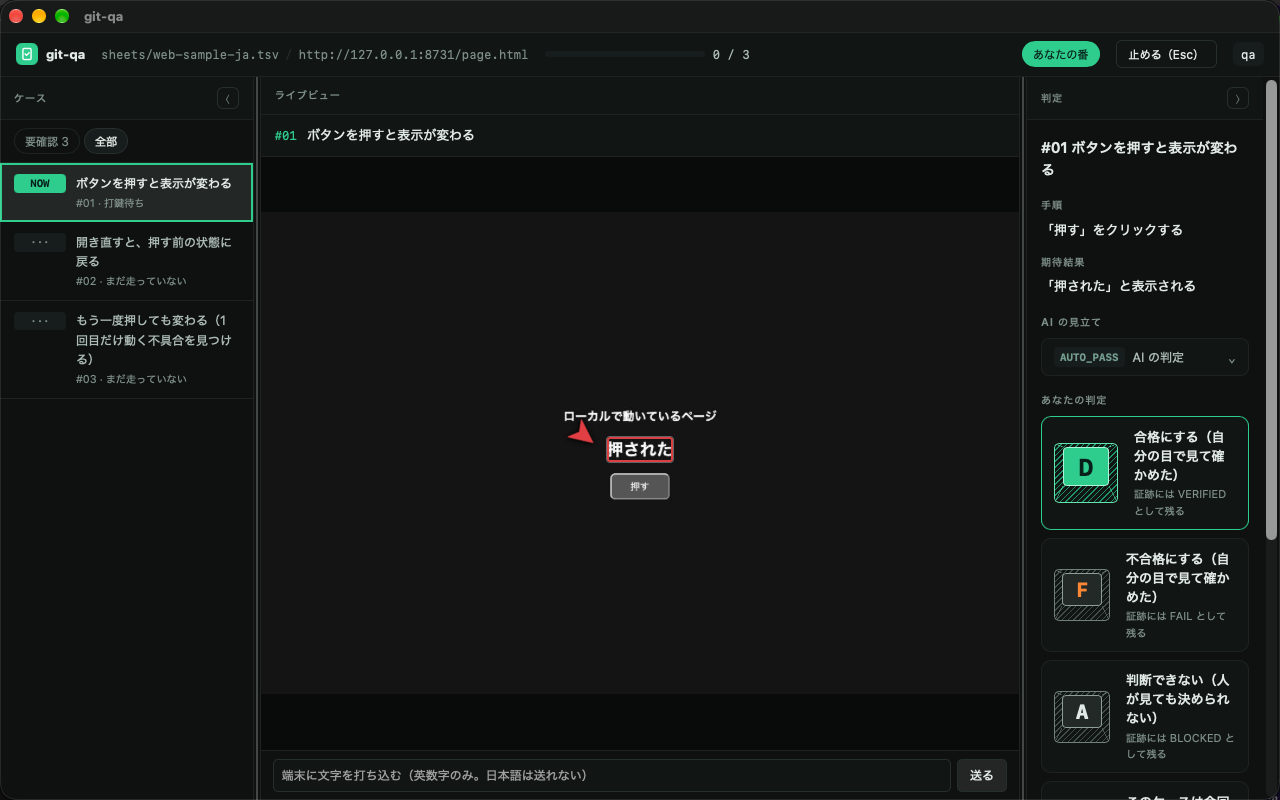
Your test sheet runs itself. You watch, and sign off each case with one key.
git-qa is an open-source human-in-the-loop QA runner. An AI agent works through your test sheet on Android, iPhone, web and desktop apps; you watch the live screen and sign off each case, and the evidence records who verified what. AI agents can also drive it over MCP.
日本語版はこちら / Japanese · Download
Left: the cases in your test sheet. Middle: the page, device or app, live, while the AI drives it —
the red marker is where it found the expected text. Right: one key per verdict — D pass, F fail.
Your handle goes into the evidence when you press it. (The UI is shown in Japanese; it also speaks English.)
When you would reach for it
The release check nobody wants to click through again. You have a 30-row regression sheet for an Android app, a web page and a desktop app. Instead of tapping through it by hand, the AI follows the sheet while you watch the live view and press a key per case. You only stop to look closely where something changed or failed.
"Who actually checked this?"
A client, an auditor or your own team asks after an incident. The evidence answers:
each case says VERIFIED (a person looked and signed) or AUTO_PASS (the AI passed it, nobody looked),
with the name, the time, and the screen at that moment.
An AI agent built the feature — now it should check it, on a real device.
Over MCP, Claude Code (or any agent) can screenshot, read the screen, list what can be pressed and tap it,
on Android, web, desktop or iPhone. It can run the sheet unattended overnight (--no-ui);
in the morning you review the failures. The pass is still yours to give.
The server is listed in the official MCP registry as io.github.meta-taro/git-qa; it runs from this clone (there is no npm package).
Try it
- Download the app from the distribution page (macOS, Windows x64 / ARM64) and install Node 22+
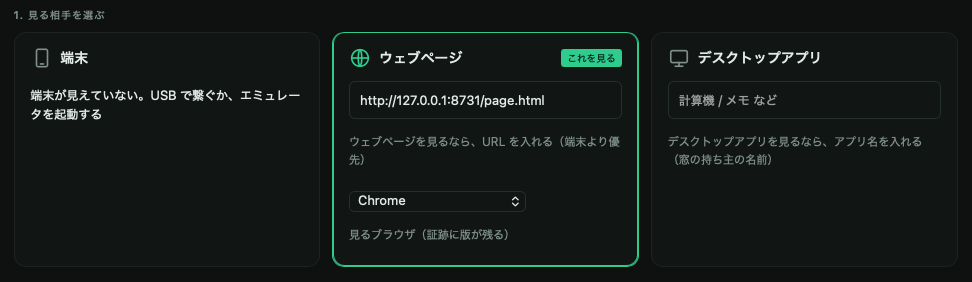
- Open git-qa. Enter a handle (it goes into the evidence as "who looked"), pick what to look at —
an
adbdevice, a web page URL, or a desktop app by name — and a test sheet - Start, watch, and press
D/Fper case
A run, case by case — the AI runs each step (press the button, reopen the page, press it again), you press D, the case turns VERIFIED / qa and the next one starts:
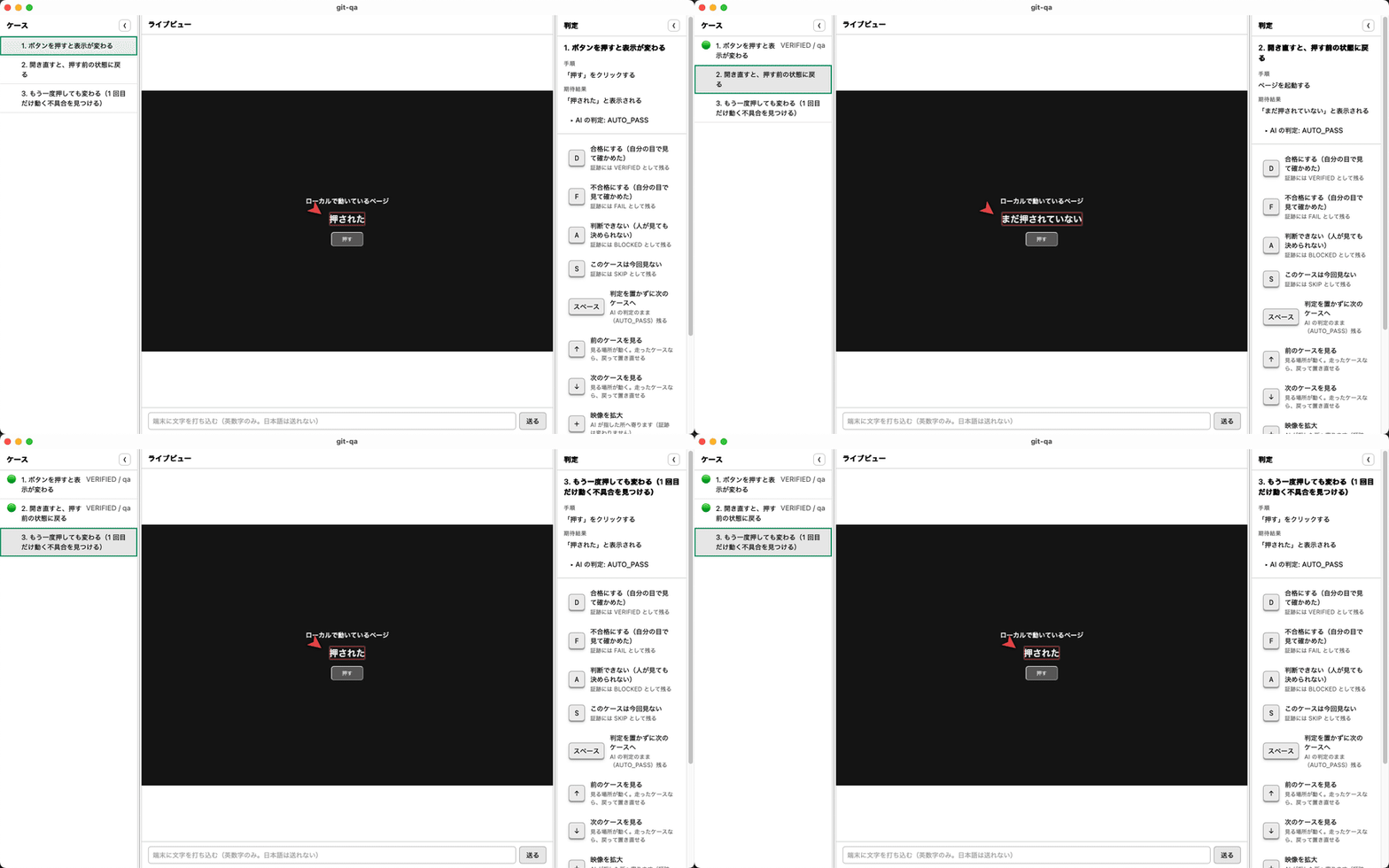
A test sheet is a TSV you can write in any spreadsheet — samples are in sheets/.
From source instead: git clone … && pnpm install && pnpm app (see Install).
Launch from another tool
Another tool (a traceability ledger, for instance) can open git-qa on a given sheet and case:
git-qa://run?sheet=<absolute path to the TSV>&case=<No.>&target=<what to look at>
case runs that one case only and sets finishedAt in run.json when it is done. target is a URL,
app:<name> for a desktop app, or an adb serial. With both present and a handle already entered, the run
starts without a click; if git-qa is already open, that window takes it. Installed app only (not pnpm app).
Why it is built this way
This is not a tool for handing verification to an AI and letting it say "everything passed." When something ships broken, the person is accountable — "the AI did it" is not an answer anyone accepts.
So git-qa splits the work:
- The AI operates the device, the browser, or the desktop app, following a test sheet
- The human watches, and places the verdict with a single keystroke
- The evidence records who saw what, and when
The vocabulary is the point
| Value | Meaning |
|---|---|
VERIFIED | A person put their name on it |
AUTO_PASS | The AI passed it. Nobody looked |
FAIL | It failed |
BLOCKED | Could not run — a precondition was not met |
SKIP | Not run |
A plain PASS would collapse the first two into one value. That collapse is
exactly what this tool exists to prevent.
You can place VERIFIED without looking. That is a feature, not a hole.
The moment you press the key, your handle goes into the evidence. It is a
signature, not a lock. There is no anti-cheat machinery — adding it would make a
tool that exists to save effort expensive to use.
What it can drive
| Android devices | Real devices and emulators over adb — tap, swipe, type |
| Web pages | Chrome / Edge / Firefox / Safari. Same viewport every run, so you can compare |
| Desktop apps | macOS (Accessibility + Vision OCR) and Windows (UI Automation) |
| iPhone / iPad | Watch, read and record over USB. Tap, type, swipe and launch apps through WebDriverAgent, which you sign and install on the device yourself (guide). Tried on a real iPhone (iOS 17.5.1) |
| Mobile browsers | Android Chrome over adb forward + CDP — tried on a real phone (Android 15, Chrome 156): open, type, tap, screenshot and read all work; text inside input fields is not part of what it reads. iOS Safari through the iPhone path above (not yet tried) |
| From an AI agent | Over MCP — screenshot, read the screen, list the names you can press, tap by name. Android, web, desktop, or iPhone / iPad |
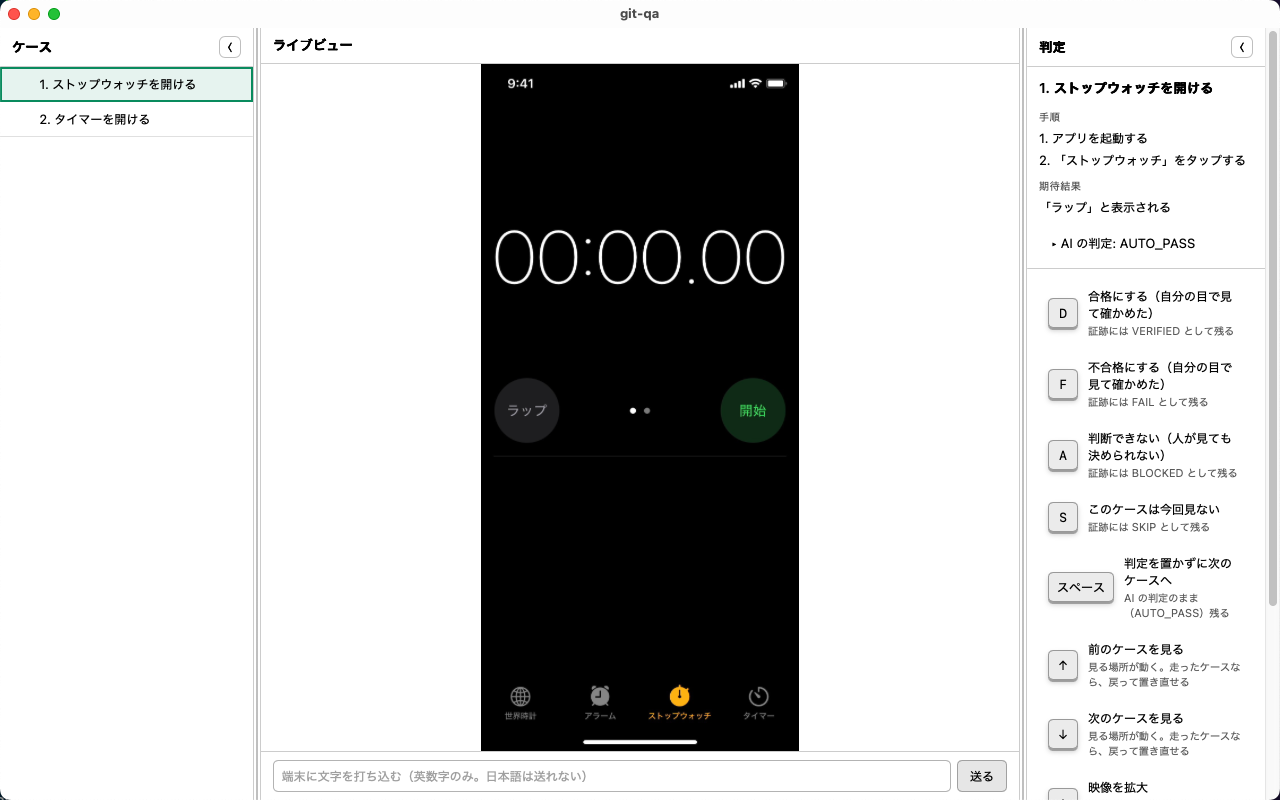
A real iPhone, driven through WebDriverAgent: git-qa launched the Clock app and tapped "Stopwatch". The case waits for a person's verdict.
What evidence looks like
One folder per test run. Commit the whole folder if you want the test itself under version control.
<workspace>/
  git-qa.json        marks this folder as one test project
  sheet.tsv          the test sheet
  runs/
    20260914-100000/
      run.json       verdicts, steps, who placed them and when
      case-001/
        screen.webp  the screen at the moment the verdict was placed
        screen.webm  video of the run — **only when asked for** (`--record`,
                     or "Record video" on the app's start screen)
After a verdict is placed, the app shows "Open the evidence folder" under the path it wrote to, so the screenshot and video of each case are one click away.
Nothing about your machine goes into the evidence: paths are relative to the workspace, so the same run reads the same way on anyone's machine.
Requirements
-
Node 22 or newer — required. The app starts a runner process Node managed by fnm / nvm is only on your terminal's PATH — an app launched from an icon or the Start menu does not see it, so install Node 22+ system-wide (the app tells you when the node it found is too old)
-
adbfor Android, a browser for web — only if you use them -
ffmpeg/cwebp— optional. Without them, evidence is kept in the format it was captured in, uncompressed
Install
Download from the distribution page, or run it from source:
git clone https://github.com/meta-taro/git-qa.git
cd git-qa
pnpm install
pnpm app
macOS builds are signed and notarized. Windows builds are not signed — you will see "Windows protected your PC"; check the source before choosing Run.
To see what this machine can actually do — measured, not guessed:
pnpm doctor
The app also states its own version on the start screen ("This git-qa is v0.2.0"). Paste that line into bug reports — it decides which build you are talking about. When a newer build exists, the same place says so; git-qa never replaces itself.
Status
Stable since v0.2.0 (2026-11-11). Three products use it in real verification work on Windows and macOS, against web, desktop, Android and iPhone targets. Rough edges are listed in each release's notes, and nothing fails silently — where a step cannot run, it is recorded as "a person needs to do this," not as a pass.
Bug reports and requests: Issues. Please write them in your own words, right after you hit the problem. Summarizing loses the part that actually hurt.
License
MIT — see LICENSE.







