Listed from the MCP registry; nobody on Odel publishes it.

Swsd
MCP server for SolarWinds Service Desk tickets, catalog, knowledge, ITSM operations, and workflows.
Runs on your machine from its package; the steps are below.
What it does
- Reads
- Writes
- High impact
At most: moves money, runs code or commands, deletes data, or sends messages for you.
What it costs
FreeOdel charges nothing per call. The publisher may charge for its own service.
Runs locally over stdio
This server isn't hosted — your MCP client launches it from a package registry. Use one of the commands below, or drop the config into your client (e.g. Claude Desktop).
Run
npx -y swsd-mcp
MCP client config
{
  "mcpServers": {
    "swsd": {
      "command": "npx",
      "args": [
        "-y",
        "swsd-mcp"
      ]
    }
  }
}swsd-mcp





MCP server for SolarWinds Service Desk (SWSD / Samanage). Works with any Model Context Protocol client to handle tickets, service requests, knowledge-base work, change/release workflows, assets/CMDB context, procurement records, risks, time entries, and attachments using each user's own SWSD JSON Web Token. See the client compatibility matrix for transport and widget guidance.
📖 Full docs: mcp-swsd.pages.dev
The server holds zero credentials at rest. HTTP tokens are supplied per request; stdio keeps the configured token for the process lifetime. The Windows companion saves the user's JSON Web Token in Windows Credential Manager, and the MCP server does not save it to disk.
Windows companion app
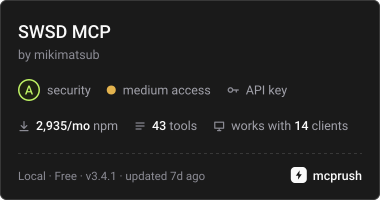
SWSD for AI apps installs swsd-mcp on this PC and chooses which tools your AI apps can use. Your JSON Web Token is saved in Windows Credential Manager. The Windows companion app page has the full guide. Pictures use example data.
Set up this PC
- Install the Windows
swsdplugin. - Start a new local chat and ask to set up SWSD on this computer.
- On Set up, select Install tools. This setup needs Node.js 24.15 or newer within version 24, or Node.js 26 or newer, with npm. Node 25 is not supported. If Node.js is missing or outside those versions, setup can install the current Node.js LTS through winget after you confirm. Windows may ask for administrator approval. Reopen the app when installation finishes.
- Choose United States or Europe, paste your JSON Web Token, and select Test. The field stays masked. ? and Where do I find my token? show where to copy it in SWSD. Generate a JSON Web Token only when none is shown.
- Choose Triage (22 tools), Agent (52), Knowledge (17), Operations (146), or a saved custom profile. The choice is saved immediately. Quit and reopen the AI app, then start a new chat so the server loads that profile.
- Open it again from SWSD Setup on the Start menu.
Install the tools, then add your JSON Web Token.
Connection and status
Home shows Node.js, the installed tools, your JSON Web Token, region, profile, and updates. The token stays masked. Test checks the connection and marks it Verified. Changing United States or Europe clears that check until you select Test again. Repair reinstalls the tools. Remove saved JSON Web Token deletes the credential on this PC. Quit the AI app afterwards. The token remains valid in SWSD until it is revoked there.
Tool guide
Tools is a searchable catalog of all 146 tools for the profile you select. Ctrl+F focuses search, which matches the friendly name, the tool id, and the description. Each tool is marked Read, Edit, or Delete. Read looks up a record, Edit creates or changes one, and Delete always previews the record first. Tools outside the profile stay grouped apart until you search. A match can point you to a profile that includes it, and you can switch to that profile from the detail. Select a tool to see where it is available and copy an example prompt.
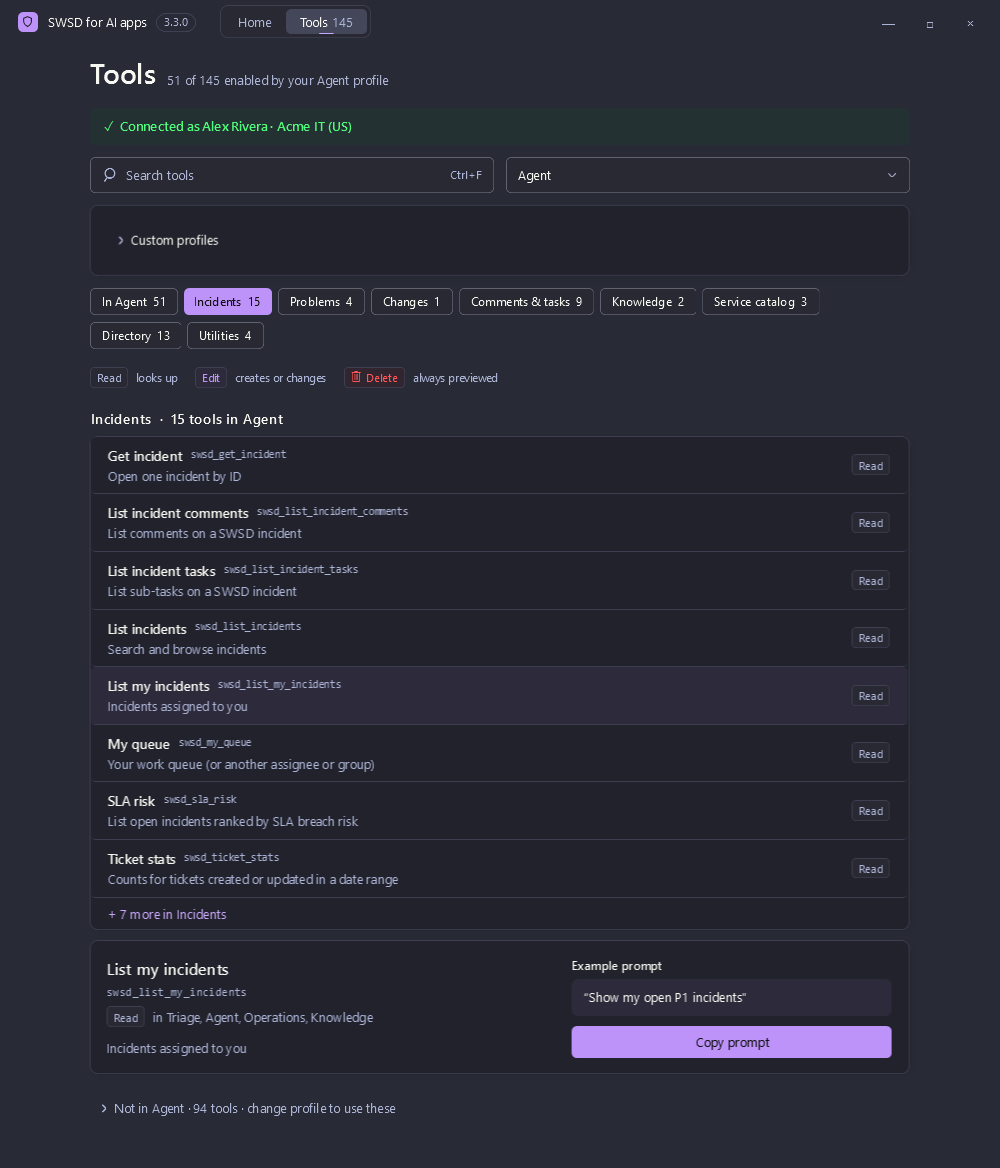
See which tools a profile includes, and copy an example prompt.
Custom profiles
On Tools, open Custom profiles to name a set and check the tools your AI apps may use. Save profile makes that set active and adds it to the Home and Tools pickers. Rename, Delete, and New manage the set. Deleting the active custom profile returns you to Agent.
Export JSON saves the profile as a file you can share. Import JSON loads a file into the builder. Select Save profile to start using an import. The file is the version-1 profile in Custom profiles: name, version, tools, and an optional description. Extra fields are rejected. Names that match Triage, Agent, Knowledge, Operations, or Full are reserved.
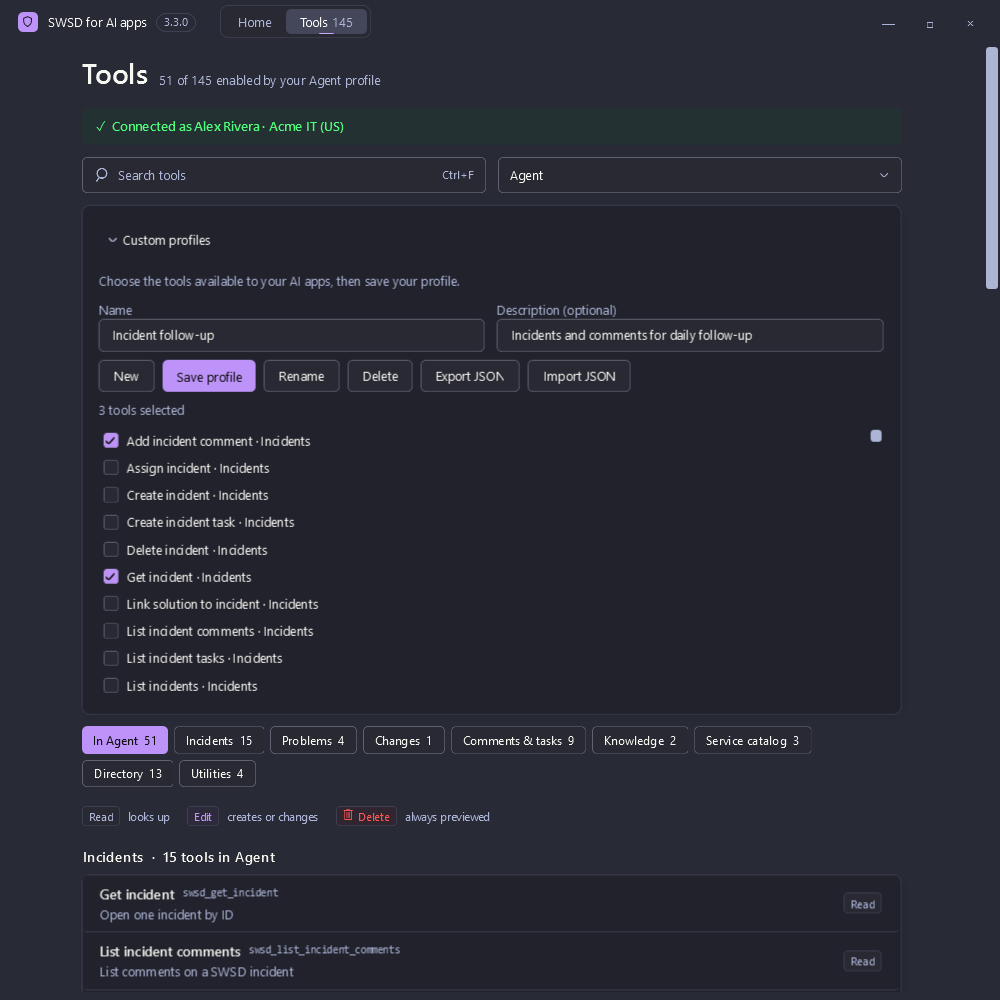
Choose the tools in a named profile, then save or share it as JSON.
Appearance
Appearance follows Match Windows, or you can choose Light, Dark, or a named theme. The choice is saved on this PC. Named themes are Dracula, Catppuccin Mocha, Catppuccin Macchiato, Catppuccin Frappe, Catppuccin Latte, Nord, Gruvbox Dark, Gruvbox Light, Tokyo Night, Tokyo Night Storm, Tokyo Night Day, One Dark, One Light, Solarized Dark, Solarized Light, Rosé Pine, Rosé Pine Moon, Rosé Pine Dawn, Monokai, Material Ocean, GitHub Dark, and GitHub Light.
Updates, diagnostics, and release notes
Check now looks for a newer published release. When one is available, Update installs it after checking the package, and keeps your current tools if the install does not finish. What's new opens the release notes on this PC, including changes that are not published yet. Copy report copies a diagnostics summary for support: versions, whether tools are installed, the profile, the region, whether a credential is saved, display scale, and a short redacted log. The report does not include your token.
Help and issue links
Report a bug and Request a feature open the GitHub forms with the app version, server version, Windows version, and profile filled in.
Quick start
You need:
- An MCP client installed: the client must support stdio or Streamable HTTP (compatibility matrix)
- Node.js 24.15+ or Node.js 26+ for local npm/
npxinstalls. Node 25 is not supported. - An SWSD JSON Web Token: in Setup → Users & Groups → Users, open your User detail page and copy the existing token. Use Actions → Generate JSON Web Token only when no token is shown (SWSD administrator rights required to generate)
VS Code
- Open the Command Palette: Ctrl+Shift+P on Windows/Linux or Shift+Command+P on macOS.
- Run MCP: Add Server....

-
Install with either supported local option:
- Command (stdio): enter
npx -y swsd-mcp. - NPM Package: enter
swsd-mcp, confirm that the publisher ismikimatsub, then select Allow.
- Command (stdio): enter

- Name the server
swsd, then choose Global for your VS Code profile or Workspace for the current project. - Add the SWSD token securely and verify the connection.
Other stdio clients
1. Add the config
Claude Desktop and Cursor use this JSON shape. Add the swsd entry inside the mcpServers object in your client's config file:
{
  "mcpServers": {
    "swsd": {
      "command": "npx",
      "args": ["-y", "swsd-mcp"],
      "env": {
        "SWSD_TOKEN": "your-jwt-here",
        "SWSD_BASE_URL": "https://api.samanage.com"
      }
    }
  }
}
Replace your-jwt-here with your token. EU tenants use https://apieu.samanage.com instead. To customize behavior, add any configuration variable (most common: SWSD_PROFILE to choose the tool set) into the same env block.
2. Drop it in the right file
| Client | Config file path |
|---|---|
| Claude Desktop (macOS) | ~/Library/Application Support/Claude/claude_desktop_config.json |
| Claude Desktop (Windows) | %APPDATA%\Claude\claude_desktop_config.json |
| Claude Code | ~/.claude.json (or use the shortcut below) |
| Cursor | ~/.cursor/mcp.json |
| Continue, Cline, other clients | check your client's docs for its configuration format |
Create the file if it doesn't exist. Then restart your client.
Windows plugin setup: after installing the Windows swsd plugin, start a new local chat and ask to set up SWSD on this computer. Reopen setup from the Windows Start menu. The WPF settings window has Home and Tools tabs.
Appearance offers Match Windows, Light, Dark, and named themes such as Dracula, Catppuccin, Nord, Gruvbox, and Tokyo Night, saved on this PC.
Browse tools by area, search with Ctrl+F, inspect Read/Edit/Delete badges and
example prompts, and select a profile to change the available tool set. The ?
beside JSON Web Token shows the SWSD User detail screen and Actions →
Generate JSON Web Token, used only when no token is shown. Test verifies the
connection and stores the JSON Web Token in Windows Credential Manager. Home also provides tool installation/repair, update checks, and US/EU region selection. The picker offers Triage, Agent, Knowledge, Operations, and saved custom profiles. On the Tools page, build a custom profile, then save, rename, delete, import, or export it. Other MCP clients still use the server configuration below (SWSD_PROFILE=custom). Tools and settings live under %LOCALAPPDATA%\swsd-mcp. Restart the desktop app and start a new chat after a profile change.
The Windows companion app section above is the setup and day-to-day guide, with the full page on the docs site.
Claude Code shortcut: skip editing the file by hand. This saves a private entry for the current project in ~/.claude.json:
claude mcp add swsd --env SWSD_TOKEN="your-jwt-here" --env SWSD_BASE_URL="https://api.samanage.com" -- npx -y swsd-mcp
Microsoft Copilot Studio: different path. Copilot Studio can't spawn local processes, so it needs an HTTP-transport server. See copilot-studio/README.md and the Azure Container Apps recipe.
3. Verify it works
In your MCP client, ask:
"Use swsd to check if you can connect."
The agent should call swsd_health_check and report success. If it does, you're set up. Try a few more:
- "Show me incident 60310": incident reference tools accept either the internal id (≥7 digits) or the human-facing number visible in the SWSD UI (≤6 digits); other tools may require internal ids.
- "List incidents updated in the last 7 days":
updated_within: "7d"(also"24h","1w","30d"). - "What tickets are assigned to me?":
swsd_list_my_incidentsresolves your email from the JWT and user record, then filters each fetched page locally. Scan metadata reports any remaining candidates.
Tools (146 across 15 categories)
| Category | Tools |
|---|---|
| Utility | swsd_get_server_info, swsd_health_check, swsd_get_me |
| Incidents | swsd_list_incidents, swsd_list_my_incidents, swsd_sla_risk, swsd_ticket_stats, swsd_my_queue, swsd_get_incident, swsd_create_incident, swsd_update_incident, swsd_assign_incident, swsd_update_incident_state, swsd_link_solution_to_incident, swsd_delete_incident |
| Comments | swsd_list_incident_comments, swsd_add_incident_comment, swsd_update_comment, swsd_list_record_comments, swsd_add_record_comment, swsd_delete_comment |
| Tasks | swsd_list_incident_tasks, swsd_create_incident_task, swsd_update_task_state, swsd_list_record_tasks, swsd_create_record_task, swsd_update_task, swsd_delete_task |
| Problems | swsd_list_problems, swsd_get_problem, swsd_create_problem, swsd_update_problem, swsd_delete_problem |
| Change & Release | swsd_change_calendar, swsd_list_changes, swsd_get_change, swsd_create_change, swsd_update_change, swsd_delete_change, swsd_list_releases, swsd_get_release, swsd_create_release, swsd_update_release, swsd_delete_release |
| Assets & CMDB | swsd_list_hardware_assets, swsd_get_hardware_asset, swsd_list_hardware_warranties, swsd_create_hardware_asset, swsd_update_hardware_asset, swsd_add_hardware_warranty, swsd_update_hardware_warranty, swsd_delete_hardware_warranty, swsd_delete_hardware_asset, swsd_list_mobile_devices, swsd_get_mobile_device, swsd_create_mobile_device, swsd_update_mobile_device, swsd_delete_mobile_device, swsd_list_printers, swsd_get_printer, swsd_update_printer, swsd_list_software_assets, swsd_get_software_asset, swsd_list_other_assets, swsd_get_other_asset, swsd_create_other_asset, swsd_update_other_asset, swsd_delete_other_asset, swsd_list_configuration_items, swsd_get_configuration_item, swsd_create_configuration_item, swsd_update_configuration_item, swsd_delete_configuration_item |
| Procurement & Risk | swsd_list_contracts, swsd_get_contract, swsd_create_contract, swsd_update_contract, swsd_add_contract_item, swsd_delete_contract, swsd_list_purchase_orders, swsd_get_purchase_order, swsd_create_purchase_order, swsd_update_purchase_order, swsd_delete_purchase_order, swsd_list_vendors, swsd_get_vendor, swsd_create_vendor, swsd_update_vendor, swsd_delete_vendor, swsd_list_change_catalogs, swsd_get_change_catalog, swsd_create_change_catalog, swsd_update_change_catalog, swsd_delete_change_catalog, swsd_list_risks |
| Time tracking | swsd_list_time_tracks, swsd_log_time, swsd_update_time_track, swsd_delete_time_track |
| Attachments | swsd_upload_attachment, swsd_get_incident_attachment |
| Solutions / KB | swsd_search_solutions, swsd_get_solution, swsd_create_solution, swsd_update_solution, swsd_delete_solution |
| Service Catalog | swsd_list_catalog_items, swsd_get_catalog_item, swsd_create_catalog_item, swsd_update_catalog_item, swsd_delete_catalog_item, swsd_create_service_request |
| Lookups | swsd_list_categories, swsd_get_category, swsd_create_category, swsd_update_category, swsd_delete_category, swsd_list_sites, swsd_get_site, swsd_create_site, swsd_update_site, swsd_delete_site, swsd_list_departments, swsd_get_department, swsd_create_department, swsd_update_department, swsd_delete_department, swsd_list_users, swsd_get_user, swsd_create_user, swsd_update_user, swsd_delete_user, swsd_list_groups, swsd_get_group, swsd_create_group, swsd_update_group, swsd_delete_group, swsd_add_group_member, swsd_remove_group_member, swsd_list_roles, swsd_get_role, swsd_create_role, swsd_update_role, swsd_delete_role |
| Custom fields | swsd_describe_custom_fields |
| Audits | swsd_get_record_audits |
Each tool's input schema and description are discovered by your MCP client at runtime; calls return structured results. See the Tools reference for full per-tool documentation.
MCP Apps widgets (rich UI)
Ten interactive UI bundles ship with read tools using the MCP Apps extension. On hosts that support MCP Apps, the tool returns a rendered widget alongside the structured response. On hosts without a widget surface, the same tools return their normal structured payload.
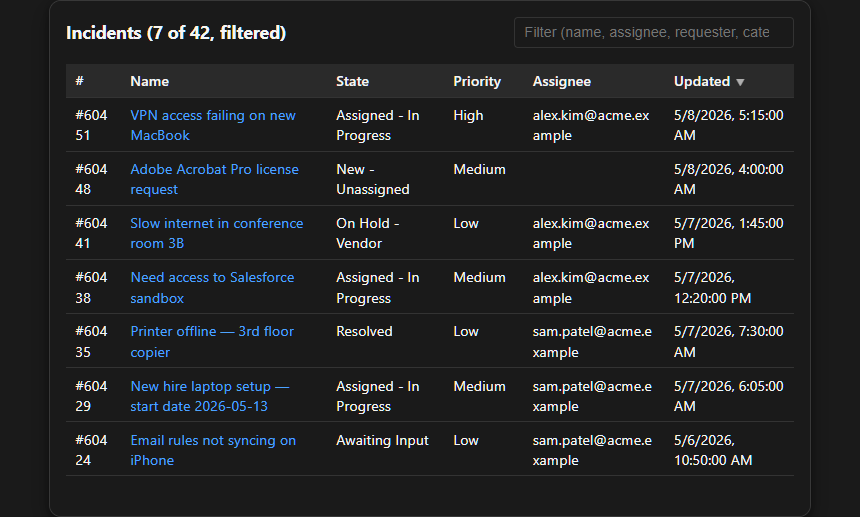
Example: swsd_list_incidents rendering the incident-list widget. Synthetic data; no real tenant info. See the full gallery for screenshots of all ten widgets.
| Tool | Widget | What it renders |
|---|---|---|
swsd_get_incident | incident-detail | Single-record card (description, due date, SLA-violation count, resolution) |
swsd_get_solution | solution-detail | Knowledge-base article with sanitized HTML body |
swsd_list_incidents, swsd_list_my_incidents, swsd_my_queue | incident-list | Filterable, sortable table |
swsd_sla_risk | sla-risk | Risk-count chips + color-coded table with due countdowns |
swsd_list_incident_comments | comment-thread | Vertical conversation with author chips and private badges |
swsd_get_record_audits | audit-timeline | Timeline grouped by day with action chips and field diffs |
swsd_get_catalog_item | catalog-item-form | Form that submits via swsd_create_service_request |
swsd_describe_custom_fields | custom-fields | Searchable explorer with scope/module filters |
swsd_change_calendar | change-calendar | Local-time day sections for changes/releases with shared-CI/group conflict badges |
swsd_ticket_stats | ticket-stats | Summary tiles, median resolution time, and state/priority/assignee/category breakdowns |
swsd_change_calendar is read-only and available in Agent and Operations, or a custom selection.
It defaults to the next 30 days from UTC midnight today and scans up to three
100-row pages per kind (maximum ten pages). All window, state, assignee, group
and name-search filters are client-side; only pagination is sent to SWSD.
The response reports scanned pages/rows, unscheduled records and truncation.
Conflicts cover returned items only; unscanned or filtered-out records can hide
additional conflicts. Touching window edges do not overlap; missing ends assume
one hour. See the tool reference
for inputs, UTC window semantics and scan accounting.
See the Widgets reference for screenshots and per-widget detail.
Configuration
Most users only need SWSD_TOKEN and SWSD_BASE_URL:
| Variable | Default | Notes |
|---|---|---|
SWSD_TOKEN | None | Required for stdio. Your SWSD JSON Web Token; HTTP uses a per-request authorization header. |
SWSD_BASE_URL | https://api.samanage.com | EU tenant: https://apieu.samanage.com |
SWSD_PROFILE | agent | triage, agent, knowledge, operations, or custom: see Profiles |
SWSD_TOOLS | (empty) | With custom, comma-separated tool names; whitespace is trimmed |
SWSD_PROFILE_FILE | (empty) | With custom, a local JSON profile path; unioned with SWSD_TOOLS |
SWSD_WRITE_MODE | live | live, dry-run, or disabled: preview or block write tools without changing profiles |
SWSD_MAX_ATTACHMENT_BYTES | 5242880 | Download byte limit, 1–26214400. Checked before and during streaming; base64 adds about one third to response size. |
SWSD_ATTACHMENT_ROOT | None | Optional real-path boundary for local file_path uploads in stdio mode |
For the full env-var reference (HTTP transport, retries, rate limits, allowlists), see Configuration.
Profiles
Profiles control which tools are registered at startup. Cannot be changed mid-session.
| Profile | Intent | Tool count |
|---|---|---|
triage | Read-heavy first-line support + commenting | 22 |
agent | Full ticket-handler workflow (default) | 52 |
knowledge | KB-author workflow + incident reads | 17 |
operations | Agent workflow plus change/release, ITAM, CMDB, procurement, and risk context, plus every KB authoring tool | 146 |
custom | Explicit selection from the tool list or a JSON profile file | Varies |
operations includes every tool, including KB authoring and guarded deletes. The legacy SWSD_PROFILE=full value is accepted as an alias for operations and emits one deprecation notice on stderr per process.
Custom profiles
Set SWSD_PROFILE=custom and supply SWSD_TOOLS, SWSD_PROFILE_FILE, or both:
SWSD_PROFILE=custom
SWSD_TOOLS="swsd_get_server_info, swsd_list_incidents"
SWSD_PROFILE_FILE=./profiles/desk.json
The JSON file uses this format:
{
  "name": "Synthetic desk",
  "version": 1,
  "description": "Incident lookup and SLA review",
  "tools": ["swsd_get_incident", "swsd_sla_risk"]
}
Both sources are unioned and deduplicated. Unknown names produce a warning listing the skipped names on stderr. A selection with no valid tools is a startup error, even if extras are configured. No tools are included automatically. These two variables only select tools when the profile is custom.
Paths may be absolute or relative to the server's startup working directory; symlinks are resolved. Files must be regular JSON files, at most 256 KiB, and are never imported or evaluated. The required name is 1–80 characters (letters, digits, spaces, _, ., -, starting with a letter or digit); version must be 1; optional description is at most 2,048 characters. The combined input accepts at most 512 tool entries, before deduplication. File tool names are 1–128 characters; extra JSON properties are rejected. The JSON Schema matches these file rules; tool availability and a nonempty union are checked at startup.
Prompts and widgets appear only when all their required tools are selected. The catalog form requires both swsd_get_catalog_item and swsd_create_service_request; without the latter, the lookup remains available as text and structured data. Custom selections are fixed at startup; restart after changing the file or environment.
Delete tools require operations or explicit inclusion in the custom CSV/file; SWSD_ENABLE_EXTRAS cannot add them to other profiles. Call a delete tool without confirmation to preview, then re-call after the user confirms with confirm: true and a matching confirm_id. Dry-run always previews; disabled blocks. SWSD_WRITE_MODE and SWSD permissions still apply.
Use SWSD_ENABLE_EXTRAS=swsd_search_solutions,swsd_get_solution to add specific tools on top of a profile.
Hosting an HTTP server (advanced)
Quick Start above runs swsd-mcp on your own machine: your MCP client spawns it on demand via npx. Most users stop there.
Set up an HTTP-mode server only if you need:
- Microsoft Copilot Studio integration: Copilot Studio can't spawn local processes
- One shared instance for a team: one deploy, many users, each providing their own token per-request
- Stricter network control: private VNet, IP allowlist, custom domain
The Docker image supports container hosting, including Azure Container Apps and a Docker-capable VM. Main builds publish :latest and :sha-XXXXXXX; release tag builds publish :X.Y.Z and :X.Y. See Deployment for the full guide and the Azure Container Apps recipe (recommended for Copilot Studio; scale-to-zero pricing).
Documentation
SECURITY.md: vulnerability reporting via GitHub Security Advisoriesdocs/SECURITY-POSTURE.md: security controls, supply-chain hardening, verification methodsCONTRIBUTING.md: bug reports, PR review criteria, local development setupCHANGELOG.md: version historycopilot-studio/: Microsoft Copilot Studio Swagger connector specs and import guidedocs/deployment/: cloud deployment recipes
License
MIT: see LICENSE. Provided "as is" without warranty.
Trademarks
SolarWinds, Samanage, and Service Desk are trademarks of SolarWinds Worldwide, LLC. This project is not affiliated with, endorsed by, or sponsored by SolarWinds. It wraps the publicly documented SWSD REST API.