Listed from the MCP registry; nobody on Odel publishes it.
Is this yours? Claim it
ATLAS Explain
Market jargon in plain language: terms, official figures, crypto prices and charts, headlines.
One address for any MCP client. No sign-in needed on this server.

What it does
2 read5 other
Grouped by tool name. At most: only reads or looks up information.
What it costs
FreeOdel charges nothing per call. The publisher may charge for its own service.
Tools
7 · grouped by tool name · checked 16 Nov 2026Read · 2Look things up
- explain_term
- browse_glossary
Other · 5Neither hinted nor named
- asset_details
- official_figures
- crypto_prices
- price_history
- todays_headlines
Educational explanations of a market move. After a sharp drop, ATLAS Explain turns a structured move card into a balanced account of why a buyer might see opportunity and why a seller might see further risk. It is free to use, Apache-2.0, and it does not tell anyone to trade.
The model runs through Firebase AI Logic hybrid inference. Chrome uses Gemini Nano on the device when that model is available, and Gemini in the cloud when it is not. The screen names the path that actually ran.
ATLAS Explain comes two ways, from one codebase: an MCP connector that AI assistants (Claude, ChatGPT, Cursor, VS Code) add with one address, and a web app at https://atlas-explain.web.app/app. There is no Chrome extension (removed on 15 Nov 2026).
This is an entry for Google's #BuildHybridAI 2026 hackathon.
Educational explanations only. Not financial advice, not a recommendation, and not an offer to buy or sell any security.
Value proposition
A sharp move can support two careful readings at once. Someone might buy a dip because the drop looks larger than the new information. Someone else might sell because the same information can keep pressuring the price. ATLAS Explain makes both readings explicit from a move card the user supplies: symbol, percent move, volume versus normal, the market and sector that day, peers, volatility, upcoming events, and optional headlines.
Headline text is classified into a fixed taxonomy: AI capex, China / export rules, scandal / governance, earnings / guidance, rates / Fed, macro shock, or other. The answer is always three buyer reasons, three seller reasons, and what would change the picture.
Private notes and a watchlist can ride along only when the on-device model runs. They are omitted from cloud prompts and they are never written to Firestore.
How Firebase AI Logic hybrid inference is used
The web client uses the Firebase JavaScript SDK (firebase@13.3.0) and the hybrid API documented here:
- Build hybrid experiences in Web apps
- Configuration options
- Structured output for hybrid experiences
InferenceModereference
Checked against @firebase/ai 3.1.0 typings shipped with that SDK. The calls are:
| Step | API | Where it runs |
|---|---|---|
| Gemini Developer API backend | getAI(app, { backend: new GoogleAIBackend() }) | src/platform/web/explainer.ts line 45 |
| Mode | InferenceMode.PREFER_ON_DEVICE, ONLY_ON_DEVICE, PREFER_IN_CLOUD, or ONLY_IN_CLOUD | src/platform/web/explainer.ts lines 37–41 |
| Model | getGenerativeModel(ai, { mode, inCloudParams, onDeviceParams }) | src/platform/web/explainer.ts lines 95–125 |
| On-device init, after the Explain click | model.initializeDeviceModel(onDownloadProgress) | src/platform/web/explainer.ts lines 127–132 |
| Inference | model.generateContent(prompt) | src/platform/web/explainer.ts line 144 |
| Which path ran | result.response.inferenceSource (on_device or in_cloud) | src/platform/web/explainer.ts lines 148 and 159–167 |
inCloudParams.generationConfig sets responseMimeType: "application/json" and a responseSchema built with Schema.object / Schema.enumString. The same schema is passed to the on-device model as onDeviceParams.promptOptions.responseConstraint, which is what the hybrid structured-output guide requires so both paths return the same shape.
The cloud model id defaults to gemini-3.5-flash-lite (the SDK 13 default) and can be changed with Remote Config. Temperature is not sent: the SDK marks it unsupported on Gemini 3.x and later.
Path selection before that call lives in src/core/inference-path.ts (selectInferencePath, line 20) and is applied in src/core/run-explanation.ts (lines 52 and 69):
- Remote Config
inference_modeis the preference. The in-app default isprefer_on_device. - More than 8 headlines, a prompt over 6,000 characters, or a document over 1,200 characters forces
ONLY_IN_CLOUD. On-device Gemini Nano's context is 9,216 tokens. - Notes and the watchlist are included only on an
ONLY_ON_DEVICEcall. If the device model is unavailable and the preference wasprefer_on_device, the app retries once in the cloud with those fields removed.
App Check, Remote Config, and Firestore are started in src/platform/web/backend.ts:
- App Check with
ReCaptchaEnterpriseProvider: lines 58–61. A debug token is assigned just above that, and only innpm run dev. - Remote Config
fetchAndActivateandgetValue: lines 65–89. In-app defaults insrc/core/settings.tsmatchremoteconfig.template.json. - Firestore
addDocunderusers/{uid}/explanations: line 117. Anonymous Authentication supplies the uid.
Without a Firebase web config and a reCAPTCHA Enterprise site key, src/main.ts lines 27–28 render a setup screen and do not initialize Firebase.
Architecture
src/core has no Firebase and no DOM, so the MCP connector (src/mcp/) and a future Android shell reuse the glossary, the move card, the prompt, the taxonomy parser and the path decision. The web app (src/web/app.ts) mounts the wallet shell in src/wallet/ over a WebBackend.
flowchart TD
  user[Move card, question, optional notes] --> app[Web app]
  app --> core[src/core validation, prompt, path]
  core --> mode{Inference mode}
  mode -->|short card, prefer on-device| device[initializeDeviceModel then generateContent]
  mode -->|private notes| deviceOnly[ONLY_ON_DEVICE with notes]
  deviceOnly -->|Gemini Nano missing| cloudRetry[ONLY_IN_CLOUD without notes]
  mode -->|long input or cloud preference| cloud[ONLY_IN_CLOUD or PREFER_IN_CLOUD without notes]
  device --> source[response.inferenceSource]
  cloud --> source
  cloudRetry --> source
  source --> parse[Taxonomy parser]
  parse --> ui[On-device or cloud badge]
  parse --> store[Firestore users/uid/explanations]
  rc[Remote Config] --> core
  check[App Check reCAPTCHA Enterprise] --> device
  check --> cloud
Setup
Requirements: Node.js 22 or newer, a Firebase project on the Spark plan or above, and Chrome when you want the on-device path. npm install may print an engine warning from the firebase package, which declares a newer Node for running the SDK inside Node. This app bundles the SDK for the browser and does not run inference in Node.
npm install
npm run dev
npm run dev serves everything at one address, http://127.0.0.1:5173: the website, the web app (/app), the owner page (/admin) and the connector Worker (/mcp, /health, /api/v1, /admin/stats). The Worker runs under wrangler dev behind that address (src/site/dev-worker.ts); set ATLAS_DEV_WORKER=0 to run the front end alone. Locally the Worker has an empty data store, so the site and app keep reading the published data from the live Worker. npm run preview serves a production build at the same address.
The public web config for project atlas-explain is committed in src/platform/web/firebaseConfig.ts and is used when the VITE_ variables are unset. .env.example lists optional overrides for a different Firebase project. Copy it to .env.local only if you need those overrides. Do not commit service-account keys.
This Firebase project
atlas-explain is on the Spark plan. AI Logic uses the Gemini Developer API with App Check enforced. Anonymous Authentication is on. Firestore is the (default) database in nam5, in production mode. App Check uses a score-based reCAPTCHA Enterprise key limited to atlas-explain.web.app and atlas-explain.firebaseapp.com. Localhost is not on that key.
App Check debug token (localhost)
npm run dev sets self.FIREBASE_APPCHECK_DEBUG_TOKEN = true before initializeAppCheck. A production build does not set it, even if VITE_APPCHECK_DEBUG_TOKEN is present.
- Run
npm run devand open the local URL. - Open the browser developer console. The App Check SDK prints a line like
AppCheck debug token: "...". - In the Firebase console, go to Security → App Check → Apps, open the web app, and choose Manage debug tokens.
- Add the token from the console, then reload the app. Cloud calls stay blocked until that token is registered.
- To reuse a token you already registered, set
VITE_APPCHECK_DEBUG_TOKENin.env.localto that token. Set it tofalseto turn the debug provider off. Do not addlocalhostto the production reCAPTCHA key.
Firebase console (another project)
- Create a project. Analytics is optional.
- Register a Web app and copy its config into
.env.localusing theVITE_FIREBASE_*names in.env.example. - Open AI Services → AI Logic and finish Get started with the Gemini Developer API. Leave App Check enforced.
- Create a score-based reCAPTCHA Enterprise key and register the web app in App Check. Put the key in
VITE_RECAPTCHA_ENTERPRISE_SITE_KEY. - Enable Authentication → Anonymous.
- Create a Firestore database. Rules allow a signed-in user to read and write only
users/{their uid}/explanations/*, and they reject documents that containnotesorwatchlist. - Remote Config parameters, also compiled into
src/core/settings.tsuntil a template is published:inference_mode,cloud_model,prompt_template,topic_taxonomy,on_device_max_headlines,on_device_max_chars,long_document_chars,max_output_tokens. Prompt placeholders are{{TAXONOMY}},{{QUESTION}},{{MOVE_CARD}}, and{{PRIVATE_CONTEXT}}. Taxonomy ids are fixed in code; Remote Config can rename labels or hide an id, andotheris always kept.
Deploy
.firebaserc selects project atlas-explain. firebase.json publishes Hosting from dist/ with a single-page rewrite, Firestore rules from firestore.rules, and Remote Config from remoteconfig.template.json.
Sign in once:
npx firebase-tools login
Run the release gate, then deploy hosting, rules, and Remote Config:
npm run release:check   # typecheck, lint, test, both builds, manifest, bundle budget, audit, trade-word scan
npx firebase-tools deploy --only hosting,firestore:rules,remoteconfig
Billing is shipped switched off. billing_enabled defaults to false, checkout is not shown, and the badge says "Free during beta". See docs/MONETIZATION.md before changing that.
How the pieces fit
One repository, one front end and one back end:
- Front end (Vite, deployed to Firebase Hosting): the website (
index.html,partners.html,privacy.html,terms.html), the web app (app.html,src/web/andsrc/wallet/), the owner page (admin.html) and one embeddable calculator (embed/). - Back end: the Cloudflare Worker (
src/mcp/): the MCP connector, the partner REST API, the owner's usage stats, the scheduled data jobs and the published data files. Firebase supplies sign-in, saved data, settings and Gemini for the web app. - Data: one copy. The Worker's data jobs capture prices and official figures; the connector, the partner API and the web app all read those same files. The browser never fetches a price feed itself (it only streams Kraken's public ticks between captures).
Older links to the app's legal pages (#/terms, #/privacy) still open them. The links and messages a separate local ATLAS app once used (#c=, #card=, #concept=, postMessage from localhost:3000) were removed on 24 Nov 2026, with everything else that talked to that app.
For AI assistants (MCP)
ATLAS Explain also has a free, read-only MCP server hosted online (Cloudflare Workers free plan). Assistants such as Claude add its web address as a connector, and can then look up glossary terms, official figures (with sources) and today's headlines. Nothing is downloaded. Hosting and owner steps: docs/MCP.md.
Screenshots
Stills live in docs/screenshots/. An on-device badge is not included: that still needs a recording on a laptop with Gemini Nano (see docs/DEMO.md).
The web app at https://atlas-explain.web.app/app is one page: Explain at the top, then Today, Economy, Assets, Tools and Learn, reached from the header. The pill shows Live prices once prices arrive.
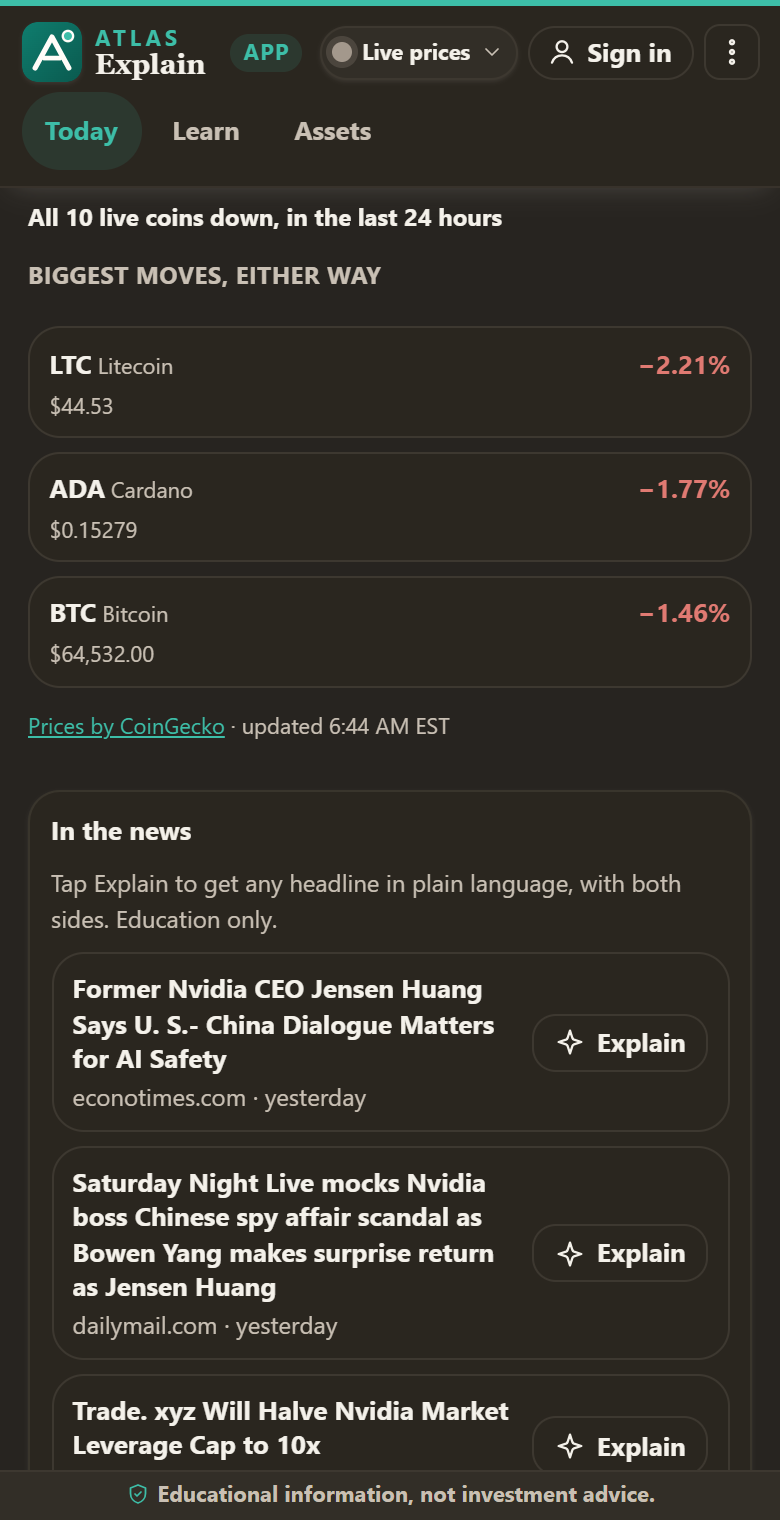
Today shows the biggest crypto moves over 24 hours from the captured prices, with the source and time.
On-device model in Chrome
On-device inference needs Chrome on desktop, version 139 or newer (getting started guide):
- Set
chrome://flags/#prompt-api-for-gemini-nano-multimodal-inputto Enabled and restart Chrome. - Optional, in DevTools:
await LanguageModel.availability(), thenawait LanguageModel.create()if the result isdownloadable. The first download can take several minutes. - Click Explain the move.
initializeDeviceModelruns from that click, which satisfies Chrome's user-activation rule. The badge then reads On-device or Cloud frominferenceSource.
If Nano is not available and the card has no private notes, PREFER_ON_DEVICE falls through to the cloud model inside the SDK. If the card has notes, the first call is device-only so the notes cannot take the cloud fallback; a failure retries in the cloud without them, and the badge says so.
Demo
The full three-minute script (the connector in Claude → a chart and official figures with their sources → the web app answering on the device with Gemini Nano → Keep going, Recent, Learn and Assets) is in docs/DEMO.md. The submission checklist is in docs/SUBMISSION.md.
| Step | What the judge sees |
|---|---|
| 1 | The home page leads with the connector; /connect gives the one address to add. |
| 2 | In Claude, ATLAS Explain explains a term, draws a price chart and returns official figures, each with its source and time. |
| 3 | In the web app, Explain runs Firebase AI Logic hybrid inference; the badge names the path that ran (on-device Gemini Nano or cloud Gemini). |
| 4 | Two sides and what would change the picture, never an instruction. |
| 5 | Recent explanations and Learn path progress stay on the device. |
Tests and CI
npm run release:check
That one command runs the Node version check, typecheck, lint, tests, the web and MCP builds, the bundle budget (every chunk ≤ 500 kB, app entry ≤ 150 kB), npm audit (must be 0) and the trade-word scan, and stops at the first failure. Hosting sends a strict CSP and security headers from firebase.json. Node ^22.12 || ^24 (.nvmrc = 24). Audit overrides are explained in docs/DEPENDENCIES.md.
Unit tests cover move-card validation, prompt building, the taxonomy parser, inference-path selection, the explain retry that drops private notes, and the Firebase AI Logic calls with firebase/ai mocked. GitHub Actions (.github/workflows/ci.yml) runs the same steps on Node 22.
npm run remote-config rewrites remoteconfig.template.json from the in-app defaults. A test fails if the two drift.
Limitations
- On-device inference is Chrome on desktop, version 139 or newer, with the Prompt API flag. Other browsers use the cloud path.
- On-device context is 9,216 tokens. Long cards are sent to the cloud without private notes. Hybrid mode does not support multi-turn chat, token counting, or the Live API.
- The on-device model can still return slightly messy JSON. The parser coerces unknown topics to
otherand rejects an answer that does not contain three reasons on each side. - Sample cards are illustrative. January 27, 2025 and April 3–4, 2025 figures are rounded from contemporaneous Reuters, AP, BBC, and CNBC reports linked on the card. They are not a licensed feed, and this repo does not ship Polygon, Yahoo, or Coinbase data. The blank card's −6% is a placeholder.
- Anonymous history is tied to the browser profile. Clearing site data starts a new user.
- App Check debug tokens are for localhost only. Production needs the reCAPTCHA Enterprise key and enforcement left on.
- Explanations can be wrong, incomplete, or too confident. They are not research from the private ATLAS desk and they are not a forecast.
Relationship to ATLAS
ATLAS is a private, paper-only trading-research desk. ATLAS Explain is a separate public companion. This repository does not contain ATLAS models, signals, notebooks, positions, or data. A move card exists only because someone pasted it, picked a labeled sample, or loaded their own saved explanation.
What to build next
Android shell. Port the move card, prompt, taxonomy, and path decision, then call Firebase AI Logic's Android hybrid API so Gemini Nano runs through ML Kit when the device has it and Gemini in the cloud otherwise. Use the current Android getting-started guide rather than a copied web snippet: hybrid inference for Android. Reuse App Check (Play Integrity), the same Firestore rules, and the same Remote Config keys.
License
Apache License 2.0. See LICENSE.