Listed from the MCP registry; nobody on Odel publishes it.

Oura Ring
Connect your Oura Ring to Claude AI assistants. Health metrics with smart analysis tools.
Runs on your machine from its package; the steps are below.
What it does
- Reads
- Writes
- High impact
At most: only reads or looks up information.
What it costs
FreeOdel charges nothing per call. The publisher may charge for its own service.
Runs locally over stdio
This server isn't hosted — your MCP client launches it from a package registry. Use one of the commands below, or drop the config into your client (e.g. Claude Desktop).
Run
npx -y oura-ring-mcp
MCP client config
{
  "mcpServers": {
    "oura-ring": {
      "command": "npx",
      "args": [
        "-y",
        "oura-ring-mcp"
      ]
    }
  }
}Oura MCP Server


An MCP server that connects your Oura Ring to Claude and other AI assistants. Get human-readable insights about your sleep, readiness, and activity—not just raw JSON.
Features
- Smart formatting - Durations in hours/minutes, scores with context ("85 - Optimal")
- Sleep analysis - Sleep stages, efficiency, HRV, and biometrics
- Readiness tracking - Recovery scores and contributor breakdown
- Activity data - Steps, calories, and intensity breakdown
- Health metrics - Heart rate, SpO2, stress, cardiovascular age
- Smart analysis - Anomaly detection, correlations, trend analysis
- Tags support - Compare metrics with/without conditions
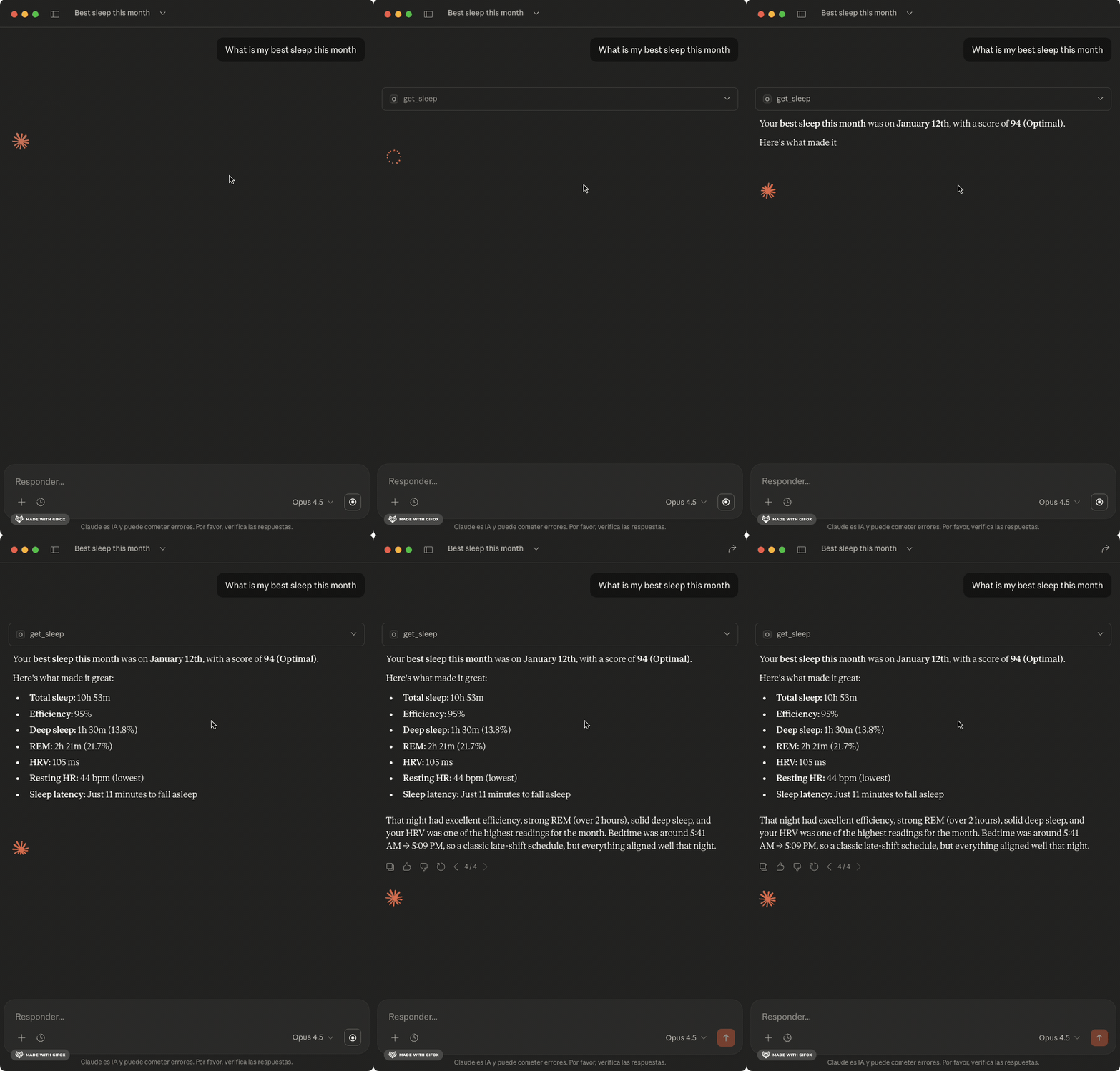
See example outputs — what Claude returns for sleep, readiness, weekly summaries, and smart analysis
Quick Start
1. Install
npm install -g oura-ring-mcp
Or use directly with npx (no install needed):
npx oura-ring-mcp
2. Authenticate with Oura
Option A: Personal Access Token (simpler)
- Go to cloud.ouraring.com/personal-access-tokens
- Create a new token
- Set
OURA_ACCESS_TOKENin your Claude Desktop config (see below)
Option B: OAuth CLI Flow
- Create an OAuth app at developer.ouraring.com
- Set Redirect URI to
http://localhost:3000/callback
- Set Redirect URI to
- Run the auth flow:
bash
export OURA_CLIENT_ID=your_client_id export OURA_CLIENT_SECRET=your_client_secret npx oura-ring-mcp auth - Credentials are saved to
~/.oura-mcp/credentials.json
3. Configure Claude Desktop
Add to claude_desktop_config.json:
With Personal Access Token:
{
  "mcpServers": {
    "oura": {
      "command": "npx",
      "args": ["oura-ring-mcp"],
      "env": {
        "OURA_ACCESS_TOKEN": "your_token_here"
      }
    }
  }
}
With OAuth (after running npx oura-ring-mcp auth):
{
  "mcpServers": {
    "oura": {
      "command": "npx",
      "args": ["oura-ring-mcp"]
    }
  }
}
The server reads credentials from ~/.oura-mcp/credentials.json. To enable automatic token refresh, add your OAuth credentials:
{
  "mcpServers": {
    "oura": {
      "command": "npx",
      "args": ["oura-ring-mcp"],
      "env": {
        "OURA_CLIENT_ID": "your_client_id",
        "OURA_CLIENT_SECRET": "your_client_secret"
      }
    }
  }
}
Restart Claude Desktop. Requires Node >=18.
What Can I Ask?
Daily check-ins:
- "How did I sleep last night?"
- "Am I recovered enough to work out today?"
- "What's my body telling me right now?"
Patterns & trends:
- "Do I sleep better on weekends?"
- "What time should I go to bed for optimal sleep?"
- "Is my HRV improving or declining?"
Correlations & insights:
- "Does alcohol affect my sleep quality?"
- "What predicts my best sleep nights?"
- "How does exercise timing affect my recovery?"
Comparisons:
- "Compare my sleep this week vs last week"
- "How do I sleep after meditation vs without?"
- "What changed when I started taking magnesium?"
Anomalies:
- "Are there any unusual readings in my data?"
- "Why was my readiness so low yesterday?"
- "Find days where my metrics were off"
Available Tools
Data Retrieval
| Tool | Description |
|---|---|
get_sleep | Sleep data with stages, efficiency, HR, HRV |
get_daily_sleep | Daily sleep scores with contributors |
get_readiness | Readiness scores and recovery metrics |
get_activity | Steps, calories, intensity breakdown |
get_workouts | Workout sessions with type and intensity |
get_sessions | Meditation and relaxation sessions |
get_heart_rate | HR readings throughout the day |
get_stress | Stress levels and recovery time |
get_spo2 | Blood oxygen and breathing disturbance |
get_tags | User-created tags and notes |
Smart Analysis
| Tool | Description |
|---|---|
detect_anomalies | Find unusual readings using outlier detection |
analyze_sleep_quality | Sleep analysis with trends, patterns, debt |
correlate_metrics | Find correlations between health metrics |
compare_periods | Compare this week vs last week |
compare_conditions | Compare metrics with/without a tag |
best_sleep_conditions | What predicts your good vs poor sleep |
analyze_hrv_trend | HRV trend with rolling averages |
Resources
| Resource | Description |
|---|---|
oura://today | Today's health summary |
oura://weekly-summary | Last 7 days with averages |
oura://baseline | Your 30-day averages and normal ranges |
oura://monthly-insights | 30-day analysis with trends and anomalies |
oura://tag-summary | Your tags and usage frequency |
Prompts
| Prompt | Description |
|---|---|
weekly-review | Comprehensive weekly health review |
sleep-optimization | Identify what leads to your best sleep |
recovery-check | Should you train hard or rest today? |
compare-weeks | This week vs last week comparison |
tag-analysis | How a specific tag affects your health |
Remote Deployment (Railway)
Deploy the MCP server for remote access. The server proxies OAuth through Oura, so users authenticate directly with their Oura account — no PAT needed.
1. Create an Oura OAuth App
- Go to Oura OAuth Applications
- Create a new application
- Set the Redirect URI to:
https://your-app.railway.app/oauth/callback - Note the Client ID and Client Secret
2. Deploy
# Install Railway CLI
npm install -g @railway/cli

# Login, init, and deploy
railway login
railway init
railway up
3. Set Environment Variables
In the Railway dashboard, add:
| Variable | Description |
|---|---|
OURA_CLIENT_ID | From your Oura OAuth app |
OURA_CLIENT_SECRET | From your Oura OAuth app |
NODE_ENV | production |
MCP_SECRET | (Optional) Static bearer token for Claude Desktop (openssl rand -base64 32) |
OURA_ACCESS_TOKEN | (Optional) PAT fallback if not using OAuth (MCP_SECRET required) |
Railway automatically sets PORT and RAILWAY_PUBLIC_DOMAIN.
4. Connect from Claude.ai
Use the connector in Claude.ai:
- Go to Settings > MCP Connectors > Add
- Enter your server URL:
https://your-app.railway.app(without/mcp) - Leave OAuth Client ID and Secret empty (dynamic registration handles it)
- You'll be redirected to Oura to authorize access to your data
5. Connect from Claude Desktop
For Claude Desktop, use MCP_SECRET + OURA_ACCESS_TOKEN:
{
  "mcpServers": {
    "oura-remote": {
      "url": "https://your-app.railway.app/mcp",
      "headers": {
        "Authorization": "Bearer your_mcp_secret_here"
      }
    }
  }
}
Local Testing
# With Oura OAuth (full flow)
OURA_CLIENT_ID=your_id OURA_CLIENT_SECRET=your_secret pnpm start:http

# With static secret only (requires OURA_ACCESS_TOKEN)
OURA_ACCESS_TOKEN=your_pat MCP_SECRET=test-secret pnpm start:http

# Verify health endpoint
curl http://localhost:3000/health

# Check OAuth metadata (only available when OURA_CLIENT_ID is set)
curl http://localhost:3000/.well-known/oauth-authorization-server

# Test authenticated request (with static secret)
curl -X POST http://localhost:3000/mcp \
  -H "Authorization: Bearer test-secret" \
  -H "Content-Type: application/json" \
  -d '{"jsonrpc":"2.0","method":"initialize","params":{"capabilities":{}},"id":1}'
Contributing
See CLAUDE.md for architecture details and development guidelines.
License
MIT