Listed from the MCP registry; nobody on Odel publishes it.

Sugo
Local, offline conversion of PDFs, Office files and screenshots into compact Markdown.
Runs on your machine from its package; the steps are below.
What it does
- Reads
- Writes
- High impact
At most: creates or changes data: records, files, settings.
What it costs
FreeOdel charges nothing per call. The publisher may charge for its own service.
Runs locally over stdio
This server isn't hosted — your MCP client launches it from a package registry. Use one of the commands below, or drop the config into your client (e.g. Claude Desktop).
Run
uvx sugo-cli
MCP client config
{
  "mcpServers": {
    "sugo": {
      "command": "uvx",
      "args": [
        "sugo-cli"
      ]
    }
  }
}

Sugo
Documents, reduced. Feed your LLM the sauce, not the water.






Quick start · What it does · Comparison · MCP · Roadmap · 🇮🇹 Italiano
| 🔒 100% local no cloud, no telemetry | ✂️ Fewer tokens 33–38% with repeated headers, ~3% on real legal text | 🧾 Nothing lost silently every removal recorded, checkable with sugo verify | 🪶 Light runs on 8 GB RAM, no GPU |
Sugo turns PDFs, Office files, screenshots and images into clean, compact Markdown for RAG systems, AI agents and LLM chats. It removes what only costs tokens (repeated headers and footers, page numbers, hidden text, tracking parameters, app chrome around a screenshot) and keeps the content, the tables and the structure. Everything runs on your computer: no cloud API, no telemetry, nothing sent anywhere.
In Italian, il sugo del discorso means "the gist", and a sugo is a sauce you reduce until only the concentrated flavour remains. That is what Sugo does to your documents.
What it does
A small generated three-page PDF, as a plain text extractor gives it to your model (pages 1 and 3 look the same):
ACME S.p.A. - Annual Report 2025                Confidential
3.2 Revenue
Revenue grew by 12% in the second half, driven by the export market.
Details: https://acme.example/report?utm_source=newsletter&utm_medium=email
Page 14 of 120
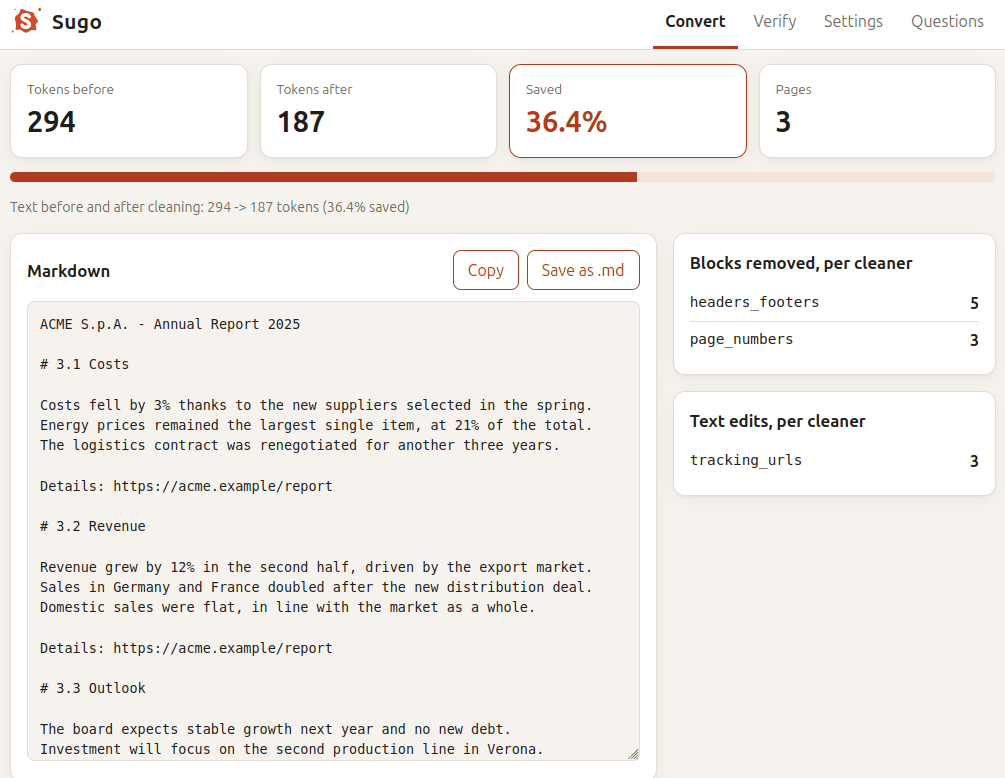
What sugo report.pdf prints:
ACME S.p.A. - Annual Report 2025

# 3.1 Costs

Costs fell by 3% thanks to the new suppliers.
Details: https://acme.example/report

# 3.2 Revenue

Revenue grew by 12% in the second half, driven by the export market.
Details: https://acme.example/report

# 3.3 Outlook

The board expects stable growth next year.
Details: https://acme.example/report
The header is kept once instead of on every page; the page numbers, the repeated "Confidential" and the tracking parameters are gone; the text is the same. sugo stats measures the difference: 180 → 97 tokens, 46% saved on this small generated example; real documents with less page furniture save much less (see below). Every removal is recorded with the cleaner that made it and the reason, so you can always check what was dropped. Text that cannot be read is marked as illegible, and handwriting in a scan, such as a signature, as [handwriting]: never guessed.
Across a benchmark corpus in five languages, no text went missing in any document (on 3 screenshots the OCR misread a few characters, 1–7%). Savings depend heavily on the document:
| Document | Tokens saved |
|---|---|
| Report with a running header, footer and page numbers | 33–38% |
| Chat or code screenshot, Markdown vs. sending the image itself | 94–98% cheaper (Claude, Gemini, OpenAI) |
| A real EU regulation from EUR-Lex, mostly substantive legal text | 2.9–3.5% |
And it stays fast on an ordinary computer: on a 2020 laptop with 4 cores, 8 GB of RAM and no GPU, a dense phone screenshot becomes text in 1.5 s; even on a 2010 desktop with 2 cores, a 100-page PDF converts in 3.6 s (full numbers in TESTING).
How it compares
Measured against two well-known alternatives, on the same 31-document benchmark corpus (26 synthetic documents made by the Sugo project plus 5 real EU-regulation PDFs), with the same tokenizer and the same ground truth — full method, raw numbers and limits in docs/comparisons:
| Sugo | Docling | MarkItDown | |
|---|---|---|---|
| Documents converted with nothing lost or garbled | 28 / 31 | 25 / 31 | 14 / 31 |
| OCR on chat/code screenshots | ✅ no text missing; 1–7% character errors on 3 accented screenshots | ⚠️ right words, wrong order on some chats | ❌ empty output |
| Reads PDFs out of the box | ✅ | ✅ | ❌ needs an extra |
| Real EU regulation PDF, every clause kept | ✅ | ⚠️ 2 of 5 drop a clause | ❌ every one drops 2–7 |
A tool that drops content also "saves" tokens on paper — that's data loss, not compression. Every number above is paired with what actually survived the conversion.
Fair caveats: the corpus is small and mostly synthetic, and it was built by the Sugo authors, so treat it as a sanity check, not a verdict. On the report PDFs Docling saves slightly more tokens than Sugo (about 38–48% vs 33–38%) without losing content; it is also several times slower on this corpus. Raw data and the full per-document table are in the linked comparison.
Status
Note
v0.3.3 is out, on PyPI as sugo-cli and in the official MCP Registry as io.github.Muralnick/sugo. See the changelog for what changed. It is still 0.x: contracts may change, with notice, before 1.0. Releases are built reproducibly, with an SBOM, Sigstore attestations and PyPI Trusted Publishing.
| Works today | Coming next |
|---|---|
| Native PDFs, DOCX, XLSX, PPTX, XML | v0.3.x: Office files through Docling at normal, once measured on real files |
| Images and screenshots with local OCR (PNG, JPEG, WEBP) | v0.4: folders, archives and emails; guided setup; work profiles; one shared engine for every port |
| Scans: handwriting marked, repeated letterheads removed | v0.5: quality engine level (vision model, GPU) |
The normal level: PDF tables and layouts with Docling (optional install) | Later: EPUB and web pages, background service, folder watcher |
| Chat and code screenshot detection | |
| Markdown, and JSON Lines chunks for vector databases; LangChain and LlamaIndex loaders | |
Conversion receipt, checked by sugo verify | |
Token metrics per provider (sugo stats) | |
| Command line, interactive shell, MCP server for agents, local web page, Python API | |
| Interface and text rules in English, Italian, Spanish, French, German; text rules also in Japanese, Chinese and Korean (Korean OCR model downloaded on request) | |
| Signed container image of the MCP server, for Intel/AMD and ARM |
See the roadmap for the full plan.
Quick start
Sugo needs Python 3.12, 3.13 or 3.14. The install is about 400 MB on disk, because the PDF library, the OCR engine and its models come with it. The easiest way to install it is with uv:
uv tool install sugo-cli
Or with pip:
pip install sugo-cli
If sugo is "not recognized" or "not found" after installing with pip, pip put it in a folder your system does not search. This happens on Windows when pip installs for your user only ("Defaulting to user installation"). Either install with uv tool install sugo-cli and run uv tool update-shell once, or add the folder pip names in its warning (on Windows, %APPDATA%\Python\Python3XX\Scripts) to your Path, then open a new terminal.
Tip
The package is called sugo-cli because the name sugo on PyPI is held by an unrelated, empty project (a name transfer request is open). The installed command is still sugo; sugo-cli works too. Older instructions with sugo-cli[lite] still work: everything is now included by default.
To run the latest development version from source instead:
uv tool install git+https://github.com/Muralnick/sugo
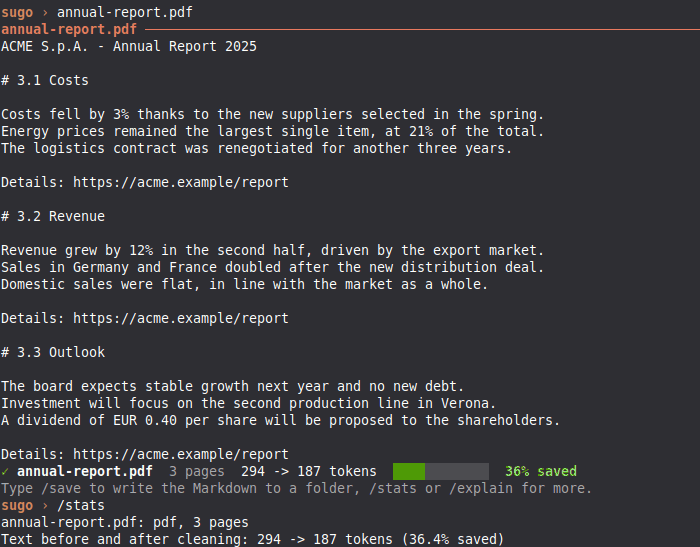
Convert a file and print its Markdown:
sugo report.pdf
Or type sugo alone to open the interactive shell: drag a file onto the window, press Enter, then use /stats, /save or /help.
More things you can do:
sugo convert *.pdf -o out/            # one NAME.md per file, in out/
sugo convert report.pdf --chunks      # chunks as JSON Lines, ready for RAG
sugo convert report.pdf --receipt     # also write report.receipt.json (see below)
sugo stats screenshot.png             # tokens saved, per LLM provider
sugo clip                             # convert the screenshot in your clipboard
sugo ui                               # open the local web page: drop a file, get Markdown
sugo doctor                           # check the installation
Add --json for output a script can read.
Check what was removed: the receipt
With --receipt (or the receipt setting on the web page), Sugo also writes NAME.receipt.json: the SHA-256 of the file, the Sugo version and settings used, the token counts, every block it removed or edited with the cleaner and the reason, and the blocks flagged as uncertain (such as low-confidence OCR). Later, anyone can check that the file still converts to the same result:
sugo verify report.pdf report.receipt.json
sugo verify converts the file again with the receipt's own settings and reports what differs, by block id only, never the text. The web page has the same check in its Verify tab:
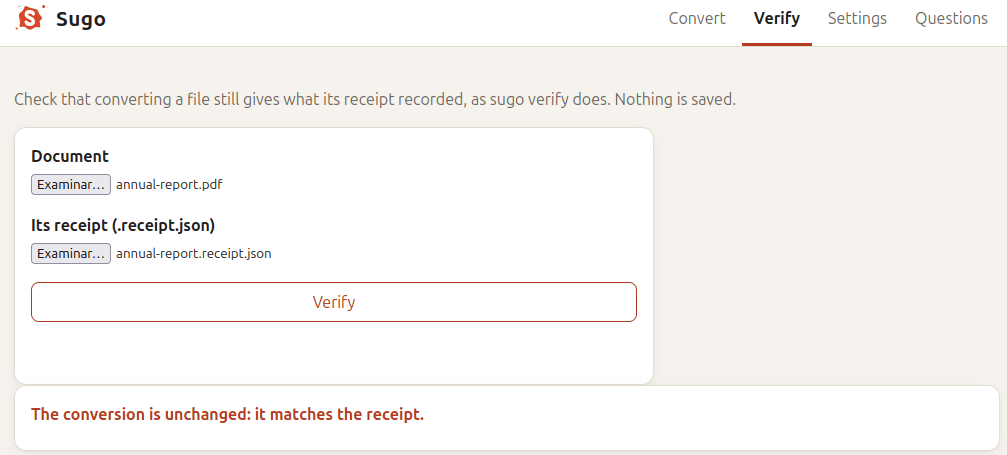
The receipt shows that the conversion is faithful to the file: nothing dropped without a recorded reason, nothing invented. It says nothing about whether the document itself is genuine.
Use it from Python
import sugo

result = sugo.convert("handbook.pdf", chunks=True)
print(result.markdown)
for chunk in result.chunks:
    print(chunk.pages, chunk.text)
By default nothing stays on disk after the call. See the Python API guide for errors, settings and the cache.
For LangChain and LlamaIndex there are ready-made loaders that give one document per Sugo chunk, with pages and headings in the metadata:
pip install langchain-sugo            # from langchain_sugo import SugoLoader
pip install llama-index-readers-sugo  # from llama_index.readers.sugo import SugoReader
Tables and complex layouts: the normal level
By default Sugo runs at the lite level: fast, light, and right for most files. For PDFs whose tables or layout matter, the normal level reads PDF pages with Docling, which rebuilds tables cell by cell. It is an optional install of about 1.3 GB, plus 384 MB of models downloaded once:
# Linux only: take PyTorch's CPU build first (from PyPI, pip would add
# several GB of NVIDIA libraries Sugo never uses)
pip install "torch==2.14.1" "torchvision==0.29.1" --index-url https://download.pytorch.org/whl/cpu
# Every system
pip install "sugo-cli[normal]"
sugo models pull normal      # pinned to a commit, checked by SHA-256

sugo convert report.pdf -l normal
You can also set level = "normal" in [general] of the configuration file, or use SUGO_LEVEL=normal, /level normal in the shell, the "Engine level" setting on the web page, or sugo.convert(..., level="normal").
Measured on the reference machine (Intel i5-10300H, 4 cores, no GPU) on PDFs in five languages (details):
lite | normal | |
|---|---|---|
| Rows of a ruled table kept intact | 0 of 35 | 35 of 35 |
| Text lost | none | none |
| Time per PDF | 0.3–0.4 s | 9–16 s for one file; about 7 s each when several are converted together |
| Memory | about 0.4 GB | about 1.8 GB while Docling is loaded |
normal is slow on purpose: use it where structure matters. The shell, the web page and multi-file runs keep Docling loaded between PDFs and stop it after 5 minutes without work. The MCP server uses the configured level, with a fresh Docling for each document, so no file can affect another's result. Docling runs in its own process with its downloads, telemetry and remote services turned off, and reads its models only from Sugo's folder (the process itself is not cut off from the network); its OCR is off: scanned pages, images and Office files are read as at lite.
Use it from an AI agent (MCP)
Sugo can serve agents such as Claude Code or Codex over MCP. It reads only inside the folders you name:
claude mcp add sugo -- sugo mcp --root ~/Documents
The agent gets two tools: convert_document and estimate_savings. Sugo is also listed in the official MCP Registry as io.github.Muralnick/sugo, so clients that read the registry can install it from there.
The server runs on the same computer as the agent, which starts it and talks to it directly: your documents never leave that computer. To keep it in a container instead, use the signed image on GitHub Container Registry, for Linux on Intel/AMD and on ARM, Apple Silicon included (from Sugo 0.3.3, ADR-075). Mount only the folder the agent may read, read-only, and give the container no network, since conversion never needs one:
claude mcp add sugo -- docker run -i --rm --network none \
  --user "$(id -u):$(id -g)" -v ~/Documents:/data:ro ghcr.io/muralnick/sugo:0.3.3
For a setup that cannot change under you, use the image's digest (ghcr.io/muralnick/sugo@sha256:…) instead of the version. To check that an image was built by Sugo's release pipeline from this repository:
gh attestation verify oci://ghcr.io/muralnick/sugo:0.3.3 --repo Muralnick/sugo
Its inventory of components comes in two parts. The signed CycloneDX SBOM lists the Python packages and the bundled models: add --predicate-type https://cyclonedx.org/bom --format json to the command above. The list of every Debian and Python package inside the image, per architecture, travels with the image: docker buildx imagetools inspect ghcr.io/muralnick/sugo:0.3.3 --format '{{ json .SBOM }}'.
Uninstall
First let Sugo delete its own files: the settings and the page cache, which holds text from the documents you converted. It lists them, asks before deleting, and then shows the command that removes the program (from Sugo 0.1.5):
sugo uninstall
To delete only the cache and keep using Sugo, run sugo cache clear.
Then remove the program the same way you installed it:
uv tool uninstall sugo-cli
Or, if you used pip:
pip uninstall sugo-cli
If you added Sugo to an agent, remove it there too, for example claude mcp remove sugo.
Uninstalling the program alone does not delete the files Sugo created. They are only on your computer; sugo uninstall deletes them, or you can delete them by hand:
| What | Windows | macOS | Linux |
|---|---|---|---|
Settings (config.toml) | %LOCALAPPDATA%\sugo | ~/Library/Application Support/sugo | ~/.config/sugo |
| Cache (text of converted documents) | %LOCALAPPDATA%\sugo\Cache | ~/Library/Caches/sugo | ~/.cache/sugo |
If you set SUGO_CACHE_DIR, the cache is in that folder instead. The cache holds text from the documents you converted, so delete it if those documents were private. Apart from these two folders and the files you asked it to write (such as -o output or receipts), Sugo keeps nothing else on disk.
On an old computer
Measured on 2026-11-03 on a 2010 desktop: Intel Core i5-650 (2 cores, 4 threads, no AVX), 8 GB RAM, SSD, no usable GPU. Weaker than the 8 GB, 4-core machine Sugo targets.
| Task | Result | Target |
|---|---|---|
| Native PDF, 100 pages, cleaning included | 3.6 s, about 28 pages/s | ≥ 20 pages/s |
| Peak memory, that PDF | 98 MB | < 1 GB |
| Dense phone screenshot (30 lines) → text, OCR | 30 of 30 lines, 0% character errors, 411 MB | < 1 GB |
| Same screenshot, time | 13.7 s | < 2 s |
Native documents run well within the targets even on this machine. OCR is accurate but slow on a CPU without AVX; on the 4-core reference machine (Intel i5-10300H, 2020) the same screenshot takes 1.5 s, within the target. Details and scripts are in TESTING.
Supported files
| Type | Formats | Size limit |
|---|---|---|
| Documents | PDF (with a text layer), DOCX, XLSX, PPTX | 200 MB |
| Images | PNG, JPEG, WEBP (screenshots, photos of text) | 50 MB |
| Data | XML | 50 MB |
Old .doc, .xls and .ppt files and password-protected files are not read: save a new copy first.
How it works
flowchart LR
    F[Your file] --> E[Reader<br/>PDF · Office · OCR · XML]
    E --> IR[Document → Page → Block]
    IR --> C[Cleaners<br/>propose removals]
    C --> K[Core<br/>applies and records them]
    K --> M[Markdown]
    K --> J[JSONL chunks]
    K --> S[Token metrics]
Each reader turns a file into the same structure of pages and blocks. Cleaners only propose changes; the core applies them and marks each removed block with who removed it and why, instead of deleting it. That is what makes the output checkable and reproducible. The full design is in ARCHITECTURE.
Promises
These are written down in PRINCIPLES and checked by tests:
- Local by principle. Conversion never needs the internet. No cloud API, no telemetry.
- No guessing. Unreadable text is marked as illegible, never filled in.
- Nothing silently lost. Every removal is recorded, with its reason.
- Honest metrics. Savings are measured, and Sugo also tells you when sending the original image would be cheaper.
- Safe with untrusted files. Size and time limits, XML parsed safely, models verified by checksum. See the threat model.
Documentation
| Document | Content |
|---|---|
| ARCHITECTURE | Complete system design |
| PYTHON API | Using Sugo from your own Python code |
| FEATURES | Features by engine level, work profiles, supported formats |
| THREAT_MODEL | Security analysis |
| TESTING | Testing, benchmarks, performance targets |
| ROADMAP | Development plan and first release scope |
| ADRs | Architecture decision records |
| PRINCIPLES | The promises Sugo never breaks |
| AI_WORKFLOW | How this project is built with AI assistance |
Contributing and security
See CONTRIBUTING. Please report vulnerabilities privately, as described in SECURITY, not in public issues.
License
AGPL-3.0-or-later (see ADR-010).






