Listed from the MCP registry; nobody on Odel publishes it.

Swirvo
Convert files, run 59 PDF/document tools and read text (OCR) locally on Windows. Nothing uploaded.
Runs on your machine from its package; the steps are below.
What it does
- Reads
- Writes
- High impact
At most: creates or changes data: records, files, settings.
What it costs
FreeOdel charges nothing per call. The publisher may charge for its own service.
Runs locally over stdio
This server isn't hosted — your MCP client launches it from a package registry. Use one of the commands below, or drop the config into your client (e.g. Claude Desktop).
Distributed as an MCP bundle (`https://github.com/Nabarup1/swirvo/releases/download/v0.1.2/Swirvo-0.1.2.mcpb`) — download it and import the bundle in your MCP client.

Swirvo
Drag. Tap. Convert. A fast, private file converter and PDF toolkit for Windows.
Everything runs on your PC: no upload, no account, no telemetry.
swirvo.vercel.app: try the gesture in your browser, read the docs.

Website · Docs · Other downloads · Watch the 50-second demo · Features · For AI assistants · Build from source
How it works
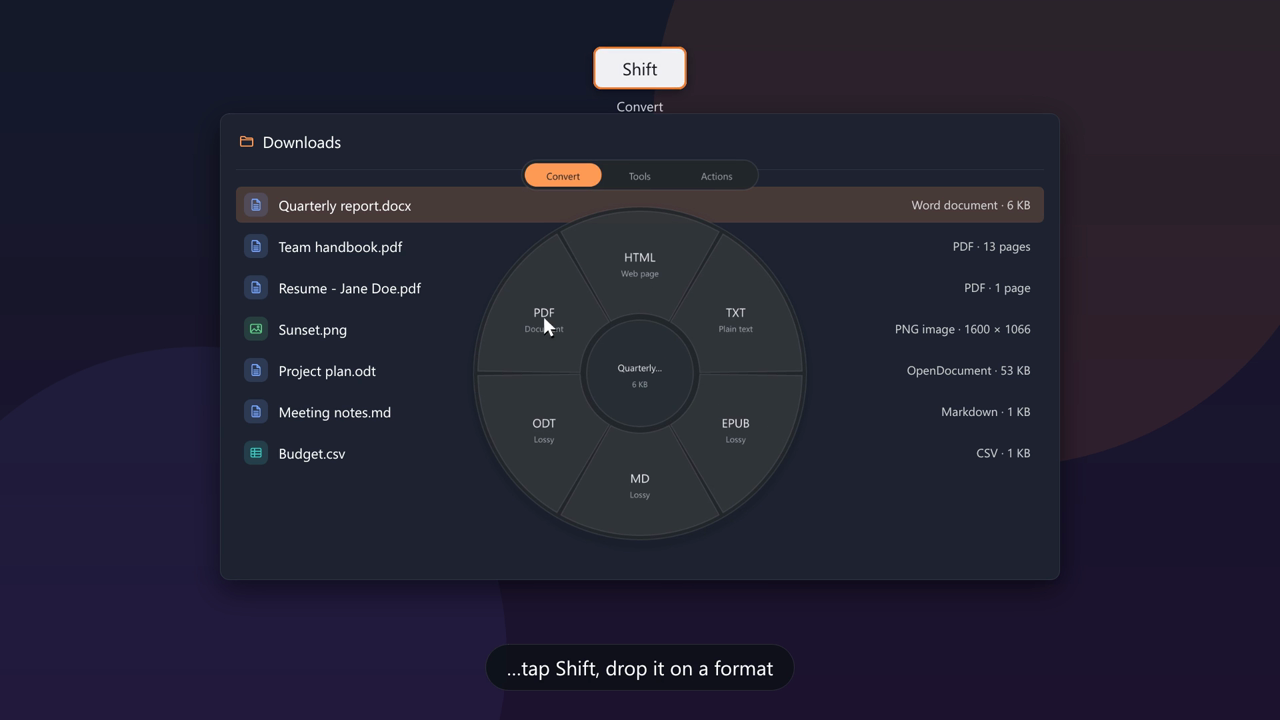
- Start dragging any file: in File Explorer, on the desktop, anywhere.
- Tap a key while you hold it: Shift for formats, Ctrl for tools, Alt for actions.
- Drop it on a wedge. The result is saved next to the original, usually before you've let go of the mouse. Your original is never changed.
No dialog, no app to open, no website to upload to.
What it can do
The Board is the full workspace behind the wheel. Drop in a whole folder, give every file its own target format and convert them all at once, in parallel across your CPU cores. Search any format or tool with Ctrl+F.
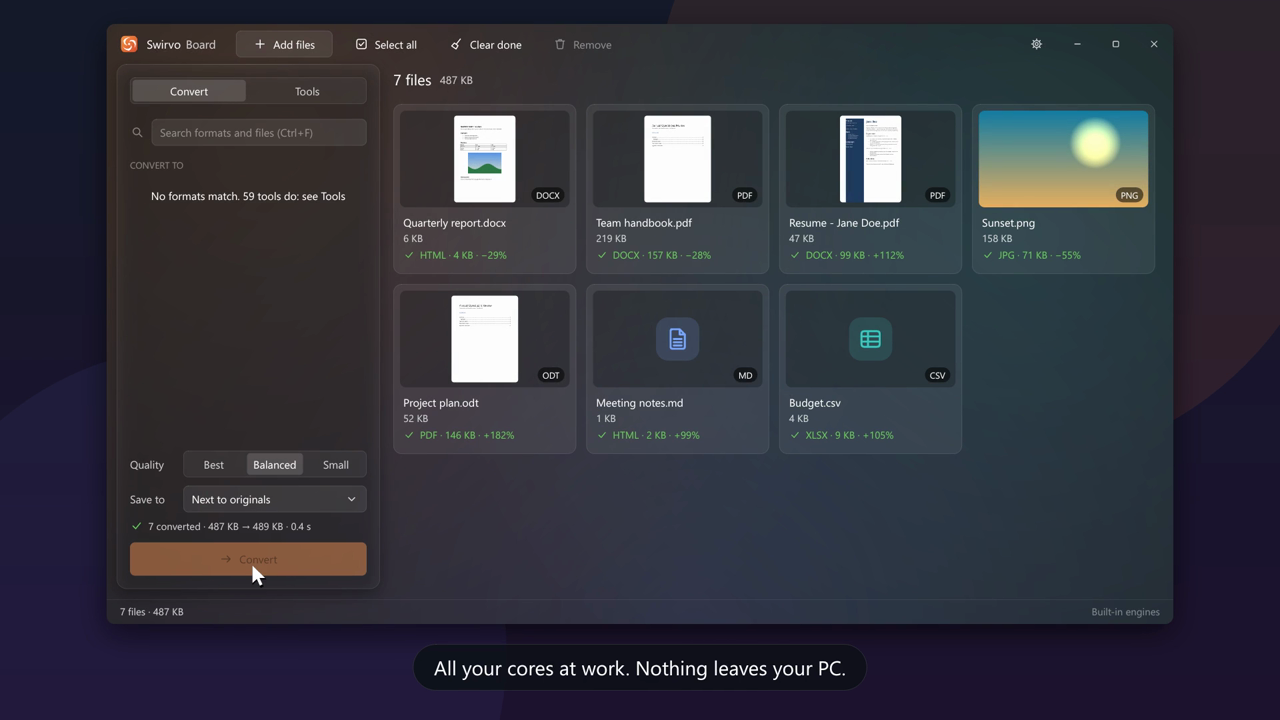
About 96 formats (138 file extensions)
| Category | Highlights |
|---|---|
| Images | PNG, JPG, WebP, TIFF, BMP, GIF, ICO, TGA, QOI; also opens SVG, JPEG XL, HEIC, AVIF, PSD and camera RAW |
| Documents | PDF, DOCX, ODT, RTF, EPUB, Markdown, HTML, TXT. PDF → Word rebuilds the layout (fonts, columns, tables, pictures). Word, Excel and PowerPoint → PDF without Office installed, optionally as PDF/A or tagged PDF |
| Data | XLSX, CSV, TSV, JSON, YAML, TOML, XML, NDJSON; PDF tables → Excel |
| Media | MP4 → MP3 and other audio through Windows' built-in media engine; video compression to a target size; FFmpeg is used automatically if you have it |
| Other | Fonts (TTF, OTF, WOFF, WOFF2), subtitles (SRT, VTT, ASS), archives (ZIP, TAR, GZ, XZ, BZ2, ZST; 7Z, RAR and ISO through Windows) |
59 tools, 35 of them for PDF:
- PDF: merge; split by page, every N pages, at bookmarks, by size or into your own page ranges; rotate; pick, reorder and delete pages; pages → images; compress; page numbers; header and footer; Bates numbering; watermark; password protect and unlock (AES-256); trim, crop, resize; N-up and booklet; remove hidden data; repair; bookmarks from headings; save pictures and attachments; OCR to make scans searchable; redaction that removes the text, not just covers it; grayscale; form fields to a spreadsheet, fill forms per row, flatten; compare; digital signatures with your own certificate, and verifying them; PDF/A.
- Word: compress, clean author and tracked changes, find and replace, save pictures, word count, mail merge.
- Images: resize, fit 1920, rotate, flip, compress, strip GPS and camera info, images → one PDF.
- Video: save a frame, compress to a size.
- Files: extract archives, test an archive, SHA-256 checksum, to ZIP, copy text (with OCR for photos and scans).
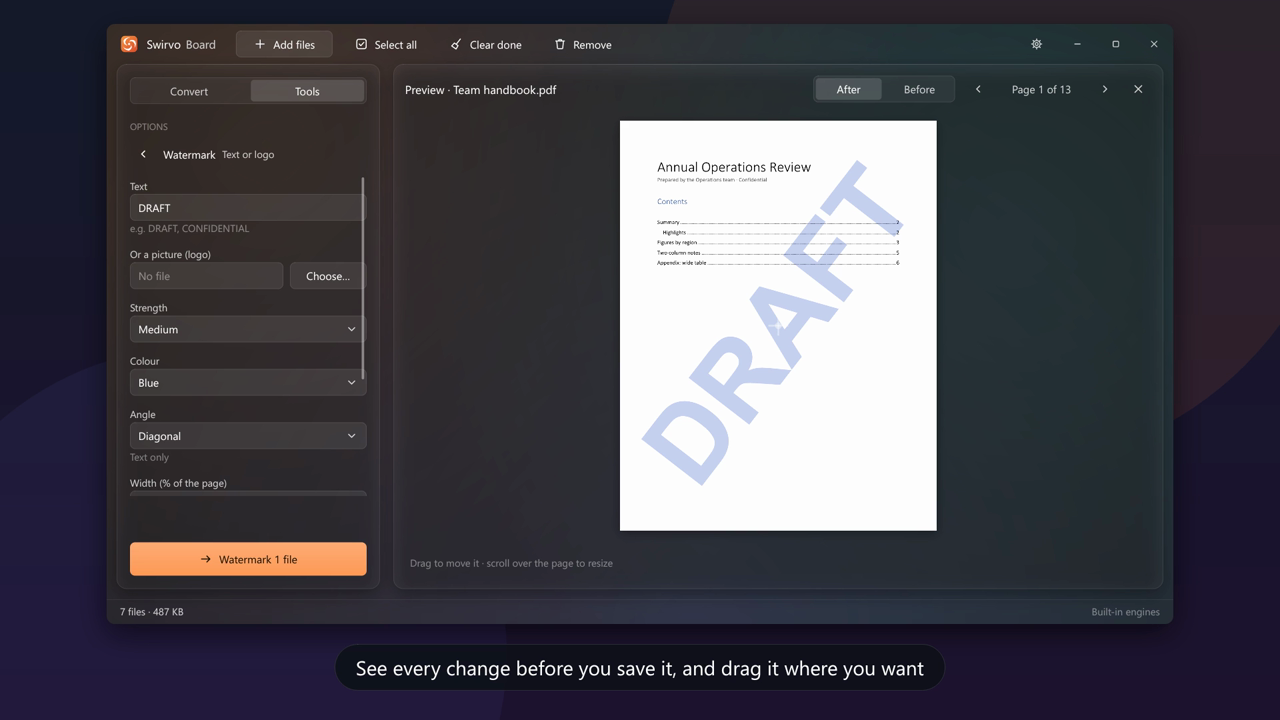
Live previews: watermark, crop, redaction, page numbers and more show the result before you save. Drag the watermark where you want it; crop every page or just one.
Private and safe by design
- Nothing leaves your PC. No network code, no account, no ads, no analytics. See the privacy policy.
- Originals are never modified. Results are new files, written atomically, never overwriting anything.
- Sandboxed conversions. Every conversion runs in a separate worker process with a memory cap, so a damaged file can't take the app down.
- No admin rights needed, no drivers, no services. Uses what Windows already has (OCR, image codecs, Media Foundation,
tar.exe) instead of bundling big libraries.
Download
- Windows 10 and 11 (recommended): Swirvo on the Microsoft Store. Free, signed by Microsoft, updates itself, and puts the
swirvocommand on your PATH.
Or get the latest release from GitHub (the download page lists every file with its size and checksum):
-
Windows 10 (1809 or later) and 11, x64:
Swirvo-<version>-windows-x64.zip. Unzip, double-clickSwirvo.exe, and it offers to install itself for your user (Start menu, Settings → Apps, start with Windows; no admin). The Swirvo icon appears in the notification area. -
Linux (x64 and ARM64): the
swirvocommand-line tool. Install it with one line (no root needed; it checks the download's checksum):bashcurl -fsSL https://raw.githubusercontent.com/Nabarup1/swirvo/main/install.sh | shOr download
swirvo_<version>_amd64.deb(Debian, Ubuntu, Mint:sudo apt install ./swirvo_*.deb) or the.tar.gzfrom the release. Runs on any distribution from about 2018 on (glibc 2.28+: Ubuntu 18.10+, Debian 10+, RHEL 8+, Fedora, Mint 20+). The Linux desktop app (wheel and Board) isn't ready yet.
"Windows protected your PC"? The GitHub downloads aren't code-signed yet, so SmartScreen warns about them. Click More info → Run anyway, or install from the Microsoft Store instead, which has no warning.
Command line
swirvo convert report.pdf --to docx
swirvo tool pdf-merge a.pdf b.pdf
swirvo tools photo.jpg
swirvo formats --supported
Use it from AI assistants (MCP)
Claude Desktop: download Swirvo-<version>.mcpb from the latest release and double-click it. That's it.
Other assistants: swirvo mcp turns Swirvo into a local MCP server, so Claude Desktop, Claude Code, Cursor, VS Code and other AI assistants can convert files, run the PDF tools and read documents (with OCR) on your PC. No API key, nothing uploaded, originals never touched.
{
  "mcpServers": {
    "swirvo": {
      "command": "swirvo",
      "args": ["mcp"]
    }
  }
}
Tools: convert_files, run_tool, extract_text, list_tools, list_formats, detect_format. Listed in the official MCP Registry as io.github.Nabarup1/swirvo; a Claude plugin with a usage skill is in plugin/. Setup for each client: docs/19.
Build from source
Rust (stable, 2024 edition) on Windows or Linux:
cargo build --release -p swirvo-cli
cargo run -p swirvo-cli -- convert photo.png --to webp
The Windows app (swirvo-agent, shipped as Swirvo.exe) builds natively on Windows with the MSVC toolchain:
cargo build --release -p swirvo-platform-win -p swirvo-cli
From WSL, scripts/build-windows-exe.sh builds a standalone dist/Swirvo/ using the Windows-side Visual Studio Build Tools. Releases are built by GitHub Actions from a version tag.
Checks: cargo fmt --all, cargo clippy --workspace --all-targets --all-features -- -D warnings, cargo test --workspace, cargo deny check. See CONTRIBUTING.md and PROJECT_GUIDE.md.
How it's built
A Rust workspace with its own engines and its own UI toolkit (no web view):
| Crate | What it does |
|---|---|
crates/formats | Format registry and content detection (signature trie, container probes, text sniffing) |
crates/graph | Conversion planner: Dijkstra per quality preset over a capability graph, with route explanations |
crates/wheel | Wheel geometry, hit-testing, gesture state machine, frecency with stable slots (property-tested) |
crates/engines | Pure-Rust engines: images, PDF, the PDF → DOCX layout rebuilder, the DOCX/XLSX/PPTX → PDF layout engines, data, fonts, archives, plus the Windows OS engines |
crates/jobs | Parallel batches, the tools, never-overwrite naming, atomic commits, the sandboxed worker |
crates/render, crates/ui | The wheel renderer and a small immediate-mode UI toolkit on tiny-skia |
crates/board | The Board, the page picker and the live previews |
crates/platform/win | The Windows app: Raw Input triggers, the OLE drag probe, the layered wheel window, tray, installer |
crates/cli | The swirvo command-line tool and the MCP server (swirvo mcp) |
website | swirvo.vercel.app: the product site, live wheel demo, downloads and user docs (Astro; see website/README.md) |
User documentation (install, the wheel, the Board, every tool, the command line, troubleshooting) is on the website: swirvo.vercel.app/docs. The design docs below are for contributors:
| Doc | What's inside |
|---|---|
| 01 · Product spec | Personas, principles, ways to invoke the app, the catalog of conversions, tools and actions |
| 02 · UX & UI spec | Wheel anatomy, gestures, state machine, motion, accessibility, screens, design tokens |
| 03 · System architecture | Process model, crate layout, job lifecycle, workers and sandboxing, storage, security |
| 04 · Algorithms | Format detection, conversion planning, frecency, radial hit-testing, scheduling, PDF reconstruction |
| 05 · Conversion engines | Techniques per category, default settings, the engine matrix with licences |
| 06 · Platform integration | The Windows gesture pipeline, overlay compositing; the Linux plan for X11 and Wayland |
| 07 · Performance, testing & release | Latency budgets, test strategy, fuzzing, CI |
| 08 · Roadmap & risks | Phases and risk register |
| 10 · Formats & conversions | Every format and conversion, and how each is done |
| 11 · Tools & features | Tools and actions on the wheels and the Board |
| 12 · Board & UI | The Board, the page picker, the UI toolkit |
| 13 · PDF reconstruction | PDF → DOCX that keeps the layout |
| 16 · DOCX → PDF | The built-in Word layout engine |
| 17 · PDF and document tools | Compress, stamps, pages, protection, clean-up, the options system |
| 19 · AI assistants (MCP) | swirvo mcp: tools and setup for Claude Desktop, Claude Code, Cursor, VS Code |
Licence
- The app (the official downloads and the Microsoft Store version) is free to use, at home and at work: EULA.md.
- The source code is available under the PolyForm Noncommercial License 1.0.0: you may read, build, change and share it for any noncommercial purpose. Commercial use of the code needs a separate licence from the author; ask through Issues.
- The name Swirvo and its logo are not licensed for use by others: TRADEMARKS.md.
- Open-source components keep their own licences, listed in
THIRD-PARTY-NOTICES.txtwith every download.
Product and format names (Microsoft Word, Excel, PowerPoint, Windows, PDF and others) belong to their owners and are used only to describe compatibility. Swirvo isn't affiliated with or endorsed by any of them.
Made by Nabarup Ghosh.







