Listed from the MCP registry; nobody on Odel publishes it.
Runs on your machine from its package; the steps are below.
What it does
- Reads
- Writes
- High impact
At most: creates or changes data: records, files, settings.
What it costs
FreeOdel charges nothing per call. The publisher may charge for its own service.
Runs locally over stdio
This server isn't hosted — your MCP client launches it from a package registry. Use one of the commands below, or drop the config into your client (e.g. Claude Desktop).
Run
uvx gds-agent
MCP client config
{
  "mcpServers": {
    "neo4j-gds-agent": {
      "command": "uvx",
      "args": [
        "gds-agent"
      ]
    }
  }
}GDS Agent
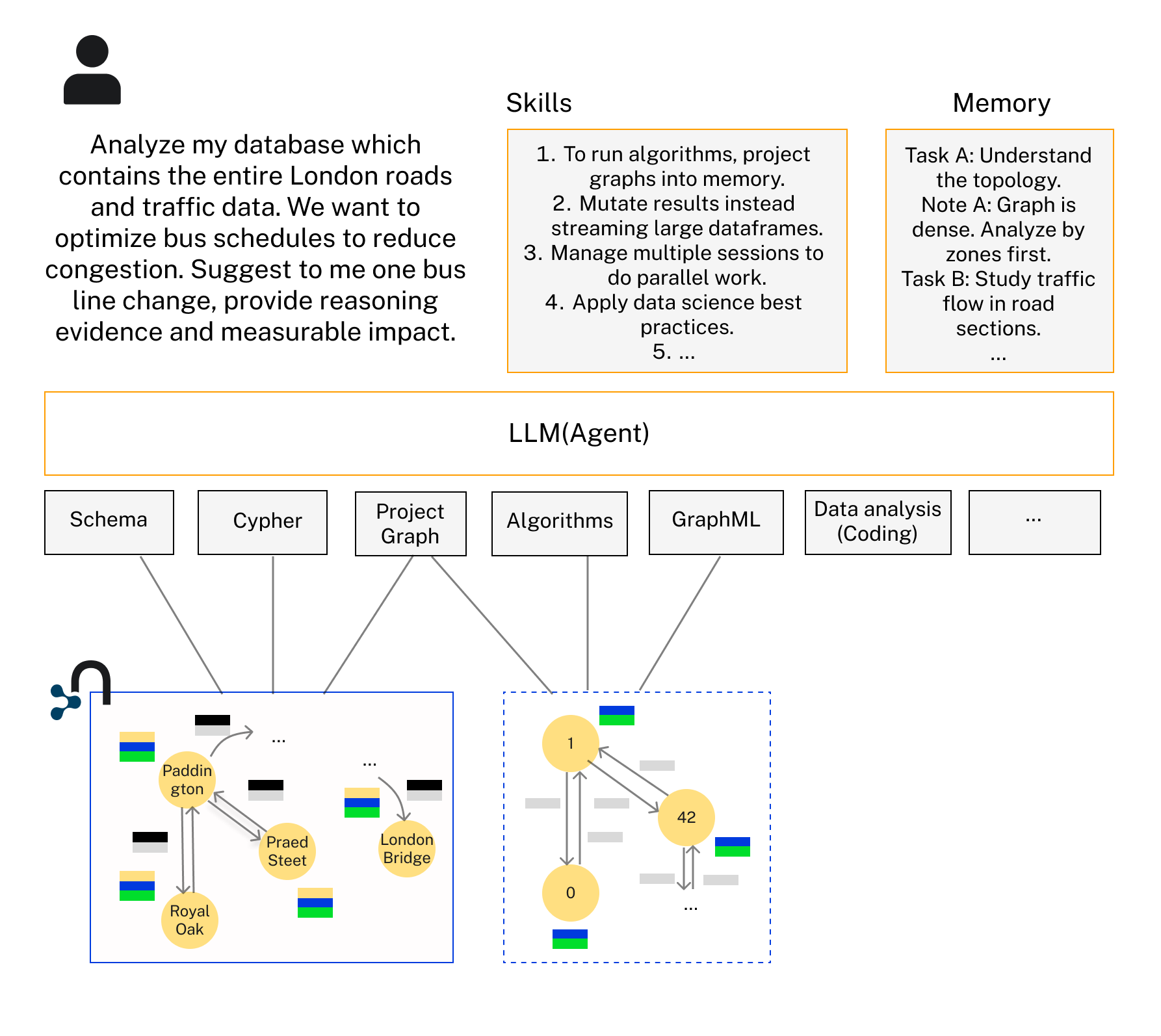
The GDS Agent let LLMs reason and do data science work on your graph data in Neo4j, by using two artifacts:
- Tools — an MCP server exposing Neo4j Graph Data Science (GDS) algorithms: centrality, community detection, path finding, similarity, node embeddings, and ML pipelines.
- Skills — an agent skill (
neo4j-graph-data-scientist) teaching the agent how and when to use those tools and best practices for doing data science on graphs.
It works with any MCP-capable harness — Claude Code, Claude Desktop, claude.ai, OpenAI Codex, Cursor, VS Code/Copilot, Gemini CLI — and programmatically from agent frameworks. It uses the GDS plugin on self-managed Neo4j and GDS Aura Graph Analytics sessions on AuraDB, over STDIO or HTTP transport.
Once set up, you can ask any graph question about your Neo4j graph and get answers. You can collaborate with the agent as a graph data scientist to solve complex tasks.
Install
| Harness | Tools (MCP) | Skill | Guide |
|---|---|---|---|
| Claude Code | /plugin marketplace add neo4j-contrib/gds-agent → /plugin install gds-agent@neo4j-gds | bundled with the plugin | setup |
| Claude Desktop | download the .mcpb from releases, double-click | upload the skill zip in Settings → Skills | setup |
| OpenAI Codex | codex mcp add neo4j-gds -- uvx gds-agent | npx skills add neo4j-contrib/gds-agent -a codex | setup |
| Cursor | one-click badge | npx skills add neo4j-contrib/gds-agent -a cursor | setup |
| VS Code / Copilot | one-click badge or .vscode/mcp.json | npx skills add neo4j-contrib/gds-agent -a copilot | setup |
| Gemini CLI | gemini extensions install https://github.com/neo4j-contrib/gds-agent | bundled with the extension | setup |
| Your own agent | any MCP client (stdio/HTTP) | inject SKILL.md as instructions | setup |
Most local setups need uv installed (the server runs via uvx gds-agent from PyPI). Generic MCP clients run uvx gds-agent over stdio with the environment variables below.
Configuration reference
Set as environment variables (or the credential form of your harness's installer):
| Variable | Required | Purpose |
|---|---|---|
NEO4J_URI | yes | neo4j:// or neo4j+s:// connection URI |
NEO4J_USERNAME / NEO4J_PASSWORD | yes | database credentials |
NEO4J_DATABASE | no | database name (defaults to neo4j) |
AURA_API_CLIENT_ID / AURA_API_CLIENT_SECRET | session mode | Aura API credentials for Aura Graph Analytics |
AURA_API_PROJECT_ID | no | only if the API client can access multiple projects |
SESSION_MEMORY_GB / SESSION_TTL_HOURS | no | session defaults (8 GB / 12 h) |
SESSION_TIMEOUT_SECONDS | no | seconds to wait for a session to become Ready |
GDS_AGENT_MAX_RESULT_ROWS / _CHARS / _CELL_CHARS | no | tool output limits (500 / 100000 / 200) |
NEO4J_READ_ONLY | no | write_neo4j_cypher stays hidden unless this is false |
By default the server uses STDIO transport for local MCP clients. For HTTP-native clients, run the server with streamable HTTP:
gds-agent --transport http --host 127.0.0.1 --port 8000 --path /mcp
The equivalent environment variables are GDS_AGENT_TRANSPORT, GDS_AGENT_HOST, GDS_AGENT_PORT, and GDS_AGENT_PATH. The Neo4j MCP-style NEO4J_TRANSPORT and NEO4J_MCP_SERVER_* names are also supported.
GDS Aura Graph Analytics (sessions)
The server detects whether the connected Neo4j has the GDS plugin installed or whether to use a GDS Aura Graph Analytics session. Detection runs gds.session.list() on startup; if it succeeds, session mode is used and graph projections fall back to gds.graph.project.remote.
Session mode requires Aura API credentials (see the configuration reference above) in the same .env file or env block as the database credentials.
Sessions are managed explicitly by the agent: three extra tools become available in session mode (list_sessions, create_session, and delete_session). A session must first be created with create_session, project_graph_cypher then projects each graph into the session named by its required sessionName parameter, and algorithm calls are routed to the right session automatically by graphName. Most workflows need a single session holding all graphs; multiple sessions allow running analyses in parallel. To resize a session (e.g. after an OOM), delete it and create it again with a larger memoryGB. All sessions created by the server are named with an mcp_ prefix. Aura sessions are charged separate to the DB.
The skill
[skills/neo4j-graph-data-scientist](https://github.com/neo4j-contrib/gds-agent/blob/main/skills/neo4j-graph-data-scientist/SKILL.md) is consumed from this one location by the Claude Code plugin, the Gemini extension, npx skills, and the release skill zip. It covers GDS-specific workflow best practices with a troubleshooting reference guide, as well as general data science best practices.
Cypher tools
read_neo4j_cypher, write_neo4j_cypher, and get_neo4j_schema are tools on this server. get_neo4j_schema calls APOC (apoc.meta.schema). write_neo4j_cypher is left off the tool list unless NEO4J_READ_ONLY=false.
Example dataset
To load a London underground example dataset:
- Fork and clone the repository
- Install the Neo4j database with GDS plugin: Download the Neo4j Desktop from Neo4j Download Center Install the GDS plugin from the Neo4j Desktop Create a new database and start it
- Populate .env file with necessary credentials:
 NEO4J_URI=bolt://localhost:7687  # or your database URI
 NEO4J_USERNAME=neo4j  # or your db username
 NEO4J_PASSWORD=your_password
- Load the London Underground dataset with the following command (uv resolves the script's dependencies automatically):
uv run import_data.py --undirected
Connect to your DB and querying the graph from Neo4j workspace, you should see: London Underground Graph
Start the server for dev
- When inside the
/mcp_serverdirectory, runuv sync --devand runuv run gds-agentto start the MCP server standalone, or runclaudeto start claude-cli with the agent. - To try the plugin (MCP server + skill) from your working tree:
claude --plugin-dir .from the repository root.
Releases
Version numbers are kept in lockstep across pyproject.toml and all distribution manifests by scripts/bump_version.py. Pushing a v* tag triggers the release workflow.
How to contribute
Open a pull request from a branch of your forked repository into the main branch of this repo, for example mygithubid:add-new-algo -> neo4j-contrib:main.
The CI build in github action requires all codestyle checks and tests to pass.
To run and fix codestyle checks locally, in the /mcp_server directory, run:
uv sync --dev
to setup the python environment. And then,
uv run pytest tests -v -s
uv run ruff check
uv run ruff format
for all tests and codestyle fixes.
Feature request and bug reports
To report a bug or a new feature request, raise an issue.
If it is a bug, include the full stacktrace and errors.
When available, attach relevant logs in mcp_server_neo4j_gds.log. This file is located inside the /mcp_server/src_mcp_server_neo4j_gds directory if the gds agent is running from source, or inside the logging path for Claude (e.g /Library/Logs/Claude for Claude Desktop on Mac). Include relevant minimal dataset that can be used to reproduce the issue if possible.
Additional resources
Details about the architecture, benchmark results and analysis: https://arxiv.org/abs/2508.20637.






