Listed from the MCP registry; nobody on Odel publishes it.

Scrape-LE
Analyse robots.txt content and report whether a path may be crawled.
Runs on your machine from its package; the steps are below.
What it does
- Reads
- Writes
- High impact
At most: only reads or looks up information.
What it costs
FreeOdel charges nothing per call. The publisher may charge for its own service.
Runs locally over stdio
This server isn't hosted — your MCP client launches it from a package registry. Use one of the commands below, or drop the config into your client (e.g. Claude Desktop).
Run
npx -y scrape-le-mcp
MCP client config
{
  "mcpServers": {
    "scrape-le": {
      "command": "npx",
      "args": [
        "-y",
        "scrape-le-mcp"
      ]
    }
  }
}

Scrape-LE: Zero Hassle Scrapeability Checks
Load a URL in headless Chromium and see what will block your scraper — before you write it
Anti-bot vendors, rate limits, robots.txt rules, login walls, console errors, screenshots




Useful? A star or rating is how other developers find it — ★ GitHub · ★ Open VSX · ★ Marketplace
What it does
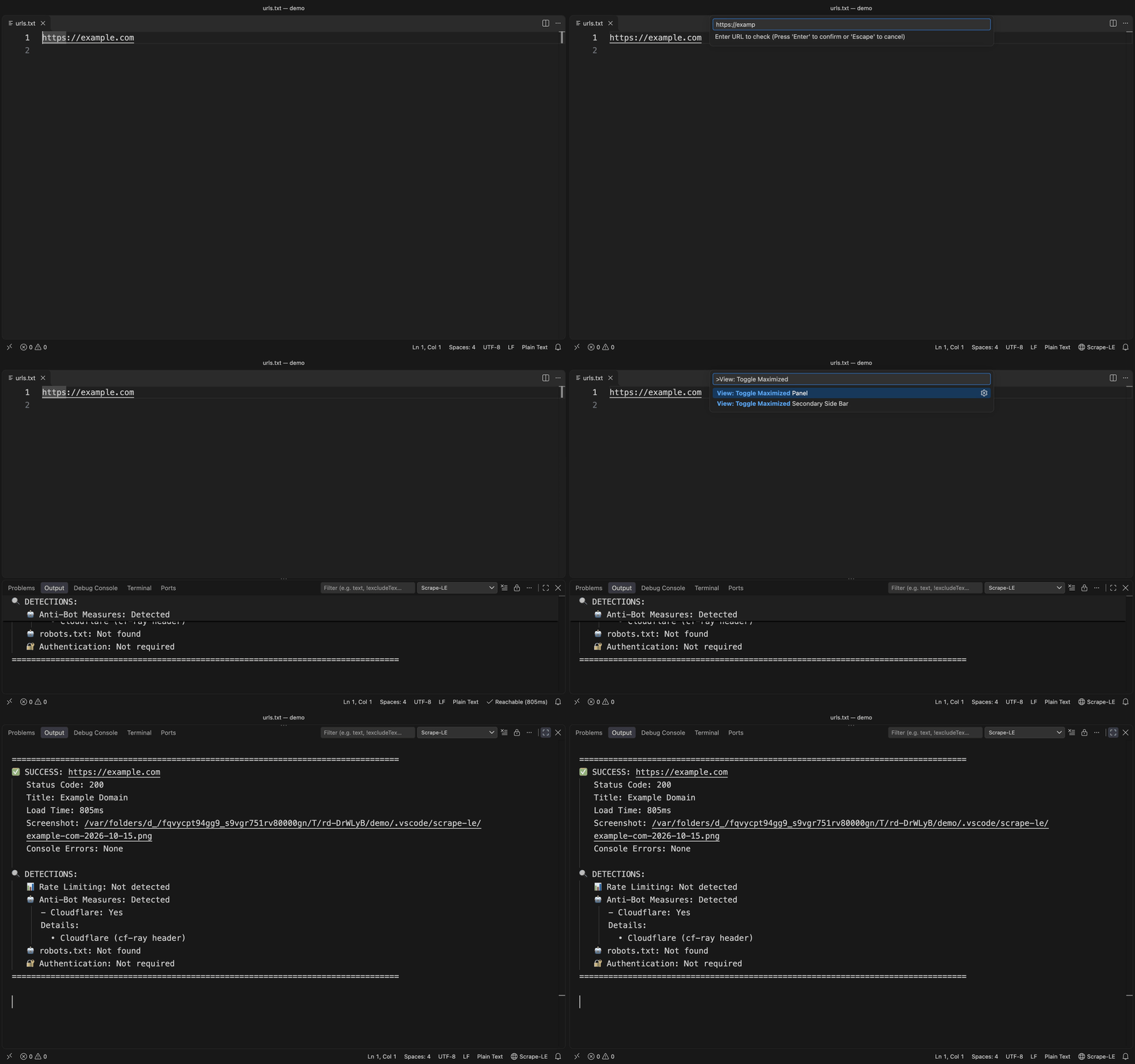
Run Scrape-LE: Check URL Scrapeability, enter a URL, and the page loads in a real headless Chromium. The report lands in the output channel: HTTP status, page title, load time, console errors, a full-page screenshot, and four detections. Works in VS Code and VS Code–based editors like Cursor and VSCodium (installable from Open VSX).
One-time setup: run Scrape-LE: Setup Browser to install Chromium (~130MB, into Playwright's browser cache).
Install
| Where | What you get | Install |
|---|---|---|
| VS Code | The same check, in your editor, on a keystroke | Marketplace |
| Cursor, VSCodium, Windsurf | The same extension | Open VSX |
| A terminal or a CI step | The same check for one URL or a batch, with exit codes | npx scrape-le · npm or cargo install scrape-le · crates.io |
| Any MCP agent, via Node | analyze_robots_txt over stdio | npx scrape-le-mcp · npm |
Use it from an AI agent
The same engine runs as an MCP server, so an agent can call it directly instead of you running a command.
| Editor | How |
|---|---|
| VS Code 1.101+ | Nothing to install — the extension registers analyze_robots_txt with agent mode |
| Claude Code | claude mcp add scrape-le -- npx -y scrape-le-mcp |
| Cursor, Windsurf, anything else | point it at npx scrape-le-mcp |
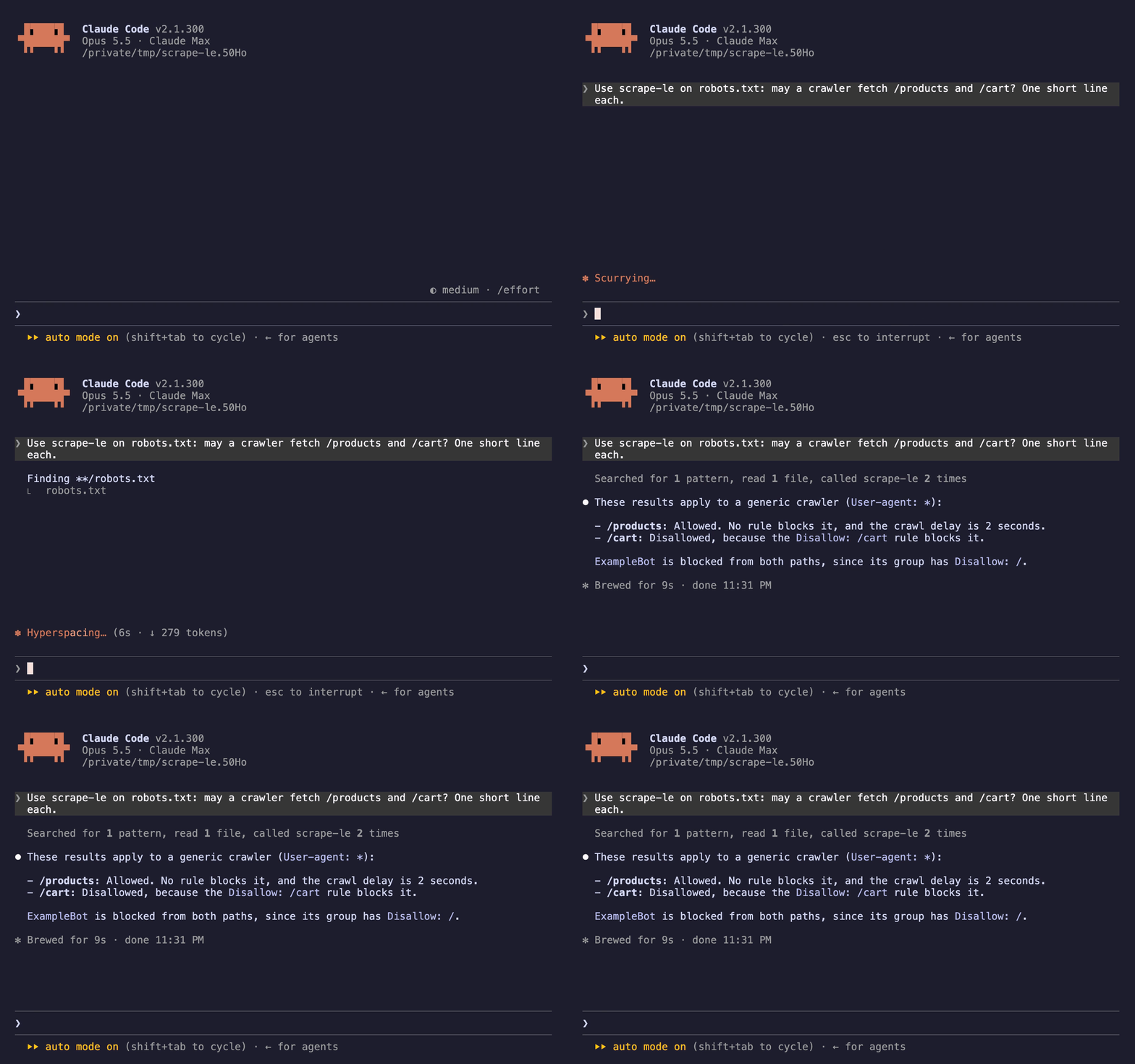
analyze_robots_txt(content, path, agent?, maxResults?)
Given robots.txt contents and a path, reports whether the rules permit crawling it: the group naming agent when one does, otherwise the generic (User-agent: *) rules, with agent in the answer saying which. Plus the crawl delay, disallowed patterns and any sitemaps.
The server takes content and returns data — it reads no files and makes no network requests of its own. Published as scrape-le-mcp on npm and as io.github.nolindnaidoo/scrape-le in the MCP registry.
Configuring it by hand — any host with an MCP config file
Most hosts read a JSON config. Add one entry:
{
  "mcpServers": {
    "scrape-le": {
      "command": "npx",
      "args": ["-y", "scrape-le-mcp"]
    }
  }
}
-y skips the install prompt on first run. Pin a version if you would rather not track releases — scrape-le-mcp@2.4.0.
Prefer not to go through npx on every launch? Install it once and point at the binary instead:
npm install -g scrape-le-mcp
{
  "mcpServers": {
    "scrape-le": { "command": "scrape-le-mcp" }
  }
}
It speaks MCP over stdio and needs no environment variables, no API key and no configuration of its own. To check it before wiring it into anything:
echo '{"jsonrpc":"2.0","id":1,"method":"tools/list"}' | npx -y scrape-le-mcp
That prints the tool list and exits — if you see analyze_robots_txt, the server works.
The CLI
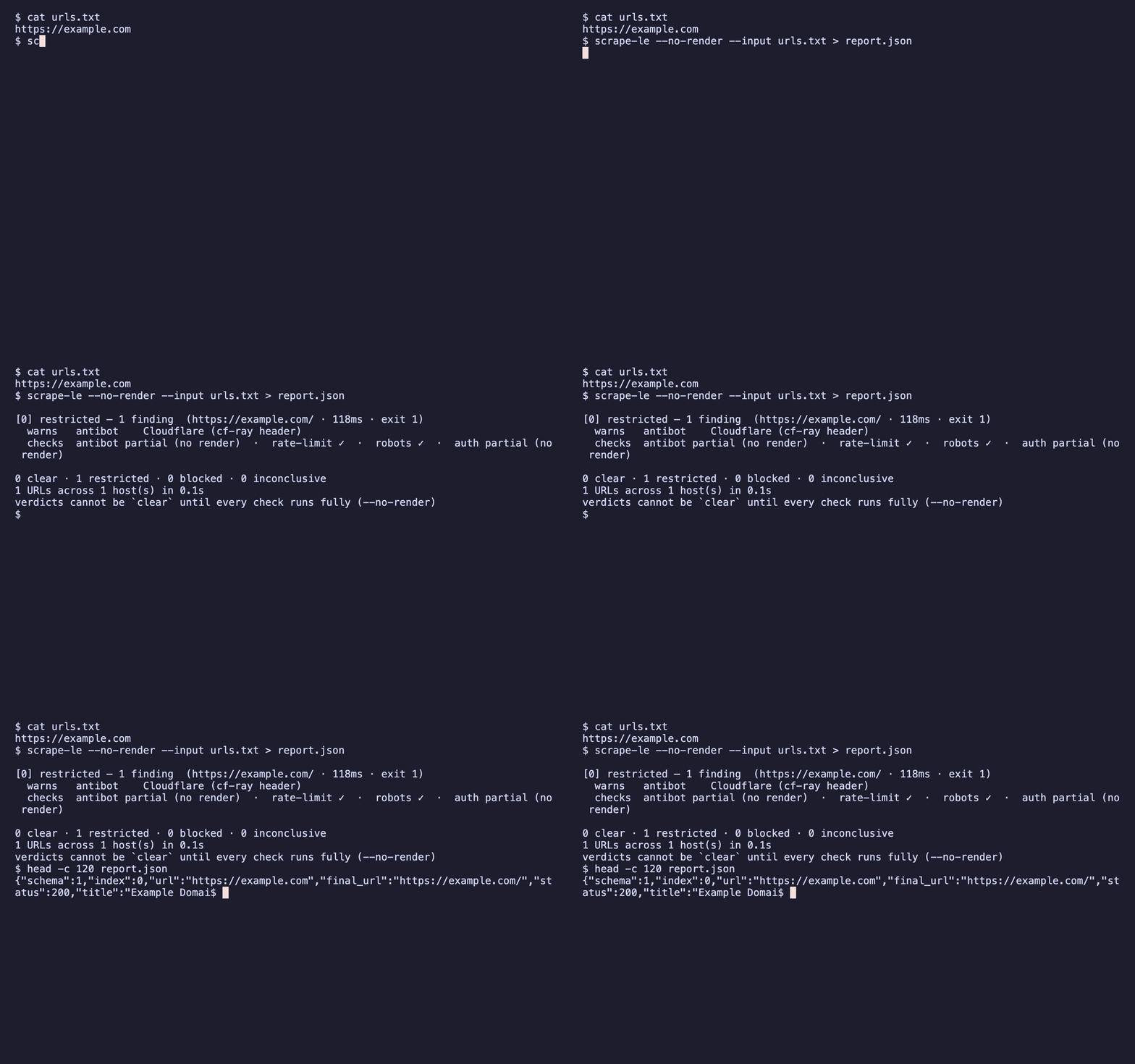
The same check runs from a terminal or an agent loop: a Rust CLI in crate/ of this repository, sharing one signature corpus with the extension — crate/signatures/ and crate/fixtures/ — so CI fails if the two ever disagree about a URL.
scrape-le https://example.com/search   # summary on stderr, JSON on stdout when piped
scrape-le --input urls.txt             # a batch, streamed as it completes
scrape-le mcp                          # the same check over MCP on stdio
Install it from npm (scrape-le) or from crates.io (scrape-le). Both install the same scrape-le command.
npm install -g scrape-le   # or run it once: npx scrape-le
cargo install scrape-le
The exit code is the answer: 0 clear · 1 a real no · 2 the question was malformed.
Detections
| Detection | How it works |
|---|---|
| Anti-bot vendors | Response headers, script sources, DOM elements, and window globals fingerprint Cloudflare (incl. Turnstile challenges), reCAPTCHA, hCaptcha, DataDome, and PerimeterX |
| Rate limiting | X-RateLimit-* / RateLimit-* / Retry-After response headers, plus HTTP 429 |
| robots.txt | Fetches <origin>/robots.txt and evaluates it against your URL with RFC 9309 semantics — the group naming scrape-le.robotsTxt.agent when set and named, otherwise User-agent: *, and the report says which answered; grouped agents, Allow/Disallow longest-match, * wildcards, $ anchors, crawl-delay, sitemaps |
| Authentication | HTTP 401/403, login forms (password + username fields), auth keywords in page text, auth path segments in the final URL |
Honest limitations: signatures are best-effort fingerprints of public integration patterns — a detected widget means the page can challenge you, not that it will, and a clean result is not proof a site allows scraping. With scrape-le.robotsTxt.agent empty, only the User-agent: * groups are evaluated. Pages get up to 5 seconds to go network-idle after load, so content rendered later than that can be missed by the page-level detections.
Commands
| Command | Description |
|---|---|
Scrape-LE: Check URL Scrapeability | Prompt for a URL and run the full check |
Scrape-LE: Check Selected URL | Run the check on the URL in the current selection (also in the right-click menu) |
Scrape-LE: Setup Browser | Install or verify the Chromium browser |
Scrape-LE: Open Settings | Open Scrape-LE settings |
Scrape-LE: Help & Troubleshooting | Built-in documentation |
No command is bound to a key by default. Give any of them one under Keyboard Shortcuts in the editor.
Settings
| Setting | Default | Description |
|---|---|---|
scrape-le.browser.timeout | 30000 | Page-load timeout in ms (5000–120000) |
scrape-le.browser.viewport.width | 1280 | Viewport width |
scrape-le.browser.viewport.height | 720 | Viewport height |
scrape-le.browser.userAgent | "" | Custom User-Agent (empty = Chromium default) |
scrape-le.retry.userAgents | false | On a blocked or failed check, retry under common User-Agents and report which worked |
scrape-le.screenshot.enabled | true | Save a full-page screenshot per check |
scrape-le.screenshot.path | .vscode/scrape-le | Screenshot directory (workspace-relative or absolute) |
scrape-le.screenshot.format | png | png or jpeg |
scrape-le.screenshot.quality | 90 | JPEG quality 0–100 (ignored for png) |
scrape-le.checkConsoleErrors | true | Capture console and page errors while loading |
scrape-le.detections.antiBot | true | Anti-bot vendor detection |
scrape-le.detections.rateLimit | true | Rate-limit detection |
scrape-le.detections.robotsTxt | true | robots.txt fetch + evaluation |
scrape-le.robotsTxt.agent | "" | The crawler robots.txt is evaluated as, e.g. Googlebot or MyBot/1.0; empty, or unnamed by any group, means the User-agent: * rules |
scrape-le.detections.authentication | true | Authentication-wall detection |
scrape-le.notificationsLevel | important | all = every notification, important = warnings + errors, silent = errors only |
scrape-le.statusBar.enabled | true | Show the status bar item |
Languages
Twelve languages besides English:
German · Spanish · French · Indonesian · Italian · Japanese · Korean · Portuguese (Brazil) · Russian · Ukrainian · Vietnamese · Chinese (Simplified)
Both halves are covered — the manifest (command titles, setting names and descriptions) and everything shown while the extension runs (notifications, the status bar, quick-picks and prompts). The extension follows VS Code's display language, so it matches whatever the editor is already set to; no setting of its own.
Privacy & security
- Network access is the feature, and it is scoped. A check talks to exactly two things: the URL you enter (loaded in headless Chromium, which fetches that page's own resources like any browser) and that origin's
/robots.txt. Nothing is sent anywhere else — no telemetry, no analytics. - Screenshots stay local, written to the configured path inside your workspace.
- The MCP server makes no network request at all — unlike the extension, deliberately.
fetchRobotsTxtbuilds a URL from an arbitrary origin, which inside an agent loop is an SSRF primitive: the caller supplying the URL is the model, not you. The server analyses robots.txt content you already fetched, and a test asserts no tool accepts aurlargument. - Error notifications redact home directories and credential-shaped fragments.
- Respect the sites you check: a scrapeability report is information, not permission.
- One rating prompt, at most twice. On the 3rd successful use the extension asks once whether you would rate it, and once more on the 20th if you chose Later or dismissed it. Don't Ask Again ends it. Setting
notificationsLeveltoimportantorsilentyourself turns it off. The counts are kept in VS Code's extension storage and nothing is sent anywhere; Rate opens the listing you installed from — the VS Code Marketplace or Open VSX — in your browser.
Documentation
| What | Where |
|---|---|
| What the tool is allowed to say — scope, output contract, refusals, non-goals | crate/SPEC.md |
| How the extension is built and held together — architecture, invariants, toolchain, release | AGENTS.md |
| How the CLI is built and held together | crate/AGENTS.md |
| What changed | CHANGELOG.md · crate/CHANGELOG.md |
| The tool's page, and the other fifteen | letools.dev/tools/scrape-le |
Performance
| Input | Size | Found | Time | Rate | Scan speed |
|---|---|---|---|---|---|
| Header signature scan | 2.83 MB | 20,000 | 7.24 ms | 2,762,876/sec | 390.5 MB/s |
| robots.txt path match | 3.32 MB | 60,000 | 14.41 ms | 4,164,654/sec | 230.4 MB/s |
Median of 7 runs after warmup, on Apple M5 Pro, 24 GB RAM, Node 24.3.0. Inputs are generated
by scripts/benchmark.ts rather than checked in, so the sizes above are
exactly what was measured. Reproduce with bun run benchmark.
These are machine-specific and are not asserted in CI — a benchmark that gates a build only tells you how busy the runner was.
Testing
| Metric | Coverage |
|---|---|
| Statements | 76.07% |
| Branches | 68.07% |
| Functions | 82.57% |
| Lines | 79.00% |
528 test cases across 40 files, plus an integration suite that runs
in a real VS Code extension host and an end-to-end test that installs the
built .vsix into a clean profile.
Generated from a real run — coverage/coverage-summary.json and
coverage/test-results.json — by scripts/coverage-readme.js, and
bun run coverage:readme:check says whether it has drifted since. Reproduce
with bun run test:coverage, and the case count is the one vitest prints.
More from the LE family
Sixteen single-purpose tools for the work in front of every model. Each ships a Rust CLI and an MCP server. One page: letools.dev
Get it out
- String-LE — Extract every string in a codebase, so a person can read them
- Numbers-LE — Extract every hardcoded number in a codebase, so a person can check them
- Units-LE — Extract every quantity with its unit, normalized, and refuse the ambiguous ones by name
- Dates-LE — Extract every date and timestamp, and the exact instant each one resolves to
- IDs-LE — Extract every UUID, ULID, NanoID, ObjectId and Snowflake, and decode the time inside
- IPs-LE — Extract every IP address, CIDR block and MAC, normalized and classified by scope
- URLs-LE — Extract every URL in a codebase, with its protocol and exact position
- Paths-LE — Extract every file path in a codebase, and say whether it still points at anything
- Colors-LE — Extract every color in a codebase, and say which ones are not in your palette
Check it
- Regex-LE — Find every regex in a codebase, and report which can be driven into catastrophic backtracking
- Versions-LE — Find where one dependency is constrained differently across a repository's manifests
- i18n-LE — Identify the i18n library a project uses, then audit its catalogs by that library's rules
- Scrape-LE — Check whether a page is scrapeable before the scraper is written, and say when it cannot tell
Guard it
- Secrets-LE — Find hardcoded credentials in a codebase, and never print one into the report
- EnvSync-LE — Compare the dotenv files in a tree, and say which keys are missing from which
- Unicode-LE — Find the Unicode that hides meaning — bidi controls, invisibles, homoglyphs, mixed scripts
Each stands on its own: no shared crate, no published core. Where two of them agree, it is because the same answer was right twice.
Contact — nolindnaidoo.com · GitHub · LinkedIn
Also by nolindnaidoo
Rust — pixelcoords and pixelactions are one loop: pixelcoords answers where, pixelactions acts there. Their own tools, their own voice — not part of the LE family.
- pixelcoords — Freeze your screen, mark regions, get pixel-exact coordinates and crops pixelcoords.dev · crates.io · docs.rs
- pixelactions — Consume human-verified coordinates, perform the interaction, confirm it landed pixelactions.dev · crates.io · docs.rs
License
MIT © nolindnaidoo